brake MERCEDES-BENZ E-CLASS SALOON 2016 Owners Manual
[x] Cancel search | Manufacturer: MERCEDES-BENZ, Model Year: 2016, Model line: E-CLASS SALOON, Model: MERCEDES-BENZ E-CLASS SALOON 2016Pages: 557, PDF Size: 11.09 MB
Page 498 of 557
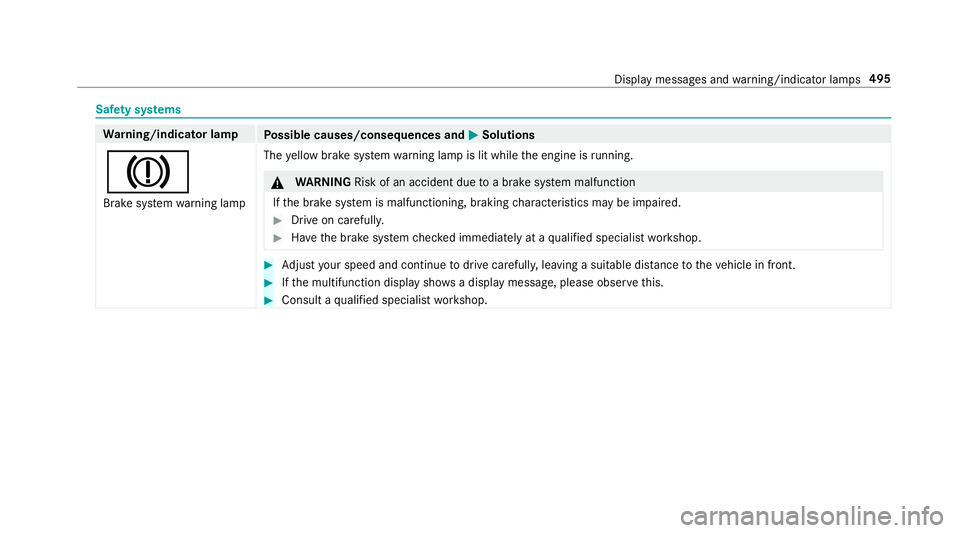
Saf
ety sy stems Wa
rning/indicator lamp
Possible causes/consequences and M
MSolutions
J Brake sy stem warning lamp The
yellow brake sy stem warning lamp is lit while the engine is running. &
WARNING Risk of an accident due toa brake sy stem malfunction
If th e brake sy stem is malfunctioning, braking characteristics may be impaired. #
Drive on carefull y. #
Have the brake sy stem checked immediately at a qualified specialist workshop. #
Adjust your speed and continue todrive carefull y,leaving a suitable dis tance totheve hicle in front. #
Ifth e multifunction display sho wsa display message, please obse rveth is. #
Consult a qualified specialist workshop. Display messages and
warning/indicator lamps 495
Page 499 of 557
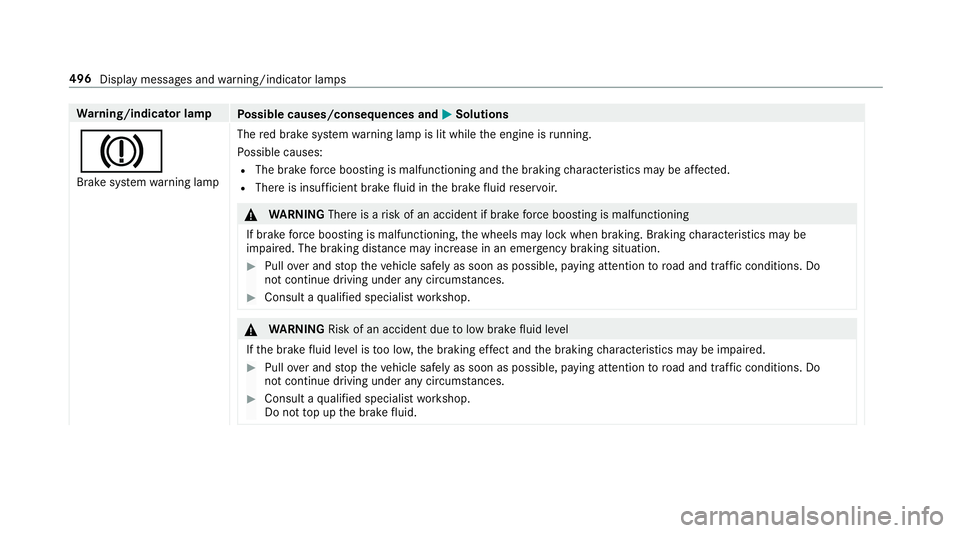
Wa
rning/indicator lamp
Possible causes/consequences and M
MSolutions
J Brake sy stem warning lamp The
red brake sy stem warning lamp is lit while the engine is running.
Po ssible causes:
R The brake forc e boosting is malfunctioning and the braking characteristics may be af fected.
R The reis insuf ficient brake fluid in the brake fluid reser voir. &
WARNING Thereis a risk of an accident if brake forc e boosting is malfunctioning
If brake forc e boosting is malfunctioning, the wheels may lock when braking. Braking characteristics may be
impaired. The braking dis tance may increase in an eme rgency braking situation. #
Pull over and stop theve hicle safely as soon as possible, paying attention toroad and traf fic conditions. Do
not continue driving under any circums tances. #
Consult a qualified specialist workshop. &
WARNING Risk of an accident due tolow brake fluid le vel
If th e brake fluid le vel is too lo w,the braking ef fect and the braking characteristics may be impaired. #
Pull over and stop theve hicle safely as soon as possible, paying attention toroad and traf fic conditions. Do
not continue driving under any circums tances. #
Consult a qualified specialist workshop.
Do not top up the brake fluid. 496
Display messages and warning/indicator lamps
Page 500 of 557
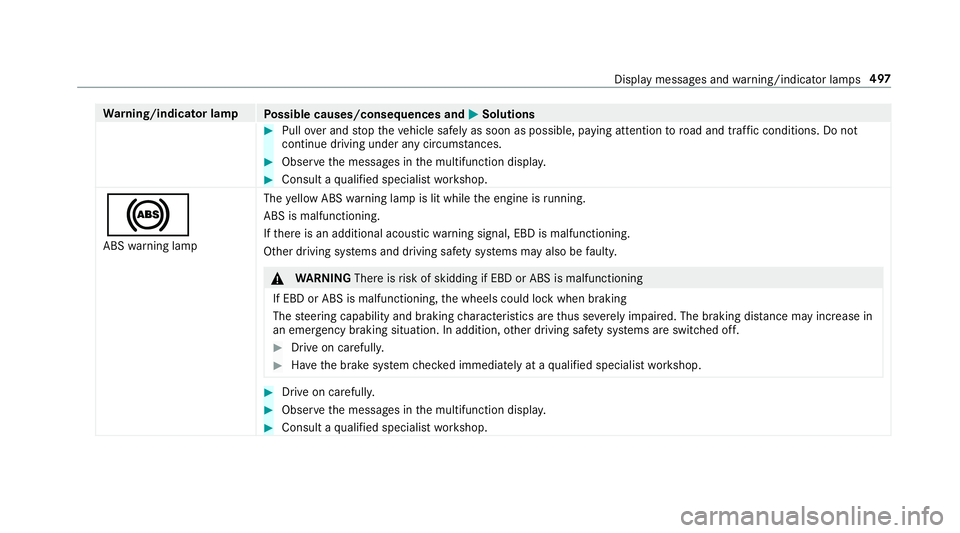
Wa
rning/indicator lamp
Possible causes/consequences and M
MSolutions #
Pull over and stop theve hicle safely as soon as possible, paying attention toroad and traf fic conditions. Do not
continue driving under any circums tances. #
Obser vethe messages in the multifunction displa y. #
Consult a qualified specialist workshop.
! ABS warning lamp The
yellow ABS warning lamp is lit while the engine is running.
ABS is malfunctioning.
If th ere is an additional acoustic warning signal, EBD is malfunctioning.
Other driving sy stems and driving saf ety sy stems may also be faulty. &
WARNING Thereisrisk of skidding if EBD or ABS is malfunctioning
If EBD or ABS is malfunctioning, the wheels could lock when braking
The steering capability and braking characteristics are thus se verely impaired. The braking dis tance may increase in
an emergency braking situation. In addition, other driving saf ety sy stems are switched off. #
Drive on carefull y. #
Have the brake sy stem checked immediately at a qualified specialist workshop. #
Drive on carefully. #
Obser vethe messages in the multifunction displa y. #
Consult a qualified specialist workshop. Display messages and
warning/indicator lamps 497
Page 503 of 557
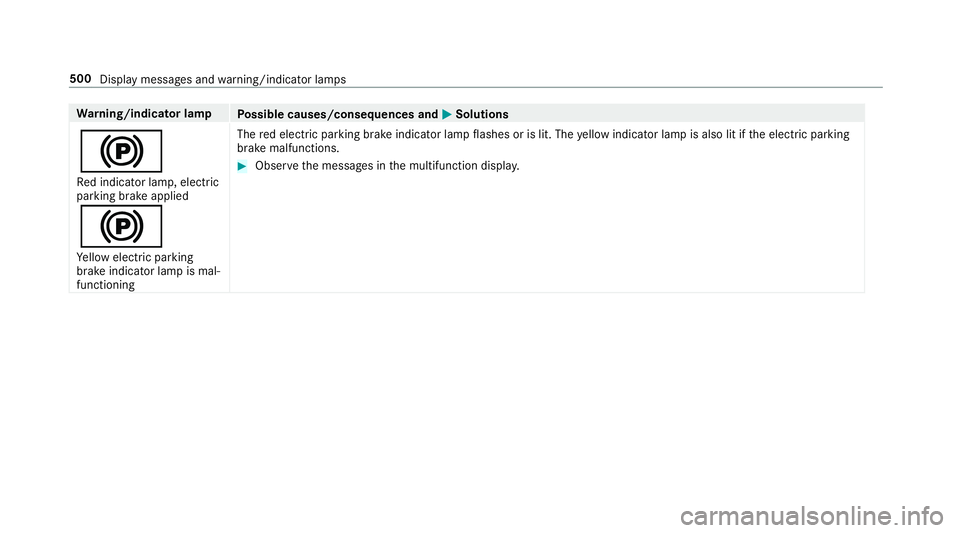
Wa
rning/indicator lamp
Possible causes/consequences and M
MSolutions
! Re d indicator lamp, elect ric
parking brake applied
!
Ye llow elect ric pa rking
brake indicator lamp is mal‐
functioning The
red elect ric pa rking brake indicator lamp flashes or is lit. The yellow indicator lamp is also lit if the electric parking
brake malfunctions. #
Obser vethe messages in the multifunction displa y.500
Display messages and warning/indicator lamps
Page 505 of 557
Wa
rning/indicator lamp
Possible causes/consequences and M
MSolutions
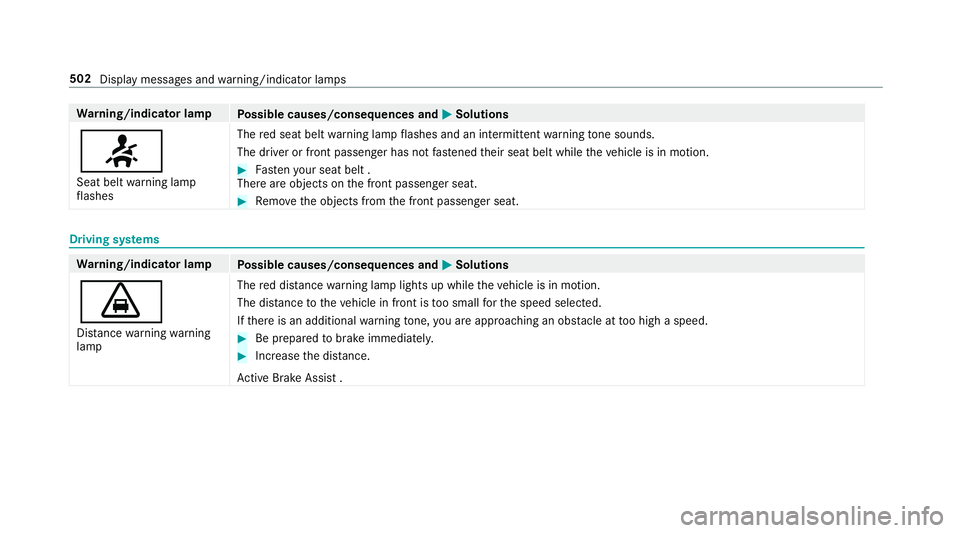
7 Seat belt warning lamp
fl ashes The
red seat belt warning lamp flashes and an intermit tent wa rning tone sounds.
The driver or front passenger has not fastened their seat belt while theve hicle is in motion. #
Fasten your seat belt .
There are objects on the front passenger seat. #
Remo vethe objects from the front passenger seat. Driving sy
stems Wa
rning/indicator lamp
Possible causes/consequences and M
MSolutions
· Dis tance warning warning
lamp The
red dis tancewarning lamp lights up while theve hicle is in motion.
The dis tance totheve hicle in front is too small forth e speed selected.
If th ere is an additional warning tone, you are approaching an obs tacle at too high a speed. #
Be prepared tobrake immediatel y. #
Increase the dis tance.
Ac tive Brake Assi st .502
Display messages and warning/indicator lamps
Page 513 of 557

1,
2, 3 ...
12 V so cket
see Soc ket (12 V)
230 V so cket ............................................ 11 9
360° Camera ............................................ 214
Assigning as a favo urite ...................... .217
Care .................................................... .374
Fu nction ............................................... 214
Selecting a view ................................... 216A
A/C function Activating/deactivating (control
panel) .................................................. 14 3
Ac tivating/deactivating (multimedia
sy stem) ................................................ 14 3
ABS (Anti-lock Braking Sy stem) ............ .180
Ac celeration
see Kickdown
Ac cess data
Editing ................................................ .332
Setting ................................................. 330 Ac
oustic locking verification signal
Swit ching on/off .................................. .65
Ac tive Blind Spot Assi st......................... 232
Ac tivating/deactivating ...................... .234
Brake application ................................. 232
Fu nction/no tes ................................... 232
Sy stem limits ....................................... 232
Tr ailer operation .................................. 232
Ac tive bonn et(pedestrian pr otection) .. 364
Operation ............................................ 364
Re setting ............................................. 364
Ac tive Brake Assi st................................. 185
Fu nction/no tes ................................... 185
Setting ................................................. 189
Ac tive Eme rgency Stop Assist ................ 201
Ac tive Lane Change Assi st..................... 201
Ac tive Lane Keeping Assist .................... 234
Ac tivating/deactivating ...................... .236
Fu nction .............................................. 234
Sensitivity (function/no tes) ................. 237
Setting the sensitivity .......................... 237
Sy stem limits ....................................... 234
Tr ailer operation .................................. 234 Ac
tive light function ................................ 12 6
Ad aptive brake lights ..............................19 0
Ad aptive cruise control
see Dis tance Pilot DISTRONIC
Ad aptive functions, MULTIBEAM LED
see Intelligent Light Sy stem
Ad aptive Highbeam Assist Plus
Ac tivating/deactivating ...................... .129
Fu nction .............................................. 12 8
Ad Blue ®
.................................................... 429
Ad ditives .............................................4 29
Filling capacity ................................... .430
Low outside temp eratures ...................4 29
No tes ................................................... 16 9
Purity ................................................... 429
Ad ditional door lo ck.................................. 68
Ad diti ves.................................................. 430
Ad Blue ®
............................................... 429
Engine oil ............................................ 430
Fu el ..................................................... 427
Ad diti ves (engine oil)
see Additives 51 0
Index
Page 516 of 557

Au
tomatic mir rorfo lding function
Ac tivating/deactivating ...................... .139
Au tomatic transmission
DIRECT SELECT le ver ........................... 16 2
Drive program display .......................... 161
Drive programs .................................... 16 0
DY NA MIC SELECT switch .................... 16 0
Engaging drive position ....................... 16 4
Engaging reve rsege ar ........................ .164
Kickdown ............................................. 16 5
Manual gearshifting ............................ .165
Selecting park position ........................ 16 4
Shifting toneutral ................................ 16 4
St eering wheel gearshift paddles ........ .165
Tr ansmission position display .............. 16 2
Tr ansmission positions ........................ 16 2
Au tomatic transmission
see Selector le ver
Axle load Perm issible .......................................... 423
Tr ailer operation .................................. 436 B
Ball neck Extending/r etra cting ........................... 238
BA S (Brake Assist Sy stem) .................... .181
Battery Key ........................................................ 66
Re mo tecontrol (s tationary heater) ...... 14 9
Battery (vehicle) Charging .............................................. 389
Notes ................................................... 387
St arting assis tance .............................. 389
Battery (vehicle) see Vehicle battery
Belt .............................................................32
Belt airbag Activation .............................................. 31
Fu nction/no tes .....................................35
Bic ycle rack
Tr ailer operation .................................. .241
Blind Spot Assi st..................................... 232
Ac tivating/deactivating ...................... .234
Fu nction/no tes ................................... 232
Sy stem limits ....................................... 232 Blind Spot Assist
see Active Blind Spot Assi st
Blo wer
see Climate control
BlueTEC see AdBlue ®
Blue tooth ®
Ac tivating/deactivating ...................... .278
Setting up an Internet connection ....... 330
Settings ............................................... 277
Switching profile (DUN/PAN) .............. 332
Blue tooth ®
Au dio
Ac tivating ............................................ 349
De-authorising (de-regis tering) the
device .................................................. 349
Information .......................................... 346
Overview .............................................3 47
Sea rching for and auth orisingthe
device .................................................. 348
Switching device via NFC .................... 349
Boot box see EASY -PAC K boot box Index
513
Page 517 of 557

Boot lid
....................................................... 73
Ac tivating/deactivating the boot lid
opening limiter ...................................... 78
Closing .................................................. .74
HANDS-FREE ACCESS .......................... .76
Loc ked separately .................................77
Opening .................................................73
Opening dimensions ............................4 33
Boot lid see Boot lid
see Locking/unlocking
Boot load ................................................. .434
Brake Assist Sy stem
see BAS (Brake Assi stSystem)
Brake fluid
No tes ................................................... 431
Brake forc e distribution
EBD (Elect ronic Brake forc e Distribu‐
tion) ..................................................... 184
Brakes ABS (Anti-lock Braking Sy stem) ........... 180
Ad aptive brake lights .......................... .190
BA S (Brake Assi stSystem) ...................1 81
Driving tips .......................................... 15 6EBD (Electronic Brake
forc e Distribu‐
tion) ..................................................... 184
HOLD function .................................... .203
Limi ted braking ef fect (salt-trea ted
ro ads) .................................................. 15 6
New/replaced brake linings/brake
discs .................................................... 15 6
Ru nning-in no tes ..................................1 56
Brakes see Active Brake Assi st
Braking assistance see BAS (Brake Assi stSystem)
Breakdown ............................................... 381
Assis tance overview .............................. 18
To w- starting ........................................ 397
To wing away ........................................ 393
Tr ansporting theve hicle ......................3 95
Wheel change ...................................... 414
Breakdown assistance call see Service call
Breakdown management see Service call Burmes
ter®
high-end 3D sur round
sound sy stem
Ad justing the balance/fader ................3 61
Ad justing the sound optimisation ........ 362
Ad justing treble, mid and bass ............ 361
Calling up the sound menu .................. 361
Information .......................................... 361
Setting the sound profile ..................... 362
Burmes ter®
sur round sound sy stem .....3 60
Ad justing the balance/fader ................3 61
Ad justing the sound focus ................... 361
Ad justing treble, mid and bass ............ 361
Calling up the sound menu .................. 360
Information .......................................... 360
Switching the sur round sound on/off
............................................................ .361
Buttons Steering wheel .....................................2 45 C
CA module (TV) ........................................ 360
Calling up a menu ................................ 360
Inse rting .............................................. 359 514
Index
Page 521 of 557
Wi
reless vehicle components ................24
Designs Menu (on-board co mputer) .................. 255
Destination .............................................. 297
Editing ................................................ .289
Editing the last destinations ................2 97
Entering an intermedia tedestination .. 289
Saving (cur rent vehicle position) ......... 297
Saving as global favo urite .................... 297
St oring a map position ........................ 297
Destination entry ............................2 85, 287
Entering a POI or add ress .................... 285
Entering geo-coordinates .................... 288
Last destinations ................................. 288
Selecting a contact ............................. 288
Selecting a POI .................................... 287
Selecting from the map ....................... 288
Destination entry see Intermediate destination
Diagnostics connection ............................26
Diesel ...................................................... .428
Digital Owner's Manual ............................ 20
Digital speedome ter ................................ 24 9Digital
TV
see TV
Dipped beam Activating/deactivating ...................... .123
Changing bulbs ................................... .132
Setting ................................................. 12 9
Setting for abroad (symmetrical) ......... 12 3
DIRECT SELECT le ver............................... 16 2
Fu nction .............................................. 16 2
DIRECT SELECT selector le ver
Engaging drive position ....................... 16 4
Engaging pa rkposition automatically .. 16 4
Engaging reve rsege ar ........................ .164
Selecting pa rkposition ........................ 16 4
Shifting toneutral ................................ 16 4
Display Care .................................................... .376
Display (multimedia sy stem)
Settings .............................................. .276
Display (on-boa rdcompu ter) .................. 247
Display content Menu (on-board co mputer) .................. 254 Display message
.................................... .437
Calling up (on-board co mputer) .......... .437
No tes ................................................... 437
Display messages ? ................................................... 464
C ................................................... 489
M ................................................... 489
N ................................................... 490
¯ ....................................................4 61
Ac tive Blind Spot Assi stcur rently
una vailable See Owner's Manual .........459
Ac tive Blind Spot Assi stinope rative .... 459
Ac tive Blind Spot Assi stnot available
when towing a trailer See Owner's
Manual ................................................ 463
Ac tive bonnet malfunction See Own‐
er's Manual ......................................... 488
Ac tive Brake Assi stFunctions cur‐
re ntly limited See Owner's Manual ......448
Ac tive Brake Assi stFunctions limited
See Owner's Manual ...........................448518
Index
Page 522 of 557
Ac
tive Lane Keeping Assist Camera
view restricted See Owner's Manual ... 458
Ac tive Lane Keeping Assist cur rently
una vailable See Owner's Manual .........457
Ac tive Lane Keeping Assist inopera‐
tive ...................................................... 457
bAc tive Light Sy stem inoperative .. 491
Ad aptive Highbeam Assist Plus Cam‐
era view restricted See Owner's
Manual ................................................ 493
Ad aptive Highbeam Assist Plus cur‐
re ntly una vailable See Owner's Man‐
ual ...................................................... .493
Ad aptive Highbeam Assist Plus inop‐
erative ................................................ .492
4Ad d 1 litre engine oil when next
re fuelling ............................................. 469
Air conditioning Malfunction See
Owner's Manual .................................. 485 Apply brake
todeselect Park (P)
position ...............................................4 81
À ATTENTION ASSIST inoperative ... 454
ÀAT TENTION ASSIS T:Take a
break! .................................................. 454
bAU TOlights inope rative ............... 492
Au xilia rybattery malfunction .............. 484
_Before starting the engine, turn
th esteering wheel. .............................. 485
Blind Spot Assist cur rently una vaila‐
ble See Owner's Manual ...................... 459
Blind Spot Assist inope rative ............... 459
Blind Spot Assi stnot available when
to wing a trailer See Owner's Manual ...4 62
Brake immediate ly............................... 447
 Changekey bat teries ...................4 78
Ø Check AdBlue See Owne r’s
Manual ................................................ 470
J Check brake fluid le vel................ 4474
Check eng. oil le v.when next
re fuelling ............................................. 467
jChe cktrailer hitch lo ck............... 481
hCheck tyre(s) ............................... 474
! Clean the fuel filter ...................... 472
Clutch overheated Avoid pulling away
fo r XX:XX mins ................................... .484
É Compressor is cooling .................457
? Coolant Stop vehicle Switch
engine off ............................................ 465
Cruise contro l and Limiter inope ra‐
tive ....................................................... 461
Cruise control inope rative ................... 463
Cruise control off ................................. 461
!cu rrently unavailable See Own‐
er's Manual ........................................ .438
÷cur rently una vailable See Own‐
er's Manual ........................................ .440
Depress clutch ful lyto start engine .....4 84
Dis tance Pilot available again .............. 460 Index
519