buttons MERCEDES-BENZ E-CLASS SALOON 2016 User Guide
[x] Cancel search | Manufacturer: MERCEDES-BENZ, Model Year: 2016, Model line: E-CLASS SALOON, Model: MERCEDES-BENZ E-CLASS SALOON 2016Pages: 557, PDF Size: 11.09 MB
Page 176 of 557
#
Vehicles with manual transmission:
Engage firs t1 orreve rsege ar k. #
App lythe electric parking brake. #
Press button 1once.
% When you swit choff theve hicle, you can still
opera tethe side windo wsand the panoramic
sliding sunroof forfive minutes. Garage door opener
Prog
ramming buttons for the garage door
opener &
WARNING Risk ofexhaust gas poisoning
Combustion engines emit poisonous exhaust
ga ses such as carbon monoxide. Inhaling
th ese exhaust gases causes poisoning. #
Never lea vethe engine running in an
enclosed space wi thout suf ficient venti‐
lation. &
WARNING Risk of inju ryand ent rapment
when opening thega rage door using the
ga rage door opener
When you operate or program thega rage
door with the integrated garage door opener,
persons in thera nge of mo vement of the
ga rage door can become trapped or stru ck
by thega rage door. #
When using the integrated garage door
opener, alw ays make sure that nobody
is within the sweep of thega rage door. Prior
toprog ramming a garage door opener, park
th eve hicle outside thega rage and swit choff the
engine. #
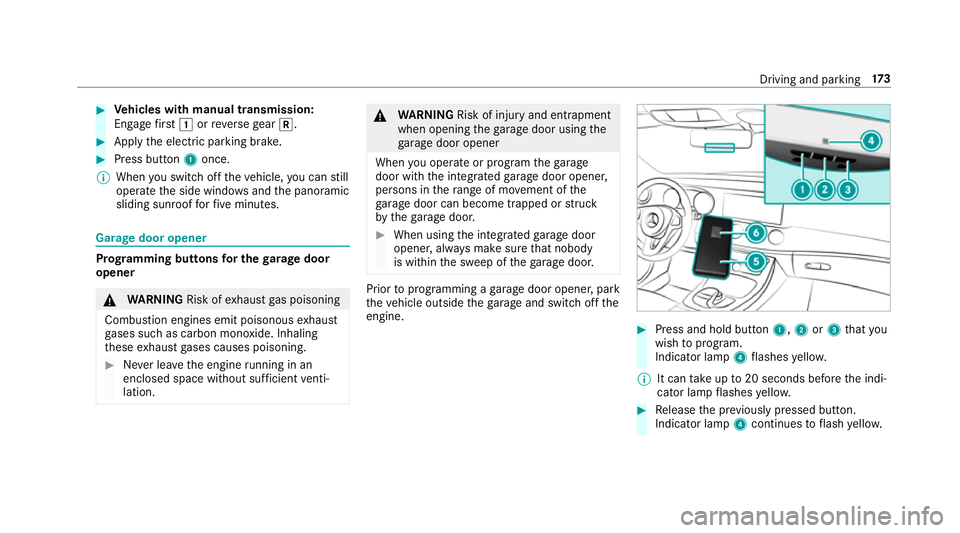
Press and hold button 1,2or3 that you
wish toprog ram.
Indicator lamp 4flashes yello w.
% It can take up to20 seconds before the indi‐
cator lamp flashes yello w. #
Release the pr eviously pressed button.
Indicator lamp 4continues toflash yello w. Driving and pa
rking 17 3
Page 177 of 557
#
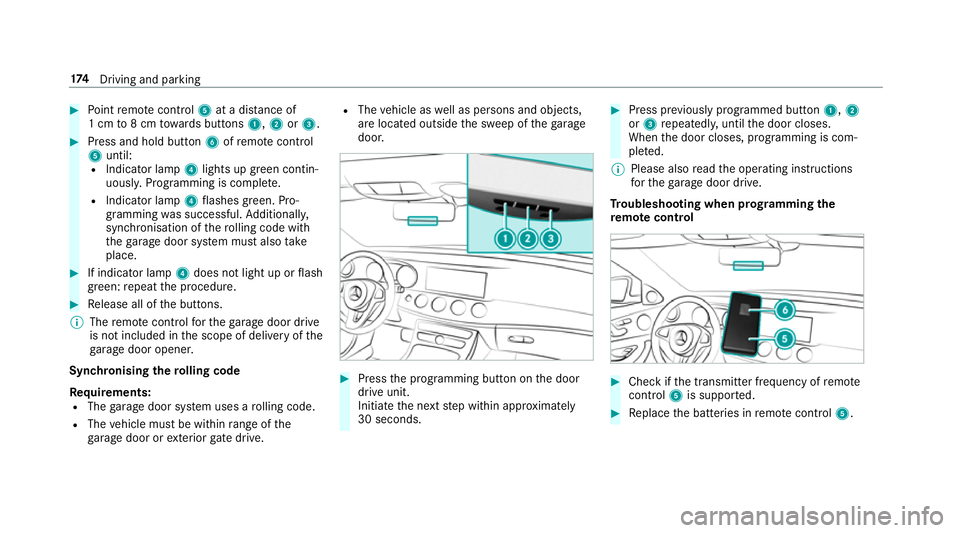
Point remo tecontrol 5at a di stance of
1 cm to8 cm towa rds buttons 1,2or3. #
Press and hold button 6ofremo tecontrol
5 until:
R Indicator la mp4lights up green contin‐
uousl y.Programming is comple te.
R Indicator lamp 4flashes green. Pro‐
gr amming was successful. Additionally,
synchronisation of thero lling code with
th ega rage door sy stem must also take
place. #
If indicator lamp 4does not light up or flash
green: repeat the procedure. #
Release all of the buttons.
% The remo tecontrol forth ega rage door drive
is not included in the scope of delivery of the
ga rage door opener.
Synchronising thero lling code
Re quirements:
R The garage door sy stem uses a rolling code.
R The vehicle must be within range of the
ga rage door or exterior gate drive. R
The vehicle as well as persons and objects,
are located outside the sweep of thega rage
door. #
Press the programming button on the door
drive unit.
Initiate the next step within appr oximately
30 seconds. #
Press pr eviously prog rammed button 1,2
or 3 repeatedl y,until the door closes.
When the door closes, programming is com‐
ple ted.
% Please also read the operating instructions
fo rth ega rage door drive.
Tr oubleshooting when prog ramming the
re mo tecont rol #
Check if the transmit ter frequency of remo te
control 5is suppo rted. #
Replace the batteries in remo tecontrol 5. 174
Driving and pa rking
Page 178 of 557
#
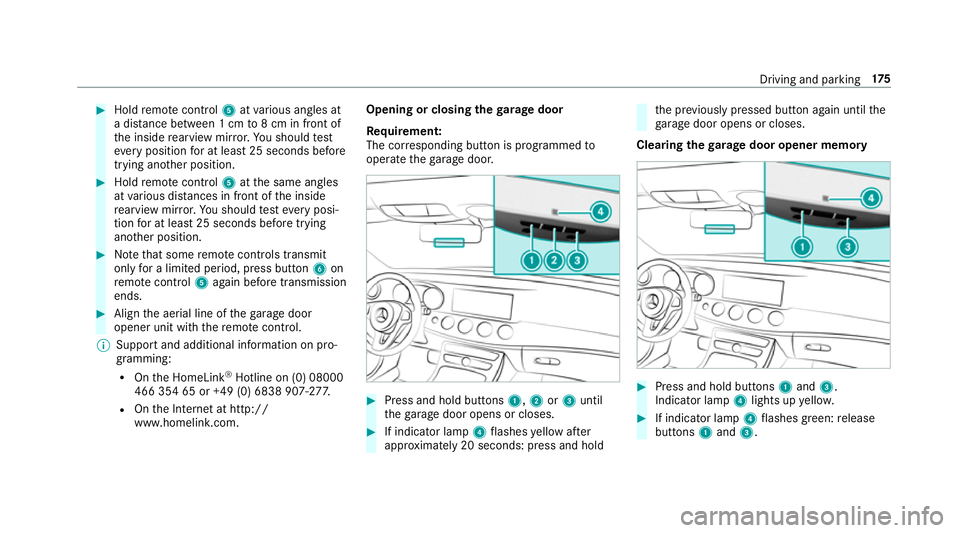
Hold remo tecontrol 5atvarious angles at
a dis tance between 1 cm to8 cm in front of
th e inside rearview mir ror.Yo u should test
eve ryposition for at least 25 seconds before
trying ano ther position. #
Hold remo tecontrol 5atthe same angles
at various dis tances in front of the inside
re arview mir ror.Yo u should test eve ryposi‐
tion for at least 25 seconds before trying
ano ther position. #
Notethat some remo tecontrols transmit
only for a limi ted period, press button 6on
re mo tecontrol 5again before transmission
ends. #
Align the aerial line of thega rage door
opener unit with there mo tecontrol.
% Support and additional information on pro‐
gramming:
R Onthe HomeLink ®
Hotline on (0) 08000
466 354 65 or +49 (0) 6838 907-2 77.
R Onthe Internet at http://
www.homelin k.com. Opening or closing the
garage door
Requ irement:
The cor responding button is programmed to
operate thega rage door. #
Press and hold buttons 1,2or3 until
th ega rage door opens or closes. #
If indicator lamp 4flashes yellow af ter
appr oximately 20 seconds: press and hold th
e pr eviously pressed button again until the
ga rage door opens or closes.
Clearing thega rage door opener memo ry #
Press and hold buttons 1and 3.
Indicator lamp 4lights up yello w. #
If indicator lamp 4flashes green: release
buttons 1and 3. Driving and parking
175
Page 248 of 557
Ve
hicles with Traf fic Sign Assist and wide‐
screen cockpit: detected instructions and traf‐
fi c signs appear in the speedome ter
( → page 229).
* NO
TEEngine dama gedue toexc essively
high engine speeds The engine will be damaged if
you drive with
th e engine in theov errevving range. #
Do not drive wi th the engine in theove r‐
re vving range. The fuel supply is inter
rupted toprotect the
engine when there d band in rev counter 3
(o ve rrev ving range) is reached.
During no rmal operating conditions, coolant
te mp erature display 4may rise to120 °C. &
WARNING Danger of bu rns when open‐
ing the bonn et
If yo u open the engine bonn etwhen the
engine has overheated or during a fire inthe
engine compartment, you could come into contact with hot
gases or other escaping
operating fluids. #
Before opening the bonn et, allow the
engine tocool down. #
Intheeve nt of a fire inthe engine com‐
partment, keep the engine bonn et
closed and call thefire service. Plug-in
hybrid: make sure that youre ad the
separate Owner's Manual. Otherwise, you may
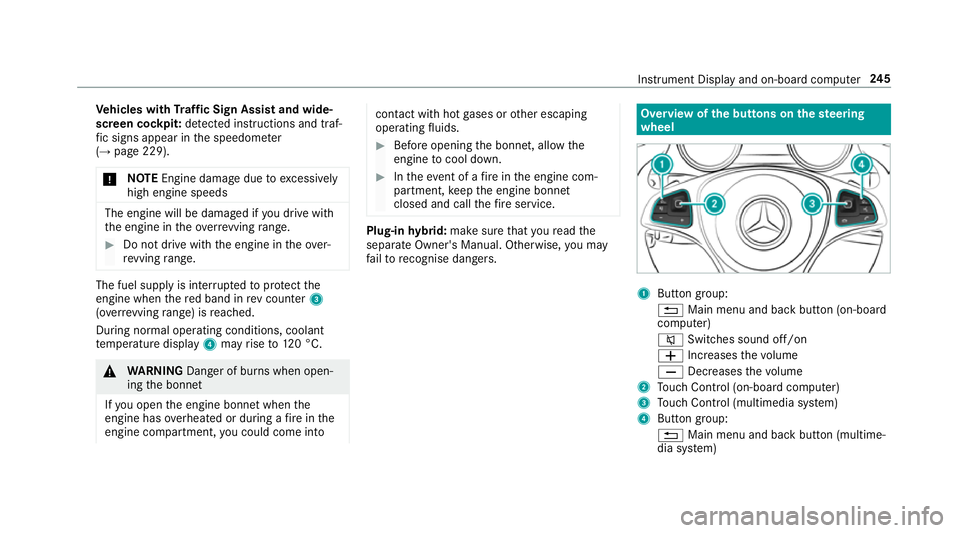
fa ilto recognise dangers. Overview of the buttons on the
steering
wheel 1
Button group:
% Main menu and ba ckbutton (on-board
computer)
8 Switches sound off/on
W Increases thevo lume
X Decreases thevo lume
2 Touch Control (on-board co mputer)
3 Touch Control (multimedia sy stem)
4 Button group:
% Main menu and back button (multime‐
dia sy stem) Instrument Display and on-board computer
245
Page 257 of 557
R
Updating data...: the call list is being upda‐
te d.
R Importing contacts... :th e conta cts from the
mobile phone or from a storage medium are
impor ted.
Ac cepting/rejecting a call
When youre cei vea call, a message appears in
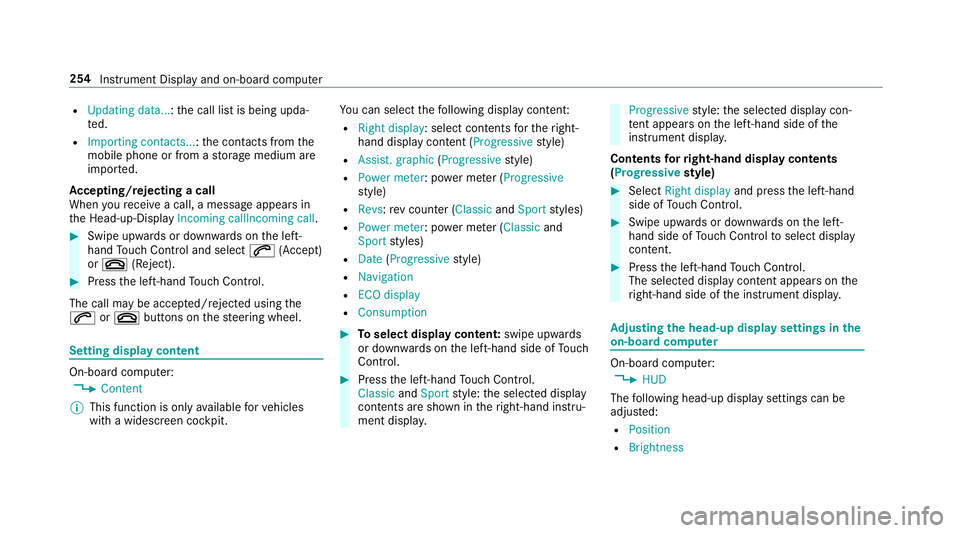
th e Head-up-Display Incoming callIncoming call.#
Swipe upwards or down wards on the left-
hand Touch Control and select 6(Accept)
or ~ (Reject). #
Press the left-hand Touch Control.
The call may be accep ted/rejec ted using the
6 or~ buttons on thesteering wheel. Setting display content
On-board computer:
, Content
% This function is only available forve hicles
with a widescreen cockpit. Yo
u can select thefo llowing display con tent:
R Right display: select contents forth eright-
hand display content (Progressive style)
R Assist. graphic (Progressivestyle)
R Power meter : power me ter (Progressive
st yle)
R Revs :re v counter ( ClassicandSport styles)
R Power meter : power me ter (Classic and
Sport styles)
R Date (Progressive style)
R Navigation
R ECO display
R Consumption #
Toselect display content: swipe upwards
or down wards on the left-hand side of Touch
Control. #
Press the left-hand Touch Control.
Classic andSport style: the selected display
conte nts are shown in theright-hand instru‐
ment displa y. Progressive
style: the selected display con‐
te nt appears on the left-hand side of the
instrument displa y.
Contents forri ght-hand display contents
(Progressive style) #
Select Right display and pressthe left-hand
side of Touch Control. #
Swipe upwards or down wards on the left-
hand side of Touch Control toselect display
content. #
Press the left-hand Touch Control.
The selected displ aycontent appea rson the
ri ght-hand side of the instrument displa y. Ad
justing the head-up display settings in the
on-board co mputer On-board computer:
, HUD
The following head-up display settings can be
adjus ted:
R Position
R Brightness 254
Instrument Display and on-board computer
Page 517 of 557

Boot lid
....................................................... 73
Ac tivating/deactivating the boot lid
opening limiter ...................................... 78
Closing .................................................. .74
HANDS-FREE ACCESS .......................... .76
Loc ked separately .................................77
Opening .................................................73
Opening dimensions ............................4 33
Boot lid see Boot lid
see Locking/unlocking
Boot load ................................................. .434
Brake Assist Sy stem
see BAS (Brake Assi stSystem)
Brake fluid
No tes ................................................... 431
Brake forc e distribution
EBD (Elect ronic Brake forc e Distribu‐
tion) ..................................................... 184
Brakes ABS (Anti-lock Braking Sy stem) ........... 180
Ad aptive brake lights .......................... .190
BA S (Brake Assi stSystem) ...................1 81
Driving tips .......................................... 15 6EBD (Electronic Brake
forc e Distribu‐
tion) ..................................................... 184
HOLD function .................................... .203
Limi ted braking ef fect (salt-trea ted
ro ads) .................................................. 15 6
New/replaced brake linings/brake
discs .................................................... 15 6
Ru nning-in no tes ..................................1 56
Brakes see Active Brake Assi st
Braking assistance see BAS (Brake Assi stSystem)
Breakdown ............................................... 381
Assis tance overview .............................. 18
To w- starting ........................................ 397
To wing away ........................................ 393
Tr ansporting theve hicle ......................3 95
Wheel change ...................................... 414
Breakdown assistance call see Service call
Breakdown management see Service call Burmes
ter®
high-end 3D sur round
sound sy stem
Ad justing the balance/fader ................3 61
Ad justing the sound optimisation ........ 362
Ad justing treble, mid and bass ............ 361
Calling up the sound menu .................. 361
Information .......................................... 361
Setting the sound profile ..................... 362
Burmes ter®
sur round sound sy stem .....3 60
Ad justing the balance/fader ................3 61
Ad justing the sound focus ................... 361
Ad justing treble, mid and bass ............ 361
Calling up the sound menu .................. 360
Information .......................................... 360
Switching the sur round sound on/off
............................................................ .361
Buttons Steering wheel .....................................2 45 C
CA module (TV) ........................................ 360
Calling up a menu ................................ 360
Inse rting .............................................. 359 514
Index
Page 529 of 557
Fr
ont airbag .............................................. .37
Fr ont passenger airbag shu toff ............... 39
PA SSENGER AIR BAG indicator lamp .... .41
Po ints toremember when the front
passenger seat is occupied ...................39
St atus display ........................................ 41
Sy stem self-test .....................................41
Fr ont passenger airbag shu toff
see Occupant saf ety
Fr ont passenger seat
Ad justing from the driver's seat ............ 94
Fr ont passenger seat
see Seat
Fu el .......................................................... .427
Ad ditives .............................................4 27
Consum ption ...................................... .429
Diesel ................................................. .428
E10 ...................................................... 426
Low outside temp eratures ...................4 28
Pe trol ................................................... 426
Quality (diesel) .................................... 428
Quality (p etro l) .................................... 426
Re fuelling ............................................ 16 6
Re ser vefuel le vel ................................ 429 Sulphur con
tent ................................... 426
Ta nk capacity ...................................... 429
Fu el consum ption
On-board computer ............................ .249
Fu nction seat
see Door cont rol panel
Fu se insert
see Fuses
Fu ses ........................................................ 398
Assignment diagram ............................3 98
Before changing .................................. 398
Fu se box in the boot ............................4 00
Fu se box in the engine compartment .. 399
Fu se box in the front-passen gerfo ot‐
we ll ...................................................... 400
Fu se box on the dashboard ................. 400
No tes .................................................. 398 G
Garage door opener Cleari ngthe memory ........................... 175
Opening or closing thega rage door .....1 75
Programming buttons .......................... 173
Ra dio equipment appr oval number ...... 176Re
solving problems .............................. 174
Synchronising thero lling code ............ .174
Gearshift paddles see Steering wheel gearshift paddles
Gea rshift recommendation ............162, 16 5
Genuine parts ............................................ 22
Genuine wood (Care) .............................. .376
Glide mode ............................................... 16 6
Glo vebox
Air vent ................................................ 151
Locking/unlocking .............................. 106
Gross mass ............................................. .423 H
Handbrake see Electric parking brake
Handling characteristics (unusual) ........401
HANDS-FREE ACCESS ................................ 76
HANDS-FREE ACCESS
see Opening the boot lid using your foot
Hands-free sy stem .................................... 69 526
Index
Page 535 of 557

Designs ............................................... 255
Media .................................................. 252
Na vigation .......................................... .250
Overview ............................................. 24 6
Ra dio ...................................................2 52
Service ................................................ 24 8
Te lephone ............................................ 253
Tr ip ...................................................... 24 9
Mercedes me connect Accident mana gement ......................... 318
Breakdown assis tance call ................... 318
Calling the Mercedes-Benz Cus tomer
Centre using the multimedia sy stem ....3 17
Consenting tothe transfer of data .......3 19
Making a call via theove rhead con‐
trol panel ............................................. 317
MB Info call .......................................... 318
No tes ................................................... 316
Service messa ge.................................. 318
Tr ansmit ted data .................................. 319
Mercedes-Benz Apps Calling up ............................................ 333
Using voice control .............................. 333 Mercedes-Benz emer
gency call sys‐
te m ........................................................... .319
Au tomatic emergency call ................... 320
Manual emer gency call ........................ 321
No tes ................................................... 319
Overview ..............................................3 19
St arting/ending ERA-GLONASS test
mode .................................................. .322
Tr ansmit ted data .................................. 321
Mercedes-Benz service centre see Qualified specialist workshop
Message (multifunction display) see Display message
Message memory .................................... 437
Messages see Text messa ges
Mir rors
see Outside mir rors
Mobile phone ................................... 253, 422
Au thorising (Remo teParking Pilot) ...... 226
Cancelling permission for Internet
connection .......................................... 332
Fr equencies ......................................... 422
Locking theve hicle ................................ 69 St
arting theve hicle ............................. 154
Tr ansmission output (maximum) ........ .422
Un locking theve hicle ............................69
Wi reless charging ................................ 121
Mobile phone see Hands-free sy stem
see Locking/unlocking
see Mobile phone
see Telephone
Mobile phone voice recognition
St arting ................................................ 311
St opping ............................................... 311
Model type ............................................... 423
MOExtended tyres ................................... 381
Mo torw ay mode ....................................... 127
MULTIBEAM LED see Intelligent Light Sy stem
Multifunction display (on-board com‐
puter) ........................................................ 247
Multifunction steering wheel
Overview of buttons ............................ 24 5
Multifunction steering wheel
see Steering wheel 532
Index
Page 544 of 557

Problems (remo
tecontrol) ................... 15 0
Setting (using the multimedia sys‐
te m) ..................................................... 14 8
Setting (via remo tecontrol) ................. 14 8
Switching on/off (via control panel) .... 14 6
Ste ering Pilot .......................................... .200
Ac tive Emergency Stop Assist .............2 01
Ac tive Lane Change Assi st................... 201
Fu nction .............................................. 200
Switching on/o ff................................. 203
Sy stem limits ....................................... 200
Ste ering wheel ........................................ .245
Ad justing (electrically) ........................ .102
Ad justing (manually) ............................ 101
Buttons ................................................ 24 5
St eering wheel heater .......................... 102
Using the memory function ................. 104
Ste ering wheel gearshift paddles ..........16 5
Ste ering wheel heater
Swit ching on/off ................................ .102
St opping the ala rm(ATA ).......................... 88
St ow age areas
see Laden
see Stow age compartment St
ow age comp artment........................... 106
Armrest ............................................... 106
Centre console .................................... 106
Door ................................................... .106
Glove box .............................................1 06
Re ar armrest ........................................ 107
Spectacles compa rtment .................... 107
St ow age comp artments
see Laden
see Stow age compartment
St ow age space under the boot floor ......11 3
Sulphur content ...................................... 426
Sun visor Operating ............................................ 13 9
Sur round lighting
Setting ................................................ .130
Sur round View
see 360° Camera
Suspension Damping characteristics ...................... 205
DY NA MIC BODY CONTROL .................. 205
Setting the suspension le vel ................ 207 Suspension
see AIR BODY CONTROL
Suspension le vel
Setting ................................................. 207
Switch-off del aytime
Interior ................................................ .131
Switching residual heat on/off ..............14 4
Switching the sur round sound on/off
Burmes ter®
sur round sound sy stem ....3 61
Synchronisation function Activating/deactivating (control
panel) .................................................. 14 4
Ac tivating/deactivating (multimedia
sy stem) ................................................ 14 4
Sy stem settings
Language ............................................ .281
No tes on language selection ................2 81
Re set function (multimedia sy stem) ....2 84
Setting the dis tance unit ...................... 281
Software upda te.................................. 283
Sy stem settings
see Multimedia sy stem Index
541