fog light MERCEDES-BENZ E-CLASS SALOON 2016 User Guide
[x] Cancel search | Manufacturer: MERCEDES-BENZ, Model Year: 2016, Model line: E-CLASS SALOON, Model: MERCEDES-BENZ E-CLASS SALOON 2016Pages: 557, PDF Size: 11.09 MB
Page 204 of 557
R
When the sy stem is actively steering, the
è symbol is shown in green in the multi‐
function displa y.
St eering Pilot sy stem limits
St eering Pilot has a limited steering torque for
lateral guidance. In some cases, thesteering
inter vention is not su fficient tokeep theve hicle
in the lane.
If de tection of lane markings and vehicles ahead
is impaired, Steering Pilot switches topassive
mode. The sy stem pr ovides no support in this
case. During the transition from the active to
passive status theè symbol is shown as
enlar ged and flashes yello w. Once the sy stem is
passive theè symbol is gr eyed out in the
multifunction displa y.
The sy stem may be impaired or may not function
in thefo llowing situations:
R Ifth ere is poor visibility, e.g. due toinsuf fi‐
cient illumination of thero ad, or due tosno w,
ra in, fog or spr ay.
R Ifth ere is glare, e.g. from oncoming traf fic,
di re ct sunlight or reflection from other vehi‐
cles (e.g. if thero ad sur face is wet). R
Ifth e windscreen is dirty, mis ted up, dam‐
aged or co vered, for ins tance byast icke r,in
th e vicinity of the camera.
R If no, or se veral, unclear lane markings are
present for one lane, e.g. in a construction
area.
R Ifth e lane markings are wornaw ay, dark or
co vered up, e.g. bydirt or sno w.
R Ifth e dis tance totheve hicle in front is too
small and the lane markings thus cannot be
de tected.
R Ifth e lane markings change quickl y,e.g.
lanes branch off, cross one ano ther or
mer ge.
R Ifth ero ad is nar rowand winding.
R Ifth ere are highly variable shade conditions
on thero ad.
R Ifth ere are obs tacles su chas traf fic guid‐
ance posts on the lane or projecting out into
th e lane.
The sy stem does not pr ovide assis tance in the
fo llowing conditions:
R Onvery sharp bends. R
When towing a trailer.
R Ifyo u actively change lane without swit ching
on the turn signal indicator.
R Ifyo u swit chon the turn signal indicator and
th e conditions for activating Active Lane
Change Assi stare not fulfilled.
Note s onSteering Pilot
St eering Pilot is only an aid. You are responsible
fo rth e dis tance totheve hicle in front, forve hi‐
cle speed, for braking in good time and forst ay‐
ing in lane. Before changing lanes, make sure
th at the neighbouring lane is free (shoulder
view).
Ac tive Lane Change Assi st
% The availability of thefo llowing function is
countr y-dependent.
St eering Pilot remains active even if the turn sig‐
nal indicator is switched on. Steering Pilot then
assists the driver when changing lanes byapply‐
ing steering torques toinitiate the lane change. Driving and parking
201
Page 219 of 557
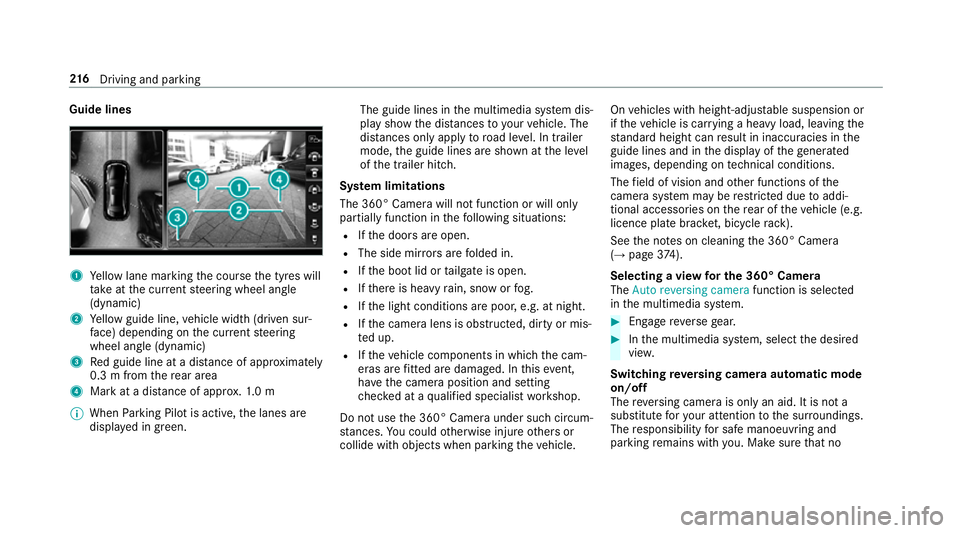
Guide lines
1
Yellow lane marking the course the tyres will
ta ke atthe cur rent steering wheel angle
(dynamic)
2 Yellow guide line, vehicle width (driven sur‐
fa ce) depending on the cur rent steering
wheel angle (dynamic)
3 Red guide line at a dis tance of appr oximately
0.3 m from there ar area
4 Mark at a distance of appr ox.1. 0 m
% When Parking Pilot is active, the lanes are
displa yed in green. The guide lines in
the multimedia sy stem dis‐
play show the dis tances toyour vehicle. The
dis tances only apply toroad le vel. In trailer
mode, the guide lines are shown at the le vel
of the trailer hitch.
Sy stem limitations
The 360° Camera will not function or will only
partially function in thefo llowing situations:
R Ifth e doors are open.
R The side mir rors are folded in.
R Ifth e boot lid or tailgate is open.
R Ifth ere is heavy rain, snow or fog.
R Ifth e light conditions are poor, e.g. at night.
R Ifth e camera lens is obstructed, dirty or mis‐
te d up.
R Ifth eve hicle components in which the cam‐
eras are fitted are dama ged. In this event,
ha ve the camera position and setting
ch ecked at a qualified specialist workshop.
Do not use the 360° Camera under such circum‐
st ances. You could otherwise injure others or
collide with objects when parking theve hicle. On
vehicles with height-adjus table suspension or
if th eve hicle is car rying a heavy load, leaving the
st andard height can result in inaccuracies in the
guide lines and in the display of thege nerated
ima ges, depending on tech nical conditions.
The field of vision and other functions of the
came rasystem may be restricted due toaddi‐
tional accesso ries on there ar of theve hicle (e.g.
licence plate brac ket, bicycle rack ).
See the no tes on cleaning the 360° Camera
(→ page 374).
Selecting a view for the 360° Camera
The Auto reversing camera function is selected
in the multimedia sy stem. #
Enga gereve rsege ar. #
Inthe multimedia sy stem, select the desired
vie w.
Switching reve rsing camera automatic mode
on/off
The reve rsing camera is only an aid. It is not a
substitute foryo ur attention tothe sur roundings.
The responsibility for safe manoeuvring and
parking remains with you. Make sure that no 216
Driving and pa rking
Page 234 of 557
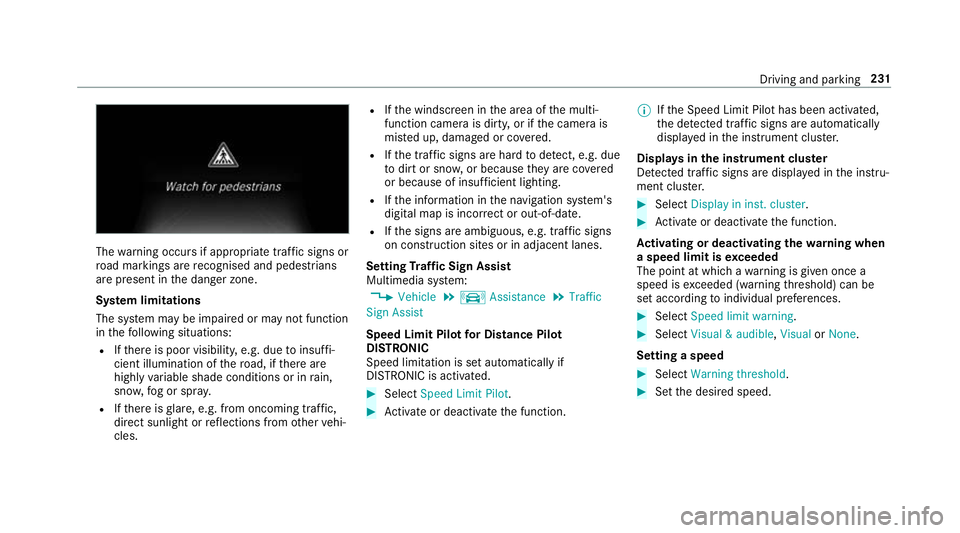
The
warning occurs if appropriate traf fic signs or
ro ad markings are recognised and pedestrians
are present in the danger zone.
Sy stem limitations
The sy stem may be impaired or may not function
in thefo llowing situations:
R Ifth ere is poor visibility, e.g. due toinsuf fi‐
cient illumination of thero ad, if there are
highly variable shade conditions or in rain,
sno w,fog or spr ay.
R Ifth ere is glare, e.g. from oncoming traf fic,
di re ct sunlight or reflections from other vehi‐
cles. R
Ifth e windscreen in the area of the multi‐
function camera is dirty, or if the camera is
mis ted up, damaged or co vered.
R Ifth e tra ffic signs are hard todetect, e.g. due
to dirt or sno w,or because they are co vered
or because of insuf ficient lighting.
R Ifth e information in the navigation sy stem's
digital map is incor rect or out-of-da te.
R Ifth e signs are ambiguous, e.g. tra ffic signs
on con stru ction sites or in adjacent lanes.
Setting Traf fic Sign Assist
Multimedia sy stem:
, Vehicle .
k Assistance .
Traffic
Sign Assist
Speed Limit Pilot for Di stance Pil ot
DISTRONIC
Speed limi tation is set au tomatically if
DISTRONIC is activated. #
Select Speed Limit Pilot. #
Activate or deacti vate the function. %
Ifth e Speed Limit Pilot has been activated,
th e de tected traf fic signs are au tomatical ly
displa yed in the instrument clus ter.
Displa ysinthe instrument clus ter
De tected traf fic signs are displ ayed in the instru‐
ment clus ter. #
Select Display in inst. cluster. #
Activate or deacti vate the function.
Ac tivating or deactivating the warning when
a speed limit is exceeded
The point at which a warning is given once a
speed is exceeded (warning thre shold) can be
set according toindividual preferences. #
Select Speed limit warning. #
Select Visual & audible ,Visual orNone.
Setting a speed #
Select Warning threshold. #
Set the desired speed. Driving and parking
231
Page 235 of 557
Blind Spot Assi
stand Active Blind Spot
Assi st Fu
nction of Blind Spot Assist and Active
Blind Spot Assi st
Blind Spot Assi stuses two lateral, rear-facing
ra dar sensors tomonitor the area up to40 m
behind your vehicle and 3 m directly next to your
ve hicle.
If a vehicle is de tected at speeds ab ove appr ox‐
imately 12km/h and this vehicle subsequently
enters the monitoring range di rectly next to your
ve hicle, thewa rning lamp in the outside mir ror
lights up red.
If a vehicle is de tected close to yourvehicle in
th e lateral monitoring range and you swit chon
th e turn signal indicator in the cor responding
direction, a warning tone sounds once. The red
wa rning lamp in the outside mir rorflashes. If the
turn signal indica torre mains on, all other de tec‐
te dve hicles are indicated only bytheflashing of
th ere dwa rning lamp.
If yo uove rtake a vehicle quickl y,no warning is
given. &
WARNING Risk of accident despi teBlind
Spot Assi st
Blind Spot Assi stdoes not react tovehicles
approaching and overtaking you at a greatly
di fferent speed.
As a result, Blind Spot Assist cannot warn
drivers in this situation. #
Alw ays pay careful attention tothe traf‐
fi c situation and maintain a safe dis‐
ta nce at the side of theve hicle. Blind Spot Assist and
Active Blind Spot Assi st
are on lyaids. They may failto detect some vehi‐
cles and are no substitute for attentive driving.
Alw ays ensure that there is suf ficient di stance to
th e side forot her road users and obs tacles.
Sy stem limitations
The de tection capability of Blind Spot Assi stcan
be restricted in thefo llowing situations:
R Ifth e sensors are dirty or co vered.
R When there is poor visibility, e.g. due tofog,
heavy rain, snow or spr ay. R
If nar rowvehicles are within the monitoring
ra nge, e.g. bicycles.
Wa rnings may be issued in er ror when driving
close tocrash ba rriers or similar solid lane bor‐
ders. Warnings may be inter rupte d when driving
alongside long vehicles, forex ample lor ries, for a
prolonged time.
Blind Spot Assist is not operational when reve rse
ge ar is engaged.
Brake application of Active Blind Spot Assi st
If Ac tive Blind Spot Assi stdetects a risk of a side
impact in the monitoring range, a cou rse-cor‐
re cting brake application is car ried out. This is
designed tohelp youavo id a collision.
The course-cor recting brake application is availa‐
ble in the speed range between appr oximately
30 km/h and 200 km/h. &
WARNING Risk of accident despi te
brake application of Active Blind Spot
Assi st
A cou rse-co rrecting brake application cann ot
alw ays pr event a collision. 232
Driving and parking
Page 496 of 557
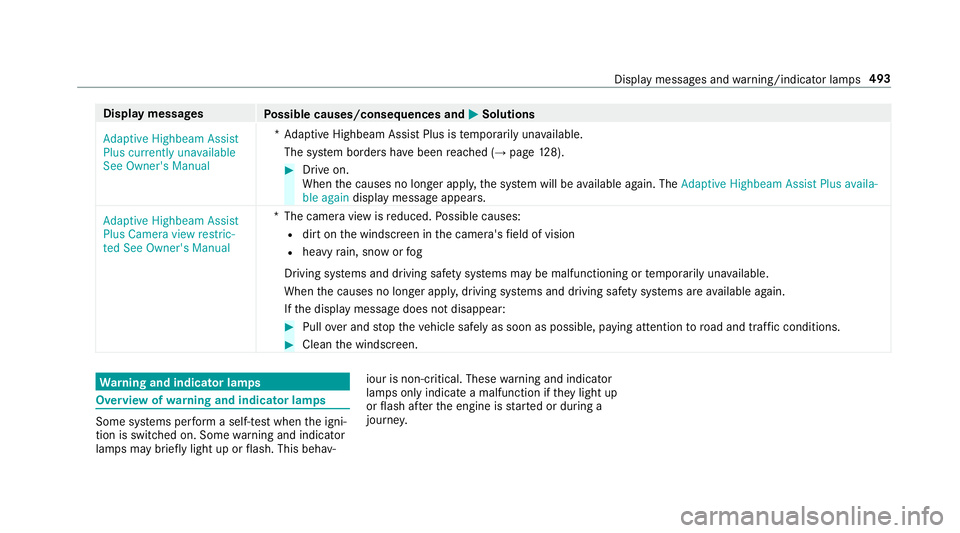
Display messages
Possible causes/consequences and M
MSolutions
Adaptive Highbeam Assist
Plus currently unavailable
See Owner's Manual *A
daptive Highbeam Assist Plus is temp orarily una vailable.
The sy stem borders ha vebeen reached (→ page128). #
Drive on.
When the causes no longer appl y,the sy stem will be available again. The Adaptive Highbeam Assist Plus availa-
ble again display message appears.
Adaptive Highbeam Assist
Plus Camera view restric-
ted See Owner's Manual *T
he camera view is reduced. Possible causes:
R dirt on the windscreen in the camera's field of vision
R heavy rain, snow or fog
Driving sy stems and driving saf ety sy stems may be malfunctioning or temp orarily una vailable.
When the causes no longer appl y,driving sy stems and driving saf ety sy stems are available again.
If th e display message does not disappear: #
Pull over and stop theve hicle safely as soon as possible, paying attention toroad and traf fic conditions. #
Clean the windscreen. Wa
rning and indicator lamps Overview of
warning and indicator lamps Some sy
stems per form a self-test when the igni‐
tion is switched on. Some warning and indicator
lamps may briefly light up or flash. This behav‐ iour is non-critical. These
warning and indicator
lamps only indicate a malfunction if they light up
or flash af terth e engine is star ted or during a
journe y. Displ
aymessa ges and warning/indicator lamps 493
Page 497 of 557
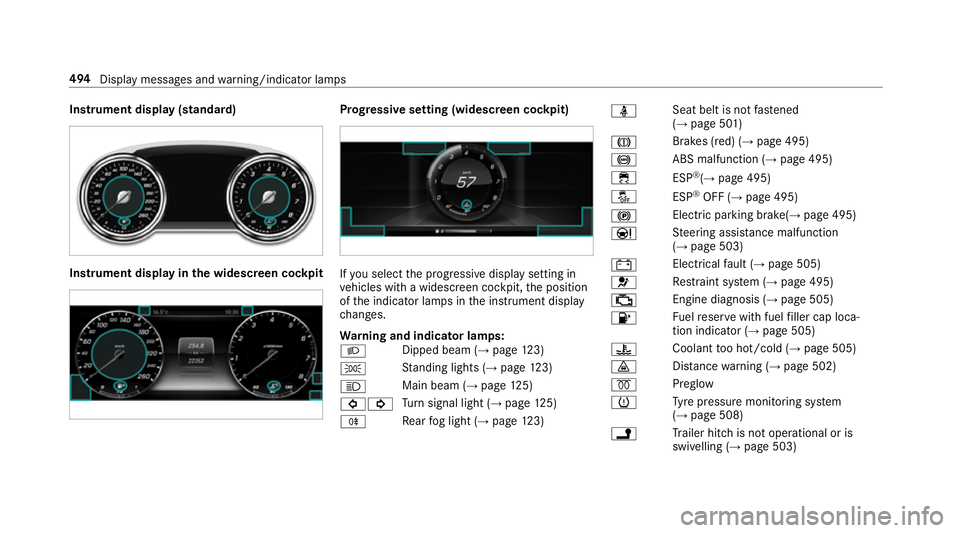
Instrument display (standard)
Instrument display in
the widescreen cockpit Prog
ressive setting (widescreen cockpit) If
yo u select the progressive display setting in
ve hicles with a widescreen cockpit, the position
of the indicator lamps in the instrument display
ch anges.
Wa rning and indicator lamps:
L Dipped beam (→
page123)
T St
anding lights (→ page123)
K Main beam (→
page125)
#! Tu
rn signal light (→ page125)
R Re
ar fog light (→ page123) ü
Seat belt is not
fastened
(→ page 501)
J Brakes (red) (→
page 495)
! ABS malfunction (→
page 495)
÷ ESP®
(→ page 495)
å ESP®
OFF (→ page 495)
! Elect
ric pa rking brake(→ page 495)
Ð St
eering assis tance malfunction
(→ page 503)
# Electrical
fault (→ page 505)
6 Re
stra int sy stem (→ page 495)
; Engine diagnosis (→
page 505)
8 Fu
elreser vewith fuel filler cap loca‐
tion indicator (→ page 505)
? Coolant
too hot/cold (→ page 505)
· Dis
tance warning (→ page 502)
% Preglow
h Ty
re pressure monitoring sy stem
(→ page 508)
j Tr
ailer hit chis not operational or is
swivelling (→ page 503)494
Display messages and warning/indicator lamps
Page 533 of 557

Light switch .........................................1
23
Main beam .......................................... .125
Mo torw ay mode ................................... 127
Pa rking lights ...................................... .123
Re ar fog light ....................................... 124
Re sponsibility for lighting sy stems .......1 23
Setting the dipped beam ..................... 12 9
Setting the sur round lighting .............. .130
St anding lights .................................... .123
Tu rn signal light ................................... 12 5
Limiter ...................................................... 19 0
Ac tivating ............................................ .191
Calling up a speed .............................. .191
Deactivating ......................................... 191
Fu nction .............................................. 19 0
Le ver .................................................... 191
Pa ssive mode ...................................... 19 0
Pe rm anent setting .............................. .193
Re quirements ...................................... 191
Selecting .............................................. 191
Setting a speed .................................... 191
St oring a speed .................................... 191
Sy stem limits ....................................... 19 0
Limiting speed see Limiter LINGU
ATRO NIC ........................................ 257
Application-speci fic command ............ 258
Au dible help functions .........................2 59
Command types .................................. 258
Entering numbe rs................................ 258
Global command ................................. 258
Impr oving speech quality .................... 259
Language setting ................................ .259
Media pla yer commands .................... .265
Messa gecommands ........................... 265
Multifunction steering wheel (operat‐
ing) ...................................................... 257
Na vigation commands ........................ .261
Operable functions .............................. 258
Operating saf ety .................................. 257
Ra dio commands .................................2 64
Switch commands ............................... 259
Te lephone commands ........................ .263
Te xt messa gecommands .................... 265
TV commands ..................................... 264
Ve hicle commands .............................. 266
Vo ice prom pting .................................. 258
Live Traf fic Information
Displaying subsc ript ion information .... 299
Re gis tering on Mercedes me ............... 299 Loading guidelines
.................................. 105
Loads Securing .............................................. 105
Locking ...................................................... .64
Locking/unlocking ........................ 68, 69, 73
Lo weri ng
Ve hicle .................................................4 18
Lu bricant additives
see Additives
Lu ggage
Securing .............................................. 105
Lu mbar support
see Lumbar support (4-w ay)
Lu mbar support (4-w ay).......................... .95 M
Main beam Adaptive Highbeam Assist Plus .......... .128
Changing bulbs ................................... .132
Switching on/off ................................. 12 5
Maintenance see ASS YST PLUS 530
Index
Page 539 of 557

PRE-SAFE
®
PLUS (anticipatory occu‐
pant pr otection plus)
Fu nction ................................................ 44
Re versing measures .............................. 44
PRE-SAFE ®
PLUS (anticipatory occu‐
pant pr otection plus)
see Anticipatory occupant pr otection
see Occupant saf ety
Pr eve ntative occupant pr otection sys‐
te m ............................................................. 44
Prog ramme in form ation
TV channel .......................................... 356
Prog rams
see DYNA MIC SELECT
Pr otection of the environment
No tes ..................................................... 21
Re turning an end-of-life vehicle .............21 Q
Qibla ......................................................... 306
QR code Rescue card ...........................................27
Qualified specialist workshop ................. 26 R
Ra dar senso rs.......................................... 17 9
Ra diator shutters
see AIRPANEL (Care)
Ra dio
Ac tivating ............................................ 349
Ac tivating/deactivating radio text ....... 352
Calling up a slide show ........................ 351
Calling up thest ation list .................... .351
Commands (LINGU ATRO NIC) .............. 264
Deleting stations .................................. 351
Direct frequency ent ry......................... 351
Displaying information ......................... 352
Editing station presets ........................ .351
Fr equency fix ....................................... 352
Menu (on-boa rdcompu ter) .................. 252
Moving stations .................................. .351
Overview ............................................. 350
Sear ching forst ations .......................... 351
Setting a station .................................. 351
Setting station tracking ...................... .352
Setting the frequency band .................. 351
Setting the traf fic information
service volume inc rease ...................... 352 St
oring stations .................................. .351
Switching traf fic announcements
on/off ................................................. 352
Ta gging music trac ks........................... 352
To display radio text ............................ 352
Ra dio stations
Selecting (on-boa rdcompu ter) ............ 252
Ra in-closing feature
Sliding sunroof ...................................... 85
Ra ising
Ve hicle .................................................4 15
Ra nge
Displaying ............................................ 24 9
Re ading lamp
see Interior lighting
Re ar door (child saf ety lock) .....................61
Re ar fog light ...........................................1 24
Re ar seat
see Seat
Re ar seat belt
St atus display ........................................ 36
Re ar seat belt status display .................... 36536
Index