height MERCEDES-BENZ E-CLASS SALOON 2016 User Guide
[x] Cancel search | Manufacturer: MERCEDES-BENZ, Model Year: 2016, Model line: E-CLASS SALOON, Model: MERCEDES-BENZ E-CLASS SALOON 2016Pages: 557, PDF Size: 11.09 MB
Page 211 of 557
The
vehicle is lo wered again in thefo llowing sit‐
uations:
R When driving fasterthan 100 km/h.
R When driving between 80 km/h and
100 km/h for appro ximately thre e minutes.
R After selecting a drive program using the
DY NA MIC SELECT switch.
The vehicle is adjus tedto the height of the last
active drive program.
Lo weri ngtheve hicle #
Press button 1.
Indicator lamp 2goes out. The vehicle is
adjus tedto the height of the last active drive
program. Pa
rking Assist PARKTRONIC Fu
nctions of Parking Assist PARKTRONIC Pa
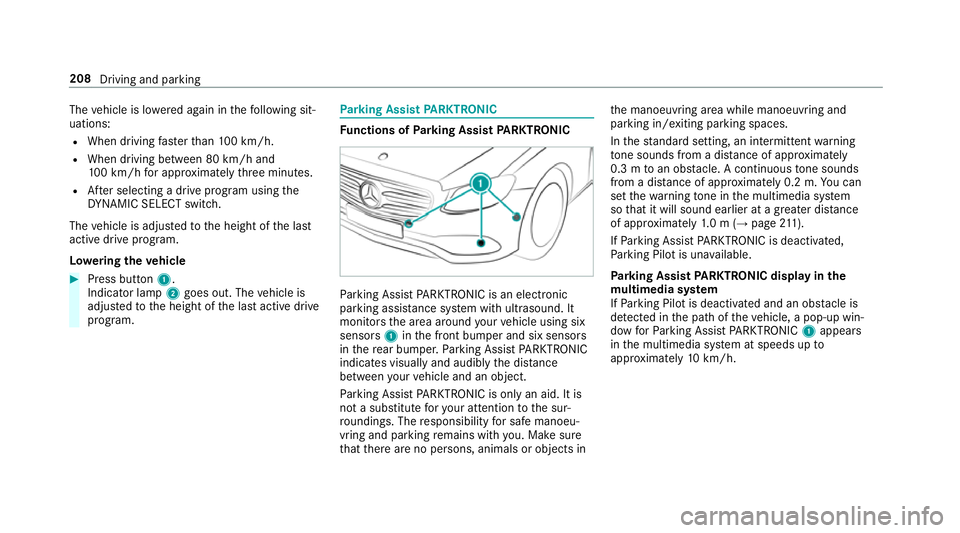
rking Assist PARKTRONIC is an electronic
parking assi stance sy stem with ultrasound. It
monitors the area around your vehicle using six
sensors 1inthe front bumper and six sensors
in there ar bumper. Parking Assist PARKTRONIC
indicates visually and audibly the dis tance
between your vehicle and an object.
Pa rking Assist PARKTRONIC is on lyan aid. It is
not a substitute foryo ur attention tothe sur‐
ro undings. The responsibility for safe manoeu‐
vring and parking remains with you. Make sure
th at there are no persons, animals or objects in th
e manoeuvring area while manoeuvring and
parking in/exiting parking spaces.
In thest andard setting, an intermit tent wa rning
to ne sounds from a di stance of appr oximately
0.3 m toan obs tacle. A continuous tone sounds
from a di stance of appr oximately 0.2 m. You can
set thewa rning tone in the multimedia sy stem
so that it will sound earlier at a greater dis tance
of appr oximately 1.0 m (→ page211).
If Pa rking Assist PARKTRONIC is deacti vated,
Pa rking Pilot is una vailable.
Pa rking Assist PARKTRONIC displ ayinthe
mu ltimedia sy stem
If Pa rking Pilot is deactivated and an obs tacle is
de tected in the path of theve hicle, a pop-up win‐
dow forPa rking Assist PARKTRONIC 1appears
in the multimedia sy stem at speeds up to
appr oximately 10km/h. 208
Driving and pa rking
Page 219 of 557
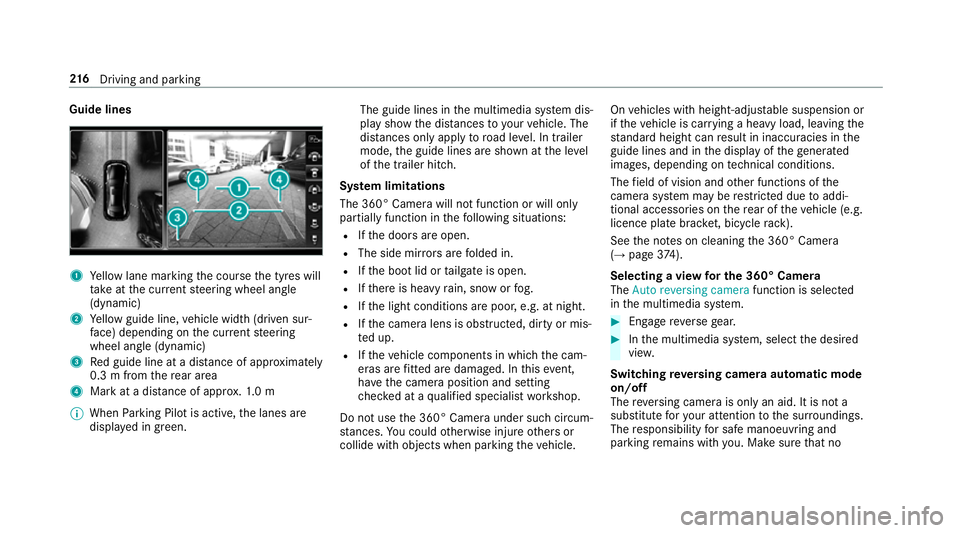
Guide lines
1
Yellow lane marking the course the tyres will
ta ke atthe cur rent steering wheel angle
(dynamic)
2 Yellow guide line, vehicle width (driven sur‐
fa ce) depending on the cur rent steering
wheel angle (dynamic)
3 Red guide line at a dis tance of appr oximately
0.3 m from there ar area
4 Mark at a distance of appr ox.1. 0 m
% When Parking Pilot is active, the lanes are
displa yed in green. The guide lines in
the multimedia sy stem dis‐
play show the dis tances toyour vehicle. The
dis tances only apply toroad le vel. In trailer
mode, the guide lines are shown at the le vel
of the trailer hitch.
Sy stem limitations
The 360° Camera will not function or will only
partially function in thefo llowing situations:
R Ifth e doors are open.
R The side mir rors are folded in.
R Ifth e boot lid or tailgate is open.
R Ifth ere is heavy rain, snow or fog.
R Ifth e light conditions are poor, e.g. at night.
R Ifth e camera lens is obstructed, dirty or mis‐
te d up.
R Ifth eve hicle components in which the cam‐
eras are fitted are dama ged. In this event,
ha ve the camera position and setting
ch ecked at a qualified specialist workshop.
Do not use the 360° Camera under such circum‐
st ances. You could otherwise injure others or
collide with objects when parking theve hicle. On
vehicles with height-adjus table suspension or
if th eve hicle is car rying a heavy load, leaving the
st andard height can result in inaccuracies in the
guide lines and in the display of thege nerated
ima ges, depending on tech nical conditions.
The field of vision and other functions of the
came rasystem may be restricted due toaddi‐
tional accesso ries on there ar of theve hicle (e.g.
licence plate brac ket, bicycle rack ).
See the no tes on cleaning the 360° Camera
(→ page 374).
Selecting a view for the 360° Camera
The Auto reversing camera function is selected
in the multimedia sy stem. #
Enga gereve rsege ar. #
Inthe multimedia sy stem, select the desired
vie w.
Switching reve rsing camera automatic mode
on/off
The reve rsing camera is only an aid. It is not a
substitute foryo ur attention tothe sur roundings.
The responsibility for safe manoeuvring and
parking remains with you. Make sure that no 216
Driving and pa rking
Page 309 of 557
Displaying
the compass
Multimedia sy stem:
, Navigation .
Á Position #
Select Compass.
The compass display sho wsthefo llowing
information:
R the cur rent di rection of tr avel with bear‐
ing (360 deg reefo rm at) and compass
direction
R longitude and latitude coo rdinates in
degrees, minutes and seconds
R height (rounded) abo vesea le vel
R number of GPS sa tellites from which a
signal can be recei ved
Displaying Qibla
Multimedia sy stem:
, Navigation .
Á Position #
Select Qibla(ifavailable).
The ar rowonthe compass sho wsthe direc‐
tion of pr ayer toMecca in relation tothe cur‐
re nt di rection of tr avel. This function is not
av ailable in all countries. The number of satellites
recei ved is shown.
Displaying the satellite map
Multimedia sy stem:
, Navigation .
Z Options .
Map con-
tent
Satellite maps can be displa yed in map scales
from 2 km. #
Switch Satellite map onO or off ª.
By doing so, satellite maps in map scales
from 2 km to10 km can be switched off.
% Satelli temaps forth ese map scales are not
av ailable in all countries.
Displ aying weather information
Multimedia sy stem:
, Navigation .
Z Options .
Map con-
tent #
Switch Weather information onO or off ª.
When the function is switched on O, current
we ather information is displa yed on the navi‐
ga tion map, e.g. temp erature or cloud co ver‐
age.
This function is not available in all countries. %
Requirements:
R You ha vea Mercedes me account.
R The service has been activated at a
Mercedes-Benz Service Cent re.
Fu rther information can be found at http://
www.mercedes.me. Calling up
the Digital Owner's Manual (navi‐
ga tion) In
fo rm ation on navigation
Multimedia sy stem:
, Navigation .
Information on navigation #
Select a topic. 306
Multimedia sy stem
Page 369 of 557
th
era diator and parts of theex haust sy stem. #
Let the engine cool down and only
to uch the component parts described
below: &
WARNING Risk of inju ryfrom using the
windscreen wipers while the engine bon‐
net is open
When the engine bonn etis open, and the
windscreen wipers are set in motion, you can
be trapped bythe wiper linkage. #
Alw ays switch off the windscreen wip‐
ers and ignition before opening the
engine bonn et. Plug-in
hybrid: make sure that youre ad the
separate Owner's Manual. You could otherwise
fa ilto recognise dangers, e.g. due tohigh volt‐
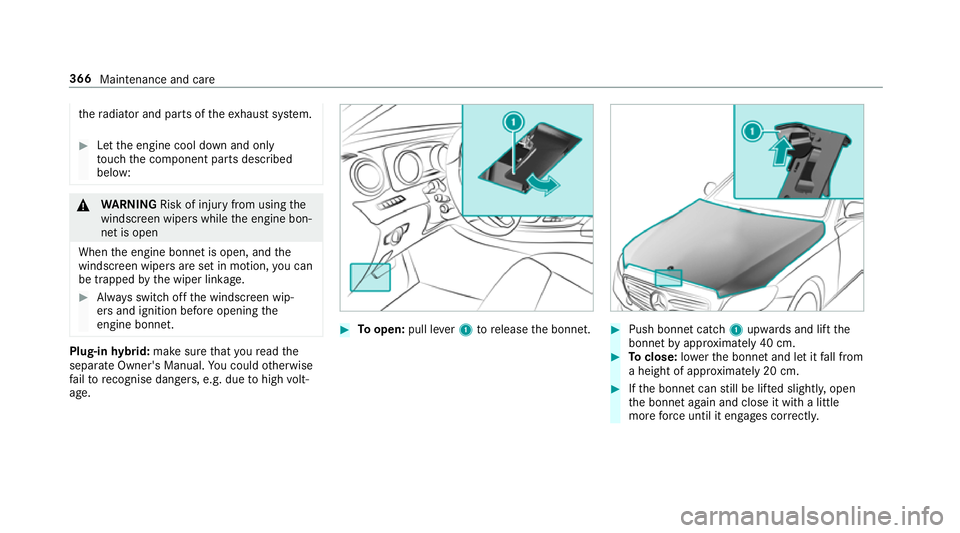
age. #
Toopen: pull lever1 torelease the bonn et. #
Push bonnet catch 1upwards and lift the
bonn etby appr oximately 40 cm. #
Toclose: lowe rth e bonn etand let it fall from
a height of appr oximately 20 cm. #
Ifth e bonn etcan still be lif ted slightl y,open
th e bonn etagain and close it with a little
more forc e until it engages cor rectly. 366
Maintenance and care
Page 436 of 557
The proportion of cor
rosion inhibitor/ antifreeze
concentrate in the engine cooling sy stem should
be:
R A minimum of 50% (antifreeze pr otection
down toappr oximately -37 °C).
R A maximum of 55% (antifreeze pr otection
down to-45 °C). Note
s on windscreen washer fluid Obser
vethe no tes on operating fluids
(→ page 425). &
WARNING ‑ Risk of fire and injury due to
windscreen washer concentrate
Wi ndsc reen washer concentrate is highly
fl ammable. It could ignite if it comes into
con tact wi thhot engine component parts or
th eex haust sy stem. #
Make sure that no windsc reen washer
concentrate spills out next tothefiller
opening. *
NO
TEDama getotheex terior lighting
due tounsuitable windsc reen washer
fl uid Uns
uitable windsc reen washer fluids may
damage the plastic sur face of theex terior
lighting. #
Only use windscreen washer fluids
which are also suitable for use on plas‐
tic sur faces, e.g. MB SummerFit or MB
Wi nterFit. *
NO
TEBlocked spr aynozzles caused by
mixing windscreen washer fluids #
Do not mix MB SummerFit and MB Win‐
te rFit with other windscreen washer flu‐
ids. Do not use distilled or de-ionised
water asthefill
le ve l sensor may be triggered er roneously.
Re commended windscreen washer fluid:
R Abo vefreezing point: e.g. MB SummerFit
R Below freezing point: e.g. MB WinterFit Fo
rth e cor rect mixing ratio referto the informa‐
tion on the antif reeze reser voir.
Mix thewa sher fluid with the windscreen washer
fl uid all year round. Ve
hicle data Ve
hicle dimensions The heights speci
fied may vary as a result of the:
R tyres
R load
R condition of the suspension
R optional equipment Te
ch nical da ta433
Page 437 of 557
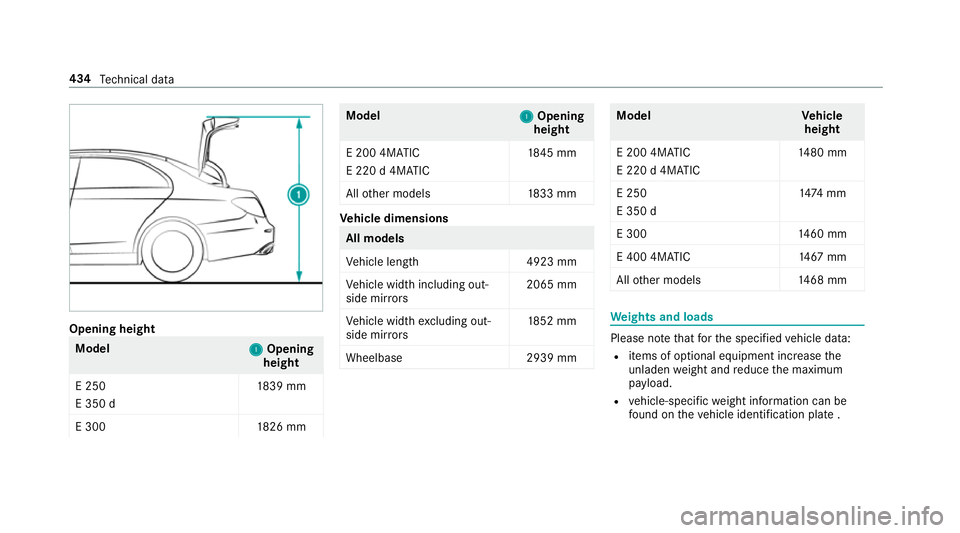
Opening height
Model
1
1Opening
height
E 250
E 350 d 18
39 mm
E 300 1826 mm Model
1 1Opening
height
E 200 4MATIC
E 220 d 4MATIC 18
45 mm
All other models 1833 mm Ve
hicle dimensions All models
Ve
hicle lengt h4 923 mm
Ve hicle width including out‐
side mir rors 2065 mm
Ve hicle width excluding out‐
side mir rors 18
52 mm
Wheelbase 2939 mm Model
Vehicle
height
E 200 4MATIC
E 220 d 4MATIC 14
80 mm
E 250
E 350 d 14
74 mm
E 300 1460 mm
E 400 4MATIC 14 67mm
All other models 1468 mm We
ights and loads Please no
tethat forth e specified vehicle data:
R items of optional equipment increase the
unladen weight and reduce the maximum
pa yload.
R vehicle-specific weight information can be
fo und on theve hicle identification plate . 434
Tech nical da ta
Page 526 of 557
Ad
aptive brake lights .......................... .190
BA S (Brake Assi stSystem) ...................1 81
EBD (Electronic Brake forc e Distribu‐
tion) ..................................................... 184
ESP ®
(Electronic Stability Prog ram)
Crosswind Assist ................................. 184
ESP ®
(Electronic Stability Prog ram)
trailer stabilisation .............................. .184
Overview ............................................. 180
Ra dar sensors ...................................... 17 9
Re sponsibility ...................................... 17 9
Driving saf ety sy stem
see ESP ®
(Elect ronic Stability Prog ram)
Driving sy stem
DY NA MIC BODY CONTROL .................. 205
Driving sy stem
see 360° Camera
see Active Blind Spot Assi st
see Active Lane Keeping Assist
see AIR BODY CONTROL
see ATTENTION ASSIST
see Blind Spot Assist
see Cruise control
see Dis tance Pilot DISTRONIC see DRIVE PIL
OT
see Driving saf ety sy stem
see HOLD function
see Limiter
see Parking Assist PARKTRONIC
see Parking Pilot
see Remo teParking Pilot
see Reversing camera
see Speed Limit Pilot
see Steering Pilot
see Traf fic Sign Assi st
Driving tips Driving abroad (symmetrical dipped
beam) .................................................. 12 3
Gene ral driving tips ............................ .156
Ru nning-in no tes ..................................1 56
Dr ow siness de tection
see ATTENTION ASSIST
Dr ow siness warning
see ATTENTION ASSIST
DY NA MIC BODY CONT ROL
Suspension .......................................... 205
Dynamic handling control sy stem
see ESP ®
(Elect ronic Stability Prog ram) Dynamic multicontour seat
Setting .................................................. .97
DY NA MIC SELECT ................................... .160
Configu ring drive program I ................. 161
Displ aying engine data ........................ .161
Displ aying vehicle data ........................ 161
Drive prog ram display ......................... .161
Drive prog rams ................................... .160
Fu nction .............................................. 16 0
Operating (DYNAMIC SELECT switch) .. 161 E
E10 ............................................................ 426
Easy entry feature
Operation/no tes ................................. 103
Setting ................................................. 103
Easy exitfeature
Operation/no tes ................................. 103
Setting ................................................. 103
EAS Y-PA CK boot box ................................ 11 3
Ad justing the height toany position .... .111
Care .................................................... .376
Ins talling/ removing .............................. 11 3 Index
523
Page 541 of 557

Ro
ute ................................................ 290, 293
Calculating .......................................... 290
Displ aying destination information ...... 292
Selecting a type .................................. .291
Selecting an al tern ative route ............ .293
Selecting notifications ......................... 292
Selecting options ................................ 292
Switching the automatic filling sta‐
tion sear chon/off ...............................2 93
Wi th intermediate destinations .......... .289
Ro ute guidance ....................................... 293
Cancelling .......................................... .296
Changing direction .............................. 293
Continuing .......................................... .296
Destination reached ............................ 295
Fr om an off-road location .................... 297
Lane recommendations ....................... 294
No tes .................................................. 293
Off-road ............................................... 297
To an off- road destination .................. .296
Ro ute guidance
see Navigation announcements
Ru n-flat characteristics
MOExtended tyres ............................... 381 Ru
nning-in no tes .....................................1 56 S
Saf ety
see Child seat
Saf ety sy stems
see Driving saf ety sy stem
Saf etyve st ............................................... 379
Satellite map ...........................................3 06
SD card Inserting/removing ............................ .338
Seat ..................................................... 91,107
4-w aylumbar support .......................... .95
Ad justing (electrically) .......................... .94
Ad justing (manually and electrically) ..... 91
Ad justing (Seat Comfort) ....................... 93
Backrest (rear) folding forw ards .......... 107
Backrest (rear) locking ........................ 109
Cor rect driver's seat position ................ 90
Dynamic multicontour seat .................... 97
Fo lding the backrest (rear) back ..........1 08
Massage programme overview .............. 98
Pa nel heating ....................................... 100
Re setting the settings ............................99 Selecting a massa
geprogramme .......... 99
Setting options ...................................... 16
Using the memory function ................. 104
Seat see Head restra int
Seat belt Activating/deactivating seat belt
adjustment ............................................ 36
Ad justing the height .............................. 35
Belt airbag ............................................. 35
Care ..................................................... 376
Fa stening ............................................... 35
Pr otection ..............................................32
Re ar seat belt status display ................ .36
Re leasing .............................................. .36
Seat belt adjustment (function) ............. 35
Seat belt see Belt
see Occupant sa fety
Seat belt adjustment Activating/deactivating ......................... 36
Fu nction ................................................ 35
Seat belt tensioners
Ac tivation .............................................. 31538
Index
Page 549 of 557
No
tes on fitting ................................... 409
Re moving ............................................. 417
Re placing ............................................ 409
Re starting the tyre pressure loss
wa rning sy stem ................................... 409
Re starting the tyre pressure monitor‐
ing sy stem ...........................................4 05
Selection ............................................. 409
Snow chains ........................................ 401
St oring .................................................4 13
TIREFIT kit ...........................................3 83
Ty re pressure (N otes) .......................... 402
Ty re pressure loss warning sy stem
(function) ............................................. 408
Ty re pressure monitoring sy stem
(function) ............................................. 404
Ty re pressure table .............................. 403
Ty re(s) .................................................. 401
Un usual handling characteristics ........ .401 U
Un its of measurement
Setting ................................................ .281
Un locking setting ...................................... 65 USB devices
Connecting .......................................... 341
User profile .............................................. 282
Creating .............................................. 282
Importing/exporting .......................... .283
Options ................................................ 283
Selecting ............................................. 282 V
Ve hicle .............................................. 154, 15 5
Ac tivating/deactivating standby
mode .................................................. .179
Commands (LING UATRONIC) .............. 266
Cor rect use ........................................... 27
Data acquisition .................................... 27
Diagno stics connection ........................ .26
Equipment ............................................. 23
Implied warranty .................................... 27
Locking (auto matically) ......................... .71
Locking (emergency key) ...................... .71
Locking (from inside) ............................. 69
Locking (KEYLESS-GO) ..........................70
Locking (mobile phone) ......................... 69
Lo we ring .............................................. 41 8
Pa rking up .......................................... .178 QR code
rescue card ............................. 27
Qualified specialist workshop ................26
Ra ising ................................................ .415
Re gistration ...........................................27
St arting (eme rgency operation
mode) .................................................. 15 5
St arting (mobile phone) ...................... .154
St arting (s tart/s top button) .................1 54
Switching off (s tart/s top button) .........1 72
Un locking (from inside) ........................ .69
Un locking (KEYLESS-GO) ...................... .70
Un locking (mobile phone) ...................... 69
Ve ntilating (co nvenience opening) ......... 80
Ve hicle
see Locking/unlo cking
Ve hicle battery ........................................ 387
Ve hicle data
Boot load ............................................. 434
Displ aying ............................................ 161
Ro of load ............................................. 434
Ve hicle height ...................................... 433
Ve hicle length ...................................... 433
Ve hicle width ....................................... 433
Wheelbase ...........................................4 33546
Index