weight MERCEDES-BENZ E-CLASS SALOON 2016 User Guide
[x] Cancel search | Manufacturer: MERCEDES-BENZ, Model Year: 2016, Model line: E-CLASS SALOON, Model: MERCEDES-BENZ E-CLASS SALOON 2016Pages: 557, PDF Size: 11.09 MB
Page 437 of 557
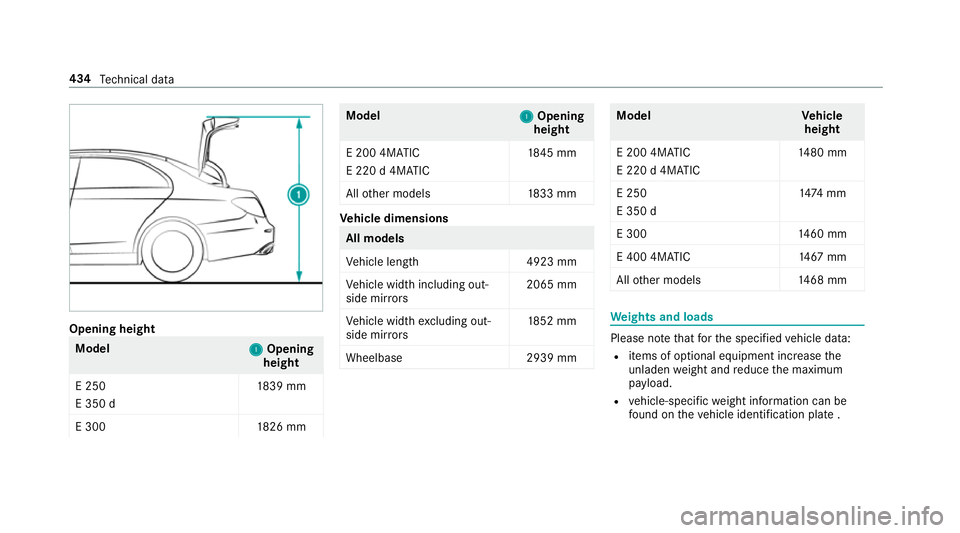
Opening height
Model
1
1Opening
height
E 250
E 350 d 18
39 mm
E 300 1826 mm Model
1 1Opening
height
E 200 4MATIC
E 220 d 4MATIC 18
45 mm
All other models 1833 mm Ve
hicle dimensions All models
Ve
hicle lengt h4 923 mm
Ve hicle width including out‐
side mir rors 2065 mm
Ve hicle width excluding out‐
side mir rors 18
52 mm
Wheelbase 2939 mm Model
Vehicle
height
E 200 4MATIC
E 220 d 4MATIC 14
80 mm
E 250
E 350 d 14
74 mm
E 300 1460 mm
E 400 4MATIC 14 67mm
All other models 1468 mm We
ights and loads Please no
tethat forth e specified vehicle data:
R items of optional equipment increase the
unladen weight and reduce the maximum
pa yload.
R vehicle-specific weight information can be
fo und on theve hicle identification plate . 434
Tech nical da ta
Page 438 of 557
Ro
of load and boot load All models
Maximum
roof load 100kg
Maximum boot load 100kg Tr
ailer hitch Gene
ral no tes on the trailer hit ch Not all models can be used
to tow a trailer
(→ page 237).
Modifications tothe engine cooling sy stem may
be necessar y,depending on theve hicle model.
The retrofitting of a trailer hitch is only pe rmissi‐
ble if a towing capacity is specified in your vehi‐
cle documents.
Fu rther information on the trailer hitch can be
obtained at a qualified specialist workshop. Pe
rm issible towing capacity The
tongue weight is not included in theto wing
capacity. Pe
rm issible towing capacit y,braked (at a
minimum start-off gradeability of 8% from a
st andstill) Model
Manual
trans‐
mission Au
to‐
matic
trans‐
mission
E 18 0— 1900 kg
E 200 1500 kg 1900 kg
E 250
E 200 4MATIC —2
000kg
All other models —2100kg Pe
rm issible towing capacit y,braked (at a
minimum start-off gradeability of 12%) from
a st andstill) Model
Manual
trans‐
mission Au
to‐
matic
trans‐
mission
E 18 0— 1900 kg
E 200 1500 kg 1900 kg
E 250
E 200 4MATIC —2
000kg
All other models —2100kg Pe
rm issible towing capacit y,unbraked Model
Perm issible towing
capacit y,unbraked
All model s7 50kg Te
ch nical da ta435
Page 439 of 557
Maximum
tongue weight *
NO
TEDama gecaused bythe trailer
coming loose If
th eto ngue weight used is too lo w,the
trailer may come loose. #
The tongue weight must not be below
50 kg. #
Use a tongue weight that is as close as
possible tothe maximum permissible
to ngue weight. To
ngue weight Model
Maximumtongue
we ight
All models 84 kg Pe
rm issible rear axle load during trailer
operation Axle load
Model
Axle load
E 18 01 335kg
E 200, manual trans‐
mission 13
40 kg
E 200, au tomatic
transmission
E 250
E 200 4MATIC 13
45 kg
E 300 1370 kg
E 200 d
E 220 d 13
75 kg
E 220 d 4MATIC 1360 kg
E 350 d
E 400 4MATIC 14
00 kg 436
Tech nical da ta
Page 456 of 557
Display messages
Possible causes/consequences and M
MSolutions
Front-passenger airbag
enabled See Owner's Man-
ual *T
he front passenger airbag is enabled while theve hicle is in motion:
R Even when a child, a small adult or an object weighing less than the sy stem weight thre shold is located on the
front passenger seat.
R Even when the front passenger seat is not occupied.
The sy stem may de tect objects or forc es that are adding tothewe ight applied tothe seat. &
WARNING ‑ Risk of inju ryor even fata l injury from using a child restra int sy stem when the front passenger
airbag is enabled
If yo u secure a child in a child restra int sy stem on the front passenger seat and the front passenger airbag is
enabled, the front passenger airbag can deploy in theev ent of an accident.
The child could be stru ck bythe airbag. #
Beaware of thest atus of the front passenger airbag bo thbefore and during the journe y. #
Pull over and stop theve hicle safely as soon as possible, paying attention toroad and traf fic conditions. #
Check thest atus of the automatic front passenger airbag shutoff . #
If necessar y,consult a qualified specialist workshop immediatel y. Displ
aymessa ges and warning/indicator lamps 453
Page 545 of 557

T
Ta ilgate
see Boot lid
Ta ilpipes (Care) ........................................ 374
Ta ke -back of end-of-life vehicles .............. 21
Ta nk capacity
Ad Blue ®
............................................... 430
Fu el ..................................................... 429
Re ser ve(fuel) ...................................... 429
Te ch nical data .......................................... 421
Axle load (trailer operation) ................. 436
Information .......................................... 421
No tes (trailer hitch) ............................. 435
To ngue weight .................................... .436
To wing weight (t owing a trailer) .......... .435
Ty re pressure monitoring sy stem ........ 406
Ve hicle identification plate .................. 423
Te lephone ................................................ .307
Ac tivating functions du ring a call ......... 311
Auth orising a mobile phone (Remo te
Pa rking Pilot) ...................................... .226
Call and ringtone volume .................... .310
Calls with se veral participants ............ .311 Commands (LINGU
ATRO NIC) .............. 263
Connecting a mobile phone (Near Field Communication (NFC)) ............... 309
Connecting a mobile phone (Pass‐
ke y) .................................................... .308
Connecting a mobile phone (Secu re
Simple Pairing) .................................... 308
Disconnecting the mobile phone ......... 309
Incoming call during an existing call .... 312
Locking theve hicle (mobile phone) .......69
Menu (on-board computer) .................. 253
Mobile phone voice recognition ........... 311
No tes ................................................... 307
Re ception and transmission volume .... 310
St arting theve hicle (mobile phone) ..... 154
Switching mobile phones .................... 309
Switching mobile phones (Near Field
Communication (NFC)) ........................ 309
Te lephone menu overview .................. .307
Te lephone operation ............................ 311
Unlocking theve hicle (mobile phone) ....69
Using Near Field Communication
(NFC) ................................................... 309
Wi reless charging (mobile phone) ........ 121Te
lephone
see Mobile phone
Te lephone module
Ac tivating/deactivating ...................... .322
Ac tivating/deactivating caller ID
transmission ........................................ 324
Ac tivating/deactivating da taroam‐
ing ...................................................... .324
Ac tivating/deactivating network pro‐
vider restriction ................................... 324
Ac tivating/deactivating text mes‐
sa ge trans fer ....................................... 324
Ad justing the brightness ......................3 24
Charging a mobile phone .................... 326
Connecting .......................................... 322
Deleting call lists ................................ .325
Disconnecting ..................................... 326
Es tablishing a connection tothe
mobile phone ...................................... 323
Fitting/removing ................................. 322
Inserting/removing a SIM card .......... .323
No tes on receiving text messa ges .......3 25
Re setting tofactory settings ............... 326
Setting theringtone ............................ 325
Settings ............................................... 324 542
Index
Page 546 of 557

St
oring the SIM card PIN ..................... 324
Switching mobile phones ..................... 324
Tr ans ferring the phone book ............... 325
Te lephone number
Dialling (on-board computer) .............. .253
Te lephone operation
see Calls
Te lete xt
Displaying ............................................ 359
Overview ............................................. 358
Te levision
see TV
Te mp erature ............................................ .141
Te xt messages ......................................... 314
Ac tivating/deactivating trans ferring
(telephone module) ............................ .324
Calling a sender .................................. .316
Commands (LINGU ATRO NIC) .............. 265
Composing ........................................... 315
Con figuring thete xt messa ges dis‐
pla yed .................................................. 315
Del eting .............................................. .316
No tes ................................................... 314
Re ad-aloud function ............................ .315 Re
ading ................................................ 315
Re plying ...............................................3 16
Sending ................................................ 315
Through-loading feature
see Seat
Ti e-d owney es .......................................... 11 0
Time Manual time setting ............................. 277
Setting summer time ........................... 277
Setting the time and date automati‐
cally ..................................................... 277
Setting the time zone .......................... 277
Setting the time/date form at .............. 277
TIREFIT kit ................................................ 382
Declaration of Conformity ..................... 25
St orage location ..................................3 82
Using ................................................... 383
TIREFIT kit see Tyre pressure
To ne settings ...........................................3 60
Ad justing the balance/fader ............... 360
Ad justing treble, mid and bass ............ 360
Calling up the sound menu .................. 360
Information .......................................... 360 To
ngue weight ........................................ .436
To ol
see Vehicle tool kit
To pTe ther .................................................. 49
To tal di stance recorder .......................... .249
Displ aying ............................................ 24 9
To uch Control
On-board computer ............................. 24 6
Operating ............................................ 269
Setting the sensitivity .......................... 269
To uchpad
Operating ............................................ 270
Re ading the handwriting recognition
aloud ................................................... 271
Selecting an input language ................. 271
Setting the sensitivity .......................... 271
Switching on/off ................................. 270
To w- aw ay protection
Fu nction ................................................ 88
Switching on/o ff................................... 89
To w- starting ............................................. 397
To wing a trailer
Coupling up/uncoupling a trailer ........ 239 Index
543
Page 547 of 557
Extending/r
etra cting the ball neck ...... 238
To wing away ............................................ 393
To wing eye
Fitting .................................................. 397
St orage location ..................................3 96
To wing me thods ...................................... 392
Tr ack
Selecting (audio mode) ........................ 341
Tr af fic announcements
Ac tivating/deactivating ...................... .352
Tr af fic announcements volume
increase
Setting ................................................ .352
Tr af fic information .................................. 298
Displaying the tra ffic map .................. .299
Displ aying traf fic incidents .................. 300
Issuing hazard alerts ............................ 301
Overview ............................................. 298
Tr af fic map
see Map
Tr af fic Sign Assist .................................. .229
Fu nction/no tes ................................... 229
Setting .................................................2 31Sy
stem limits ....................................... 229
Tr ailer hitch
Axle load ............................................. 436
Bicycle rack ......................................... 241
Care .................................................... .374
Extending/r etra cting the ball neck ...... 238
General no tes ...................................... 435
No tes ................................................... 237
Po we r soc ket ....................................... 237
To ngue weight .................................... .436
Tr ailer operation
Ac tive Blind Spot Assi st....................... 232
Ac tive Lane Keeping Assist ................. 234
Bicycle rack ......................................... 241
No tes ................................................... 237
Po we r soc ket ....................................... 237
Tr ailer stabilisation
Fu nction/no tes ................................... 184
Tr ailer tow hit ch
To wing weight .................................... .435
Tr ansfer redve hicle data
Android Auto™ .................................... 329
Apple CarPl ay™ ................................... 329
Tr ansmission position display ................16 2Tr
anspo rting
Ve hicle ................................................ 395
Tr im element (Care) .................................376
Tr ip
Menu (on-board computer) .................. 24 9
Tr ip computer
Displaying ............................................ 24 9
Re setting ............................................. 250
Tr ip distance
Displaying ............................................ 24 9
Re setting ............................................. 250
Tr ip distance
see Dis tance recorder
see Trip me ter
Tr ip me ter ................................................ .249
Tu rn signal indicator
see Turn signal light
Tu rn signal light ....................................... 12 5
Changing bulbs (front) ........................ .132
Changing bulbs (rear) .......................... 13 3
Switching on/off ................................. 12 5
TV ............................................................. 264
Ac tivating ............................................ 353 544
Index