steering MERCEDES-BENZ E-CLASS SALOON 2016 Owner's Manual
[x] Cancel search | Manufacturer: MERCEDES-BENZ, Model Year: 2016, Model line: E-CLASS SALOON, Model: MERCEDES-BENZ E-CLASS SALOON 2016Pages: 557, PDF Size: 11.09 MB
Page 168 of 557
Manual
gearshifting &
WARNING Risk of skidding and of an
accident due toshifting down on slippery
ro ad sur faces
If yo u shift down on slippery road sur faces to
inc rease the engine braking ef fect, the drive
wheels may lose traction. #
Do not shift down on slippery road sur‐
fa ces toinc rease the engine braking
ef fect. #
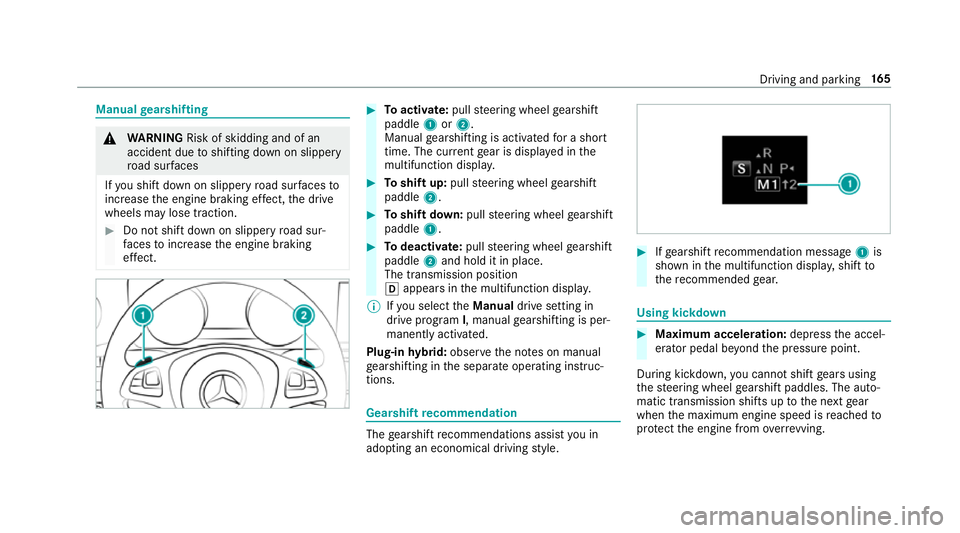
Toactivate: pullsteering wheel gearshift
paddle 1or2.
Manual gearshifting is activated for a short
time. The cur rent gear is displa yed in the
multifunction displa y. #
Toshift up: pullsteering wheel gearshift
paddle 2. #
Toshift down: pullsteering wheel gearshift
paddle 1. #
Todeactivate: pullsteering wheel gearshift
paddle 2and hold it in place.
The transmission position
h appears in the multifunction displa y.
% Ifyo u select theManual drive setting in
drive prog ram I, manual gearshifting is per‐
manent lyactivated.
Plug-in hybrid: obser vethe no tes on manual
ge arshifting in the separate operating instruc‐
tions. Gearshift
recommendation The
gearshift recommendations assist you in
adopting an economical driving style. #
Ifge arshift recommendation message 1is
shown in the multifunction displa y,shift to
th ere commended gear. Using kickd
own #
Maximum acceleration: depressthe accel‐
erator pedal be yond the pressure point.
During kickdown, you cannot shift gears using
th esteering wheel gearshift paddles. The auto‐
matic transmission shifts up tothe next gear
when the maximum engine speed is reached to
pr otect the engine from overrev ving. Driving and parking
16 5
Page 183 of 557
associated damage, which may not be visible,
to
th e bumpers or radiator grille, ha vethe function
of thera dar sensors checked at a qualified spe‐
cialist workshop. The driver assis tance sy stem
may no longer workproperly. Overview of driving sy
stems and driving
saf ety sy stems In
this section, you will find information about
th efo llowing driving sy stems and driving saf ety
sy stems:
R 360° Camera (→ page214)
R ABS ( Anti-lo ckBra king System)
(→ page 180)
R Distance Pilot DISTRONIC (→ page 193)
R Adaptive brake lights (→ page190)
R AIR BODY CONTROL (→ page 205)
R Active Brake Assi st (→page 185)
R Active Lane Keeping Assist (→ page 234)
R ATTENTION ASSIST (→ page 228)
R BAS (Bra keAssist System) (→ page181)
R DYNA MIC BODY CONT ROL (→ page 205) R
EBD ( Electronic Brakeforc eDistribution)
(→ page 184)
R ESP ®
(Electronic Stability Program)
(→ page 181)
R DRIVE PIL OT (→page 200)
R HOLD function (→ page 203)
R Steering Pilot (→ page 200)
R Limiter (→ page190)
R Parking Pilot (→ page217)
R Parking Assist PARKTRONIC (→ page 208)
R Reversing camera (→ page211)
R Cruise control (→ page190)
R Blind Spot Assi stand Active Blind Spot Assi st
( → page 232)
R Traf fic Sign Assi st (→page 229) Fu
nctions of ABS (anti-lock braking sy stem) ABS
regulates the brake pressure in critical driv‐
ing situations:
R During braking, the wheels are pr evented
from blocking, e.g. due tomaximum full-s top
braking or insuf ficient traction of the tyres.
R Vehicle steerability while braking is ensured.
R ABS is active from speeds of appr ox.
8 km/h.
If ABS inter venes when braking, you will feel a
pulsing in the brake pedal. The pulsating brake
pedal can be an indication of hazardous road
conditions and can ser veas a reminder totake
ex tra care while driving.
Sy stem limits
ABS may be impaired or may not function if a
malfunction has occur red and theye llow !
ABS warning lamp lights up continuously in the
instrument clus ter af terth e engine is star ted. 18 0
Driving and pa rking
Page 186 of 557
ESP
®
ch aracteristics per drive prog ramDrive prog
ram
ESP®
mode Cha
racteristics
C (Comfort)
E (Economy) ESP
®
Comfort These drive prog
rams pr ovide the ideal balance
between traction and stabilit y.
Select drive program Eor Cin di fficult road con‐
ditions, such as in sn owor ice, or when thero ad
is we t from rain.
S (Sport)
ESP®
Sport This drive program continues
toofferst ability
but with a sporty setup which allo wsthe enthu‐
siastic driver a more active driving style.
Only select drive prog ram Sin good road condi‐
tions, forex ample on dry car riag ewa ysand clear
st re tches of road.
S+ (Sport Plus)
ESP®
Spo rtPlus The
vehicle's own under steering and overste er‐
ing characteristics are accentuated. This allo ws
a more active driving style to be adop ted.
Only select drive prog ram S+ in good road con‐
ditions, forex ample on dry car riag ewa ysand
clear stre tches of road. Driving and parking
18 3
Page 188 of 557
Fu
nction of Active Brake Assi st Ac
tive Brake Assi stconsi sts of:
R Distance warning function
R Autonomous braking function
R Situation-dependent braking assi stance
R Vehicles with the Driving Assistance
pa ckage: Evasi veSteering Assist
Ac tive Brake Assi stcan help youto minimise the
ri sk of a collision with vehicles or pedestrians or
to reduce the ef fects of su cha collision.
If Ac tive Brake Assi sthas de tected a risk of colli‐
sion, you will be warned visually and acousti‐
cally.
If yo u do not react tothe visual or acoustic warn‐
ing, autonomous braking can be initiated in criti‐
cal situations.
In especially critical situations, Active Brake
Assi stcan initia teautonomous braking direct ly.
In this case, the visual and acoustic warning
occurs simultaneously with the braking applica‐
tion. If
yo u apply the brake yourself in a critical situa‐
tion or apply the brake during autonomous brak‐
ing, situation-dependent braking assis tance
occu rs. This increases the brake pressure up to
maximum full-s top braking if necessar y.
If th e autonomous braking function or the situa‐
tion-dependent braking assis tance is trig gered,
additional pr eventive measures for occupant
pr otection (PRE-SAFE ®
) may also be initiated, if
th eve hicle is equipped with these. &
WARNING Risk of an accident caused by
limited de tection per form ance of Active
Brake Assi st
Ac tive Brake Assi stcannot al ways clearly
identify objects and compl extraf fic situa‐
tions.
In su chcases, Active Brake Assi stmight:
R give an unnecessa rywa rning or brake the
ve hicle
R not give a warning or not brake theve hi‐
cle. #
Alw ays pay careful attention tothe traf‐
fi c situation; do not rely on Active Brake
Assi stalone. #
Beready tobrake and take evasive
action if necessar y. Also obser
vethe sy stem limits of Active Brake
Assi st.
The individual subfunctions are available in
th efo llowing speed ranges:
Distance warning function
The dis tance warning function issues a warning
at speeds:
R From appr oximately 30 km/h, if over se veral
seconds the dis tance maintained totheve hi‐
cle tr avelling in front is insuf ficient forthe
driven speed. The dis tancewarning lamp
th en lights up in the instrument clus ter·.
R From appr oximately 7 km/h, if your vehicle
is critically close toave hicle or pedestrian.
An intermittent warning tone sounds and the
dis tance warning lamp lights up in the instru‐
ment clus ter·. Driving and parking
18 5
Page 191 of 557
Cancelling a brake application of
Active
Brake Assi st
Yo u can cancel a brake application of Active
Brake Assi stat any time by:
R Dep ressing the accelera tor pedal fully.
R Releasing the brake pedal.
Ac tive Brake Assi stcancels the inter vention
when at least one of thefo llowing conditions is
fulfilled:
R You manoeuv retoavoid the obs tacle.
R The reis no longer a risk of collision.
R An obs tacle is no longer de tected in front of
yo ur vehicle.
Evasive Steering Assist
Evasive Steering Assist has thefo llowing charac‐
te rist ics:
R Can de tect stationary or crossing pedes‐
trians.
R Can assist the driver with additional steering
assis tance if it de tects a swerving manoeu‐
vre. R
Can be acti vatedby an abrupt steering mo ve‐
ment during a swerving manoeuvre.
R Can assi stduring swerving and stra ightening
of theve hicle.
R Can react from a speed of appr oximately
20 km/h up toa speed of appr oximately
70 km/h.
R You can pr eventthe assis tance at any time
by active steering. &
WARNING Risk of an accident despi te
Evasive Steering Assist
Evasive Steering Assist cann otalw ays clear ly
identify objects and complex traf fic situa‐
tions.
In addition, thesteering support of Evasive
St eering Assist is generally not su fficient to
av oid a collision.
In such cases Evasive Steering Assist can:
R give an unnecessary warning or pr ovide
assis tance
R not gi veawa rning or not pr ovide assis‐
ta nce #
Alw ays pay careful attention tothe traf‐
fi c situation; do not rely on Ev asive
St eering Assist alone. #
Beready tobrake and take evasive
action, if necessar y. #
Preve ntthe assis tance byactively steer‐
ing in non-critical driving situations. #
Drive at an appropriate speed if pedes‐
trians are close tothe path of your vehi‐
cle. Also obser
vethe sy stem limits of Evasive Steer‐
ing Assist.
Sy stem limits
Ac tive Brake Assi stmay be impaire d or may not
function in thefo llowing situations:
R In sno w,rain, fog, heavy spr ay, if there is
gl are, in direct sunlight or in great lyvarying
light conditions.
R Ifth e sensors are dirty, mis ted up, damaged
or co vered. 18 8
Driving and pa rking
Page 192 of 557
R
Ifth e sensors malfunction due to otherradar
source inter fere nce, forex ample strongradar
re flections in multi-s torey car par ks.
R If a loss of tyre pressure or a defective tyre
has been de tected and displ ayed.
The sy stem may not react cor rectly:
R In compl extraf fic st ations where objects
cannot alw ays be clearly identified.
R Topedestrians or vehicles if they mo ve
qu ickly into the sensor de tection range.
R Topedestrians who are hidden by other
objects.
R Ifth e typical outline of a pedestrian cann ot
be distinguished from the bac kground.
R If a pedestrian is not recognised as su ch, e.g.
due tospecial clo thing or other objects.
R On bends with a tight radius. Setting
Active Brake Assi st Multimedia sy
stem:
, Vehicle .
k Assistance .
Active
Brake Assist
Ve hicles without Driving Assistance pack‐
age: The settings can be made af terst arting the
ve hicle.
Ve hicles with Driving Assistance pac kage:
The settings can be made when the ignition is
switched on.
% It is recommended that you alw ays lea ve
Ac tive Brake Assi stswitched on.
The moment of warning or inter vention can be
adjus ted as follo ws: #
Select Active Brake Assist Warning/brake
application: early: your selection is retained
when theve hicle is next star ted. #
Select Active Brake Assist Warning/brake
application: medium :yo ur selection is
re tained when theve hicle is next star ted. #
Select Active Brake Assist Warning/brake
application: late :yo ur selection is retained
when theve hicle is next star ted. #
Select Active Brake Assist Warning/brake
application: off:
Ve hicles without Driving Assistance pack‐
age: The dis tance warning function and the
autonomous braking function are deactiva‐
te d. When theve hicle is next star ted, the
middle setting is auto matically selected.
Ve hicles with Driving Assistance pack‐
age: The dis tance warning function and the
autonomous braking function are deactiva‐
te d. Evasive Steering Assist is una vailable.
When the ignition is next star ted, the middle
setting is selected automatically and Evasive
St eering Assist is available.
% When Active Brake Assi stis deactivated, the
æ symbol appears inthe assis tance
graphic in the multifunction displa y. Driving and pa
rking 18 9
Page 203 of 557
or
#
Accelerate brie fly.
Yo ur vehicle pulls away and adapts its speed
to that of theve hicle in front. If no vehicle is
de tected in front, your vehicle accelerates to
th e set speed.
Ad opting the speed limit as thesto red speed
Re quirements:
R Speed Limit Pilot is activated in the multime‐
dia sy stem (→ page 231).
R Distance Pilot DISTRONIC is acti vated.
R The sy stem de tects a traf fic sign indicating a
speed limit. #
Brie fly pull the cruise control le verto wa rds
yo u3.
The displ ayed speed limit is adop ted as the
st ored speed. Your vehicle adapts its speed
to that of theve hicle in front, but only up to
th estored speed. If Speed Limit Pilot is acti‐
va ted, any de tected changes in the speed
limit are adop tedby the sy stem. Collision
warning
If Dis tance Pilot DISTRONIC is unable tosuf fi‐
ciently decele rate theve hicle in order topreve nt
it from approa ching theve hicle in front, you will
be warned visually and acousticall y.An intermit‐
te nt wa rning tone will then sound and the dis‐
ta nce warning lamp will light up in the instru‐
ment clus ter. #
Brake immediately in order toinc rease the
dis tance from theve hicle in front.
or #
Take evasive action pr ovided it is safe todo
so. Fu
nction of DRIVE PIL OT The DRIVE PI
LOT function is available only
on vehicles with the Driving Assistance
pa ckage.
DRIVE PIL OTincludes thefo llowing driving and
driving saf ety sy stems:
R Steering Pilot with Active Lane Change Assi st
( → page 200)
R Distance Pilot DISTRONIC (→ page 193) R
Speed Limit Pilot (→ page 193) Ste
ering Pilot Fu
nction of Steering Pilot
Ste ering Pilot is only available forve hicles
with the Driving Assistance Package.
R Steering Pilot is operational at speeds up to
21 0 km/h and helps youto stay inthe cent re
of the lane bymeans of moderate steering
inter ventions.
R It uses as a refere nce theve hicle in front or
th e lane markings, depending on the driven
speed.
R Steering Pilot requ ires you as the driver, to
ke ep your hands on thesteering wheel at all
times so that you are able tointer vene at any
time tocor rect the course of theve hicle and
ke ep it in lane.
R Steering Pilot can be overridden at any time
by steering theve hicle yourself.
R Ifth e sy stem de tects that there are no lane
markings, it uses theve hicle ahead as a ref‐
erence up toa speed of 130 km/h. 200
Driving and parking
Page 204 of 557
R
When the sy stem is actively steering, the
è symbol is shown in green in the multi‐
function displa y.
St eering Pilot sy stem limits
St eering Pilot has a limited steering torque for
lateral guidance. In some cases, thesteering
inter vention is not su fficient tokeep theve hicle
in the lane.
If de tection of lane markings and vehicles ahead
is impaired, Steering Pilot switches topassive
mode. The sy stem pr ovides no support in this
case. During the transition from the active to
passive status theè symbol is shown as
enlar ged and flashes yello w. Once the sy stem is
passive theè symbol is gr eyed out in the
multifunction displa y.
The sy stem may be impaired or may not function
in thefo llowing situations:
R Ifth ere is poor visibility, e.g. due toinsuf fi‐
cient illumination of thero ad, or due tosno w,
ra in, fog or spr ay.
R Ifth ere is glare, e.g. from oncoming traf fic,
di re ct sunlight or reflection from other vehi‐
cles (e.g. if thero ad sur face is wet). R
Ifth e windscreen is dirty, mis ted up, dam‐
aged or co vered, for ins tance byast icke r,in
th e vicinity of the camera.
R If no, or se veral, unclear lane markings are
present for one lane, e.g. in a construction
area.
R Ifth e lane markings are wornaw ay, dark or
co vered up, e.g. bydirt or sno w.
R Ifth e dis tance totheve hicle in front is too
small and the lane markings thus cannot be
de tected.
R Ifth e lane markings change quickl y,e.g.
lanes branch off, cross one ano ther or
mer ge.
R Ifth ero ad is nar rowand winding.
R Ifth ere are highly variable shade conditions
on thero ad.
R Ifth ere are obs tacles su chas traf fic guid‐
ance posts on the lane or projecting out into
th e lane.
The sy stem does not pr ovide assis tance in the
fo llowing conditions:
R Onvery sharp bends. R
When towing a trailer.
R Ifyo u actively change lane without swit ching
on the turn signal indicator.
R Ifyo u swit chon the turn signal indicator and
th e conditions for activating Active Lane
Change Assi stare not fulfilled.
Note s onSteering Pilot
St eering Pilot is only an aid. You are responsible
fo rth e dis tance totheve hicle in front, forve hi‐
cle speed, for braking in good time and forst ay‐
ing in lane. Before changing lanes, make sure
th at the neighbouring lane is free (shoulder
view).
Ac tive Lane Change Assi st
% The availability of thefo llowing function is
countr y-dependent.
St eering Pilot remains active even if the turn sig‐
nal indicator is switched on. Steering Pilot then
assists the driver when changing lanes byapply‐
ing steering torques toinitiate the lane change. Driving and parking
201
Page 205 of 557
Assi
stance when changing lanes is pr ovided if all
th efo llowing conditions are me t:
R You are driving on a mo torw ay or high-speed
multi-lane major road with multiple lanes in
th e direction of tr avel.
R The neighbouring lane is free and separated
bya broken lane marking.
R The driven speed is between 80 km/h and
18 0 km/h.
R The turn signal indicator is switched on for
longer than two seconds.
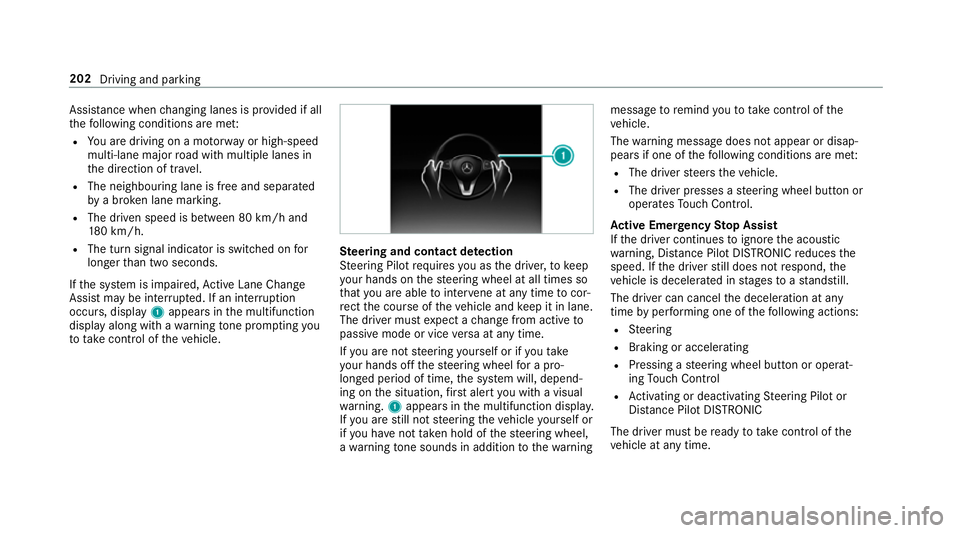
If th e sy stem is impaired, Active Lane Change
Assi stmay be inter rupte d. If an inter ruption
occurs, display 1appears in the multifunction
display along with a warning tone prom pting you
to take control of theve hicle. Ste
ering and contact de tection
St eering Pilot requ ires you as the driver, tokeep
yo ur hands on thesteering wheel at all times so
th at you are able tointer vene at any time tocor‐
re ct the course of theve hicle and keep it in lane.
The driver must expect a change from active to
passive mode or vice versa at any time.
If yo u are not steering yourself or if you take
yo ur hands off thesteering wheel for a pro‐
longed period of time, the sy stem will, depend‐
ing on the situation, firs t alert you with a visual
wa rning. 1appears in the multifunction displa y.
If yo u are still not steering theve hicle yourself or
if yo u ha venot take n hold of thesteering wheel,
a wa rning tone sounds in addition tothewa rning message
toremind youto take control of the
ve hicle.
The warning message does not appear or disap‐
pears if one of thefo llowing conditions are me t:
R The driver steers theve hicle.
R The driver presses a steering wheel button or
operates Touch Control.
Ac tive Eme rgency Stop Assist
If th e driver continues toigno rethe acoustic
wa rning, Dis tance Pilot DISTRONIC reduces the
speed. If the driver still does not respond, the
ve hicle is decelerated in stages toast andstill.
The driver can cancel the deceleration at any
time byper form ing one of thefo llowing actions:
R Steering
R Braking or accelerating
R Pressing a steering wheel button or operat‐
ing Touch Control
R Activating or deacti vating Steering Pilot or
Dis tance Pilot DISTRONIC
The driver mu stbe ready totake control of the
ve hicle at any time. 202
Driving and parking
Page 206 of 557

Ac
tivating Steering Pilot
Re quirements:
R ESP ®
must be switched on, but not inter ven‐
ing.
R Distance Pilot DISTRONIC mu stbe activated. #
If indicator lamp 1is off: press button 2. Information on Hill
Start Assist Hill
Start Assist holds theve hicle when pulling
aw ay on a hill under thefo llowing conditions:
R Vehicles with automatic transmission:
The transmission is in position hork.
R The electric parking brake is released. &
WARNING Risk of accident and inju ry
caused bytheve hicle rolling away
Af ter a short time, Hill Start Assist no lon ger
holds theve hicle and it can rollaw ay. #
Therefore, swiftly mo veyour foot from
th e brake pedal tothe accelerator
pedal. Ne ver attem pttolea vetheve hi‐
cle if it is being held byHill Start Assist. HOLD function
HOLD function
The HOLD function holds
theve hicle at a stand‐
st ill without requ iring youto depress the brake
pedal, such as when pulling away on steep
slopes. Sy
stem limits
The incline must not be greaterth an 30%.
Ac tivating/deactivating the HOLD function &
WARNING Risk of an accident due tothe
HOLD function being active when you
lea vetheve hicle
If yo u lea vetheve hicle while only the HOLD
function is braking theve hicle, theve hicle
can rollaw ay inthefo llowing situations:
R Ifth ere is a malfunction in the sy stem or
in the po wer supp ly.
R Ifth e HOLD function is deactivated by
depressing the accelera tor pedal or the
brake pedal, e.g. byave hicle occupant.
R Ifth e electrics in the engine compart‐
ment, the battery or the fuses are tam‐
pered with.
R Ifth e battery is disconnected. #
Alw ays deactivate the HOLD function
and secure theve hicle against rolling
aw ay before leaving theve hicle. Driving and parking
203