air condition MERCEDES-BENZ E-CLASS SALOON 2017 User Guide
[x] Cancel search | Manufacturer: MERCEDES-BENZ, Model Year: 2017, Model line: E-CLASS SALOON, Model: MERCEDES-BENZ E-CLASS SALOON 2017Pages: 497, PDF Size: 10.38 MB
Page 152 of 497
%
When the climate control is switched off, the
windo wscan mist up faster. Only switch off
th e climate control brief ly.Ac
tivating/deactivating the A/C function via
the control panel The A/C function cools, heats and dehumidifies
th
e interior air in theve hicle. #
Press button ¿.
Deactivate the A/C function only briefly other‐
wise the windo wscan mist up more quickl y.
Condensation may drip from the underside of
th eve hicle when cooling mode is active. This is
not a sign that there is a malfunction. Ac
tivating/deactivating the A/C function
using the multimedia sy stem Multimedia sy
stem:
, Vehicle
The A/C function heats, cools and dehumidifies
th eve hicle's interior air. #
Tocall up the clima tecont rol bar: navigate
down until the climate control bar is active. #
Call up theA/C on/off air conditioning
menu. #
Select OA/C. #
Switch the function on Oor off ª.
% The climate control bar can be called up
from any menu. Setting climate control
toautomatic mode In auto
matic mode, the set temp erature is con‐
trolled and maintained at a const ant levelby the
air suppl y. #
Press theà button. #
Toswitch tomanual mode: presstheH
or _ button. Climate
style Climate
style function
In automatic mode, you can select thefo llowing
climate style settings forth e driver's and front
passenger areas:
R FOCUS: high air flow , slightly cooler setting
R MEDIUM: medium air flow ,st andard setting
R DIFFUSE: low airflow , slightly warmer and
draught-f ree setting
Setting the clima testyle
Requ irements:
R THERMOTRONIC automatic climate control is
fi tted.
R The à button has been pressed.
Multimedia sy stem:
, Vehicle #
Tocall up the clima tecont rol bar: navigate
down until the climate control bar is active. #
Call up theA/C on/off air conditioning
menu. Climate control
14 9
Page 154 of 497
Air-reci
rculation mode is swit ched off automati‐
cally.
% If air-recirculation mode is switched on, the
windo wsmay mist up more quickl y.Switch
on ai r-re circulation mode only brie fly. Switching
there sidual heat on/off Re
quirements:
R The vehicle is par ked.
It is possible tomake use of there sidual heat
from the engine tocontinue heating or ventilat‐
ing the front compartment of theve hicle for
appr oximately 30 minutes. #
Toswitch on: pressthe! button.
Re sidual heat is switched off automaticall y. Ac
tivating and deactivating ionisation Multimedia sy
stem:
, Vehicle
Ionisation cleans and refreshes the interior air of
th eve hicle. The ionisation of the interior air is
odourless. #
Tocall up the clima tecont rol bar: navigate
down until the climate control bar is active. #
Call up theA/C on/off air conditioning
menu. #
Select Ionisation. #
Activate or deacti vate the function.
% The climate control bar can be called up
from any menu. Fr
ag rance sy stem Ac
tivating or deactivating the frag rance sys‐
tem
Re quirements:
R Automatic clima tecontrol is acti vated.
R The glove compa rtment is closed. Multimedia sy
stem:
, Vehicle
The fragrance sy stem distributes a pleasant fra‐
grance thro ughout theve hicle interior from a fla‐
con located in theglov e compartment. #
Tocall up the clima tecont rol bar: navigate
down until the climate control bar is active. #
Call up theA/C on/off air conditioning
menu. #
Select Air freshener. #
Activate or deacti vate fragrancing. #
Adjust the intensit y.
% The climate contro l bar can be called up
from any menu.
Inserting or removing the flacon ofthe fra‐
gr ance sy stem &
WARNING Risk of inju ryfrom liquid per‐
fume
If ch ildren open theflacon, they could drink
th e liquid perfume or it could come into con‐
ta ct wi th theireyes. Climate control
151
Page 157 of 497
#
After heating or ventilating theve hicle
twice, drive for a longer period of time. Re
quirements:
R The fuel tank is filled toat least reser vefuel
le ve l. #
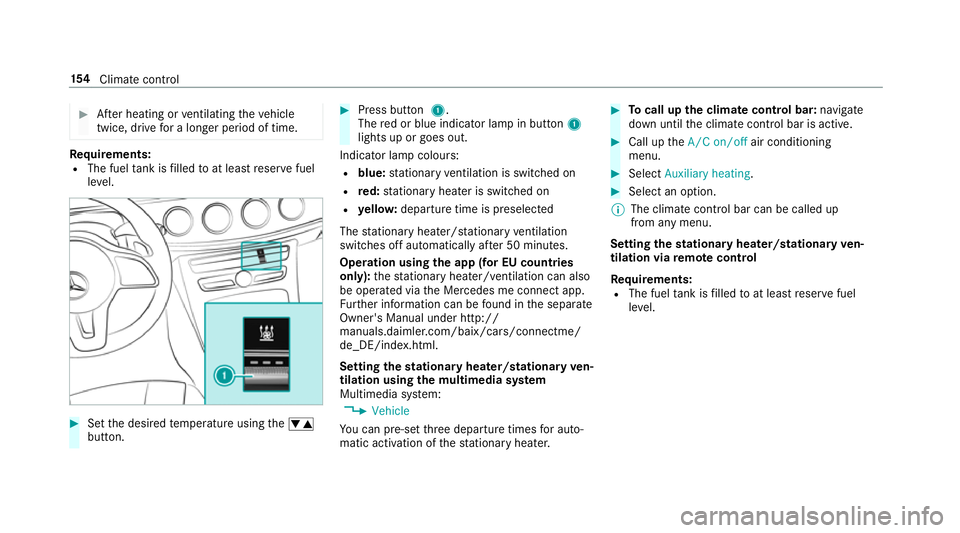
Set the desired temp erature using thew
button. #
Press button 1.
The red or blue indicator lamp in button 1
lights up or goes out.
Indicator lamp colours: R blue: stationary ventilation is switched on
R red: stationary heater is swit ched on
R yello w: departure time is preselected
The stationary heater/ stationary ventilation
switches off au tomatically af ter 50 minutes.
Operation using the app (for EU count ries
only): thest ationary heater/ ventilation can also
be operated via the Mercedes me connect app.
Fu rther information can be found in the separate
Owner's Manual under http://
manuals.daimler.com/baix/cars/connectme/
de_DE/index.html.
Setting thest ationary heater/stationary ven‐
tilation using the multimedia sy stem
Multimedia sy stem:
, Vehicle
Yo u can pre-set thre e departure times for auto‐
matic activation of thest ationary heater. #
Tocall up the clima tecont rol bar: navigate
down until the climate control bar is active. #
Call up theA/C on/off air conditioning
menu. #
Select Auxiliary heating . #
Select an option.
% The climate control bar can be called up
from any menu.
Setting thest ationary heater/stationary ven‐
tilation via remo tecont rol
Re quirements:
R The fuel tank is filled toat least reser vefuel
le ve l. 15 4
Climate cont rol
Page 165 of 497
#
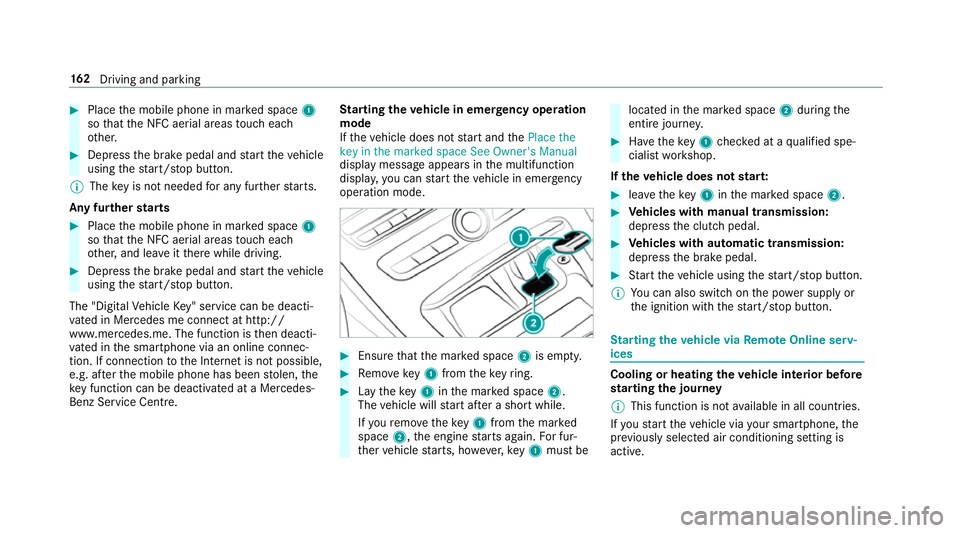
Place the mobile phone in mar ked space 1
so that the NFC aerial areas touch each
ot her. #
Depress the brake pedal and start theve hicle
using thest art/ stop button.
% The key is not needed for any fur ther starts.
Any fu rther starts #
Place the mobile phone in mar ked space 1
so that the NFC aerial areas touch each
ot her, and lea veitth ere while driving. #
Depress the brake pedal and start theve hicle
using thest art/ stop button.
The "Digital Vehicle Key" service can be deacti‐
va ted in Mercedes me connect at http://
www.mercedes.me. The function is then deacti‐
va ted in the smartphone via an online connec‐
tion. If connection tothe Internet is not possible,
e.g. af terth e mobile phone has been stolen, the
ke y function can be deacti vated at a Mercedes-
Benz Service Centre. St
arting theve hicle in emer gency operation
mode
If th eve hicle does not start and thePlace the
key in the marked space See Owner's Manual
display message appears in the multifunction
displa y,yo u can start theve hicle in emer gency
operation mode. #
Ensu rethat the mar ked space 2is em pty. #
Remo vekey1 from theke yring. #
Lay theke y1 inthe mar ked space 2.
The vehicle will start af ter a short while.
If yo ure mo vetheke y1 from the mar ked
space 2,the engine starts again. For fur‐
th er vehicle starts, ho wever,ke y1 must be located in
the mar ked space 2during the
entire journe y. #
Have theke y1 checked at a qualified spe‐
cialist workshop.
If th eve hicle does not star t: #
leavetheke y1 inthe mar ked space 2. #
Vehicles with manual transmission:
depress the clutch pedal. #
Vehicles with automatic transmission:
depress the brake pedal. #
Start theve hicle using thest art/ stop button.
% You can also swit chon the po wer supp lyor
th e ignition with thest art/ stop button. St
arting theve hicle via Remo teOnline serv‐
ices Cooling or heating
theve hicle interior before
st arting the jou rney
% This function is not available in all countries.
If yo ustart theve hicle via your smartphone, the
pr ev iously selec ted air conditioning setting is
active. 16 2
Driving and pa rking
Page 194 of 497
Overview of driving sy
stems and driving
saf ety sy stems In
this section, you will find information about
th efo llowing driving sy stems and driving saf ety
sy stems:
R 360° Camera (→ page 223)
R ABS (A nti-lock Braking System) (→ page191)
R Active Dis tance Assi stDISTRONIC
(→ page 205)
R Adaptive brake lights (→ page 201)
R AIR BODY CONTROL (→ page213)
R Active Brake Assi st (→page 196)
R Active Lane Keeping Assist (→ page241)
R ATTENTION ASSIST (→ page 237)
R BAS (Brak eAssist System) (→ page191)
R DYNA MIC BODY CONT ROL (→ page 213)
R EBD ( Electronic Brakeforc eDistribution)
(→ page 196)
R ESP ®
(E lectronic Stability Program)
(→ page 192)
R Hill Start Assist R
HOLD function (→ page212)
R STEER CONTROL (→ page 196)
R Active Steering Assist (→ page210)
R Limi ter (→ page 202)
R Active Parking Assist (→ page 226)
R Parking Assist PARKTRONIC (→ page216)
R Reversing camera (→ page 220)
R Cruise control (→ page 201)
R Blind Spot Assist and Active Blind Spot Assi st
( → page 239) Fu
nctions of ABS (anti-lock braking sy stem) ABS
regulates the brake pressure in critical driv‐
ing situations:
R During braking, e.g. at maximum full-s top
braking or insuf ficient traction of the tyres,
th e wheels are pr evented from blocking.
R Vehicle steerability while braking is ensured.
If ABS inter venes when braking, you will feel a
pulsing in the brake pedal. The pulsating brake
pedal can be an indication of hazardous road conditions and can ser
veas a reminder totake
ex tra care while driving.
Sy stem limitations
R ABS is active from speeds of appr ox.
8 km/h.
R ABS may be impai red or may not function if a
malfunction has occur red and theye l‐
low ! ABSwarning lamp lights up contin‐
uously in the instrument clus ter af terthe
engine is star ted. Fu
nction of BAS (Brake Assist Sy stem) &
WARNING Risk of an accident caused by
a malfunction in BAS (Brake Assi stSys‐
te m)
If BA S is malfunctioning, the braking dis tance
in an emergency braking situation is
increased. #
Dep ress the brake pedal with full force
in emer gency braking situations. ABS
pr eve nts the wheels from locking. Driving and parking
191
Page 198 of 497
Ac
tivating/deactivating ESP ®
(Electronic Sta‐
bility Prog ram) Multimedia sy
stem:
, Vehicle .
Assistance .
Electronic Sta-
bility Program
Mercedes‑AMG vehicles: always obser vethe
no tes in the Supplement. Otherwise, you may
fa ilto recognise dangers. #
Activate or deacti vate the function.
ESP ®
is deactivated if theå ESP®
OFF warn‐
ing lamp lights up continuously in the instrument
clus ter.
Obser vethe information on warning lamps and
display messages which may be shown in the
instrument clus ter. Fu
nctions of ESP ®
Crosswind Assist ESP
®
Crosswind Assist de tects sudden gu sts of
side wind and helps the driver tokeep theve hi‐
cle in the lane:
R ESP ®
Crosswind Assist is active at vehicle
speeds between 80 km/h and 200 km/h
when driving stra ight ahead or cornering
slightly.
R The vehicle is stabilised bymeans of individ‐
ual brake application on one side. Fu
nctions of ESP ®
trailer stabilisation &
WARNING Risk of accident in poor road
and weather conditions
In poor road and weather conditions, the
trailer stabilisation cannot pr event lu rching of
th eve hicle/trailer combination. Trailers with
a high centre of gr avity may tip over before
ESP ®
de tects this. #
Alw ays adapt your driving style to suit
th e cur rent road and weather condi‐
tions. When driving with a trailer, ESP
®
can stabilise
yo ur vehicle if the trailer begins toswer vefrom
side toside:
R ESP ®
trailer stabilisation is active abo ve
speeds of 65 km/h.
R Slight swerving is reduced bymeans of a tar‐
ge ted, individual brake application on one
side.
R Intheeve nt of se vere swerving, the engine
output is also reduced and all wheels are
braked.
ESP ®
trailer stabilisation may be impaired or
may not function if:
R The trailer is not connec ted cor rectly or is
not de tected prope rly by theve hicle. Driving and parking
19 5
Page 203 of 497
R
Can assist during swerving and stra ightening
of theve hicle.
R Can react from a speed of appr oximately
20 km/h up toa speed of appr oximately
70 km/h.
Yo u can pr eventthe assis tance at any time by
actively steering. &
WARNING Risk of an accident despi te
Evasive Steering Assist
Evasive Steering Assist cann otalw ays clearly
identify objects and complex traf fic situa‐
tions.
In addition, thesteering support of Evasive
St eering Assist is generally not su fficient to
av oid a collision.
In such cases Evasive Steering Assist can:
R give an unnecessary warning or pr ovide
assis tance
R not gi veawa rning or not pr ovide assis‐
ta nce #
Alw ays pay careful attention tothe traf‐
fi c situation; do not rely on Ev asive
St eering Assist alone. #
Beready tobrake and take evasive
action, if necessar y. #
Preve ntthe assis tance byactively steer‐
ing in non-critical driving situations. #
Drive at an appropriate speed if pedes‐
trians are close tothe path of your vehi‐
cle. Also obser
vethe sy stem limitations of Evasive
St eering Assist.
Sy stem limitations
The sy stem may be impaired or may not function
in thefo llowing situations:
R In sno w,rain, fog, heavy spr ay, if there is
gl are, in direct sunlight or in greatlyvarying
light conditions.
R Ifth e sensors are dirty, mis ted up, damaged
or co vered. R
Ifth e sensors malfunction due to otherradar
source inter fere nce, forex ample stro ng radar
re flections in multi-s torey car par ks.
R If a loss of tyre pressure or a defective tyre
has been de tected and displ ayed.
The sy stem may not react cor rectly:
R In compl extraf fic situations whe reobjects
cannot always be clearly identified.
R Topedestrians or vehicles if they mo ve
qu ickly into the sensor de tection range.
R Topedestrians who are hidden by other
objects.
R Ifth e typical outline of a pedestrian cann ot
be distinguished from the bac kground.
R If a pedestrian is not recognised as su ch, e.g.
due tospecial clo thing or other objects.
R On bends with a tight radius. 200
Driving and parking
Page 209 of 497
If
yo u activate the turn signal indicator tochange
lanes, theve hicle will accelerate more briskly to
th e set speed under thefo llowing conditions:
R Active Dis tance Assi stDISTRONIC is acti va‐
te d.
R Ifth e driving speed is higher than 70 km/h.
R Ifth e driven speed drops below thestored
speed.
R The sy stem cann otdetect a vehicle in there l‐
ev ant area of theov ertak ing lane.
Drive prog ram
The DYNA MIC SELECT switch allo wsyouto
ch ange the driving style of Active Dis tance
Assi stDISTRONIC. Depending on which drive
program is selected, the driving characteristics
can be geared towa rds fuel econom y,comfort or
dynamic per form ance (→ page170).
Sy stem limitations
Ac tive Dis tance Assi stDISTRONIC is acti vein
th e 0 km/h to200 km/h speed range.
Ve hicles with the Driving Assistance Pack‐
age: Active Dis tance Assi stDISTRONIC is acti ve
in the 0 km/h to210 km/h speed range. The sy
stem may be impaired or may not function
in thefo llowing ins tances, forex ample:
R In sn ow,ra in, fog, heavy spr ay, if there is
gl are, in direct sunlight or in great lyvarying
light conditions.
R The windsc reen in the area of the camera is
dirty, mis ted up, damaged or co vered.
R Ifth era dar sensors are dirty or co vered.
R On slippery roads, braking or accelerating
can cause the drive wheels tolose traction
and theve hicle could then skid.
R In multi-s torey car par ks,to llst ations or on
ro ads with steep uphill or downhill gradients.
Do not use Active Dis tance Assi stDISTRONIC in
th ese situations.
Tips
Pa y particular attention in thefo llowing traf fic
situations. In such situations, brake if necessar y.
Ac tive Dis tance Assi stDISTRONIC is then deacti‐
va ted:
R When cornering, entering and exiting a bend.
R When not driving in the cent reofthe lane. R
When other vehicles are changing lane.
R Ifth ere are nar row vehicles.
R Ifth ere are obs tacles and stationary vehi‐
cles.
R Ifth ere are crossing vehicles, pedestrians,
mo torcyc lists or cyclists.
Display of Active Di stance Assist DIST RONIC
in the assistance graphic and in the speed‐
ome ter 1
Vehicle ahead
2 Distance indica tor 206
Driving and parking
Page 210 of 497
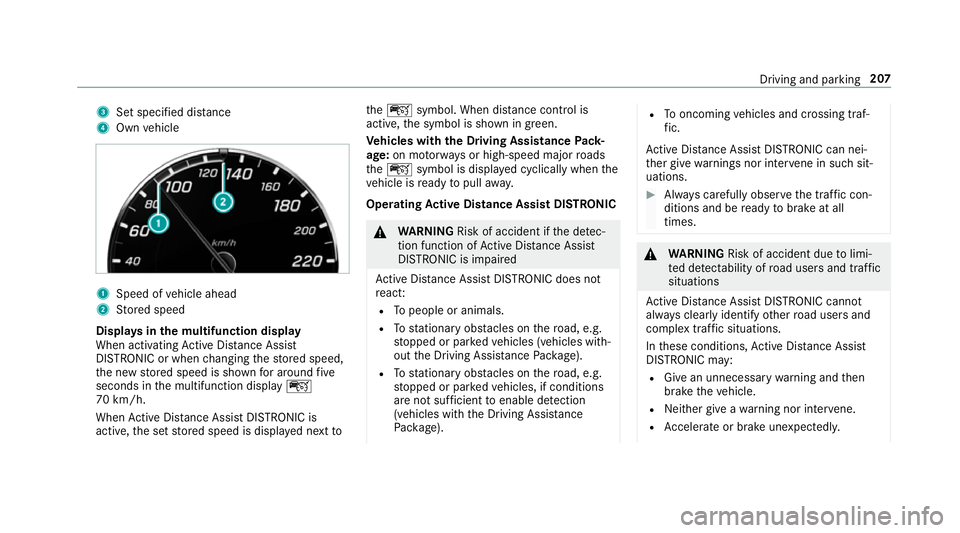
3
Set specified di stance
4 Own vehicle 1
Speed of vehicle ahead
2 Stored speed
Displa ysinthe multifunction display
When activating Active Dis tance Assi st
DISTRONIC or when changing thestored speed,
th e new stored speed is shown for around five
seconds in the multifunction display ç
70 km/h.
When Active Dis tance Assi stDISTRONIC is
acti ve,th e set stored speed is displa yed next toth
eç symbol. When dis tance control is
acti ve,th e symbol is shown in green.
Ve hicles with the Driving Assistance Pack‐
age: on mo torw ays or high-speed major roads
th eç symbol is displa yed cyclically when the
ve hicle is ready topull away.
Operating Active Di stance Assist DIST RONIC &
WARNING Risk of accident if the de tec‐
tion function of Active Dis tance Assi st
DISTRONIC is impaired
Ac tive Dis tance Assi stDISTRONIC does not
re act:
R Topeople or animals.
R Tostationary obstacles on thero ad, e.g.
st opped or par kedve hicles (vehicles with‐
out the Driving Assis tance Package).
R Tostationary obstacles on thero ad, e.g.
st opped or par kedve hicles, if conditions
are not suf ficient toenable de tection
(vehicles wi th the Driving Assis tance
Pa ckage). R
Tooncoming vehicles and crossing traf‐
fi c.
Ac tive Dis tance Assi stDISTRONIC can nei‐
th er give warnings nor inter vene in su chsit‐
uations. #
Alw ays carefully obser vethe traf fic con‐
ditions and be ready tobrake at all
times. &
WARNING Risk of accident due tolimi‐
te d de tectability of road users and traf fic
situations
Ac tive Dis tance Assi stDISTRONIC cannot
al wa ys clear lyidentify other road users and
complex traf fic situations.
In these conditions, Active Dis tance Assi st
DISTRONIC may:
R Give an unnecessary warning and then
brake theve hicle.
R Neither give a warning nor inter vene.
R Accelerate or brake unexpectedly. Driving and pa
rking 207
Page 216 of 497
The HOLD function is deactivated in
thefo llow‐
ing situations:
R When Active Dis tance Assi stDISTRONIC is
acti vated.
R Vehicles with automatic transmission:
when transmission position jis selected.
R When theve hicle is secured with the electric
parking brake.
In thefo llowing situations, theve hicle is held by
th e transmission position jorby the electric
parking brake:
R When the seat belt is unfas tened and the
driver's door is opened.
R When the engine is switched off.
R When there is a malfunction in the sy stem or
if th e po wer supply is insuf ficient.
Ve hicles with manual transmission:
The Brake immediately message may also
appear in the multifunction displa y:#
Immedia tely depress the brake pedal firm ly
until thewa rning message disappears.
The HOLD function is deactivated. A horn sounds at
regular inter vals if you turn off
th e engine, remo veyour seat belt and open the
driver's door while the HOLD function is activa‐
te d. If you attem pttolock theve hicle, the horn
to ne becomes louder. The vehicle cannot be
loc ked until you ha vedeactivated the HOLD
function.
% Once you ha veswitched off the engine, you
cannot restart the engine until you ha ve
deactivated the HOLD function. DY
NA MIC BODY CONT ROL DY
NA MIC BODY CONTROL has thefo llowing
ch aracteristics:
R Variable damping characteristics
R Continual adjustment of the damping forc es
The damping characteristics adapt tothe cur rent
operating and driving situation.
The da mping is tuned individually for each wheel
and is af fected bythefo llowing factors:
R The road sur face conditions
R Vehicle load R
The drive program selected
The drive program can be adjus ted using the
DY NA MIC SELECT switch. AIR
BODY CONT ROL AIR
BODY CONT ROL function
AIR BODY CONTROL is an air suspension sy stem
with variable damping for impr oved driving com‐
fo rt. The all-round le vel control sy stem ensures
th e best possible suspension and const ant
ground clea rance, even wi tha laden vehicle.
When driving at speed, theve hicle is lo wered
automatically toimpr ovedriving saf ety and to
re duce fuel consum ption. The option of manually
adjusting theve hicle le vel is also available.
AIR BODY CONTROL comprises:
R Air suspension with variable spring rate
R Automatic le vel control sy stem
R Speed-dependent lo wering toreduce fuel
consum ption
R Manually selec table high-le vel setting for
grea ter ground clea rance Driving and pa
rking 213