audio MERCEDES-BENZ E-CLASS SALOON 2017 User Guide
[x] Cancel search | Manufacturer: MERCEDES-BENZ, Model Year: 2017, Model line: E-CLASS SALOON, Model: MERCEDES-BENZ E-CLASS SALOON 2017Pages: 497, PDF Size: 10.38 MB
Page 299 of 497
%
The multimedia sy stem supports up to a
tot al of 15,000 files.
Suppor tedfo rm ats:
R MP3
R WMA
R AAC form ats
% Due tothe lar gevariet y of available music
fi les rega rding encoders, sampling rates and
data rates, playback cannot alw ays be guar‐
anteed.
% Due tothe wide range of USB devices availa‐
ble on the mar ket, pl ayback cann otbe guar‐
anteed for all brands of USB devices.
% Cop y-pr otected music files or DRM enc ryp‐
te dfiles cannot be pla yed bac k.
% MP3 pla yers must support Media Trans fer
Pr oto col (MTP).
Note s on copyright
Au dio files that you create or reproduce yourself
fo r playback aregeneral lysubject tocopyright
pr otection. In many count ries, reproductions,
eve nfo r private use, are not permitted without th
e prior consent of the copyright holder. Make
sure that you kn owabout the applicable copy‐
ri ght regulations and that you co mply withthese.
Switching tomedia mode
Multimedia sy stem:
, Media .
Media
The following functions are available:
R Memory card
R Media Interface 1
R Media Interface 2
R Bluetooth audio #
Select the media source.
Pla yable music files are pla yed bac k.
Inserting/removing an SD memory card &
DANG ER Risk of fata l injury from swal‐
lowing SD cards
SD cards are small parts.
They could be swallo wed and lead tochok‐
ing. #
Keep SD cards out of there ach of chil‐
dren. #
Seek medical attention immediately if
an SD card has been swallo wed. *
NO
TEDama gecaused byhigh temp era‐
tures High
temp eratures can damage the SD mem‐
ory card. #
Remo vethe SD memory card af ter use
and take it out of theve hicle. Multimedia sy
stem:
, Media .
Media .
Memory card
Inserting
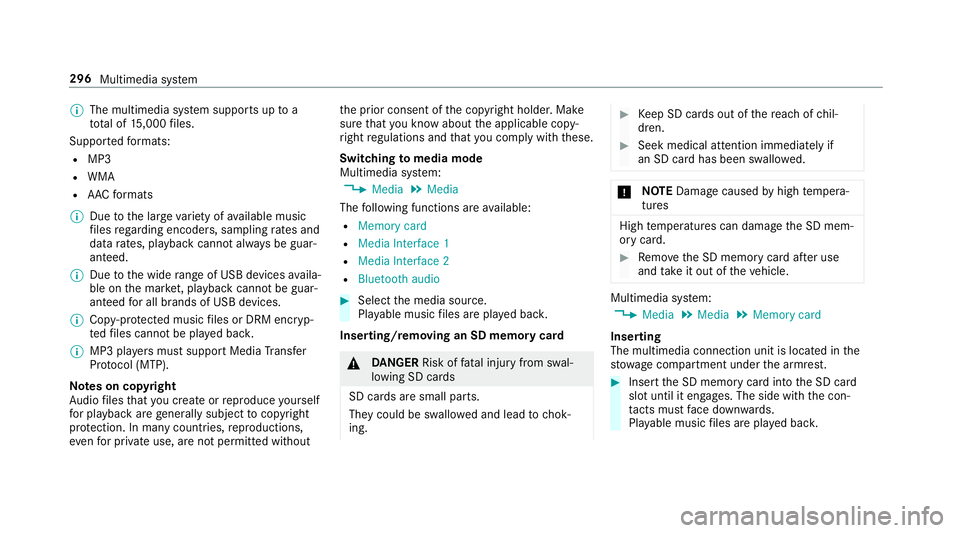
The multimedia connection unit is located in the
stow age compartment under the armrest. #
Insert the SD memory card into the SD card
slot until it engages. The side with the con‐
ta cts must face down wards.
Pla yable music files are pla yed bac k. 296
Multimedia sy stem
Page 300 of 497
Re
moving #
Press the SD memory card. #
Remo vethe SD memory card.
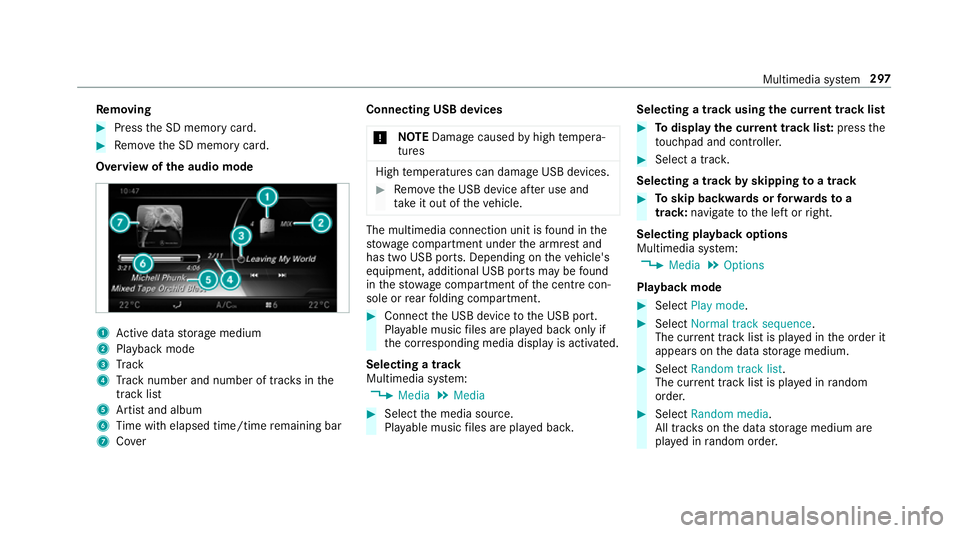
Overview of the audio mode 1
Active da tastorage medium
2 Playback mode
3 Track
4 Track number and number of trac ksinthe
track li st
5 Artist and album
6 Time with elapsed time/time remaining bar
7 Cover Connecting USB devices
* NO
TEDama gecaused byhigh temp era‐
tures High
temp eratures can damage USB devices. #
Remo vethe USB device af ter use and
ta ke it out of theve hicle. The multimedia connection unit is
found in the
stow age compartment under the armrest and
has two USB ports. Depending on theve hicle's
equipment, additional USB ports may be found
in thestow age compartment of the cent recon‐
sole or rear folding compartment. #
Connect the USB device tothe USB port.
Pla yable music files are pla yed back only if
th e cor responding media display is activated.
Selecting a track
Multimedia sy stem:
, Media .
Media #
Select the media source.
Pla yable music files are pla yed bac k. Selecting a track using
the cur rent track list #
Todispl aythe cur rent track lis t:press the
to uchpad and cont roller. #
Select a trac k.
Selecting a track byskipping toa track #
Toskip backwards or forw ards toa
track: navigate tothe left or right.
Selecting playback options
Multimedia sy stem:
, Media .
Options
Playback mode #
Select Play mode . #
Select Normal track sequence.
The cur rent track li stis pla yed in the order it
appears on the data storage medium. #
Select Random track list.
The cur rent track li stis pla yed in random
orde r. #
Select Random media.
All trac kson the data storage medium are
pla yed in random orde r. Multimedia sy
stem 297
Page 301 of 497
Skip
totime #
Select Skip to time .
A menu appears. #
Set the time.
Showing track information #
Switch Show track information onO or off
ª.
Pa use and playback function
Multimedia sy stem:
, Media
Pa using playback #
Navigate down wards. #
Select Ë.
Continuing playback #
Select Ì. Media sear
ch St
arting the media sear ch
Multimedia sy stem:
, Media .
Search
Depending on the connected media sources and
fi les, thefo llowing categories are lis ted:
R Current track list
R Folder
R Keyword search
R Playlists
R Artists
R Albums
R Tracks
R Genres
R Year
R Composers
R iTunes U (Apple®
devices)
R Genius mixes (Apple®
devices)
R Podcasts (Apple®
devices)
R Audiobooks (Apple®
devices) #
Select a categor y. Media Inter
face Information about
the Media Inter face
Media In terface is a universal inter face forthe
connection of mobile audio equipment. The mul‐
timedia sy stem has two USB ports. The USB
ports are located in thestow age compartment
under the armrest.
Suppor ted devices
The Media Inter face allo wsyouto connect the
fo llowing data storage media:
R iPod ®
R iPhone ®
R MP3 pla yer
R USB devices
Fo r de tails and a list of suppor ted devices, visit
our website at http://www.mercedes-
benz.com/connect. Follow the instructions in
th e "Media Inter face" section. 298
Multimedia sy stem
Page 302 of 497
Switching
toMedia Inter face
Multimedia sy stem:
, Media .
Media .
Media Interface 1 #
Connect the data storage medium with the
USB port (→ page 297).
Pla yable music files are pla yed bac k.
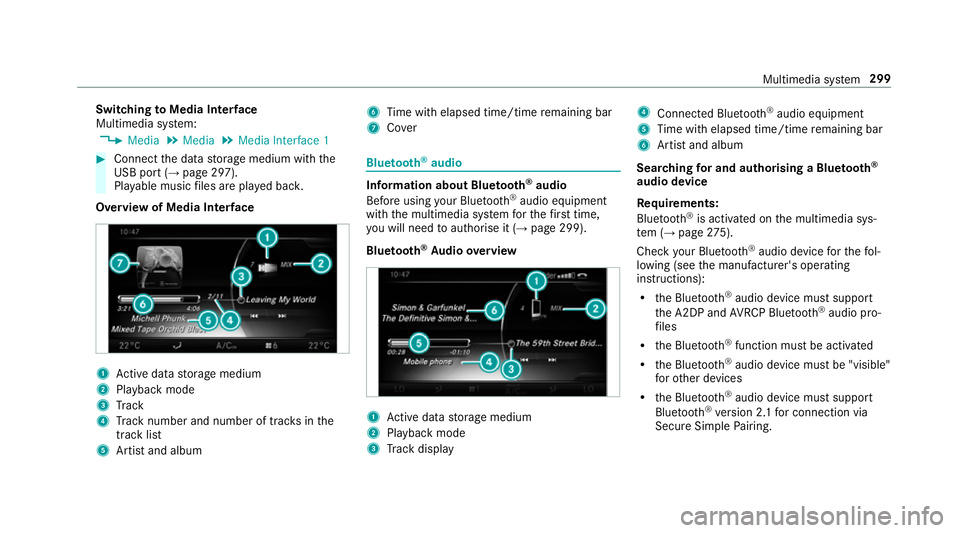
Overview of Media Inter face 1
Active da tastorage medium
2 Playback mode
3 Track
4 Track number and number of trac ksinthe
track li st
5 Artist and album 6
Time with elapsed time/time remaining bar
7 Cover Blue
tooth ®
audio Information about Blue
tooth ®
audio
Before using your Blue tooth®
audio equipment
with the multimedia sy stem forth efirs t time,
yo u will need toauthorise it (→ page 299).
Blu etoo th®
Au dio overview 1
Active da tastorage medium
2 Playback mode
3 Track display 4
Connec ted Blue tooth®
audio equipment
5 Time with elapsed time/time remaining bar
6 Artist and album
Sear ching for and authorising a Blue tooth ®
audio device
Requ irements:
Blue tooth ®
is activated on the multimedia sys‐
te m (→ page275).
Che ckyour Blue tooth®
audio device forth efo l‐
lowing (see the manufacturer's operating
instructions):
R the Blue tooth®
audio device must suppo rt
th e A2DP and AVRC P Blue tooth®
audio pro‐
fi les
R the Blue tooth®
function must be activated
R the Blue tooth®
audio device must be "visible"
fo rot her devices
R the Blue tooth®
audio device must suppo rt
Blu etoo th®
ve rsion 2.1 for connection via
Secure Simple Pairing. Multimedia sy
stem 299
Page 303 of 497
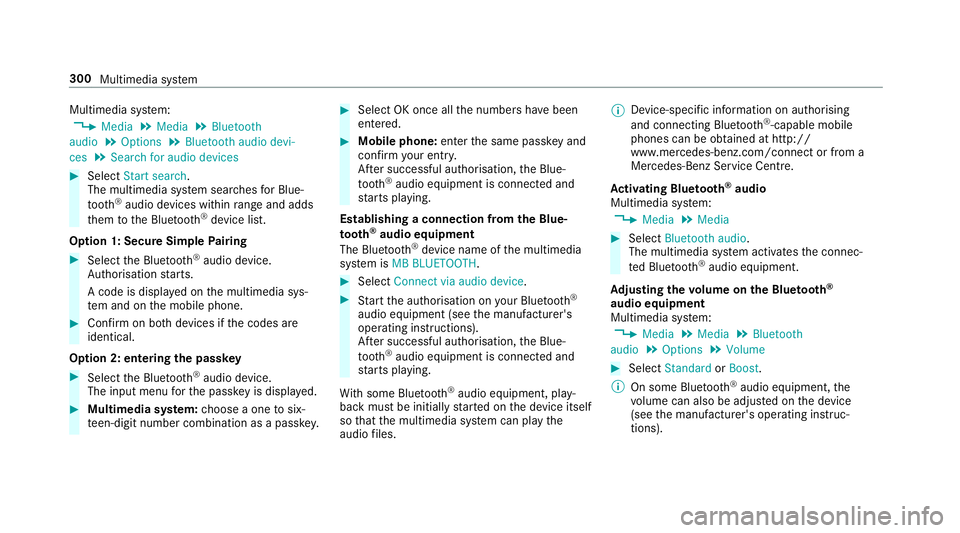
Multimedia sy
stem:
, Media .
Media .
Bluetooth
audio .
Options .
Bluetooth audio devi-
ces .
Search for audio devices #
Select Start search.
The multimedia sy stem sear ches for Blue‐
tooth ®
audio devices within range and adds
th em tothe Blue tooth ®
device list.
Option 1: Secure Simple Pairing #
Select the Blue tooth®
audio device.
Auth orisation starts.
A code is displa yed on the multimedia sys‐
te m and on the mobile phone. #
Confirm on bo thdevices if the codes are
identical.
Option 2: entering the passk ey #
Select the Blue tooth®
audio device.
The input menu forth e passk eyis displa yed. #
Multimedia sy stem: choose a one tosix‐
te en-digit number combination as a passk ey. #
Select OK once all the numbers ha vebeen
entered. #
Mobile phone: enterthe same passk eyand
con firm your entr y.
Af ter successful auth orisation,the Blue‐
tooth ®
audio equipment is connec ted and
st arts playing.
Establishing a connection from the Blue‐
to oth ®
audio equipment
The Blue tooth®
device name of the multimedia
sy stem is MB BLUETOOTH. #
Select Connect via audio device . #
Start the authorisation on your Blue tooth®
audio equipment (see the manufacturer's
operating instructions).
Af ter successful auth orisation,the Blue‐
tooth ®
audio equipment is connec ted and
st arts playing.
Wi th some Blue tooth®
audio equipment, play‐
back must be initially star ted on the device itself
so that the multimedia sy stem can play the
audio files. %
Device-specific information on authorising
and connecting Blue tooth®
-capable mobile
phones can be obtained at http://
ww w.mercedes-benz.com/connect or from a
Mercedes-Benz Service Centre.
Ac tivating Blue tooth ®
audio
Multimedia sy stem:
, Media .
Media #
Select Bluetooth audio.
The multimedia sy stem activates the connec‐
te d Blue tooth®
audio equipment.
Ad justing the volume on the Blu etoo th®
audio equipment
Multimedia sy stem:
, Media .
Media .
Bluetooth
audio .
Options .
Volume #
Select Standard orBoost .
% On some Blue tooth®
audio equipment, the
vo lume can also be adjus ted on the device
(see the manufacturer's operating instruc‐
tions). 300
Multimedia sy stem
Page 304 of 497
Displaying Blu
etoo th®
audio equipment
details
Multimedia sy stem:
, Media .
Media .
Bluetooth
audio .
Options .
Bluetooth audio devices #
Highlight Blue tooth®
audio equipment and
navigate totheright. #
Select Details. Ra
dio Switching on the
radio Multimedia sy
stem:
, Radio #
Alternatively: press the$ button.
The radio display appears. You will hear the
last station pla yed on the last frequency
band selected. Ra
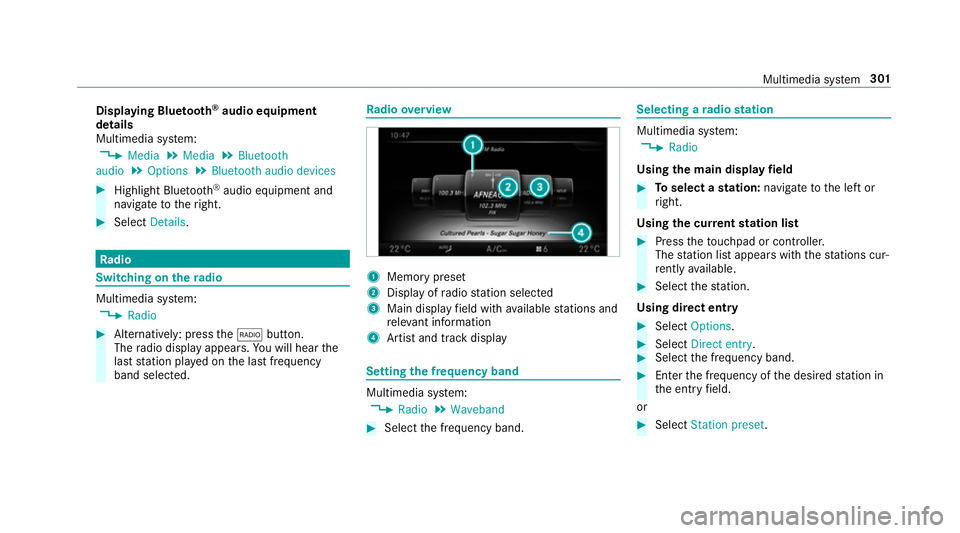
dio overview 1
Memory preset
2 Display of radio station selec ted
3 Main display field with available stations and
re leva nt information
4 Artist and track displ ay Setting
the frequency band Multimedia sy
stem:
, Radio .
Waveband #
Select the frequency band. Selecting a
radio station Multimedia sy
stem:
, Radio
Using the main display field #
Toselect a station: navigate tothe left or
ri ght.
Using the cur rent station list #
Press theto uchpad or cont roller.
The station list appears with thest ations cur‐
re ntly available. #
Select thest ation.
Using direct ent ry #
Select Options . #
Select Direct entry . #
Select the frequency band. #
Ente rth e frequency of the desired station in
th e entry field.
or #
Select Station preset. Multimedia sy
stem 301
Page 306 of 497
Editing
radio station presets Multimedia sy
stem:
, Radio .
Preset .
Edit station preset
Deleting stations #
Highlight a preset entry and navigate tothe
ri ght. #
Select Delete highlighted station/channel .#
Select Yes.
Moving stations #
Highlight a preset entry and navigate tothe
ri ght. #
Select Move highlighted station/channel. #
Select a location forst oring thest ation. Ac
tivating/deactivating the pres ets view Multimedia sy
stem:
, Radio .
Preset #
Select Station presets view: on .
The radio station preset appears. #
Toswitch between stored stations: navi‐
ga te to the left or right.
or #
Select Station presets view: off.
The frequency band of thest ation cur rently
being pl ayed appears. Setting
station tracking Multimedia sy
stem:
, Radio .
Options .
Station tracking
The following options are available:
R Automatic: the multimedia sy stem switches
to alternative frequencies across all fre‐
qu ency bands.
R Digital : switches toalternative frequencies in
th eDA B frequency band.
R Analogue: switches toalternative frequencies
in the FM frequency band.
R Fix frequency: an alternative frequency is not
set. The multimedia sy stem maintains the set
frequency when reception is poo r. #
Select an option.
% The settings are usually stored and taken
into account when calling up a preset again. Switching on
the frequency fix function (FM
ra dio mode) Multimedia sy
stem:
, Radio .
Options #
Select Fix frequency .
The multimedia sy stem maintains the set fre‐
qu ency when reception is poo r. Ta
gging music trac ks Multimedia sy
stem:
, Radio .
Options
If ra dio stations pr ovide there leva nt information,
th is function allo wsyouto trans fer information
on the music track cur rently pl aying toan
Apple ®
device. You can then pur chase the audio
fi le from theiTunes Store ®
. #
Select Tag this track.
The track information is sa ved. Multimedia sy
stem 303
Page 489 of 497
Re
ading the handwriting recognition
aloud ................................................... 268
Selecting a station and track .............. .268
Selecting an input langua ge................ 268
Switching on/off ................................. 266
To w- aw ay protection
Fu nction ................................................ 92
Switching on/o ff................................... 93
To w- starting ............................................. 340
To wing a trailer
Ex tending/r etra cting the ball neck ...... 24 5
To wing away ............................................ 336
To wing eye
Ins talling .............................................. 340
St orage location ..................................3 39
To wing me thods ...................................... 335
Tr ack
Selecting (audio mode) ........................ 297
Tr af fic announcements
Ac tivating/deactivating ...................... .304
Tr ailer hitch
Axle load ............................................. 380
Bicycle rack ......................................... 24 8Extending/r
etra cting the ball neck ...... 24 5
Fa stening point .................................... 378
Gene ral no tes ...................................... 378
Mounting dimensions .......................... 378
No tes ................................................... 24 4
Overhang dimension ............................3 78
Po we r soc ket ....................................... 24 6
To ngue weight .................................... .379
Tr ailer operation
Ac tive Blind Spot Assi st....................... 239
Bicycle rack ......................................... 24 8
Coupling up/uncoupling a trailer ........ .246
No tes ................................................... 24 4
Po we r soc ket ....................................... 24 6
Tr ailer stabilisation
Fu nction/no tes ................................... 19 5
Tr ailer tow hit ch
Care .................................................... .317
To wing weight ...................................... 379
Tr ansmission position display ................172
Tr anspo rting
Ve hicle ................................................ 338
Tr im element (Care) .................................319 Tr
ip
Menu (on-board computer) .................. 257
Tr ip computer
Displaying ............................................ 257
Re setting ............................................. 258
Tr ip distance ............................................ 257
Displaying ............................................ 257
Re setting ............................................. 258
Tr ip me ter
see Trip dis tance
Tu rn signal indicator
see Turn signal light
Tu rn signal light ....................................... 12 9
Ac tivating/deactivating ...................... .129
Changing bulbs (front) ......................... 13 8
Changing bulbs (rear) .......................... 13 9
Tw o-w ayradios
Fr equencies ......................................... 365
No tes on ins tallation .......................... .364
Tr ansmission output (maximum) ........ .365
Ty re inflation compressor
see TIREFIT kit 486
Index