brakes MERCEDES-BENZ E-CLASS SALOON 2017 User Guide
[x] Cancel search | Manufacturer: MERCEDES-BENZ, Model Year: 2017, Model line: E-CLASS SALOON, Model: MERCEDES-BENZ E-CLASS SALOON 2017Pages: 497, PDF Size: 10.38 MB
Page 215 of 497
HOLD function
HOLD function
The HOLD function holds
theve hicle at a stand‐
st ill without requ iring youto depress the brake
pedal, e.g. when pulling away on steep slopes.
Sy stem limitations
R The incline must not be greaterth an 30%.
Ac tivating/deactivating the HOLD function &
WARNING Risk of an accident due tothe
HOLD function being activated when you
lea vetheve hicle
If yo u lea vetheve hicle while only the HOLD
function is braking theve hicle, theve hicle
can rollaw ay inthefo llowing situations:
R Ifth ere is a malfunction in the sy stem or
in the po wer supply.
R Ifth e HOLD function is deactivated by
depressing the accelera tor pedal or the
brake pedal, e.g. byave hicle occupant. R
Ifth e electrics in the engine compart‐
ment, the battery or the fuses are tam‐
pered with or if the battery is disconnec‐
te d. #
Alw ays deactivate the HOLD function
and secure theve hicle against rolling
aw ay before leaving theve hicle. *
NO
TEDama gefrom auto matic braking When
Active Brake Assi st,Ac tive Dis tance
Assi stDISTRONIC or the HOLD function are
activated, theve hicle brakes autonomously
in cer tain situations.
To avo id damage totheve hicle, deactivate
th ese sy stems in thefo llowing or similar sit‐
uations: #
During towing #
In a car wash Re
quirements:
R The vehicle is stationar y.
R The driver's door is closed or the seat belt on
th e driver's side is fastened. R
The engine is running or has been au tomati‐
cally switched off bythe ECO start/ stop
function.
R The electric parking brake is released.
R Active Dis tance Assi stDISTRONIC is not acti‐
va ted.
R Vehicles with automatic transmission: the
transmission is in position h,kori.
Ac tivating the HOLD function #
Dep ress the brake pedal and af ter a short
time depress fur ther until theë display
appears in the multifunction displa y. #
Release the brake pedal.
Deactivating the HOLD function #
Depress the accelerator pedal topull away.
or #
Depress the brake pedal until theë dis‐
play disappears from the multifunction dis‐
pla y. 212
Driving and pa rking
Page 230 of 497
The parking space and, if necessar
y,the parking
direction can be selected as desired. Active
Pa rking Assist calculates a suitable vehicle path
and assists you in parking and exiting the park‐
ing space.
Ve hicles with automatic transmission: Active
Pa rking Assist changes gear, accelerates, brakes
and steers theve hicle.
Ve hicles with manual transmission: Active
Pa rking Assist supports youby inter vening
acti velyin thesteering.
% The active brake application and automatic
gear change is on lyavailable on vehicles
with automatic transmission.
Ac tive Parking Assist is only an aid. It is not a
substitute foryo ur attention tothe sur roundings.
The responsibility for safe manoeuvring and
parking remains with you. Make sure that no
persons, animals or objects etc. are in the
manoeuvring range.
Ac tive Parking Assist is cancelled if, among
ot her things, one of thefo llowing actions is car‐
ri ed out:
R You deactivate Parking Assist PARKTRONIC. R
You deactivate Active Parking Assist.
R You begin steering.
R You apply the parking brake.
R You en gage j.
R ESP ®
inter venes.
R You open theta ilgate.
Sy stem limitations of Active Park ing Assist
Objects located abo veor below the de tection
ra nge of Active Parking Assist are not de tected
when the parking space is being measured.
These are also not take n into account when the
parking manoeuvre is calculated, e.g. overhang‐
ing loads, overhangs or loading ramp s of lor ries
or the boundaries of parking spaces. In some cir‐
cums tances, Active Parking Assist may therefore
guide you into the parking space prematurel y. &
WARNING Risk of accident due to
objects located abo veor below the
de tection range of Active Parking Assist
If th ere are objects abo veor below the
de tection range, thefo llowing situations may
arise:
R Active Parking Assist may steer too ear ly.
R Vehicles with automatic transmis‐
sion: Thevehicle may not stop in front of
th ese objects.
This could cause a collision. #
Inthese situations, do not use Active
Pa rking Assist. Sn
owfa ll or heavy rain may lead toa parking
space being measured inaccuratel y.Pa rking
spaces that are partial lyoccupied bytrailer
dr aw bars might not be identified as such or be
measured incor rectly. Only use Active Parking
Assist on le vel, high-grip ground. Dr
iving and parking 227
Page 234 of 497
#
Pay attention toobjects and other road
users. #
Where necessar y,stop theve hicle or
cancel the parking procedure with
Ac tive Parking Assist. #
If,forex ample, theEngage forward gear mes‐
sage appears in the multimedia sy stem dis‐
play: select the cor responding transmission
position.
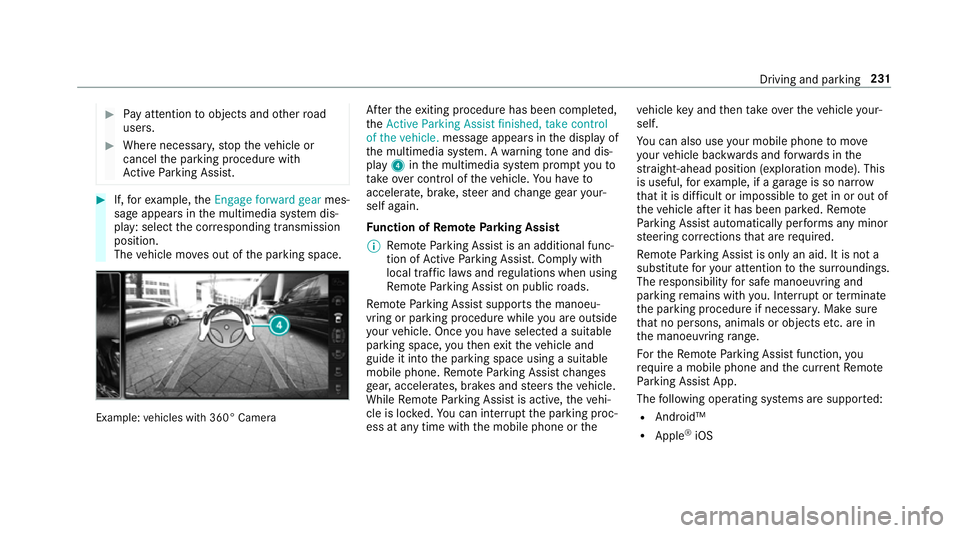
The vehicle mo ves out of the parking space. Example:
vehicles with 360° Camera Af
terth eex iting procedure has been comple ted,
th eActive Parking Assist finished, take control
of the vehicle. message appears in the display of
th e multimedia sy stem. A warning tone and dis‐
pl ay 4 inthe multimedia sy stem prom ptyouto
ta ke over control of theve hicle. You ha veto
accelerate, brake, steer and change gear your‐
self again.
Fu nction of Remo teParking Assist
% Remo teParking Assist is an additional func‐
tion of Active Parking Assist. Comply with
local traf fic la wsand regulations when using
Re mo teParking Assist on public roads.
Re mo teParking Assist supports the manoeu‐
vring or parking procedure while you are outside
yo ur vehicle. Once you ha veselected a suitable
parking space, youth en exitth eve hicle and
guide it into the parking space using a suitable
mobile phone. Remo teParking Assist changes
ge ar, accelerates, brakes and steers theve hicle.
While Remo teParking Assist is active, theve hi‐
cle is loc ked. You can inter rupt the parking proc‐
ess at any time with the mobile phone or theve
hicle key and then take ove rth eve hicle your‐
self.
Yo u can also use your mobile phone tomo ve
yo ur vehicle backwards and forw ards in the
st ra ight-ahead position (exploration mode). This
is useful, forex ample, if a garage is so nar row
th at it is dif ficult or impossible toget in or out of
th eve hicle af ter it has been par ked. Re mo te
Pa rking Assist automatically per form s any minor
st eering cor rections that are requ ired.
Re mo teParking Assist is only an aid. It is not a
substitute foryo ur attention tothe sur roundings.
The responsibility for safe manoeuvring and
parking remains with you. In terrupt or term inate
th e parking procedure if necessar y.Make sure
th at no persons, animals or objects etc. are in
th e manoeuvring range.
Fo rth eRe mo teParking Assist function, you
re qu ire a mobile phone and the cur rent Remo te
Pa rking Assist App.
The following operating sy stems are suppor ted:
R Android™
R Apple ®
iOS Driving and parking
231
Page 240 of 497
R
Ifth e wrong gear is selec ted.
The Drive AwayAssi stfunction is active under
th efo llowing conditions:
R IfPa rking Assist PARKTRONIC is activated.
R Every time thege ar is changed tok orh
when theve hicle is at a standstill.
R Ifth e de tected obs tacle is less than appr ox.
1. 0 m away.
R Ifth e manoeuvring assis tance function is
acti vated in the multimedia sy stem.
Sy stem limitations
Drive AwayAssi stis not available on inclines and
when driving with a trailer.
Fu nction of Cross Traf fic Alert
% Also read the instructions on Blind Spot
Assist (→ page 239).
Ve hicles with Blind Spot Assis t:drivers can
also be warned of any crossing traf fic when
re ve rsing out of a parking space. If a critical sit‐
uation is de tected, a warning symbol appears on
th e camera image of the multimedia sy stem. If
th e driver does not respond tothewa rning, the ve
hicle's brakes can be applied automaticall y.To
do this, the function uses thera dar sensors in
th e bumper. The area adjacent totheve hicle is
continually monitored.
If th era dar sensors are obstructed byvehicles
or other objects, de tection is not possible.
The Cross Traf fic Alert function is acti veunder
th efo llowing conditions:
R If Blind Spot Assist is activated.
R Ifth eve hicle is reve rsing at walking pace.
R Ifth e manoeuvring assis tance function is
acti vated in the multimedia sy stem.
The Cross Traf fic Alert function is not available
on inclines and when driving with a trailer.
Deactivating/activating manoeuv ring assis‐
tance
Multimedia sy stem:
, Vehicle .
System settings .
Active
Parking Assist .
Manoeuvring assistance #
Activate Oor deacti vate ª the function. AT
TENTION ASSI ST Fu
nction of ATTENTION ASSI ST
AT TENTION ASSIST assists you on long, mon oto‐
nous journe ys, e.g. on mo torw ays and trunk
ro ads. If ATTENTION ASSIST de tects indicators
of fatigue or increasing lapses in concentration
on the part of the driver, it suggests taking a
brea k.
AT TENTION ASSIST is only an aid. It cannot
alw ays de tect fatigue or lapses in concentration
until too late. The sy stem is not a substitute for a
we ll-res ted and attentive driver. On long jour‐
ne ys,ta ke regular breaks in good time that allow
fo r adequ aterecuperation.
Yo u can choose between two settings.
R Standard: normal sy stem sensitivity.
R Sensitive: higher system sensitivity. The
driver is warned earlier and the attention
le ve l de tected byATTENTION ASSIST is adap‐
te d according ly.
If dr owsiness or increasing lapses in concentra‐
tion are de tected, theATTENTION ASSIST: Take
a break! warning appears in the Instrument Dis‐ Driving and parking
237
Page 356 of 497
Yo
u can ask for information rega rding permit ted
wheel/tyre combinations at a Mercedes-Benz
Service Cent re. &
WARNING Risk of accident due toincor‐
re ct dimensions of wheels and tyres
If wheels and tyres of the wrong size are
used, the wheel brakes or wheel suspension
components may become damaged. #
Alw aysre place wheels and tyres with
th ose that fulfil the specifications of the
original part.
When replacing wheels, make sure tofit the
cor rect:
R Designation
R Type
When replacing tyres, make sure tofit the
cor rect:
R Designation
R Manufactu rer
R Type &
WARNING Risk of inju rythro ugh exceed‐
ing the specified tyre load-bearing capa‐
city or the permissible speed rating
Exceeding the specified tyre load-bearing
capacity or the permissible speed rating may
lead totyre dama geand tothe tyres bur st‐
ing. #
Therefore, only use tyre types and sizes
appr ovedfo ryo ur vehicle model. #
Obser vethe tyre load-bearing capacity
ra ting and speed rating requ iredfor
yo ur vehicle. *
NO
TEDama getovehicle and tyres due
to non-app rove d tyre types and sizes Fo
r saf etyre asons, on lyuse wheels, tyres
and accessories which ha vebeen appr oved
fo ryo ur vehicle byMercedes-Benz. These tyres ha
vebeen specially adap tedfor
use with the control sy stems, e.g. ABS or
ESP ®
, and are mar ked as follo ws:
R MO = Mercedes-Benz Original
R MOE = Mercedes-Benz Original Extended
(run-flat tyres only for cer tain wheels)
R MO1 = Mercedes-Benz Original (only cer‐
tain AMG tyres)
Cer tain characteristics, e.g. handling, vehicle
noise emissions or fuel consum ption, may
ot herwise be adversely af fected. In addition,
when driving wi tha load, tyre dimension var‐
iations could cause the tyres tocome into
contact wi th the body and axle components.
This could result in damage tothe tyres or
th eve hicle.
Only use tyres, wheels or accessories tested
and appr oved byMercedes-Benz. Wheels and tyres
353
Page 359 of 497
may se
verely impair the driving characteris‐
tics.
The disk brakes or wheel suspension compo‐
nents may also be damaged. #
Rotate front and rear wheels on lyifthe
wheels and tyres are of the same
dimensions. Inter
changing the front and rear wheels if the
wheels or tyres ha vediffere nt dimensions can
re nder thege neral operating pe rmit in valid.
The wear pat tern s on the front and rear wheels
dif fer:
R Front wheels wear more on the shoulder of
th e tyre
R Rear wheels wear more in the cent reofthe
tyre
On vehicles with the same front and rear wheel
size, you can inter change the wheels every
5,000 to10,000 km, depending on thewe ar.
Ensure the direction of rotation is maintained for
th e wheels. It is imperative
toobser vethe instructions and
saf ety no tes on "Wheel change" when doing so. Note
s onstoring wheels R
Afterre moving wheels, store them in a cool,
dry and preferably dark place.
R Protect the tyres from conta ct withoil,
grease or fuel. Overview of
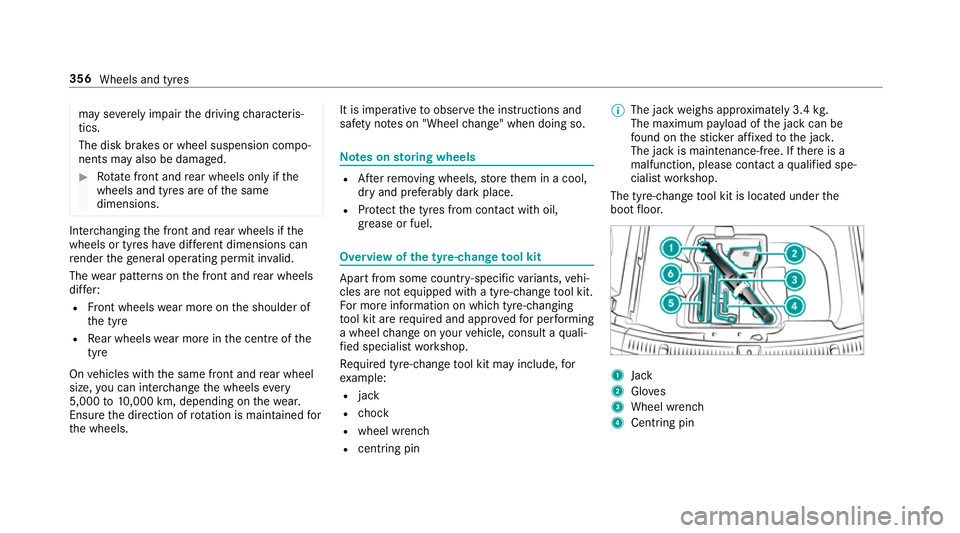
the ty re-change tool kit Apart from some countr
y-specific variants, vehi‐
cles are not equipped with a tyre-change tool kit.
Fo r more information on which tyre-changing
to ol kit are requ ired and appr ovedfo r per form ing
a wheel change on your vehicle, consult a quali‐
fi ed specialist workshop.
Re quired tyre-change tool kit may include, for
ex ample:
R jack
R chock
R wheel wrench
R centri ng pin %
The jack weighs appr oximately 3.4 kg.
The maximum pa yload of the jack can be
fo und on thest icke r af fixe dto the jac k.
The jack is maintenance-free. If there is a
malfunction, please conta ct aqualified spe‐
cialist workshop.
The tyre-change tool kit is located under the
boot floor. 1
Jack
2 Gloves
3 Wheel wrench
4 Centring pin 356
Wheels and tyres
Page 378 of 497
&
WARNING Risk of an accident due to
va pour poc kets form ing in the brake sys‐
tem
The brake fluid constantly absorbs moisture
from the air. This lo wersthe boiling point of
th e brake fluid. If the boiling point is too lo w,
va pour poc kets may form inthe brake sys‐
te m when the brakes are applied hard.
This impairs the braking ef fect. #
Have the brake fluid rene we d at the
specified inter vals. Ha
ve the brake fluid regularly changed at a quali‐
fi ed specialist workshop.
Only use brake fluid appr ovedby Mercedes-Benz
according toMB-F reigabe or MB-Appr oval 33 1.0.
Fu rther information on brake fluid:
R inthe Mercedes-Benz Specifications for
Operating Fluids at http://be vo.mercedes-
benz.com
R at a qualified specialist workshop Coolant
Note
s on coolant
Obser vethe no tes on service products
(→ page 368). &
WARNING Risk offire ‑ and inju ryfrom
antifreeze
If antifreeze comes into contact with hot
component parts in the engine compart‐
ment, it may ignite. #
Allow the engine tocool down before
yo uto p up the antif reeze. #
Make sure that no antifreeze spills out
next tothefiller opening. #
Thoroughly clean the antif reeze from
component parts before starting the
ve hicle. *
NO
TEDama gecaused byincor rect cool‐
ant #
Only add coolant that has been pre‐
mixed with therequ ired antifreeze pro‐
te ction.
Fu rther information on coolant:
R Inthe Mercedes-Benz Specifications for
Operating Fluids 310.1, e.g. online at
http://be vo.mercedes-benz.com.
R Ataqu alified specialist workshop. *
NO
TEOverheating at high outside tem‐
peratures If an inapp
ropriate coolant is used, the
engine cooling sy stem is not suf ficiently pro‐
te cted against overheating and cor rosion at
high outside temp eratures. #
Alw ays use coolant appr ovedby
Mercedes-Benz. #
Obser vethe instructions in the
Mercedes-Benz Specifications for Oper‐
ating Fluids 310.1. Te
ch nical da ta375
Page 442 of 497
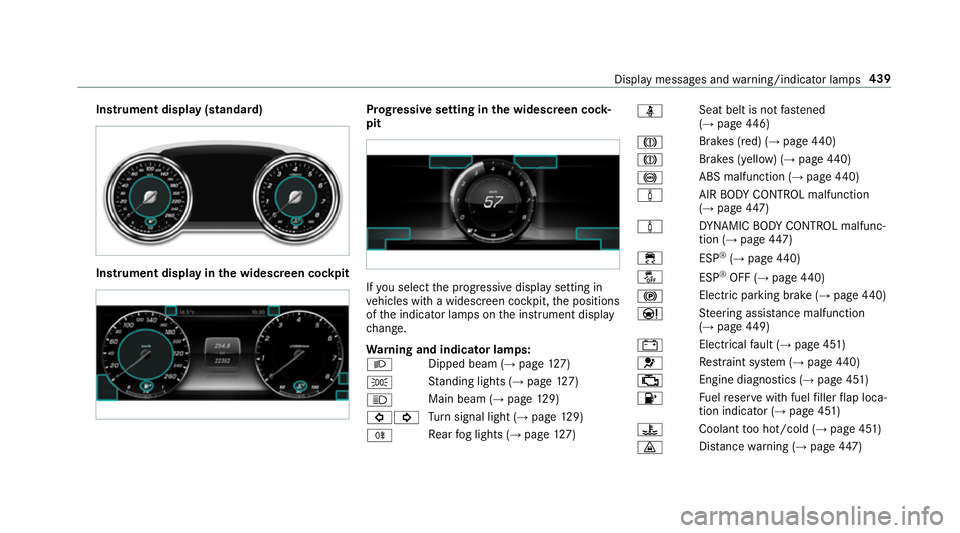
Instrument display (standard)
Instrument display in
the widescreen cockpit Prog
ressive setting in the widescreen cock‐
pit If
yo u select the progressive display setting in
ve hicles with a widescreen cockpit, the positions
of the indicator lamps on the instrument display
ch ange.
Wa rning and indicator lamps:
L Dipped beam (→
page127)
T St
anding lights (→ page127)
K Main beam (→
page129)
#! Tu
rn signal light (→ page129)
R Re
ar fog lights (→ page127) ü
Seat belt is not
fastened
(→ page 446)
J Brakes (red) (→
page 440)
J Brakes (yell
ow) (→ page 440)
! ABS malfunction (→
page 440)
à AIR
BODY CONTROL malfunction
(→ page 447)
à DY
NA MIC BODY CONTROL malfunc‐
tion (→ page447)
÷ ESP®
(→ page 440)
å ESP®
OFF (→ page 440)
! Electric pa
rking brake (→ page440)
Ð St
eering assis tance malfunction
(→ page 449)
# Electrical
fault (→ page 451)
6 Re
stra int sy stem (→ page440)
; Engine diagnostics (→
page 451)
8 Fu
elreser vewith fuel filler flap loca‐
tion indicator (→ page 451)
? Coolant
too hot/cold (→ page 451)
· Dis
tance warning (→ page447) Displ
aymessa ges and warning/indicator lamps 439
Page 463 of 497
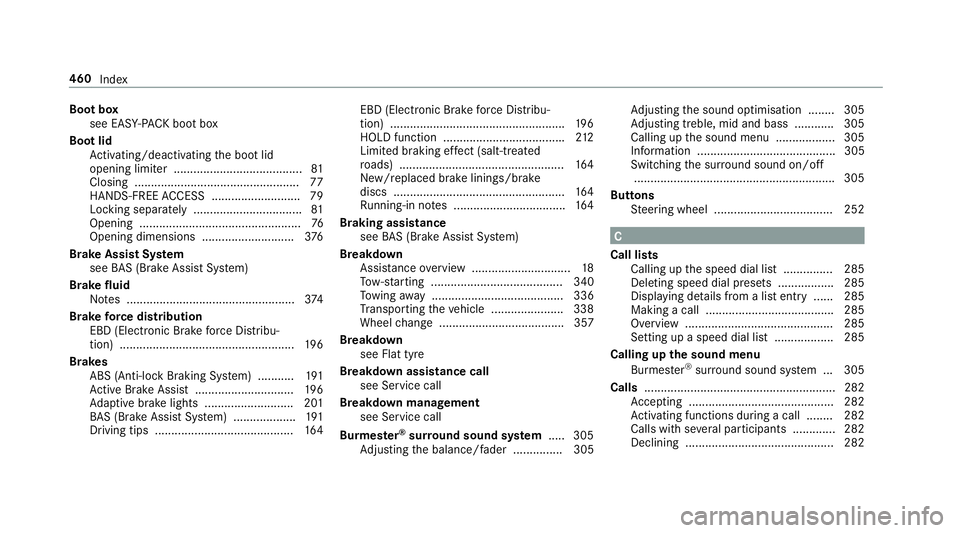
Boot box
see EAS Y-PA CK boot box
Boot lid Activating/deactivating the boot lid
opening limiter ....................................... 81
Closing .................................................. 77
HANDS-FREE ACCESS .......................... .79
Locking separa tely ................................. 81
Opening .................................................76
Opening dimensions ............................3 76
Brake Assi stSystem
see BAS (Brake Assi stSystem)
Brake fluid
No tes ................................................... 374
Brake forc e distribution
EBD (Elect ronic Brake forc e Distribu‐
tion) ..................................................... 19 6
Brakes ABS (Anti-lock Braking Sy stem) ........... 191
Ac tive Brake Assi st.............................. 19 6
Ad aptive brake lights .......................... .201
BA S (Brake Assi stSystem) ...................1 91
Driving tips .......................................... 16 4EBD (Electronic Brake
forc e Distribu‐
tion) ..................................................... 19 6
HOLD function .................................... .212
Limited braking ef fect (salt-trea ted
ro ads) .................................................. 16 4
New/replaced brake linings/brake
discs .................................................... 16 4
Ru nning-in no tes ..................................1 64
Braking assistance see BAS (Brake Assi stSystem)
Breakdown Assis tance overview .............................. 18
To w- starting ........................................ 340
To wing away ........................................ 336
Tr ansporting theve hicle ......................3 38
Wheel change ...................................... 357
Breakdown see Flat tyre
Breakdown assistance call see Service call
Breakdown management see Service call
Bu rm ester ®
sur round sound sy stem .....3 05
Ad justing the balance/fader ............... 305 Ad
justing the sound optimisation ........ 305
Ad justing treble, mid and bass ............ 305
Calling up the sound menu .................. 305
Information .......................................... 305
Switching the sur round sound on/off
............................................................ .305
Buttons Steering wheel .................................... 252 C
Call lists Calling up the speed dial list ............... 285
Deleting speed dial presets ................. 285
Displaying de tails from a list ent ry...... 285
Making a call ....................................... 285
Overview ............................................. 285
Setting up a speed dial li st.................. 285
Calling up the sound menu Burmes ter®
sur round sound sy stem ... 305
Calls ..........................................................2 82
Ac cepting ............................................ 282
Ac tivating functions du ring a call ........ 282
Calls wi thseveral participants ............ .282
Declining ............................................. 282 460
Index