buttons MERCEDES-BENZ E-CLASS SALOON 2017 User Guide
[x] Cancel search | Manufacturer: MERCEDES-BENZ, Model Year: 2017, Model line: E-CLASS SALOON, Model: MERCEDES-BENZ E-CLASS SALOON 2017Pages: 497, PDF Size: 10.38 MB
Page 150 of 497
Overview of climate control sy
stems Note
s on climate control Ve
hicles with THERMOTRONIC automatic cli‐
mate control: an interior airfilter must alw ays
be used so that the air conditioning sy stem, the
pollution le vel monitoring and the air filtering
function workcor rectly. Ma kesure that thefilter
is ins talled cor rectly and thefilter housing in the
engine compartment is closed cor rectly using
th e cap and alw ays tightly sealed when in opera‐
tion. Use filters recommended and appr ovedby
Mercedes-Benz. Alw ays ha veservice workcar‐
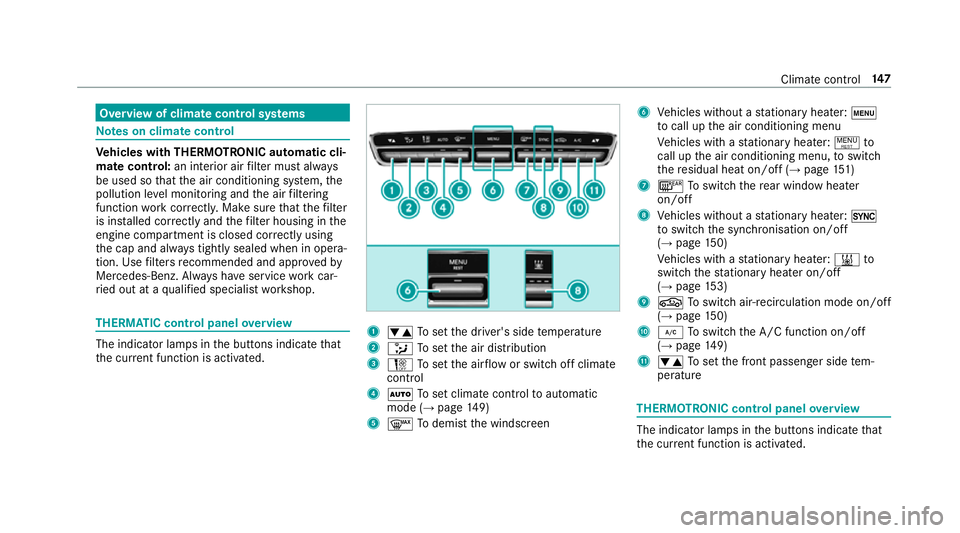
ri ed out at a qualified specialist workshop. THERMATIC control panel
overview The indicator lamps in
the buttons indicate that
th e cur rent function is acti vated. 1
w Toset the driver's side temp erature
2 _ Toset the air distribution
3 H Toset the air flow or switch off climate
control
4 Ã Toset climate contro lto automatic
mode (→ page149)
5 ¬ Todemist the windscreen 6
Vehicles without a stationary heater: t
to call up the air conditioning menu
Ve hicles with a stationary heater: !to
call up the air conditioning menu, toswitch
th ere sidual heat on/off (→ page151)
7 ¤ Toswitch there ar wind owheater
on/off
8 Vehicles without a stationary heater: 0
to switch the synchronisation on/off
(→ page 150)
Ve hicles with a stationary heater: &to
switch thest ationary heater on/off
(→ page 153)
9 g Toswitch air-recirculation mode on/off
(→ page 150)
A ¿ Toswitch the A/C function on/off
(→ page 149)
B w Toset the front passenger side tem‐
perature THERMOTRONIC control panel
overview The indicator lamps in
the buttons indicate that
th e cur rent function is acti vated. Climate control
147
Page 158 of 497
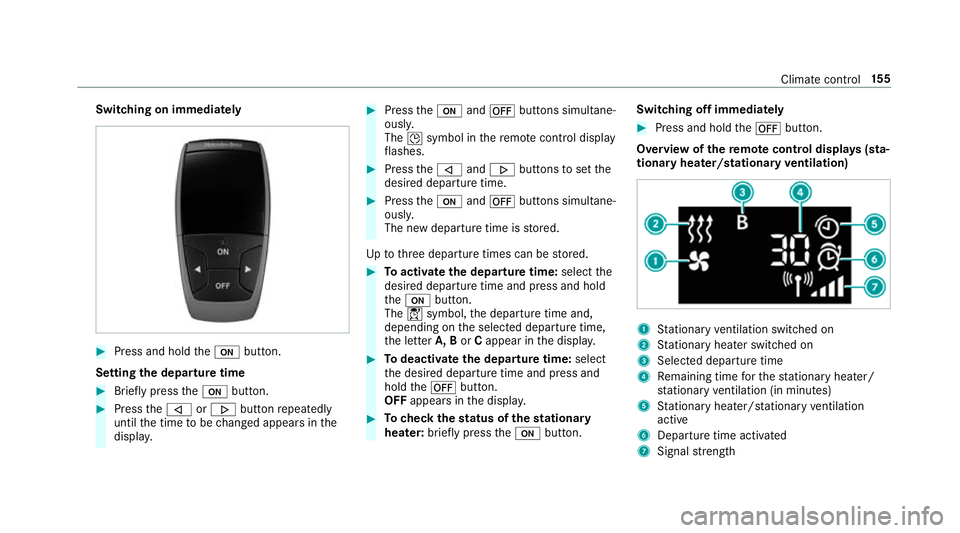
Switching on immediately
#
Press and hold theu button.
Setting the departu retime #
Brie fly press theu button. #
Press the, or. button repeatedly
until the time tobe changed appears in the
displa y. #
Press theu and^ buttons simultane‐
ousl y.
The Îsymbol in there mo tecontrol displ ay
fl ashes. #
Press the, and. buttons toset the
desired departure time. #
Press theu and^ buttons simultane‐
ousl y.
The new departure time is stored.
Up tothre e departure times can be stored. #
Toactivate the departu retime: select the
desired departure time and press and hold
th eu button.
The Ísymbol, the departure time and,
depending on the selected departure time,
th e letter A, BorCappear in the displa y. #
Todeactivate the departure time: select
th e desired departure time and press and
hold the^ button.
OFF appears in the displa y. #
Tocheck thest atus of thest ationary
heater: briefly press theu button. Switching off immediately #
Press and hold the^ button.
Overview of there mo tecont rol displa ys(sta‐
tiona ryheater/stationary ventilation) 1
Stationary ventilation switched on
2 Stationary heater swit ched on
3 Selected departure time
4 Remaining time forth est ationary heater/
st ationary ventilation (in minu tes)
5 Stationary heater/ stationary ventilation
acti ve
6 Departure time acti vated
7 Signal stre ngth Clima
tecontrol 15 5
Page 185 of 497
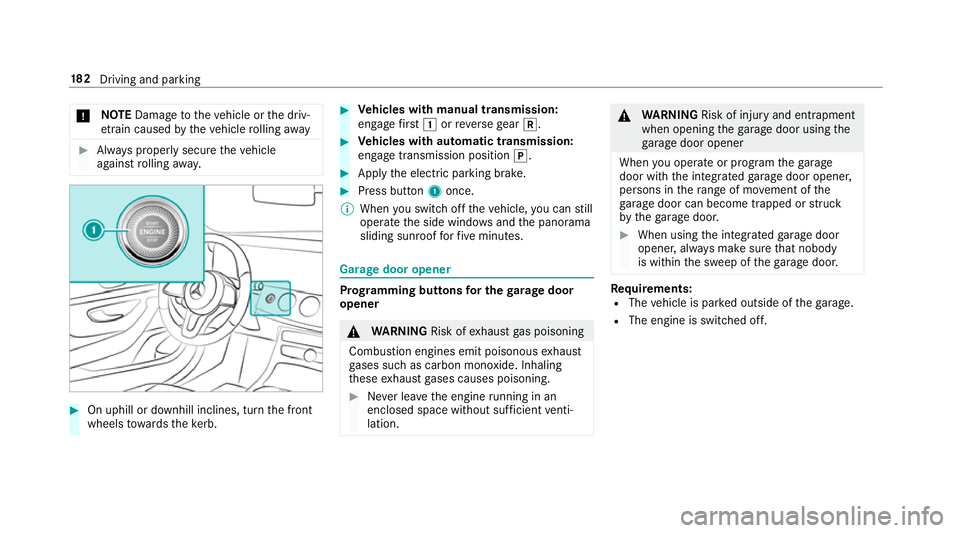
*
NO
TEDama getotheve hicle or the driv‐
et ra in caused bytheve hicle rolling away #
Alw ays proper lysecure theve hicle
against rolling away. #
On uphill or downhill inclines, turn the front
wheels towa rdsth eke rb. #
Vehicles with manual transmission:
engage firs t1 orreve rsege ar k. #
Vehicles with automatic transmission:
engage transmission position j. #
Apply the electric parking brake. #
Press button 1once.
% When you swit choff theve hicle, you can still
opera tethe side windo wsand the panorama
sliding sunroof forfive minutes. Garage door opener
Prog
ramming buttons for the garage door
opener &
WARNING Risk ofexhaust gas poisoning
Combustion engines emit poisonous exhaust
ga ses such as carbon monoxide. Inhaling
th ese exhaust gases causes poisoning. #
Never lea vethe engine running in an
enclosed space wi thout suf ficient venti‐
lation. &
WARNING Risk of inju ryand ent rapment
when opening thega rage door using the
ga rage door opener
When you operate or program thega rage
door with the integrated garage door opener,
persons in thera nge of mo vement of the
ga rage door can become trapped or stru ck
by thega rage door. #
When using the integrated garage door
opener, alw ays make sure that nobody
is within the sweep of thega rage door. Re
quirements:
R The vehicle is par ked outside of thega rage.
R The engine is switched off. 18 2
Driving and pa rking
Page 186 of 497
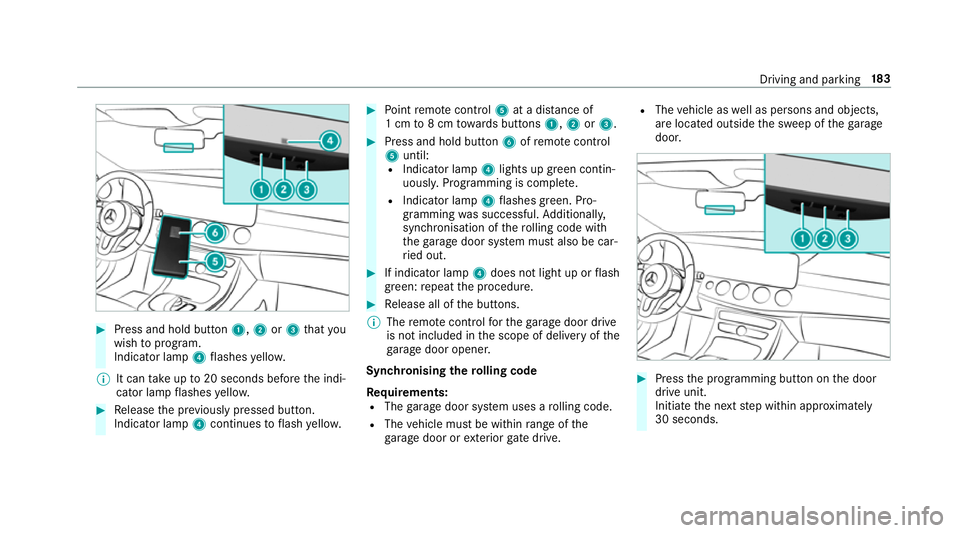
#
Press and hold button 1,2or3 that you
wish toprog ram.
Indicator lamp 4flashes yello w.
% It can take up to20 seconds before the indi‐
cator lamp flashes yello w. #
Release the pr eviously pressed button.
Indicator lamp 4continues toflash yello w. #
Point remo tecontrol 5at a di stance of
1 cm to8 cm towa rds buttons 1,2or3. #
Press and hold button 6ofremo tecontrol
5 until:
R Indicator la mp4lights up green contin‐
uousl y.Programming is comple te.
R Indicator lamp 4flashes green. Pro‐
gr amming was successful. Additionally,
synchronisation of thero lling code with
th ega rage door sy stem must also be car‐
ri ed out. #
If indicator lamp 4does not light up or flash
green: repeat the procedure. #
Release all of the buttons.
% The remo tecontrol forth ega rage door drive
is not included in the scope of delivery of the
ga rage door opener.
Synchronising thero lling code
Re quirements:
R The garage door sy stem uses a rolling code.
R The vehicle must be within range of the
ga rage door or exterior gate drive. R
The vehicle as well as persons and objects,
are located outside the sweep of thega rage
door. #
Press the programming button on the door
drive unit.
Initiate the next step within appr oximately
30 seconds. Driving and parking
18 3
Page 187 of 497
#
Press pr eviously prog rammed button 1,2
or 3 repeatedl y,until the door closes.
When the door closes, programming is com‐
ple ted.
% Please also read the operating instructions
fo rth ega rage door drive.
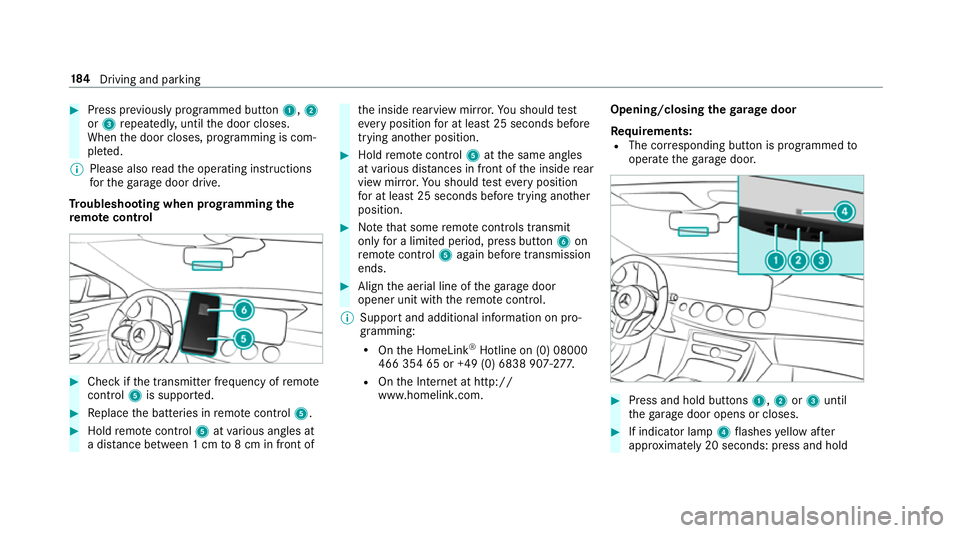
Tr oubleshooting when prog ramming the
re mo tecont rol #
Check if the transmit ter frequency of remo te
control 5is suppo rted. #
Replace the batteries in remo tecontrol 5. #
Hold remo tecontrol 5atvarious angles at
a dis tance between 1 cm to8 cm in front of th
e inside rearview mir ror.Yo u should test
eve ryposition for at least 25 seconds before
trying ano ther position. #
Hold remo tecontrol 5atthe same angles
at various dis tances in front of the inside rear
view mir ror.Yo u should test eve ryposition
fo r at least 25 seconds before trying ano ther
position. #
Notethat some remo tecontrols transmit
only for a limi ted period, press button 6on
re mo tecontrol 5again before transmission
ends. #
Align the aerial line of thega rage door
opener unit with there mo tecontrol.
% Support and additional information on pro‐
gramming:
R Onthe HomeLink ®
Hotline on (0) 08000
466 354 65 or +49 (0) 6838 907-2 77.
R Onthe Internet at http://
www.homelin k.com. Opening/closing the
garage door
Requ irements:
R The cor responding button is programmed to
operate thega rage door. #
Press and hold buttons 1,2or3 until
th ega rage door opens or closes. #
If indicator lamp 4flashes yellow af ter
appr oximately 20 seconds: press and hold 184
Driving and pa rking
Page 188 of 497
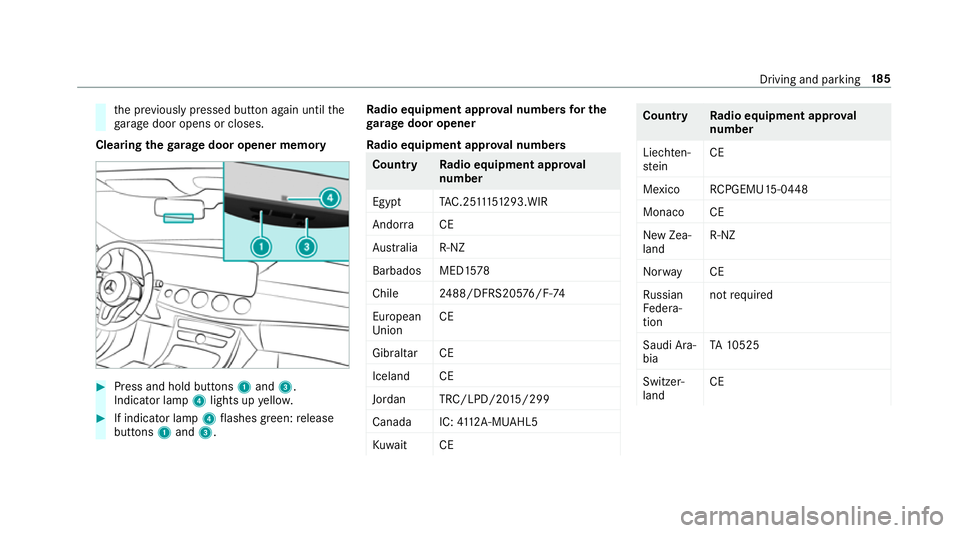
th
e pr eviously pressed button again until the
ga rage door opens or closes.
Clearing thega rage door opener memo ry#
Press and hold buttons 1and 3.
Indicator lamp 4lights up yello w. #
If indicator lamp 4flashes green: release
buttons 1and 3. Ra
dio equipment appr oval numbers for the
ga rage door opener
Ra dio equipment appr oval numbers Countr
yRadio equipment appr oval
number
Egyp tT AC.25 111 51293.WIR
Andor ra CE
Au stra lia R-NZ
Barbados MED1 578
Chile 2488/DFRS205 76/F-74
European
Union CE
Gibral tarCE
Iceland CE
Jordan TRC/LPD/20 15/299
Canad aI C:4112 A-MUAHL5
Ku wa it CE Count
ryRadio equipment appr oval
number
Liechten‐
st ein CE
Mexico RCPGEMU15-0448
Monaco CE
New Zea‐
land R-
NZ
Nor wayCE
Ru ssian
Fe dera‐
tion not
requ ired
Saudi Ara‐
bia TA
10525
Switzer‐
land CE Driving and parking
18 5
Page 264 of 497
#
Only operate this equipment when the
traf fic situation permits. #
Ifyo u cannot be sure of this, stop the
ve hicle whilst paying attention toroad
and traf fic conditions and ope rate the
equipment with theve hicle stationar y. When
telephoning, you must obse rveth e legal
re qu irements forth e count ryin which you are
cur rently driving.
Ve hicles with theAu dio 20 multimedia sys‐
te m: the most recently dialled telephone num‐
bers are displa yed on theTelephone menu. #
Select an entr y:swipe upwards or down‐
wa rds on the left-hand touch cont rol. #
Press the left-hand touch cont rol.
If th ere is only one telephone number
sa ve dto an entr y:thete lephone number is
selec ted. #
Ifth ere are multiple telephone numbers
sa ve dto an entr y:swipe upwards or down‐
wa rds on the left-hand touch cont rolto
select the desired telephone number. #
Press the left-hand touch cont rol.
The telephone number is dialled.
The following displa ysmay appear ins tead of the
te lephone numbers dialled:
R Please wait... :th e application is starting.
When a Blue tooth®
connection tothe mobile
phone is not es tablished, the menu for
authorising and connecting a mobile phone is
displa yed in the multimedia sy stem
(→ page 279).
R Updating data. ..:the call list is being upda‐
te d.
R Importing contacts... :th e conta cts from the
mobile phone or from a storage medium are
being impor ted.
Ac cepting/rejecting a call
When youre cei vea call, theIncoming call mes‐
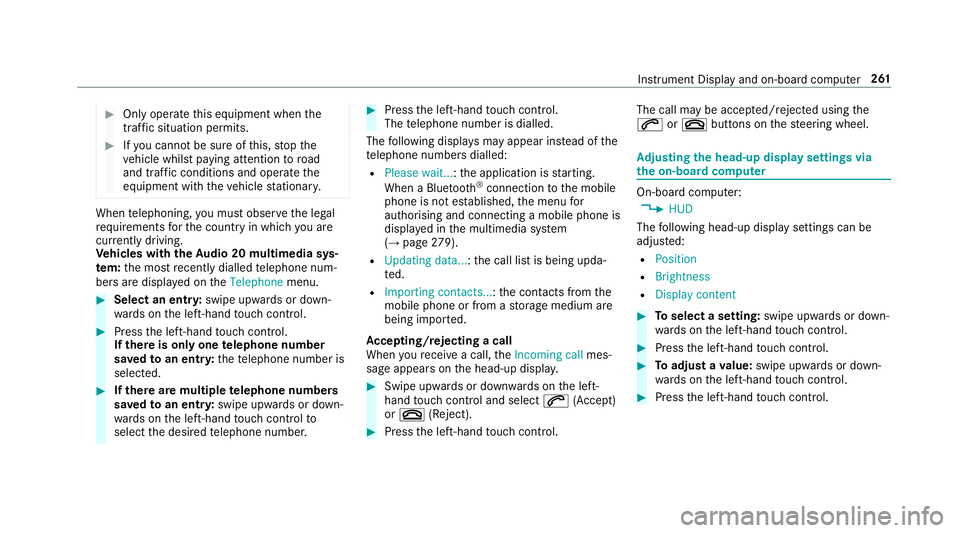
sage appears on the head-up displa y. #
Swipe up wards or down wards on the left-
hand touch cont rol and select 6(Accept)
or ~ (Reject). #
Press the left-hand touch cont rol. The call may be accep
ted/rejec ted using the
6 or~ buttons on thesteering wheel. Ad
justing the head-up display settings via
the on-board co mputer On-board computer:
, HUD
The following head-up display settings can be
adjus ted:
R Position
R Brightness
R Display content #
Toselect a setting: swipe upwards or down‐
wa rds on the left-hand touch cont rol. #
Press the left-hand touch cont rol. #
Toadjust a value: swipe upwards or down‐
wa rds on the left-hand touch cont rol. #
Press the left-hand touch cont rol. Instrument Display and on-board computer
261
Page 463 of 497
Boot box
see EAS Y-PA CK boot box
Boot lid Activating/deactivating the boot lid
opening limiter ....................................... 81
Closing .................................................. 77
HANDS-FREE ACCESS .......................... .79
Locking separa tely ................................. 81
Opening .................................................76
Opening dimensions ............................3 76
Brake Assi stSystem
see BAS (Brake Assi stSystem)
Brake fluid
No tes ................................................... 374
Brake forc e distribution
EBD (Elect ronic Brake forc e Distribu‐
tion) ..................................................... 19 6
Brakes ABS (Anti-lock Braking Sy stem) ........... 191
Ac tive Brake Assi st.............................. 19 6
Ad aptive brake lights .......................... .201
BA S (Brake Assi stSystem) ...................1 91
Driving tips .......................................... 16 4EBD (Electronic Brake
forc e Distribu‐
tion) ..................................................... 19 6
HOLD function .................................... .212
Limited braking ef fect (salt-trea ted
ro ads) .................................................. 16 4
New/replaced brake linings/brake
discs .................................................... 16 4
Ru nning-in no tes ..................................1 64
Braking assistance see BAS (Brake Assi stSystem)
Breakdown Assis tance overview .............................. 18
To w- starting ........................................ 340
To wing away ........................................ 336
Tr ansporting theve hicle ......................3 38
Wheel change ...................................... 357
Breakdown see Flat tyre
Breakdown assistance call see Service call
Breakdown management see Service call
Bu rm ester ®
sur round sound sy stem .....3 05
Ad justing the balance/fader ............... 305 Ad
justing the sound optimisation ........ 305
Ad justing treble, mid and bass ............ 305
Calling up the sound menu .................. 305
Information .......................................... 305
Switching the sur round sound on/off
............................................................ .305
Buttons Steering wheel .................................... 252 C
Call lists Calling up the speed dial list ............... 285
Deleting speed dial presets ................. 285
Displaying de tails from a list ent ry...... 285
Making a call ....................................... 285
Overview ............................................. 285
Setting up a speed dial li st.................. 285
Calling up the sound menu Burmes ter®
sur round sound sy stem ... 305
Calls ..........................................................2 82
Ac cepting ............................................ 282
Ac tivating functions du ring a call ........ 282
Calls wi thseveral participants ............ .282
Declining ............................................. 282 460
Index
Page 474 of 497
Flat ty
re.................................................... 324
MOExtended tyres ............................... 325
No tes ................................................... 324
TIREFIT kit ...........................................3 26
Wheel change ...................................... 357
Floor mats ................................................ 12 6
Fo g light (extended range) ......................1 32
Fr ag rance
see Fragrance sy stem
Fr ag rance sy stem .................................... 151
Ad justing the fragrance intensity ......... 151
Inserting/removing theflacon ............ .151
Switching on/off .................................. 151
Fr ee software ............................................ 30
Fr equencies
Mobile phone ...................................... 365
Tw o-w ayradio ...................................... 365
Fr equency band
Selecting (on-board computer) ............ 259
Fr ont airbag (driver, front passenger) .....38
Fr ont passenger seat
Ad justing from the driver's seat ............ 98 Fr
ont passenger seat
see Seat
Fr ont wheel ar ch
Fitting/removing the co ver .................. 13 8
Fr ont wheel ar chcover
Fitting/removing ................................. 13 8
Fu el
E10 ...................................................... 370
Pe trol ................................................... 370
Quality (petrol) .................................... 370
Re ser vefuel le vel ................................ 372
Sulphur content ................................... 370
Ta nk capacity ....................................... 372
Fu el consum ption
On-board computer ............................ .257
Fu elling .................................................... .371
Ad ditives .............................................. 371
Diesel .................................................. 371
Low outside temp eratures ...................3 71
Quality (diesel) ..................................... 371
Re fuelling ............................................. 176
Fu nction seat
see Door cont rol panel Fu
se insert
see Fuses
Fu ses ........................................................ 341
Assignment diagram ............................3 41
Before replacing a fuse ........................ 341
Fu se box in the boot ............................3 43
Fu se box in the engine compartment .. 342
Fu se box in the front-passen gerfo ot‐
we ll ...................................................... 343
Fu se box on the dashboard ................. 343
No tes ................................................... 341 G
Garage door opener Cleari ngthe memory ........................... 185
Opening/closing thega rage door ........ 184
Programming buttons .......................... 182
Ra dio equipment appr oval numbers .... 185
Re solving problems ............................. 184
Synchronising thero lling code ............ 183
Garmin ®
MAP PIL OTnavigation mod‐
ule
Activating ............................................ 277
Overview ..............................................2 76 Index
471
Page 479 of 497
St
eering wheel — Saving settings ......... 106
Menu (on-board computer) Assis tance graphic .............................. 256
Designs ............................................... 262
Media ................................................. .260
Na vigation .......................................... .258
Overview ............................................. 253
Ra dio ...................................................2 59
Service ................................................ 256
Te lephone ............................................ 260
Tr ip ...................................................... 257
Mercedes me connect accident management ........................ .289
Ar ranging a service appointment ........ 289
Breakdown assi stance call .................. 289
Calling the Mercedes-Benz Cus tomer
Centre ................................................. 287
Consenting todata transfer .................2 89
Information .......................................... 287
Making a call via theove rhead con‐
trol panel ............................................. 288
MB Info call ......................................... 288
Tr ans ferred data ..................................2 90
Mercedes-AMG vehicles
No tes ................................................... 15 9Mercedes-Benz emer
gency call sys‐
te m ........................................................... 290
Au tomatic emergency call ................... 291
Information .......................................... 290
Manual emer gency call ........................ 291
Overview ............................................. 290
Tr ans ferred data ..................................2 92
Mercedes-Benz Service Centre see Qualified specialist workshop
Message (multifunction display) see Display message
Message memory .................................... 381
Messages .................................................2 86
Making a call ....................................... 286
No tes .................................................. 286
Re ading .............................................. .286
Settings ............................................... 286
Mir rors
see Outside mir rors
Mobile phone Authorising (Remo teParking Assist) .. .236
Cancelling permission for Internet
connection .......................................... 294
Damage de tection (pa rked vehicle) ..... 189Fr
equencies ......................................... 365
Locking theve hicle ................................ 72
St arting theve hicle .............................. 161
Tr ansmission output (maximum) ........ .365
Un locking theve hicle ............................72
Wi reless charging ................................ 12 5
Mobile phone see Telephone
Model series ............................................ 366
MOExtended tyres .................................. 325
Mo torw ay mode ....................................... 131
MULTIBEAM LED see Intelligent Light Sy stem
Multifunction display (on-board com‐
puter) ........................................................ 255
Multifunction steering wheel
Overview of buttons ............................ 252
Multifunction steering wheel
see Steering wheel
Multimedia sy stem ........................ .264,273
Ac tivating/deactivating standby
mode .................................................. .190
Ad justing thevo lume .......................... .271 476
Index