fog light MERCEDES-BENZ E-CLASS SALOON 2017 User Guide
[x] Cancel search | Manufacturer: MERCEDES-BENZ, Model Year: 2017, Model line: E-CLASS SALOON, Model: MERCEDES-BENZ E-CLASS SALOON 2017Pages: 497, PDF Size: 10.38 MB
Page 213 of 497
#
Brief lypull the cruise control le verto wa rds
yo u3.
or #
Accelerate brie fly.
Yo ur vehicle pulls away and adapts its speed
to that of theve hicle in front. If no vehicle is
de tected in front, your vehicle accelerates to
th e set speed.
Collision warning
If Ac tive Dis tance Assi stDISTRONIC is unable to
suf ficiently decele rate theve hicle in order to
pr eve nt it from approa ching theve hicle in front,
yo u will be warned visually and acousticall y.An
intermittent warning tone will then sound and
th e dis tance warning lamp will light up in the
instrument clus ter. #
Brake immediately in order toinc rease the
dis tance from theve hicle in front.
or #
Take evasive action pr ovided it is safe todo
so. Ac
tive Steering Assist Fu
nction of Active Steering Assist
Ac tive Steering Assist is only available for
ve hicles with the Driving Assistance Pack‐
age.
R Active Steering Assist is operational at
speeds up to210 km/h and helps youto stay
in the cent reofthe lane bymeans of moder‐
ate steering inter ventions.
R It uses theve hicle in front and the lane mark‐
ings as a refere nce depending on the driven
speed.
R Active Steering Assist requ ires you as the
driver, tokeep your hands on thesteering
wheel at all times so that you are able to
inter vene at any time tocor rect the course of
th eve hicle and keep it in lane.
R Active Steering Assist can be overridden at
any time bysteering theve hicle yourself.
R When the sy stem is actively steering, the
è symbol is shown in green in the multi‐
function displa y. Sy
stem limitations of Active Steering Assist
Ac tive Steering Assist has a limited steering tor‐
qu efo r lateral guidance. In some cases, the
st eering inter vention is not su fficient tokeep the
ve hicle in the lane.
If th e de tection of lane markings and vehicles
ahead is impaired, Active Steering Assist
switches topassive mode. The sy stem pr ovides
no support in this case. During the transition
from the active topassive status, theè sym‐
bol is shown as enlar ged and flashes yello w.
Once the sy stem is passive theè symbol is
shown as gr eyinthe multifunction displa y.
The sy stem may be impaired or may not function
in thefo llowing ins tances:
R Ifth ere is poor visibility, e.g. due toinsuf fi‐
cient illumination of thero ad, or due tosno w,
ra in, fog or heavy spr ay.
R Ifth ere is glare, e.g. from oncoming traf fic,
di re ct sunlight or reflection from other vehi‐
cles (e.g. if the car riag ewa y is wet).
R Ifth e windscreen is dirty, mis ted up, dam‐
aged or co vered, for ins tance byast icke r,in
th e vicinity of the camera. 210
Driving and pa rking
Page 223 of 497
Re
versing camera Fu
nction of there ve rsing camera If
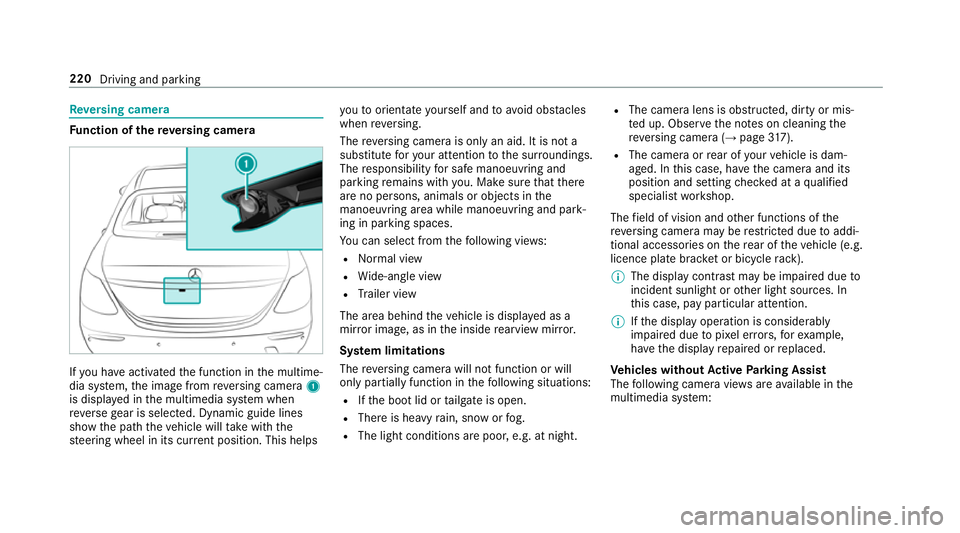
yo u ha veactivated the function in the multime‐
dia sy stem, the image from reve rsing camera 1
is displa yed in the multimedia sy stem when
re ve rsege ar is selec ted. Dynamic guide lines
show the path theve hicle will take with the
st eering wheel in its cur rent position. This helps yo
uto orientate yourself and toavo id obs tacles
when reve rsing.
The reve rsing camera is only an aid. It is not a
substitute foryo ur attention tothe sur roundings.
The responsibility for safe manoeuvring and
parking remains with you. Make sure that there
are no persons, animals or objects in the
manoeuvring area while manoeuvring and park‐
ing in parking spaces.
Yo u can select from thefo llowing vie ws:
R Normal view
R Wide-angle view
R Trailer view
The area behind theve hicle is displa yed as a
mir ror image, as in the inside rearview mir ror.
Sy stem limitations
The reve rsing camera will not function or will
only partially function in thefo llowing situations:
R Ifth e boot lid or tailgate is open.
R There is heavy rain, snow or fog.
R The light conditions are poor, e.g. at night. R
The camera lens is obstructed, dirty or mis‐
te d up. Obser vethe no tes on cleaning the
re ve rsing camera (→ page317).
R The camera or rear of your vehicle is dam‐
aged. In this case, ha vethe camera and its
position and setting checked at a qualified
specialist workshop.
The field of vision and other functions of the
re ve rsing camera may be restricted due toaddi‐
tional accesso ries on there ar of theve hicle (e.g.
licence plate brac ket or bicycle rack ).
% The display contrast may be impaired due to
incident sunlight or other light sources. In
th is case, pay particular attention.
% Ifth e display operation is considerably
impaired due topixel er rors,fo rex ample,
ha ve the display repaired or replaced.
Ve hicles without Active Parking Assist
The following camera vie wsare available in the
multimedia sy stem: 220
Driving and parking
Page 228 of 497
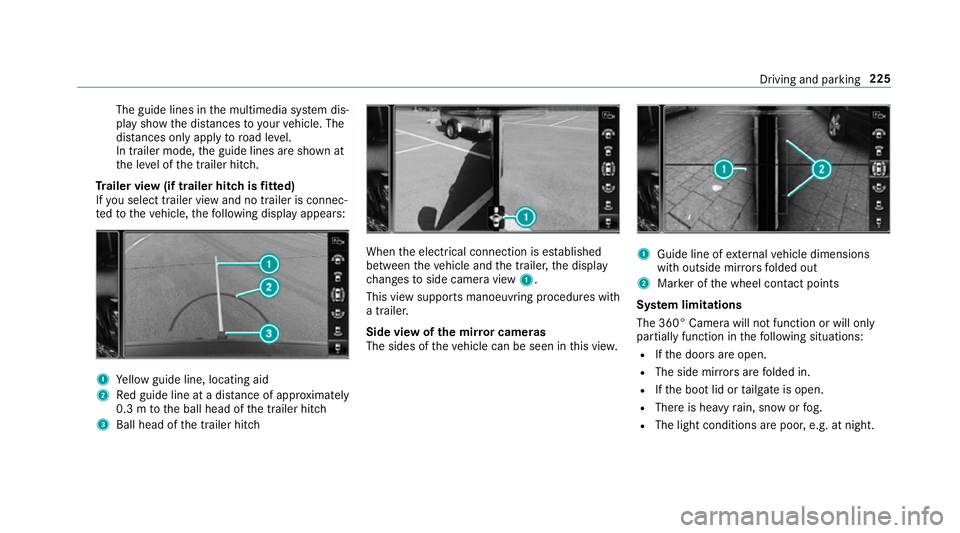
The guide lines in
the multimedia sy stem dis‐
play show the dis tances toyour vehicle. The
dis tances only apply toroad le vel.
In trailer mode, the guide lines are shown at
th e le vel of the trailer hitch.
Tr ailer view (if trailer hitch is fitted)
If yo u select trailer view and no trailer is connec‐
te dto theve hicle, thefo llowing display appears: 1
Yellow guide line, locating aid
2 Red guide line at a dis tance of appr oximately
0.3 m tothe ball head of the trailer hitch
3 Ball head of the trailer hitch When
the electrical connection is es tablished
between theve hicle and the trailer, the display
ch anges toside camera view 1.
This view supports manoeuvring procedures with
a trailer.
Side view of the mir ror cameras
The sides of theve hicle can be seen in this vie w. 1
Guide line of extern al vehicle dimensions
with outside mir rors folded out
2 Marker of the wheel conta ct points
Sy stem limitations
The 360° Camera will not function or will only
partially function in thefo llowing situations:
R Ifth e doors are open.
R The side mir rors are folded in.
R Ifth e boot lid or tailgate is open.
R There is heavy rain, snow or fog.
R The light conditions are poor, e.g. at night. Driving and parking
225
Page 242 of 497
Blind Spot Assi
stand Active Blind Spot
Assi st Fu
nction of Blind Spot Assist and Active
Blind Spot Assi st
Blind Spot Assi stuses two lateral, rear-facing
ra dar sensors tomonitor the area up to40 m
behind your vehicle and 3 m directly next to your
ve hicle.
If a vehicle is de tected at speeds ab ove appr ox‐
imately 12km/h and this vehicle subsequently
enters the monitoring range di rectly next to your
ve hicle, thewa rning lamp in the outside mir ror
lights up red.
If a vehicle is de tected close to yourvehicle in
th e lateral monitoring range and you swit chon
th e turn signal indicator in the cor responding
direction, a warning tone sounds once. The red
wa rning lamp in the outside mir rorflashes. If the
turn signal indica torre mains on, all other de tec‐
te dve hicles are indicated only bytheflashing of
th ere dwa rning lamp.
If yo uove rtake a vehicle quickl y,no warning is
given. &
WARNING Risk of accident despi teBlind
Spot Assi st
Blind Spot Assi stdoes not react tovehicles
approaching and overtaking you at a greatly
di fferent speed.
As a result, Blind Spot Assist cannot warn
drivers in this situation. #
Alw ays pay careful attention tothe traf‐
fi c situation and maintain a safe dis‐
ta nce at the side of theve hicle. Blind Spot Assist and
Active Blind Spot Assi st
are on lyaids. They may failto detect some vehi‐
cles and are no substitute for attentive driving.
Alw ays ensure that there is suf ficient di stance to
th e side forot her road users and obs tacles.
Sy stem limitations
The sy stem may be limited in thefo llowing situa‐
tions:
R the sensors are dirty or co vered
R poor visibility, e.g. due tofog, heavy rain,
snow or spr ay R
narrow vehicles, e.g. bicycles, are within the
monitoring range
Wa rnings may be issued in er ror when driving
close tocrash ba rriers or similar solid lane bor‐
ders. Warnings may be inter rupte d when driving
alongside long vehicles, e.g. lor ries, for a pro‐
longed time.
Blind Spot Assist is not operational when reve rse
ge ar is engaged.
Fu nction of braking applications (Active
Blind Spot Assist)
If Ac tive Blind Spot Assi stdetects a risk of a side
impact in the monitoring range, a cou rse-cor‐
re cting brake application is car ried out. This is
designed tohelp youav oid a collision.
The course-cor recting brake application is availa‐
ble in the speed range between appr oximately
30 km/h and 200 km/h. Driving and parking
239
Page 441 of 497
Display messages
Possible causes/consequences and M
MSolutions
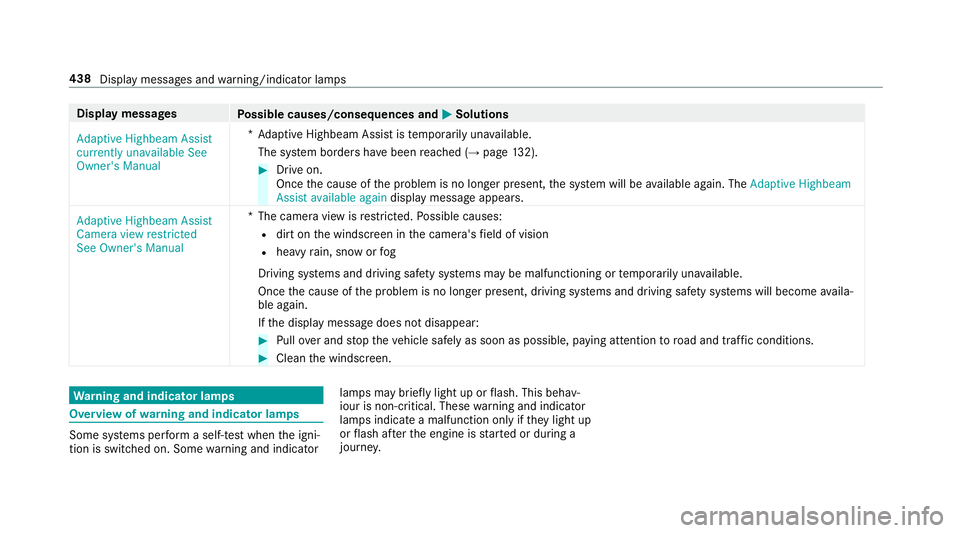
Adaptive Highbeam Assist
currently unavailable See
Owner's Manual *A
daptive Highbeam Assist is temp orarily una vailable.
The sy stem borders ha vebeen reached (→ page132). #
Drive on.
Once the cause of the problem is no longer present, the sy stem will be available again. The Adaptive Highbeam
Assist available again display message appears.
Adaptive Highbeam Assist
Camera view restricted
See Owner's Manual *T
he camera view is restricted. Possible causes:
R dirt on the windscreen in the camera's field of vision
R heavy rain, snow or fog
Driving sy stems and driving saf ety sy stems may be malfunctioning or temp orarily una vailable.
Once the cause of the problem is no longer present, driving sy stems and driving saf ety sy stems will become availa‐
ble again.
If th e display message does not disappear: #
Pull over and stop theve hicle safely as soon as possible, paying attention toroad and traf fic conditions. #
Clean the windscreen. Wa
rning and indicator lamps Overview of
warning and indicator lamps Some sy
stems per form a self-test when the igni‐
tion is switched on. Some warning and indicator lamps may briefly light up or
flash. This behav‐
iour is non-critical. These warning and indicator
lamps indicate a malfunction only if they light up
or flash af terth e engine is star ted or during a
journe y. 438
Display messages and warning/indicator lamps
Page 442 of 497
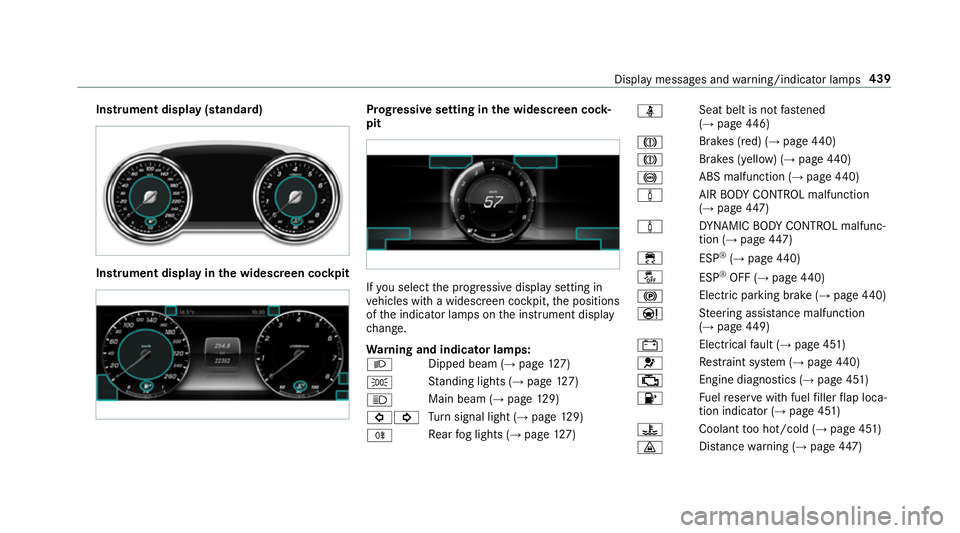
Instrument display (standard)
Instrument display in
the widescreen cockpit Prog
ressive setting in the widescreen cock‐
pit If
yo u select the progressive display setting in
ve hicles with a widescreen cockpit, the positions
of the indicator lamps on the instrument display
ch ange.
Wa rning and indicator lamps:
L Dipped beam (→
page127)
T St
anding lights (→ page127)
K Main beam (→
page129)
#! Tu
rn signal light (→ page129)
R Re
ar fog lights (→ page127) ü
Seat belt is not
fastened
(→ page 446)
J Brakes (red) (→
page 440)
J Brakes (yell
ow) (→ page 440)
! ABS malfunction (→
page 440)
à AIR
BODY CONTROL malfunction
(→ page 447)
à DY
NA MIC BODY CONTROL malfunc‐
tion (→ page447)
÷ ESP®
(→ page 440)
å ESP®
OFF (→ page 440)
! Electric pa
rking brake (→ page440)
Ð St
eering assis tance malfunction
(→ page 449)
# Electrical
fault (→ page 451)
6 Re
stra int sy stem (→ page440)
; Engine diagnostics (→
page 451)
8 Fu
elreser vewith fuel filler flap loca‐
tion indicator (→ page 451)
? Coolant
too hot/cold (→ page 451)
· Dis
tance warning (→ page447) Displ
aymessa ges and warning/indicator lamps 439
Page 477 of 497
Knee airbag
................................................ 38L
Laden ........................................................ 11 3
St ow age space under the boot floor ....1 17
Ti e-down eyes ...................................... 11 3
Lamp (instrument display) see Warning/indicator lamps
Lamps see Interior lighting
Lane Keeping Assist
see Active Lane Keeping Assist
Language Setting .................................................2 75
LED light see In telligent Light Sy stem
Le vel control sy stem
see AIR BODY CONTROL
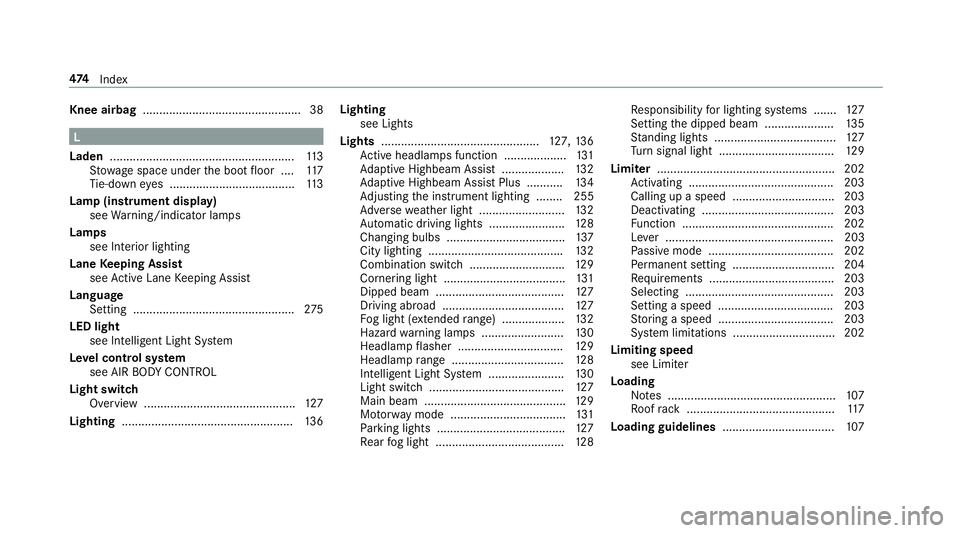
Light switch Overview .............................................. 127
Lighting .................................................... 13 6Lighting
see Lights
Lights ................................................ 127, 13 6
Ac tive headla mps function ...................1 31
Ad aptive Highbeam Assist .................. .132
Ad aptive Highbeam Assist Plus .......... .134
Ad justing the instrument lighting ........ 255
Ad versewe ather light .......................... 13 2
Au tomatic driving lights ....................... 12 8
Changing bulbs .................................... 137
City lighting ........................................ .132
Combination switch ............................ .129
Cornering light ..................................... 131
Dipped beam ....................................... 127
Driving ab road .................................... .127
Fo g light (extended range) ................... 13 2
Haza rdwa rning lamps ........................ .130
Headlamp flasher ................................ 12 9
Headla mprange .................................. 12 8
Intellige nt Light Sy stem ....................... 13 0
Light switch .........................................1 27
Main beam ...........................................1 29
Mo torw ay mode ................................... 131
Pa rking lights ...................................... .127
Re ar fog light ....................................... 12 8Re
sponsibility for lighting sy stems .......1 27
Setting the dipped beam ..................... 13 5
St anding lights .................................... .127
Tu rn signal light ................................... 12 9
Limiter ...................................................... 202
Ac tivating ............................................ 203
Calling up a speed ............................... 203
Deactivating ........................................ 203
Fu nction .............................................. 202
Le ver ................................................... 203
Pa ssive mode ...................................... 202
Pe rm anent setting .............................. .204
Re quirements ...................................... 203
Selecting ............................................ .203
Setting a speed ................................... 203
St oring a speed ................................... 203
Sy stem limitations ...............................2 02
Limiting speed see Limi ter
Loading Notes ................................................... 107
Ro ofrack ............................................. 11 7
Loading guidelines .................................. 107474
Index
Page 483 of 497
Calling up
thest ation list .................... .302
Deleting stations ................................ .303
Displ aying information ........................ .304
Displ aying radio text ............................ 304
Displaying the artist and track ............ 304
Editing station presets ........................ .303
Fr equency fix ....................................... 303
Menu (on-boa rdcompu ter) .................. 259
Moving stations .................................. .303
Overview .............................................. 301
Sear ching forst ations .......................... 301
Setting a station .................................. 301
Setting station tracking ...................... .303
Setting the frequency band ................. 301
Sorting thest ation list ........................ .302
St oring radio stations .......................... 302
Swit ching traf fic announcements
on/off ................................................. 304
Ta gging music trac ks........................... 303
Ra dio station list
Sorting ................................................ 302
Ra dio stations
Selecting (on-boa rdcompu ter) ............ 259
Ra in-closing feature
Sliding sunroof ...................................... 89 Ra
nge
Displaying ............................................ 257
Re ading light
see Interior lighting
Re ar door (child saf ety lock) .................... 63
Re ar fog light ...........................................1 28
Re ar seat
see Seat
Re ar seat belt
St atus display ........................................ 37
Re ar seat belt status display .................... 37
Re ar window
Ro ller sunblind ...................................... 82
Re ar window heater ................................ 147
Re ar-view mir ror
see Outside mir rors
Re cycling
see Take -ba ckof end-of-life vehicles
Re ducing agent
see AdBlue ®
Re fuel
Re fuelling theve hicle ........................... 176Re
fuelling
To pping up AdBlue ®
............................. 17 9
Re gistration
Ve hicle ................................................... 27
Re mo tecont rol (stationa ryheater)
Displ ays ............................................... 15 5
Problems ............................................. 157
Re placing the battery .......................... 15 6
Setting ................................................. 154
Re mo teOnline
Charging the battery ............................1 63
Cooling or heating theve hicle inte‐
ri or .......................................................1 62
St arting theve hicle ............................. 16 3
Re mo teParking Assist ............................ 231
Auth orising a mobile phone ................. 236
Fu nction .............................................. 231
Ope rating ............................................ 233
Sy stem limitations ...............................2 31
Re placing a bulb
see Changing bulbs
Re scue card ............................................... 27480
Index