radio MERCEDES-BENZ E-CLASS SALOON 2017 User Guide
[x] Cancel search | Manufacturer: MERCEDES-BENZ, Model Year: 2017, Model line: E-CLASS SALOON, Model: MERCEDES-BENZ E-CLASS SALOON 2017Pages: 497, PDF Size: 10.38 MB
Page 268 of 497
-
calls up a li st
R slide 4 up or down
- highlights a preset in thest ation
- selects a sy stem language
R slide 2 diagonally
- movesth e crosshair across the map
R turn 3
- sound: sets the treble, mid-range and
bass
- Selecting a favo urite
- connects a mobile phone: selects a
mobile phone from the list of de tected
mobile phones
R press 7
- Storing radio stations
- con firm s a selection or entry
To uch Control and touchpad (sin gle-finger swipe)
R swipe left orright
- selects a radio station
- calls up a list R
swipe up or down
- highlights a preset in thest ation
- selects a sy stem language
R swipe diagonally
- movesth e crosshair across the map
R press
- Storing radio stations
- con firm s a selection or entry
To uchpad (t wo-finger swipe)
R turn right or left using two fingers
- tone settings: adjusts the treble, mid-
ra nge and bass
R movetwo fingers apart ortoge ther
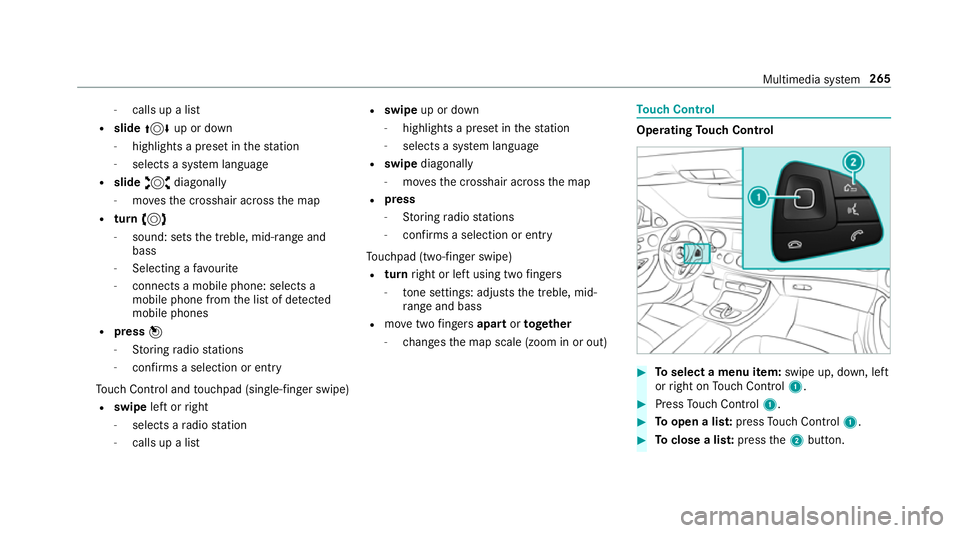
- changes the map scale (zoom in or out) To
uch Control Operating
Touch Control #
Toselect a menu item: swipe up, down, left
or right on Touch Control 1. #
Press Touch Control 1. #
Toopen a lis t:press Touch Control 1. #
Toclose a lis t:press the2 button. Multimedia sy
stem 265
Page 274 of 497
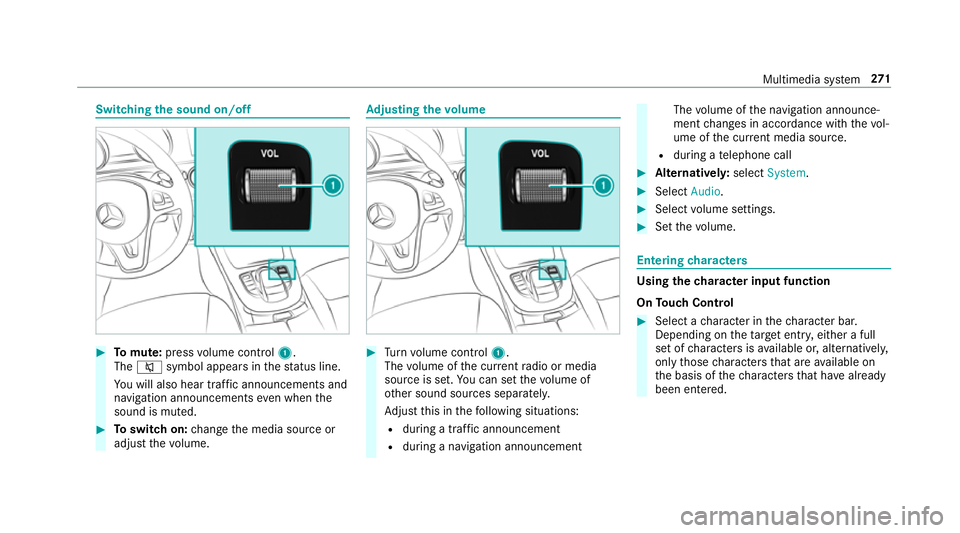
Switching
the sound on/off #
Tomute: pressvolume control 1.
The 8 symbol appears in thest atus line.
Yo u will also hear traf fic announcements and
navigation announcements even when the
sound is muted. #
Toswitch on: change the media source or
adjust thevo lume. Ad
justing the volume #
Turn volume control 1.
The volume of the cur rent radio or media
source is set. You can set thevo lume of
ot her sound sources separatel y.
Ad just this in thefo llowing situations:
R during a traf fic announcement
R during a navigation announcement The
volume of the navigation announce‐
ment changes in accordance with thevo l‐
ume of the cur rent media sou rce.
R during a telephone call #
Alternativel y:select System. #
Select Audio. #
Select volume settings. #
Set thevo lume. Entering
characters Using
thech aracter input function
On Touch Control #
Select a character in thech aracter bar.
Depending on theta rget entry , either a full
set of characters is available or, alternativel y,
only those characters that are available on
th e basis of thech aracters that ha vealready
been entered. Multimedia sy
stem 271
Page 304 of 497
Displaying Blu
etoo th®
audio equipment
details
Multimedia sy stem:
, Media .
Media .
Bluetooth
audio .
Options .
Bluetooth audio devices #
Highlight Blue tooth®
audio equipment and
navigate totheright. #
Select Details. Ra
dio Switching on the
radio Multimedia sy
stem:
, Radio #
Alternatively: press the$ button.
The radio display appears. You will hear the
last station pla yed on the last frequency
band selected. Ra
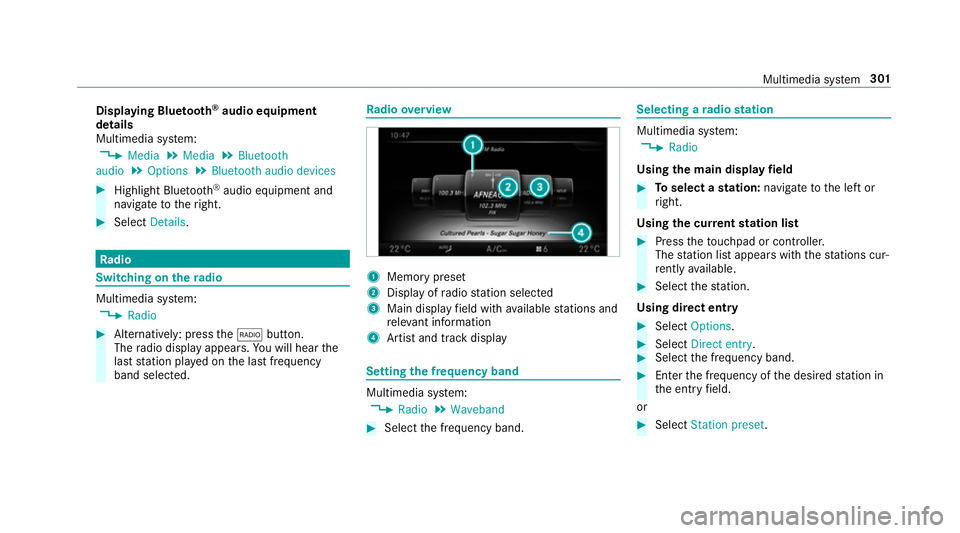
dio overview 1
Memory preset
2 Display of radio station selec ted
3 Main display field with available stations and
re leva nt information
4 Artist and track displ ay Setting
the frequency band Multimedia sy
stem:
, Radio .
Waveband #
Select the frequency band. Selecting a
radio station Multimedia sy
stem:
, Radio
Using the main display field #
Toselect a station: navigate tothe left or
ri ght.
Using the cur rent station list #
Press theto uchpad or cont roller.
The station list appears with thest ations cur‐
re ntly available. #
Select thest ation.
Using direct ent ry #
Select Options . #
Select Direct entry . #
Select the frequency band. #
Ente rth e frequency of the desired station in
th e entry field.
or #
Select Station preset. Multimedia sy
stem 301
Page 305 of 497
#
Enter thest ation preset of the desired sta‐
tion. #
Select ¬.
Using the preset position #
Select Preset. #
Select Enter preset. #
Enterth est ation preset of the desired sta‐
tion. #
Select ¬.
Using the sear chfunction #
Select è. #
Enter the sear chterm. #
Select ¬.
The results are displa yed. #
Select thest ation. Calling up
thera dio station list Multimedia sy
stem:
, Radio #
Press theto uchpad or cont roller.
The station list appears.
% Each frequency range has its ownstation list
with thest ations that can cur rently be
re cei ved.
Ra dio station list with EPG (FM/DABradio
mode) #
Select Options . #
Select Current station list with EPG . #
Select a station. #
Toswitch between Current programme and
Programme preview: navigate tothe left or
th eright. Sorting
thera dio station list Multimedia sy
stem:
, Radio .
Options #
Select Sort station list . #
Select a sorting option. St
oring radio stations Multimedia sy
stem:
, Radio #
Select Preset. #
Select Save current station . #
Select a location forst oring thest ation.
or #
Inradio mode, press and hold theto uchpad
or cont roller until the preset list appears. #
Select a location forst oring thest ation. 302
Multimedia sy stem
Page 306 of 497
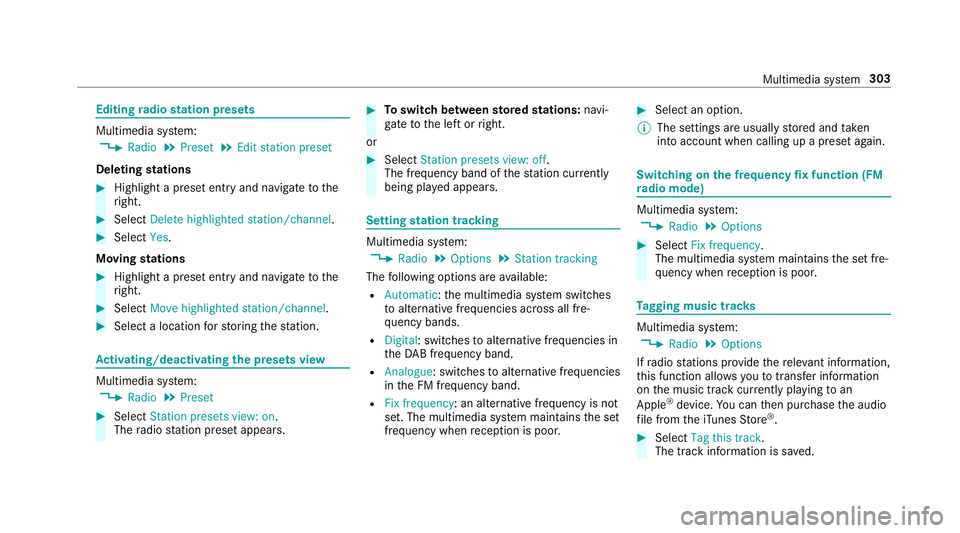
Editing
radio station presets Multimedia sy
stem:
, Radio .
Preset .
Edit station preset
Deleting stations #
Highlight a preset entry and navigate tothe
ri ght. #
Select Delete highlighted station/channel .#
Select Yes.
Moving stations #
Highlight a preset entry and navigate tothe
ri ght. #
Select Move highlighted station/channel. #
Select a location forst oring thest ation. Ac
tivating/deactivating the pres ets view Multimedia sy
stem:
, Radio .
Preset #
Select Station presets view: on .
The radio station preset appears. #
Toswitch between stored stations: navi‐
ga te to the left or right.
or #
Select Station presets view: off.
The frequency band of thest ation cur rently
being pl ayed appears. Setting
station tracking Multimedia sy
stem:
, Radio .
Options .
Station tracking
The following options are available:
R Automatic: the multimedia sy stem switches
to alternative frequencies across all fre‐
qu ency bands.
R Digital : switches toalternative frequencies in
th eDA B frequency band.
R Analogue: switches toalternative frequencies
in the FM frequency band.
R Fix frequency: an alternative frequency is not
set. The multimedia sy stem maintains the set
frequency when reception is poo r. #
Select an option.
% The settings are usually stored and taken
into account when calling up a preset again. Switching on
the frequency fix function (FM
ra dio mode) Multimedia sy
stem:
, Radio .
Options #
Select Fix frequency .
The multimedia sy stem maintains the set fre‐
qu ency when reception is poo r. Ta
gging music trac ks Multimedia sy
stem:
, Radio .
Options
If ra dio stations pr ovide there leva nt information,
th is function allo wsyouto trans fer information
on the music track cur rently pl aying toan
Apple ®
device. You can then pur chase the audio
fi le from theiTunes Store ®
. #
Select Tag this track.
The track information is sa ved. Multimedia sy
stem 303
Page 307 of 497
Displaying
the artist and track Multimedia sy
stem:
, Radio .
Options #
Select Display artist and track. #
Switch on Oa function. Switching traf
fic announcements on/off Multimedia sy
stem:
, Radio .
Options .
TA #
Activate Oor deacti vate ª the function.
or #
Press and hold the8 button on the mul‐
tifunction steering wheel until theTA display
in thest atus line lights up or goes out. Displ
aying station information Re
quirements:
R Radio stations pr ovide there leva nt informa‐
tion. Multimedia sy
stem:
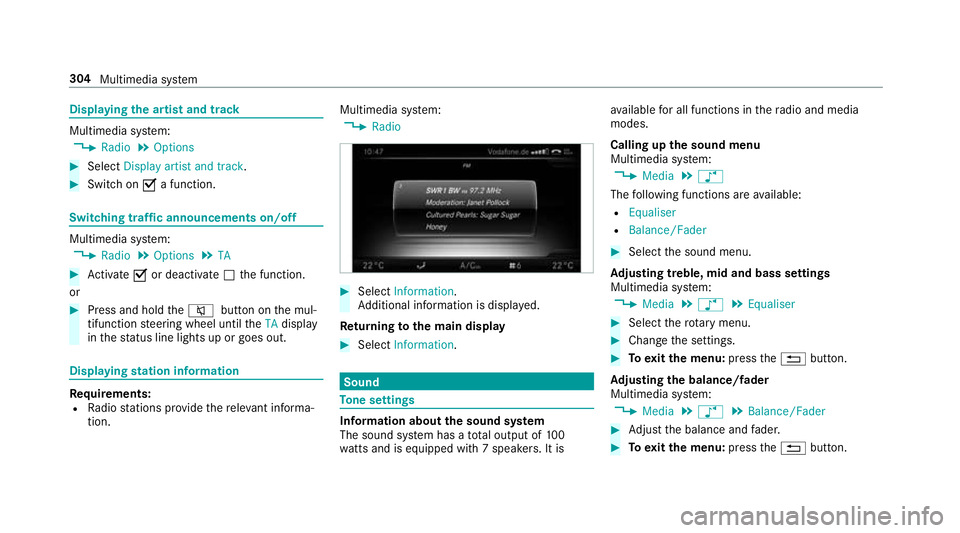
, Radio #
Select Information.
Ad ditional information is displa yed.
Re turning tothe main display #
Select Information. Sound
To
ne settings Information about
the sound sy stem
The sound sy stem has a total output of 100
wa tts and is equipped wi th7 spea kers. It is av
ailable for all functions in thera dio and media
modes.
Calling up the sound menu
Multimedia sy stem:
, Media .
à
The following functions are available:
R Equaliser
R Balance/Fader #
Select the sound menu.
Ad justing treble, mid and bass settings
Multimedia sy stem:
, Media .
à .
Equaliser #
Select thero tary menu. #
Change the settings. #
Toexitth e menu: pressthe% button.
Ad justing the balance/ fader
Multimedia sy stem:
, Media .
à .
Balance/Fader #
Adjust the balance and fader. #
Toexitth e menu: pressthe% button. 304
Multimedia sy stem
Page 352 of 497
On-board computer:
, Service .
Tyres #
Swipe down wards on Touch Control on the
left-hand side of thesteering wheel.
The Use current pressures as new reference
values message is shown in the multifunction
displa y. #
Press atoconfirm there start.
The Tyre press. monitor restarted message is
shown in the multifunction displa y.
Cur rent wa rning messages are dele ted and
th eh yellow warning lamp goes out.
Af teryo u ha vedriven for a few minutes, the
sy stem checks whe ther the cur rent tyre pres‐
su res are within the specified range. The cur‐
re nt tyre pressures are then accep ted as ref‐
erence values and monitored.
Make sure toobser vethefo llowing fur ther rela‐
te d subjec t:
R Notes on tyre pressure (→ page 345)Ra
dio-equipment appr oval of the ty repres‐
sure moni toring sy stem
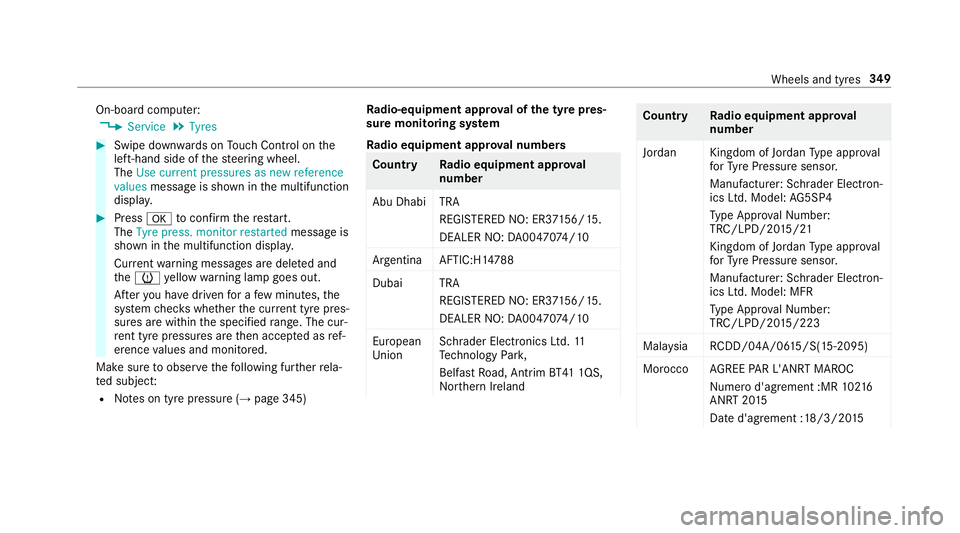
Ra dio equipment appr oval numbers Countr
yRadio equipment appr oval
number
Abu Dhabi TRA REGISTERED NO: ER3 7156/15.
DEALER NO: DA00470 74/10
Argentina AFTIC:H1 4788
Duba iT RA
REGI STERED NO: ER3 7156/15.
DEALER NO: DA00470 74/10
European
Union Schrader Electronics Ltd.
11
Te ch nology Park,
Belfast Road, Antrim BT41 1QS,
Nor thern Ireland Countr
yRadio equipment appr oval
number
Jordan Kingdom of Jordan Type appr oval
fo rTy re Pressure sensor.
Manufacturer: Schrader Elect ron‐
ics Ltd. Model: AG5SP4
Ty pe Appr oval Numb er:
TRC/LPD/20 15/21
Kingdom of Jo rdan Type appr oval
fo rTy re Pressure sensor.
Manufacturer: Schrader Elect ron‐
ics Ltd. Model: MFR
Ty pe Appr oval Numb er:
TRC/LPD/20 15/223
Mal aysia RCDD/04A/0 615/S(15-2095)
Morocco AGREE PAR L'ANRT MA ROC
Nume rod'agrement :MR 10216
ANRT 20 15
Date d'agrement :18/3/20 15 Wheels and tyres
349
Page 353 of 497
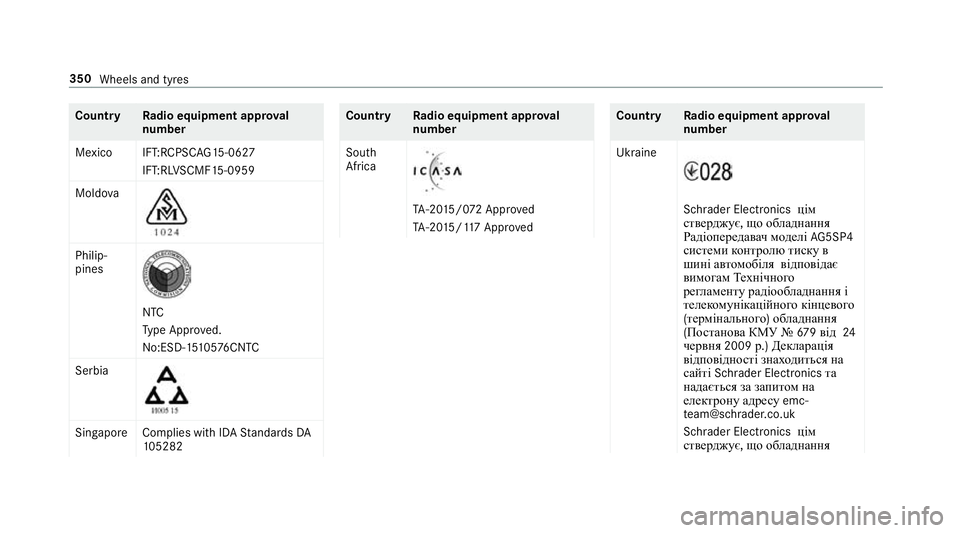
Count
ryRadio equipment appr oval
number
Mexico IFT:RCPSC AG15-0627
IFT:RL VSCMF 15-0959
Moldo va Philip‐
pines
NTC
Ty
pe Appr oved.
No:ESD-1 5105 76CNTC
Serbia Sin
gapor eC omplies with IDA Standards DA
10 5282 Countr
yRadio equipment appr oval
number
South
Africa TA
-20 15/0 72 App roved
TA -20 15/117 App roved Count
ryRadio equipment appr oval
number
Ukraine Schrader Electronics
цім
стверджує, що обладнання
Радіопередав ачмоделі AG5SP4
системи контролю тиск ув
шині ав томобіля відповідає
вимогам Технічного
регламент урадіообладнання і
телек омунікаційног окінцевого
(термінального )обладнання
(Постанов аКМУ № 679від 24
червня 2009р.)Декларація
відповідн ості знах одиться на
са йті Schrader Electronics та
надається за запит омна
елек трону адре суemc‐
te [email protected]
Schrader Elect ronics цім
стверджує, що обладнання 350
Wheels and tyres
Page 354 of 497
Count
ryRadio equipment appr oval
number
Радіопередав ачмоделі MFR
системи контролю тиск ув
шині ав томобіля відповідає
вимогам Технічного
регламент урадіообладнання і
телек омунікаційног окінцевого
(термінального )обладнання
(Постанов аКМУ № 679від 24
червня 2009р.)Декларація
відповідн ості знах одиться на
са йті Schrader Electronics та
надається за запит омна
елек трону адре суemc‐
te [email protected]
Uni ted
Arab Emi‐
ra tes TRA
REGISTERED NO :ER3
7156/15.
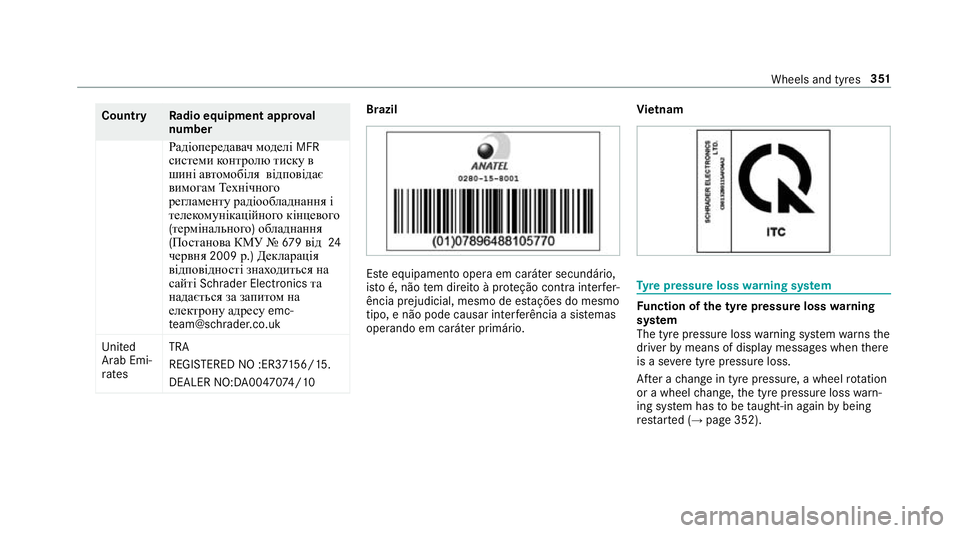
DEALER NO:DA00470 74/10 Brazil
Es
te equipamento opera em caráter secundário,
is to é, não tem direito à pr oteção contra inter fer‐
ência prejudicial, mesmo de es tações do mesmo
tipo, e não pode causar inter ferê ncia a si stemas
operando em caráter primário. Vi
etnam Ty
re pressure loss warning sy stem Fu
nction of the ty repressure loss warning
sy stem
The tyre pressure loss warning sy stem warnsthe
driver bymeans of display messa ges when there
is a se vere tyre pressu reloss.
Af ter a change in tyre pressure, a wheel rotation
or a wheel change, the tyre pressure loss warn‐
ing sy stem has tobe taught-in again bybeing
re star ted (→ page 352). Wheels and tyres
351
Page 367 of 497
Note
s ontech nical data
Mercedes-AMG vehicles: be sure toobser ve
th e no tes in the Supplement. Otherwise, you
may failto recognise dangers.
The tech nical da tawa s de term ined in accord‐
ance with EU Directives. The data stated on ly
applies tovehicles with standard equipment. Yo u
can obtain fur ther information from a Mercedes-
Benz Service Centre.
Only for ce rtain countries: you can find vehi‐
cle-specific vehicle data in the COC documents
(CERTIFIC ATE OF CONFORMITY). These docu‐
ments are deli vered with your vehicle. On-board electronics
Note
s on tampering with the engine elec‐
tronics *
NO
TEPremature wearthro ugh improper
main tenance Improper maintenance may cause
vehicle
components towe ar more quickly and the ve
hicle's operating permit may be in valida‐
te d. #
Alw ays ha vewo rkon the engine elec‐
tronics and related components car ried
out at a qualified specialist workshop. Tw
o-w ayradios Note
s on installing two-w ayradios &
WARNING Risk of accident due to
improper workon two-w ayradios
The elect romagnetic radiation from two-w ay
ra dios can inter fere with the on-board elec‐
tronics if RF transmit ters are manipulated or
re trofitted inco rrectly.
This could jeopardise the operating saf ety of
th eve hicle. #
You should ha veall workon electrical
and electronic components car ried out
at a qualified specialist workshop. &
WARNING Risk of accident from incor‐
re ct ope ration of two-w ayradios
If yo u operate two- wayra dios inco rrectly in
th eve hicle, the electromagnetic radiation
could inter fere with the on-board electronics,
e.g.:
R ifth e two-w ayradio is not connec tedto
an exterior aerial
R ifth eex terior aerial is not cor rectly
mounted or is not of low reflection
This could jeopardise the operating saf ety of
th eve hicle. #
Have the lo w-reflection exterior aerial
fi tted at a qualified specialist workshop. #
When operating two-w ayradios in the
ve hicle, alw ays connect them tothe
lo w- reflection exterior aerial. 364
Tech nical da ta