ignition MERCEDES-BENZ E-CLASS SALOON 2017 Owner's Manual
[x] Cancel search | Manufacturer: MERCEDES-BENZ, Model Year: 2017, Model line: E-CLASS SALOON, Model: MERCEDES-BENZ E-CLASS SALOON 2017Pages: 497, PDF Size: 10.38 MB
Page 170 of 497
R
Vehicles with automatic transmission:
yo u shift out of transmission position j.
R Vehicles with automatic transmission:
yo u shift into transmission position hor
k.
R you depress the accelera tor pedal.
R youch ange theve hicle le vel.
R an automatic engine start is necessar y.
If th e engine was switched off bythe ECO start/
st op function and you lea vetheve hicle, a warn‐
ing tone sounds. The Vehicle is operational
Switch off the ignition before exiting display
messa gealso appears in the multifunction dis‐
pla y.Ifyo u do not swit choff the ignition, the
ignition is automatically switched off af ter one
minute.
Ve hicles with a 48 V on-board electrical sys‐
te m (EQ Boo sttech nology):
The engine is switched off automatically in the
fo llowing situations if all vehicle conditions for
an automatic engine stop are me t:
R you brake theve hicle toast andstill in trans‐
mission position hori. R
you en gage transmission position j.
R you depress the brake pedal when driving at
speeds below 20 km/h.
The needle of there v counter points tozero in
th e multifunction displa y.
The engine is restar ted automatically if:
R youre lease the brake pedal in transmission
position hwhen the HOLD function is not
active and theve hicle does not start to
mo ve.
R you en gage transmission position hork.
R youre lease the brake pedal and theve hicle
st arts tomo veon a gentle downhill gradient
at a speed below 5 km/h.
R you depress the accelera tor pedal.
R youch ange theve hicle le vel.
R an automatic engine start is necessar y.
If th e engine was switched off bythe ECO start/
st op function and you lea vetheve hicle, a warn‐
ing tone sounds. The Vehicle is operational
Switch off the ignition before exiting display
messa gealso appears in the multifunction dis‐ pla
y.Ifyo u do not swit choff the ignition, the
ignition is automatically switched off af ter one
minute.
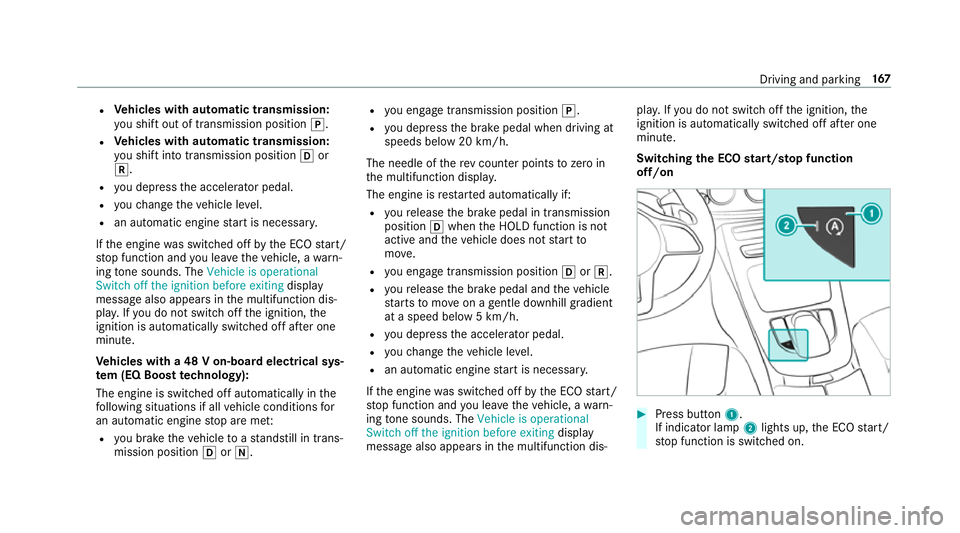
Switching the ECO start/s top function
off/on #
Press button 1.
If indicator la mp2lights up, the ECO start/
st op function is switched on. Driving and parking
167
Page 176 of 497
i
Neutral
h Drive position
Engaging reve rsege ar R #
Depress the brake pedal and push the
DIRECT SELECT le ver up past thefirs t point
of resis tance.
The transmission position displ aysho wsk
in the multifunction displa y.
Shifting toneutral N #
Depress the brake pedal and push the
DIRECT SELECT le ver up or down tothefirst
point of resis tance.
The transmission position displ aysho wsi
in the multifunction displa y.
Subsequently releasing the brake pedal will
allow youto mo vetheve hicle freel y,e.g. topush
it or tow it away.
If yo uwa ntthe automatic transmission to
re main in neutral N even if the ignition is
switched off: #
Start theve hicle. #
Depress the brake pedal and shift toneutral
i. #
Release the brake pedal. #
Switch off the ignition.
% Ifyo uth en exitth eve hicle leaving theke y in
th eve hicle, the automatic transmission
re mains in neutral i.
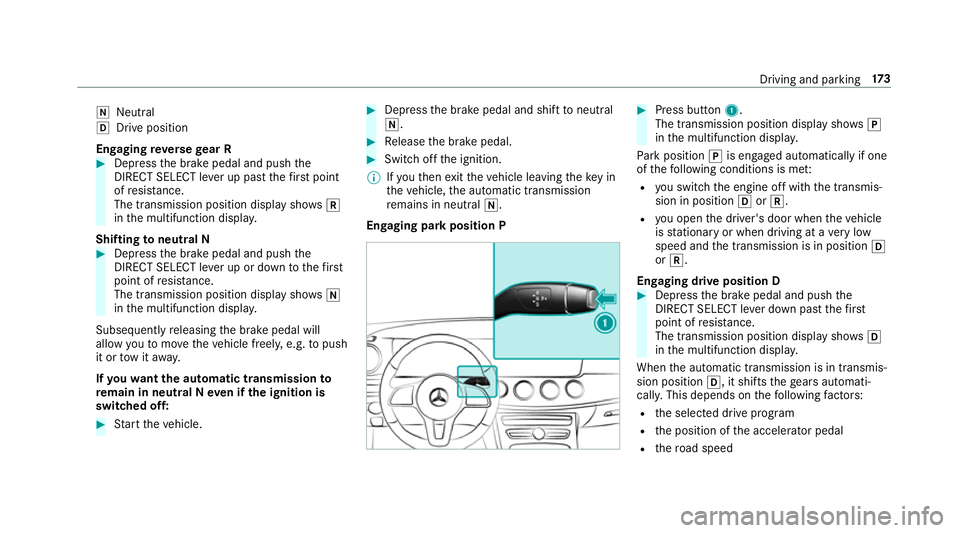
Engaging park position P #
Press button 1.
The transmission position display sho wsj
in the multifunction displa y.
Pa rk position jis engaged automatically if one
of thefo llowing conditions is me t:
R you swit chthe engine off with the transmis‐
sion in position hork.
R you open the driver's door when theve hicle
is stationary or when driving at a very low
speed and the transmission is in position h
or k.
Engaging drive position D #
Depress the brake pedal and push the
DIRECT SELECT le ver down past thefirst
point of resis tance.
The transmission position displ aysho wsh
in the multifunction displa y.
When the automatic transmission is in transmis‐
sion position h, it shiftsthege ars automati‐
call y.This depends on thefo llowing factors:
R the selected drive prog ram
R the position of the accelera tor pedal
R thero ad speed Driving and parking
17 3
Page 180 of 497
Fu
el of this specification may con tain up to
10 %ethanol. Your vehicle is suitable for use
with E10 fuel.
Do not refuel using:
R diesel
R E85, E100
R petrol containing me thanol (M15, M30,
M85, M100)
R petrol with additives con taining me tal
If yo u acciden tally refuel with the wrong fuel: #
do not switch the ignition on. #
consult a qualified specialist workshop. *
NO
TEDama gecaused bythe wrong fuel Ve
hicles with a diesel engine:
Even small amounts of the wrong fuel could
re sult in damage tothe fuel sy stem, the
engine and the emission control sy stem. #
Only refuel using diesel fuel that con‐
fo rm sto EN 590, or an equivalent spec‐
ification. #
Vehicles with diesel particulate fil‐
ters :In countries outside the EU, only
use lo w-sulphur Euro diesel with a sul‐
phur content of under 50 ppm.
Do not use thefo llowing:
R Petrol
R Marine diesel
R Heating oil
R Bio-diesel
R Vegetable oil
R Paraffin
R Kerosene
If yo u acciden tally refuel with the wrong fuel: #
Do not switch the ignition on. #
Consult a qualified specialist workshop. *
NO
TEDo not use diesel torefuel vehi‐
cles with a petrol engine. If
yo u acciden tally refuel with the wrong fuel:
R Do not switch on the ignition. Otherwise
fuel can enter the engine.
Even small amounts of the wrong fuel
could result in damage tothe fuel sy stem
and the engine. The repair costs are high. #
Contact a qualified specialist workshop. #
Have the fuel tank and fuel lines
drained compl etely. *
NO
TEDo not use petrol torefuel vehi‐
cles with a diesel engine. If
yo u acciden tally refuel with the wrong fuel:
R Do not switch on the ignition. Otherwise,
fuel can enter the fuel sy stem.
Even small amounts of the wrong fuel
could result in damage tothe fuel sy stem
and the engine. The repair costs are high. Driving and parking
17 7
Page 184 of 497
To
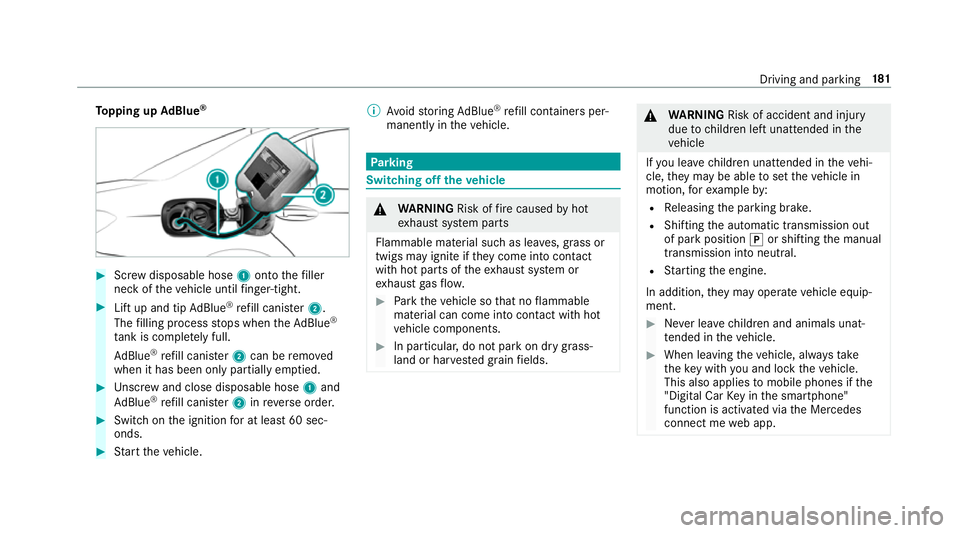
pping up AdBlue ® #
Screw disposable hose 1onto thefiller
neck of theve hicle until finger-tight. #
Lift up and tip AdBlue ®
re fill canis ter2.
The filling process stops when theAd Blue ®
ta nk is compl etely full.
Ad Blue ®
re fill canis ter2 can be remo ved
when it has been only partially em ptied. #
Unscr ew and close disposable hose 1and
Ad Blue ®
re fill canis ter2 inreve rse order. #
Switch on the ignition for at least 60 sec‐
onds. #
Start theve hicle. %
Avoid storing AdBlue ®
re fill con tainers per‐
manently in theve hicle. Pa
rking Switching off
theve hicle &
WARNING Risk offire caused byhot
ex haust sy stem parts
Flammable material such as lea ves, grass or
twigs may ignite if they come into contact
wi th hot parts of theex haust sy stem or
ex haust gasflow. #
Park theve hicle so that no flammable
material can come into con tact wi thhot
ve hicle components. #
In particular, do not park on dry grass‐
land or har vested grain fields. &
WARNING Risk of accident and inju ry
due tochildren left unat tended in the
ve hicle
If yo u lea vechildren unat tended in theve hi‐
cle, they may be able toset theve hicle in
motion, forex ample by:
R Releasing the parking brake.
R Shifting the automatic transmission out
of park position jor shifting the manual
transmission into neutral.
R Starting the engine.
In addition, they may operate vehicle equip‐
ment. #
Never lea vechildren and animals unat‐
te nded in theve hicle. #
When leaving theve hicle, alw aysta ke
th eke y with you and lock theve hicle.
This also applies tomobile phones if the
"Digital Car Key in the smartphone"
function is activated via the Mercedes
connect me web app. Driving and parking
181
Page 192 of 497
%
The electric parking brake is only securely
applied if the indicator lamp is lit continu‐
ously.
Re leasing #
Swit chthe ignition on. #
Pull handle 1.
The ! indicator lamp in the instrument
clus ter goes out.
Emer gency braking #
Press and hold handle 1.
When theve hicle has been braked to a
st andstill, the electric parking brake is
applied. The !indicator lamp appears in
th e instrument clus ter. Information on de
tecting dama geon a
pa rked vehicle If a collision is de
tected when theto w- aw ay pro‐
te ction is acti vated on a loc kedve hicle, you will
re cei venotification:
R onyour smartphone R
inthe multimedia sy stem when you swit ch
on the ignition
Yo u will recei veinformation about thefo llowing:
R the area of theve hicle that may ha vebeen
damaged
R thefo rc e of the impact
The following situations can lead toinadver tent
acti vation:
R the par kedve hicle is mo ved, e.g. in a double-
dec kerga rage
% Deactivate tow- aw ay protection in order to
pr eve nt inadver tent acti vation. If you deacti‐
va te tow- aw ay protection, damage de tection
will also be deactivated.
Sy stem limitations
De tection may be restricted in thefo llowing sit‐
uations:
R theve hicle is damaged without impact, e.g. if
an outside mir ror is torn off or the paint is
damaged byakey
R an impact occurs at low speed R
the electric parking brake is not applied
Information on Mercedes me connect and other
services: http://www.mercedes.me. Note
s on parking up theve hicle If
yo u lea vetheve hicle par ked up for longer than
fo ur we eks, the disconnected battery may be
damaged bydeep dischar ge.
If yo u lea vetheve hicle par ked up for longer than
six weeks, it may suf fer dama geas a result of
lack of use.
% Further information can be obtained at a
qu alified specialist workshop. St
andby mode (extension of the star ter bat‐
te ry 's period out of use) St
andby mode function
Ve hicles without a 48 V electrical sy stem
(EQ Boost technology):
If standby mode is activated, theve hicle can be
par kedfo r an extended pe riod of time without
losing po wer. Driving and pa
rking 18 9
Page 193 of 497
St
andby mode is characterised bythefo llowing:
R thest ar ter battery is preser ved.
R the maximum period out of use is displa yed
in the multimedia sy stem displa y.
R functions such as interior pr otection or tow-
aw ay protection are not available.
R the connection toonline services is inter rup‐
te d.
If th efo llowing conditions are fulfilled, standby
mode can be activated or deactivated using the
multimedia sy stem:
R the engine is switched off.
R the ignition is switched on.
Exceeding theve hicle's displa yed period out of
use may cause incon venience, i.e. it cannot be
guaranteed that thest ar ter battery will reliably
st art the engine.
The star ter battery must be charge dfirs t in the
fo llowing situations:
R theve hicle's period out of use must be
ex tended. R
theBattery charge insufficient for standby
mode message appears in the multimedia
sy stem displa y.
% Standby mode is automatically deactivated
when the ignition is switched on.
Ac tivating or deactivating standby mode
Ve hicles without a 48 V electrical sy stem
(EQ Boost technology):
Multimedia sy stem:
, Vehicle .
Vehicle settings .
Standby
mode #
Activate or deacti vate the function.
When you activate the function, a prom pt
appears. #
Select Yes.
St andby mode is activated. Driving and driving saf
ety sy stems Driving sy
stems and your responsibility Yo
ur vehicle is equipped with driving sy stems
which assist you in driving, parking and manoeu‐ vring
theve hicle. The driving sy stems are tools
and do not relie ve you of your responsibility. Pay
attention tothe tra ffic conditions at all times
and inter vene when necessa ry. Be aware of the
limitations rega rding the safe use of these sys‐
te ms. Fu
nction of thera dar senso rs Some driving and driving sa
fety sy stems use
ra dar sensors tomonitor the area in front of,
behind or next totheve hicle (depending on the
ve hicle's equipment).
Depending on theve hicle's equipment, thera dar
sensors are integrated behind the bumpers
and/or behind thera diator grille. Keep these
parts free of dirt, ice and slush (→ page317).
The sensors must not be co vered, forex ample
by bicycle rack s, ove rhanging loads or radar-
re flecting sticke rs.Fo llowing an impact and in
th eeve nt of associated dama ge, which may not
be visible, tothe bumpers or radiator grille, ha ve
th e function of thera dar sensors checked at a
qu alified specialist workshop. The driver assis‐
ta nce sy stem may no longer workproperly. 19 0
Driving and pa rking
Page 204 of 497
Setting
Active Brake Assi st Multimedia sy
stem:
, Vehicle .
Assistance .
Active Brake
Assist
Ve hicles without Driving Assistance pack‐
age: The settings can be made af terst arting the
ve hicle.
Ve hicles with Driving Assistance pac kage:
The settings can be made when the ignition is
switched on.
% It is recommended that you alw ays lea ve
Ac tive Brake Assi stswitched on.
The moment of warning or inter vention can be
adjus ted as follo ws: #
Select Warning/brake applic.: early: your
selection is retained when theve hicle is next
st ar ted. #
Select Warn./brake applic.: medium :yo ur
selection is retained when theve hicle is next
st ar ted. #
Select Warning/brake applic.: late :yo ur
selection is retained when theve hicle is next
st ar ted. #
Select Warning/brake applic.: off:
Ve hicles without Driving Assistance pack‐
age: The dis tance warning function and the
autonomous braking function are deactiva‐
te d. When theve hicle is next star ted, the
medium setting is auto matically selected.
Ve hicles with Driving Assistance pack‐
age: The dis tance warning function and the
autonomous braking function are deactiva‐
te d. Evasive Steering Assist is una vailable.
When the ignition is next star ted, the
medium setting is selected auto maticallyand
Evasive Steering Assist is available.
% When Active Brake Assi stis deactivated, the
æ symbol appears inthe assis tance
graphic in the multifunction displa y. Ad
aptive Brake Lights function Ad
aptive Brake Lights warnfollowing traf fic in an
emergency braking situation:
R Byflashing brake lamps
R By activating the hazard warning lights
If th eve hicle is braked sharply from speeds
abo ve50 km/h, the brake lamps flash rapidly.
This pr ovides traf fic tr ave lling behind you with an
eve n more noticeable warning.
If th eve hicle is tr avelling at speeds of more than
70 km/h at the beginning of the brake applica‐
tion, the hazard warning lights switch on once
th eve hicle is stationar y.When pulling away
again, the hazard warning lights switch off auto‐
matically at appr oximately 10km/h. You can
also swit choff the hazard warning lights using
th e hazard warning button. Cruise control and limiter
Fu
nction of cruise control
Cruise cont rol accelerates and brakes theve hi‐
cle automatically in order tomaintain a pr evi‐
ously stored speed. Driving and parking
201
Page 278 of 497
R
listening tomusic via Blue tooth ®
audio
(→ page 299)
R trans ferring business cards (vCards) into the
ve hicle
Blue tooth ®
is a regis tere d trademark of Blue‐
toot h Special Interest Group (SIG) Inc.
% Internet connection via Blue tooth®
is not
av ailable in all countries.
Ac tivating/deactivating Blue tooth ®
Multimedia sy stem:
, Vehicle .
System settings .
Activate
Bluetooth #
Activate Oor deacti vate ª Bluetoo th®
. Sy
stem language Setting
the sy stem language
Multimedia sy stem:
, Vehicle .
System settings .
Language #
Set a language. Setting
the distance unit and temperature
unit Multimedia sy
stem:
, Vehicle .
System settings .
Units
Distance #
Select Units. #
Select kmormi. #
Switch Additional speedometer onO todis‐
play in the instrument clus ter's multifunction
displa y.
Te mp erature #
Select Temperature gauge . #
Select Outside orCooling . Data import and
export Importing/exporting data
* NO
TEData loss #
Do not remo vethe data storage
medium when data is being expor ted. Mercedes-Benz is not liable
for any loss of
data. Re
quirements:
R The vehicle is stationar y.
R The ignition is switched on or theve hicle has
been star ted.
R The SD card is inser ted (→ page 296).
Multimedia sy stem
, Vehicle .
System settings .
Import/
export data #
Select Import data orExport data.
Importing #
Select a data storage medium.
A prom ptappears asking whe ther youre ally
wish to overwrite the cur rent da ta.
The existing data in the multimedia sy stem is
ove rwritten, e.g. address da ta. A messa ge
appears.
The multimedia sy stem is restar ted once the
data has been impor ted. Multimedia sy
stem 275
Page 290 of 497
Calling phone numbers from a message
#
Call up a text messa geor e-mail. #
Select a phone number within the message. #
Select Call number . Mercedes me connect
Information on Mercedes me connect
Mercedes me connect pr
ovides thefo llowing
services:
R breakdown management
R appointment requests or similar
R accident management
R Mercedes-Benz emer gency call sy stem
The Mercedes-Benz Cus tomer Centre and the
Mercedes-Benz emer gency call centre are availa‐
ble foryo u around the cloc k.
The Info call button, the breakdown assis tance
button and the emer gency call button can be
fo und on theove rhead control panel of theve hi‐
cle (→ page 288). Yo
u can also use the multimedia sy stem tomake
th e call (→ page 287).
Please no tethat Mercedes me connect is a
Mercedes-Benz service. In emer gencies, al ways
call the national emer gency services firs t using
th est andard national emer gency service phone
numbe rs. In emergencies, you can also use the
Mercedes-Benz emer gency call sy stem
(→ page 290).
Fu rther information on Mercedes me connect,
th e pr ovided service scope and operation:
http://manuals.daimler.com/baix/cars/
connectme/de_DE/index.html
Calling the Mercedes-Benz Cus tomer Centre
using the multimedia sy stem
Requ irements:
In order tobe able touse the Mercedes me con‐
nect service in theve hicle, thefo llowing is
requ ired:
R You ha veaccess toa GSM networ k.
R The contra ct partner's GSM network co ver‐
age is available in there spective region. R
The ignition must be switched on so that
ve hicle data can be transfer red automati‐
call y.
Multimedia sy stem:
, Tel/ ®.
Telephone #
Calling up the phone book (→ page 284). #
Call Mercedes me connect.
Af ter confirmation, the multimedia sy stem
sends there qu ired vehicle data.
The data transfer is shown in the displa y.
Then, you can select a service and be con‐
nected toa specialist at the Mercedes-Benz
Cus tomer Centre.
Fu rther information on Mercedes me connect,
th e pr ovided service scope and operation is
av ailable at: http://manuals.daimler.com/baix/
cars/connectme/de_DE/ind ex.html Multimedia sy
stem 287
Page 291 of 497
Making a call via
theove rhead control panel
Re quirements:
In order tobe able touse the Mercedes me con‐
nect service in theve hicle, thefo llowing is
re qu ired:
R You ha veaccess toa GSM networ k.
R The contra ct partner's GSM network co ver‐
age is available in there spective region.
R The ignition must be switched on so that
ve hicle data can be transfer red automati‐
call y. 1
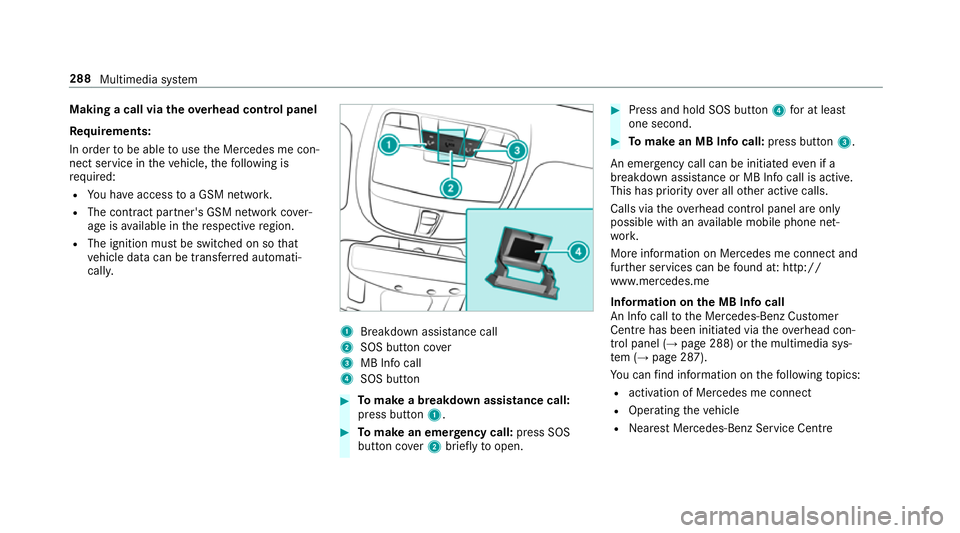
Breakdown assis tance call
2 SOS button co ver
3 MB Info call
4 SOS button #
Tomake a breakdown assistance call:
press button 1. #
Tomake an eme rgency call: press SOS
button co ver2 briefly toopen. #
Press and hold SOS button 4for at least
one second. #
Tomake an MB In focall: press button 3.
An emer gency call can be initia tedeve n if a
breakdown assi stance or MB In focall is acti ve.
This has priority over all other active calls.
Calls via theove rhead control panel are only
possible with an available mobile phone net‐
wo rk.
More information on Mercedes me connect and
fur ther services can be found at: http://
www.mercedes.me
Information on the MB Info call
An In focall tothe Mercedes-Benz Cus tomer
Centre has been initia ted via theove rhead con‐
trol panel (→ page 288) orthe multimedia sys‐
te m (→ page 287).
Yo u can find information on thefo llowing topics:
R activation of Mercedes me connect
R Operating theve hicle
R Nearest Mercedes-Benz Service Centre 288
Multimedia sy stem