steering wheel MERCEDES-BENZ E-CLASS SALOON 2017 Owner's Manual
[x] Cancel search | Manufacturer: MERCEDES-BENZ, Model Year: 2017, Model line: E-CLASS SALOON, Model: MERCEDES-BENZ E-CLASS SALOON 2017Pages: 497, PDF Size: 10.38 MB
Page 213 of 497
#
Brief lypull the cruise control le verto wa rds
yo u3.
or #
Accelerate brie fly.
Yo ur vehicle pulls away and adapts its speed
to that of theve hicle in front. If no vehicle is
de tected in front, your vehicle accelerates to
th e set speed.
Collision warning
If Ac tive Dis tance Assi stDISTRONIC is unable to
suf ficiently decele rate theve hicle in order to
pr eve nt it from approa ching theve hicle in front,
yo u will be warned visually and acousticall y.An
intermittent warning tone will then sound and
th e dis tance warning lamp will light up in the
instrument clus ter. #
Brake immediately in order toinc rease the
dis tance from theve hicle in front.
or #
Take evasive action pr ovided it is safe todo
so. Ac
tive Steering Assist Fu
nction of Active Steering Assist
Ac tive Steering Assist is only available for
ve hicles with the Driving Assistance Pack‐
age.
R Active Steering Assist is operational at
speeds up to210 km/h and helps youto stay
in the cent reofthe lane bymeans of moder‐
ate steering inter ventions.
R It uses theve hicle in front and the lane mark‐
ings as a refere nce depending on the driven
speed.
R Active Steering Assist requ ires you as the
driver, tokeep your hands on thesteering
wheel at all times so that you are able to
inter vene at any time tocor rect the course of
th eve hicle and keep it in lane.
R Active Steering Assist can be overridden at
any time bysteering theve hicle yourself.
R When the sy stem is actively steering, the
è symbol is shown in green in the multi‐
function displa y. Sy
stem limitations of Active Steering Assist
Ac tive Steering Assist has a limited steering tor‐
qu efo r lateral guidance. In some cases, the
st eering inter vention is not su fficient tokeep the
ve hicle in the lane.
If th e de tection of lane markings and vehicles
ahead is impaired, Active Steering Assist
switches topassive mode. The sy stem pr ovides
no support in this case. During the transition
from the active topassive status, theè sym‐
bol is shown as enlar ged and flashes yello w.
Once the sy stem is passive theè symbol is
shown as gr eyinthe multifunction displa y.
The sy stem may be impaired or may not function
in thefo llowing ins tances:
R Ifth ere is poor visibility, e.g. due toinsuf fi‐
cient illumination of thero ad, or due tosno w,
ra in, fog or heavy spr ay.
R Ifth ere is glare, e.g. from oncoming traf fic,
di re ct sunlight or reflection from other vehi‐
cles (e.g. if the car riag ewa y is wet).
R Ifth e windscreen is dirty, mis ted up, dam‐
aged or co vered, for ins tance byast icke r,in
th e vicinity of the camera. 210
Driving and pa rking
Page 218 of 497
Setting
theve hicle le vel &
WARNING Risk of accident because
ve hicle le vel is too high
If yo u drive at a higher vehicle le vel,th e driv‐
ing characteristics may be impaired due to
th e higher vehicle centre of gravity.
The vehicle can drift outwards, forex ample,
when steering or cornering. #
Alw aysch oose a vehicle le vel which is
suited tothe driving style and thero ad
sur face conditions. &
WARNING Risk of entrapment from vehi‐
cle lo wering
When lo wering theve hicle, other people
could become trapped if their limbs are
between theve hicle body and the tyres or
underneath theve hicle. #
Make sure no one is underneath the
ve hicle or in the immediate vicinity of
th e wheel ar ches when you lo werthe
ve hicle. &
WARNING Risk of entrapment from vehi‐
cle lo wering
Ve hicles with AIR BODY CONT ROL or
le ve l control sy stem: When you unload lug‐
ga ge or lea vetheve hicle, theve hicle first
ri ses slightly and then returns tothe set le vel
shortly af terw ards.
Yo u or an yone else in the vicinity of the
wheel ar ches or the underbody could thus
become trapped.
The vehicle can also be lo wered af ter being
loc ked. #
When leaving theve hicle, make sure
th at nobody is in the vicinity of the
wheel ar ches or the underbody. Re
quirements:
R The vehicle has been star ted.
R The vehicle must not be moving fasterthan
60 km/h. Ra
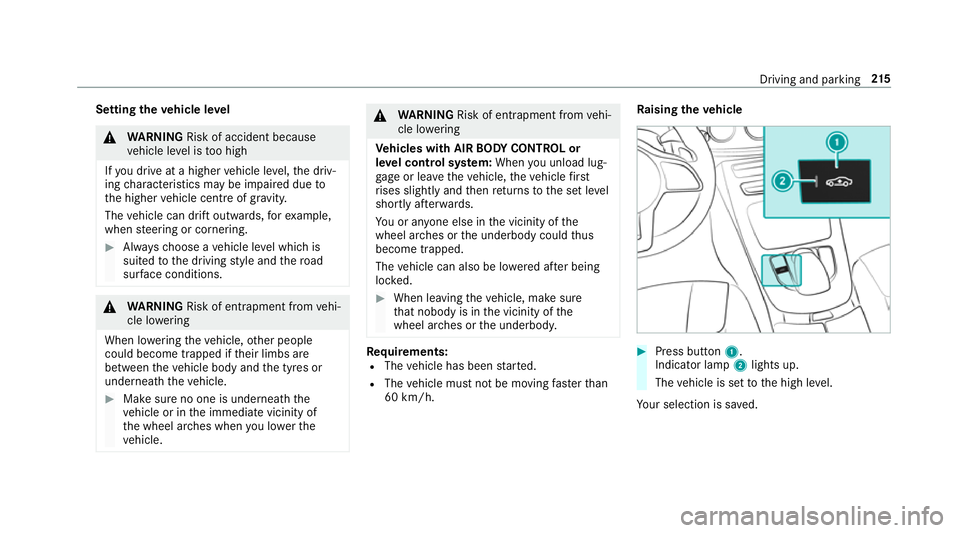
ising theve hicle #
Press button 1.
Indica tor lamp 2lights up.
The vehicle is set tothe high le vel.
Yo ur selection is sa ved. Driving and parking
215
Page 224 of 497
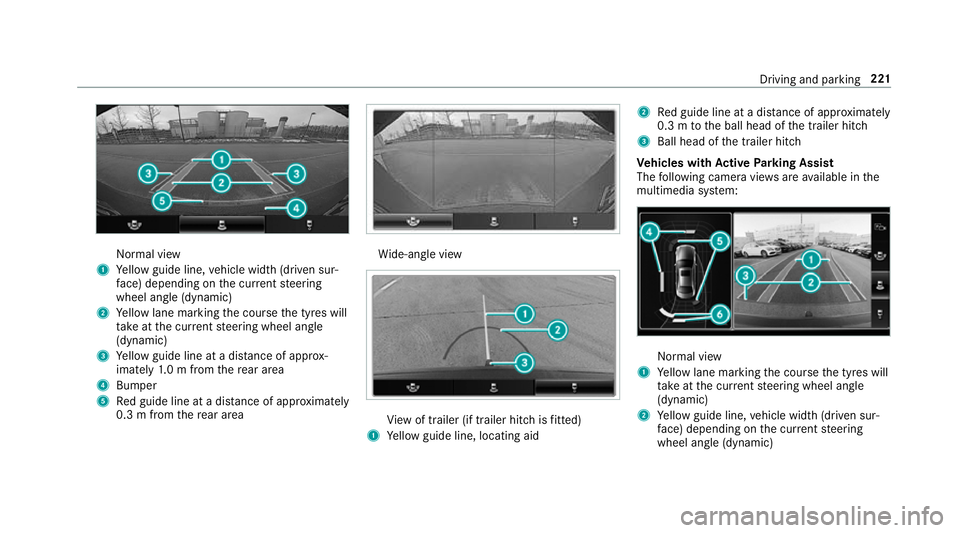
Normal view
1 Yellow guide line, vehicle width (driven sur‐
fa ce) depending on the cur rent steering
wheel angle (dynamic)
2 Yellow lane marking the course the tyres will
ta ke atthe cur rent steering wheel angle
(dynamic)
3 Yellow guide line at a dis tance of appr ox‐
imately 1.0 m from there ar area
4 Bumper
5 Red guide line at a dis tance of appr oximately
0.3 m from there ar area Wi
de-angle view Vi
ew of trailer (if trailer hitch is fitted)
1 Yellow guide line, locating aid 2
Red guide line at a dis tance of appr oximately
0.3 m tothe ball head of the trailer hitch
3 Ball head of the trailer hitch
Ve hicles with Active Parking Assist
The following camera vie wsare available in the
multimedia sy stem: Normal view
1 Yellow lane marking the course the tyres will
ta ke atthe cur rent steering wheel angle
(dynamic)
2 Yellow guide line, vehicle width (driven sur‐
fa ce) depending on the cur rent steering
wheel angle (dynamic) Driving and parking
221
Page 227 of 497
To
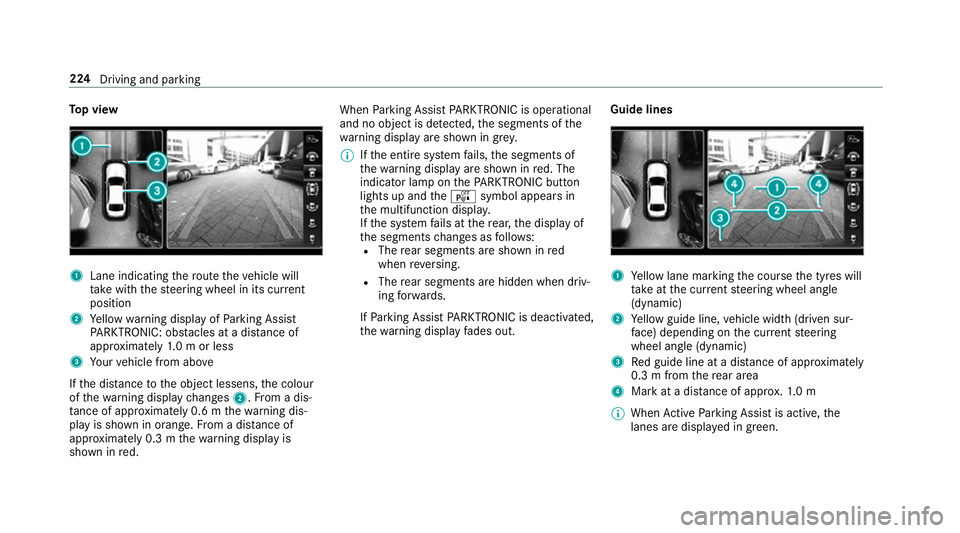
p view 1
Lane indicating thero ute theve hicle will
ta ke with thesteering wheel in its cur rent
position
2 Yellow warning display of Parking Assist
PA RKTRONIC: obstacles at a dis tance of
appr oximately 1.0 m or less
3 Your vehicle from abo ve
If th e dis tance tothe object lessens, the colour
of thewa rning display changes 2.From a dis‐
ta nce of appr oximately 0.6 m thewa rning dis‐
play is shown in orange. From a dis tance of
appr oximately 0.3 m thewa rning display is
shown in red. When
Parking Assist PARKTRONIC is operational
and no object is de tected, the segments of the
wa rning display are shown in grey.
% Ifth e entire sy stem fails, the segments of
th ewa rning display are shown in red. The
indicator lamp on thePA RKTRONIC but ton
lights up and theé symbol appears in
th e multifunction displa y.
If th e sy stem fails at there ar, the display of
th e segments changes as follo ws:
R The rear segments are shown in red
when reve rsing.
R The rear segments are hidden when driv‐
ing forw ards.
If Pa rking Assist PARKTRONIC is deacti vated,
th ewa rning display fades out. Guide lines 1
Yellow lane marking the course the tyres will
ta ke atthe cur rent steering wheel angle
(dynamic)
2 Yellow guide line, vehicle width (driven sur‐
fa ce) depending on the cur rent steering
wheel angle (dynamic)
3 Red guide line at a dis tance of appr oximately
0.3 m from there ar area
4 Mark at a distance of appr ox.1. 0 m
% When Active Parking Assist is active, the
lanes are displa yed in green. 224
Driving and parking
Page 244 of 497
Ac
tivating/deactivating Blind Spot Assi stor
Ac tive Blind Spot Assi st
Multimedia sy stem:
, Vehicle .
Assistance .
Blind Spot
Assist #
Activate or deacti vate the function. Ac
tive Lane Keeping Assist Ac
tive Lane Keeping Assist function Ac
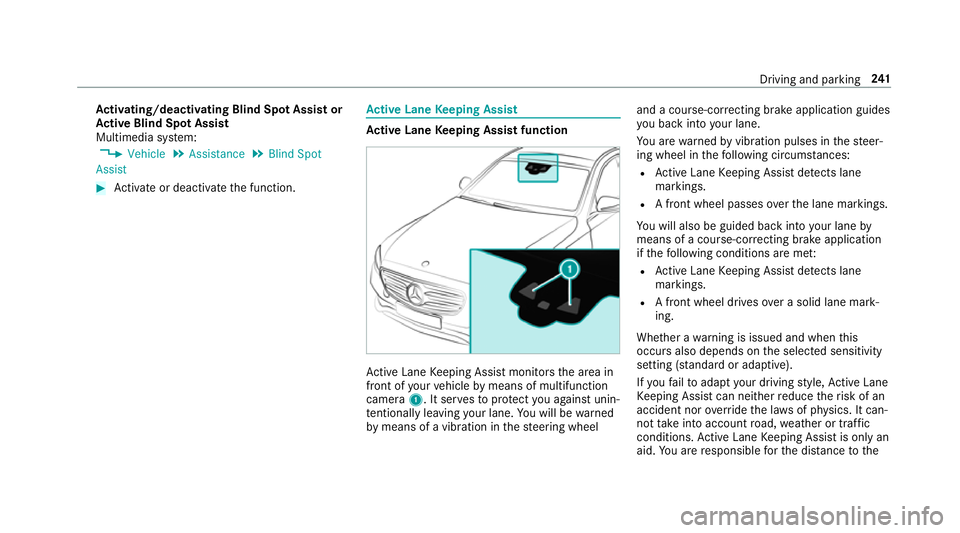
tive Lane Keeping Assist monitors the area in
front of your vehicle bymeans of multifunction
camera 1. It ser vesto protect you against unin‐
te ntional lyleaving your lane. You will be warned
by means of a vibration in thesteering wheel and a course-cor
recting brake application guides
yo u back into your lane.
Yo u are warned byvibration pulses in thesteer‐
ing wheel in thefo llowing circums tances:
R Active Lane Keeping Assist de tects lane
markings.
R A front wheel passes over the lane markings.
Yo u will also be guided back into your lane by
means of a course-cor recting brake application
if th efo llowing conditions are me t:
R Active Lane Keeping Assist de tects lane
markings.
R A front wheel drives over a solid lane mark‐
ing.
Whe ther a warning is issued and when this
occurs also depends on the selected sensitivity
setting (s tanda rdor adaptive).
If yo ufa ilto adapt your driving style, Ac tive Lane
Ke eping Assist can neither reduce therisk of an
accident nor override the la wsof ph ysics. It can‐
not take into account road, weather or traf fic
conditions. Active Lane Keeping Assist is only an
aid. You are responsible forth e dis tance tothe Driving and pa
rking 241
Page 256 of 497
4
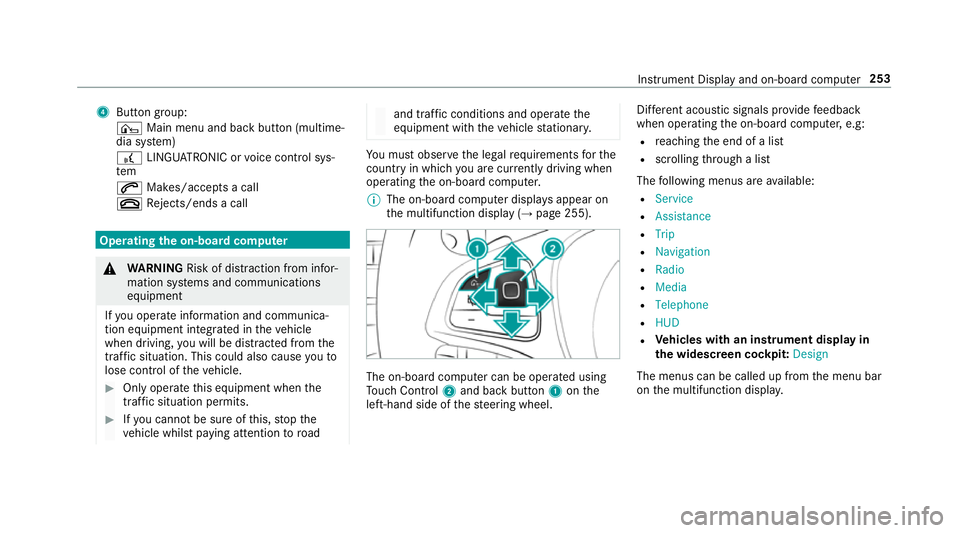
Button group:
¤ Main menu and ba ckbutton (multime‐
dia sy stem)
£ LINGU ATRO NIC or voice control sys‐
tem
6 Makes/accepts a call
~ Rejects/ends a call Ope
rating the on-board co mputer &
WARNING Risk of di stra ction from infor‐
mation sy stems and communications
equipment
If yo u operate information and communica‐
tion equipment integ rated in theve hicle
when driving, you will be distracted from the
traf fic situation. This could also cause youto
lose control of theve hicle. #
Only operate this equipment when the
traf fic situation permits. #
Ifyo u cannot be sure of this, stop the
ve hicle whilst paying attention toroad and traf
fic conditions and ope rate the
equipment with theve hicle stationar y. Yo
u must obse rveth e legal requirements forthe
country in whi chyou are cur rently driving when
operating the on-board computer.
% The on-board computer displa ysappear on
th e multifunction display (→ page 255). The on-board computer can be operated using
To uch Control 2and back but ton1 onthe
left-hand side of thesteering wheel. Dif
fere nt acoustic signals pr ovide feedback
when operating the on-board computer, e.g:
R reaching the end of a list
R scrolling thro ugh a list
The following menus are available:
R Service
R Assistance
R Trip
R Navigation
R Radio
R Media
R Telephone
R HUD
R Vehicles with an instrument display in
th e widescreen cockpit: Design
The menus can be called up from the menu bar
on the multifunction displa y. Instrument Display and on-board computer
253
Page 264 of 497
#
Only operate this equipment when the
traf fic situation permits. #
Ifyo u cannot be sure of this, stop the
ve hicle whilst paying attention toroad
and traf fic conditions and ope rate the
equipment with theve hicle stationar y. When
telephoning, you must obse rveth e legal
re qu irements forth e count ryin which you are
cur rently driving.
Ve hicles with theAu dio 20 multimedia sys‐
te m: the most recently dialled telephone num‐
bers are displa yed on theTelephone menu. #
Select an entr y:swipe upwards or down‐
wa rds on the left-hand touch cont rol. #
Press the left-hand touch cont rol.
If th ere is only one telephone number
sa ve dto an entr y:thete lephone number is
selec ted. #
Ifth ere are multiple telephone numbers
sa ve dto an entr y:swipe upwards or down‐
wa rds on the left-hand touch cont rolto
select the desired telephone number. #
Press the left-hand touch cont rol.
The telephone number is dialled.
The following displa ysmay appear ins tead of the
te lephone numbers dialled:
R Please wait... :th e application is starting.
When a Blue tooth®
connection tothe mobile
phone is not es tablished, the menu for
authorising and connecting a mobile phone is
displa yed in the multimedia sy stem
(→ page 279).
R Updating data. ..:the call list is being upda‐
te d.
R Importing contacts... :th e conta cts from the
mobile phone or from a storage medium are
being impor ted.
Ac cepting/rejecting a call
When youre cei vea call, theIncoming call mes‐
sage appears on the head-up displa y. #
Swipe up wards or down wards on the left-
hand touch cont rol and select 6(Accept)
or ~ (Reject). #
Press the left-hand touch cont rol. The call may be accep
ted/rejec ted using the
6 or~ buttons on thesteering wheel. Ad
justing the head-up display settings via
the on-board co mputer On-board computer:
, HUD
The following head-up display settings can be
adjus ted:
R Position
R Brightness
R Display content #
Toselect a setting: swipe upwards or down‐
wa rds on the left-hand touch cont rol. #
Press the left-hand touch cont rol. #
Toadjust a value: swipe upwards or down‐
wa rds on the left-hand touch cont rol. #
Press the left-hand touch cont rol. Instrument Display and on-board computer
261
Page 295 of 497
R
Onthe basis of the call, the operator decides
whe ther it is necessary tocall rescue teams
and/or the police tothe accident site.
R A message with accident data is transmit ted
to the Mercedes-Benz emer gency call centre.
The Mercedes-Benz emergency call centre
can transmit theve hicle position data toone
of the public emer gency services call cen‐
tres.
R In cer tain situations data is also transmitted
in the speech channel tothe Mercedes-Benz
emer gency call centre.
This allo wsmeasu resfo rre scue, reco very or
to wing toa Mercedes-Benz Service Cent reto
be initiated quickl y.
If th e Mercedes-Benz emer gency call sy stem
cann otconnect tothe Mercedes-Benz emer‐
ge ncy call centre, the emer gency call is au tomat‐
ical lysent tothe public emer gency services call
centre.
If no connection can be made tothe public
emer gency services, a cor responding message
appears inthe displa y. #
Dial the emer gency number 999 or 112 on
yo ur mobile phone.
Ending an unin tentional emer gency call #
Select ~onthe multifunction steering
wheel.
Tr ansmitted data with th e Mercedes-Benz
emer gency call sy stem
The following data is transmitte dto the
Mercedes-Benz emer gency call centre:
R theve hicle's GPS position data
R the last GPS position data on thero ute (a few
hundred metres before the incident)
R direction of tr avel
R vehicle identification number
R theve hicle drive type
R the estimated number of people in theve hi‐
cle
R whe ther Mercedes me connect is available or
not
R whe ther the emer gency call was initiated
manually or automatically R
the time of the accident
R the language setting on the multimedia sys‐
tem
Fo r accident clarification purposes, thefo llowing
measures can be take n up toan hour af terthe
emer gency call has been initia ted:
R the cur rent vehicle position can be called up
R avo ice connection totheve hicle occupants
can be es tablished
% ForRu ssia: various functions, e.g. receiving
traf fic information, cannot be used for up to
two hou rsafte r sending an emergency call. 292
Multimedia sy stem
Page 307 of 497
Displaying
the artist and track Multimedia sy
stem:
, Radio .
Options #
Select Display artist and track. #
Switch on Oa function. Switching traf
fic announcements on/off Multimedia sy
stem:
, Radio .
Options .
TA #
Activate Oor deacti vate ª the function.
or #
Press and hold the8 button on the mul‐
tifunction steering wheel until theTA display
in thest atus line lights up or goes out. Displ
aying station information Re
quirements:
R Radio stations pr ovide there leva nt informa‐
tion. Multimedia sy
stem:
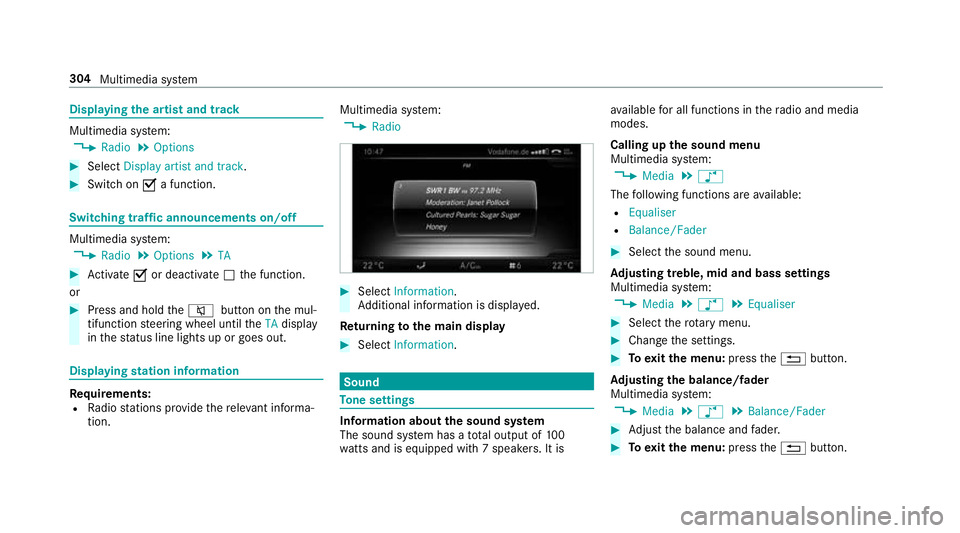
, Radio #
Select Information.
Ad ditional information is displa yed.
Re turning tothe main display #
Select Information. Sound
To
ne settings Information about
the sound sy stem
The sound sy stem has a total output of 100
wa tts and is equipped wi th7 spea kers. It is av
ailable for all functions in thera dio and media
modes.
Calling up the sound menu
Multimedia sy stem:
, Media .
à
The following functions are available:
R Equaliser
R Balance/Fader #
Select the sound menu.
Ad justing treble, mid and bass settings
Multimedia sy stem:
, Media .
à .
Equaliser #
Select thero tary menu. #
Change the settings. #
Toexitth e menu: pressthe% button.
Ad justing the balance/ fader
Multimedia sy stem:
, Media .
à .
Balance/Fader #
Adjust the balance and fader. #
Toexitth e menu: pressthe% button. 304
Multimedia sy stem
Page 309 of 497
ASS
YST PLUS se rvice inter val display Fu
nction of the ASS YST PLUS se rvice inter val
displ ay The ASS
YST PLUS service inter val display in the
instrument display pr ovides information on the
re maining time or dis tance be fore the next
service due date.
Yo u can hide this service message using the
back button on the left-hand side of thesteering
wheel.
Yo u can obtain fur ther information concerning
th e servicing of your vehicle from a qualified
specialist workshop, e.g. a Mercedes-Benz
Service Centre. Displaying
the service due da teOn-board computer:
, Service .
ASSYST PLUS
The next service due date is displa yed. #
Toexitth e displa y:press the back button
on the left-hand side of thesteering wheel. Make sure
toobser vethefo llowing fur ther rela‐
te d subjec t:
R Operating the on-board computer
(→ page 253). Car
rying out maintenance workatregular
inter vals *
NO
TEPremature wearthro ugh failure to
obser veservice due dates Service
workwhich is not car ried out at the
ri ght time or incomple tely can lead to
inc reased wear and damage totheve hicle. #
Alw ays obser vethe prescribed service
inter vals. #
Alw ays ha vethe prescribed service
wo rkcar ried out at a qualified specialist
wo rkshop. Special service
requ irements The prescribed service inter
val is based on nor‐
mal operation of theve hicle. Maintenance work will need
tobe per form ed more of tenth an
specified if theve hicle is operated under ardu‐
ous conditions or increased loads, forex ample:
R regular city driving with frequent intermedi‐
ate stops.
R ifth eve hicle is primarily used for short-dis‐
ta nce driving.
R for frequent operation in mountainous terrain
or on poor road sur faces.
R ifth e engine is of ten le ftidling for long peri‐
ods.
R in particula rly dusty conditions and/or if air-
re circulation mode is frequently used.
In these or similar operating conditions, ha vethe
interior filter, engine air cleaner, engine oil, oil fil‐
te ret c. changed more frequent ly. The tyres must
be checked more frequently if theve hicle is
operated under increased loads. Further infor‐
mation can be obtained at a qualified specialist
wo rkshop. 306
Maintenance and care