ad blue MERCEDES-BENZ E-CLASS SALOON 2020 User Guide
[x] Cancel search | Manufacturer: MERCEDES-BENZ, Model Year: 2020, Model line: E-CLASS SALOON, Model: MERCEDES-BENZ E-CLASS SALOON 2020Pages: 477, PDF Size: 8.67 MB
Page 279 of 477
Obser
vethe additional information on stowing
mobile communications devices cor rectly:
R Loading theve hicle (/ page111 )
Blue tooth ®
connection:
The menu view and theav ailable functions in the
te lephone menu are in part dependent on the
Blu etoo th®
profile of the connected mobile
phone. Full functionality is only available if the
mobile phone supports bo thofthefo llowing
Blue tooth ®
profiles:
R PBAP (Phone Book Access Profile)
- The contacts on the mobile phone are
shown automatically on the multimedia
sy stem.
R MAP (Message Access Profile)
- The mobile phone message functions can
be used on the multimedia sy stem.
Ir re spective of this, Blue tooth ®
audio functional‐
ity can byused with any mobile radio unit.
Fo r information on thera nge of functions of the
mobile radio unit tobe connec ted, see the man‐
ufacturer's operating instructions. Ne
twork connection:
The following cases can lead tothe call being
disconnected while theve hicle is in motion:
R You swit chinto a transmission/reception
st ation, in which no communication channel
is free.
R The SIM card used is not compatible with the
network available
R a mobile phone with "Twincard" is logged into
th e network with the second SIM card at the
same time
The multimedia sy stem supports calls in HD
Vo ice ®
for impr oved speech qualit y.Arequ ire‐
ment forth is is that the mobile phone and the
mobile phone network pr ovider of the person
yo u are calling suppo rtHD Voice ®
.
Depending on thequ ality of the connection, the
vo ice quality may fluctuate.
Fu rther information can be obtained from a
Mercedes-Benz service centre or at: https://
www.mercedes-benz.com/connect 276
MBUX multimedia sy stem
Page 280 of 477
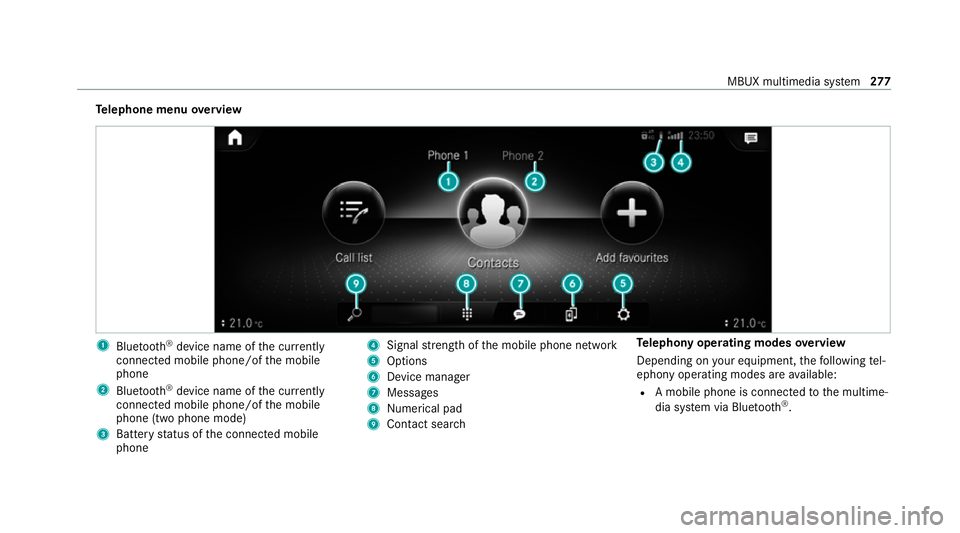
Te
lephone menu overview 1
Blue tooth ®
device name of the cur rently
connected mobile phone/of the mobile
phone
2 Blue tooth ®
device name of the cur rently
connected mobile phone/of the mobile
phone (two phone mode)
3 Battery status of the connected mobile
phone 4
Signal stre ngth of the mobile phone network
5 Options
6 Device manager
7 Messages
8 Nume rical pad
9 Contact sea rch Te
lephony operating modes overview
Depending on your equipment, thefo llowing tel‐
ephony operating modes are available:
R A mobile phone is connec tedto the multime‐
dia sy stem via Blue tooth®
. MBUX multimedia sy
stem 277
Page 281 of 477
R
Two mobile phones are connected with the
multimedia sy stem via Blue tooth®
(two
phone mode).
- You can use all the functions of the multi‐
media sy stem with the mobile phone in
th efo re ground.
- You can recei veincoming calls and mes‐
sages with the mobile phone in the back‐
ground.
Yo u can inter change the mobile phone in
th efo re ground and bac kground.
R A mobile phone is connected as the car
phone.
Connecting a mobile phone
Re quirements:
R Blue tooth ®
is activated on the mobile phone
(see the manufacturer's operating instruc‐
tions).
R Blue tooth ®
is activated on the multimedia
sy stem. Multimedia sy
stem:
4 © 5
Phone
Sear ching for a mobile phone #
Select í. #
Select Connect new device .
Connecting a mobile phone
Auth orisation follo ws using secure simple pair‐
ing. #
Select a mobile phone.
A code is displ ayed in the multimedia sy stem
and on the mobile phone. #
If bo thcodes match, confirm the code on the
mobile phone.
Fu nctions in thete lephony menu
In thete lephony menu you ha vethefo llowing
functions, forex ample:
R Making calls, e.g.:
-
R Accept a call
- k End call
- i Create conferen. call -
Accepting or rejecting a waiting call
R Managing con tacts, e.g.:
- Downloading mobile phone contacts
- Managing thefo rm at of a con tact's name
- Saving a contact as a favo urite
R Receiving and sending messages, e.g.:
- Using there ad-aloud function
- Dictating a new message Mercedes me and apps
Mercedes me connect
Information on Mercedes me connect
% Mercedes me connect or individual
Mercedes me connect services are not avail‐
able in everycountr y.Find out at a
Mercedes-Benz service centre if these func‐
tions are available in your count ry.
Mercedes me connect consists of multiple serv‐
ices. 278
MBUX multimedia sy stem
Page 289 of 477
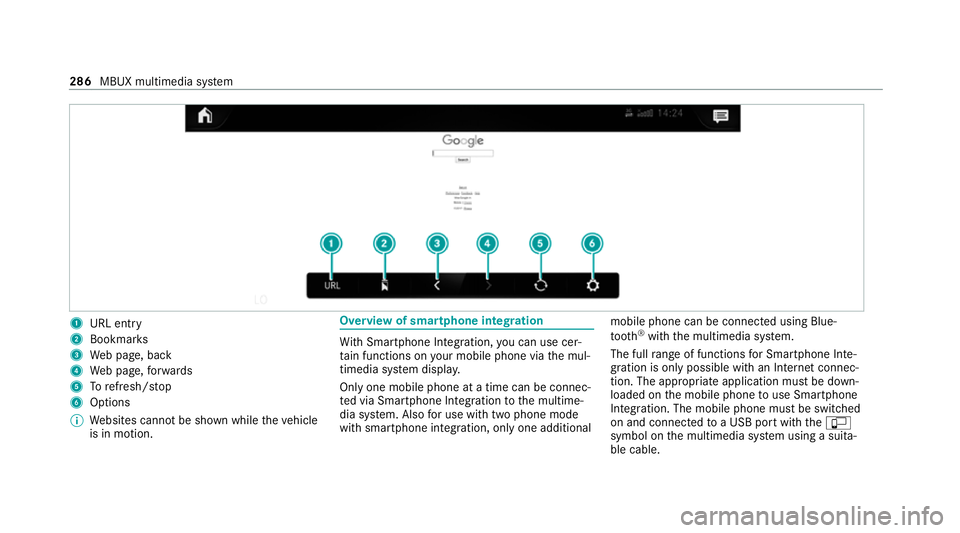
1
URL entry
2 Bookmar ks
3 Web page, back
4 Web page, forw ards
5 Torefresh/s top
6 Options
% Websites cann otbe shown while theve hicle
is in motion. Overview of smartphone integ
ration Wi
th Smartphone Integration, you can use cer‐
ta in functions on your mobile phone via the mul‐
timedia sy stem displa y.
Only one mobile phone at a time can be connec‐
te d via Smartphone Integ ration tothe multime‐
dia sy stem. Also for use with two phone mode
with smartphone integration, only one additional mobile phone can be connected using Blue‐
tooth
®
with the multimedia sy stem.
The full range of functions for Smartphone Inte‐
gration is only possible with an Internet connec‐
tion. The appro priate application must be down‐
loaded on the mobile phone touse Smartphone
In te gration. The mobile phone must be switched
on and connected toa USB port with theç
symbol on the multimedia sy stem using a suita‐
ble cable. 286
MBUX multimedia sy stem
Page 295 of 477
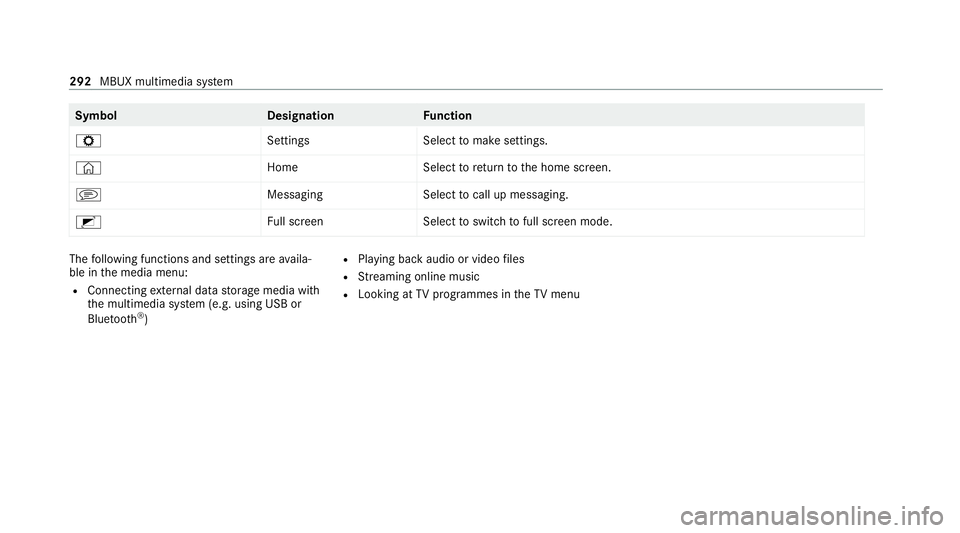
Symbol
DesignationFunction
Z SettingsSelecttomake settings.
© HomeSelecttoreturn tothe home screen.
j MessagingSelecttocall up messaging.
2 Full screen Selecttoswitch tofull screen mode. The
following functions and settings are availa‐
ble in the media menu:
R Connecting extern al data storage media with
th e multimedia sy stem (e.g. using USB or
Blue tooth ®
) R
Playing back audio or video files
R Streaming online music
R Looking at TVprogrammes in theTV menu 292
MBUX multimedia sy stem
Page 296 of 477
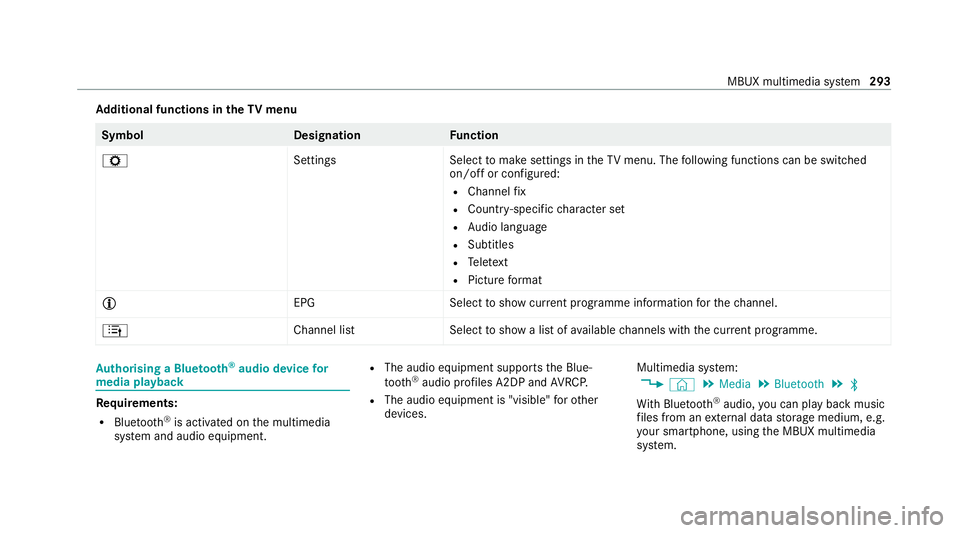
Ad
ditional functions in the TVmenu Symbol
DesignationF unction
Z SettingsSelecttomake settings in theTV menu. The following functions can be switched
on/off or con figured:
R Channel fix
R Countr y-specific character set
R Audio language
R Subtitles
R Telete xt
R Picture form at
Õ EPGS electtoshow cur rent programme information forth ech annel.
4 Channel listS electtoshow a list of available channels with the cur rent programme. Au
thorising a Blu etoo th®
audio device for
media playba ck Re
quirements:
R Blue tooth ®
is activated on the multimedia
sy stem and audio equipment. R
The audio equipment supports the Blue‐
to oth ®
audio profiles A2DP and AVRC P.
R The audio equipment is "visible" forot her
devices. Multimedia sy
stem:
4 © 5
Media 5
Bluetooth 5
ª
Wi th Blu etoo th®
audio, you can play back music
fi les from an extern al data storage medium, e.g.
yo ur smartphone, using the MBUX multimedia
sy stem. MBUX multimedia sy
stem 293
Page 297 of 477
#
Toplay back audio files using the multimedia
sy stem, authorise theex tern al data storage
medium on the MBUX multimedia sy stem.
Au thorising a new Blu etoo th®
audio device #
Select Connect new device .#
Select an audio device.
Auth orisation starts. A code is displa yed on
th e multimedia sy stem and on the mobile
phone. #
Ifth e codes are identical, confi rmonthe
audio equipment. #
Select Only as Bluetooth audio device .
The Blue tooth®
audio equipment is connec‐
te d with the multimedia sy stem.
Connecting pr eviously authorised Blue tooth ®
audio equipment #
Select a Blue tooth®
audio device from the
list.
The connection is being es tablished. Re
ceiving TVchannels in HD quality *
NO
TEDama getothe CI+ module and
Smart Card The CI+ module is designed
for use in the
home. The CI+ module can overheat and be
damaged bycontinuous exposure tohigh
outside temp eratures. #
Make sure that the CI+ module is not
subject tohigh temp eratures forex ten‐
ded pe riods of time.
If th e CI+ module is damaged, no
encryp tedch annels can be recei ved. %
The CI+ module is not available in all coun‐
tries.
A CI+ module (Common In terface Module),
which is not included in the scope of deliver y,is
used todecrypt HD programmes according to
th e CI+ standard.
In some countries, an additional smart card is
re qu ired, which is inse rted into the CI+ module
(see the manufacturer's operating manual). The CI+ module is connected in
the CI+ box in
th eglove compa rtment. #
Toinsert the sma rtcard in the CI+ mod‐
ule: ifre qu ired (countr y-dependent), insert
th e smart card into the CI+ module slot.
% The CI+ box is designed for operation at
te mp eratures between 0 °C and 65 °C. At
operating temp eratures that are higher or
to o low a message appears in the multime‐
dia sy stem and the CI+ module is switched
off automaticall y.Ifth e CI+ module is
switched off, no encryp tedch annels can be
re cei ved. 294
MBUX multimedia sy stem
Page 359 of 477
+
ENVIRONMENTAL
NOTEEnvironmental
pollution caused byenvironmen tally ir re‐
sponsible disposal #
Dispose of operating fluids in an envi‐
ro nmentally responsible manner. Operating
fluids include thefo llowing:
R fuels
R DeNOx agent AdBlue ®
forex haust gas af ter‐
treatment
R lubri cants
R coolant
R brake fluid
R windsc reen washer fluid
R climate cont rol sy stem refrigerant
Only use products app rove dby Mercedes-Benz.
Damage caused bythe use of products that ha ve
not been appr oved is not co veredby the
Mercedes-Benz warranty or goodwill gestures.
The operating fluids appr ovedby Mercedes-Benz
can be identified bythefo llowing insc ript ions on
th e conta iner: R
MB- Freigabe (e.g. MB-Fr eigabe 229.51 )
R MB-Appr oval (e.g. MB-App rova l 229.51)
Fu rther information on appr oved operating flu‐
ids:
R inthe Mercedes-Benz Specifications for
Operating Fluids byentering the designation
- at https://be vo.mercedes-benz.com
- inthe Mercedes-Benz BeVo App
R at a qualified specialist workshop &
WARNING Risk offire or explosion from
fuel
Fu els are highly flammable. #
Fire, naked flames, smoking and crea‐
tion of spar ksmust be avoided. #
Swit choff the ignition and, if available,
th est ationary heater, before and while
re fuelling theve hicle. &
WARNING Risk of inju ryfrom fuels
Fu els are poisonous and hazardous to your
health. #
Do not swallow fuel or let it come into
contact with skin, eyes or clo thing. #
Do not inhale fuel vapour. #
Keep children away from fuel. #
Keep doors and windo wsclosed du ring
th ere fuelling process.
If yo u or other people come into contact with
fuel, obser vethefo llowing: #
Immediately rinse fuel off your skin with
soap and water. #
If fuel comes into contact with your
ey es, immediately rinse them thor‐
oughly with clean water.Seek medical
attention immediately. #
Ifyo u swallow fuel, seek medical atten‐
tion immediatel y.Do not induce vomit‐
ing. 356
Tech nical da ta
Page 363 of 477
Ad
Blue ® Note
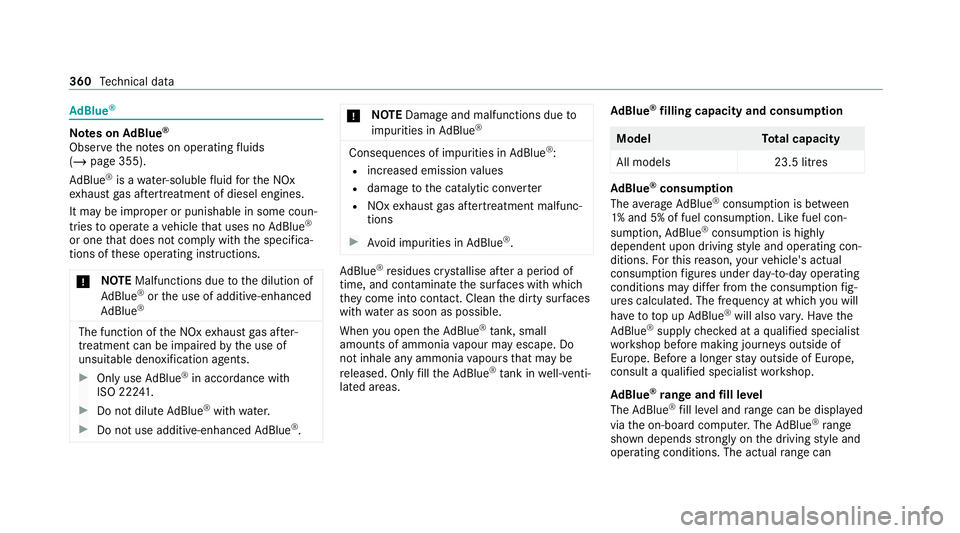
s onAdBlue ®
Obser vethe no tes on operating fluids
(/ page 355).
Ad Blue ®
is a wate r-soluble fluid forth e NOx
ex haust gas af tertre atment of diesel engines.
It may be improper or punishable in some coun‐
tries tooperate a vehicle that uses no AdBlue ®
or one that does not comply with the specifica‐
tions of these operating instructions.
* NO
TEMalfunctions due tothe dilution of
Ad Blue ®
or the use of additive-enhanced
Ad Blue ® The function of
the NOx exhaust gas af ter‐
treatment can be impaire dby the use of
unsuitable denoxification agents. #
Only use AdBlue ®
in accordance wi th
ISO 222 41 . #
Do not dilu teAd Blue ®
wi th wate r. #
Do not use additive-enhanced AdBlue ®
. *
NO
TEDama geand malfunctions due to
impurities in AdBlue ® Consequences of impu
rities in AdBlue ®
:
R increased emission values
R damage tothe catalytic con verter
R NOx exhaust gas af tertre atment malfunc‐
tions #
Avoid impurities in AdBlue ®
. Ad
Blue ®
re sidues cr ystallise af ter a period of
time, and contamina tethe sur faces wi thwhich
th ey come into contact. Clean the dirty sur faces
wi th wate r as soon as possible.
When you open theAd Blue ®
tan k,small
amounts of ammonia vapour may escape. Do
not inhale any ammonia vapours that may be
re leased. Only fill th eAd Blue ®
tank in well-venti‐
lated areas. Ad
Blue ®
filling capacity and consum ption Model
Total capacity
All models 23.5 litres Ad
Blue ®
consu mption
The average AdBlue ®
consu mption is between
1% and 5% of fuel consumption. Li kefuel con‐
sum ption, AdBlue ®
consu mption is highly
dependent upon driving style and operating con‐
ditions. Forth is reason, your vehicle's actual
consum ption figures under da y-to -day operating
conditions may di ffer from the consum ption fig‐
ures calculated. The frequency at which you will
ha ve to to p up AdBlue ®
will also vary. Ha vethe
Ad Blue ®
supply checked at a qualified specialist
wo rkshop before making journe ysoutside of
Europe. Before a longer stay outside of Europe,
consult a qualified specialist workshop.
Ad Blue ®
ra nge and fill le vel
The AdBlue ®
fill le vel and range can be displ ayed
via the on-board computer. The AdBlue ®
ra nge
shown depends strongly on the driving style and
operating conditions. The actual range can 360
Tech nical da ta
Page 421 of 477
Display messages
Possible causes/consequences and M
MSolutions #
Stop theve hicle in accordance with the tra ffic conditions. #
Check the tyre pressure (/ page 336) andthe tyres. #
When the tyre pressure is cor rect, restart the tyre pressure loss warning sy stem (/ page 339).
Check tyre pressures then
restart Run Flat Indicator *T
he tyre pressure loss warning sy stem generated a displ aymessa geand has not been restar ted since. #
When the tyre pressure is cor rect, restart the tyre pressure loss warning sy stem (/ page 339).
Run Flat Indicator inopera-
tive *T
he tyre pressure loss warning sy stem is malfunctioning. #
Consult a qualified specialist workshop. Exhaust
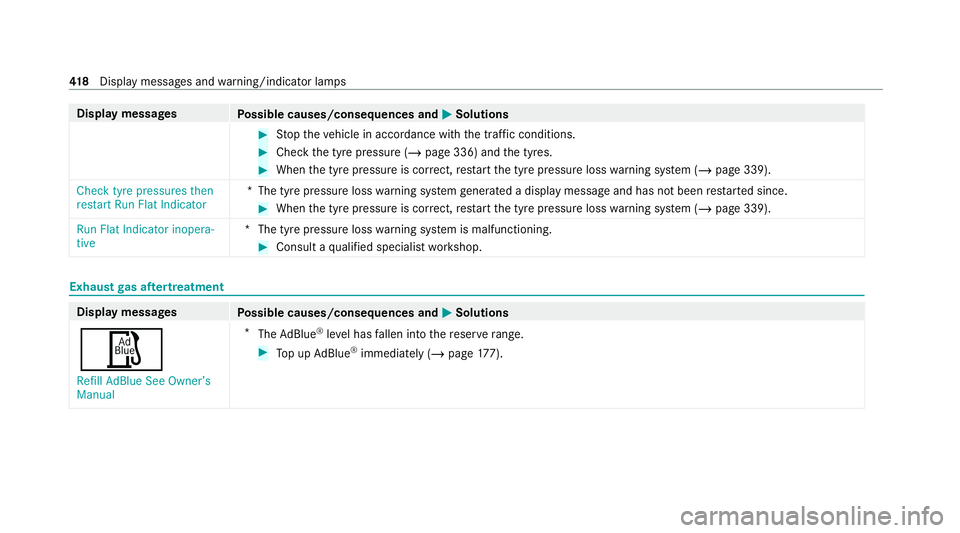
gas af tertre atment Display messages
Possible causes/consequences and M MSolutions
Ø Refill AdBlue See Owner’s
Manual *
The AdBlue ®
leve l has fallen into there ser verange. #
Top up AdBlue ®
immediately (/ page 177). 41 8
Displaymessa ges and warning/indicator lamps