fog light MERCEDES-BENZ E-CLASS SALOON 2020 User Guide
[x] Cancel search | Manufacturer: MERCEDES-BENZ, Model Year: 2020, Model line: E-CLASS SALOON, Model: MERCEDES-BENZ E-CLASS SALOON 2020Pages: 477, PDF Size: 8.67 MB
Page 223 of 477
%
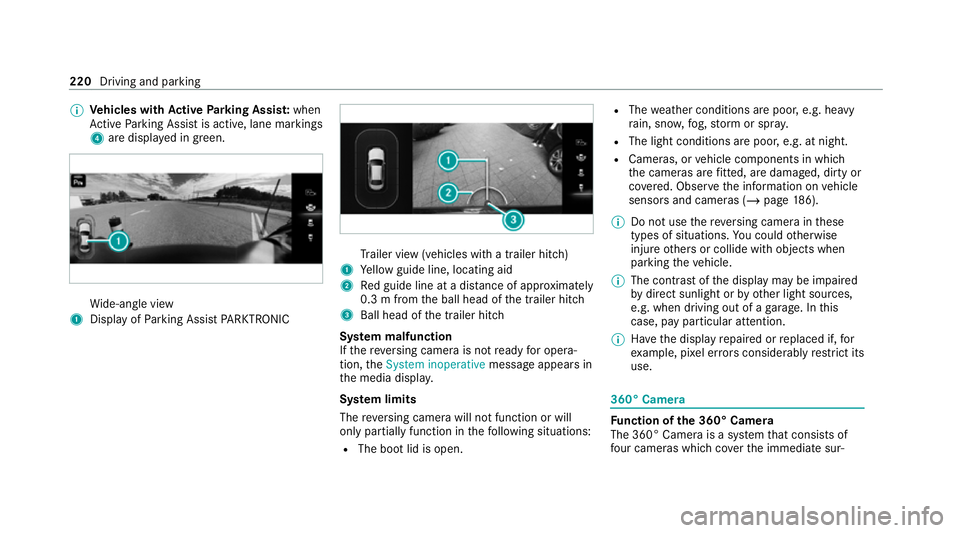
Vehicles with Active Parking Assis t:when
Ac tive Parking Assist is active, lane markings
4 are displa yed in green. Wi
de-angle view
1 Display of Parking Assist PARKTRONIC Tr
ailer view (vehicles with a trailer hit ch)
1 Yellow guide line, locating aid
2 Red guide line at a dis tance of appr oximately
0.3 m from the ball head of the trailer hitch
3 Ball head of the trailer hitch
Sy stem malfunction
If th ere ve rsing camera is not ready for opera‐
tion, theSystem inoperative message appears in
th e media displa y.
Sy stem limits
The reve rsing camera will not function or will
only partially function in thefo llowing situations:
R The boot lid is open. R
The weather conditions are poor, e.g. heavy
ra in, sno w,fog, storm or spr ay.
R The light conditions are poor, e.g. at night.
R Cameras, or vehicle components in which
th e cameras are fitted, are dama ged, dirty or
co vered. Obser vethe information on vehicle
sensors and cameras (/ page186).
% Do not use there ve rsing camera in these
types of situations. You could otherwise
injure others or collide with objects when
parking theve hicle.
% The contra stof the display may be impaired
by direct sunlight or by other light sources,
e.g. when driving out of a garage . In this
case, pay particular attention.
% Have the display repaired or replaced if, for
ex ample, pixel er rors considerably restrict its
use. 360° Came
ra Fu
nction of the 360° Camera
The 360° Camera is a sy stem that consists of
fo ur cameras which co verth e immediate sur‐ 220
Driving and parking
Page 227 of 477
R
The weather conditions are poor, e.g. heavy
ra in, sno w,fog, storm or spr ay.
R The light conditions are poor, e.g. at night.
R The camera lens is obstructed, dirty or mis‐
ted up.
R If cameras or vehicle components in which
th e cameras are fitted are dama ged. In this
eve nt, ha vethe cameras, their positions and
th eir setting checked at a qualified specialist
wo rkshop.
% Do not use the 360° Camera under such cir‐
cums tances. You could otherwise injure oth‐
ers or collide with objects when parking the
ve hicle.
Fo rte ch nical reasons, thest andard height of the
ve hicle may be altered if theve hicle is car rying a
heavy load and can result in inaccuracies in the
guide lines and in the display of thege nerated
ima ges.
The field of vision and other functions of the
came rasystem may be restricted due toaddi‐
tional attachments on theve hicle (e.g. licence
plate brac ket, bicycle rack ). %
The contrast of the display may be impaired
by abrupt, direct sunlight or by other light
sources, e.g. when driving out of a garage . In
th is case, pay particular attention.
% Have the display repaired or replaced if, for
ex ample, pixel er rors considerably restrict its
use.
See the no tes on cleaning the 360° Camera
(/ page 310).
Calling up the view of the 360° Camera
using reve rsege ar
Re quirements:
R The Auto reversing camera function is activa‐
te d in the multimedia sy stem (/ page 224). #
Shift toreve rsege ar. #
Select the desired view in the multimedia
sy stem (/ page 220). #
If, af ter shifting toreve rsege ar, the image of
th ere ve rsing camera is not shown: switch off
th e ignition, press and hold thec button,
switch on the ignition and engage reve rse
ge ar again. Swit
ching reve rsing camera automatic mode
on/off
The reve rsing camera is only an aid. It is not a
substitute foryo ur attention tothe sur roundings.
The responsibility for safe manoeuvring and
parking remains with you. Make sure that no
persons, animals or objects etc. are in the
manoeuvring range. Pay attention to your sur‐
ro undings and be ready tobrake at all times.
Multimedia sy stem:
4 © 5
Settings 5
Assistance
5 Camera & parking #
Switch Auto reversing camera on or off. Ac
tive Parking Assist Fu
nction of Active Parking Assist
Ac tive Parking Assist is an elect ronic pa rking
assis tance sy stem, which uses ultrasound with
th e assis tance of there ve rsing camera and 360°
Camera. When you are driving forw ards up to
appr oximately 35 km/h, the sy stem automati‐
cally measures parking spaces on bo thsides of
th eve hicle. 224
Driving and parking
Page 236 of 477
Sy
stem limits
The sy stem may be impaired or may not function
particular lyin thefo llowing situations:
R Ifth ere is poor visibility, e.g. due toinsuf fi‐
cient illumination of thero ad, if there are
highly variable shade conditions or in rain,
sno w,fog or heavy spr ay.
R Ifth ere is glare, e.g. from oncoming traf fic,
di re ct sunlight or reflections.
R Ifth e windscreen in the area of the multi‐
function camera is dirty, or if the camera is
mis ted up, damaged or co vered.
R Ifth e tra ffic signs are hard todetect, e.g. due
to dirt or sno w,because they are co vered, or
due toinsuf ficient lighting.
R Ifth e information in the navigation sy stem's
digital map is incor rect or out-of-da te.
R Ifth e signs are ambiguous, e.g. tra ffic signs
on con stru ction sites or in adjacent lanes.
R Ifyo u turn sharply when passing traf fic signs
outside the camera's field of vision.
Setting Traf fic Sign Assist
Re quirements: R
Only vehicles with Driving Assistance
Pa ckage:
Ac tive Dis tance Assi stDISTRONIC mu stbe
activated forth e automatic adoption of
speed limits.
Multimedia sy stem:
4 © 5
Settings 5
Assistance
5 Traffic Sign Assist
Ac tivating or deactivating automatic adop‐
tion of speed limits (only vehicles with Driv‐
ing Assistance Package) #
Select Adopt limit. #
Activate or deacti vate the function.
The speed limits de tected byTraf fic Sign
Assi stare automatically adop tedby Active
Dis tance Assi stDISTRONIC.
% If one of thefo llowing sy stems is activated,
th e de tected speed can be manually adop ted
as the speed limit:
R Active Dis tance Assi stDISTRONIC
R Cruise control
R Variable limiter Fu
rther information (/ page 202).
Displaying de tected traf fic signs in the
medi a display #
Select Display in head unit. #
Activate or deacti vate the function.
Setting the type of warning #
Select Visual & audible ,Visual orOff .
Setting thewa rning threshold
This value de term ines the speed at which a
wa rning is issued when exceeded. #
Select Warning threshold. #
Set the desired speed. Blind Spot Assist and
Active Blind Spot
Assi stwith exitwa rning Fu
nction of Blind Spot Assist and Active
Blind Spot Assi stwith exitwa rning
Blind Spot Assist and Active Blind Spot Assi st
use two lateral, rear-facing radar sensors to
monitor the area up to40 m behind and 3 m
next toyour vehicle. Driving and parking
233
Page 241 of 477
Conditions
for a course-cor recting brake
application (vehicles with Driving Assistance
Pa ckage)
Depending on the setting, a course cor recting
brake application occu rsinthefo llowing situa‐
tions (/ page 239).
% The availability of this setting is dependent
on the count ry. If the function is activated in
count ries in which this setting is notavaila‐
ble, a lane-cor recting brake application is ini‐
tia ted in all situations described under Sen-
sitive.
Standard Setting
R A lane marking and an approaching vehicle,
an ove rtaking vehicle or vehicles driving par‐
allel to yo urvehicle weredetected in the
adjacent lane. The front wheel drives over
th e lane marking.
Sensitive Setting
R The situations described under theStandard
setting.
R A continuous lane marking was de tected and
driven over with the front wheel. %
A brake application may be inter rupte d at
any time if yousteer slightly in the opposite
direction.
Sy stem limits
No lane-cor recting brake application occu rsin
th efo llowing situations:
R You clear lyand actively steer, brake or accel‐
erate.
R If a driving saf ety sy stem inter venes, su chas
ESP ®
,Ac tive Brake Assi stor Active Blind
Spot Assi st.
R You ha veadop ted a sporty driving style with
high cornering speeds or high rates of accel‐
eration.
R When ESP ®
is deactivated.
R When driving with a trailer, the electrical con‐
nection tothe trailer has been cor rectly
es tablished.
R If a loss of tyre pressure or a defective tyre
has been de tected and displ ayed.
If yo u deactivate theAc tive Lane Keeping Assist
wa rning and the lane markings cann otbe clearly de
tected, it is possible that no lane cor recting
brake application take s place (/ page 239).
The sy stem may be impaired or may not function
particular lyin thefo llowing situations:
R Ifth ere is poor visibility, e.g. due toinsuf fi‐
cient illumination of thero ad, if there are
highly variable shade conditions or in rain,
sno w,fog or heavy spr ay.
R Ifth ere is glare, e.g. from oncoming traf fic,
th e sun or reflections.
R Ifth e windscreen in the area of the multi‐
function camera is dirty, or if the camera is
mis ted up, damaged or co vered.
R Ifth ere are no lane markings, or se veral
unclear lane markings are present for one
lane, e.g. around roadwor ks.
R Ifth e lane markings are worn, dark or cov‐
ered.
R Ifth e dis tance from theve hicle in front is too
short and thus the lane markings cann otbe
de tected. 238
Driving and pa rking
Page 428 of 477
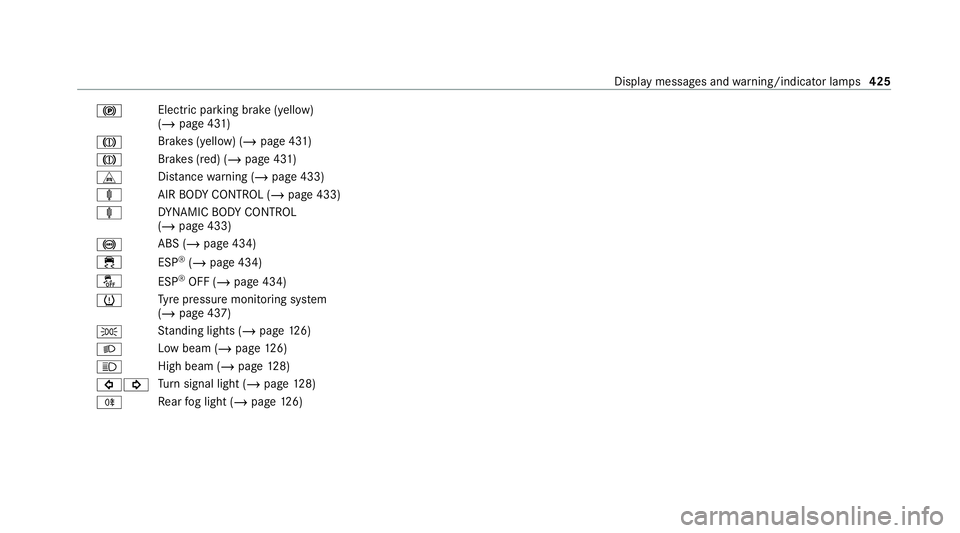
!
Electric pa
rking brake (yellow)
(/ page 431)
J Brakes (yellow) (/
page 431)
J Brakes (red) (/
page 431)
L Distance warning (/ page 433)
ä AIRBODY CONTROL (/ page 433)
ä DYNA MIC BODY CONTROL
(/ page 433)
! ABS (/
page 434)
÷ ESP®
(/ page 434)
å ESP®
OFF (/ page 434)
h Ty
re pressure monitoring sy stem
(/ page 437)
T St
anding lights (/ page126)
L Low beam (/
page126)
K High beam (
/page 128)
#! Tu
rn signal light (/ page128)
R Re
ar fog light (/ page126) Displ
aymessa ges and warning/indicator lamps 425
Page 460 of 477
Combination swit
ch............................. 12 8
Corne ring light ..................................... 12 9
Driving ab road (symm etrical low
beam) .................................................. 12 6
Fo g light (extended range) ................... 13 0
Haza rdwa rning lights .......................... 12 8
Headla mpflashing .............................. .128
High beam .......................................... .128
Intelligent Light Sy stem ....................... 12 9
Light switch .........................................1 26
Low beam ............................................ 12 6
Mo torw ay mode ................................... 13 0
Pa rking lights ...................................... .126
Re ar fog light ....................................... 12 6
Re sponsibility for lighting sy stems .......1 26
Setting the dipped beam ..................... 13 4
Setting theex terior lighting switch-
off delay time ...................................... 13 4
St anding lights .................................... .126
Switching the sur round lighting
on/off ................................................ .134
Tu rn signal indicator ............................1 28
Limi ter ...................................................... 197
Ac tivating ............................................ .197
Buttons ................................................ 197Calling up a speed ..............................
.197
Deactivating ......................................... 197
Fu nction .............................................. 197
Pa ssive mode ....................................... 197
Pe rm anent setting .............................. .199
Re quirements ...................................... 197
Selecting .............................................. 197
Setting a speed .................................... 197
St oring a speed .................................... 197
Sy stem limitations ...............................1 97
Limiting speed see Limiter
LINGU ATRO NIC
Fu nction .............................................. 260
St arting .............................................. .260
Live Traf fic Information
Swit ching the tra ffic information dis‐
play on ................................................ .274
Loading .................................................... .116
No tes ................................................... 111
Ro of luggage rack ................................ 11 9
Ti e-down eyes ...................................... 11 6
Loading guidelines ...................................111 Loads
Securing .............................................. .111
Locking/unlocking Activating/deactivating the auto‐
matic locking feature ............................ .77
Ad ditional door lock ...............................74
Digital Vehicle Keyst icke r ...................... 76
Emergency key ...................................... 78
KEYLESS-GO .......................................... 76
Un locking/opening the doors from
th e inside ............................................... 75
Low beam Swit ching on/off ................................ .126
Symmetrical low beam ........................ 12 6
Lu bricant additives
see Additives
Lu ggage
Lu ggage net ......................................... 11 6
Secu ring ............................................... 111
Lu mbar support
see Lumbar support (4-w ay)
Lu mbar support (4-w ay)........................ .100 Index
457
Page 465 of 477
Po
we r closing function
Door ...................................................... 78
Po we r supp ly
Switching on (S tart/S top button) ........ 154
Po we r windo ws
see Side windo ws
PRE-SAFE ®
(anticipatory occupant
pr otection) ................................................ .49
Fu nction ................................................ 49
PRE-SAFE ®
Sound ................................. 49
Re versing measures .............................. 49
PRE- SAFE®
Impulse Side .......................... .50
Ac tivation .............................................. 36
Fu nction ................................................ 50
PRE-SAFE ®
PLUS (anticipatory occu‐
pant pr otection plus) ................................ 49
Fu nction ................................................ 49
Re versing measures .............................. 49
Pr eve ntative occupant pr otection sys‐
tem
see PRE-SAFE ®
(anticipatory occu‐
pant pr otection) Profile
.......................................................2 63
Creating a new profile ......................... 264
No tes .................................................. 263
Selecting profile options ......................2 64
Prog rams
see DYNA MIC SELECT
Pr otection against collision ...................228
Pr otection of the environment
No tes ..................................................... 20
Ta ke -ba ckof end-of-life vehicles ............ 20
Pulling away
see No tes Q
QR code Rescue card ...........................................31
Qualified specialist workshop ................. 29 R
Ra dar and ultrasonic senso rs
Damage ............................................... 186Ra
dio
Overview of the functions and sym‐
bols ..................................................... 295
Ra dio ope rating permits ........................ .353
Ra in-closing feature
Side wind ows........................................ 85
Sliding sunroof ...................................... 90
REACH regulation ...................................... 30
Re ading light
Switching on/off with hand mo ve‐
ments .................................................. 262
Re ading light
see Interior lighting
Re ar door (child saf ety lock) .................... 67
Re ar fog light
Switching on/off .................................1 27
Re ar seat
see Seat
Re ar seat belt
St atus display ........................................ 41
Re ar seat belt status display .................... 41462
Index