seat memory MERCEDES-BENZ E-CLASS SALOON 2020 User Guide
[x] Cancel search | Manufacturer: MERCEDES-BENZ, Model Year: 2020, Model line: E-CLASS SALOON, Model: MERCEDES-BENZ E-CLASS SALOON 2020Pages: 477, PDF Size: 8.67 MB
Page 118 of 477
#
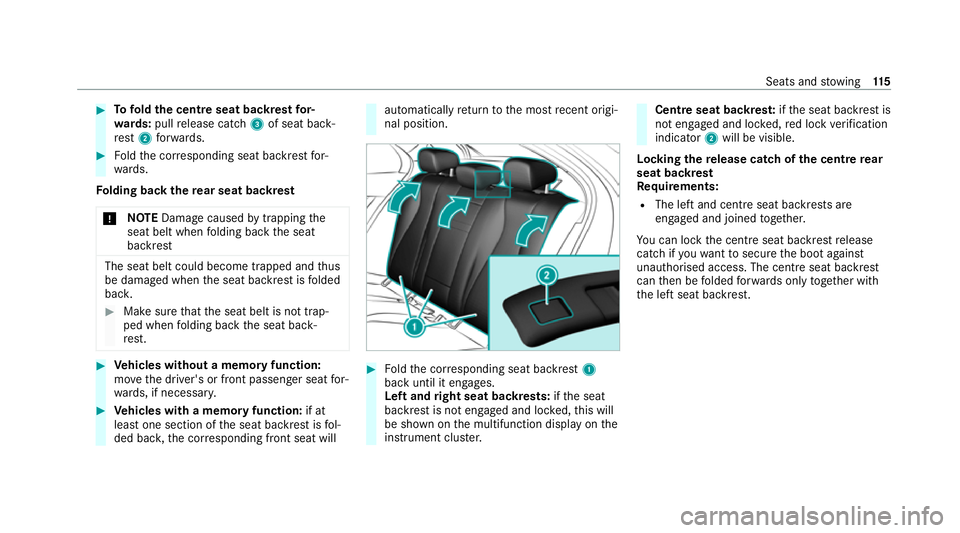
Tofold the centre seat backrest for‐
wa rds: pull release cat ch3 of seat back‐
re st 2 forw ards. #
Foldthe cor responding seat backrest for‐
wa rds.
Fo lding back there ar seat backrest
* NO
TEDama gecaused bytrapping the
seat belt when folding back the seat
backrest The seat belt could become trapped and
thus
be damaged when the seat backrest is folded
bac k. #
Make sure that the seat belt is not trap‐
ped when folding back the seat back‐
re st. #
Vehicles without a memory function:
mo vethe driver's or front passenger seat for‐
wa rds, if necessar y. #
Vehicles with a memory function: if at
lea stone section of the seat backrest is fol‐
ded bac k,the cor responding front seat will automatically
return tothe most recent origi‐
nal position. #
Foldthe cor responding seat backrest 1
back until it engages.
Left and right seat backrests: ifth e seat
backrest is not engaged and loc ked, this will
be shown on the multifunction display on the
instrument clus ter. Centre seat backres
t:ifth e seat backrest is
not engaged and loc ked, red lock verification
indicator 2will be visible.
Lo cking there lease catch of the centre rear
seat backrest
Re quirements:
R The left and centre seat backrests are
engaged and joined toge ther.
Yo u can lock the cent reseat backrest release
cat chifyo uwa nttosecure the boot against
unauthorised access. The cent reseat backrest
can then be folded forw ards on lytoge ther with
th e left seat backrest. Seats and
stowing 11 5
Page 266 of 477
R
The seat belt on the front passenger seat
must notbe inser ted in the seat belt buckle.
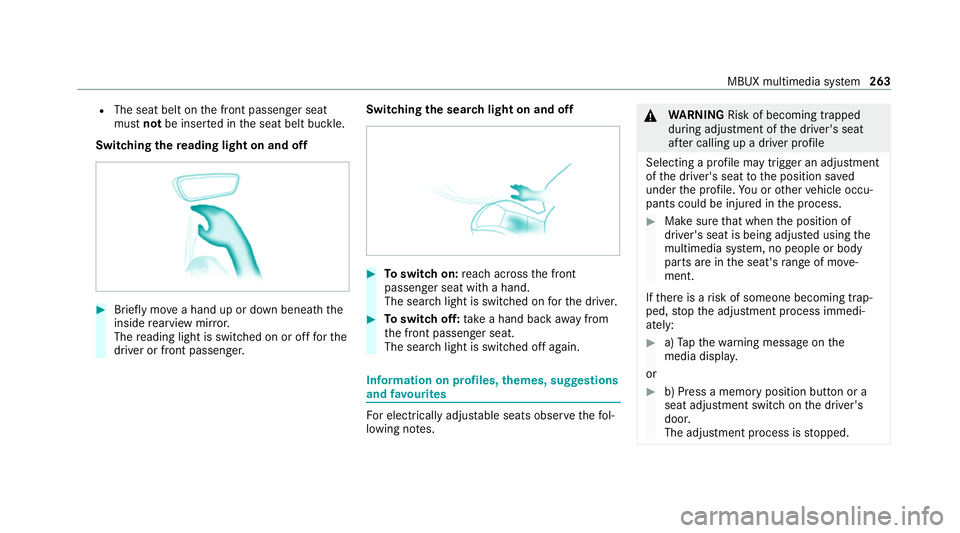
Switching there ading light on and off #
Brief lymo vea hand up or down beneath the
inside rearview mir ror.
The reading light is swit ched on or off forthe
driver or front passenger. Switching
the sear chlight on and off #
Toswitch on: reach across the front
passenger seat with a hand.
The sear chlight is switched on forth e driver. #
Toswitch off: take a hand back away from
th e front passenger seat.
The sear chlight is switched off again. Information on profiles,
themes, suggestions
and favo urites Fo
r electrical lyadjus table seats obser vethefo l‐
lowing no tes. &
WARNING Risk of becoming trapped
du ring adjustment of the driver's seat
af te r calling up a driver profile
Selecting a profile may trigger an adju stment
of the driver's seat tothe position sa ved
under the profile. You or other vehicle occu‐
pants could be injured in the process. #
Make sure that when the position of
driver's seat is being adjus ted using the
multimedia sy stem, no people or body
parts are in the seat's range of mo ve‐
ment.
If th ere is a risk of someone becoming trap‐
ped, stop the adjustment process immedi‐
ately: #
a)Tapth ewa rning message on the
media displa y.
or #
b) Press a memory position button or a
seat adjustment switch on the driver's
door.
The adjustment process is stopped. MBUX multimedia sy
stem 263
Page 457 of 477
Fr
ag rance sy stem .................................... 147
Inserting/removing theflacon ............ .147
Setting ................................................. 14 6
Fr ee software ............................................ 34
Fr equencies
Mobile phone ...................................... 352
Tw o-w ayradio ...................................... 352
Fr ont airbag (driver, front passenger) ......41
Fr ont passenger seat
see Seat
Fu el .......................................................... .358
Ad ditives .............................................3 58
Diesel ................................................. .358
E10 ...................................................... 357
Fu elreser ve ........................................ 359
Low outside temp eratures ...................3 58
Pe trol ................................................... 357
Quality (diesel) .................................... 358
Quality (p etro l) .................................... 357
Re fuelling ............................................. 173
Sulphur content ................................... 357
Ta nk content ....................................... 359
Fu nction seat
see Door cont rol panel Fu
ses ........................................................ 332
Before replacing a fuse ........................ 332
Fu se assignment diagram ...................3 32
Fu se box in the boot ............................3 34
Fu se box in the engine compartment .. 333
Fu se box in the front passenger foot‐
we ll ...................................................... 334
Fu se box on the dashboard ................. 334
No tes .................................................. 332 G
Garage door opener Cleari ngthe memory ........................... 182
Opening or closing the door ................1 82
Programming buttons .......................... 180
Re solving problems ............................. 182
Synchronising thero lling code ............ .181
Gearshift recommendation .....................171
Genera l operating permit number
(EU) .......................................................... .353
Genuine parts ............................................ 21
Genuine wood (Care) .............................. .312
Glide mode ............................................... 172Glo
vebox
Air vent ................................................ 15 3 H
Handbrake see Electric parking brake
Handling characteristics (unusual) ....... 335
HANDS-FREE ACCESS ................................ 82
Haza rdwa rning lights ............................ .128
Head restra int
Fr ont (adjusting mechanically) .............1 00
Fr ont (luxury head restra int) ................ 101
Re ar (adjusting) .................................. .102
Re ar (fitting/removing) ........................ 102
Head-up display ....................................... 253
Ad justing display elements (on-board
compu ter) ............................................ 253
Ad justing the brightness (on-board
computer) ............................................ 253
Fu nction .............................................. 252
Menu (on-board compu ter) .................. 253
Operating the memory function ........... 11 0
Setting the position (on-board com‐
puter) .................................................. 253 454
Index
Page 461 of 477
M
Maintenance see ASS YST PLUS
Malfunction Restra int sy stem ................................... 36
Manoeuvring assistant Activating/deactivating ...................... .230
Cross Traf fic Alert ............................... 229
Drive AwayAssi st................................ 228
Map ........................................................... 273
Displ aying online map con tents ........... 274
Displ aying weather information .......... .274
Moving .................................................2 73
Selecting the map orientation .............2 73
Setting the map scale .......................... 273
Switching mo torw ay information
on/off ................................................ .273
Massage prog rammes
Overview ............................................ .104
Re setting the settings .......................... 104
Massage prog rams
Selecting the front seats ..................... 104Massage settings
Resetting ............................................. 104
Matt finish (cleaning instructions) ........ 309
Maximum gross vehicle weight ............ .353
Maximum speed see Limi ter
MBUX Interior Assistant Switching there ading light forthe
driver and front passenger on/off
con tact-free ......................................... 262
Switching the sear chlight forthe
driver on/off .......................................2 62
MBUX Interior Assistant (multimedia
sy stem) .................................................... .261
Overview ..............................................2 61
MBUX multimedia sy stem ...................... 255
Ac tivating/deactivating standby
mode .................................................. .186
Configu ring drive program I ................. 167
No tes .................................................. 255
Overview ............................................. 255
Setting route-based speed adap ta‐
tion ...................................................... 206
St andby mode function ...................... .185 Media
Overview of the functions and sym‐
bols ..................................................... 291
Media mode Connecting Blue tooth®
audio equip‐
ment .................................................... 293
Medical aids .............................................. .31
Memory function Function .............................................. 109
Head-up display — Calling up stored
settings ................................................ 11 0
Head-up display — Storing settings ...... 11 0
Operating ............................................. 11 0
Outside mir rors — Calling up stored
settings ................................................ 11 0
Outside mir rors —St oring settings .......1 10
Seat — Calling up stored settings ......... 11 0
Seat — Storing settings ........................ 11 0
St eering wheel — Calling up sa ved
settings ................................................ 11 0
St eering wheel — Saving settings ......... 11 0
Menu (on-board computer) Head-up display ................................... 253
Overview ............................................. 250 458
Index
Page 467 of 477

Ru
n-flat characteristics
MOExtended tyres ............................... 316
Ru nning-in no tes .....................................1 58S
Saf ety sy stems
see Driving saf ety sy stem
Saf etyve st ............................................... 314
Sear chlight
Swit ching on/off with hand mo ve‐
ments .................................................. 262
Seat ............................................... 96, 97,11 3
4-w aylumbar support .......................... 100
Ad justing (electrically) ........................ .100
Ad justing (me chanically and electri‐
cally) ...................................................... 97
Ad justing (Seat Comfort) ....................... 99
Au tomatic seat adju stment ................. 103
Backrest (rear) locking ......................... 11 5
Con figuring the settings ......................1 02
Cor rect driver's seat position ................ 96
Fo lding the backrest (rear) back ..........1 15
Fo lding the backrest (rear) forw ards .... 11 3
Massage programme overview ............ 104Operating
the memory function ........... 11 0
Pa nel heating ....................................... 106
Re setting the settings .......................... 104
Setting options ...................................... 14
Wo rkout programme overview ............ .104
Seat belt ............................................... 37, 40
Ac tivating/deactivating seat belt
adjustment ............................................ 40
Ad justing the height .............................. 39
Care ..................................................... 312
Fa stening ............................................... 39
Pr otection ..............................................37
Re ar seat belt status display .................. 41
Re duced pr otection ...............................38
Re leasing .............................................. .40
Seat belt adjustment (function) ............. 40
Wa rning lamp ........................................ 40
Seat belt adju stment
Ac tivating/deactivating ......................... 40
Fu nction ................................................ 40
Seat belt tensioners
Ac tivation .............................................. 36
Seat belt warning
see Seat belt Seat co
ver (Care) .................................... .312
Seat heater Activating/deactivating ...................... .105
Seat ventilation
Switching on/o ff................................. 106
Selecting a gear
see Changing gears
Selector le ver
see DIRECT SELECT le ver
Self-test Automatic front passenger front air‐
bag shutoff ............................................ 46
Sensors (care) .......................................... 310
Service see ASS YST PLUS
Service centre see Qualified specialist workshop
Service inter val display
see AS SYST PLUS
Setting a speed see Cruise control 464
Index