change time MERCEDES-BENZ E-CLASS SALOON 2020 Owner's Manual
[x] Cancel search | Manufacturer: MERCEDES-BENZ, Model Year: 2020, Model line: E-CLASS SALOON, Model: MERCEDES-BENZ E-CLASS SALOON 2020Pages: 477, PDF Size: 8.67 MB
Page 276 of 477
or
#
Select Start new route guidance.
The destination address is set as the new
destination. The pr evious destination and the
intermediate destinations are dele ted. Ro ute
guidance tothe new destination begins.
Selecting route settings #
Select Z. #
Select Advanced . #
Select Route. #
Select thero ute type. #
Take traf fic information into consideration
wi th Dynamic route guidance r.#
Select route options with Avoid options. #
Activate Suggest alternative route.
Alternati veroutes are calculated forev ery
ro ute. #
Activate Activate commuter route .
If th ere qu irements are met, the multimedia
sy stem automatically de tects that theve hicle
is on a commuter route. Route guidance
begins without voice output. Ac
tivating route guidance with augmented
re ality #
During route guidance, tap on the camera
symbol on the media displa y.
The camera image will be shown ins tead of
th e navigation map before a turning manoeu‐
vre and will show additional information. #
Toreturn tothe navigation map: tapon
th e camera symbol again.
Displaying additional information in the cam‐
era ima ge #
Select Z. #
Select Advanced . #
Select Augmented Reality. #
Activate Street names andHouse numbers.
During route guidance, stre et names and
house numbe rsare shown in the camera
image. Using map functions
Multimedia sy
stem:
4 © 5
Navigation
Setting the map scale #
Tozoom in: tap twice quickly with one finger
on the media displa y. #
Tozoom out: tap with two fingers on the
media displa y.
Moving the map #
Moveone finger in any di rection on the
to uchsc reen. #
Toreset the map tothe cur rent vehicle
position: press\briefly.
Selecting map orientation #
Tapre peatedly on theÄ compass symbol
on the map.
The view changes in the sequence 3D,2D
heading up to2D north up .
Switching mo torw ay information on/off #
Select Z. MBUX multimedia sy
stem 273
Page 278 of 477
Te
lephone Te
lephony Note
s ontelephony &
WARNING Risk of di stra ction from oper‐
ating integrated communication equip‐
ment while theve hicle is in motion
If yo u operate communication equipment
integrated in theve hicle when driving, you
will be distracted from the tra ffic situation.
This could also cause youto lose control of
th eve hicle. #
Only operate this equipment when the
traf fic situation permits. #
Ifyo u cannot be sure of this, stop the
ve hicle whilst paying attention toroad
and traf fic conditions and ope rate the
equipment with theve hicle stationar y. &
WARNING Risk of an accident from
ope rating mobile communication equip‐
ment while theve hicle is in motion
Mobile communications devices distract the
driver from the traf fic situation. This could
also cause the driver tolose control of the
ve hicle. #
Asthe driver, only operate mobile com‐
munications devices when theve hicle is
st ationar y. #
As a vehicle occupant, only use mobile
communications devices in the areas
intended forth is purpose, e.g. in the
re ar passenger compartment. Yo
u must obse rveth e legal requirements forthe
country in whi chyou are cur rently driving when
operating mobile communication equipment in
th eve hicle. &
WARNING Risk of inju rydue toobjects
being stowed inco rrectly
If objects in theve hicle interior are stowed
incor rectly, they can slide or be thrown
around and hit vehicle occupants. In addi‐
tion, cup holders, open stowage spaces and
mobile phone recep tacles cannot al ways
re tain all objects within.
There is a risk of injur y,particularly in the
ev ent of sudden braking or a sudden change
in direction. #
Alw aysstow objects so that they can‐
not be throw n around in su chsitua‐
tions. #
Alw ays make sure that objects do not
pr otru de from stowage spaces, luggage
nets or stowage nets. #
Close the loc kable stow age spaces
before starting a journe y. #
Alw aysstow and secure heavy, hard,
poin ted, sharp-edged, fragile or bulky
objects in the boot/load compartment. MBUX multimedia sy
stem 275
Page 281 of 477
R
Two mobile phones are connected with the
multimedia sy stem via Blue tooth®
(two
phone mode).
- You can use all the functions of the multi‐
media sy stem with the mobile phone in
th efo re ground.
- You can recei veincoming calls and mes‐
sages with the mobile phone in the back‐
ground.
Yo u can inter change the mobile phone in
th efo re ground and bac kground.
R A mobile phone is connected as the car
phone.
Connecting a mobile phone
Re quirements:
R Blue tooth ®
is activated on the mobile phone
(see the manufacturer's operating instruc‐
tions).
R Blue tooth ®
is activated on the multimedia
sy stem. Multimedia sy
stem:
4 © 5
Phone
Sear ching for a mobile phone #
Select í. #
Select Connect new device .
Connecting a mobile phone
Auth orisation follo ws using secure simple pair‐
ing. #
Select a mobile phone.
A code is displ ayed in the multimedia sy stem
and on the mobile phone. #
If bo thcodes match, confirm the code on the
mobile phone.
Fu nctions in thete lephony menu
In thete lephony menu you ha vethefo llowing
functions, forex ample:
R Making calls, e.g.:
-
R Accept a call
- k End call
- i Create conferen. call -
Accepting or rejecting a waiting call
R Managing con tacts, e.g.:
- Downloading mobile phone contacts
- Managing thefo rm at of a con tact's name
- Saving a contact as a favo urite
R Receiving and sending messages, e.g.:
- Using there ad-aloud function
- Dictating a new message Mercedes me and apps
Mercedes me connect
Information on Mercedes me connect
% Mercedes me connect or individual
Mercedes me connect services are not avail‐
able in everycountr y.Find out at a
Mercedes-Benz service centre if these func‐
tions are available in your count ry.
Mercedes me connect consists of multiple serv‐
ices. 278
MBUX multimedia sy stem
Page 319 of 477
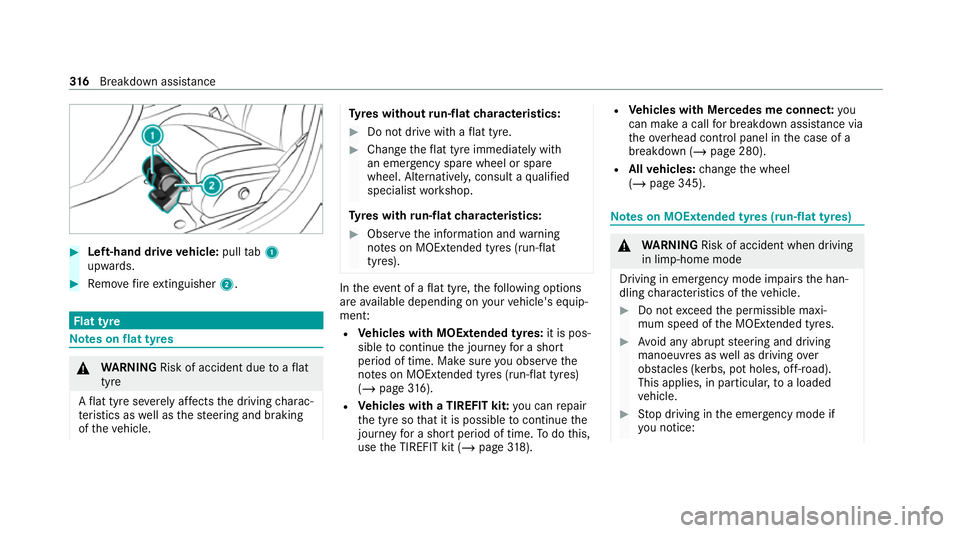
#
Left-hand drive vehicle: pulltab1
upwards. #
Remo vefire extinguisher 2. Flat tyre
Note
s onflat tyres &
WARNING Risk of accident due toaflat
tyre
A flat tyre se verely affects the driving charac‐
te rist ics as well as thesteering and braking
of theve hicle. Ty
res without run-flat characteristics: #
Do not drive with a flat tyre. #
Chan getheflat tyre immediately with
an emer gency spa rewheel or spare
wheel. Alternativel y,consult a qualified
specialist workshop.
Ty res with run-flat characteristics: #
Obse rveth e information and warning
no tes on MOExtended tyres (run-flat
tyres). In
theeve nt of a flat tyre, thefo llowing options
are available depending on your vehicle's equip‐
ment:
R Vehicles with MOExtended tyres: it is pos‐
sible tocontinue the journey for a short
period of time. Make sure you obse rvethe
no tes on MOExtended tyres (run-flat tyres)
(/ page 316).
R Vehicles with a TIREFIT kit: you can repair
th e tyre so that it is possible tocontinue the
jou rney fo r a short period of time. Todo this,
use the TIREFIT kit (/ page318). R
Vehicles with Mercedes me connect: you
can make a call for breakdown assi stance via
th eov erhead control panel in the case of a
breakdown (/ page 280).
R Allvehicles: change the wheel
(/ page 345). Note
s on MOExtended tyres (run-flat tyres) &
WARNING Risk of accident when driving
in li mp-home mode
Driving in emergency mode impairs the han‐
dling characteristics of theve hicle. #
Do not exceed the permissible maxi‐
mum speed of the MOEx tended tyres. #
Avoid any abrupt steering and driving
manoeuvres as well as driving over
obs tacles (kerbs, pot holes, off-road).
This applies, in pa rticular, toa loaded
ve hicle. #
Stop driving in the emer gency mode if
yo u notice: 316
Breakdown assis tance
Page 349 of 477
R
There are no persons in theve hicle.
R The vehicle has been prepared for a wheel
ch ange (/ page 345).
R The hub caps ha vebeen remo ved
( / page 345).
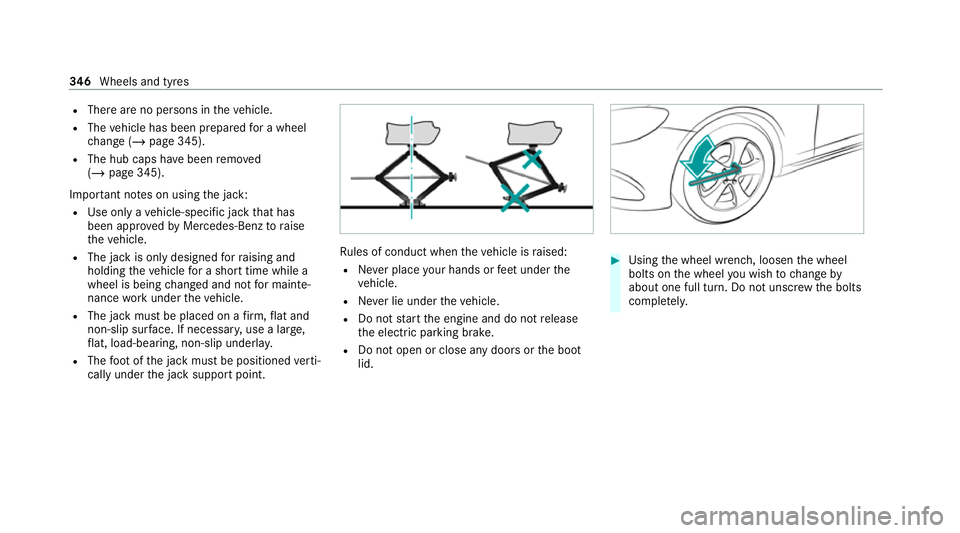
Impor tant no tes on using the jack:
R Use only a vehicle-specific jack that has
been appr ovedby Mercedes-Benz toraise
th eve hicle.
R The jack is only designed forra ising and
holding theve hicle for a short time while a
wheel is being changed and not for mainte‐
nance workunder theve hicle.
R The jack must be placed on a firm ,fl at and
non-slip sur face. If necessar y,use a lar ge,
fl at, load-bearing, non-slip unde rlay.
R The foot ofthe jack must be positioned verti‐
cally under the jack support point. Ru
les of conduct when theve hicle is raised:
R Never place your hands or feet under the
ve hicle.
R Never lie under theve hicle.
R Do not start the engine and do not release
th e electric parking brake.
R Do not open or close any doors or the boot
lid. #
Using the wheel wrench, loosen the wheel
bolts on the wheel you wish tochange by
about one full turn. Do not unscr ewthe bolts
comple tely. 346
Wheels and tyres
Page 365 of 477
*
re commended for lo west possible fuel con‐
sum ption (lo westSA E viscosity class in ea ch
case; obser vepossible restrictions of the
appr ovedSA E viscosity classes)
To achie vethe lo west possible fuel consum ption,
it is recommended touse the engine oil specifi‐
cations mar ked in theta ble forth e lo west SAE
viscosity class. Possible restrictions of the
appr ovedSA E viscosity classes mu stbe
obser ved.
% Ifth e engine oils lis ted in theta ble are not
av ailable, you may add a maximum of
1. 0 litr e ofthefo llowing engine oils once
onl y.
Engine oils for one-time filling only in exceptional
cases:
R vehicles with a petrol engine:
- E 450 4MATIC: MB-Freigabe or MB-
Appr oval 229.3 or ACEA A3/B4
- allother models: MB-Freigabe or MB-
Appr oval 229. 31orAC EA C3
R vehicles with a diesel engine: -
E 350 d, E 400 d 4MATIC: MB-Freigabe
or MB-Appr oval 229. 51orAC EA C3
- allother models: ACEA C3
The following values referto an oil change,
including the oil filter.
Missing values werenot available at the time of
going topress. Model
Capacity
E 200 d
E 220 d (143 kW)
E 220 d 4MATIC
(143 kW) 6.3 litres
E 200 4MATIC
E 220 d (150 kW)
E 220 d 4MATIC
(150 kW) 6.0 litres
E 300 d 4MATIC
E 450 4MATIC 6.5 litres
E 300 d6 .8 litres Mode
lC apacity
E 350
E 350 d8 .5 litres
E 400 d 4MATIC 7.5 litres
All other models 6.6 litres Note
s on brake fluid Obser
vethe no tes on operating fluids
(/ page 355). &
WARNING Risk of an accident due to
va pour poc kets form ing in the brake sys‐
tem
The brake fluid cons tantly absorbs moi sture
from the air. This lo wersthe boiling point of
th e brake fluid. If the boiling point is too lo w,
va pour poc kets may form inthe brake sys‐
te m when the brakes are applied hard.
This impairs the braking ef fect. 362
Tech nical da ta