Service ad MERCEDES-BENZ E-Class SEDAN 2011 W212 Comand Manual
[x] Cancel search | Manufacturer: MERCEDES-BENZ, Model Year: 2011, Model line: E-Class SEDAN, Model: MERCEDES-BENZ E-Class SEDAN 2011 W212Pages: 234, PDF Size: 8.64 MB
Page 110 of 234

X
Sel ect SIRIUS Service and
pressW to
confi rm.
The window onthe right halfof the displ ay
sho wsthe telephone numb erofthe
pro vider(SIR IUSXM) andtheserialn umb er
of your ser vice modulef or rece iving traf fic
mes sages .
Reg isteri ngfor the SIRIU SXMt raffic
repo rtse rvic e X
Ca llthe trafficrep ort provider'sp hone
numb ersho wnonthe scre en.
i Youc an also have the satel lite ser vice
acti vate donline .Tod oso,visit theSIRIUS
XM Radio website at
htt <0019000F00320032001E001E001E00460017002300160023002500170046001F
002700149 (USA)or
htt <0019000F00320032001E001E001E0046001700230016002300250017001F002A
0028002A001C002A9 .com
(Canada) .
Once theconn ection hasbeen established:
X Follow theinstr uctions ofthe operator.
The activation processmaytake uptoten
minutes.
If registrat ionisnot included when
purchasing thesystem, yourcredit card
details willberequired toactivate your
account . Compass
function
In the compass view,youcan seethecurrent
direction oftravel, thecurrent heightabove
sea level andthecoordinat esofthe vehicle
position, forexample.
X To switch onnavigation mode:pressthe
Ø functionbutton .
X To show themenu: pressWthe COMAND
cont roller.
X Select Pos. in
the navigation systemmenu
bar bysliding VÆandturnin gcVd the
COMAND controller andpress Wto
conf irm.
X Select Compass and
press Wtoconf irm. Compass
(example)
: Current direction oftravel
; Current heightaboveaverage sealevel,
rounded
= Current vehicleposition: longitude
coordinat es
? Number ofGPS satellites currentlybeing
used
A Current vehicleposition: latitude
coordinat es
B Currently setsteerin gangle ofthe front
wheels
i Todisplay current height;,thesystem
must beable toreceive atleast four
satellites. Steeringangle Bcan bea
maximum of35° inboth direction s.
X To exit thedisplay: confirmBack by
pressing Worpress the% button . Showing
themap dataversion
X To show themenu: pressWthe COMAND
cont roller.
X Select Navi in
the main functionbar by
sliding ZVandturnin gcVd theCOMAND
cont roller andpress Wtoconf irm.
X Select MapVersion and
press Wto
conf irm.
The map data version number isshown.
Infor mation aboutnewversions ofthe
digital mapcanbeobtained froman
authorized Mercedes-B enzCenter. 108
Additional
settingsNavigation
Page 151 of 234
envir
onmen talortopogr aphical conditions
as well asother issues beyond thecontrol
of Mercedes- BenzUSA,LLC. Operation
may alsobeimpaired incert ainlocation s
(e.g. tunnels,multi-s toreycarparks or
within aswell asclose tobuildings).
i SIRIUS XMRadio offersmore than 130
digital-quality radiochann elsproviding
100 %comm ercial-f reemusic, sports,news
and entertain ment.
SIRIUS XMRadio employs afleet ofhigh-
perform ancesatellites tobroadcast around
the clock throughout theUSA andCanada.
The satellite radioprogram isavailable for
am onthly fee. Details areavailable from
the SIRIUS XMServ iceCenter andat
htt p://www.sirius.com (USA)or
htt p://www.siri uscanada .com
(Canada). Register
ingsatellit eradio
X Switc honsatellite radiomode
(Y page 149).
The satellite radiomainmenu appears
showing theweather channel.You cann ot
select anyother stations.
X Select SatRadio in
the lower menu bar
and press Wtocon firm.
X Select Service and
press Wtocon firm.
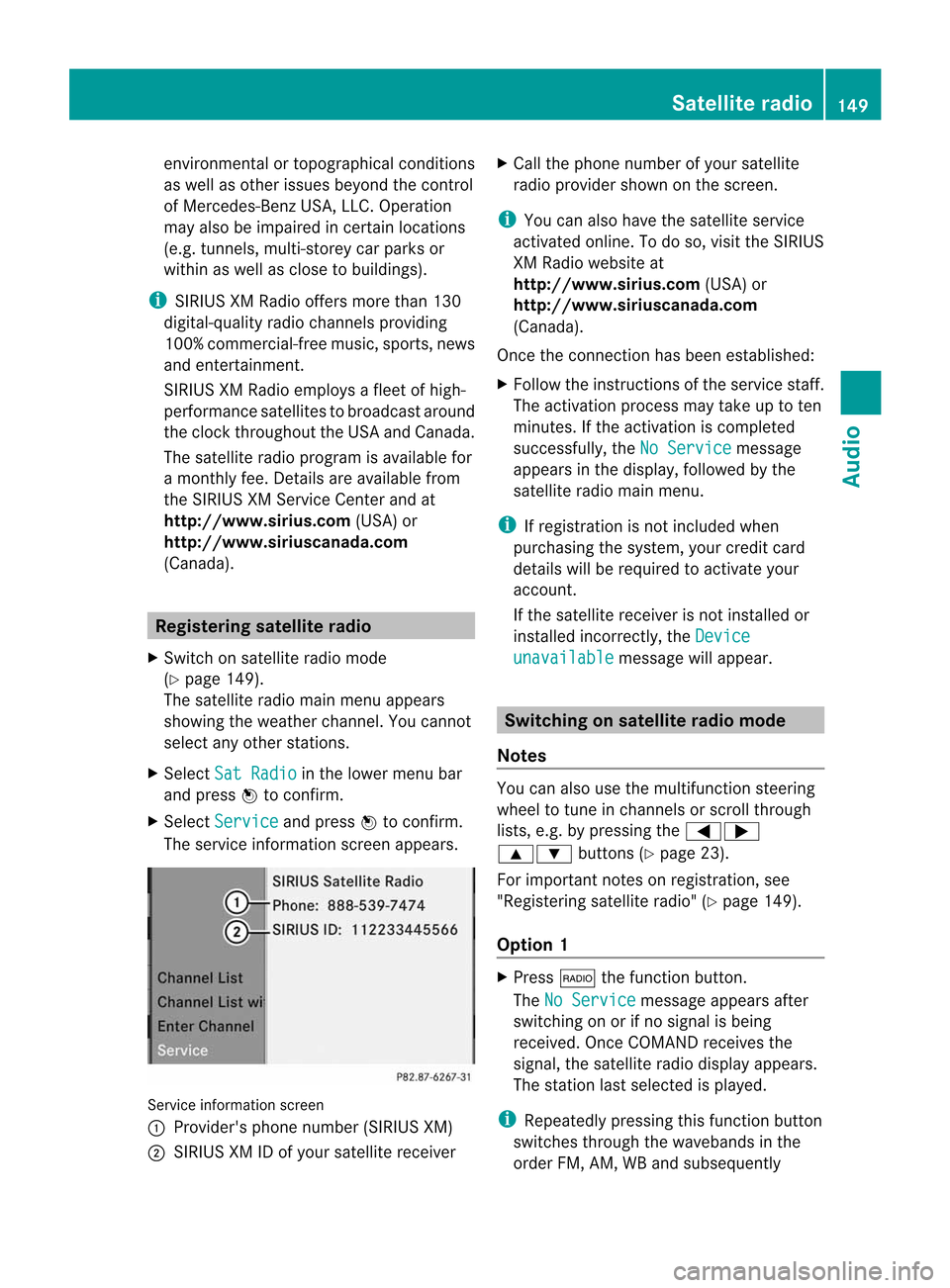
The servic einfor mation screenappears. Serv
iceinfor mation screen
1 Provider's phonenumber (SIRIUSXM)
2 SIRIUS XMIDofyour satellite receiver X
Call thephone number ofyour satellite
radio provider shownonthe screen .
i You canalso have thesatellite service
activ ated online. Todo so, visit theSIRIUS
XM Radio website at
htt p://www.sirius.com (USA)or
htt p://ww w.siriu scanada .com
(Canada).
Onc ethe con nection hasbeen established:
X Follow theinstruct ions ofthe servic estaff .
The activ ation process maytake uptoten
minut es.Ifthe activ ation iscomplet ed
success fully,theNoService message
appears inthe display, followed bythe
satellite radiomainmenu.
i Ifregistr ationisnot included when
purchasing thesystem, yourcredit card
details willberequired toactivat eyour
accoun t.
If the satellite receiver isnot installed or
inst alled incorrectly,the Device unavail
able message
willappear. Switching
onsatellit eradiomode
Notes You
canalso usethemultifunc tionsteer ing
wheel totune inchann elsorscroll through
lists, e.g.bypressing the=;
9: buttons(Ypage 23).
For import antnoteson registr ation,see
"Registering satelliteradio"(Y page 149).
Opt ion 1 X
Press $thefunc tion button .
The NoService message
appearsafter
switch ingonorifno signal isbeing
received. OnceCOMAND receives the
signal, thesatellite radiodisplay appears.
The stationlast select edisplayed.
i Repeatedly pressingthisfunc tion button
switch esthrough thewavebands inthe
order FM,AM, WBand subsequently Sat
ellite radio
149Audio
Page 152 of 234

switches
onthe satellite radio.Pressing the
button againtake syou back toFM radio
mod e.
Opt ion 2 X
Sel ect Audio in
them ainfunction bar by
slidin gZV andturnin gcVd theC OMA ND
co ntroll erand pres sW toconfirm .
If sat ellit eradio modewasthel ast mod e
selec ted, itwill nowb eactive.
If ano ther audio modeiss wit ched on,you
can nows witch tosat ellit eradio modein
th ea udio menu.
X Sel ect Audio by
slidin gZV theC OMA ND
co ntroll erand pres sW toconfirm .
The audio menuappear s.
X Sel ect Sat Rad
io and
pres sW toconfirm .
The NoService mes
sage appear swhen
st art ing uporifno sign alisbein greceive d.
If th es atellit ereceive risn otinstalled oris
not installed correctly,the Device Unavailable message
willappea r. Once
COMAND receivesthesignal, the
satellite radiodispla yappea rs.The station
last selected isplay ed. Satellite
radiomainmenu
1 Satellite radiomaindispla y
2 Channel name
3 Preset
4 Selected category/channel number
5 Channel information (inbrief)
6 Sound settings
7 Category list
8 Channel information (indetail)
9 Channel presetlist
a Satellite radiomenu
Channel information Acan beviewed in
detail (Ypage 153).
Changing thecategory Satellite
radiostations aresorted intovarious
categories. Youcanchoose between the
different categories, suchasnews/talk
shows, sportsorcountry, ifthey areavail able.
The category listissorted alphabetically .
Selec tingacatego ry
X To callupt he categ orylist:sel ect
Catego ry by
turning cVdtheCOM AND
controlle rand pre ssW toconfi rm.
The cate gorylista ppears.
X To select ac atego ry:select acatego ryby
turning cVdtheCOM AND controll erand
pres sing Wtoconfirm.
The catego rysel ected isshow nint he
displa y.You hear thestation lastselected
for this category.
The All Channels category
isat the top
of the category list.This category issorted 150
Satellite
radioAudio
Page 155 of 234

Selec
tingachanne lfrom thepreset list
X To call upthe preset list:sele ct
Presets in
the submenu barbyturning
cVd theCOMAND controllerand press
W toconfirm.
The channel presetlist appears.
X To set achanne l:sele ctap rese tby
tur ning cVd theCOMAND controllera nd
pre ssW toconf irm.
or
X Pre ssan um berk ey, such asn.
Displaying information X
Select Info in
the submenu barbyturn ing
cVd theCOMAND controller andpress
W tocon firm.
Inf ormation onthe curren tlyreceived
program isdisplayed. If
available, yousee:
R the complet echann elname
R the artist ofthe curren tlyplayed track
R the curren tlyplayed track
X To retu rntothe radiodispla y:con firm
Info by
pressing W.
X Slide ZVtheCOMAND controller up.
Displaying serviceinformation The
provider's customerservicecenter is
available byphone atany time toanswer any
general questions orquestions onthe
version savailable. X
Select Satradio in
the submenu barby
turn ingcVd theCOMAND controller and
press Wtocon firm.
X Select Service and
press Wtocon firm.
The provider's detailsappear. 1
Provider's phonenumber (SIRIUSXM)or
Call Service Provider 2
SIRIUS IDofyour satellite receiver
X To retu rntothe SatR adio main displa y:
slide XVY theCOMAND controller.
Channel listupd ates When
receivin ganewchann ellist, thedisplay
shows theUpdatin gChannel s... message.
The stationlast select edisswitch edtomute
until theupdate hasbeen complet ed.
Satellit eradio mode isnot available during
this process .
Onc ethe update hasbeen complet ed,the
satellite radiomainmenu appears. The
stat ionlast select edisplayed.
Sound settings You
willfind details onthe sound settings in
the "Ataglance" section(Ypage 34). Sat
ellite radio
153Audio
Page 156 of 234

Aud
ioCD/DVD andMP3 mode Imp
ortant safety notes G
WAR
NING
COMA NDisclas sified asaC lass 1laser
prod uct.You must notopen thecasing. Ifyou
open thecasing, orifthe casing isfaulty or
damaged, thereisar isk ofexposure to
invisible laserradiation. Thismay damage
your eyes, orthose ofothers.
COMAND doesnotcont ainany parts thatcan
be serviced bythe user. Forsafety reasons,
all mainten ancework must becarried outby
quali fiedaftersales technicians. G
WARNING
Only when thevehicle isstation aryshould
you:
R load adisc
R eject adisc
There isar isk ofbeing distract edfrom the
road andtraffic conditionsifthis isdone while
the vehicle isin motion. <002600280017001B001600180023002800110032001B0024001B001F00180023
002800119
CDs/DVDs
Notes If
the CD/D VDhas aprinted side,thismust
face upwards whentheCD/D VDisinsert ed.
If neither sideisprinted, theside tobe playe d
should facedownwards. Thesystem maynot
be able toplay CDs/D VDswith copy
protect ion.
i Ifam edium contains other filesin
addition tomusic files,theloading time
before thefirst track startstop lay may be
longer.
Inserting discsintotheDVD changer The
DVD changer hasafixed magazine with
six trays. X
To insert aCD/DVD intothe ma gaz ine
tr ay :pre sstheV load/ejec tb utt on.
Am enu shows thecurren tload status of
the magazine trays.Thelasttray selected
is identified byared digit. Magazine
menu
X Select amagazine traytobe filled by
turnin gcVd theCOMAND controller and
press Wtoconf irm.
or
X Press anumber key,e.g.j.
The DVD changer switches tothe selected
magazine tray.YouseethePlease wait... message.
You then seethePlease insert disc
i Never insertadata medium before
COMAND promptsyoutodo so. Never
insert morethanonedisc intoamagazine
tray atat ime. X
Insert adisc into thedisc slotwith the
printed sidefacing upwards. 154
Audio
CD/DVD andMP3 modeAudio
Page 188 of 234

COMAN
Dfeatures
Thes eOperatin gInstruc tio ns desc ribeall
st andar dand opt ionalequipm enta vail able
for you rCOMAND systematthe time of
purcha se.Cou ntry-specifi cdeviation sare
possible. Pleasenotethat your COMAND
system maynotbeequipped withallthe
features described. General
information Autom
aticpictu reshut off
The video image isonly displayed ifthe
select orlever ofthe tran smission isin
position P.
If the select orlever ofthe tran smission is
changed fromposition P,theIn order not
to
distrac tyoufrom thetraffic situati
on, the picture is faded out
while
thevehicle isinmotion. message
appears
As soon asthe select orlever ofthe
tran smission isreturn edtoposition P,the
video image isshown. Basic
settings Pictur
esettings
Adju sting thebright ness,contra stor
color X
Press Wthe COMAND controller toshow
the menu.
X Select DVD-Vid eo by
sliding VÆand
turn ingcVd theCOMAND controller and
press Wtocon firm.
Am enu appears.
X Select Brightn ess ,
Contras t or
Color by
turn ingcVd theCOMAND controller and
press Wtocon firm. Changing
thepictu reform at X
Press Wthe COMAND controller toshow
the menu.
X Select DVD-Vid eo by
sliding VÆand
turn ingcVd theCOMAND controller and
press Wtocon firm.
Am enu appears.
X Select 16:9Optimiz ed ,
4:3 or
Widescr een and
press Wtocon firm.
The dotinfron tofthe ent ryindicat esthe
curren tlyselect edformat .
X Select asetting byturn ingcVd the
COMAND controller andpress Wto
con firm. Video
DVDmode Safet
ynotes G
WARN
ING
COMAND isclassified asaC lass 1laser
prod uct.You must notopen thecasing. Ifyou
open thecasing, orifthe casing isfaulty or
damaged, thereisar isk ofexposure to
invisible laserradiation. Thismay damage
your eyes, orthose ofothers.
COMAND doesnotcont ainany parts thatcan
be serviced bythe user. Forsafety reasons,
all mainten ancework must becarried outby
quali fiedaftersales technicians. G
WARNING
Only when thevehicle isstation aryshould
you:
R load adisc
R eject adisc
There isar isk ofbeing distract edfrom the
road andtraffic conditionsifthis isdone while
the vehicle isin motion. 186
Video
DVDmodeVideo
Page 197 of 234

COMAN
Dfeatures .... .... .... ...... ........ ... 196
SIRIU SWeather <003B003B003B003B003B003B003B003B003B003B003B003B003B003B003B003B
003B003B003B003B003B003B003B003B003B003B003B003B003B003B003B003BV 196 195Weat
her
services
Page 198 of 234

COMAN
Dfeatures
Thes eOperatin gInstruc tio ns desc ribeall
st andar dand opt ionalequipm enta vail able
for you rCOMAND systematthe time of
purcha se.Cou ntry-specifi cdeviation sare
possible. Pleasenotethat your COMAND
system maynotbeequipped withallthe
features described. SIRIUS
Weather Introd
uction
For therecept ionofweather forecastsvia
satellite radio,youwillneed aSIRIUS XM
Satellit eWeather subscript ion.
When theCall SIRIUS toactivat e system at 888-539
-7474 message
withthe
SIRIUS deviceidentification number appears,
you willfirst have toobtain access tothe
weather service.Ad escript ionofthe
procedure canbefound inthe "Registering
satellite radio"section(Ypage 149).
COMAND canreceive weather forecastsvia
satellite radioforthe entireUSA (including
Alaska andHawaii). Thereceived weather
data canbedisplayed asan infor mation chart
(daily forecast,five-dayforec ast,detail
infor mation )oro nthe weather map.
The weather datareceived fromaweather
stat ionisstor edinCOMAND foranhour and
can beshown againimmediately after
rest artin gthe engin e(e.g. after refueling).
The weather mapcandisplay thefollowing
weather datawithsymbols:
R rain radar
R stor mcharact eristics
R areas ofhigh-pres sure/low-pr essure,
weather fronts
R course oftropic alcyclon es(hurricanes ,
typhoon s)
R wind direct ionand speeds
i The rain radar cannotbe displayed for
Alaska, HawaiiandPuerto Rico. i
Hurric ane:descript ionofat ropic al
cyclon ewhich most lydevelop inthe
At lantic Ocean orinthe Nort hPacific
Ocean orSouth Pacific Ocean. Thewind
speeds areabove 74mph (118 km/h).To
charact erizethestrengt hofah urrican e,
ther earefive categor ies.
Typhoon: thedescript ionofat ropic al
cyclon ethat develops inthe Nort hWest
Pacific Ocean. Thewind speeds areinthe
categor yofah urrican e. Switching
theSIRIUS weather display
on/off
Switching on X
Select theglobe iconinthe main function
bar bysliding ZVandturningcVd the
COMAND controller andpress Wto
con firm.
The SIRIUS weather basicdisplay appears. X
Confirm SIRIUS Weather by
pressing W.
The infor mation chartshows thedaily
forec astatthe curren tvehicle position . 196
SIRIUS
WeatherWeat
herservices
Page 199 of 234

Dai
lyfore castasa ninformation chart(example)
You seethefollowi nginformation:
R the date andtime ofthe weather message
received last
R information onthe current weather
(temperature, cloudcover) andforecast for
the next 3,6,12 hours
R the current highest temperature and
forecasts
R the current lowesttemperature and
forecasts
R the probabi lityofrain
X To switch tothe five-day forecast:
confirm 5-Day by
pressing W.
The information chartdispla ysthe forecast
for the next fivedaysint he currently
selected location. Five-day
forecastasan information chart
(example)
X To retur ntothe daily forecast: confirm
Current by
pressing W. Switching
off X
Press the% button.
or
X Select Back by
turning cVdtheCOMAND
cont roller andconfirm bypressing W.
Both options appearint he SIRIUS weather
basic menu. Displaying
detailedinformation
Besides thecurrent temperatures, youcan
displa yinformation suchaswind speeds and
UV index.
X Select Info in
the information chartby
turning cVdtheCOMAND controller and
press Wtoconfirm .
The information chartshows detailed
information forthe selected area. Selec
tingthearea forthe weather
forecast
Introduction You
canselect thefollowing areas:
R the current vehicleposition
R vicinity ofthe destination
R aw inter sports area
R an area within theUSA
You canselect anarea inthe information
chart (firstoption), onthe map (second
option) orfrom thememory, ifyou have SIRIUS
Weather
197Weatherservices
Page 200 of 234
alread
ysave dareas inthem emory
(Y page 199).
i COMA NDreceive sweather forecas tdata
fr om then eares tweat her statio natthe
selec tedd estinat ion.
Opt ion 1:select ingthel ocat ioninthe
infor mation chart X
Sel ect Positi on in
thei nform ationchart
by turnin gcVd theC OMA NDcontroll er
and pres sW toconfirm .
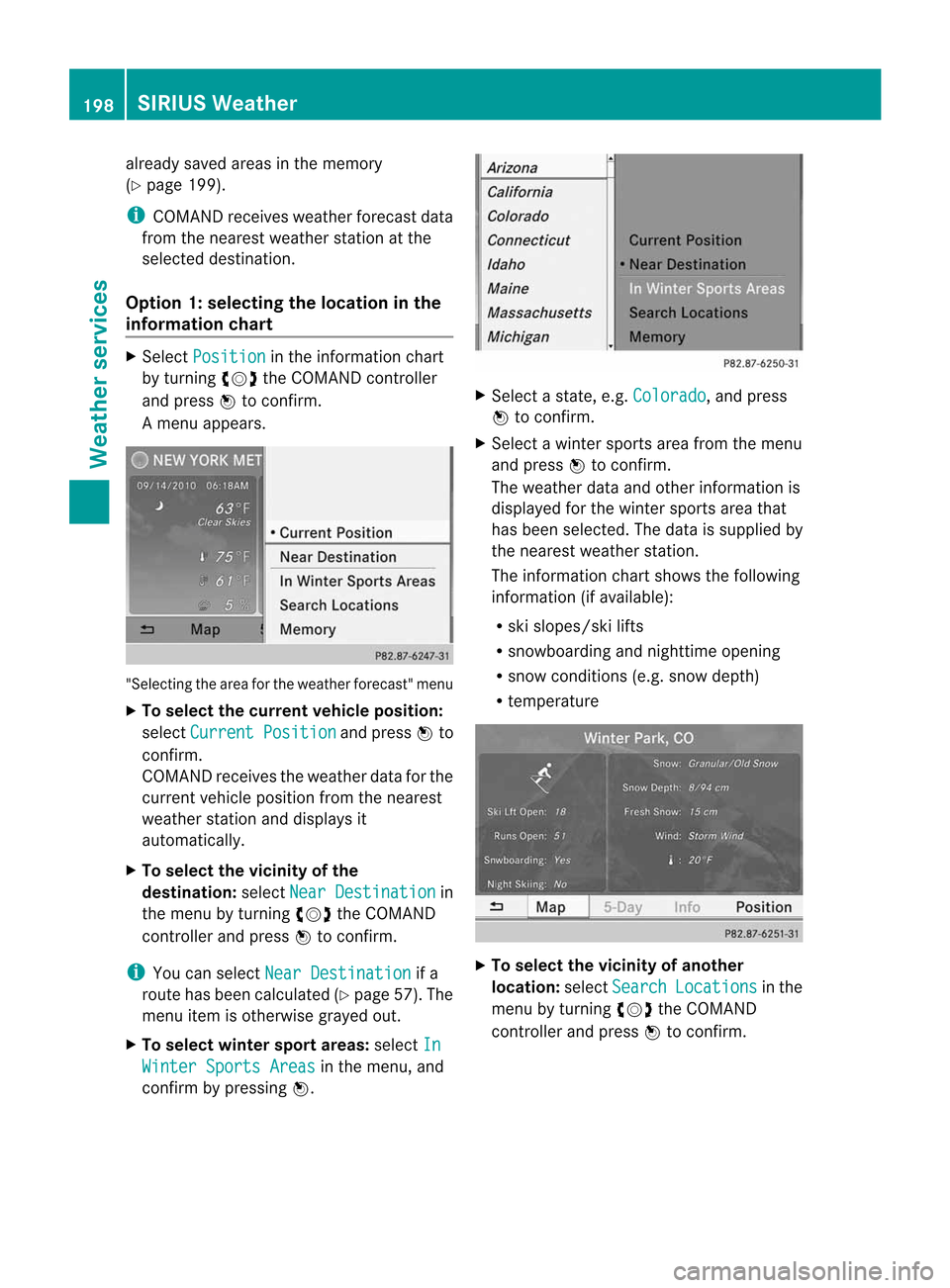
Am enu appears. "Select
ingthe area forthe weather forecast"menu
X To select thecurr entvehicle position:
select Current Position and
press Wto
con firm.
COMAND receivestheweather dataforthe
curren tvehicle position fromthenearest
weather stationand displays it
automatic ally.
X To select thevicinity ofthe
destina tion:select NearDestina tion in
the menu byturn ingcVd theCOMAND
con troller andpress Wtocon firm.
i You canselect NearDestina tion if
a
route hasbeen calculated (Ypage 57).The
menu itemisother wisegrayed out.
X To select winter sportareas:select In Winter
SportsAreas in
the menu, and
con firm bypressing W. X
Select astate,e.g. Colorad o ,a
nd press
W tocon firm.
X Select awinter sportsarea from themenu
and press Wtocon firm.
The weather dataandother information is
displayed forthe winter sportsarea that
has been select ed.The data issupplied by
the nearest weather station.
The infor mation chartshows thefollowing
infor mation (ifavailable):
R ski slopes/sk ilifts
R snowboardin gand night time openin g
R snow conditions (e.g.snow depth)
R temper ature X
To select thevicinity ofanoth er
location: selectSearch Locatio
ns in
the
menu byturn ingcVd theCOMAND
con troller andpress Wtocon firm. 198
SIRIUS
WeatherWeat
herservices