air condition MERCEDES-BENZ E-Class SEDAN 2012 W212 Owner's Manual
[x] Cancel search | Manufacturer: MERCEDES-BENZ, Model Year: 2012, Model line: E-Class SEDAN, Model: MERCEDES-BENZ E-Class SEDAN 2012 W212Pages: 396, PDF Size: 17.07 MB
Page 6 of 396
1, 2, 3 ...
115 V socket ...................................... 295
12 V socket see Sockets
4ETS
see ETS/4ETS (Electronic
Traction System)
4MATIC (permanent four-wheel
drive) .................................................. 192
4MATIC off-road system ................... 192
A
ABS (Anti-lock Braking System) Display message ............................ 235
Function/notes ................................ 64
Important safety notes ....................64
Warning lamp ................................. 264
Activating/deactivating cooling
with air dehumidification ................. 134
Active Blind Spot Assist Activating/deactivating (on-
board computer) ............................ 225
Function/information ....................207
Active Driving Assistance package . 206
Active Lane Keeping Assist Activating/deactivating (on-
board computer) ............................ 225
Display message ............................ 250
Function/information ....................210
Active Light System
Display message ............................ 244
Active multicontour seat .................. 102
Active service system PLUS see ASSYST PLUS service interval
display
ADAPTIVE BRAKE ................................. 69
Adaptive Highbeam Assist Display message ............................ 245
Function/notes ............................. 118
Switching on/off (on-board
computer) ...................................... 227
Additives (engine oil) ........................ 388
Air bags Display message ............................ 241
Front air bag (driver, front
passenger) ....................................... 41
Important safety notes ....................40
Knee bag .......................................... 42
PASSENGER AIRBAG OFF
indicator lamp .................................. 44
Pelvis air bag ................................... 43
Safety guidelines ............................. 39
Side impact air bag ..........................42
Window curtain air bag ....................44
Air-conditioning system
see Climate control
Air filter (display message) .............. 248
AIRMATIC Display message ............................ 249
Function/notes ............................. 189
Air pressure
see Tire pressure
Air vents
Glove box ....................................... 141
Important safety notes ..................140
Rear ............................................... 141
Setting ........................................... 140
Setting the center air vents ...........141
Setting the side air vents ...............141
Alarm system
see ATA (Anti-Theft Alarm system)
Alertness Assistant
see ATTENTION ASSIST
Ambient lighting (on-board
computer) .......................................... 227
AMG adaptive sport suspension
system ................................................ 190
AMG menu (on-board computer) ..... 230
Anti-lock Braking System see ABS (Anti-lock Braking System)
Anti-Theft Alarm system
see ATA (Anti-Theft Alarm system)
Anti-theft system
ATA (Anti-Theft Alarm system) .........72
Ashtray ............................................... 292
Assistance menu (on-board
computer) .......................................... 224
ASSYST PLUS see ASSYST PLUS service interval
display 4Index
Page 18 of 396
Seat beltsAdjusting the driver's and front-
passenger seat belt .........................54
Adjusting the height ......................... 54
Belt force limiters ............................ 56
center rear-compartment seat .........55
Cleaning ......................................... 320
Correct usage .................................. 52
Emergency Tensioning Devices ........ 56
Fastening ......................................... 53
Important safety guidelines .............51
Releasing ......................................... 55
Safety guidelines ............................. 39
Special seat belt retractor ...............59
Switching belt adjustment on/off
(on-board computer) ......................229
Warning lamp ................................. 261
Warning lamp (function) ................... 55
Seats
Active multicontour seat ................102
Adjusting (electrically) ...................100
Adjusting the 4-way lumbar
support .......................................... 103
Adjusting the head restraint ..........100
Cleaning the cover .........................320
Correct driver's seat position ........... 98
Folding the backrest (rear
compartment) forwards/back .......280
Important safety notes ....................99
Seat heating problem ....................106
Seat ventilation problem ................106
Storing settings (memory
function) ........................................ 111
Switching seat heating on/off .......105
Switching seat ventilation on/off ..106
Sensors (cleaning instructions) ....... 317
Service see ASSYST PLUS service interval
display
Service interval display
Displaying service messages .........313
Hiding service messages ...............313
Notes ............................................. 313
Service messages ..........................312
Service menu (on-board computer) . 226
Service products Brake fluid ..................................... 388
Capacities ...................................... 384Coolant (engine) ............................ 389
DEF special additives .....................387
Engine oil ....................................... 387
Fuel ................................................ 385
Important safety notes ..................382
Refrigerant (air-conditioning
system) .......................................... 388
Washer fluid ................................... 389
Settings
Factory (on-board computer) .........230
On-board computer .......................226
Setting the air distribution ............... 137
Setting the airflow ............................ 137
SETUP (on-board computer) ............. 230
Side impact air bag ............................. 42
Side marker lamp (display
message) ............................................ 244
Side windows Convenience closing feature ............91
Convenience opening feature ..........91
Important safety information ...........90
Opening/closing .............................. 90
Problem (malfunction) .....................92
Resetting ......................................... 92
Skibag ................................................ 277
Sliding sunroof Important safety notes ....................93
Opening/closing .............................. 94
Problem (malfunction) .....................96
Resetting ......................................... 94
see Panorama roof with power
tilt/sliding panel
SmartKey
Changing the battery .......................78
Changing the programming .............77
Checking the battery .......................78
Convenience closing feature ............91
Convenience opening feature ..........91
Display message ............................ 259
Door central locking/unlocking .......74
Important safety notes ....................74
Loss ................................................. 80
Mechanical key ................................ 77
Positions (ignition lock) .................145
Problem (malfunction) .....................80
Starting the engine ........................147
Snow chains .............................. 174, 34916Index
Page 25 of 396
Information for customers in
California
Under California law you may be entitled to a
replacement of your vehicle or a refund of the
purchase price or lease price, if after a
reasonable number of repair attempts
Mercedes-Benz USA, LLC and/or its
authorized repair or service facilities fail to fix
one or more substantial defects or
malfunctions in the vehicle that are covered
by its express warranty. During the period of
18 months from original delivery of the
vehicle or the accumulation of 18 000 miles
(approximately 29 000 km) on the odometer
of the vehicle, whichever occurs first, a
reasonable number of repair attempts is
presumed for a retail buyer or lessee if one or
more of the following occurs:(1)the same substantial defect or
malfunction results in a condition that is
likely to cause death or serious bodily
injury if the vehicle is driven, that defect
or malfunction has been subject to repair
two or more times, and you have directly
notified Mercedes-Benz USA, LLC in
writing of the need for its repair.(2)the same substantial defect or
malfunction of a less serious nature than
category (1) has been subject to repair
four or more times and you have directly
notified Mercedes-Benz in writing of the
need for its repair.(3)the vehicle is out of service by reason of
repair of the same or different substantial
defects or malfunctions for a cumulative
total of more than 30 calendar days.
Please send your written notice to:
Mercedes-Benz USA, LLC
Customer Assistance Center
One Mercedes Drive
Montvale, NJ 07645-0350
Maintenance
The Service and Warranty Booklet describes
all the necessary maintenance work which
should be done at regular intervals.
Always have the Service and Warranty
Booklet with you when you bring the vehicle
to an authorized Mercedes-Benz Center. The
service advisor will record every service for
you in the Service and Warranty Booklet.
Roadside Assistance
The Mercedes-Benz Roadside Assistance
Program offers technical help in the event of
a breakdown. Calls to the toll-free Roadside
Assistance Hotline are answered by our
agents 24 hours a day, 365 days a year.
1-800-FOR-MERCedes(1-800-367-6372)
(USA)
1-800-387-0100 (Canada)
For additional information, refer to the
Mercedes-Benz Roadside Assistance
Program brochure (USA) or the "Roadside
Assistance" section in the Service and
Warranty booklet (Canada). You will find both
in your vehicle literature portfolio.
Change of address or change of
ownership
In the event of a change of address, please
send us the "Change of Address Notice"
found in the Service and Warranty
Information Booklet, or simply call the
Mercedes-Benz Customer Assistance Center
(in the USA) at the hotline number
1-800-FOR-MERCedes(1-800-367-6372) or
Customer Service Center (in Canada) at
1-800-387-0100. This will assist us in
contacting you in a timely manner should the
need arise.
If you sell your Mercedes, please leave the
entire literature in the vehicle so that it is
available to the next owner.
Introduction23
Page 52 of 396
PRE-SAFE®
(preventative occupant
protection)GWARNING
The PRE-SAFE ®
system reduces the impact of
an accident on vehicle occupants, as long as
their seat belts have been fastened correctly.
Although your vehicle is equipped with a PRE-
SAFE ®
system, the possibility of injury in the
event of an accident cannot be ruled out. You
should therefore always drive carefully and
adapt your driving style to the prevailing road,
weather and traffic conditions.
PRE-SAFE ®
takes preemptive measures to
protect occupants in certain hazardous
situations.
PRE-SAFE ®
intervenes:
R in emergency braking situations, e.g. if BAS
is activated or, in vehicles with DISTRONIC
PLUS, BAS PLUS intervenes powerfully
R if the radar sensor system detects an
imminent danger of collision in certain
situations (on vehicles with DISTRONIC
PLUS)
R in critical driving situations, e.g. when
physical limits are exceed and the vehicle
understeers or oversteers severely
PRE-SAFE ®
takes the following measures
depending on the hazardous situation
detected:
R the front seat belts are pre-tensioned.
R it adjusts the front-passenger seat if it is in
an unfavorable position.
R the air pressure in the side bolsters of the
seat cushion and seat backrest of the front
active multicontour seats is increased.
R if the vehicle skids, the sliding sunroof/
panorama roof with power tilt/sliding
panel and the side windows are closed so
that only a small gap remains.
If the hazardous situation passes without
resulting in an accident, PRE-SAFE ®
slackens
the belt pretensioning. The air pressure in the
side bolsters on the active multicontour seat
is reduced again. All settings made by PRE-
SAFE ®
can then be reversed.
If the seat belts are not released:XMove the backrest or seat back slightly, but
only when the vehicle is stationary.
The belt pretensioning is reduced and the
locking mechanism is released.GWARNING
Make sure that nobody can become trapped
as you adjust the seat.
! Make sure that there are no objects in the
footwell or behind the seats when resetting
the seats. There is a risk that the seats
and/or the objects could be damaged.
More information about seat-belt
adjustment, a convenience function
integrated into PRE-SAFE ®
, can be found in
the "Seat-belt adjustment" section
( Y page 54).
NECK-PRO head restraints
The NECK-PRO head restraints increase
protection to the driver's and front
passenger's head and neck. To this end, the
NECK-PRO head restraints on the driver's and
front-passenger seats are moved forwards
and upwards in the event of a rear-end
collision of a certain severity. This provides
better head support.
GWARNING
Do not secure any objects (e.g. coat hangers)
on the NECK-PRO head restraints. Otherwise,
the NECK-PRO head restraints may not
function properly, or in the event of a rear-end
collision may not be able offer the level of
protection they are designed to provide.
GWARNING
Seat or head restraint covers can cause a
malfunction when the NECK-PRO head
restraints are activated or when the side
impact air bags or pelvis air bags are
50Occupant safetySafety
Page 67 of 396
Any unauthorized modification to this
device could void the user's authority to
operate the equipment.
With the help of the radar sensor system, BAS
PLUS can detect obstacles that are in the
path of your vehicle for an extended period of
time.
At speeds up to approximately
40 mph (70 km/h), BAS PLUS can also detect
stationary obstacles, for example stopped or
parked vehicles.
Should you approach an obstacle and BAS
PLUS has detected a risk of collision, BAS
PLUS calculates the braking force necessary
to avoid a rear-end collision.
R At speeds up to approximately
20 mph(30 km/h) : should you apply the
brakes forcefully, BAS PLUS will
automatically increase the braking force to
a level suitable for the traffic conditions.
R At speeds up to approximately
20 mph(30 km/h) : should you apply the
brakes, BAS PLUS is activated. Braking is
performed as late as possible.
If BAS PLUS demands particularly high
braking force, preventative passenger
protection measures (PRE-SAFE ®
) are
activated simultaneously.XKeep the brake pedal depressed until the
emergency braking situation is over.
ABS prevents the wheels from locking.
The brakes will work normally again if:
R you release the brake pedal.
R there is no longer any danger of a rear-end
collision.
R no obstacle is detected in front of your
vehicle.
BAS PLUS is then deactivated.
For BAS PLUS to assist you when driving, the
radar sensor system must be switched on and
operational, see "Radar sensor system" in the
index.
GWARNING
BAS PLUS cannot always clearly identify
objects and complex traffic situations. BAS
PLUS cannot intervene in these cases.
There is a risk of an accident. Always pay
careful attention to the traffic situation and be
ready to brake.
In particular, the detection of obstacles can
be impaired if there is:
R dirt on the sensors or anything else
covering the sensors
R snow or heavy rain
R interference by other radar sources
R the possibility of strong radar reflections,
for example in parking garages
R a narrow vehicle traveling in front, e.g. a
motorbike
R a vehicle traveling in front on a different line
GWARNING
BAS PLUS does not react:
R to people or animals
R to oncoming vehicles
R to crossing traffic
R in curves
As a result, BAS PLUS cannot intervene in
critical situations. There is a risk of an
accident. Always pay careful attention to the
traffic situation and be ready to brake.
Following damage to the front end of the
vehicle, have the configuration and operation
of the radar sensors checked at a qualified
specialist workshop. This also applies to
collisions at low speeds where there is no
visible damage to the front of the vehicle.
If BAS PLUS is not available due to a
malfunction in the radar sensor system, the
brake system remains available with full
brake boosting effect and BAS.
Driving safety systems65SafetyZ
Page 100 of 396
Useful information
i This Operator's Manual describes all
models and all standard and optional
equipment of your vehicle available at the
time of publication of the Operator's
Manual. Country-specific differences are
possible. Please note that your vehicle may
not be equipped with all features
described. This also applies to safety-
related systems and functions.
i Please read the information on qualified
specialist workshops ( Y page 25).
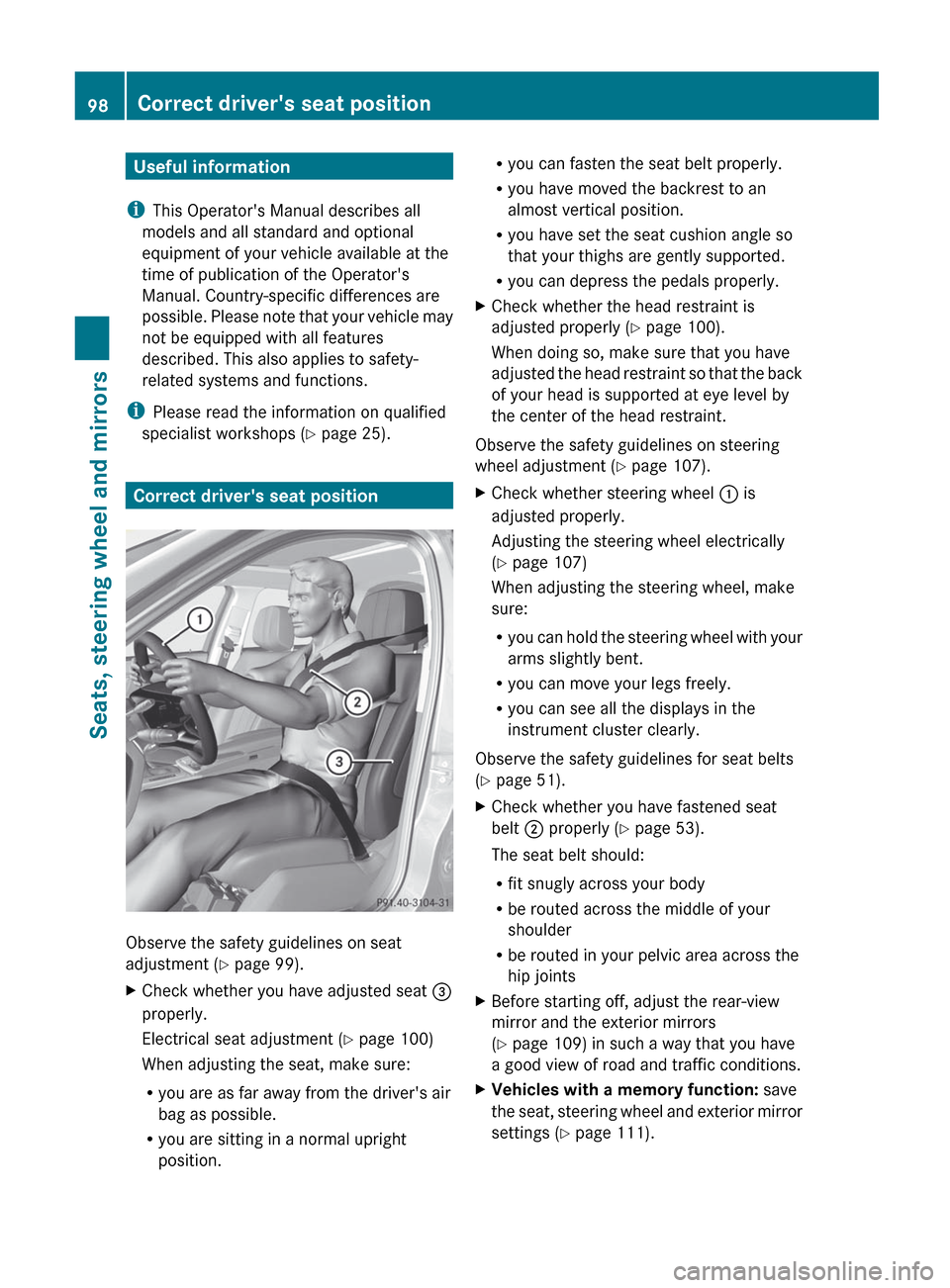
Correct driver's seat position
Observe the safety guidelines on seat
adjustment ( Y page 99).
XCheck whether you have adjusted seat =
properly.
Electrical seat adjustment ( Y page 100)
When adjusting the seat, make sure:
R you are as far away from the driver's air
bag as possible.
R you are sitting in a normal upright
position.R you can fasten the seat belt properly.
R you have moved the backrest to an
almost vertical position.
R you have set the seat cushion angle so
that your thighs are gently supported.
R you can depress the pedals properly.XCheck whether the head restraint is
adjusted properly ( Y page 100).
When doing so, make sure that you have
adjusted the head restraint so that the back
of your head is supported at eye level by
the center of the head restraint.
Observe the safety guidelines on steering
wheel adjustment ( Y page 107).
XCheck whether steering wheel : is
adjusted properly.
Adjusting the steering wheel electrically
( Y page 107)
When adjusting the steering wheel, make
sure:
R you can hold the steering wheel with your
arms slightly bent.
R you can move your legs freely.
R you can see all the displays in the
instrument cluster clearly.
Observe the safety guidelines for seat belts
( Y page 51).
XCheck whether you have fastened seat
belt ; properly ( Y page 53).
The seat belt should:
R fit snugly across your body
R be routed across the middle of your
shoulder
R be routed in your pelvic area across the
hip jointsXBefore starting off, adjust the rear-view
mirror and the exterior mirrors
( Y page 109) in such a way that you have
a good view of road and traffic conditions.XVehicles with a memory function: save
the seat, steering wheel and exterior mirror
settings ( Y page 111).98Correct driver's seat positionSeats, steering wheel and mirrors
Page 121 of 396
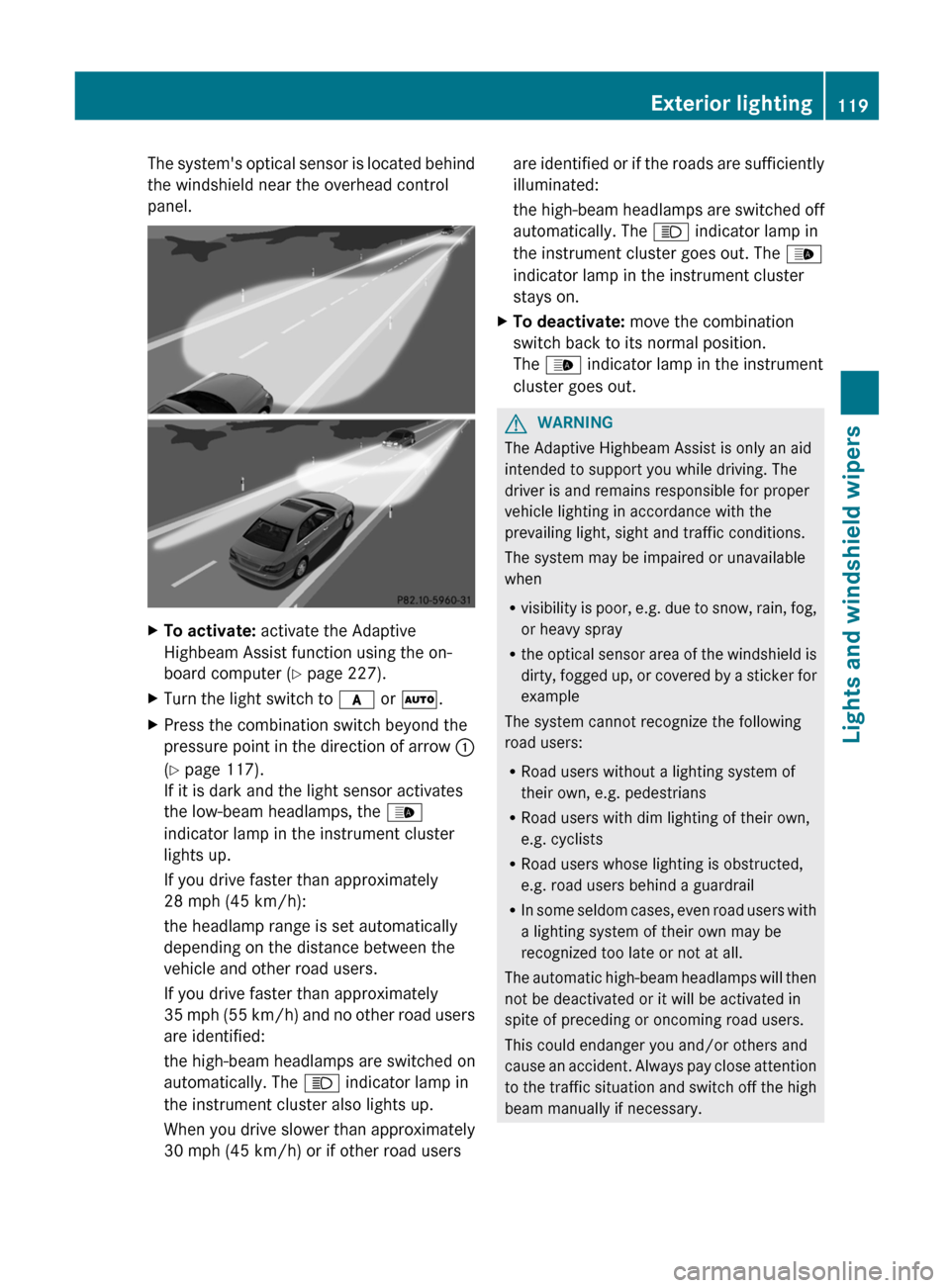
The system's optical sensor is located behind
the windshield near the overhead control
panel.XTo activate: activate the Adaptive
Highbeam Assist function using the on-
board computer ( Y page 227).XTurn the light switch to c or à .XPress the combination switch beyond the
pressure point in the direction of arrow :
( Y page 117).
If it is dark and the light sensor activates
the low-beam headlamps, the _
indicator lamp in the instrument cluster
lights up.
If you drive faster than approximately
28 mph (45 km/h):
the headlamp range is set automatically
depending on the distance between the
vehicle and other road users.
If you drive faster than approximately
35 mph (55 km/h) and no other road users
are identified:
the high-beam headlamps are switched on
automatically. The K indicator lamp in
the instrument cluster also lights up.
When you drive slower than approximately
30 mph (45 km/h) or if other road usersare identified or if the roads are sufficiently
illuminated:
the high-beam headlamps are switched off
automatically. The K indicator lamp in
the instrument cluster goes out. The _
indicator lamp in the instrument cluster
stays on.XTo deactivate: move the combination
switch back to its normal position.
The _ indicator lamp in the instrument
cluster goes out.GWARNING
The Adaptive Highbeam Assist is only an aid
intended to support you while driving. The
driver is and remains responsible for proper
vehicle lighting in accordance with the
prevailing light, sight and traffic conditions.
The system may be impaired or unavailable
when
R visibility is poor, e.g. due to snow, rain, fog,
or heavy spray
R the optical sensor area of the windshield is
dirty, fogged up, or covered by a sticker for
example
The system cannot recognize the following
road users:
R Road users without a lighting system of
their own, e.g. pedestrians
R Road users with dim lighting of their own,
e.g. cyclists
R Road users whose lighting is obstructed,
e.g. road users behind a guardrail
R In some seldom cases, even road users with
a lighting system of their own may be
recognized too late or not at all.
The automatic high-beam headlamps will then
not be deactivated or it will be activated in
spite of preceding or oncoming road users.
This could endanger you and/or others and
cause an accident. Always pay close attention
to the traffic situation and switch off the high
beam manually if necessary.
Exterior lighting119Lights and windshield wipersZ
Page 132 of 396
Useful information
i This Operator's Manual describes all
models and all standard and optional
equipment of your vehicle available at the
time of publication of the Operator's
Manual. Country-specific differences are
possible. Please note that your vehicle may
not be equipped with all features
described. This also applies to safety-
related systems and functions.
i Please read the information on qualified
specialist workshops ( Y page 25).
Overview of climate control systems
Important safety notes
GWARNING
Severe conditions (e.g. strong air pollution)
may require replacement of the filter before
its scheduled replacement interval. A clogged
filter will reduce the air volume to the interior
and the windows could fog up, impairing
visibility and endangering you and others.
Have a blocked filter replaced at a Mercedes-
Benz Center as soon as possible.
GWARNING
Follow the recommended settings for heating
and cooling given on the following pages.
Otherwise, the windows could fog up,
impairing visibility and endangering you and
others.
The automatic climate control adjusts the
temperature and the humidity of the vehicle
interior and filters undesired substances from
the air.
The automatic climate control is only
operational when the engine is running. 15
Optimum operation is only achieved if you
drive with the side windows and sliding
sunroof/panorama roof with power tilt/
sliding panel closed.
i Ventilate the vehicle for a brief period
during warm weather, e.g. using the
convenience opening feature ( Y page 91).
This will speed up the cooling process and
the desired vehicle interior temperature
will be reached more quickly.
i The integrated filter can filter out most
particles of dust and completely filters out
pollen. A clogged filter reduces the amount
of air supplied to the vehicle interior. For
this reason, you should always observe the
interval for replacing the filter, which is
specified in the Service Booklet. As it
depends on environmental conditions, e.g.
heavy air pollution, the interval may be
shorter than stated in the Service Booklet.
i It is possible that the residual heat
function may be activated automatically an
hour after the SmartKey is removed. The
vehicle is then ventilated for 30 minutes to
dry the air-conditioning system.15 Automatic climate control: the residual heat function can only be activated/deactivated when the ignition
is switched off.130Overview of climate control systemsClimate control
Page 137 of 396
dehumidified according to the temperature
selected.GWARNING
If you switch off the cooling function, the
vehicle will not be cooled when weather
conditions are warm. The windows can fog up
more quickly. Window fogging may impair
visibility and endanger you and others.
Condensation may drip from the underside of
the vehicle when it is in cooling mode. This is
normal and not a sign that there is a
malfunction.
i The cooling with air dehumidification
function uses refrigerant R134a. This
coolant does not contain
chlorofluorocarbons, and therefore does
not damage the ozone layer.
Activating/deactivating
XTo activate: press the ¿ button.
The indicator lamp above the ¿ button
lights up.XTo switch off: press the ¿ button.
The indicator lamp above the ¿ button
goes out. The cooling with air
dehumidification function has a delayed
switch-off feature.
Problems with the cooling with air
dehumidification function
When you press the ¿ button, the
indicator lamp in the button flashes three
times or remains off. You can no longer switch
on the cooling with air dehumidification
function.
XConsult a qualified specialist workshop.
Setting climate control to automatic
GWARNING
If you switch off the cooling function, the
vehicle will not be cooled when weather
conditions are warm. The windows can fog up
more quickly. Window fogging may impair
visibility and endanger you and others.
In automatic mode, the set temperature is
maintained automatically at a constant level.
The system automatically regulates the
temperature of the dispensed air, the airflow
and the air distribution.
Automatic mode will achieve optimal
operation if cooling with air dehumidification
is also activated. If desired, cooling with air
dehumidification can be deactivated.XTurn the SmartKey to position 2 in the
ignition lock.XSet the desired temperature.XTo activate: press the à button.
The indicator lamp above the à button
lights up. Automatic air distribution and
airflow are activated.
i 3-zone automatic climate control: when
automatic mode is activated, you can
select a climate mode setting
( Y page 136).
XTo deactivate: press the air distribution
button.
Dual-zone automatic climate control: press
button F(Y page 131).
3-zone automatic climate control: press
button I(Y page 133).
The indicator lamp above the à button
goes out.
or
XPress the airflow button.
Dual-zone automatic climate control: press
button G(Y page 131).
3-zone automatic climate control: press
button H(Y page 133).
The indicator lamp above the à button
goes out.Operating the climate control system135Climate controlZ
Page 141 of 396
P or O symbol appears in the
display.XAutomatic climate control: press button
I up or down ( Y page 133) until the
P or O symbol appears in the
display.
i You should only select this setting until
the windshield is clear again.
Rear window defroster
Activating/deactivating
GWARNING
Any accumulation of snow and ice should be
removed from the rear window before driving.
Visibility could otherwise be impaired,
endangering you and others.
The rear window defroster has a high current
draw. You should therefore switch it off as
soon as the window is clear as it only switches
off automatically after several minutes.
If the battery voltage is too low, the rear
window defroster may switch off.
XTurn the SmartKey to position 2 in the
ignition lock.XPress the ¤ button.
The indicator lamp above the ¤ button
lights up or goes out.
Problems with the rear window
defroster
The rear window defroster has deactivated
itself prematurely or cannot be activated.
XSwitch off any consumers that are not
required, e.g. reading lamps or interior
lighting.
When the battery is sufficiently charged,
the rear window defroster is activated
again automatically.Activating/deactivating air-
recirculation mode
You can deactivate the flow of fresh air if
unpleasant odors are entering the vehicle
from outside. The air already inside the
vehicle will then be recirculated.
The operation of air-recirculation mode is the
same for all control panels.GWARNING
Fogged windows impair visibility,
endangering you and others. If the windows
begin to fog on the inside, switching off the
air recirculation mode immediately should
clear interior window fogging. If interior
window fogging persists, make sure the air
conditioning is activated, or press the ¬
button.
XTurn the SmartKey to position 2 in the
ignition lock.XTo activate: press the g button.
The indicator lamp above the g button
lights up.
i In the event of high pollution levels 19
or at
high outside temperatures, air-
recirculation mode is automatically
activated. When air-recirculation mode is
activated automatically, the indicator lamp
above the g button does not light up.
Outside air is added after about 30
minutes.
XTo switch off: press the g button.
The indicator lamp above the g button
goes out.19 Automatic climate control only.Operating the climate control system139Climate controlZ