phone MERCEDES-BENZ E-Class SEDAN 2013 W212 User Guide
[x] Cancel search | Manufacturer: MERCEDES-BENZ, Model Year: 2013, Model line: E-Class SEDAN, Model: MERCEDES-BENZ E-Class SEDAN 2013 W212Pages: 420, PDF Size: 14.26 MB
Page 231 of 420
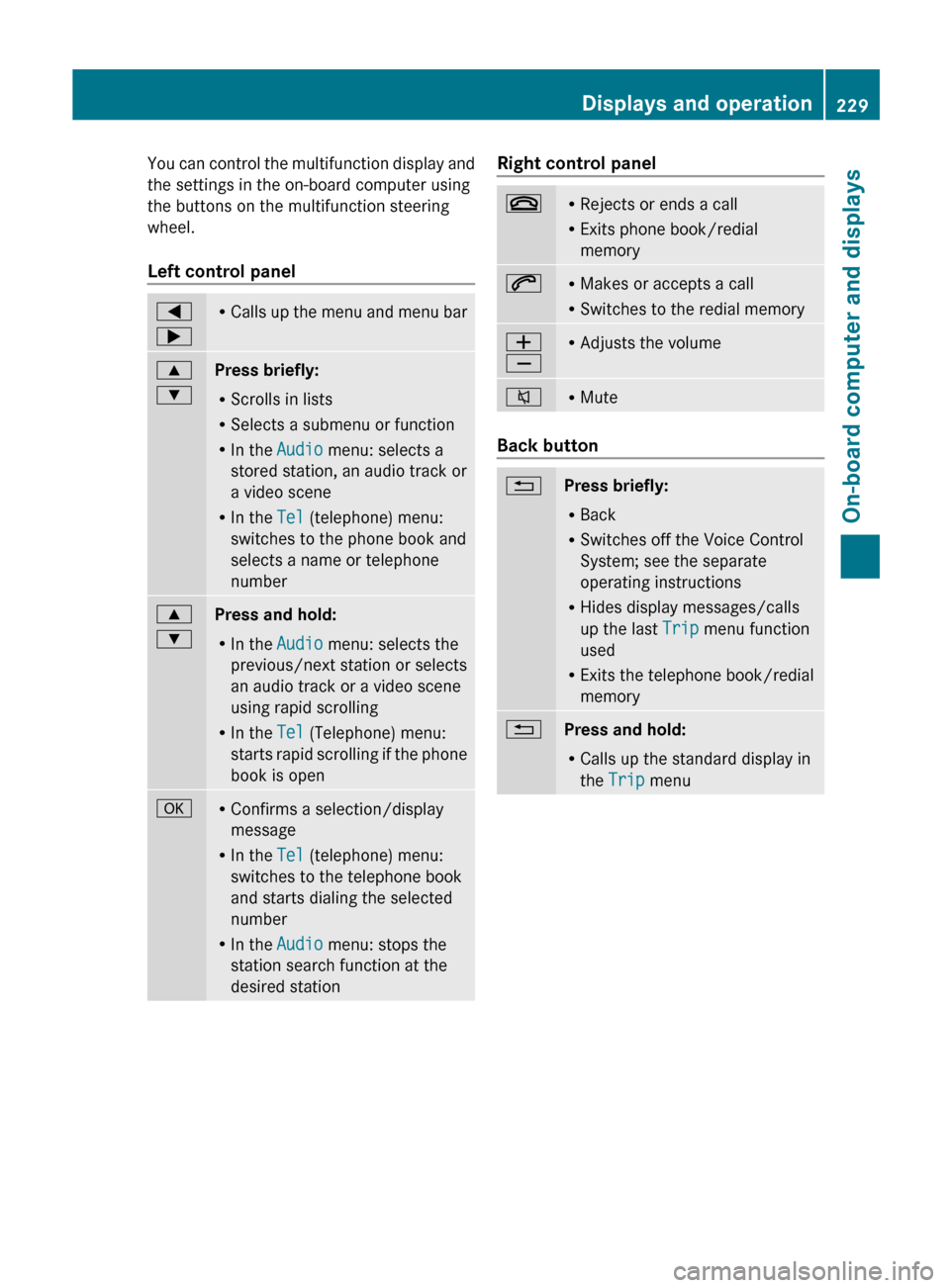
You can control the multifunction display and
the settings in the on-board computer using
the buttons on the multifunction steering
wheel.
Left control panel
=
; R
Calls up the menu and menu bar 9
:
Press briefly:
R
Scrolls in lists
R Selects a submenu or function
R In the Audio menu: selects a
stored station, an audio track or
a video scene
R In the Tel (telephone) menu:
switches to the phone book and
selects a name or telephone
number 9
:
Press and hold:
R
In the Audio menu: selects the
previous/next station or selects
an audio track or a video scene
using rapid scrolling
R In the Tel (Telephone) menu:
starts
rapid scrolling if the phone
book is open a R
Confirms a selection/display
message
R In the Tel (telephone) menu:
switches to the telephone book
and starts dialing the selected
number
R In the Audio menu: stops the
station search function at the
desired station Right control panel
~ R
Rejects or ends a call
R Exits phone book/redial
memory 6 R
Makes or accepts a call
R Switches to the redial memory W
X R
Adjusts the volume 8 R
Mute Back button
%
Press briefly:
R
Back
R Switches off the Voice Control
System; see the separate
operating instructions
R Hides display messages/calls
up the last Trip menu function
used
R Exits the telephone book/redial
memory %
Press and hold:
R
Calls up the standard display in
the Trip menu Displays and operation
229
On-board computer and displays Z
Page 232 of 420
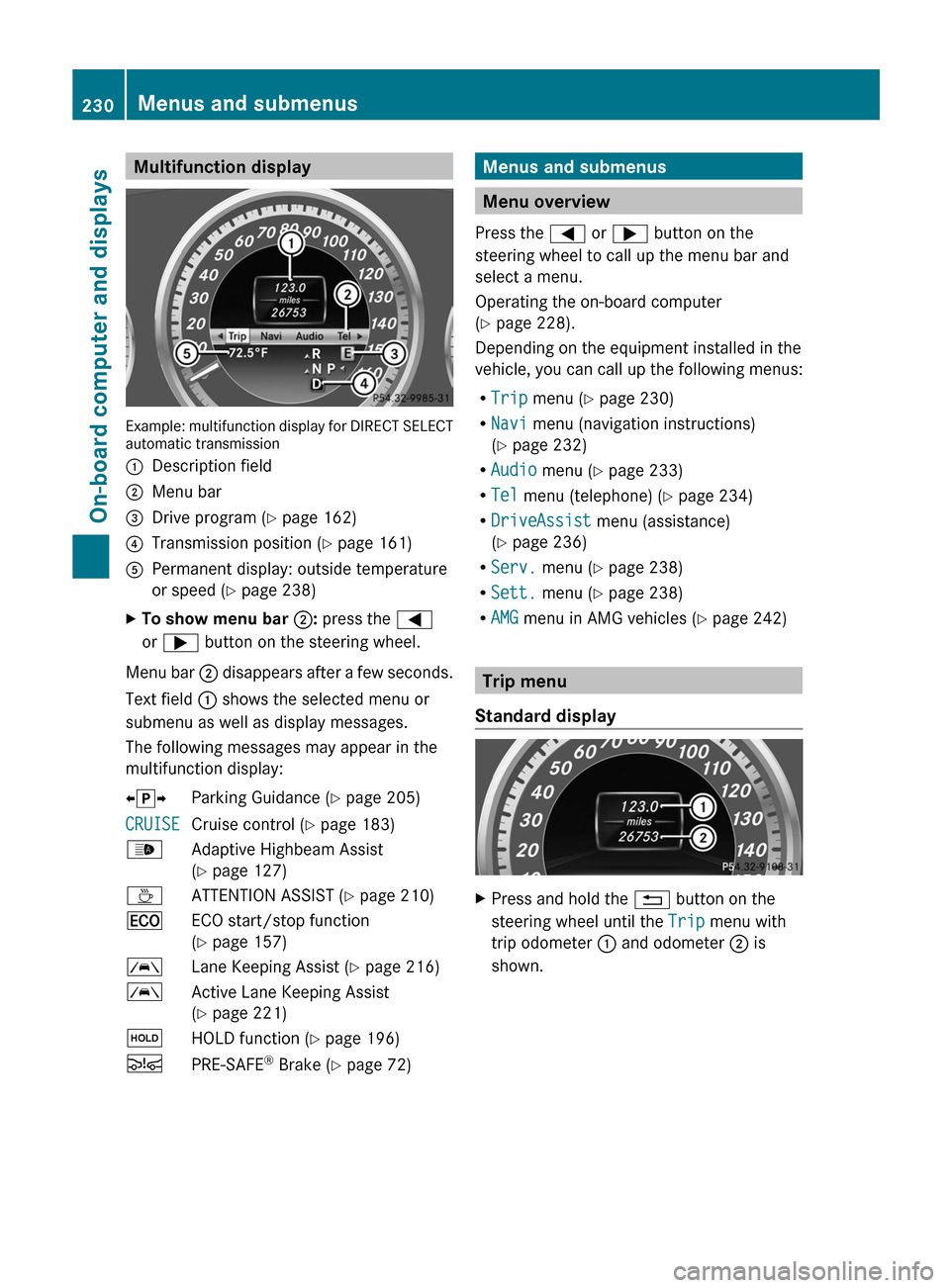
Multifunction display
Example: multifunction display for DIRECT SELECT
automatic transmission
:
Description field
; Menu bar
= Drive program (Y page 162)
? Transmission position ( Y page 161)
A Permanent display: outside temperature
or speed ( Y page 238)
X To show menu bar ;: press the =
or ; button on the steering wheel.
Menu bar ; disappears after a few seconds.
Text field : shows the selected menu or
submenu as well as display messages.
The following messages may appear in the
multifunction display:
XjY Parking Guidance (Y page 205)
CRUISE Cruise control (
Y page 183)
_ Adaptive Highbeam Assist
(Y page 127)
À ATTENTION ASSIST (Y page 210)
¤ ECO start/stop function
(Y page 157)
à Lane Keeping Assist (Y page 216)
à Active Lane Keeping Assist
(Y page 221)
ë HOLD function ( Y page 196)
Ä PRE-SAFE ®
Brake (Y page 72) Menus and submenus
Menu overview
Press the = or ; button on the
steering wheel to call up the menu bar and
select a menu.
Operating the on-board computer
(Y page 228).
Depending on the equipment installed in the
vehicle, you can call up the following menus:
R Trip menu (Y page 230)
R Navi menu (navigation instructions)
(Y page 232)
R Audio menu (Y page 233)
R Tel menu (telephone) ( Y page 234)
R DriveAssist menu (assistance)
(Y page 236)
R Serv. menu (Y page 238)
R Sett. menu (Y page 238)
R AMG menu in AMG vehicles ( Y page 242) Trip menu
Standard display X
Press and hold the % button on the
steering wheel until the Trip menu with
trip odometer : and odometer ; is
shown. 230
Menus and submenus
On-board computer and displays
Page 236 of 420
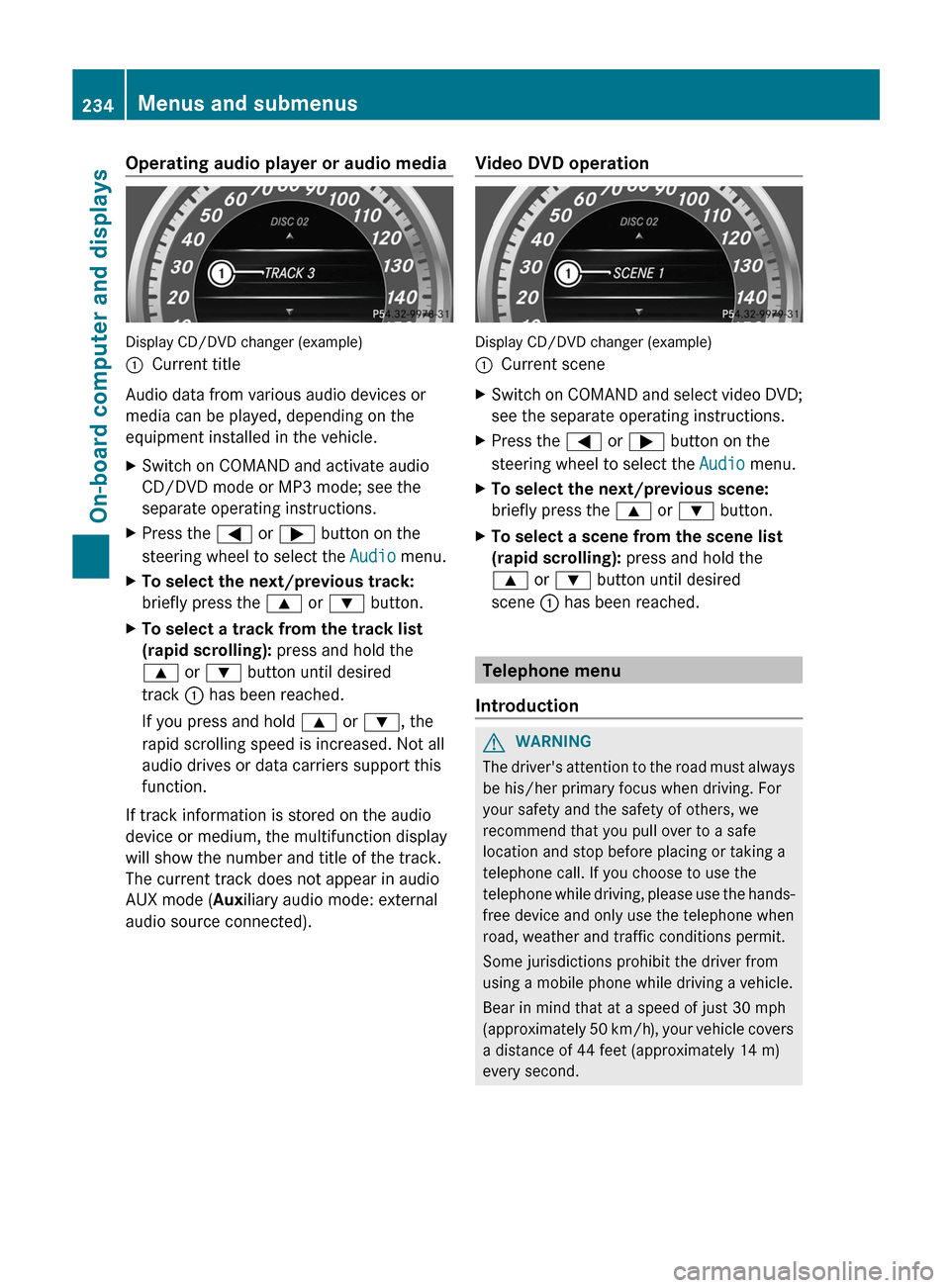
Operating audio player or audio media
Display CD/DVD changer (example)
:
Current title
Audio data from various audio devices or
media can be played, depending on the
equipment installed in the vehicle.
X Switch on COMAND and activate audio
CD/DVD mode or MP3 mode; see the
separate operating instructions.
X Press the = or ; button on the
steering wheel to select the Audio menu.
X To select the next/previous track:
briefly press the 9 or : button.
X To select a track from the track list
(rapid scrolling): press and hold the
9 or : button until desired
track : has been reached.
If you press and hold 9 or :, the
rapid scrolling speed is increased. Not all
audio drives or data carriers support this
function.
If track information is stored on the audio
device or medium, the multifunction display
will show the number and title of the track.
The current track does not appear in audio
AUX mode (Auxiliary audio mode: external
audio source connected). Video DVD operation Display CD/DVD changer (example)
:
Current scene
X Switch on COMAND and select video DVD;
see the separate operating instructions.
X Press the = or ; button on the
steering wheel to select the Audio menu.
X To select the next/previous scene:
briefly press the 9 or : button.
X To select a scene from the scene list
(rapid scrolling): press and hold the
9 or : button until desired
scene : has been reached. Telephone menu
Introduction G
WARNING
The driver's attention to the road must always
be his/her primary focus when driving. For
your safety and the safety of others, we
recommend that you pull over to a safe
location and stop before placing or taking a
telephone call. If you choose to use the
telephone
while driving, please use the hands-
free device and only use the telephone when
road, weather and traffic conditions permit.
Some jurisdictions prohibit the driver from
using a mobile phone while driving a vehicle.
Bear in mind that at a speed of just 30 mph
(approximately 50 km/h), your vehicle covers
a distance of 44 feet (approximately 14 m)
every second. 234
Menus and submenus
On-board computer and displays
Page 237 of 420
X
Switch on the mobile phone (see the
separate operating instructions).
X Switch on COMAND (see the separate
operating instructions).
X Establish a Bluetooth ®
connection to
COMAND; see the separate operating
instructions.
X Press the = or ; button on the
steering wheel to select the Tel menu.
You will see one of the following display
messages in the multifunction display:
R Phone READY or the name of the network
provider: the mobile phone has found a
network and is ready to receive.
R Phone No Service: there is no network
available or the mobile phone is searching
for a network.
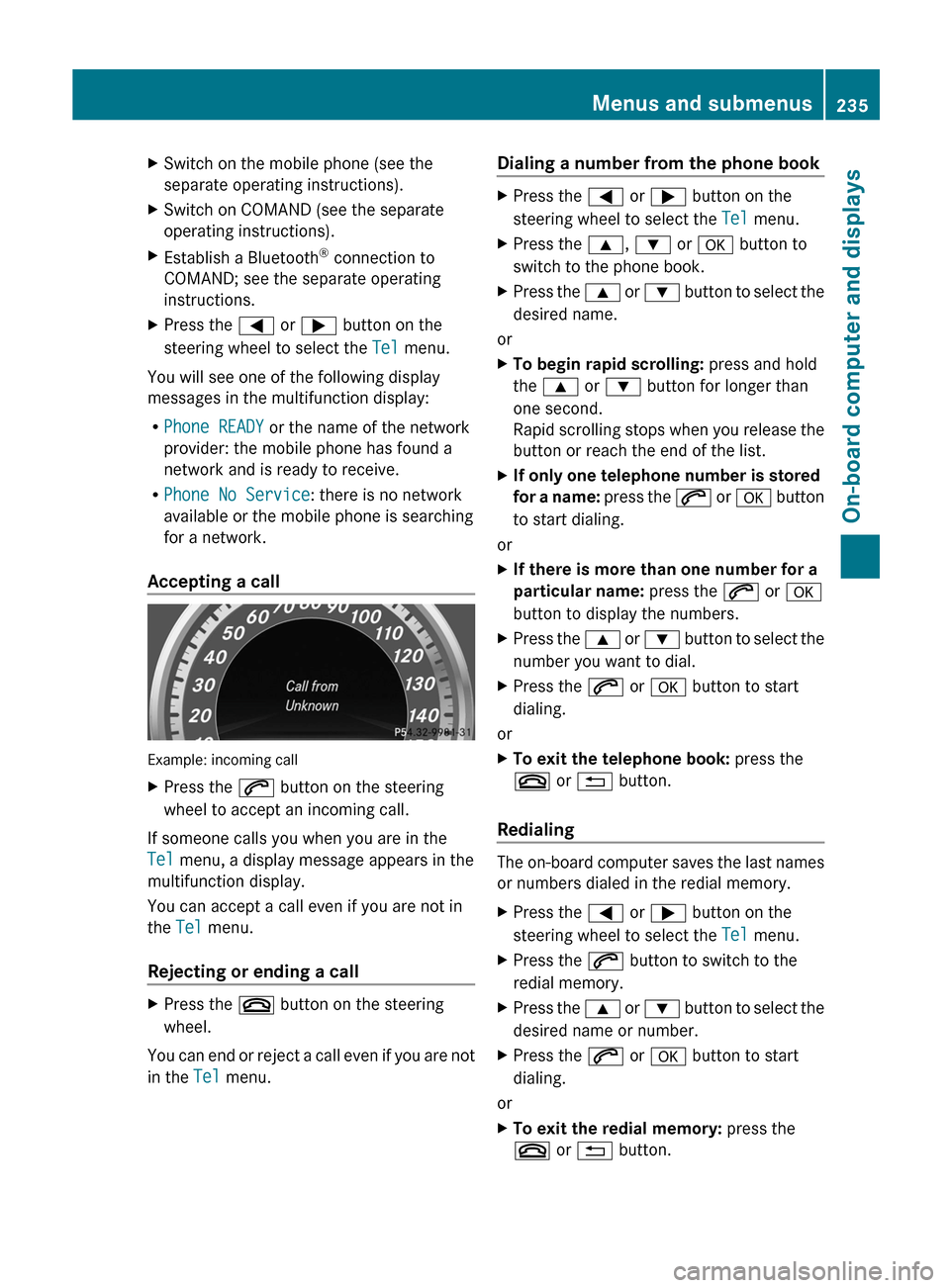
Accepting a call Example: incoming call
X
Press the 6 button on the steering
wheel to accept an incoming call.
If someone calls you when you are in the
Tel menu, a display message appears in the
multifunction display.
You can accept a call even if you are not in
the Tel menu.
Rejecting or ending a call X
Press the ~ button on the steering
wheel.
You can end or reject a call even if you are not
in the Tel menu. Dialing a number from the phone book X
Press the = or ; button on the
steering wheel to select the Tel menu.
X Press the 9, : or a button to
switch to the phone book.
X Press the 9 or : button to select the
desired name.
or
X To begin rapid scrolling: press and hold
the 9 or : button for longer than
one second.
Rapid
scrolling stops when you release the
button or reach the end of the list.
X If only one telephone number is stored
for
a name: press the 6 or a button
to start dialing.
or
X If there is more than one number for a
particular name: press the 6 or a
button to display the numbers.
X Press the 9
or : button to select the
number you want to dial.
X Press the 6 or a button to start
dialing.
or
X To exit the telephone book: press the
~ or % button.
Redialing The on-board computer saves the last names
or numbers dialed in the redial memory.
X
Press the = or ; button on the
steering wheel to select the Tel menu.
X Press the 6 button to switch to the
redial memory.
X Press the 9
or : button to select the
desired name or number.
X Press the 6 or a button to start
dialing.
or
X To exit the redial memory: press the
~ or % button. Menus and submenus
235
On-board computer and displays Z
Page 275 of 420
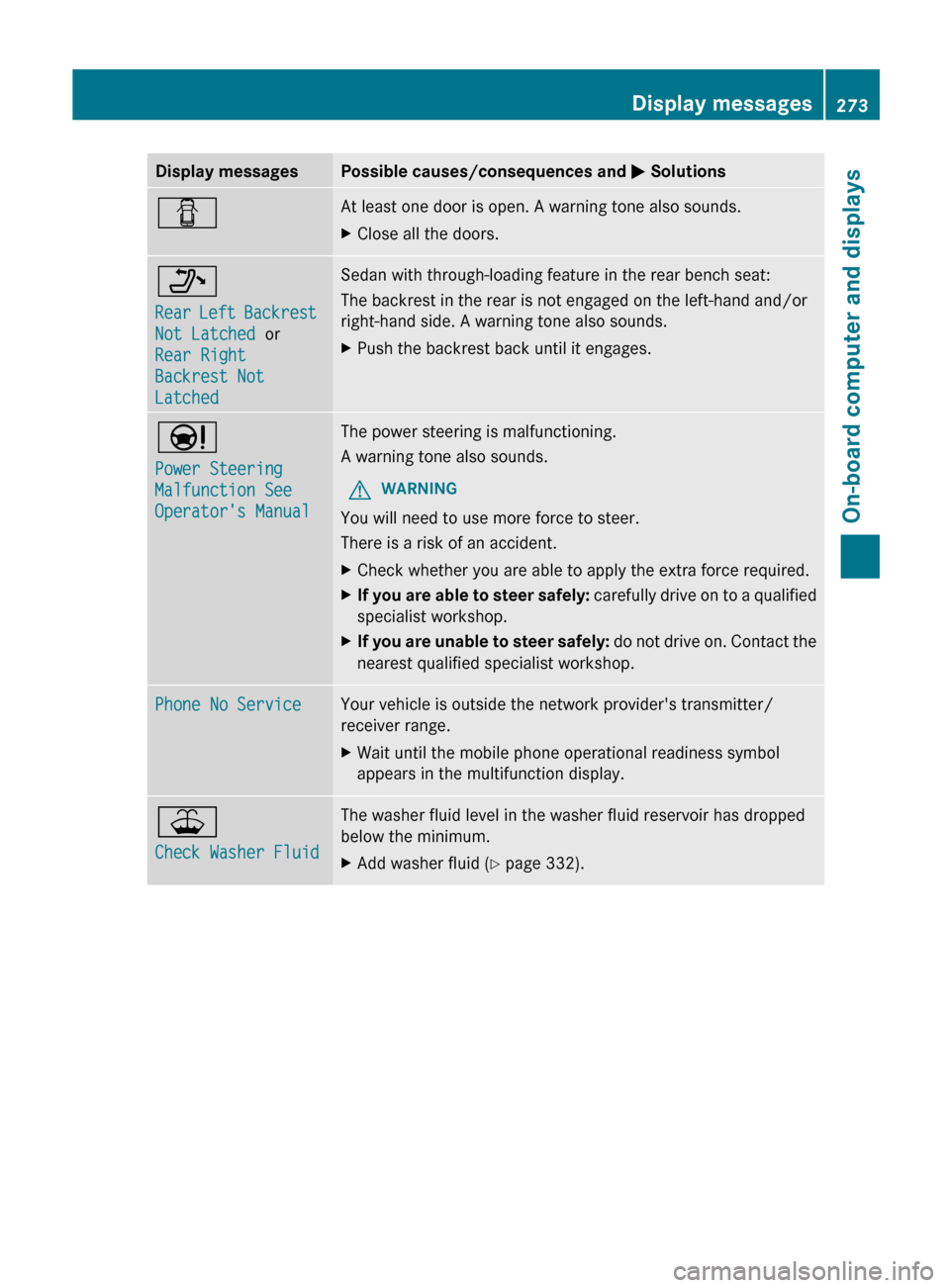
Display messages Possible causes/consequences and
M SolutionsC At least one door is open. A warning tone also sounds.
X
Close all the doors. _
Rear
Left Backrest
Not Latched or
Rear Right
Backrest Not
Latched Sedan with through-loading feature in the rear bench seat:
The backrest in the rear is not engaged on the left-hand and/or
right-hand side. A warning tone also sounds.
X
Push the backrest back until it engages. Ð
Power Steering
Malfunction See
Operator's Manual The power steering is malfunctioning.
A warning tone also sounds.
G WARNING
You will need to use more force to steer.
There is a risk of an accident.
X Check whether you are able to apply the extra force required.
X If you are able to steer safely:
carefully drive on to a qualified
specialist workshop.
X If you are unable to steer safely:
do not drive on. Contact the
nearest qualified specialist workshop. Phone No Service Your vehicle is outside the network provider's transmitter/
receiver range.
X
Wait until the mobile phone operational readiness symbol
appears in the multifunction display. ¥
Check Washer Fluid The washer fluid level in the washer fluid reservoir has dropped
below the minimum.
X
Add washer fluid ( Y page 332). Display messages
273
On-board computer and displays Z
Page 311 of 420
Cigarette lighter
G
WARNING
When leaving the vehicle, always remove the
SmartKey from the ignition lock. Always take
the SmartKey with you and lock the vehicle.
Do not leave children unattended in the
vehicle, even if they are secured in a child
restraint system, or with access to an
unlocked vehicle. A child's unsupervised
access
to a vehicle could result in an accident
and/or serious personal injury. The children
could:
R injure themselves on parts of the vehicle
R be seriously or fatally injured through
excessive exposure to extreme heat or cold
R injure themselves or cause an accident with
vehicle equipment that can be operated
even if the SmartKey is removed from the
ignition lock or removed from the vehicle,
such as seat adjustment, steering wheel
adjustment, or the memory function
If children open a door, they could injure other
persons or get out of the vehicle and injure
themselves or be injured by following traffic.
Do not expose the child restraint system to
direct sunlight. The child restraint system's
metal parts, for example, could become very
hot, and the child could be burned on these
parts. G
WARNING
Never touch the heating element or sides of
the lighter; they are extremely hot. Hold the
knob only.
Make sure any children traveling with you do
not injure themselves or start a fire with the
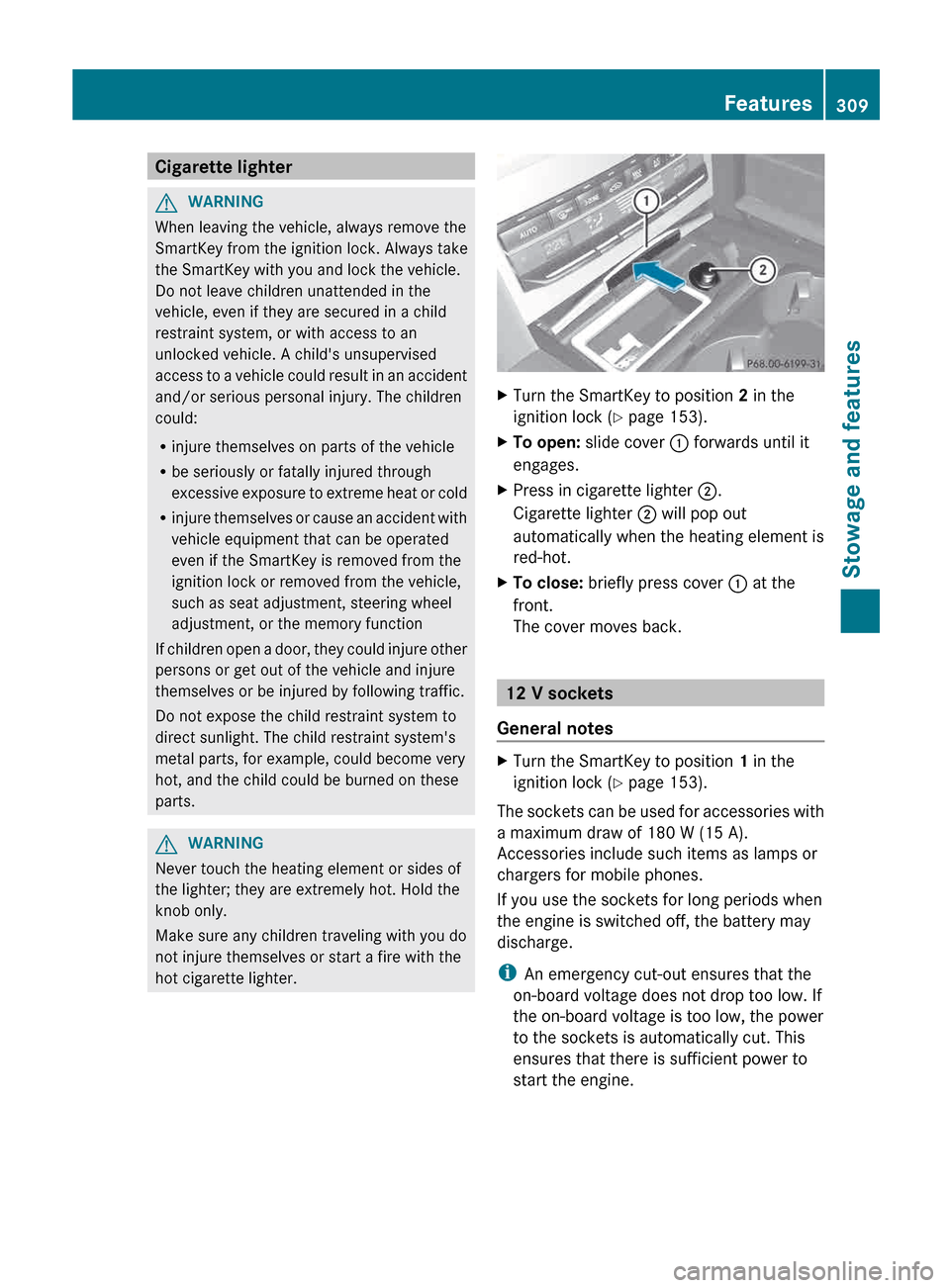
hot cigarette lighter. X
Turn the SmartKey to position 2 in the
ignition lock ( Y page 153).
X To open: slide cover : forwards until it
engages.
X Press in cigarette lighter ;.
Cigarette lighter ; will pop out
automatically when the heating element is
red-hot.
X To close: briefly press cover : at the
front.
The cover moves back. 12 V sockets
General notes X
Turn the SmartKey to position 1 in the
ignition lock ( Y page 153).
The sockets can be used for accessories with
a maximum draw of
180 W (15 A).
Accessories include such items as lamps or
chargers for mobile phones.
If you use the sockets for long periods when
the engine is switched off, the battery may
discharge.
i An emergency cut-out ensures that the
on-board voltage does not drop too low. If
the on-board voltage is too low, the power
to the sockets is automatically cut. This
ensures that there is sufficient power to
start the engine. Features
309
Stowage and features Z
Page 313 of 420
pull at a cable to disconnect a plug from a
115
V AC power socket. Never use a damaged
connection cable. The 115 V AC power socket
must never be connected to another 115 V
AC power source. Do not use a converter with
an earthed plug for the 115 V AC power
socket. This could cause serious injury to you
and/or other people. G
WARNING
If the 115 V AC power socket is damaged or
pulled
out of the trim, do not use or touch the
115 V AC power socket. The use of a 115 V
AC power socket that has been damaged or
pulled out of the trim could cause serious
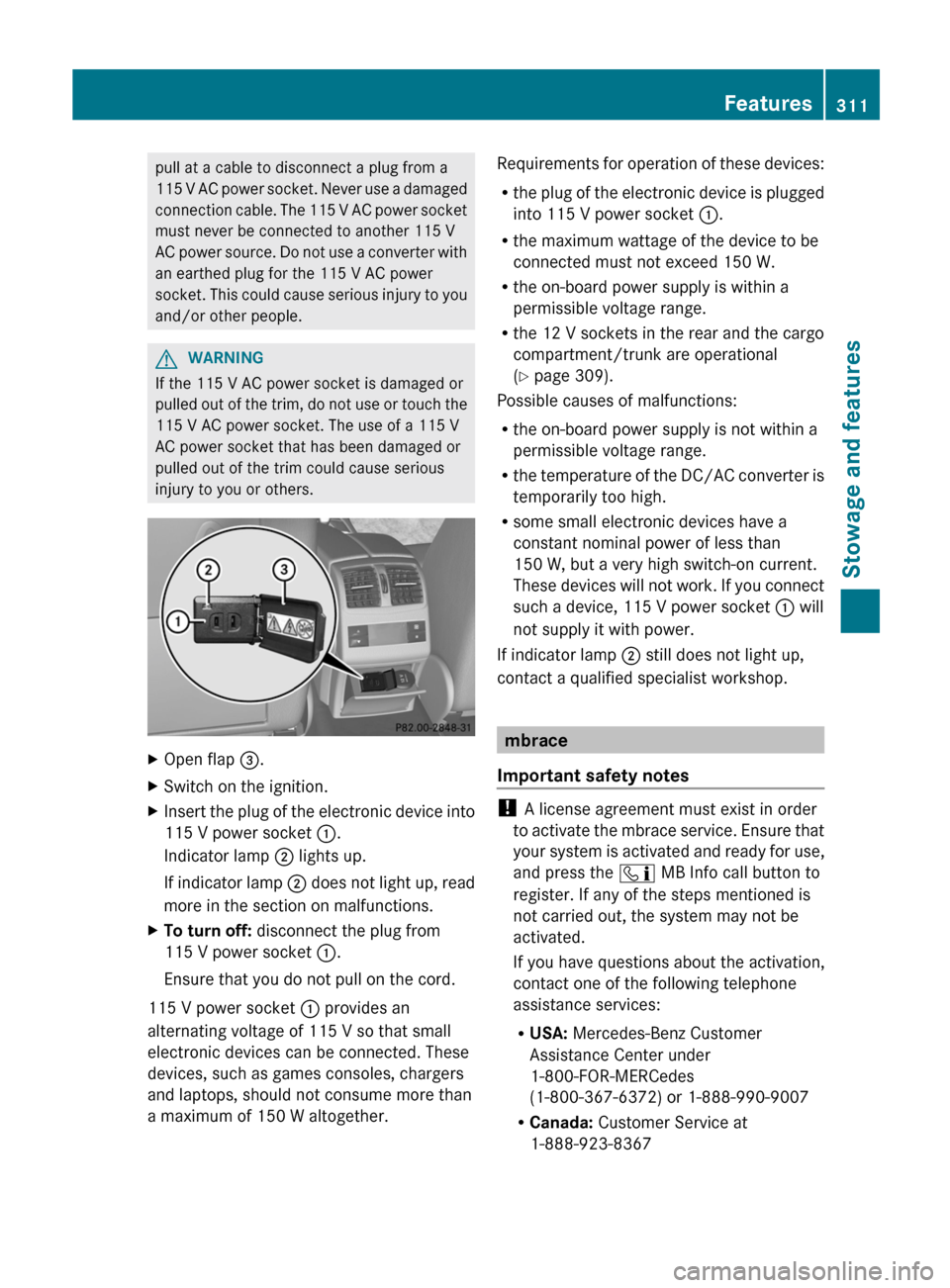
injury to you or others. X
Open flap =.
X Switch on the ignition.
X Insert the plug of the electronic device into
115 V power socket :.
Indicator lamp ; lights up.
If
indicator lamp ; does not light up, read
more in the section on malfunctions.
X To turn off: disconnect the plug from
115 V power socket :.
Ensure that you do not pull on the cord.
115 V power socket : provides an
alternating voltage of 115 V so that small
electronic devices can be connected. These
devices, such as games consoles, chargers
and laptops, should not consume more than
a maximum of 150 W altogether. Requirements for operation of these devices:
R
the
plug of the electronic device is plugged
into 115 V power socket :.
R the maximum wattage of the device to be
connected must not exceed 150 W.
R the on-board power supply is within a
permissible voltage range.
R the 12 V sockets in the rear and the cargo
compartment/trunk are operational
(Y page 309).
Possible causes of malfunctions:
R the on-board power supply is not within a
permissible voltage range.
R the temperature of the DC/AC converter is
temporarily too high.
R some small electronic devices have a
constant nominal power of less than
150 W, but a very high switch-on current.
These devices will not work. If you connect
such a device, 115 V power socket : will
not supply it with power.
If indicator lamp ; still does not light up,
contact a qualified specialist workshop. mbrace
Important safety notes !
A license agreement must exist in order
to
activate the mbrace service. Ensure that
your system is activated and ready for use,
and press the ï MB Info call button to
register. If any of the steps mentioned is
not carried out, the system may not be
activated.
If you have questions about the activation,
contact one of the following telephone
assistance services:
R USA: Mercedes-Benz Customer
Assistance Center under
1-800-FOR-MERCedes
(1-800-367-6372) or 1-888-990-9007
R Canada: Customer Service at
1-888-923-8367 Features
311
Stowage and features Z
Page 314 of 420
Shortly after successfully registering with the
mbrace
service (Canada: TELEAID), a user ID
and password will be sent to you by post. USA
only: you can use this password to log onto
the mbrace area under "Owners Online" at
http://www.mbusa.com .
The mbrace system is available if:
R it has been activated and is operational
R the corresponding mobile phone network
is available for transmitting data to the
Customer Center
R a service subscription is available
R the starter battery is sufficiently charged
i Determining the location of the vehicle on
a map is only possible if:
R GPS reception is available
R the vehicle position can be forwarded to
the Customer Assistance Center
The mbrace system To adjust the volume during an mbrace call,
proceed as follows:
X
Press the W or X button on the
multifunction steering wheel.
or
X Use the volume controller of the audio
system/COMAND.
The mbrace system provides various
services, e.g.:
R automatic and manual emergency call
R Roadside Assistance call
R MB Info call
USA only: you can find information and a
description of all available features under
"Owners
Online" at http://www.mbusa.com.
System self-test After you have switched on the ignition, the
system carries out a self-diagnosis. A malfunction in the system has been
detected if one of the following conditions
occurs:
R
the indicator lamp in the SOS button does
not come on during the system self-test.
R the indicator lamp in the F Roadside
Assistance button does not light up during
self-diagnosis of the system.
R the
indicator lamp in the ï MB-Info call
button does not light up during self-
diagnosis of the system.
R the indicator lamp in one or more of the
following buttons continues to light up red
after the system self-diagnosis:
-SOS button
- Roadside Assistance call button F
- MB Info call button ï
R The mbrace Inoperative or mbrace
Service Not Activated message
appears in the multifunction display after
the system self-diagnosis.
If a malfunction is indicated as outlined
above, the system may not operate as
expected. In the event of an emergency,
assistance must be summoned by other
means.
Have the system checked at the nearest
authorized Mercedes-Benz Center or contact
the following service hotlines:
R USA: Mercedes-Benz Customer Assistance
center at
1-800-FOR-MERCedes (1-800-367-6372)
or 1-888-990-9007
R Canada: Customer Service at
1-888-923-8367
Emergency call Important safety notes
G
WARNING
If the indicator lamp in the SOS button is
flashing continuously and no voice
connection with the Response center has
been established, then the mbrace system 312
Features
Stowage and features
Page 315 of 420
has not been able to initiate an emergency call
(e.g.
the relevant mobile phone network is not
available).
The Call Failed message is displayed in the
multifunction display and must be confirmed.
Should this occur, assistance must be
summoned by other means.
! A license agreement must exist in order
to activate the mbrace service. Ensure that
your system is activated and ready for use,
and press the ï MB Info call button to
register. If any of the steps mentioned is
not carried out, the system may not be
activated.
If you have questions about the activation,
contact one of the following telephone
assistance services:
R USA: Mercedes-Benz Customer
Assistance Center under
1-800-FOR-MERCedes
(1-800-367-6372) or 1-888-990-9007
R Canada: Customer Service at
1-888-923-8367
An emergency call is dialed automatically if
an air bag or Emergency Tensioning Device is
triggered.
i You cannot end an automatically
triggered emergency call yourself.
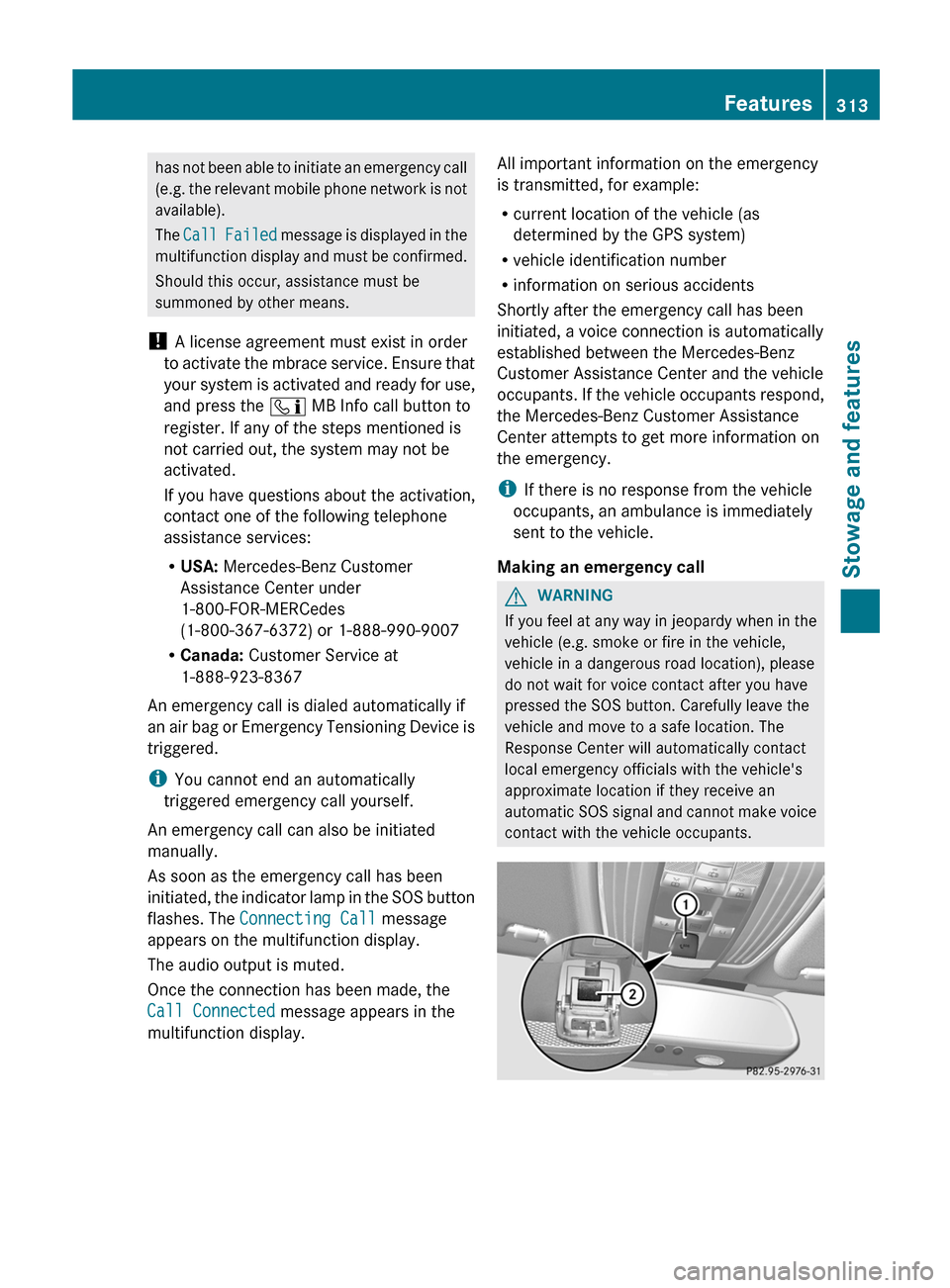
An emergency call can also be initiated
manually.
As soon as the emergency call has been
initiated, the indicator lamp in the SOS button
flashes. The Connecting Call message
appears on the multifunction display.
The audio output is muted.
Once the connection has been made, the
Call Connected message appears in the
multifunction display. All important information on the emergency
is transmitted, for example:
R
current location of the vehicle (as
determined by the GPS system)
R vehicle identification number
R information on serious accidents
Shortly after the emergency call has been
initiated, a voice connection is automatically
established between the Mercedes-Benz
Customer Assistance Center and the vehicle
occupants.
If the vehicle occupants respond,
the Mercedes-Benz Customer Assistance
Center attempts to get more information on
the emergency.
i If there is no response from the vehicle
occupants, an ambulance is immediately
sent to the vehicle.
Making an emergency call G
WARNING
If you feel at any way in jeopardy when in the
vehicle (e.g. smoke or fire in the vehicle,
vehicle in a dangerous road location), please
do not wait for voice contact after you have
pressed the SOS button. Carefully leave the
vehicle and move to a safe location. The
Response Center will automatically contact
local emergency officials with the vehicle's
approximate location if they receive an
automatic
SOS signal and cannot make voice
contact with the vehicle occupants. Features
313
Stowage and features Z
Page 316 of 420
X
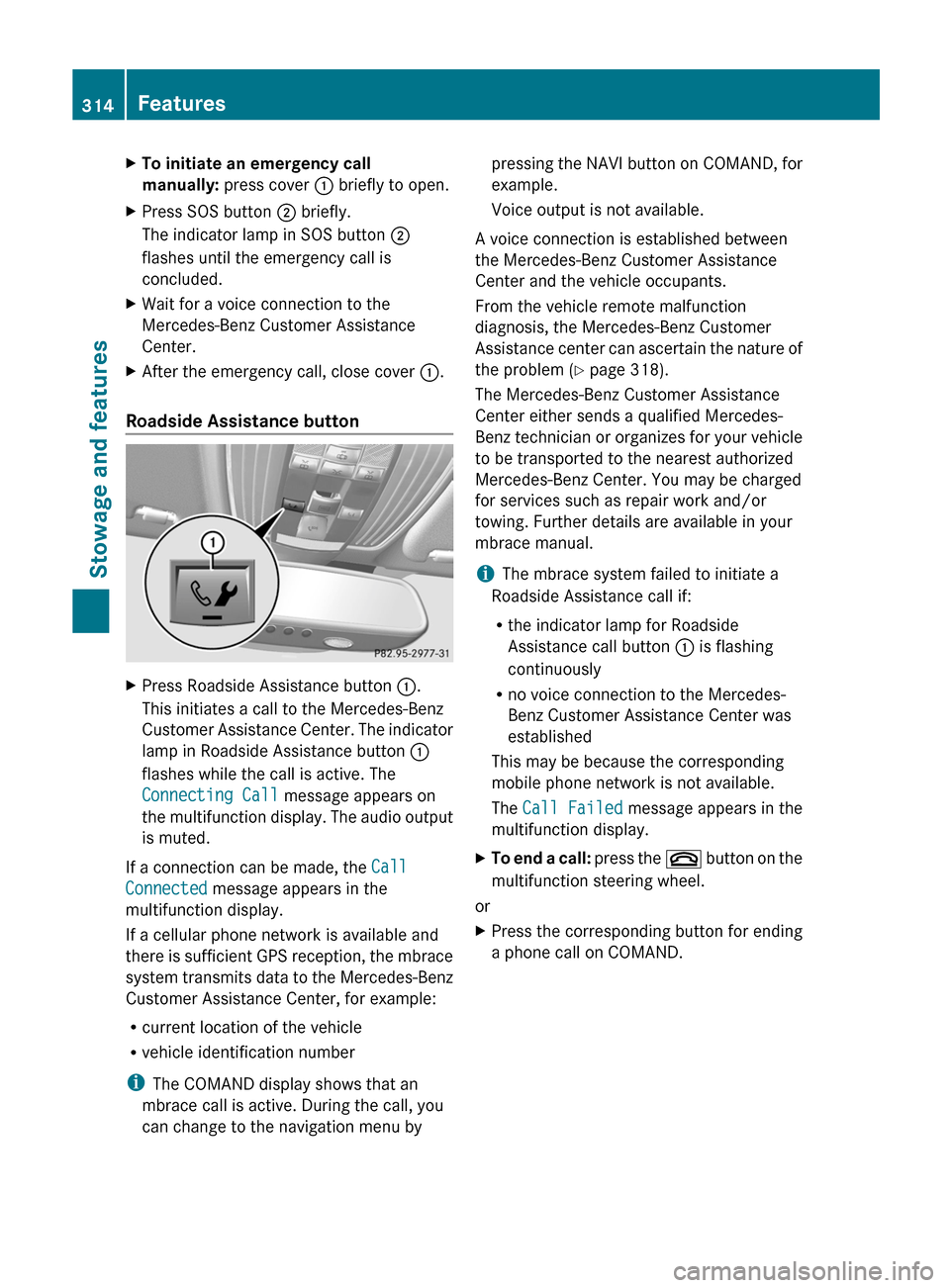
To initiate an emergency call
manually: press cover : briefly to open.
X Press SOS button ; briefly.
The indicator lamp in SOS button ;
flashes until the emergency call is
concluded.
X Wait for a voice connection to the
Mercedes-Benz Customer Assistance
Center.
X After the emergency call, close cover :.
Roadside Assistance button X
Press Roadside Assistance button :.
This initiates a call to the Mercedes-Benz
Customer
Assistance Center. The indicator
lamp in Roadside Assistance button :
flashes while the call is active. The
Connecting Call message appears on
the multifunction display. The audio output
is muted.
If a connection can be made, the Call
Connected message appears in the
multifunction display.
If a cellular phone network is available and
there
is sufficient GPS reception, the mbrace
system transmits data to the Mercedes-Benz
Customer Assistance Center, for example:
R current location of the vehicle
R vehicle identification number
i The COMAND display shows that an
mbrace call is active. During the call, you
can change to the navigation menu by pressing the NAVI button on COMAND, for
example.
Voice output is not available.
A voice connection is established between
the Mercedes-Benz Customer Assistance
Center and the vehicle occupants.
From the vehicle remote malfunction
diagnosis, the Mercedes-Benz Customer
Assistance
center can ascertain the nature of
the problem ( Y page 318).
The Mercedes-Benz Customer Assistance
Center either sends a qualified Mercedes-
Benz technician or organizes for your vehicle
to be transported to the nearest authorized
Mercedes-Benz Center. You may be charged
for services such as repair work and/or
towing. Further details are available in your
mbrace manual.
i The mbrace system failed to initiate a
Roadside Assistance call if:
R the indicator lamp for Roadside
Assistance call button : is flashing
continuously
R no voice connection to the Mercedes-
Benz Customer Assistance Center was
established
This may be because the corresponding
mobile phone network is not available.
The Call Failed message appears in the
multifunction display.
X To end a call:
press the ~ button on the
multifunction steering wheel.
or
X Press the corresponding button for ending
a phone call on COMAND.314
Features
Stowage and features