start stop button MERCEDES-BENZ E-Class SEDAN 2013 W212 User Guide
[x] Cancel search | Manufacturer: MERCEDES-BENZ, Model Year: 2013, Model line: E-Class SEDAN, Model: MERCEDES-BENZ E-Class SEDAN 2013 W212Pages: 420, PDF Size: 14.26 MB
Page 82 of 420
X
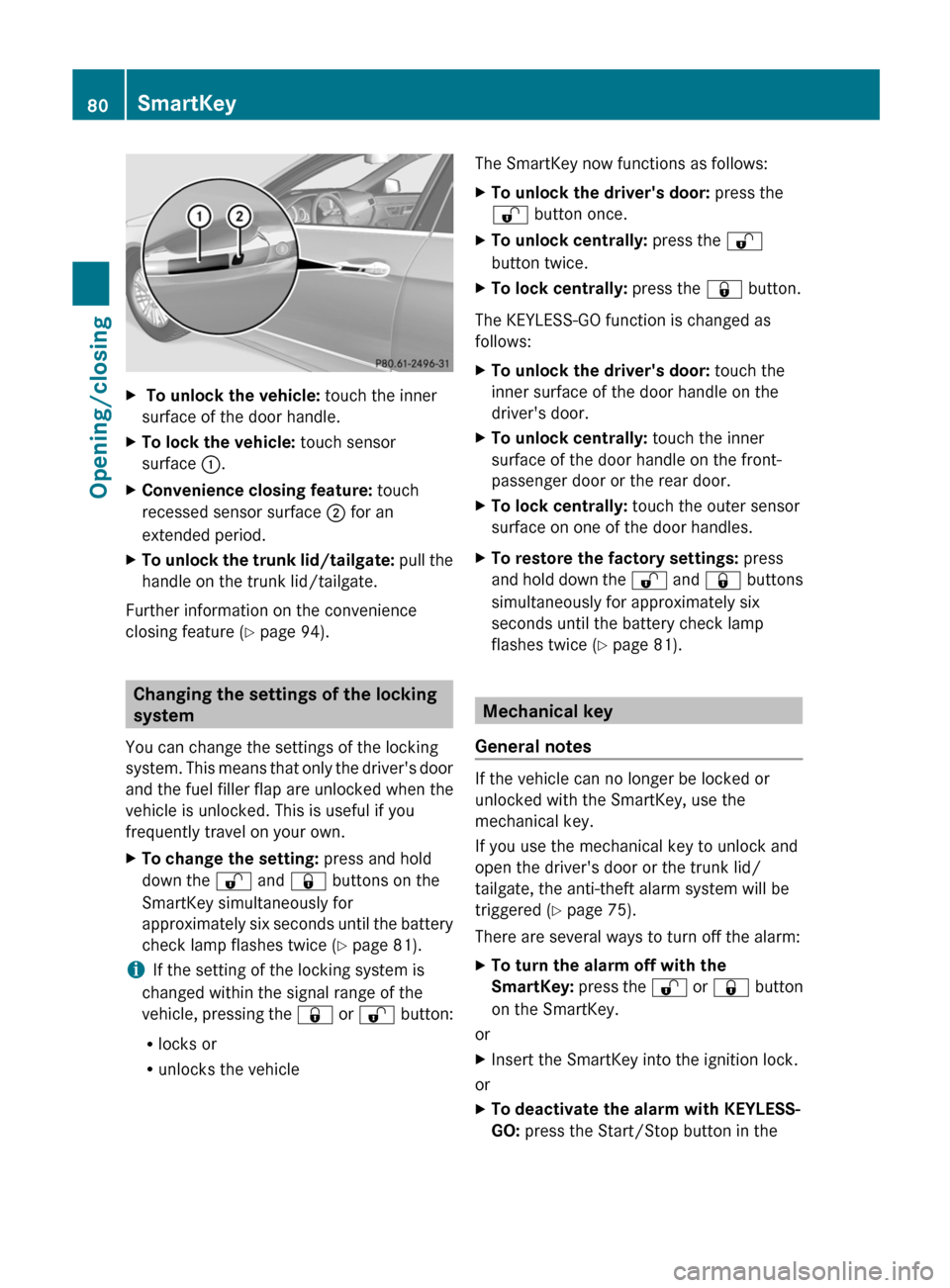
To unlock the vehicle: touch the inner
surface of the door handle.
X To lock the vehicle: touch sensor
surface :.
X Convenience closing feature: touch
recessed sensor surface ; for an
extended period.
X To unlock the trunk lid/tailgate: pull the
handle on the trunk lid/tailgate.
Further information on the convenience
closing feature ( Y page 94).Changing the settings of the locking
system
You can change the settings of the locking
system.
This means that only the driver's door
and the fuel filler flap are unlocked when the
vehicle is unlocked. This is useful if you
frequently travel on your own.
X To change the setting: press and hold
down the % and & buttons on the
SmartKey simultaneously for
approximately
six seconds until the battery
check lamp flashes twice ( Y page 81).
i If the setting of the locking system is
changed within the signal range of the
vehicle,
pressing the & or % button:
R locks or
R unlocks the vehicle The SmartKey now functions as follows:
X
To unlock the driver's door: press the
% button once.
X To unlock centrally: press the %
button twice.
X To lock centrally: press the & button.
The KEYLESS-GO function is changed as
follows:
X To unlock the driver's door: touch the
inner surface of the door handle on the
driver's door.
X To unlock centrally: touch the inner
surface of the door handle on the front-
passenger door or the rear door.
X To lock centrally: touch the outer sensor
surface on one of the door handles.
X To restore the factory settings: press
and
hold down the % and & buttons
simultaneously for approximately six
seconds until the battery check lamp
flashes twice ( Y page 81). Mechanical key
General notes If the vehicle can no longer be locked or
unlocked with the SmartKey, use the
mechanical key.
If you use the mechanical key to unlock and
open the driver's door or the trunk lid/
tailgate, the anti-theft alarm system will be
triggered (
Y page 75).
There are several ways to turn off the alarm:
X To turn the alarm off with the
SmartKey:
press the % or & button
on the SmartKey.
or
X Insert the SmartKey into the ignition lock.
or
X To deactivate the alarm with KEYLESS-
GO: press the Start/Stop button in the80
SmartKey
Opening/closing
Page 91 of 420
X
Pull the trunk lid/tailgate down using
recess :.
X Wagon: allow the tailgate to drop into the
lock.
X If necessary, lock the vehicle with
the & button on the SmartKey
(Y page 79) or with KEYLESS-GO
(Y page 79).
i If a KEYLESS-GO key is detected in the
trunk/cargo compartment, the trunk lid/
tailgate will not lock.
Sedan: the trunk lid then opens again. Opening/closing automatically from
outside
Important safety notes G
WARNING
Ensure that the trunk lid/tailgate is closed
when the engine is running and the vehicle is
in motion. Among other dangers, deadly
carbon monoxide (CO) may enter the vehicle
interior and cause unconsciousness and even
death.
! The trunk lid/tailgate swings upwards
and to the rear when opened. Therefore,
make sure that there is sufficient clearance
above and behind the trunk lid/tailgate.
Opening You can open the trunk lid/tailgate
automatically using the SmartKey or the
handle in the trunk lid/tailgate.
X
Press and hold the F
button on the key
until the trunk lid/tailgate opens.
or
X If the trunk lid/tailgate is unlocked, pull the
handle
of the trunk lid/tailgate and let it go
again immediately ( Y page 88). Closing G
WARNING
Monitor the closing procedure carefully to
make sure no one is in danger of being
injured. To prevent possible personal injury,
always
keep hands and fingers away from the
trunk opening when closing the trunk lid. Be
especially careful when small children are
around. To stop the closing procedure, do one
of the following:
R Press button F on the SmartKey.
R Press the remote trunk opening/closing
switch (on the driver's door).
R Press the trunk closing switch.
R Press the KEYLESS-GO locking/closing
switch.
R Pull the trunk lid handle.
Even with the SmartKey removed from the
starter switch or the SmartKey with KEYLESS-
GO removed from the vehicle, the remote
trunk opening/closing switch can be
operated. Therefore, do not leave children
unattended in the vehicle, or with access to
an unlocked vehicle. A child's unsupervised
access to a vehicle could result in an accident
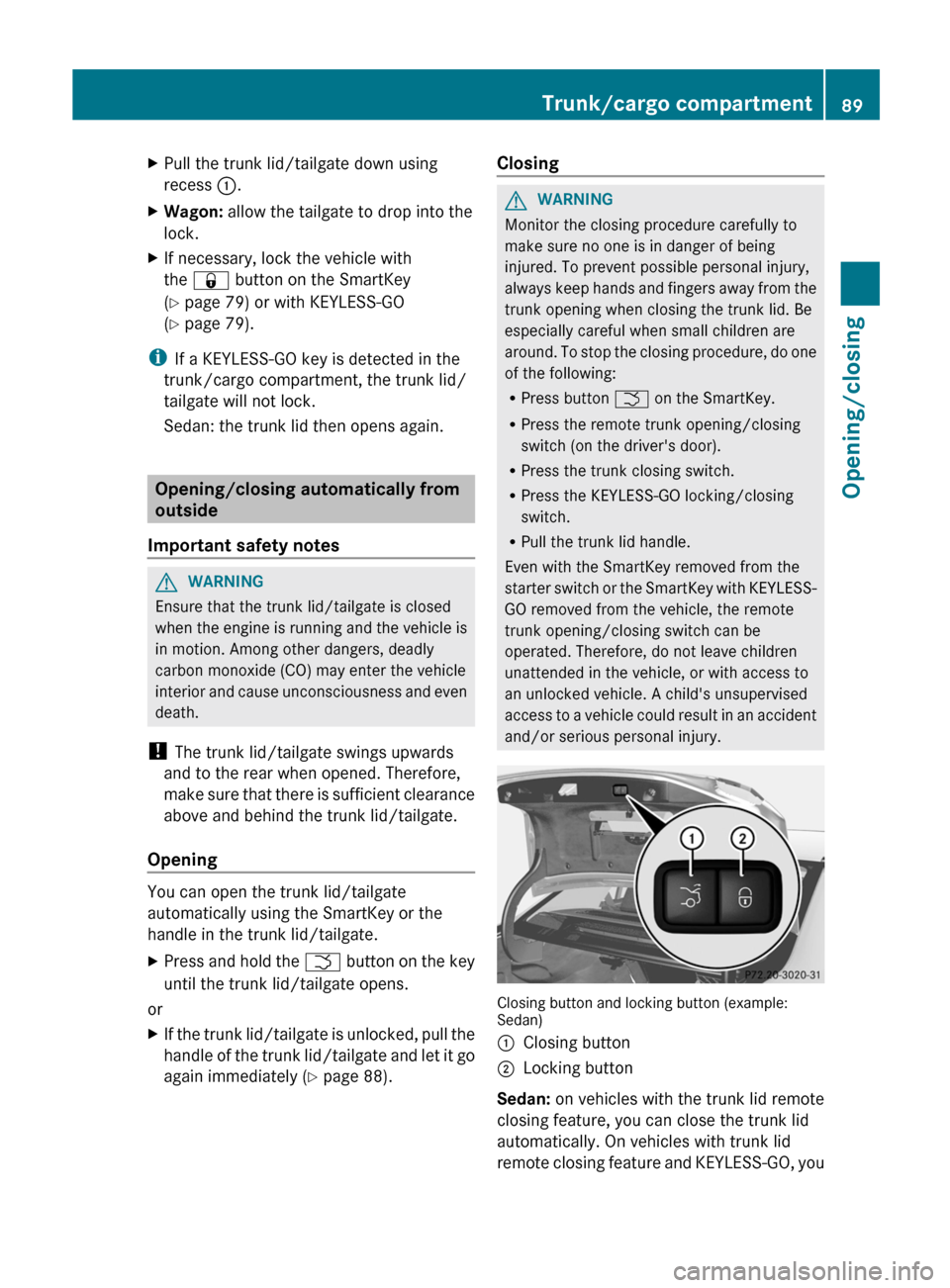
and/or serious personal injury. Closing button and locking button (example:
Sedan)
:
Closing button
; Locking button
Sedan: on vehicles with the trunk lid remote
closing feature, you can close the trunk lid
automatically. On vehicles with trunk lid
remote
closing feature and KEYLESS-GO, you Trunk/cargo compartment
89
Opening/closing Z
Page 92 of 420
can simultaneously close and lock the trunk
lid.
Wagon: on vehicles with KEYLESS-GO, you
can simultaneously close and lock the
tailgate.
X
To close: press closing button : in the
trunk lid/tailgate.
X To close and lock simultaneously:
Press closing button ; in the trunk lid/
tailgate.
i If you leave a KEYLESS-GO key in the
trunk/cargo compartment, the trunk lid/
tailgate will not lock. Opening/closing automatically from
inside
Important safety notes G
WARNING
Keep an eye on the area at the rear end of the
vehicle when operating the trunk lid/tailgate
with
the remote operating switch on the door.
Monitor the entire closing procedure to
ensure that there is no risk of injury to anyone
near the vehicle.
Release the switch on the door to interrupt
the closing procedure.
The remote operating switch can also be used
if the SmartKey has been removed from the
starter switch or the KEYLESS-GO key has
been removed from the vehicle. Never leave
children with no adult supervision in the
vehicle or with access to an unlocked vehicle.
If unsupervised children have access to a
vehicle, it could lead to an accident and/or
serious injury. G
WARNING
Ensure that the trunk lid/tailgate is closed
when
the engine is running and the vehicle is
in motion. Among other dangers, deadly
carbon monoxide (CO) may enter the vehicle
interior and cause unconsciousness and even
death. Opening/closing
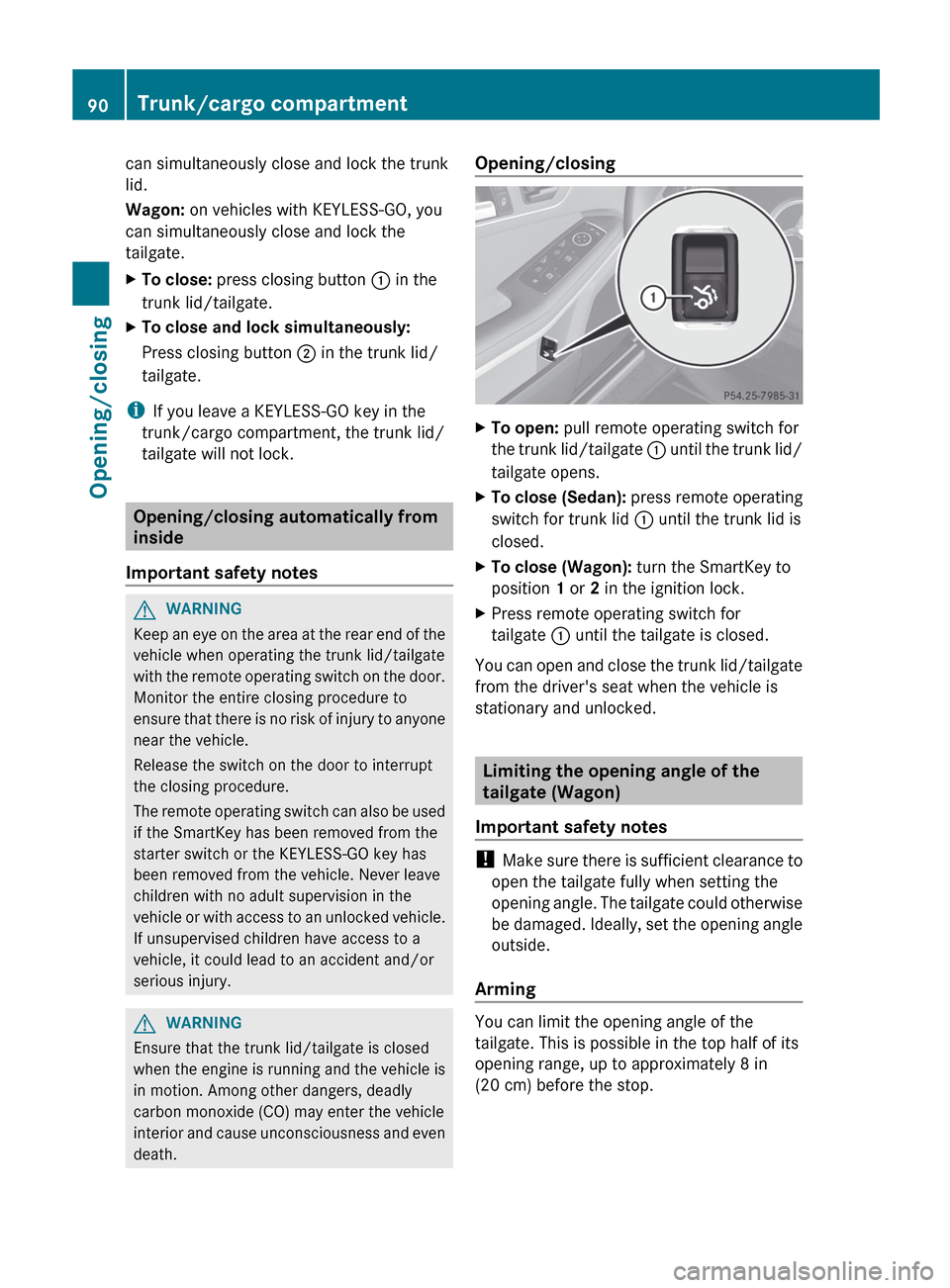
X
To open: pull remote operating switch for
the
trunk lid/tailgate : until the trunk lid/
tailgate opens.
X To close (Sedan): press remote operating
switch for trunk lid : until the trunk lid is
closed.
X To close (Wagon): turn the SmartKey to
position 1 or 2 in the ignition lock.
X Press remote operating switch for
tailgate : until the tailgate is closed.
You can open and close the trunk lid/tailgate
from the driver's seat when the vehicle is
stationary and unlocked. Limiting the opening angle of the
tailgate (Wagon)
Important safety notes !
Make
sure there is sufficient clearance to
open the tailgate fully when setting the
opening angle. The tailgate could otherwise
be damaged. Ideally, set the opening angle
outside.
Arming You can limit the opening angle of the
tailgate. This is possible in the top half of its
opening range, up to approximately
8 in
(20 cm) before the stop. 90
Trunk/cargo compartment
Opening/closing
Page 95 of 420
X
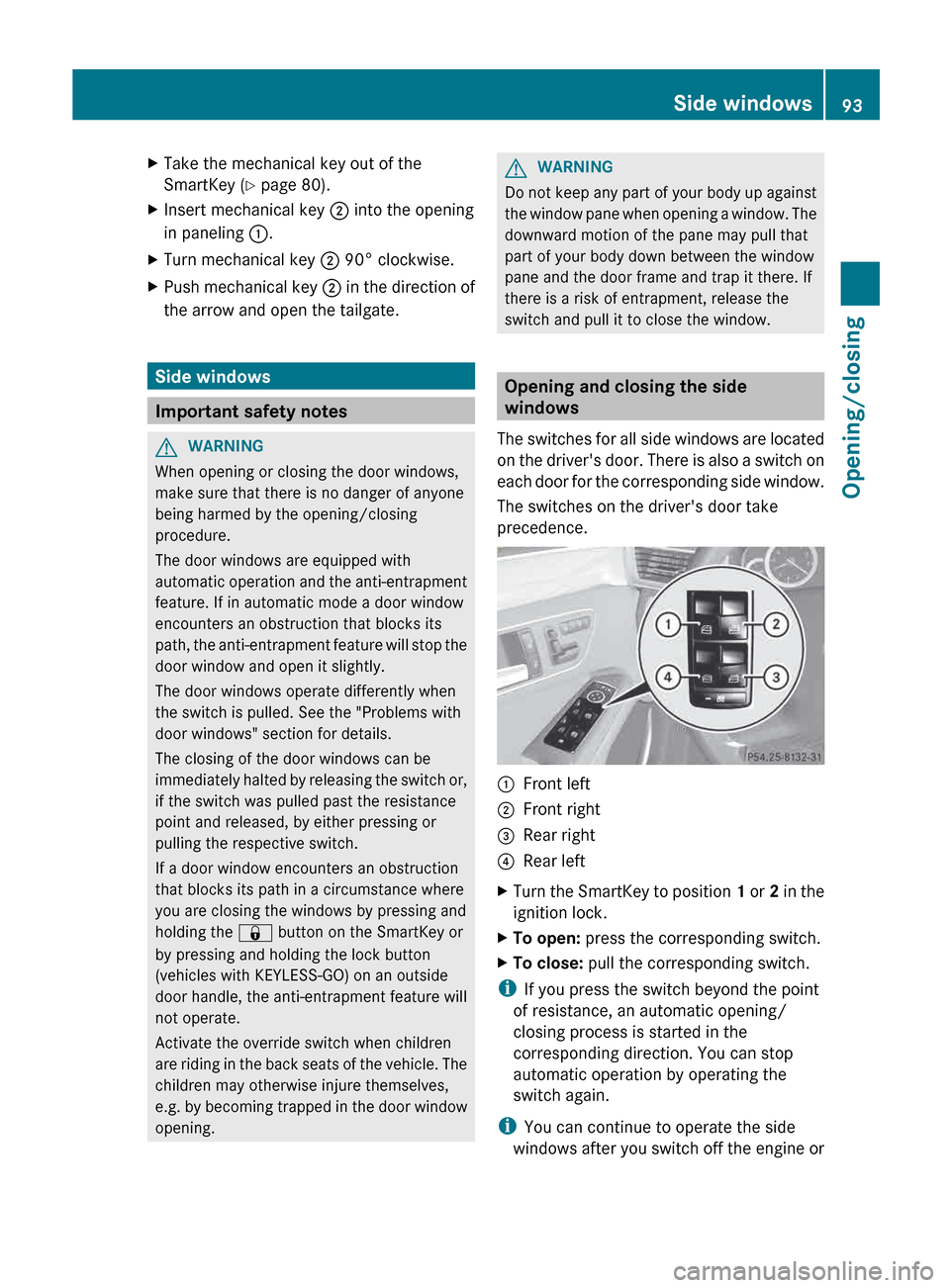
Take the mechanical key out of the
SmartKey (Y page 80).
X Insert mechanical key ; into the opening
in paneling :.
X Turn mechanical key ; 90° clockwise.
X Push mechanical key ; in the direction of
the arrow and open the tailgate. Side windows
Important safety notes
G
WARNING
When opening or closing the door windows,
make sure that there is no danger of anyone
being harmed by the opening/closing
procedure.
The door windows are equipped with
automatic
operation and the anti-entrapment
feature. If in automatic mode a door window
encounters an obstruction that blocks its
path, the anti-entrapment feature will stop the
door window and open it slightly.
The door windows operate differently when
the switch is pulled. See the "Problems with
door windows" section for details.
The closing of the door windows can be
immediately halted by releasing the switch or,
if the switch was pulled past the resistance
point and released, by either pressing or
pulling the respective switch.
If a door window encounters an obstruction
that blocks its path in a circumstance where
you are closing the windows by pressing and
holding the & button on the SmartKey or
by pressing and holding the lock button
(vehicles with KEYLESS-GO) on an outside
door handle, the anti-entrapment feature will
not operate.
Activate the override switch when children
are riding in the back seats of the vehicle. The
children may otherwise injure themselves,
e.g. by becoming trapped in the door window
opening. G
WARNING
Do not keep any part of your body up against
the
window pane when opening a window. The
downward motion of the pane may pull that
part of your body down between the window
pane and the door frame and trap it there. If
there is a risk of entrapment, release the
switch and pull it to close the window. Opening and closing the side
windows
The
switches for all side windows are located
on the driver's door. There is also a switch on
each door for the corresponding side window.
The switches on the driver's door take
precedence. :
Front left
; Front right
= Rear right
? Rear left
X Turn the SmartKey to position 1
or 2 in the
ignition lock.
X To open: press the corresponding switch.
X To close: pull the corresponding switch.
i If you press the switch beyond the point
of resistance, an automatic opening/
closing process is started in the
corresponding direction. You can stop
automatic operation by operating the
switch again.
i You can continue to operate the side
windows
after you switch off the engine or Side windows
93
Opening/closing Z
Page 96 of 420
remove the SmartKey. This function is
available for up to five minutes or until the
driver's
or front-passenger door is opened.
i When the override feature for the side
windows is activated ( Y page 66), the side
windows cannot be operated from the rear. Convenience opening
General notes You can ventilate the vehicle before you start
driving. To do this, the SmartKey is used to
carry out the following functions
simultaneously:
R
unlock the vehicle
R open the side windows
R open the sliding sunroof or the panorama
roof with power tilt/sliding panel and the
roller sunblinds
R switch on the seat ventilation for the
driver's seat
i The convenience opening feature can
only be operated using the SmartKey. The
SmartKey must be close to the driver's
door handle.
Convenience opening X
Point the tip of the SmartKey at the driver's
door handle.
X Press and hold the % button until the
side
windows and the sliding sunroof or the
panorama roof with power tilt/sliding
panel are in the desired position.
If the roller sunblinds of the panorama roof
with power tilt/sliding panel are closed, the
roller sunblinds are opened first.
X Press and hold the %
button again until
the panorama roof with power tilt/sliding
panel is in the desired position.
X To interrupt convenience opening:
release the % button. Convenience closing
Important safety notes G
WARNING
When closing the door windows and the
sliding sunroof or panorama roof with power
tilt/sliding panel, make sure that there is no
danger
of anyone being harmed by the closing
procedure.
If potential danger exists, proceed as follows:
R Release the & button to stop the closing
procedure. To open, press and hold the
% button. To continue the closing
procedure after making sure that there is
no danger of anyone being harmed by the
closing procedure, press and hold the
& button.
Vehicles with KEYLESS-GO:
R Release the sensor surface on the outside
door handle to stop the closing procedure.
R Immediately pull on the same outside door
handle and hold firmly. The door windows
and the sliding sunroof or panorama roof
with power tilt/sliding panel will open for
as long as the door handle is held but the
door is not opened.
When you lock the vehicle, you can
simultaneously:
R close the side windows
R close the sliding sunroof or the panorama
roof with power tilt/sliding panel
On vehicles with a panorama roof with power
tilt/sliding panel, you can then close the
roller sunblinds.
Using the SmartKey The SmartKey must be close to the driver's
door handle.
X
Point the tip of the SmartKey at the driver's
door handle.
X Press and hold the & button until the
side
windows and the sliding sunroof or the94
Side windows
Opening/closing
Page 100 of 420
Reset the sliding sunroof if it does not move
smoothly.
X
Turn the SmartKey to position 2 in the
ignition lock.
X Raise the sliding sunroof fully at the rear
(Y page 97).
X Keep the 3 switch pressed for another
second.
X Make sure that the sliding sunroof can be
fully
opened and closed again (Y page 97).
X If this is not the case, repeat the steps
above again. Operating the panorama roof with
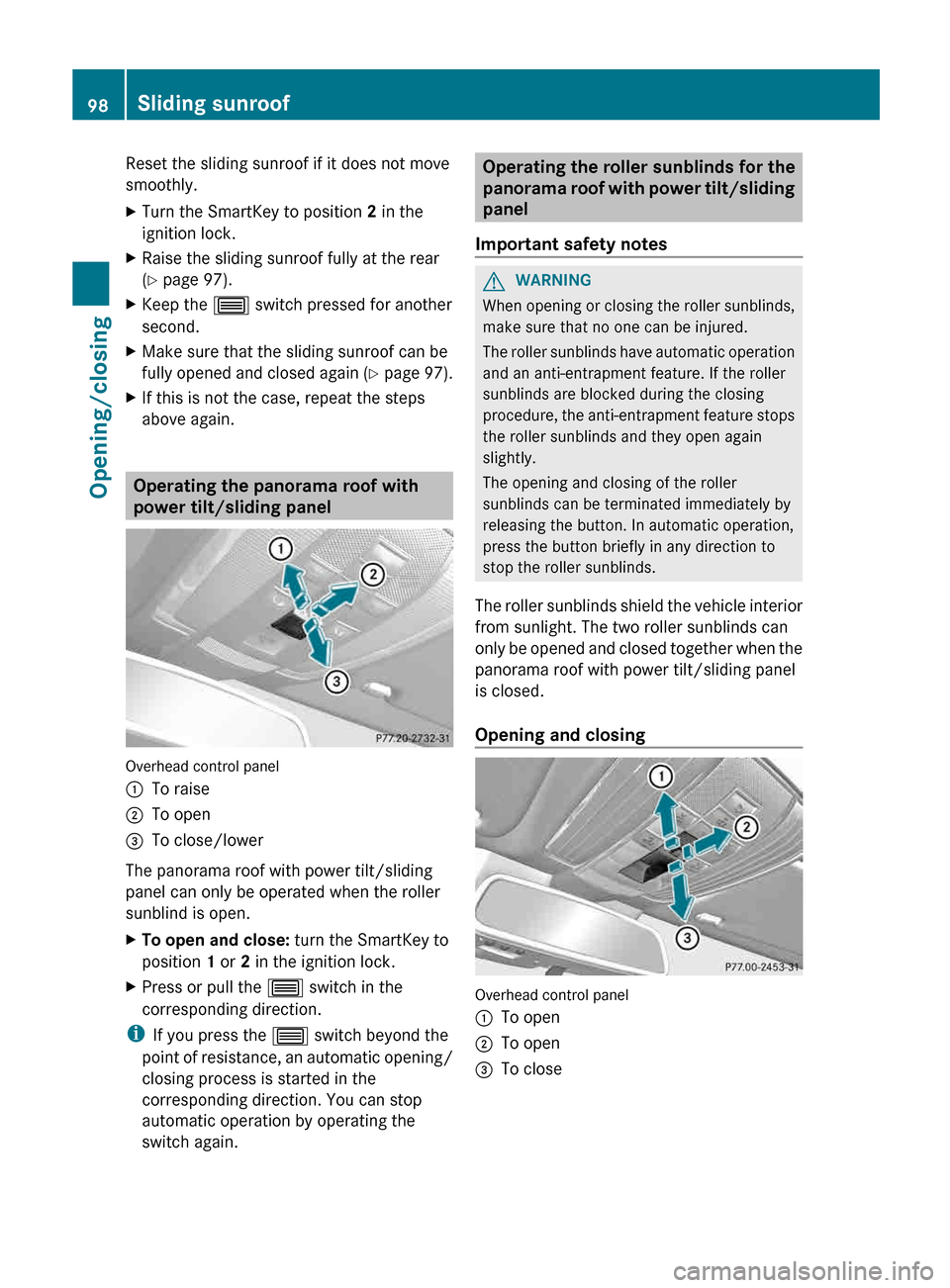
power tilt/sliding panel
Overhead control panel
:
To raise
; To open
= To close/lower
The panorama roof with power tilt/sliding
panel can only be operated when the roller
sunblind is open.
X To open and close: turn the SmartKey to
position 1 or 2 in the ignition lock.
X Press or pull the 3 switch in the
corresponding direction.
i If you press the 3 switch beyond the
point
of resistance, an automatic opening/
closing process is started in the
corresponding direction. You can stop
automatic operation by operating the
switch again. Operating the roller sunblinds for the
panorama
roof with power tilt/sliding
panel
Important safety notes G
WARNING
When opening or closing the roller sunblinds,
make sure that no one can be injured.
The
roller sunblinds have automatic operation
and an anti-entrapment feature. If the roller
sunblinds are blocked during the closing
procedure, the anti-entrapment feature stops
the roller sunblinds and they open again
slightly.
The opening and closing of the roller
sunblinds can be terminated immediately by
releasing the button. In automatic operation,
press the button briefly in any direction to
stop the roller sunblinds.
The roller sunblinds shield the vehicle interior
from sunlight. The two roller sunblinds can
only be opened and closed together when the
panorama roof with power tilt/sliding panel
is closed.
Opening and closing Overhead control panel
:
To open
; To open
= To close98
Sliding sunroof
Opening/closing
Page 115 of 420
Do not keep the memory function position
button pressed as this will start the memory
function and set the steering wheel and seat
in motion.
Do not leave children unattended in the
vehicle.
They could open the driver's door and
thereby unintentionally activate the EASY-
ENTRY/EXIT feature and become trapped. G
WARNING
Let the system complete the adjustment
procedure before setting the vehicle in
motion. All steering wheel adjustment must
be completed before setting the vehicle in
motion. Driving off with the steering wheel
still adjusting could cause the driver to lose
control of the vehicle.
The
EASY-ENTRY/EXIT feature makes getting
in and out of your vehicle easier.
You can activate and deactivate the EASY-
ENTRY/EXIT feature in the on-board
computer (Y page 241).
Position of the steering wheel when the
EASY-ENTRY/EXIT feature is active The steering wheel swings upwards when
you:
R
remove
the SmartKey from the ignition lock
R open the driver's door and KEYLESS-GO is
in position 1
R open the driver's door and the SmartKey is
in position 0 or 1 in the ignition lock
i The steering wheel only moves upwards if
it has not already reached the upper end
stop.
Position of the steering wheel for
driving The steering wheel is moved to the last
selected position when:
R
the driver's door is closed.
R you insert the SmartKey into the ignition
lock. or
R you press the Start/Stop button once on
vehicles with KEYLESS-GO.
When you close the driver's door with the
ignition switched on, the steering wheel is
also automatically moved to the previously
set position.
The last position of the steering wheel is
stored when you switch off the ignition or
when you store the setting with the memory
function ( Y page 116).
Crash-responsive EASY-EXIT feature If the crash-responsive EASY-EXIT feature is
triggered
in an accident, the steering column
will move upwards when the driver's door is
opened. This occurs irrespective of the
position of the SmartKey in the ignition lock.
This makes it easier to exit the vehicle and
rescue the occupants.
The crash-responsive EASY-EXIT feature is
only operational if the EASY-EXIT/ENTRY
feature is activated in the on-board computer. Mirrors
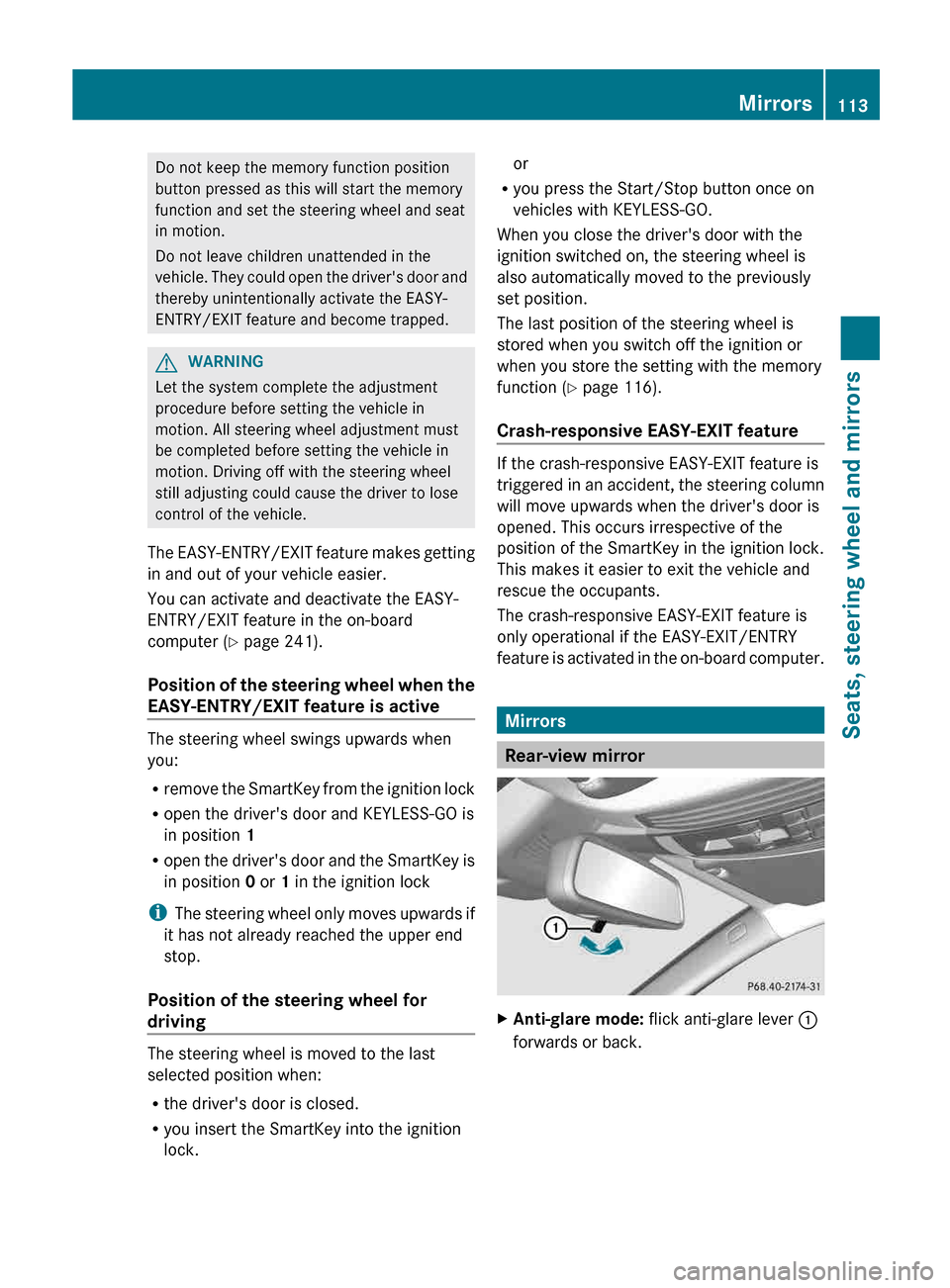
Rear-view mirror
X
Anti-glare mode: flick anti-glare lever :
forwards or back. Mirrors
113
Seats, steering wheel and mirrors Z
Page 137 of 420
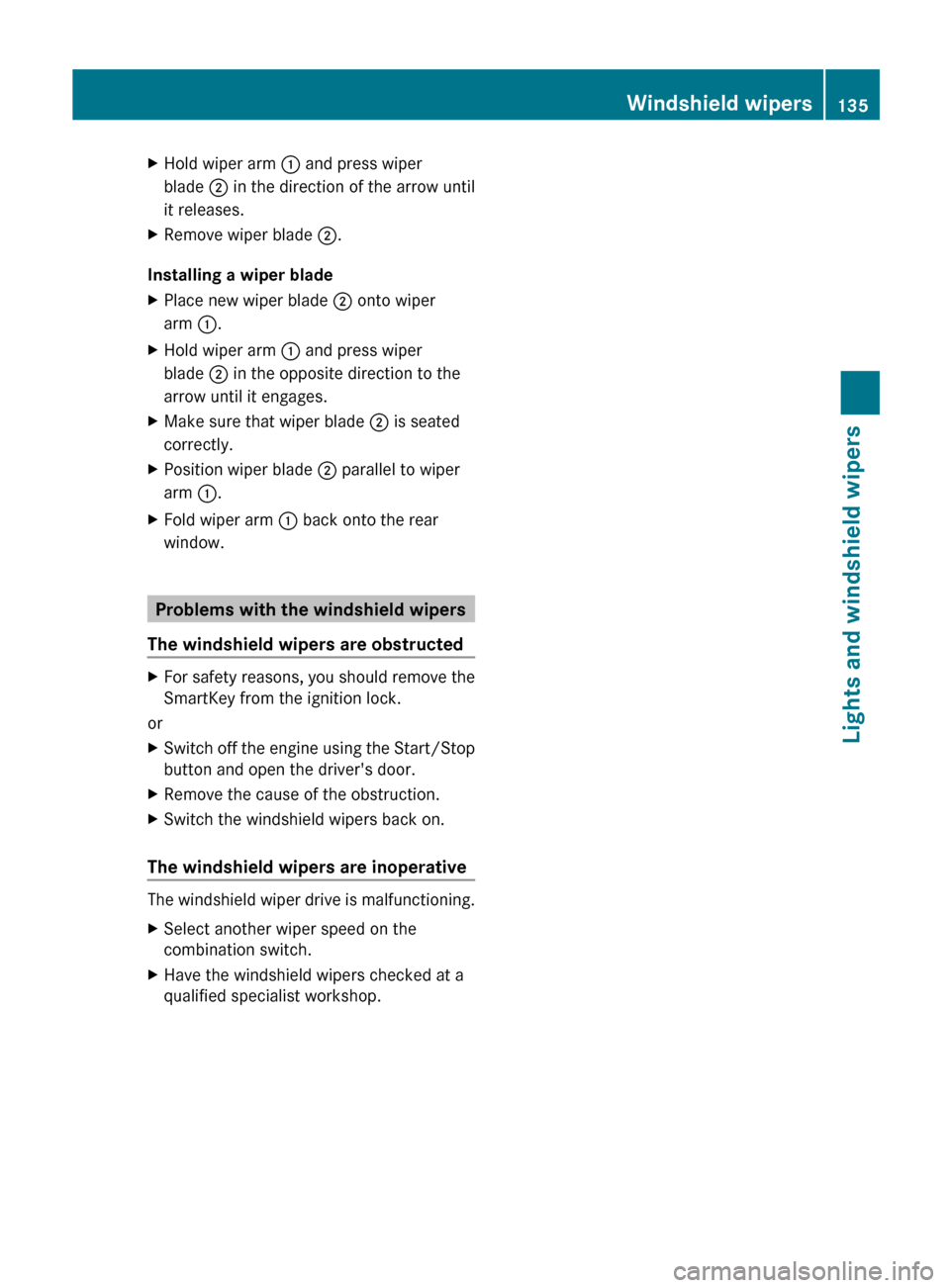
X
Hold wiper arm : and press wiper
blade ; in the direction of the arrow until
it releases.
X Remove wiper blade ;.
Installing a wiper blade
X Place new wiper blade ; onto wiper
arm :.
X Hold wiper arm : and press wiper
blade ; in the opposite direction to the
arrow until it engages.
X Make sure that wiper blade ; is seated
correctly.
X Position wiper blade ; parallel to wiper
arm :.
X Fold wiper arm : back onto the rear
window. Problems with the windshield wipers
The windshield wipers are obstructed X
For safety reasons, you should remove the
SmartKey from the ignition lock.
or
X Switch off the engine using the Start/Stop
button and open the driver's door.
X Remove the cause of the obstruction.
X Switch the windshield wipers back on.
The windshield wipers are inoperative The windshield wiper drive is malfunctioning.
X
Select another wiper speed on the
combination switch.
X Have the windshield wipers checked at a
qualified specialist workshop. Windshield wipers
135Lights and windshield wipers Z
Page 156 of 420
KEYLESS-GO
General notes
R
Do
not keep the KEYLESS-GO key together
with:
- electronic devices, e.g. a mobile phone
or another key
- metallic objects, e.g. coins or metal film
R Do not keep the KEYLESS-GO key in metal
objects, e.g. metal cases.
This can affect the functionality of
KEYLESS-GO.
Vehicles with KEYLESS-GO are equipped with
a SmartKey featuring an integrated KEYLESS-
GO start function and a detachable Start/
Stop button.
The Start/Stop button must be inserted into
the ignition lock and the SmartKey must be in
the vehicle.
Pressing the Start/Stop button several times
in succession corresponds to the different
SmartKey positions in the ignition lock. This
is only the case if you are not depressing the
brake pedal.
If you depress the brake pedal and press the
Start/Stop button, the engine starts
immediately.
The Start/Stop button can be removed from
the ignition lock. Then, you can insert the
SmartKey into the ignition lock.
i You do not have to remove the Start/Stop
button from the ignition lock when you
leave the vehicle. You should, however,
always take the SmartKey with you when
leaving the vehicle. As long as the
SmartKey is in the vehicle:
R the vehicle can be started using the
Start/Stop button and
R electrically powered equipment can be
operated. Key positions with KEYLESS-GO
As soon as the ignition is switched on, all the
indicator
lamps in the instrument cluster light
up. If an indicator lamp does not go out after
starting the engine or lights up while driving,
see ( Y page 277).
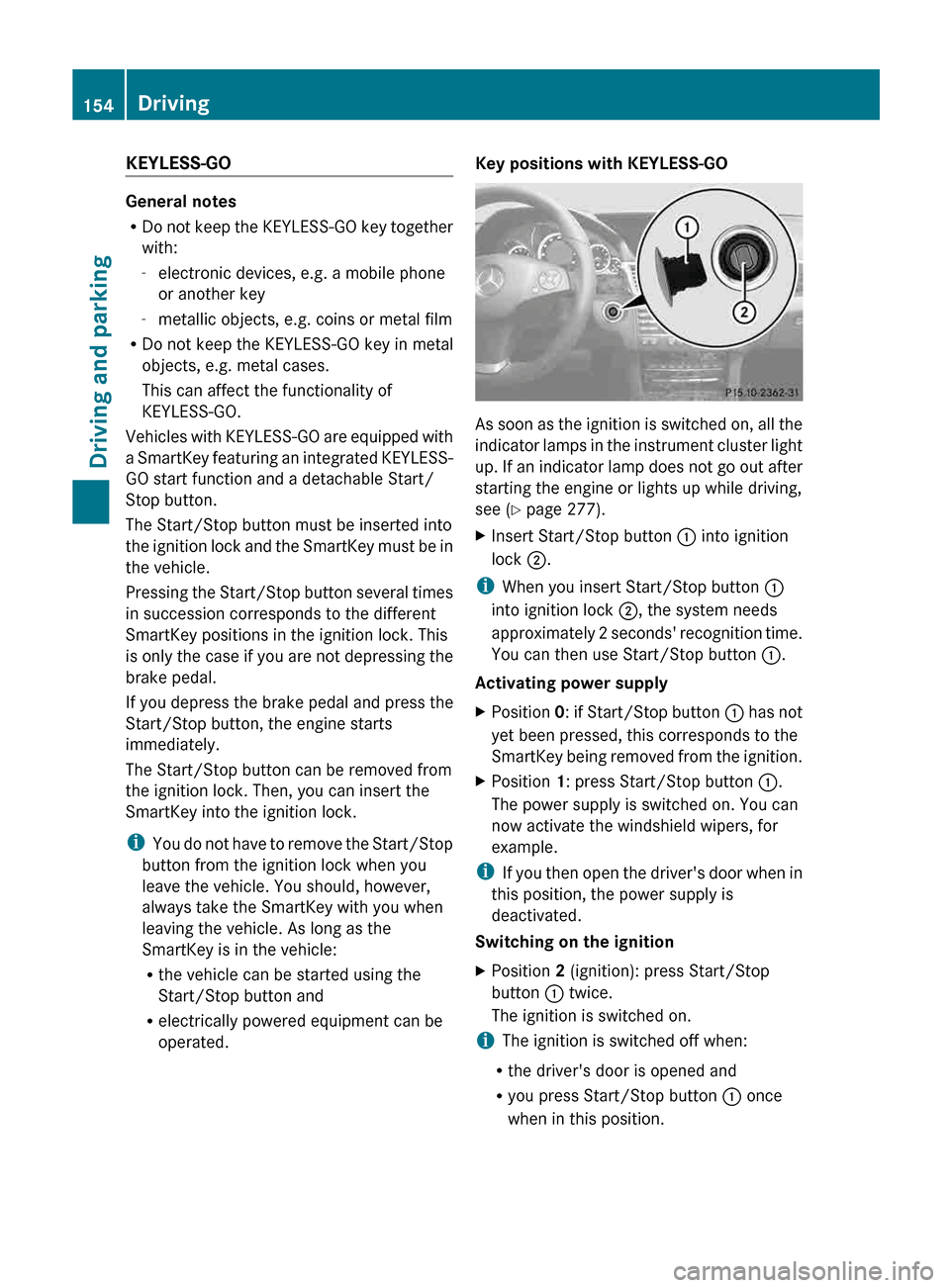
X Insert Start/Stop button : into ignition
lock ;.
i When you insert Start/Stop button :
into ignition lock ;, the system needs
approximately
2 seconds' recognition time.
You can then use Start/Stop button :.
Activating power supply
X Position 0:
if Start/Stop button : has not
yet been pressed, this corresponds to the
SmartKey being removed from the ignition.
X Position 1: press Start/Stop button :.
The power supply is switched on. You can
now activate the windshield wipers, for
example.
i If
you then open the driver's door when in
this position, the power supply is
deactivated.
Switching on the ignition
X Position 2 (ignition): press Start/Stop
button : twice.
The ignition is switched on.
i The ignition is switched off when:
R the driver's door is opened and
R you press Start/Stop button : once
when in this position. 154
Driving
Driving and parking
Page 157 of 420
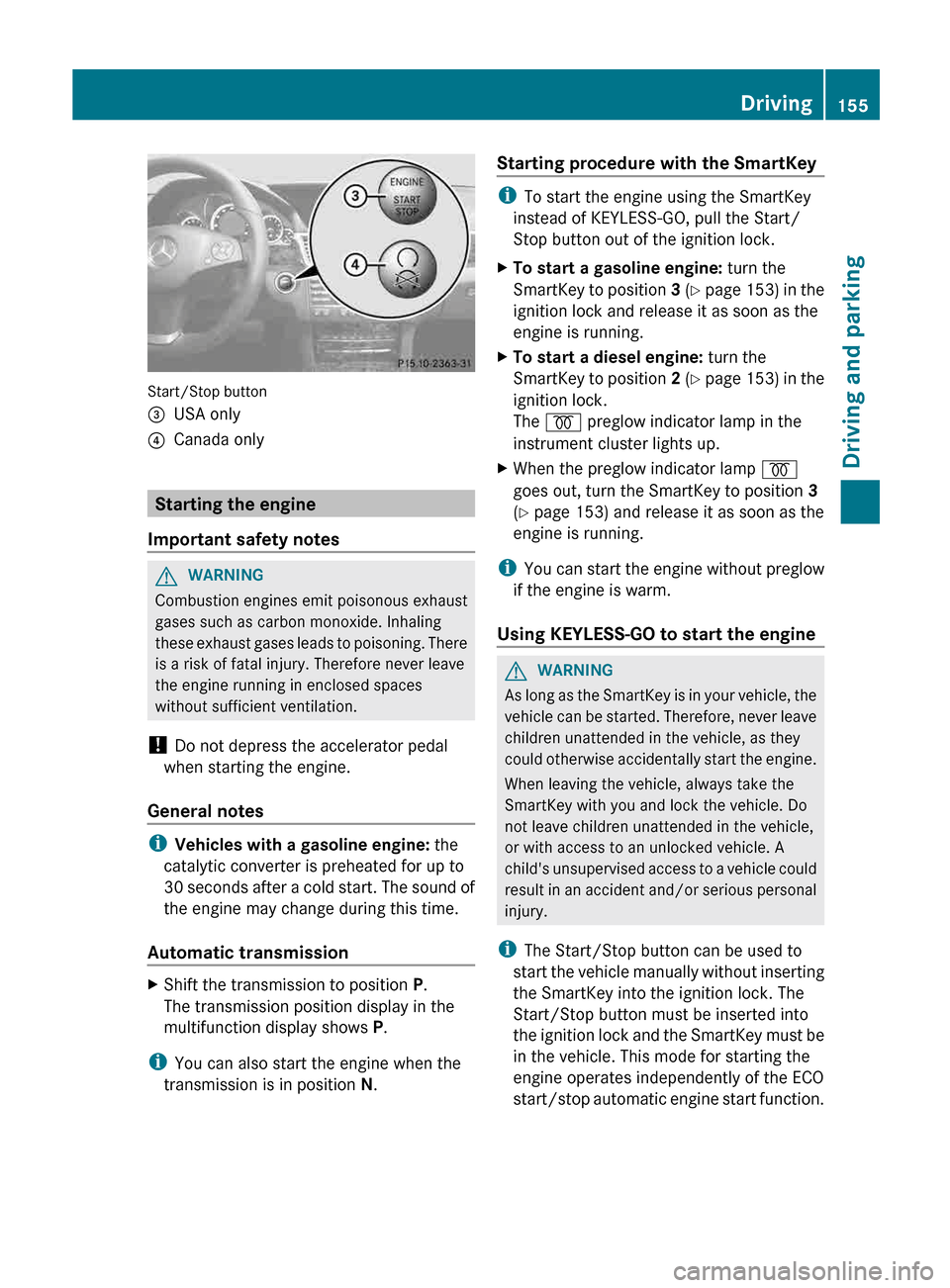
Start/Stop button
=
USA only
? Canada only Starting the engine
Important safety notes G
WARNING
Combustion engines emit poisonous exhaust
gases such as carbon monoxide. Inhaling
these
exhaust gases leads to poisoning. There
is a risk of fatal injury. Therefore never leave
the engine running in enclosed spaces
without sufficient ventilation.
! Do not depress the accelerator pedal
when starting the engine.
General notes i
Vehicles with a gasoline engine: the
catalytic converter is preheated for up to
30
seconds after a cold start. The sound of
the engine may change during this time.
Automatic transmission X
Shift the transmission to position P.
The transmission position display in the
multifunction display shows P.
i You can also start the engine when the
transmission is in position N. Starting procedure with the SmartKey i
To start the engine using the SmartKey
instead of KEYLESS-GO, pull the Start/
Stop button out of the ignition lock.
X To start a gasoline engine: turn the
SmartKey
to position 3 (Y page 153) in the
ignition lock and release it as soon as the
engine is running.
X To start a diesel engine: turn the
SmartKey
to position 2 (Y page 153) in the
ignition lock.
The % preglow indicator lamp in the
instrument cluster lights up.
X When the preglow indicator lamp %
goes out, turn the SmartKey to position 3
(Y page 153) and release it as soon as the
engine is running.
i You
can start the engine without preglow
if the engine is warm.
Using KEYLESS-GO to start the engine G
WARNING
As long as the SmartKey is in your vehicle, the
vehicle
can be started. Therefore, never leave
children unattended in the vehicle, as they
could otherwise accidentally start the engine.
When leaving the vehicle, always take the
SmartKey with you and lock the vehicle. Do
not leave children unattended in the vehicle,
or with access to an unlocked vehicle. A
child's unsupervised access to a vehicle could
result in an accident and/or serious personal
injury.
i The Start/Stop button can be used to
start the vehicle manually without inserting
the SmartKey into the ignition lock. The
Start/Stop button must be inserted into
the ignition lock and the SmartKey must be
in the vehicle. This mode for starting the
engine operates independently of the ECO
start/stop automatic engine start function. Driving
155
Driving and parking Z