distronic MERCEDES-BENZ E-Class SEDAN 2013 W212 Owner's Manual
[x] Cancel search | Manufacturer: MERCEDES-BENZ, Model Year: 2013, Model line: E-Class SEDAN, Model: MERCEDES-BENZ E-Class SEDAN 2013 W212Pages: 420, PDF Size: 14.26 MB
Page 10 of 420
Delayed switch-off
Exterior lighting (on-board
computer) ...................................... 239
Interior lighting .............................. 240
Diagnostics connection ......................25
Diesel particle filter ..........................180
Digital speedometer .........................231
DIRECT SELECT lever see Automatic transmission
Display message
ASSYST PLUS ................................ 332
Display messages
Calling up (on-board computer) ..... 246
Driving systems ............................. 261
Engine ............................................ 258
General notes ................................ 246
Hiding (on-board computer) ........... 246
KEYLESS-GO .................................. 274
Lights ............................................. 254
Safety systems .............................. 247
SmartKey ....................................... 274
Tires ............................................... 268
Vehicle ........................................... 271
Distance display (on-board
computer) .......................................... 236
Distance recorder see Trip odometer
Distance warning (warning lamp) ....285
DISTRONIC PLUS Deactivating ................................... 194
Display message ............................ 265
Displays in the multifunction
display ........................................... 193
Function/notes ............................. 185
Important safety notes .................. 185
Setting the specified minimum
distance ......................................... 193
Warning lamp ................................. 285
Doors
Automatic locking (on-board
computer) ...................................... 240
Automatic locking (switch) ............... 86
Central locking/unlocking
(SmartKey) ....................................... 79
Control panel ................................... 37
Display message ............................ 273
Emergency locking ........................... 86
Emergency unlocking .......................86Important safety notes ....................
85
Opening (from inside) ......................85
Drinking and driving .........................178
Drinks holder see Cup holder
Drive program
Automatic ...................................... 166
Display ........................................... 161
Display (DIRECT SELECT lever) ...... 162
Manual ........................................... 167
SETUP (on-board computer) .......... 243
Drive program selector ..................... 165
Driver's door see Doors
Driving abroad
Mercedes-Benz Service .................333
Symmetrical low beam .................. 120
Driving on flooded roads ..................182
Driving safety systems ABS (Anti-lock Braking System) ....... 67
ADAPTIVE BRAKE ............................. 72
BAS (Brake Assist System) ..............67
BAS PLUS (Brake Assist System
PLUS) ............................................... 68
Electronic brake force distribution ... 72
ESP ®
(Electronic Stability
Program) .......................................... 69
ETS/4ETS (Electronic Traction
System) ........................................... 70
Important safety information ........... 67
Overview .......................................... 66
PRE-SAFE ®
Brake ............................. 72
Driving systems
Active Blind Spot Assist ................. 218
Active Driving Assistance
package ......................................... 218
Active Lane Keeping Assist ............ 221
AIRMATIC ...................................... 199
AMG adaptive sport suspension
system ........................................... 200
ATTENTION ASSIST ........................ 210
Blind Spot Assist ............................ 214
Cruise control ................................ 183
Display message ............................ 261
DISTRONIC PLUS ........................... 185
HOLD function ............................... 196
Lane Keeping Assist ...................... 2168
Index
Page 16 of 420
Notes on breaking-in a new
vehicle
................................................ 152O
Occupant Classification System
(OCS) Faults ............................................... 52
Operation ......................................... 48
System self-test
............................... 50
Occupant safety
Children in the vehicle .....................60
Important safety notes .................... 40
OCS
Faults ............................................... 52
Operation ......................................... 48
System self-test ............................... 50
Odometer
see Trip odometer
Oil
see Engine oil
On-board computer
AMG menu ..................................... 242
Assistance menu ........................... 236
Audio menu ................................... 233
Convenience submenu .................. 241
Displaying a service message ........ 333
Display messages ..........................246
DISTRONIC PLUS ........................... 193
Factory settings submenu ............. 242
Important safety notes .................. 226
Instrument cluster submenu ..........238
Lighting submenu .......................... 239
Menu overview .............................. 230
Message memory .......................... 246
Navigation menu ............................ 232
Operation ....................................... 228
RACETIMER ................................... 243
Service menu ................................. 238
Settings menu ............................... 238
Standard display ............................ 230
Telephone menu ............................ 234
Trip menu ...................................... 230
Vehicle submenu ........................... 240
Video DVD operation ..................... 234
Operating system
see On-board computer
Outside temperature display ...........228Overhead control panel
......................36
Override feature Rear side windows
...........................66 P
Paint code number ............................ 405
Paintwork (cleaning instructions) ...335
Panic alarm .......................................... 40
Panorama roof with power tilt/
sliding panel
Opening/closing .............................. 98
Opening/closing the roller
sunblind ........................................... 98
Problem (malfunction) ...................100
Resetting ......................................... 99
Panorama sliding sunroof
Important safety notes
....................96
Parking ............................................... 175
Important safety notes .................. 175
Parking brake ................................ 176
Position of exterior mirror, front-
passenger side ............................... 115
Rear view camera .......................... 208
see PARKTRONIC
Parking aid
Parking Guidance ........................... 205
see Exterior mirrors
see PARKTRONIC
Parking brake
Display message ............................ 249
Notes/function .............................. 176
Warning lamp ................................. 281
Parking Guidance
Display message ............................ 264
Important safety notes .................. 205
Parking lamps
Switching on/off ........................... 123
Parking lamps (changing bulbs) ......132
PARKTRONIC Deactivating/activating ................. 204
Driving system ............................... 202
Function/notes ............................. 202
Important safety notes .................. 202
Problem (malfunction) ...................205
Range of the sensors ..................... 202
Warning display ............................. 20314
Index
Page 22 of 420
Trip odometer
Calling up ....................................... 230
Resetting (on-board computer) ...... 232
Trunk
Emergency release .......................... 91
Locking separately ...........................91
Trunk lid
Display message ............................ 272
Opening dimensions ...................... 414
Trunk load (maximum) ...................... 414
Turn signals Changing bulbs (front) ................... 132
Display message ............................ 254
Switching on/off ........................... 124
Type identification plate
see Vehicle identification plate U
Unlocking Emergency unlocking .......................86
From inside the vehicle (central
unlocking button) ............................. 85V
Vanity mirror (in the sun visor) ........
306
Vehicle Data acquisition ............................... 26
Display message ............................ 271
Equipment ....................................... 22
Individual settings ..........................238
Limited Warranty ............................. 26
Loading .......................................... 373
Locking (in an emergency) ............... 86
Locking (SmartKey) .......................... 79
Lowering ........................................ 389
Maintenance .................................... 23
Parking for a long period ................ 177
Pulling away ................................... 156
Raising ........................................... 386
Reporting problems .........................25
Securing from rolling away ............386
Towing away .................................. 354
Transporting .................................. 356
Unlocking (in an emergency) ........... 86
Unlocking (SmartKey) ......................79
Vehicle data ................................... 414Vehicle data .......................................
414
Vehicle dimensions ...........................414
Vehicle emergency locking ................86
Vehicle identification number see VIN
Vehicle identification plate ..............405
Vehicle level AIRMATIC ...................................... 199
Vehicle level (display message) .......261
Vehicle tool kit .................................. 342
Video Operating the DVD ......................... 234
VIN ...................................................... 405 W
Warning and indicator lamps ABS
................................................ 278
Brakes ........................................... 277
Check Engine ................................. 282
Coolant .......................................... 283
Distance warning ........................... 285
DISTRONIC PLUS ........................... 285
ESP ®
.............................................. 279
ESP ®
OFF ....................................... 279
Fuel tank ........................................ 282
Overview .................................. 32, 275
PASSENGER AIR BAG OFF
indicator lamp .................................. 48
Reserve fuel ................................... 282
Seat belt ........................................ 276
SPORT handling mode ................... 280
SRS ................................................ 281
Tire pressure monitor .................... 286
Warranty ............................................ 405
Washer fluid Display message ............................ 273
Wheel bolt tightening torque ...........389
Wheel chock ...................................... 386
Wheels Changing a wheel .......................... 384
Checking ........................................ 363
Cleaning ......................................... 336
Cleaning (warning) .........................385
Emergency spare wheel ................. 398
Important safety notes .................. 362
Interchanging/changing ................384
Mounting a new wheel ................... 38820
Index
Page 56 of 420
X
Firmly push the NECK-PRO head restraint
cushion back in the direction of arrow =
until the cushion engages.
X Repeat this procedure for the second
NECK-PRO head restraint.
i Resetting the NECK-PRO head restraints
requires a lot of strength. If you have
difficulty resetting the NECK-PRO head
restraints, have this work carried out at a
qualified specialist workshop.
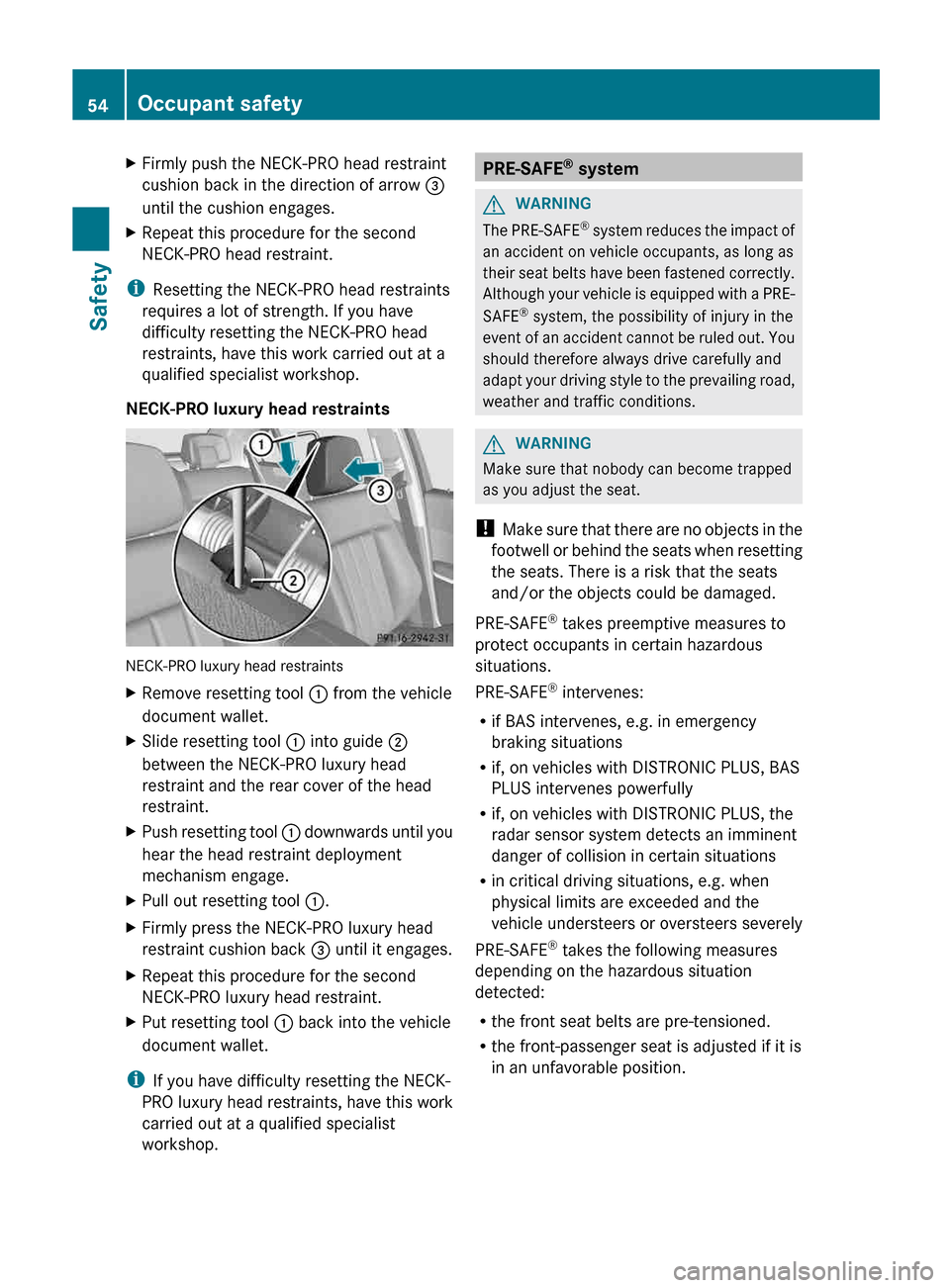
NECK-PRO luxury head restraints NECK-PRO luxury head restraints
X
Remove resetting tool : from the vehicle
document wallet.
X Slide resetting tool : into guide ;
between the NECK-PRO luxury head
restraint and the rear cover of the head
restraint.
X Push resetting tool : downwards until you
hear the head restraint deployment
mechanism engage.
X Pull out resetting tool :.
X Firmly press the NECK-PRO luxury head
restraint cushion back = until it engages.
X Repeat this procedure for the second
NECK-PRO luxury head restraint.
X Put resetting tool : back into the vehicle
document wallet.
i If you have difficulty resetting the NECK-
PRO
luxury head restraints, have this work
carried out at a qualified specialist
workshop. PRE-SAFE
®
system G
WARNING
The PRE-SAFE ®
system reduces the impact of
an accident on vehicle occupants, as long as
their seat belts have been fastened correctly.
Although your vehicle is equipped with a PRE-
SAFE ®
system, the possibility of injury in the
event of an accident cannot be ruled out. You
should therefore always drive carefully and
adapt your driving style to the prevailing road,
weather and traffic conditions. G
WARNING
Make sure that nobody can become trapped
as you adjust the seat.
! Make
sure that there are no objects in the
footwell or behind the seats when resetting
the seats. There is a risk that the seats
and/or the objects could be damaged.
PRE-SAFE ®
takes preemptive measures to
protect occupants in certain hazardous
situations.
PRE-SAFE ®
intervenes:
R if BAS intervenes, e.g. in emergency
braking situations
R if, on vehicles with DISTRONIC PLUS, BAS
PLUS intervenes powerfully
R if, on vehicles with DISTRONIC PLUS, the
radar sensor system detects an imminent
danger of collision in certain situations
R in critical driving situations, e.g. when
physical limits are exceeded and the
vehicle understeers or oversteers severely
PRE-SAFE ®
takes the following measures
depending on the hazardous situation
detected:
R the front seat belts are pre-tensioned.
R the front-passenger seat is adjusted if it is
in an unfavorable position.54
Occupant safety
Safety
Page 70 of 420
G
WARNING
If BAS is malfunctioning, the braking distance
in an emergency braking situation is
increased. There is a risk of an accident.
In an emergency braking situation, depress
the brake pedal with full force. ABS prevents
the wheels from locking.
BAS operates in emergency braking
situations. If you depress the brake pedal
quickly,
BAS automatically boosts the braking
force, thus shortening the stopping distance.
The brakes will function as usual once you
release the brake pedal. BAS is deactivated. BAS PLUS (Brake Assist System Plus)
i Observe the "Important safety notes"
section ( Y page 67).
BAS PLUS is only available in vehicles
equipped with DISTRONIC PLUS.
BAS PLUS provides braking assistance in
hazardous situations at speeds greater than
4 mph (7 km/h) and uses radar sensor
technology to assess the traffic situation.
With
the help of the radar sensor system, BAS
PLUS can detect obstacles that are in the
path of your vehicle for an extended period of
time.
BAS PLUS can also react to stationary
obstacles, e.g. stopped or parked vehicles, at
speeds of up to approximately 40 mph
(70 km/h).
To prevent a front-end collision, BAS PLUS
calculates the brake force necessary if:
R you approach an obstacle, and
R BAS PLUS has detected a risk of collision
For speeds above 20 mph (30 km/h): if you
apply the brakes forcefully, BAS PLUS
automatically increases the braking force to
a level suitable for the traffic conditions.
For speeds below 20 mph (30 km/h): if you
apply the brakes, BAS PLUS is activated.
Braking is performed as late as possible. If BAS PLUS demands particularly high
braking force, preventative passenger
protection measures (PRE-SAFE
®
) are
activated simultaneously.
X Keep the brake pedal depressed until the
emergency braking situation is over.
ABS prevents the wheels from locking.
BAS PLUS is deactivated and the brakes
function as usual, if:
R you release the brake pedal.
R there
is no longer any danger of a rear-end
collision.
R no obstacle is detected in front of your
vehicle.
For BAS PLUS to assist you when driving, the
radar sensor system must be:
R switched on (Y page 241)
R operational ( Y page 262)
If the radar sensor system is malfunctioning,
BAS PLUS will not be available. The brake
system is still available with complete brake
boosting effect and BAS. G
WARNING
BAS PLUS cannot always clearly identify
objects and complex traffic situations. BAS
PLUS cannot intervene in these cases. There
is a risk of an accident.
Always pay careful attention to the traffic
situation and be ready to brake.
In particular, the detection of obstacles can
be impaired if there is:
R dirt on the sensors or anything else
covering the sensors
R snow or heavy rain
R interference by other radar sources
R the possibility of strong radar reflections,
for example in parking garages
R a narrow vehicle traveling in front, e.g. a
motorbike
R a
vehicle traveling in front on a different line
relative to the center of your vehicle 68
Driving safety systems
Safety
Page 74 of 420
the instrument cluster does not flash. In such
situations, ESP
®
will not stabilize the vehicle.
It may be best to deactivate ESP ®
in the
following situations:
R when using snow chains
R in deep snow
R on sand or gravel
If you deactivate ESP ®
:
R ESP ®
no longer improves driving stability.
R traction control is still activated.
R PRE-SAFE ®
is no longer available, nor is it
activated if you brake firmly and ESP ®
intervenes.
R PRE-SAFE ®
Brake is no longer available; it
is also not activated if you brake firmly and
ESP ®
intervenes.
R ABS still provides support when you brake.
R engine torque is no longer limited and the
drive wheels are able to spin. The spinning
wheels produce a cutting effect for better
traction.
Vehicles with ECO start/stop function: the
ECO start/stop function switches the engine
off automatically when the vehicle comes to
a stop. The engine starts automatically when
the driver wants to pull away again. ESP ®
remains in its previously selected status.
Example: if ESP ®
was deactivated before the
engine was switched off, ESP ®
remains
deactivated when the engine is switched on
again. EBD (electronic brake force
distribution)
i Observe the "Important safety notes"
section ( Y page 67).G
WARNING
If EBD has malfunctioned, the rear wheels can
still lock, e.g. under full braking. This
increases
the risk of skidding and an accident.
You should therefore adapt your driving style
to the different handling characteristics. Have the brake system checked at a qualified
specialist workshop.
Observe information regarding indicator and
warning lamps ( Y page 278) as well as
display messages
(Y page 248).
EBD monitors and controls the brake
pressure on the rear wheels to improve
driving stability while braking. ADAPTIVE BRAKE
ADAPTIVE BRAKE enhances braking safety
and offers increased braking comfort. In
addition to the braking function, ADAPTIVE
BRAKE also has the HOLD function
(Y page 196) and hill start assist
(Y page 156). PRE-SAFE
®
Brake
i Observe the "Important safety notes"
section ( Y page 67).
PRE-SAFE ®
Brake is only available in vehicles
with DISTRONIC PLUS.
PRE-SAFE ®
Brake can help you to minimize
the risk of a collision with a vehicle ahead or
reduce the effects of such a collision. If PRE-
SAFE ®
Brake detects a risk of collision, you
will be warned visually and acoustically as
well as by automatic braking. PRE-SAFE ®
Brake cannot prevent a collision without your
intervention.
Above a speed of around 4 mph (7 km/h), this
function warns you if you are very quickly
approaching a vehicle in front. An
intermittent warning tone will then sound and
the · distance warning lamp will light up
in the instrument cluster.
X Brake immediately in order to increase the
distance from the vehicle in front.
or
X Take evasive action provided it is safe to do
so.72
Driving safety systems
Safety
Page 164 of 420
DIRECT SELECT lever
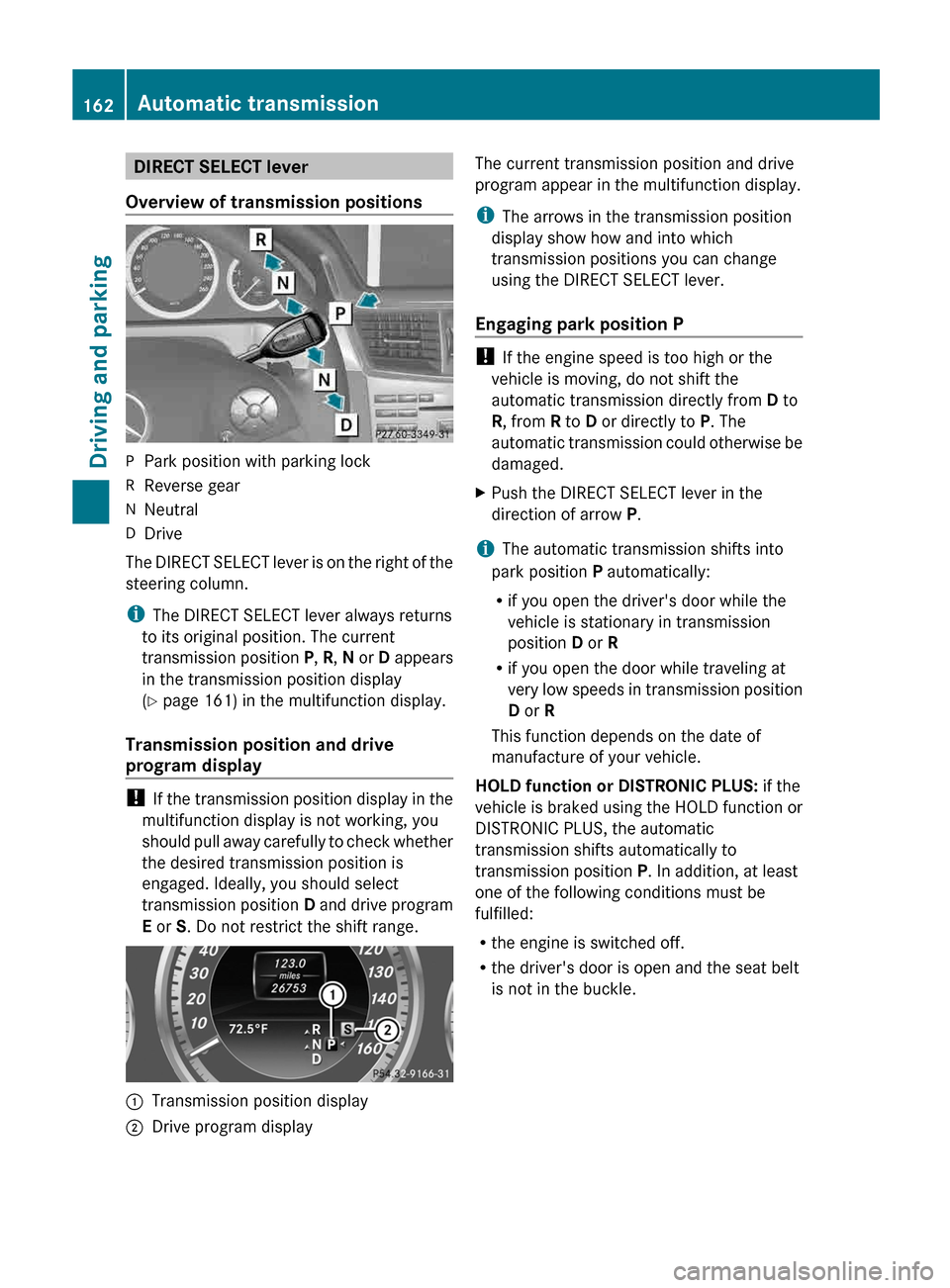
Overview of transmission positions P
Park position with parking lock
R Reverse gear
N Neutral
D Drive
The DIRECT SELECT lever is on the right of the
steering column.
i The DIRECT SELECT lever always returns
to its original position. The current
transmission
position P, R, N or D appears
in the transmission position display
(Y page 161) in the multifunction display.
Transmission position and drive
program display !
If
the transmission position display in the
multifunction display is not working, you
should pull away carefully to check whether
the desired transmission position is
engaged. Ideally, you should select
transmission position D and drive program
E or S. Do not restrict the shift range. :
Transmission position display
; Drive program display The current transmission position and drive
program appear in the multifunction display.
i
The arrows in the transmission position
display show how and into which
transmission positions you can change
using the DIRECT SELECT lever.
Engaging park position P !
If the engine speed is too high or the
vehicle is moving, do not shift the
automatic transmission directly from D to
R, from R to D or directly to P. The
automatic
transmission could otherwise be
damaged.
X Push the DIRECT SELECT lever in the
direction of arrow P.
i The automatic transmission shifts into
park position P automatically:
R if you open the driver's door while the
vehicle is stationary in transmission
position D or R
R if you open the door while traveling at
very
low speeds in transmission position
D or R
This function depends on the date of
manufacture of your vehicle.
HOLD function or DISTRONIC PLUS: if the
vehicle is braked using the HOLD function or
DISTRONIC PLUS, the automatic
transmission shifts automatically to
transmission position P. In addition, at least
one of the following conditions must be
fulfilled:
R the engine is switched off.
R the driver's door is open and the seat belt
is not in the buckle.162
Automatic transmission
Driving and parking
Page 185 of 420
Slippery road surfaces
G
WARNING
If you shift down on a slippery road surface in
an attempt to increase the engine's braking
effect, the drive wheels could lose their grip.
There is an increased danger of skidding and
accidents.
Do not shift down for additional engine
braking on a slippery road surface. G
WARNING
The outside temperature indicator is not
designed to serve as an ice-warning device
and is therefore unsuitable for that purpose.
Indicated temperatures just above the
freezing
point do not guarantee that the road
surface is free of ice. The road may still be icy,
especially in wooded areas or on bridges.
If the vehicle threatens to skid or cannot be
stopped when moving at low speed:
X Shift the transmission to position N.
Drive particularly carefully on slippery road
surfaces.
Avoid sudden acceleration, steering
and braking maneuvers. Do not use the cruise
control or DISTRONIC PLUS.
i For more information on driving with
snow chains, see ( Y page 365).Driving systems
Cruise control
Important safety notes G
WARNING
The cruise control is a convenience system
designed to assist the driver during vehicle
operation. The driver is and must always
remain responsible for the vehicle's speed
and for safe brake operation.
Only
use the cruise control if the road, traffic,
and weather conditions make it advisable to
travel at a constant speed. R
The use of the cruise control can be
dangerous on winding roads or in heavy
traffic
because conditions do not allow safe
driving at a constant speed.
R The use of the cruise control can be
dangerous on slippery roads. Rapid
changes in tire traction can result in wheel
spin and loss of control.
R Deactivate the cruise control when driving
in fog.
The "Resume" function should only be
operated if the driver is fully aware of the
previously set speed and wishes to resume
this particular preset speed. G
WARNING
The cruise control brakes automatically so
that the set speed is not exceeded.
General notes Cruise control maintains a constant road
speed
for you. It brakes automatically in order
to avoid exceeding the set speed. On long and
steep downhill gradients, especially if the
vehicle is laden, you must select shift range
1, 2 or 3 in good time. By doing so, you will
make use of the braking effect of the engine,
which relieves the load on the brake system
and prevents the brakes from overheating
and wearing too quickly.
Use cruise control only if road and traffic
conditions make it appropriate to maintain a
steady speed for a prolonged period. You can
store any road speed above 20 mph
(30 km/h). Driving systems
183
Driving and parking Z
Page 187 of 420
speed of the vehicle to the previously
stored speed.
Setting a speed G
WARNING
Keep in mind that it may take a brief moment
until the vehicle has made the necessary
adjustments.
Increase
or decrease the set vehicle speed to
a value that the prevailing road conditions and
legal speed limits permit. Otherwise, sudden
and unexpected acceleration or deceleration
of the vehicle could cause an accident and/
or serious injury to you and others. X
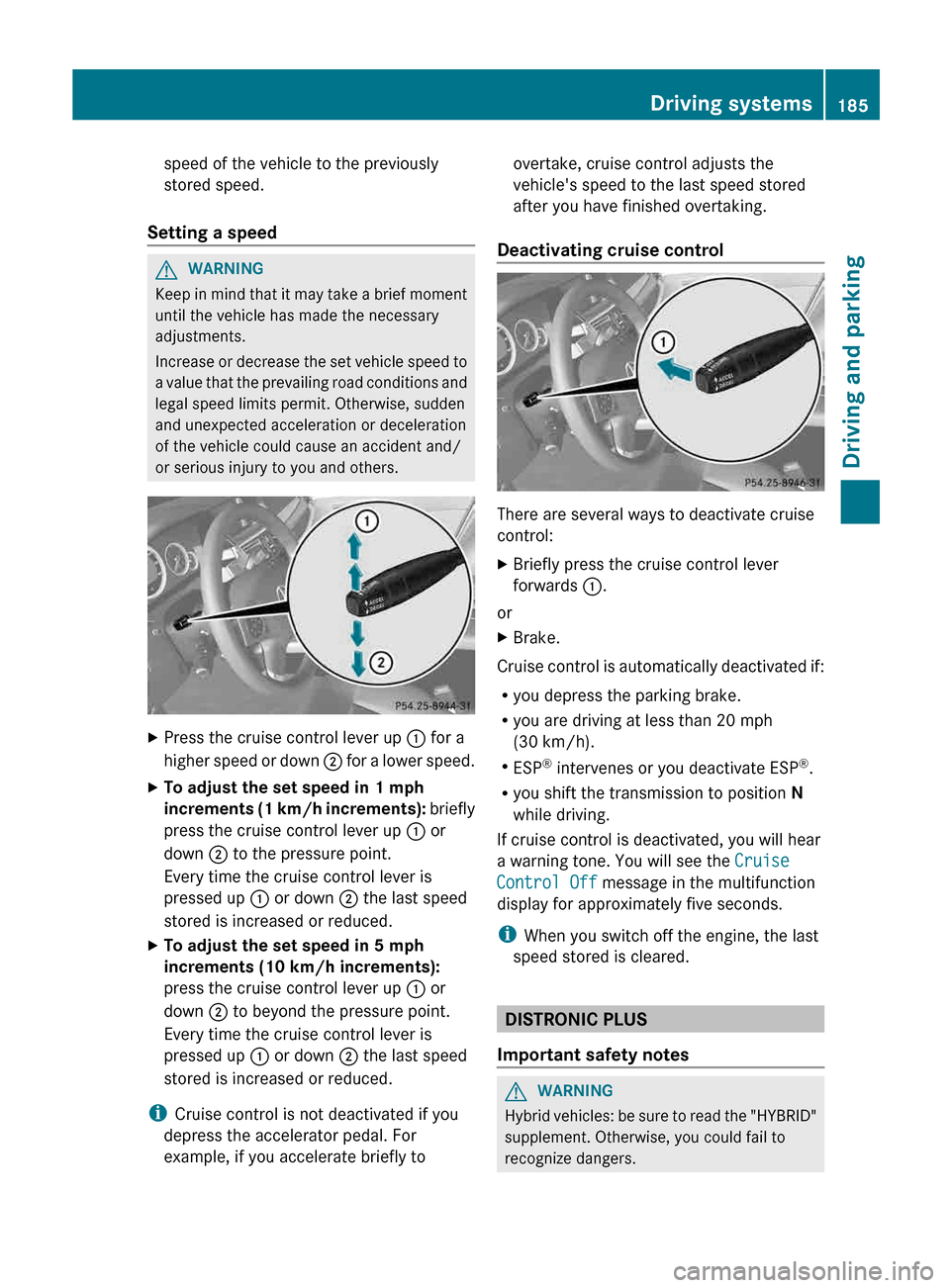
Press the cruise control lever up : for a
higher
speed or down ; for a lower speed.
X To adjust the set speed in 1 mph
increments
(1 km/h increments): briefly
press the cruise control lever up : or
down ; to the pressure point.
Every time the cruise control lever is
pressed up : or down ; the last speed
stored is increased or reduced.
X To adjust the set speed in 5 mph
increments (10 km/h increments):
press the cruise control lever up : or
down ; to beyond the pressure point.
Every time the cruise control lever is
pressed up : or down ; the last speed
stored is increased or reduced.
i Cruise control is not deactivated if you
depress the accelerator pedal. For
example, if you accelerate briefly to overtake, cruise control adjusts the
vehicle's speed to the last speed stored
after you have finished overtaking.
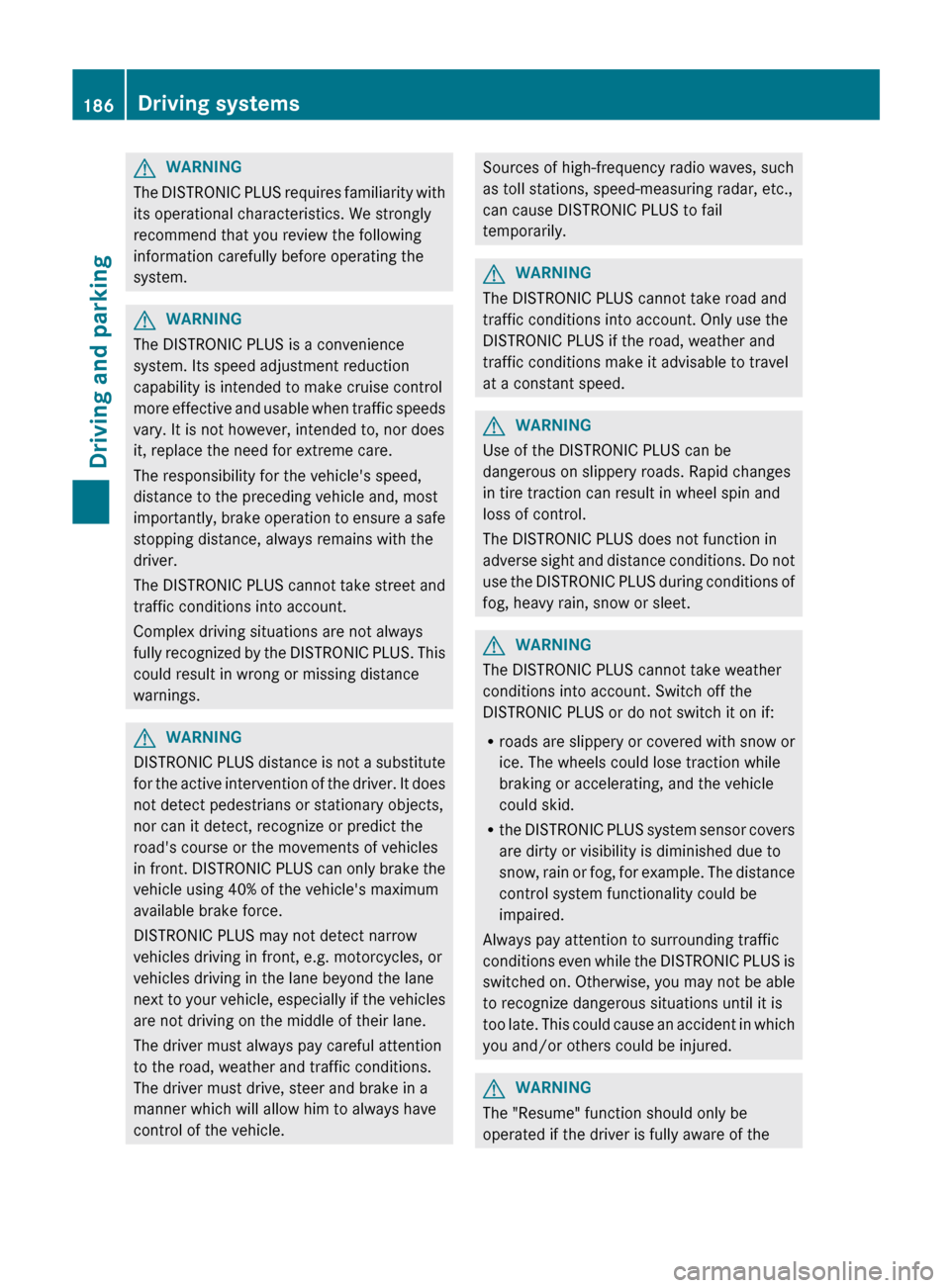
Deactivating cruise control There are several ways to deactivate cruise
control:
X
Briefly press the cruise control lever
forwards :.
or
X Brake.
Cruise control is automatically deactivated if:
R you depress the parking brake.
R you are driving at less than
20 mph
(30 km/h).
R ESP ®
intervenes or you deactivate ESP ®
.
R you shift the transmission to position N
while driving.
If cruise control is deactivated, you will hear
a warning tone. You will see the Cruise
Control Off message in the multifunction
display for approximately five seconds.
i When you switch off the engine, the last
speed stored is cleared. DISTRONIC PLUS
Important safety notes G
WARNING
Hybrid vehicles: be sure to read the "HYBRID"
supplement. Otherwise, you could fail to
recognize dangers. Driving systems
185
Driving and parking Z
Page 188 of 420
G
WARNING
The DISTRONIC PLUS requires familiarity with
its operational characteristics. We strongly
recommend that you review the following
information carefully before operating the
system. G
WARNING
The DISTRONIC PLUS is a convenience
system. Its speed adjustment reduction
capability is intended to make cruise control
more
effective and usable when traffic speeds
vary. It is not however, intended to, nor does
it, replace the need for extreme care.
The responsibility for the vehicle's speed,
distance to the preceding vehicle and, most
importantly, brake operation to ensure a safe
stopping distance, always remains with the
driver.
The DISTRONIC PLUS cannot take street and
traffic conditions into account.
Complex driving situations are not always
fully recognized by the DISTRONIC PLUS. This
could result in wrong or missing distance
warnings. G
WARNING
DISTRONIC PLUS distance is not a substitute
for
the active intervention of the driver. It does
not detect pedestrians or stationary objects,
nor can it detect, recognize or predict the
road's course or the movements of vehicles
in front. DISTRONIC PLUS can only brake the
vehicle using 40% of the vehicle's maximum
available brake force.
DISTRONIC PLUS may not detect narrow
vehicles driving in front, e.g. motorcycles, or
vehicles driving in the lane beyond the lane
next to your vehicle, especially if the vehicles
are not driving on the middle of their lane.
The driver must always pay careful attention
to the road, weather and traffic conditions.
The driver must drive, steer and brake in a
manner which will allow him to always have
control of the vehicle. Sources of high-frequency radio waves, such
as toll stations, speed-measuring radar, etc.,
can cause DISTRONIC PLUS to fail
temporarily.
G
WARNING
The DISTRONIC PLUS cannot take road and
traffic conditions into account. Only use the
DISTRONIC PLUS if the road, weather and
traffic conditions make it advisable to travel
at a constant speed. G
WARNING
Use of the DISTRONIC PLUS can be
dangerous on slippery roads. Rapid changes
in tire traction can result in wheel spin and
loss of control.
The DISTRONIC PLUS does not function in
adverse
sight and distance conditions. Do not
use the DISTRONIC PLUS during conditions of
fog, heavy rain, snow or sleet. G
WARNING
The DISTRONIC PLUS cannot take weather
conditions into account. Switch off the
DISTRONIC PLUS or do not switch it on if:
R roads
are slippery or covered with snow or
ice. The wheels could lose traction while
braking or accelerating, and the vehicle
could skid.
R the DISTRONIC PLUS system sensor covers
are dirty or visibility is diminished due to
snow, rain or fog, for example. The distance
control system functionality could be
impaired.
Always pay attention to surrounding traffic
conditions even while the DISTRONIC PLUS is
switched on. Otherwise, you may not be able
to recognize dangerous situations until it is
too late. This could cause an accident in which
you and/or others could be injured. G
WARNING
The "Resume" function should only be
operated if the driver is fully aware of the 186
Driving systems
Driving and parking