brake light MERCEDES-BENZ E-Class SEDAN 2016 W213 Owner's Guide
[x] Cancel search | Manufacturer: MERCEDES-BENZ, Model Year: 2016, Model line: E-Class SEDAN, Model: MERCEDES-BENZ E-Class SEDAN 2016 W213Pages: 350, PDF Size: 6.71 MB
Page 172 of 350

Front sensors
CenterApprox. 40 in (approx.
100 cm)
CornersApprox. 24 in (approx.
60 cm)
Rear sensors
CenterApprox. 48 in (approx.
120 cm)
CornersApprox. 32 in (approx.
80 cm)
Minimum distance
CenterApprox. 8 in (approx.
20 cm)
CornersApprox. 6 in (approx.
15 cm)
If there is an obstacle within this range, the
relevant warning displays light up and a warn-
ing tone sounds. If the distance falls below
the minimum, the distance may no longer be
shown.
Information in the Digital Operator's
Manual
In the Digital Operator's Manual you will find
information on the following topics:
RWarning displays
RDeactivating/activating PARKTRONIC
RProblems with PARKTRONIC
Active Parking Assist
General notes
Active Parking Assist is an electronic parking
aid with ultrasound. It measures the road on
both sides of the vehicle. A parking symbol
indicates a suitable parking space. Active
steering intervention and brake application can assist you during parking. You may also
use PARKTRONIC (
Ypage 168).
iThe active braking application is only
available on vehicles with automatic trans-
mission.
Important safety notes
Active Parking Assist is merely an aid. It is not
a replacement for your attention to your
immediate surroundings. You are always
responsible for safe maneuvering, parking
and exiting a parking space. Make sure that
no persons, animals or objects are in the
maneuvering range.
When PARKTRONIC is switched off, Active
Parking Assist is also unavailable.
GWARNING
If there are objects above the detection range:
RActive Park Assist may steer too early
Rthe vehicle may not stop in front of these
objects.
You may cause a collision as a result. There is
a risk of an accident.
If there are objects above the detection range,
stop and deactivate Active Parking Assist.
GWARNING
While parking or pulling out of a parking
space, the vehicle swings out and can drive
onto areas of the oncoming lane. This could
result in a collision with another road user.
There is a risk of an accident.
Pay attention to other road users. Stop the
vehicle if necessary or cancel the Active Park- ing Assist parking procedure.
!If unavoidable, you should drive over
obstacles such as curbs slowly and not at a
sharp angle. Otherwise, you may damage
the wheels or tires.
170Driving systems
Driving and parking
Page 184 of 350
The detection of obstacles can be impaired in
the case of:
Rthere is dirt on the sensors or anything else
covering the sensors
Rpoor visibility, e.g. due to rain, snow or
spray
Vehicles in the monitoring range are then not indicated or indicated with a delay.
Active Blind Spot Assist may not detect nar-
row vehicles, such as motorcycles or bicy-
cles, or may only detect them too late.
If the lanes are narrow, vehicles driving in the
lane beyond the lane next to your vehicle may
be indicated, especially if the vehicles are not
driving in the middle of their lane. This may be
the case if there are vehicles at the edge of
their lane.
Due to the nature of the system:
Rwarnings may be issued in error when driv-
ing close to crash barriers or similar solid
lane borders.
Rthe warning is canceled when driving for an
extended period next to long vehicles, such
as trucks.
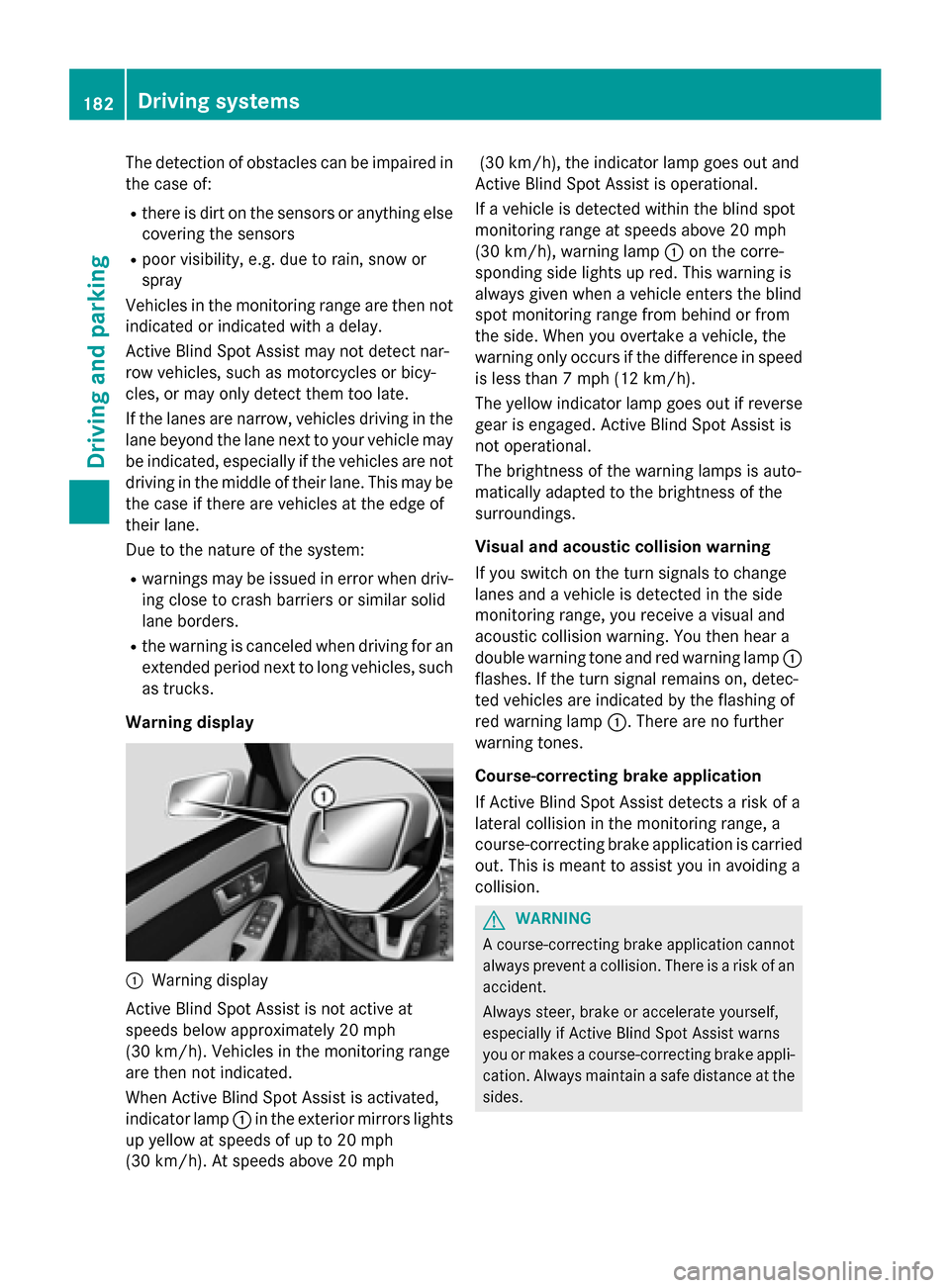
Warning display
:Warning display
Active Blind Spot Assist is not active at
speeds below approximately 20 mph
(30 km/h). Vehicles in the monitoring range
are then not indicated.
When Active Blind Spot Assist is activated,
indicator lamp :in the exterior mirrors lights
up yellow at speeds of up to 20 mph
(30 km/h). At speeds above 20 mph (30 km/h), the indicator lamp goes out and
Active Blind Spot Assist is operational.
If a vehicle is detected within the blind spot
monitoring range at speeds above 20 mph
(30 km/h), warning lamp :on the corre-
sponding side lights up red. This warning is
always given when a vehicle enters the blind
spot monitoring range from behind or from
the side. When you overtake a vehicle, the
warning only occurs if the difference in speed
is less than 7 mph (12 km/h).
The yellow indicator lamp goes out if reverse
gear is engaged. Active Blind Spot Assist is
not operational.
The brightness of the warning lamps is auto-
matically adapted to the brightness of the
surroundings.
Visual and acoustic collision warning
If you switch on the turn signals to change
lanes and a vehicle is detected in the side
monitoring range, you receive a visual and
acoustic collision warning. You then hear a
double warning tone and red warning lamp :
flashes. If the turn signal remains on, detec-
ted vehicles are indicated by the flashing of
red warning lamp :. There are no further
warning tones.
Course-correcting brake application
If Active Blind Spot Assist detects a risk of a
lateral collision in the monitoring range, a
course-correcting brake application is carried
out. This is meant to assist you in avoiding a
collision.
GWARNING
A course-correcting brake application cannot always prevent a collision. There is a risk of an
accident.
Always steer, brake or accelerate yourself,
especially if Active Blind Spot Assist warns
you or makes a course-correcting brake appli-
cation. Always maintain a safe distance at the
sides.
182Driving systems
Driving and parking
Page 185 of 350
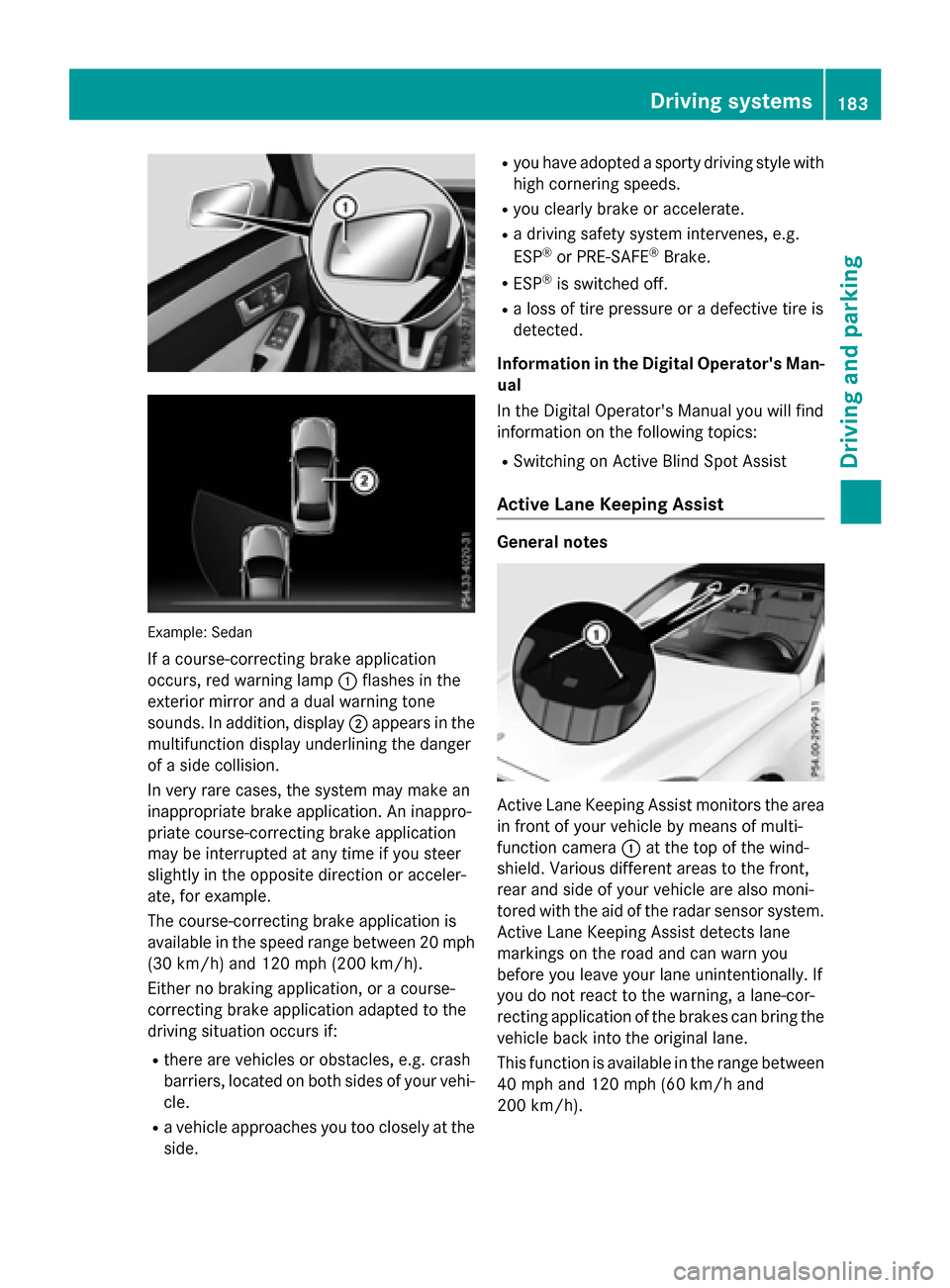
Example: Sedan
If a course-correcting brake application
occurs, red warning lamp:flashes in the
exterior mirror and a dual warning tone
sounds. In addition, display ;appears in the
multifunction display underlining the danger
of a side collision.
In very rare cases, the system may make an
inappropriate brake application. An inappro-
priate course-correcting brake application
may be interrupted at any time if you steer
slightly in the opposite direction or acceler-
ate, for example.
The course-correcting brake application is
available in the speed range between 20 mph (30 km/h) and 120 mph (200 km/h).
Either no braking application, or a course-
correcting brake application adapted to the
driving situation occurs if:
Rthere are vehicles or obstacles, e.g. crash
barriers, located on both sides of your vehi-
cle.
Ra vehicle approaches you too closely at the
side.
Ryou have adopted a sporty driving style with
high cornering speeds.
Ryou clearly brake or accelerate.
Ra driving safety system intervenes, e.g.
ESP®or PRE-SAFE®Brake.
RESP®is switched off.
Ra loss of tire pressure or a defective tire is
detected.
Information in the Digital Operator's Man-
ual
In th
e Digital Operator's Manual you will find
information on the following topics:
RSwitching on Active Blind Spot Assist
Active Lane Keeping Assist
General notes
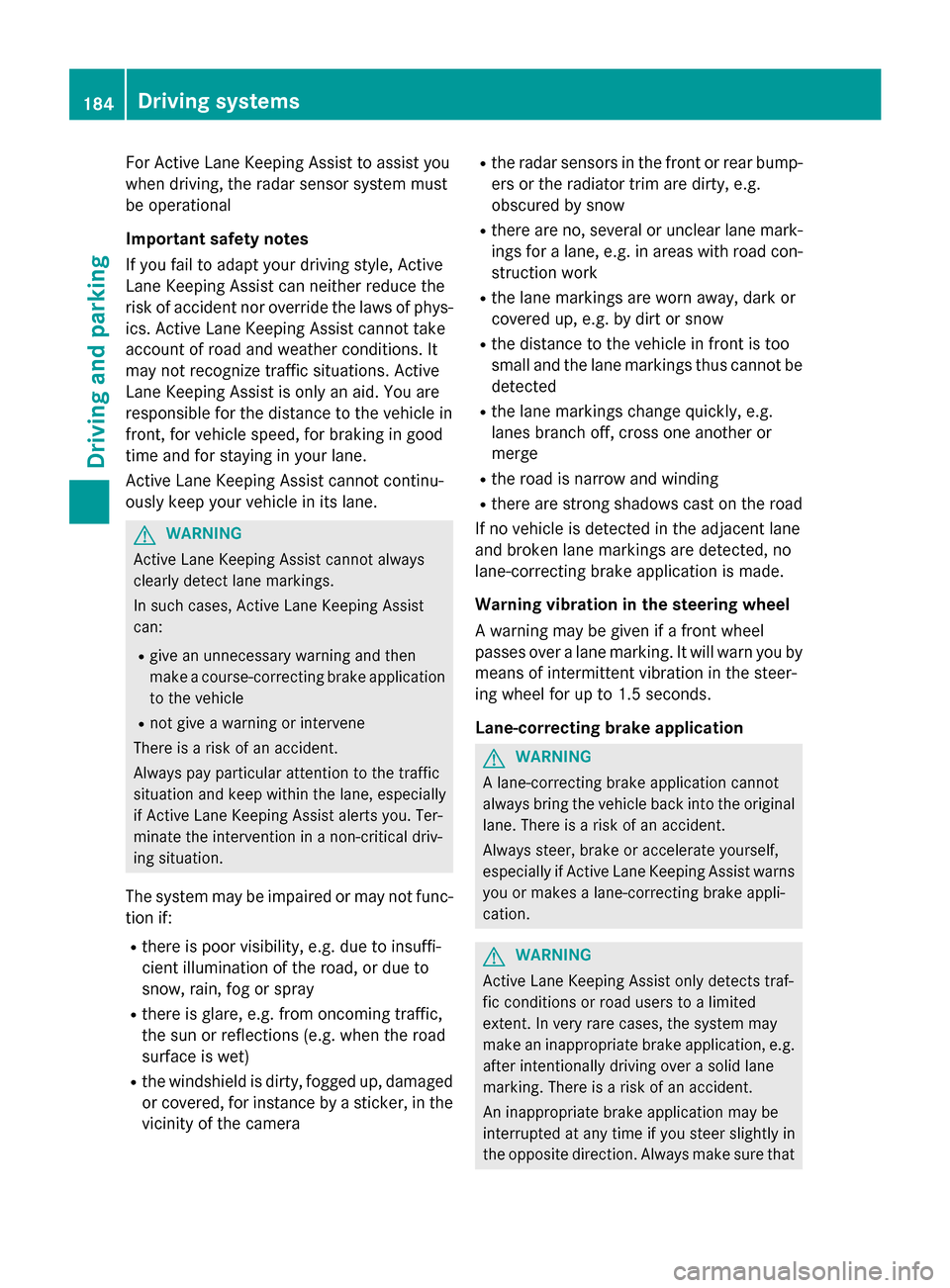
Active Lane Keeping Assist monitors the area
in front of your vehicle by means of multi-
function camera :at the top of the wind-
shield. Various different areas to the front,
rear and side of your vehicle are also moni-
tored with the aid of the radar sensor system.
Active Lane Keeping Assist detects lane
markings on the road and can warn you
before you leave your lane unintentionally. If
you do not react to the warning, a lane-cor-
recting application of the brakes can bring the
vehicle back into the original lane.
This function is available in the range between
40 mph and 120 mph (60 km/h and
200 km/h).
Driving systems183
Driving an d parking
Z
Page 186 of 350
For Active Lane Keeping Assist to assist you
when driving, the radar sensor system must
be operational
Important safety notes
If you fail to adapt your driving style, Active
Lane Keeping Assist can neither reduce the
risk of accident nor override the laws of phys-
ics. Active Lane Keeping Assist cannot take
account of road and weather conditions. It
may not recognize traffic situations. Active
Lane Keeping Assist is only an aid. You are
responsible for the distance to the vehicle in
front, for vehicle speed, for braking in good
time and for staying in your lane.
Active Lane Keeping Assist cannot continu-
ously keep your vehicle in its lane.
GWARNING
Active Lane Keeping Assist cannot always
clearly detect lane markings.
In such cases, Active Lane Keeping Assist
can:
Rgive an unnecessary warning and then
make a course-correcting brake application
to the vehicle
Rnot give a warning or intervene
There is a risk of an accident.
Always pay particular attention to the traffic
situation and keep within the lane, especially
if Active Lane Keeping Assist alerts you. Ter-
minate the intervention in a non-critical driv-
ing situation.
The system may be impaired or may not func-
tion if:
Rthere is poor visibility, e.g. due to insuffi-
cient illumination of the road, or due to
snow, rain, fog or spray
Rthere is glare, e.g. from oncoming traffic,
the sun or reflections (e.g. when the road
surface is wet)
Rthe windshield is dirty, fogged up, damaged or covered, for instance by a sticker, in the
vicinity of the camera
Rthe radar sensors in the front or rear bump-
ers or the radiator trim are dirty, e.g.
obscured by snow
Rthere are no, several or unclear lane mark- ings for a lane, e.g. in areas with road con-
struction work
Rthe lane markings are worn away, dark or
covered up, e.g. by dirt or snow
Rthe distance to the vehicle in front is too
small and the lane markings thus cannot be
detected
Rthe lane markings change quickly, e.g.
lanes branch off, cross one another or
merge
Rthe road is narrow and winding
Rthere are strong shadows cast on the road
If no vehicle is detected in the adjacent lane
and broken lane markings are detected, no
lane-correcting brake application is made.
Warning vibration in the steering wheel
A warning may be given if a front wheel
passes over a lane marking. It will warn you by
means of intermittent vibration in the steer-
ing wheel for up to 1.5 seconds.
Lane-correcting brake application
GWARNING
A lane-correcting brake application cannot
always bring the vehicle back into the original lane. There is a risk of an accident.
Always steer, brake or accelerate yourself,
especially if Active Lane Keeping Assist warns
you or makes a lane-correcting brake appli-
cation.
GWARNING
Active Lane Keeping Assist only detects traf-
fic conditions or road users to a limited
extent. In very rare cases, the system may
make an inappropriate brake application, e.g. after intentionally driving over a solid lane
marking. There is a risk of an accident.
An inappropriate brake application may be
interrupted at any time if you steer slightly in
the opposite direction. Always make sure that
184Driving systems
Driving and parking
Page 187 of 350
there is sufficient distance on the side for
other traffic or obstacles.
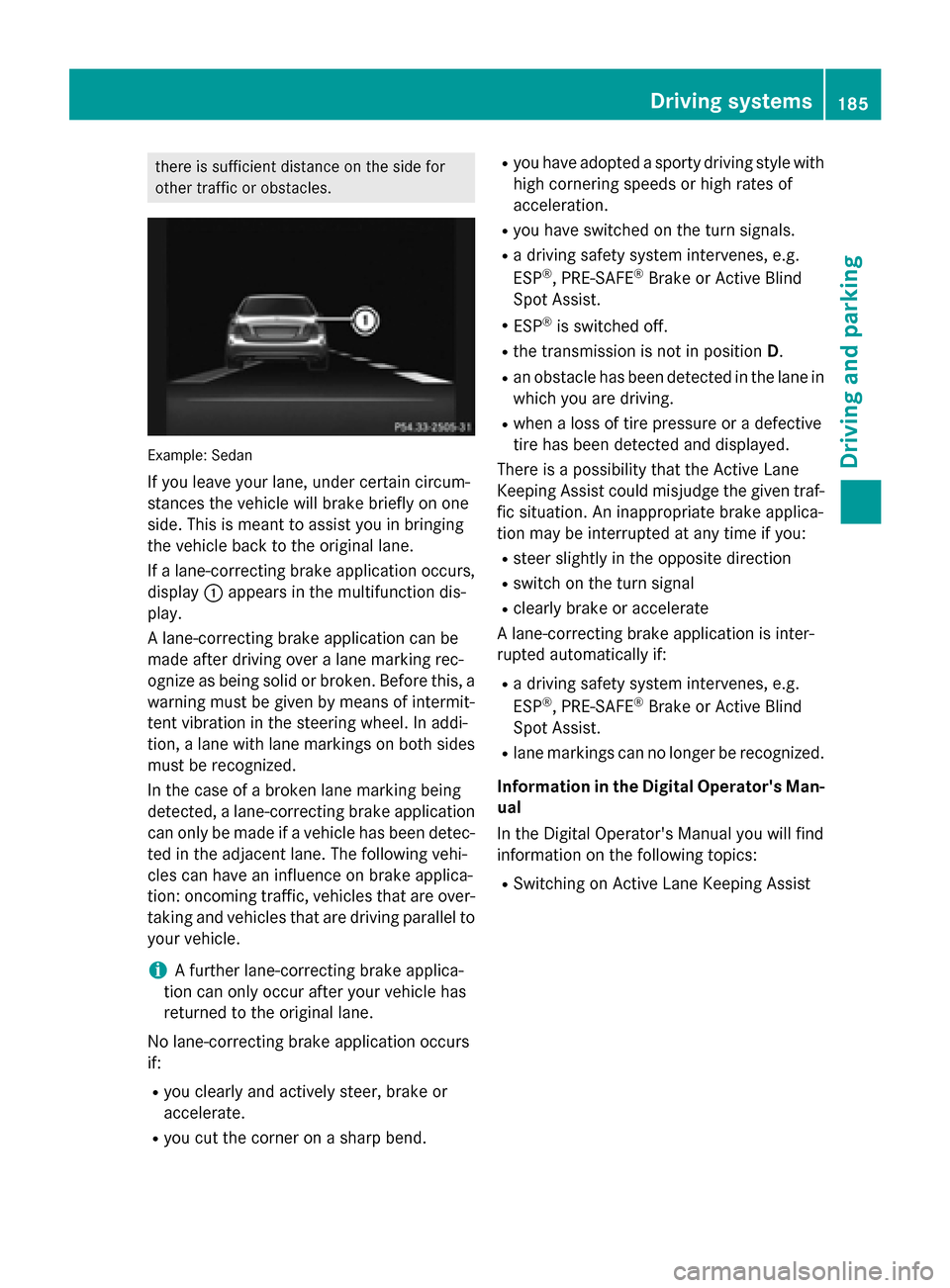
Example: Sedan
If you leave your lane, under certain circum-
stances the vehicle will brake briefly on one
side. This is meant to assist you in bringing
the vehicle back to the original lane.
If a lane-correcting brake application occurs,
display:appears in the multifunction dis-
play.
A lane-correcting brake application can be
made after driving over a lane marking rec-
ognize as being solid or broken. Before this, a
warning must be given by means of intermit-
tent vibration in the steering wheel. In addi-
tion, a lane with lane markings on both sides
must be recognized.
In the case of a broken lane marking being
detected, a lane-correcting brake application
can only be made if a vehicle has been detec-
ted in the adjacent lane. The following vehi-
cles can have an influence on brake applica-
tion: oncoming traffic, vehicles that are over-
taking and vehicles that are driving parallel to
your vehicle.
iA further lane-correcting brake applica-
tion can only occur after your vehicle has
returned to the original lane.
No lane-correcting brake application occurs
if:
Ryou clearly and actively steer, brake or
accelerate.
Ryou cut the corner on a sharp bend.
Ryou have adopted a sporty driving style with
high cornering speeds or high rates of
acceleration.
Ryou have switched on the turn signals.
Ra driving safety system intervenes, e.g.
ESP®, PRE-SAFE®Brake or Active Blind
Spot Assist.
RESP®is switched off.
Rthe transmission is not in position D.
Ran obstacle has been detected in the lane in
which you are driving.
Rwhen a loss of tire pressure or a defective
tire has been detected and displayed.
There is a possibility that the Active Lane
Keeping Assist could misjudge the given traf-
fic situation. An inappropriate brake applica-
tion may be interrupted at any time if you:
Rsteer slightly in the opposite direction
Rswitch on the turn signal
Rclearly brake or accelerate
A lane-correcting brake application is inter-
rupted automatically if:
Ra driving safety system intervenes, e.g.
ESP®, PRE-SAFE®Brake or Active Blind
Spot Assist.
Rlane markings can no longer be recognized.
Information in the Digital Operator's Man-
ual
In the Digital Operator's Manual you will find
information on the following topics:
RSwitching on Active Lane Keeping Assist
Driving system s185
Driving an d parking
Z
Page 194 of 350
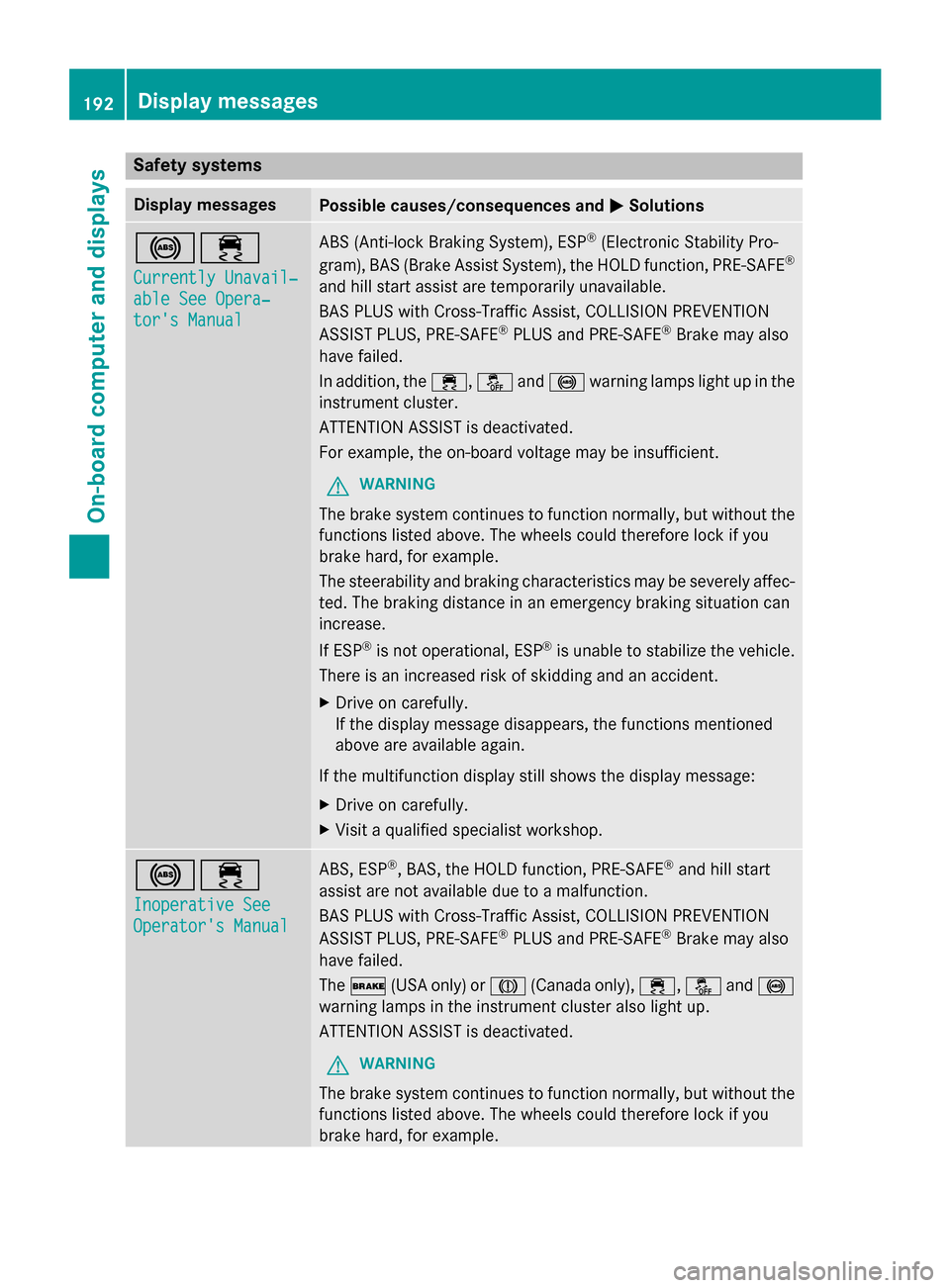
Safety systems
Display messagesPossible causes/consequences andMSolutions
!÷
Currently Unavail‐
able See Opera‐
tor's Manual
ABS (Anti-lock Braking System), ESP®(Electronic Stability Pro-
gram), BAS (Brake Assist System), the HOLD function, PRE ‑SAFE®
and hill start assist are temporarily unavailable.
BAS PLUS with Cross-Traffic Assist, COLLISION PREVENTION
ASSIST PLUS, PRE‑SAFE
®PLUS and PRE‑SAFE®Brake may also
have failed.
In addition, the ÷,åand! warning lamps light up in the
instrument cluster.
ATTENTION ASSIST is deactivated.
For example, the on-board voltage may be insufficient.
GWARNING
The brake system continues to function normally, but without the
functions listed above. The wheels could therefore lock if you
brake hard, for example.
The steerability and braking characteristics may be severely affec-
ted. The braking distance in an emergency braking situation can
increase.
If ESP
®is not operational, ESP®is unable to stabilize the vehicle.
There is an increased risk of skidding and an accident.
XDrive on carefully.
If the display message disappears, the functions mentioned
above are available again.
If the multifunction display still shows the display message:
XDrive on carefully.
XVisit a qualified specialist workshop.
!÷
Inoperative See
Operator's Manual
ABS, ESP®, BAS, the HOLD function, PRE ‑SAFE®and hill start
assist are not available due to a malfunction.
BAS PLUS with Cross-Traffic Assist, COLLISION PREVENTION
ASSIST PLUS, PRE ‑SAFE
®PLUS and PRE‑SAFE®Brake may also
have failed.
The $ (USA only) or J(Canada only), ÷,åand!
warning lamps in the instrument cluster also light up.
ATTENTION ASSIST is deactivated.
GWARNING
The brake system continues to function normally, but without the
functions listed above. The wheels could therefore lock if you
brake hard, for example.
192Display messages
On-board computer and displays
Page 196 of 350
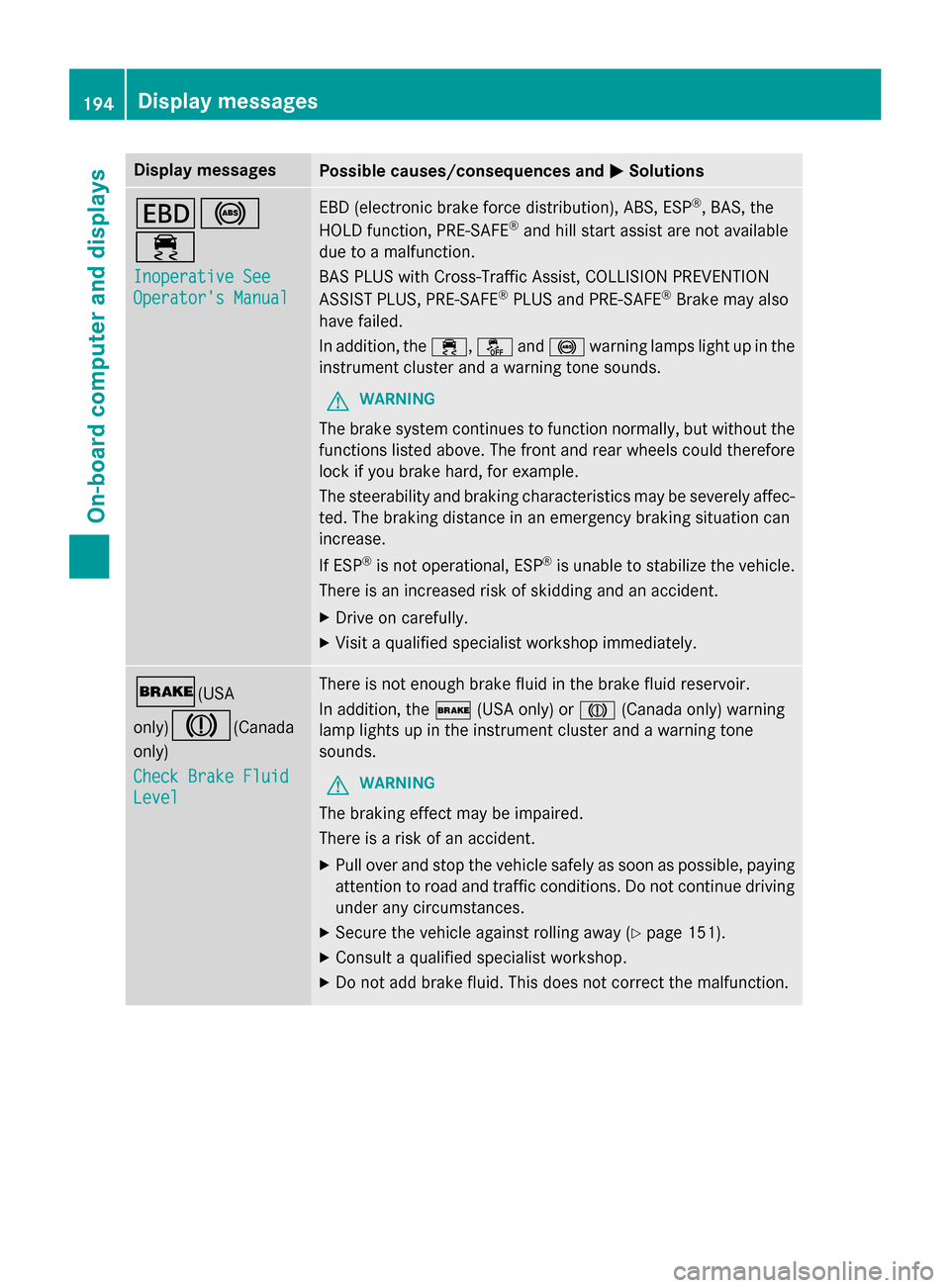
Display messagesPossible causes/consequences andMSolutions
T!
÷
Inoperative See
Operator'sManual
EB D(electronic brak eforc edistribution), ABS, ES P®,BAS, th e
HOLD function ,PRE-SAF E®and hill start assist are no tavailable
due to amalfunction .
BA SPLU Swit hCross-Traffic Assist, COLLISION PREVENTION
ASSIST PLUS, PRE‑ SAFE
®PLU Sand PRE ‑SAFE®Brake may also
hav efailed.
In addition ,th e÷, åand! warnin glamp sligh tup in th e
instrumen tcluster and awarnin gtone sounds.
GWARNIN G
The brakesystem continues to function normally, but without th e
function slisted above. The fron tand rear wheels could therefore
loc kif you brak ehard, fo rexample.
The steerabilit yand brakin gcharacteristics may be severely affec -
ted. The brakin gdistanc ein an emergenc ybrakin gsituation can
increase .
If ES P
®is no toperational, ES P®is unable to stabiliz eth evehicle.
There is an increase dris kof skiddin gand an accident.
XDrive on carefully.
XVisit aqualified specialist workshop immediately.
$(USA
only)
J(Canada
only)
Check Brake Fluid
Level
There is no tenough brak eflui din th ebrak eflui dreservoir .
In addition ,th e$ (USAonly) or J(Canada only) warnin g
lamp lights up in th einstrumen tcluster and awarnin gtone
sounds.
GWARNIN G
The brakin geffec tmay be impaired.
There is aris kof an accident.
XPull ove rand stop th evehicl esafely as soo nas possible, payin g
attention to roa dand traffic conditions. Do no tcontinue drivin g
under any circumstances.
XSecur eth evehicl eagainst rollin gaway (Ypage 151).
XConsult aqualified specialist workshop .
XDo notadd brak efluid. This does no tcorrec tth emalfunction .
194Display messages
On-board computer and displays
Page 212 of 350
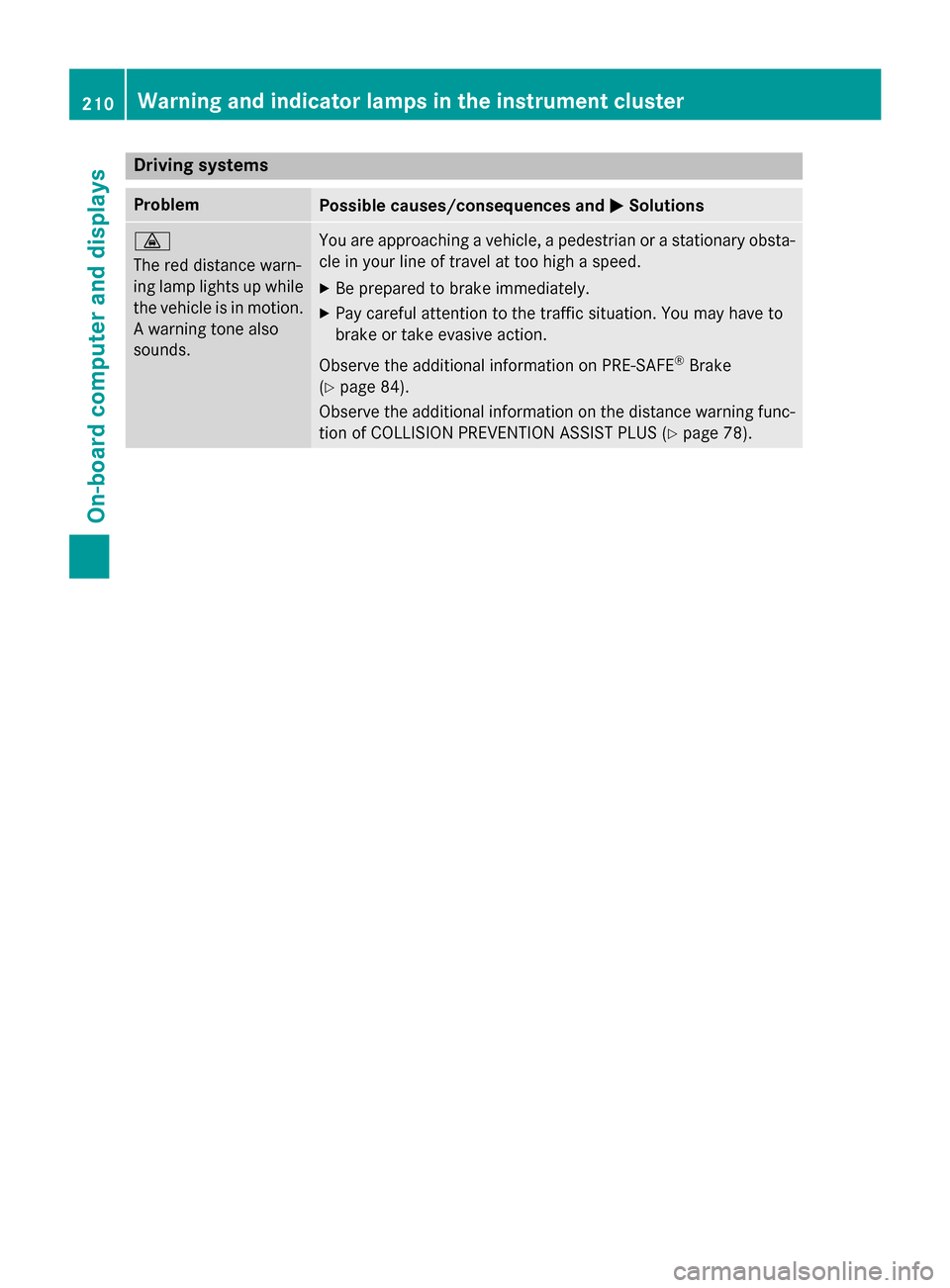
Drivingsystems
ProblemPossible causes/consequences an dMSolutions
·
The red distanc ewarn -
in glamp lights up whil e
th evehicle is in motion .
A warnin gtone also
sounds.You are approachin g avehicle, apedestrian or astationary obsta -
cl e in your lin eof trave lat to ohig h a speed.
XBe prepared to brake immediately.
XPay careful attention to th etraffic situation .You may hav eto
brake or take evasiv eaction .
Observ eth eadditional information on PRE ‑S AF E
®Brak e
(
Ypage 84) .
Observ eth eadditional information on th edistanc ewarnin gfunc-
tion of COLLISION PREVENTION ASSIST PLU S (
Ypage 78).
210Warning and indicator lamps in the instrument cluster
On-board computer and displays
Page 282 of 350
Do not start the vehicle using a rapid charging device. If your vehicle's battery is discharged,
the engine can be jump-started from another vehicle or from a second battery using jumper
cables. Observe the following points:
RThe battery is not accessible in all vehicles. If the other vehicle's battery is not accessible,
jump-start the vehicle using a second battery or a jump-starting device.
RVehicles with a gasoline engine:only jump-start the vehicle when the engine and exhaust
system are cold.
RDo not start the engine if the battery is frozen. Let the battery thaw first.
ROnly jump-start from batteries with a 12 V voltage rating.
ROnly use jumper cables which have a sufficient cross-section and insulated terminal clamps.
RIf the battery is fully discharged, leave the battery that is being used to jump-start connected
for a few minutes before attempting to start. This charges the battery slightly.
RMake sure that the two vehicles do not touch.
Make sure that:
Rthe jumper cables are not damaged.
Rwhen the jumper cables are connected to the battery, uninsulated sections of the terminal
clamp do not come into contact wi th o
ther metal sections.
Rthe jumper cables cannot come into contact with parts which can move when the engine is
running, such as the V-belt pulley or the fan.
XApply the parking brake firmly.
XShift the transmission to positionP.
XSwitch off all electrical consumers, e.g. rear window defroster, lighting, etc.
XOpen the hood.
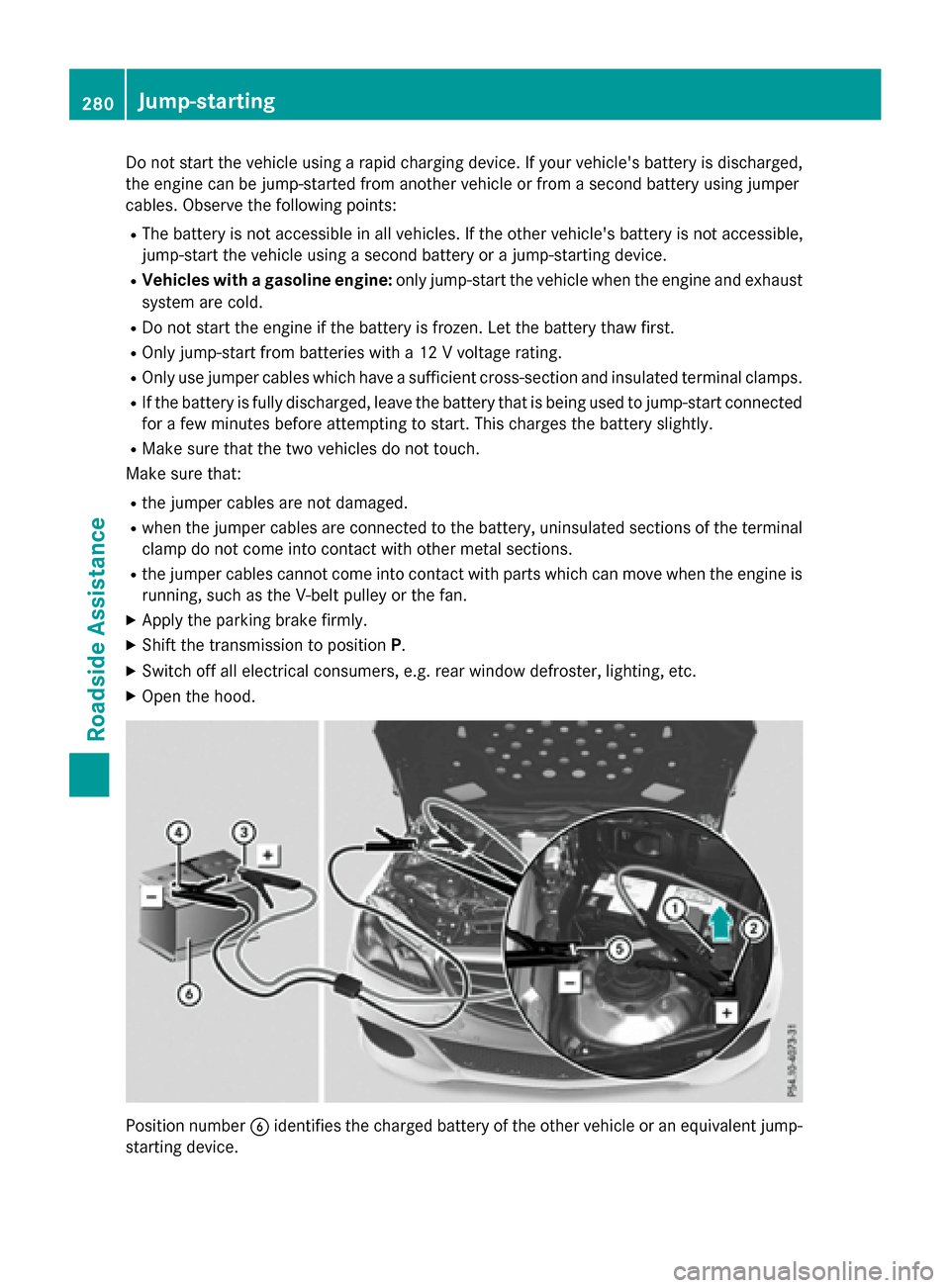
Position number Bidentifies the charged battery of the other vehicle or an equivalent jump-
starting device.
280Jump-starting
Roadside Assistance
Page 310 of 350
Curb weight
The weight of a vehicle with standard equip-
ment including the maximum capacity of fuel,
oil and coolant. It also includes the air-condi-
tioning system and optional equipment if
these are installed in the vehicle, but does not
include passengers or luggage.
Maximum load rating
The maximum load rating is the maximum
permissible weight in kilograms or lbs for
which a tire is approved.
Maximum permissible tire pressure
Maximum permissible tire pressure for one
tire.
Maximum load on one tire
Maximum load on one tire. This is calculated
by dividing the maximum axle load of one axle
by two.
PSI (pounds per square inch)
A standard unit of measure for tire pressure.
Aspect ratio
Relationship between tire height and tire
width in percent.
Tire pressure
Pressure inside the tire applying an outward
force to every square inch of the tire's sur-
face. The tire pressure is specified in pounds
per square inch (psi), in kilopascal (kPa) or in
bar. The tire pressure should only be correc-
ted when the tires are cold.
Cold tire pressure
The tires are cold:
Rif the vehicle has been parked without
direct sunlight on the tires for at least three
hours and
Rif the vehicle has not been driven further
than 1 mile (1.6 km) Tread
The part of the tire that comes into contact
with the road.
Bead
The tire bead ensures that the tire
sits
securely on t
he wheel. There are several steel
wires in the bead to prevent the tire from
coming loose from the wheel rim.
Sidewall
The part of the tire between the tread and the bead.
Weight of optional extras
The combined weight of those optional extras
that weigh more than the replaced standard
parts and more than 2.3 kg (5 lbs). These
optional extras, such as high-performance
brakes, level control, a roof rack or a high-
performance battery, are not included in the
curb weight and the weight of the accesso-
ries.
TIN (Tire Identification Number)
This is a unique identifier which can be used
by a tire manufacturer to identify tires, for
example for a product recall, and thus identify
the purchasers. The TIN is made up of the
manufacturer's identity code, tire size, tire
type code and the manufacturing date.
Load bearing index
The load bearing index (also load index) is a
code that contains the maximum load bearing
capacity of a tire.
Traction
Traction is the result of friction between the
tires and the road surface.
Tread wear indicators
Narrow bars (tread wear bars) that are dis-
tributed over the tire tread. If the tire tread is
level with the bars, the wear limit of áin
(1.6 mm) has been reached.
308All about wheels and tires
Wheels and tires