transmission MERCEDES-BENZ E-Class SEDAN 2017 W213 User Guide
[x] Cancel search | Manufacturer: MERCEDES-BENZ, Model Year: 2017, Model line: E-Class SEDAN, Model: MERCEDES-BENZ E-Class SEDAN 2017 W213Pages: 446, PDF Size: 6.23 MB
Page 138 of 446
#Ifyo ue ngaget he transmission position
h ork alwaysd epress theb rake
pedal firm lyand do no taccelerat eat
th es ame time.
* NO
TEDama getothea utomatic trans‐
mission caused bychanging thet rans‐
mission position during thej ourney
#Onl ychang ethe transmission position
when thev ehicle is stationar y.
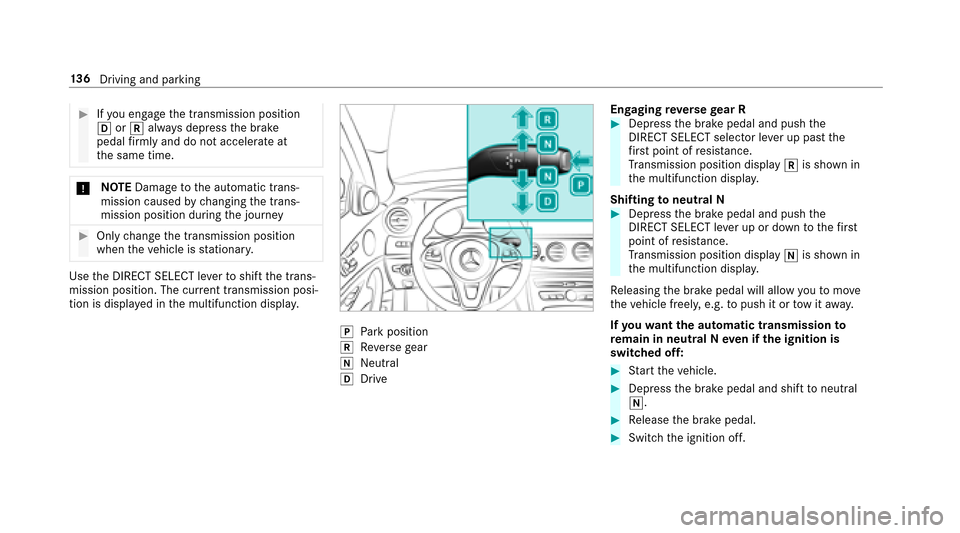
UsetheD IRECT SELECT le vertos hiftthe trans‐
mission position. The cur rent transmission posi‐
tio nisd ispl ay ed in them ultifunction displa y.
jPark position
kReverseg ear
iNeutral
hDrive Engaging
reve rseg ear R
#Depres sthe brak epedal and push the
DIRECT SELECTs elector leverupp astthe
fi rs tp oint of resis tance.
Tr ansmission position display kis shown in
th em ultifunction displa y.
Shifting toneutral N
#Depress theb rake pedal and push the
DIRECT SELECTl everupord owntot hefirs t
point of resis tance.
Tr ansmission position display iis shown in
th em ultifunction displa y.
Re leasing theb rake pedal will allo wyoutomo ve
th ev ehicle freely ,e.g. topush it or towita way.
If yo uw ant thea utomatic transmission to
re main in neutral Nevenift he ignition is
switched off:
#St artt he vehicle.
#Depress theb rake pedal and shif ttoneutral
i.
#Re lease theb rake pedal.
#Switc hthe ignition off.
13 6
Driving and pa rking
Page 139 of 446
%Automatic transmission remains in neutral
i,w henyoul eave thev ehicle and the
SmartK eyremains in thev ehicle.
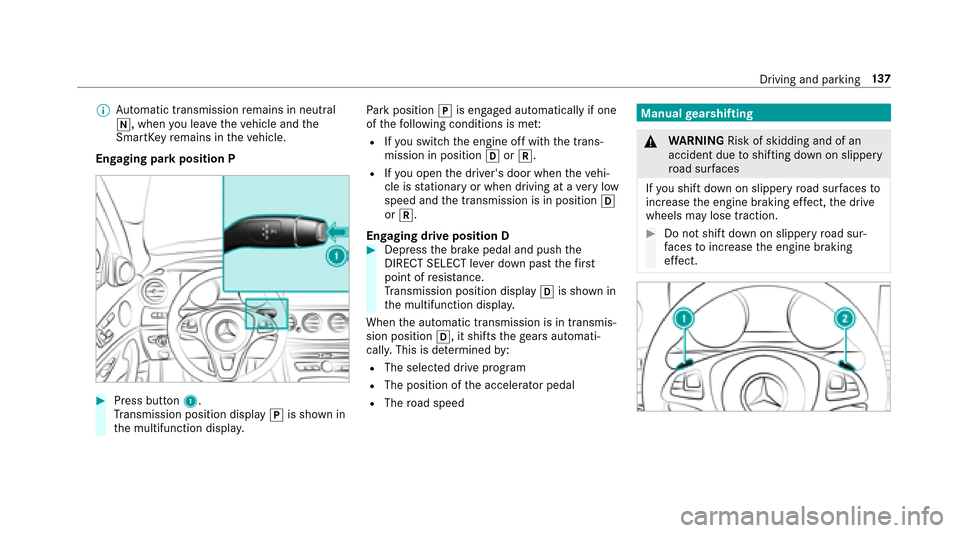
Engaging par kposition P
#Press button 1.
Tr ansmission position display jis shown in
th em ultifunction displa y. Pa
rk position jis engaged automaticall yifone
of thef ollowing condition sismet:
RIfyo us witch thee ngine of fwitht he trans‐
mission in position hork.
RIfyo uo pen thed rive r's door when thev ehi‐
cle is stationar yorwhen drivin gataveryl ow
speed and thet ransmission is in position h
or k.
Engaging driv eposition D
#Depress theb rake pedal and push the
DIRECT SELECTl everdow np astthe firs t
point of resis tance.
Tr ansmission position display his shown in
th em ultifunction displa y.
When thea utomatic transmission is in transmis‐
sion position h,itshiftstheg ear sautomati‐
call y.This is de term ined by:
RThe selected driv eprogram
RThe position of thea ccelerator pedal
RThe road speed
Manua lgearshifting
&
WARNING Risk of skidding and of an
accident duetos hifting down on slippery
ro ad sur faces
If yo us hiftd ow nons lipperyroad sur faces to
inc rease thee ngine braking ef fect, thed rive
wheels ma ylose traction.
#Do no tshif td ow nons lipperyroad sur‐
fa ces toinc rease thee ngine braking
ef fect.
Driving and park ing13
7
Page 140 of 446
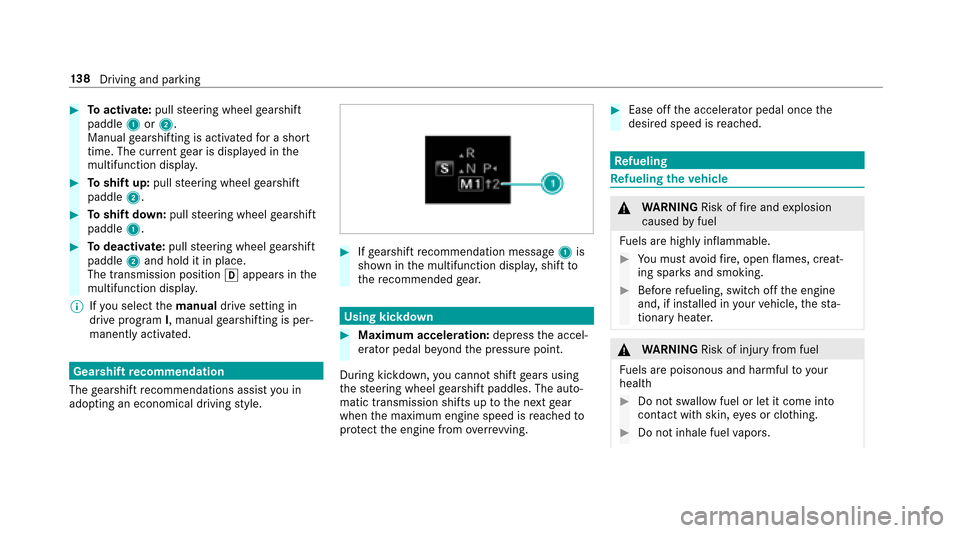
#Toactivate: pullsteering wheel gearshift
paddle 1or2.
Manual gearshiftin gisactivated foras hort
time. The cur rent gear is displa yedint he
multifunction displa y.
#Toshif tup:pull steering wheel gearshift
paddle 2.
#Toshif tdow n:pull steering wheel gearshift
paddle 1.
#Todeactivate: pullsteering wheel gearshift
paddle 2and hold it in place.
The transmissionp ositionhappear sinthe
multifunction displa y.
% Ifyo us elect themanual drivesetting in
driv eprogram I,m anua lgearshifting is per‐
manently activated.
Gearshif trecommendation
The gearshif trecommendations assis tyou in
adopting an economical driving style.
#If ge arshif trecommendatio nmessage 1is
shown in them ultifunction displa y,shif tto
th er ecommende dgear.
Using kickdown
#Maximum acceleration: depressthea ccel‐
erator pedal be yond thep ressur epoint.
During kickdown, youc anno tshif tgear susing
th es teering wheel gearshif tpaddles.T he auto‐
matic transmissions hifts uptothen extg ear
when them aximum engine speed is reached to
pr otect thee ngine from overrev ving.
#Ease of fthe accelera torp edalo ncethe
desired speed is reached.
Re fueling
Refueling thev ehicle
&
WARNING Risk offire and explosion
caused byfuel
Fu els ar ehighly inflammable.
#Youm usta void fire ,o pen flames,c reat‐
ing spar ksand smoking.
#Befor erefueling, switc hoffthee ngine
and, if ins talled in your vehicle, thes ta‐
tionar yheater.
&
WARNING Risk of injury from fuel
Fu els ar epoisonous and harmful to your
health
#Do no tswa llowf uel or le titcomeinto
contact withs kin, eyes or clo thing.
#Do no tinhale fuel vapors.
13 8
Driving and pa rking
Page 145 of 446
RThevehicle mus tbewithinrang eoft he
ga rage door or exterior gate drive.
RThe vehicle as well as personsa nd objects,
ar el ocated outside thes weep of theg arage
door.
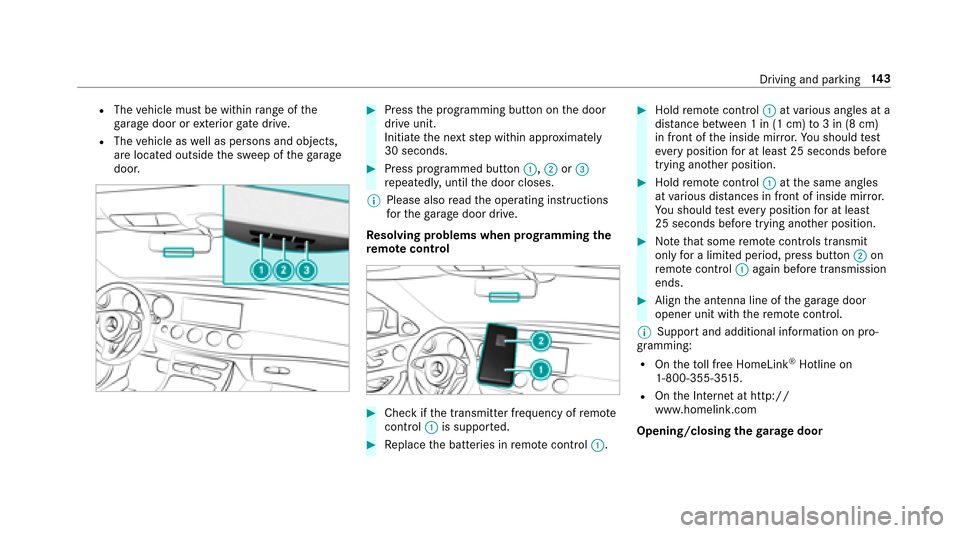
#Press thep rogramming button on thed oor
driv eunit.
Initiat ethe next step within appr oximately
30 seconds.
#Press programmed button :,;or=
re peatedl y,until thed oor closes.
% Please also read theo perating instructions
fo rt he garage door drive.
Re solving problems when prog rammin gthe
re mo tecontro l
#Checkifthe transmitter frequency of remo te
control :is suppo rted.
#Re place theb atteries in remo tecontrol :.
#Holdremotecontrol :atvarious angles at a
dis tance betwee n1in(1cm)to3in(8c m)
in front of thei nside mir ror.Yo us hould test
eve ryposition foratl east 25 seconds before
trying ano ther position.
#Hold remo tecontrol :atthes ame angles
at various dis tances in front of insid emirro r.
Yo us hould test eve ryposition foratl east
25 seconds befor etryinga nother position.
#No tethat somer emotecontrols transmit
only foral imitedp eriod, press button ;on
re mo tecontrol :agai nbefor etransmission
ends.
#Align thea ntenn aline of theg arag edoor
opener unit wit hthe remo tecontrol.
% Suppor tand additiona linformation on pro‐
gramming:
ROn thet oll free HomeLink®Hotline on
1-800-355-35 15.
ROn theI nterne tath ttp://
www.homelink. com
Opening/closing the garage door
Driving and park ing14
3
Page 147 of 446
The electric parking brakeisapplied if thet rans‐
mission is in position jand one of thef ollow‐
ing condition sisfulfilled:
RThe engin eisswitched off.
RThe seat belt tongueisn otinser tedint he
seat belt buckle and thed rive r's door is
opened.
% Toprev ent application: pull theh andle of the
electric parking brake.
The electric parking brak eisalso applied if one
of thef ollowing condition sisfulfilled:
RDistance Pilo tDISTRONIC bring sthe vehicle
to as tandstill.
RThe HOL Dfunction is keeping thev ehicle sta‐
tionar y.
RParking Pilo tiskeeping thev ehicle station‐
ar y.
In addition, one of thef ollowing condition smust
be fulfilled:
RThe engin eisswitched off.
RThe seat belt tongueisn otinser tedint he
seat belt buckle and thed rive r's door is
opened.
RTher eisas ystemm alfunction.
RThe po wersupp lyis insuf ficient.
RThe vehicle is stationar yfor alengt hyperiod.
When thee lectric parking brak eisapplied, the
F (USA) or !(Canada) indicator lamp
lights up in thei nstrument clus ter.
The electric parking brak eisnotautomatically
engaged if thee ngine is switched of fbythe ECO
st art/ stop function.
Re leasing thee lectric pa rking brak eauto‐
matically
The elect ricp arkin gb rake isreleased when all of
th ef ollowing condition sarefulfilled:
RThe engin eisrunning.
RTh es eatb eltt ongue is inser tedi ntot he seat
belt buckle.
RThe transmission is in position hork and
y
o ud epress thea ccelera torp edalory ou shif
tfromt ransmission position jtoh or
k.
RIf th et ransmission is in position k,the
trunk lid mus tbeclosed.
If th es eat belt tongueisn otinser tedi ntot he
seat belt buckle, thef ollowing condition smust
be fulfilled:
RThe driver's door is closed.
RYo um ovet he transmission out of transmis‐
sion position joryouh ave prev iously
driven faster than 2m ph (3 km/h).
RIfth et ransmission is in position k,the
trunk lid mus tbeclosed.
If th ee lectric parking brak eisreleased, the
F (USA) or !(CANADA) indicator lam pin
th ei nstrument clus terg oes out.
Driving and parking 14
5
Page 165 of 446
RIf Distance Pilo tDISTRONIC is deacti va‐
te dw itht he cruise control le ver,e.g. bya
ve hicle occupant or from outside the
ve hicle.
RIfth ee lectrics in thee ngine compart‐
ment ,the batter yorthe fuses ar etam‐
pered with.
RIf th eb atter yisd isconnected.
RIfth ev ehicle is accelerated, e.g. bya
ve hicle occupant.
#Alw aysd eactivat eDista nce Pilot
DISTRONIC and secu rethev ehicle to
pr eve nt it from rolling away befor eyou
lea vethed rive r's seat.
&
WARNING Risk of accident duet o
unkno wnstored speed
If yo uc all up thes tore ds peed and this is
lo we rthan your cur rent speed ,the vehicle
decelerates.
If yo udon otknow thes tore ds peed, the
ve hicle could decelerat eunexpectedl y.
#Take intoa ccount thet raffic situation
befor ecallin gupt hestored speed.
#If th es tore ds peed is no tknown, store
th ed esired speed again.
&
WARNING Risk of accident duetou nex‐
pecte dacceleration byDis tance Pilot
DISTRONIC
If Dis tance Pilo tDISTRONIC no longer
de tects avehicle in front, it ma yunexpect‐
edly accelerat etothe speed stored.
RThis speed ma ybetoo high foraf ilter
lane or aslip road.
RIf drivin gintheright lane, this speed may
be so high that youp ass vehicles driving
on thel eft( in count ries wher etraffic
drives on ther ight).
RIf driving in thel eftlane, this speed may
be so high that youp ass vehicles driving
on ther ight (in count ries wher etraffic
drives on thel eft).
Alw aysc arefully obser vethet raffic condi‐
tionsa nd beready tobrak eata ll times.
&
WARNING Risk of accident duetoD is‐
ta nce Pilo tDISTRONIC pulling away auto‐
matically
If Dis tance Pilo tDISTRONIC pe rforms an
automatic driving-of fprocedure, thev ehicle
ma yaccelerat eunexpectedly.
Wher enecessar y,brak ethe vehicle yourself
and take evasiv eaction.
Requ irementsRThevehicle's engine or mus tbeswitched on.
RThe electric parking brak emustber eleased.
RParking Pilo tisnotbeing used topar kthe
ve hicle or toexit from aparkin gspace.
RESP®mus tbes witched on, but no tinter ven‐
ing.
RThe transmission must be in positionD.
RThe driver's door ,fro nt passenger door and
th er ear door smustbec losed.
Drivin gand parking 16
3
Page 171 of 446
RVehicles with automatic transmission:
The transmission is in position h,kori.
Ac tivatin gthe HOL Dfunction
#Dep ress theb rake pedal and af teras hort
time depress fur ther until theë display
appear sinthe multifunction displa y.
#Release theb rake pedal.
Deactivating the HOLD function
#Depress thea ccelerator pedal topull away.
or
#Depress theb rake pedal until theë dis‐
pla yd isappear sfromt he multifunction dis‐
pla y.
In thef ollowing situations, thev ehicle is held by
th et ransmission position jorby thee lectric
parking brake:
RWhen thes eat belt is unfas tened and the
driver's door is opened.
RWhen thee ngine is switched off.
RWhen ther eisam alfunction in thes ystemo r
if th ep owe rsupp lyis insuf ficient.
Ad aptiv eDamping Sy stem
The suspension wit hadaptiv edamping adjust‐
menth asthef ollowing features:
RVa riable dampingc haracteristics
RContinuous damper tuning
The damping characteristic sadap ttot he cur rent
operating and driving situation.
The da mping is tuned individually fore achw heel
and is af fected bythef ollowing factors:
RYo ur drivin gstyle ,e.g. sporty
RThe road sur face conditions
RThe driv eprogram selected
RVe hicle load The driv
eprogram can be adjus tedu sing the
DY NA MIC SELECT switch.
AIR BODY CONT ROL
AIR BODY CONT ROLfunction
AI RB ODYC ONTROL comprises:
RAir suspension wit hvariable spring rate
RAu tomatic le velc ontrol sy stem
RSpeed-dependent lo wering toreduce fuel
consum ption
RManual le vela djustment
RAD SP LUS( Adaptiv eDamping Sy stem with
const ant dampingf orce adjustment)
RDYNA MIC SELECT switc hand le velb utton
Drivinga nd parking 16
9
Page 185 of 446
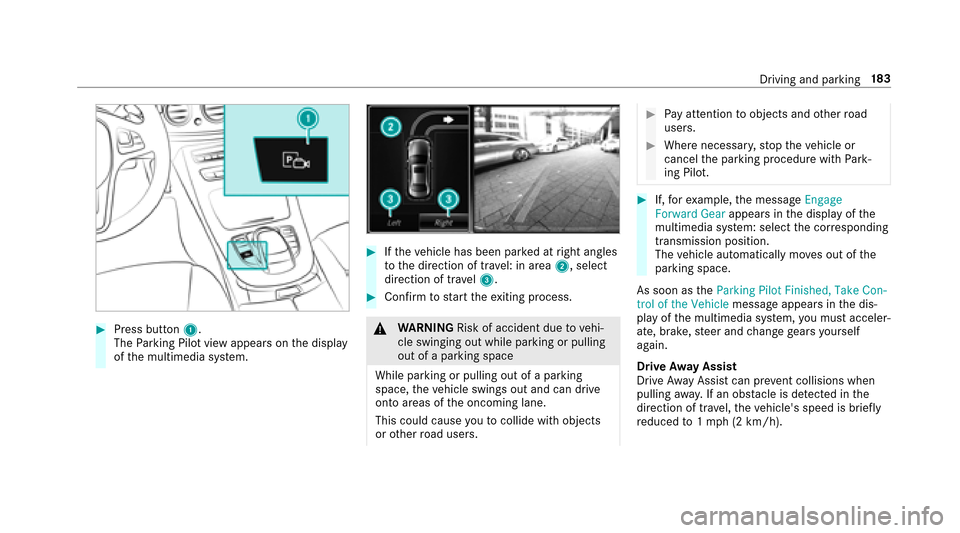
#Press button1.
The Parking Pilo tviewa ppear sonthe display
of them ultimedia sy stem.
#If th ev ehicle has been par kedatr ight angles
to thed irection of tra vel: in area 2,select
direction of tra vel3.
#Confir mtos tart thee xiting process.
&
WARNING Risk of accident duetov ehi‐
cle swinging out while parking or pulling
out of aparking space
While parking or pulling out of aparking
space, thev ehicle swings out and can drive
ont oareas of theo ncoming lane.
This could cause youtoc ollidewitho bjects
or other road users.
#Pa ya ttention toobject sand other road
users.
#Wher enecessar y,stop thev ehicle or
cancel thep arking procedur ewithP ark‐
ing Pilot.
#If, fore xamp le,them essage Engage
Forward Gear appearsinthe displa yofthe
multimedia sy stem: select thec orresponding
transmission position.
The vehicle automatically mo veso ut of the
parkin gspace.
As soon as theParkin gPilot Finished, Take Con-
trol of the Vehicle messageappear sinthe dis‐
pla yoft he multimedia sy stem, youm usta cceler‐
ate, brake, steer and chang egear syourself
again.
Driv eAwayA ssist
Driv eAwayA ssistcan pr event collisions when
pulling away.Ifano bstacle is de tected in the
direction of tr avel, thev ehicle's speed is brief ly
re duced to1m ph (2 km/h).
Driving and parking 18
3
Page 199 of 446
#Tocall up thes ubmenu or confir mthe
selection: pressthel eft-hand side of Touch
Control.
#To exitth es ubmenu: presstheb ackb ut‐
to n.
If yo ua rebrows ingasubmenua ndyoup ress
and hold theb ackb utton, them enu bar appears.
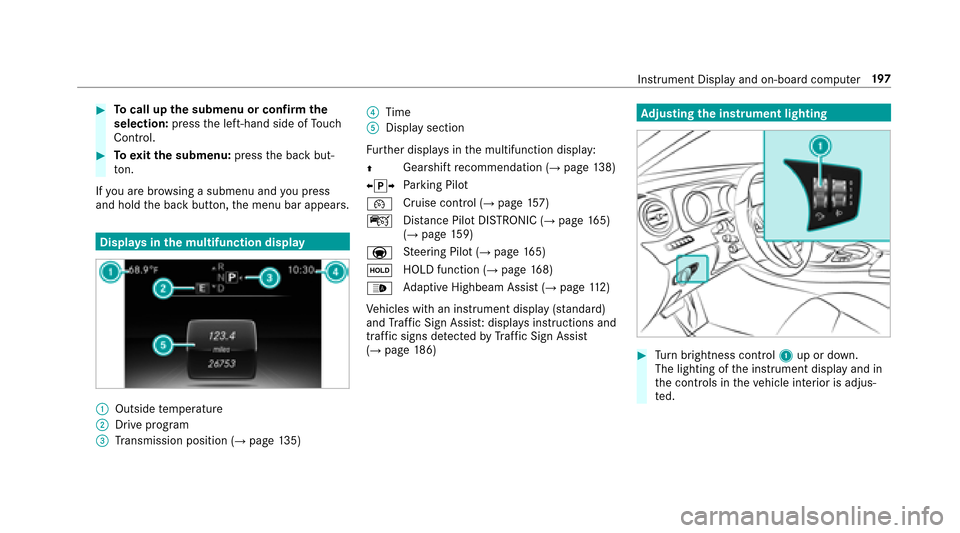
Displa ysinthem ultifunction display
:Outside temp erature
;Driv eprogram
=Transmission position (→pag e135)
?Time
ADispla ysection
Fu rther displa ysinthem ultifunction display:
Z Gearshif
trecommendatio n(
→page 138)
X j YPa
rking Pilot
¯ Cruise control (
→pag
e157)
ç Distance Pilo tDISTRONIC (
→page 165)
(→pag e159)
a St
eering Pilo t(
→page165)
ë HOLD function (
→pag
e168)
_ Ad
aptiv eHighbeam Assis t(
→page112)
Ve hicles wit haninstrument displa y(standard)
and Traf ficS ign Assist :displ ay si nstructions and
traf fics igns de tected byTraf ficS ign Assist
(
→pag e186)
Adjustin gthe in stru men tlighting
#Tu rn brightness control 1up or down.
The lightin gofthe instrument displa yand in
th ec ontrols in thev ehicle interior is adjus‐
te d.
Instrument Displa yand on-boar dcomputer 19
7
Page 240 of 446
#SelectYes.
Switchin gmobilephones
Re quirement
The mobile phones ar econnec ted( authorized)
(
→pag e237).
Multimedia sy stem:
,Phone.á Connec tDevic e-
Mobile phone
#Select them obile phone from thed evice list.
% Onlyone mobile phone can be connected at
an yo ne time. The connected mobile phone
is displa yedatt hetopoft he list.
Using them obil ephone wit hNear Field Com‐
munication (NFC)
Re quirements
RNFC is activated on them obile phone (see
th em anufacturer's operating instructions).
RThe mobile phone's screen is switched on
and unloc ked( see them anufacturer's oper‐
ating instructions).
NFC enables short- rang ew ireles sdatat ransfer.
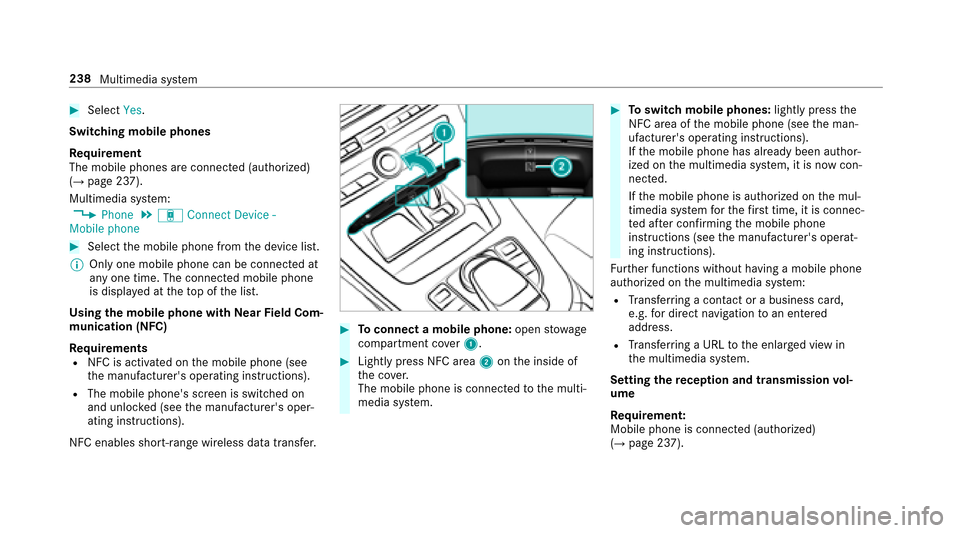
#To connect amobile phone: openstowage
compartment co ver1.
#Lightly press NFC area 2onthei nside of
th ec over.
The mobile phone is connected tothem ulti‐
media sy stem.
#To switc hmobile phones: lightlypress the
NFC area of them obile phone (see them an‐
ufacturer's operating instructions).
If th em obile phone has already been author‐
ized on them ultimedia sy stem, it is no wcon‐
nected.
If th em obile phone is authorized on them ul‐
timedia sy stem fort he firs tt ime, it is connec‐
te da fter confirming them obile phone
instruction s(see them anufacturer's operat‐
ing instructions).
Fu rther functions without having amobile phone
authorized on them ultimedia sy stem:
RTr ans ferring acontact or abusiness card,
e.g. ford irect navigation toan entered
address.
RTr ans ferring aURLtothee nlar gedv iewi n
th em ultimedia sy stem.
Setting ther eception and transmission vol‐
ume
Re quirement:
Mobile phoneisc onnected( authorized)
(
→pag e237).
238
Multimedia sy stem