light MERCEDES-BENZ E-CLASS SEDAN 2019 Repair Manual
[x] Cancel search | Manufacturer: MERCEDES-BENZ, Model Year: 2019, Model line: E-CLASS SEDAN, Model: MERCEDES-BENZ E-CLASS SEDAN 2019Pages: 534, PDF Size: 45.39 MB
Page 184 of 534
When
Distance AssistDIS TRONI Cis acti ve,th e
function adjuststh espeed depending onthe
ro uteeve nts ahead. Dep endingonthedr ive pr o‐
gr am select ed,theve hicle negotiatesthero ute
eve ntaheadin afue l-saving, com fortable or
dynam icman ner.When thero uteev ent has been
passed, theve hicle acceler ates again tothe
st or ed speed. Thesetdis tan cetotheve hicle in
fr ont, vehicles detected aheadand speedrestric‐
tions aheadar eta ke nint oacco unt.
Ro ute-based speedadj ustm entcan byconf ig‐
ur ed inthemultimedia system
(0013 page18 3).
Ro uteeve nts aheadar e:
R Bend s
R T-int ersect ions,tr af fic cir cle sand tollst a‐
tio ns
R Turnsand exits
R Traf fic jams ahead(only with Liv eTr af fic
( 0013 page288))
0009 When theto llst atio nis reac hed, ActiveDis ‐
ta nce AssistDIS TRONI Cad op tsthespeed as
th estor ed speed. Also,
thespeed isreduced ifth etur nsignal to
ch ang elane sis swit ched on and one ofthefo l‐
lo wing situat ionsisde tected:
R Turning offat intersect ions
R Drivin gon slowing- down lanes
R Drivin gon lanes adjacenttoslo wing-do wn
lanes
The driver isresponsible forch oosing theright
speed andobser vingother road user s.This
applies inpar ticular tointersect ions,traf fic cir‐
cle sand traf fic lights, asroute-based speed
adap tatio ndo es notbr ak eth eve hicle toast and‐
st ill.
When routeguidan ceisact ive, thefirs tsp ee d
ad jus tment iscar ried out automaticall y.Ifth e
tur nsigna lind icatoris swi tched on,theselect ed
ro uteis co nfirmed andfurther speed adjustment
is activ ated.
Speed adjustmentis canc eled inthefo llo wing
cases :
R Ifth etur nsignal indicat orisswitc hedoff
bef oreth ero uteeve nt. R
Ifth edr iver depr esses theacceler ator or
br ak epedal during thepr ocess.
Sy stem limita tions
Ro ute-based speedadap tatio ndo es notta ke
ri ght ofwa yre gulations intoaccount .The driver
is responsible forcom plying withro ad traf fic
re gulations anddriving atasuit able speed.
In dif ficul tcondi tions (e.g.uncl earro ads, narrow
lanes, wetro ad sur faces, snowor ice )or whe n
dr ivi ng with atrailer ,th espeed adjustmentmade
by thesy stem mayno talw aysbe suit able. In
th ese situation sth edr iver mus tint erve ne
acco rding ly. 000A
WARNIN GRisk ofacci dent inspi teof
ro ute-based speedadj ustm ent
Ro ute-based speedadj ustm entmigh tmal‐
fun ction orbe temp orarily una vailable inthe
fo llo wing situat ions:
R Ifmap datais no tup todat eor available
R Ifyo udo notfo llo wtheselect edroute
guidan ce 18
2
Driving and parking
Page 186 of 534
If
th edr iver does notst eer theve hicle overa
long period, orhas notta ke nhol dof thesteer ing
wheel, are peat edwarning tone sou nds inad di‐
tio nto thevisual warning mess age(depen ding
on thecount ry).
The warning mess agedoes notappear ordisap‐
pear sif one ofthefo llo wing condition sar eme t:
R The driver steer sth eve hicle.
R The driver presses ast eer ing wheel buttonor
oper ates Touc hCon trol.
Ac tiveSt eer ing Assis tis onl yan aid. Thedriver is
re sponsible forth edis tance totheve hicle in
fr ont, forve hicle speed, forbr aking ingood time
and forst ay ing inlane. Beforech ang inglane s,
th edr iver mus tmak esur eth at theneighbor ing
lane isfree (glance over theshoulder).
Sy stem limita tions
Ac tiveSt eer ing Assis thas alimit edsteer ing tor‐
qu efo rlat eral gui dance. Insome cases, the
st eer ing interve ntio nis no tsu fficien tto keep the
ve hicle inthelane ortodrive pas tex its. The
system maybe impair edorma yno tfunc tion
in thefo llo wing instances:
R Insno w,rain, fog, hea vyspr ay,if th er eis
gl ar e, dir ect sunlight ,gr ea tly varying ambien t
light ,re flect ions orstro ng sha dows onthe
ro adw ay.
R Insuf ficie ntroad illumin ation.
R The wind shieldinthear ea ofthecamer ais
dir ty,fo gg ed up, damag edorcovered.
R Absence oflane markings, orseveralunc lear
lane markings, orifth emar king sch ang era p‐
idly .
R The distance totheve hicle infront istoo
small andthelane marking sth us can notbe
de tected.
R The road isnar row and windin g.
R Obs tacle son thelane orprojec ting outinto
th elane.
The system does notpr ov ide assis tance inthe
fo llo wing condition s:
R Ontigh tbends ,int ersect ions,to llst atio ns,
traf fic cir cle sand whentur ning. R
Whe nacti vely ch ang inglane without switch‐
ing onthetur nsignal.
R When thetir epr essur eis toolow. 000A
WARNIN GRisk ofacci dent ifAc tive
St eer ing Assis tune xpect edlyst ops func‐
tionin g
If th esy stem limit ations ofActiveSt eer ing
Assis tar ere ac hed ther eis no guar anteethat
th esy stem will remain activeor wil lke ep the
ve hicle inlane. 0007
Alw ayske ep your han dson thesteer ing
wheel andobser vethetra ffic car efull y. 0007
Alw aysst eer theve hicle paying atten‐
tion totraf fic condi tions. 000A
WARNIN GRisk ofacci dent ifAc tive
St eer ing Assis tune xpect edlyinterve nes
A ma lfunctio nin thede tection oflane mar k‐
ings andobje ctscan occu r.
This could cause unexpect edsteer ing inter‐
ve ntio n. 18
4
Driving and parking
Page 188 of 534
mus
tbe initia ted. An immediat elane chang eis
on lypo ssible on free wa ysec tion swit hout speed
limi ts.
If th esy stem isim pair ed,ActiveLa ne Chang e
Assi stma ybe canceled .If it is canceled ,th e
Lane Change Cancel edmessag eappe arsin the
multifu nctiondisplay and awa rning tone sou nds. 000A
WARNIN GRisk ofacci dent from chang ‐
ing lane toan occ upied adjacentlane
Lan eChan geAssi stcanno tal wa ys detect
cle arly ifth eadjacen tlane isfree.
The lane chang emigh tbe init iated although
th eadjacen tlane isno tfr ee. 0007
Beforech ang inglane s,mak esur eth at
th eneighbor inglane isfree and ther eis
no dang ertoother road user s. 0007
Mon itor thelane chang e. 000A
WARNIN GRisk ofacci dent ifLane
Ch ang eAssi stune xpectedl yst ops func‐
tionin g
If th esy stem limit ations forLane Change
Assis tha ve been reac hed, ther eis no guar‐
ant eethat thesy stem will remain active.
Lane ChangeAssis tcanno tth en assis tyo u
by appl ying steer ing torq ues . 0007
Alw aysmonit orthelane chang eand
ke ep your han dson thesteer ing wheel.
Obser vethetra ffic con dition sand steer
and/or brak eif neces sary. Sy
stem limita tions
The system limit ations ofActiveSt eer ing Assis t
apply toActiveLa ne Chang eAssi st
( 0013 page18 3).
The system mayalso beimpair edorma yno t
func tion inthefo llo wing situat ions:
R The sensorsin there ar bum peraredir ty,
damag edorcovered, forins tance bya
st icke ror ice and snow.
R The exterior lighting ismalfunct ioning. Ac
tiv atin g/deac tivatin gAc tiv eLan eCha nge
As sist
Multimedia system:
0018 Vehicle 0019
k Assist ance 0007
Select LaneChange Assist. 0007
Activate0073 ordeacti vate 0053 thefunc tion.
Fu nction ofActiv eEme rgency Stop Assis t
If th edr iver con tinuall yignor esthevisual or
acous ticwarning toput their hands onthesteer‐
ing wheel, theBeginn ingEmer gencySt op mes‐
sag eappear sin themultifunc tiondispla y.Ifth e
dr iver still does notre spond, ActiveDis tance
Assi stDIS TRONI Creduces thespeed. Thevehi‐
cle isdeceler ated instag es toast ands till.At
speeds below40 mph(6 0km/h) thehazar d
wa rning light sswitc hon aut omat ically.
When theve hicle isstatio nary,thefo llo wing
act ions arecar ried out :
R The vehicle issecur edwithth eelectr icpar k‐
ing brak e
R ActiveDis tance AssistDIS TRONI Cis end ed
R The vehicle isunloc ked 18
6
Driving and parking
Page 190 of 534
3
ActiveDis tance AssistDIS TRONI Cacti ve,
speed stor ed, novehicle detected (brigh t
ve hicle symbol)
4 ActiveDis tance AssistDIS TRONI Cacti ve,
speed stor ed, vehicle detected (green vehi‐
cle symbol)
5 ActiveDis tance AssistDIS TRONI Cand route-
based speedadap tatio nacti ve,speed stor ed
0009 Onhighw aysor high-speed major roads, the
gr een ç vehicle symbol isdispla yedcy cli‐
cally when theve hicle isready topull away.
Speedome ter
The stor ed speed ishighlight edon thespeedom‐
et er.If th espeed oftheve hicle infront orthe
speed adjustment isless than thestor ed speed
due tothero uteeve ntahead, thesegment sin
th espeedome terlig ht up. Activati on ordeacti va‐
tio nof ActiveDis tance AssistDIS TRONI C,as
we llas alteration sto thespeed duetomanua lor
au tomatic adoptionofthespeed limit,aredis‐
pla yedin thecon trol feedbac kof themultifunc ‐
tion displa yon asing leline. Ac
tiv eSte ering Assis tst atus displa y 1
Gray steer ing wheel: ActiveSt eer ing Assis t
switc hedonand passiv e
2 Green steer ing wheel: ActiveSt eer ing Assis t
switc hedonand activ e
3 Flashing steer ing wheel: prom pttothedr iver
to act ivel ycon firm ortransition from activ e
to passiv est atus ,sy stem limit ation detected
Dur ing thetransition from theactiv eto passiv e
st atus ,symbo l3 issho wnasenl arge dand
fl ashes yello w. Once thesy stem ispassiv e,sym‐
bol 1issho wnasgray inthemultifunc tiondis‐
pla y. Fu
nction ofHill StartAss ist Hill
StartAs sis tholds theve hicle fora shor t
time when pulling away on ahill under thefo l‐
lo wing condition s:
R Vehicl eswith automatic transmiss ion:
The transmis sionisin posi tion 005Bor005E.
R The electricpar king brak eis released.
This gives youen ough timeto mo veyour foot
fr om thebr ak epedal totheaccelera torpeda l
and depr essitbef oreth eve hicle begins toroll
aw ay. 000A
WARNIN GRisk ofacci dent andinjury
due totheve hicle rolling away
Af tera shor ttime, HillStartAs sis tno longer
holds theve hicle anditcan rollaw ay. 0007
Ther efor e, swif tly mo veyour foot from
th ebr ak epedal totheacceler ator
pedal. Neveratt em pttolea vetheve hi‐
cle ifit is being heldbyHillSt artAs sis t. 18
8
Driving and parking
Page 194 of 534
Se
tting theve hicl eleve l 000A
WARNIN GRisk ofacci dent because
ve hicle leve lis toohigh
If yo udr ive at ahigh ervehicle leve l,th edr iv‐
ing charact eristic sma ybe impair eddue to
th ehigher vehicle centerofgrav ity .
The vehicle candrift outw ards, forex am ple,
when steer ing orcor ner ing. 0007
Alw aysch oose ave hicle leve lwhic his
suit edtothedr iving style and thero ad
sur face condi tions. 000A
WARNIN GRisk ofentr apment from vehi‐
cle lowe ring
Whe nlowe ring theve hicle, people could
become trapped ifth eir limbs arebe tween
th eve hicle body andthetir es orunder neath
th eve hicle. 0007
Mak esur eno one isunder neathth e
ve hicle orintheimmediat evicinit yof
th ewheel arch es when youlowe rth e
ve hicle. 000A
WARNIN GRisk ofentr apment from vehi‐
cle lowe ring
Ve hicl eswith AIRBO DY CONT ROLor
le ve lcontr olsystem: When youunlo adlug‐
ga ge orlea vetheve hicle, theve hicle firs t
ri ses slightly andthen retur ns tothese tle ve l
shor tly af te rw ards.
Yo uor anyone else inthevicinit yof the
wheel arch es ortheunderbody couldthus
bec ome trapped.
The vehicle canalso belowe redaf te rbeing
loc ked. 0007
When leaving theve hicle, makesur e
th at nobody isin thevicinit yof the
wheel arch es ortheunderbody . Re
quirement s:
R The vehicle hasbeen star ted.
R The vehicle mustno tbe mo ving faster than
37 mph(60 km/h). Ra
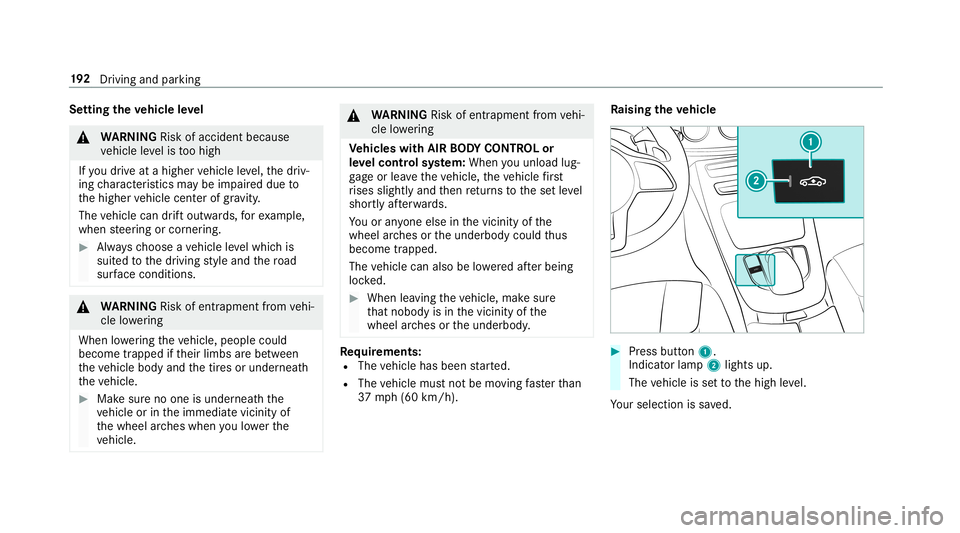
ising theve hicl e 0007
Press butt on1.
Indica torlam p2 lights up.
The vehicle issetto thehigh leve l.
Yo ur sele ction issave d. 19
2
Driving and parking
Page 197 of 534
light
upyello wor red, dependin gon thedis tance
to theobs tacle .
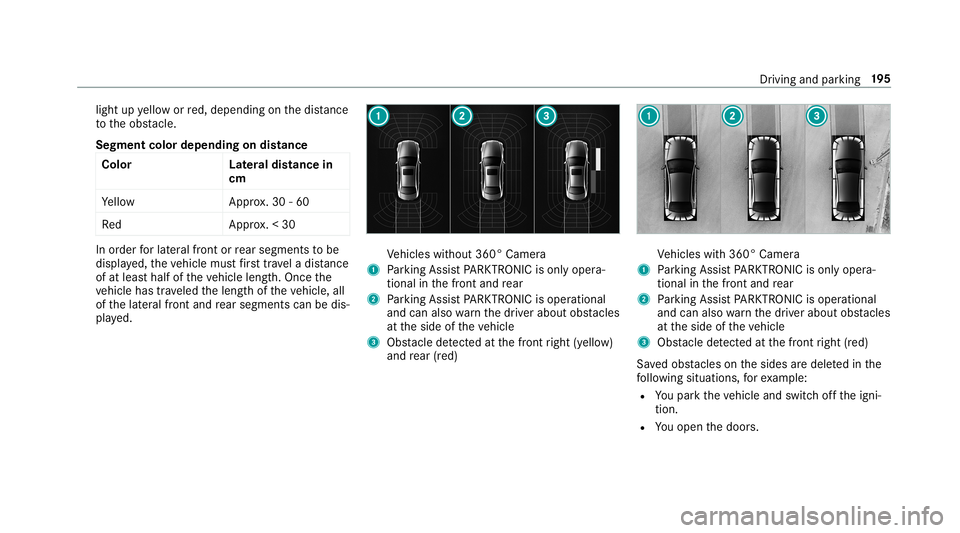
Seg ment colordepe ndingon distan ce
Co lor Lateral dis tan cein
cm
Ye llo wA pprox.30 -60
Re dA pprox.< 30 In
order forlat eral front orrear segm entsto be
displa yed, theve hicle mustfirs ttr ave la dis tance
of at leas tha lfof theve hicle length.Once the
ve hicle hastrave led thelengt hof theve hicle, all
of thelat eral front and rear segm entscan bedis‐
pla yed. Ve
hicles without 360° Camer a
1 Parking AssistPA RK TRONI Cis on lyop era‐
tio nal inthefront and rear
2 Parking AssistPA RK TRONI Cis oper ational
and canalso warnthedr iver about obstacle s
at theside oftheve hicle
3 Obstacle detected atthefront right (yello w)
and rear (red) Ve
hicles with360° Camer a
1 Parking AssistPA RK TRONI Cis on lyop era‐
tio nal inthefront and rear
2 Parking AssistPA RK TRONI Cis oper ational
and canalso warnthedr iver about obstacle s
at theside oftheve hicle
3 Obstacle detected atthefront right (red)
Sa vedobs tacle son thesides aredele tedin the
fo llo wing situat ions,fo rex am ple:
R Youpar kth eve hicle andswitc hof fth eigni‐
tion .
R Youopen thedoor s. Dr
iving andparking 19
5
Page 201 of 534
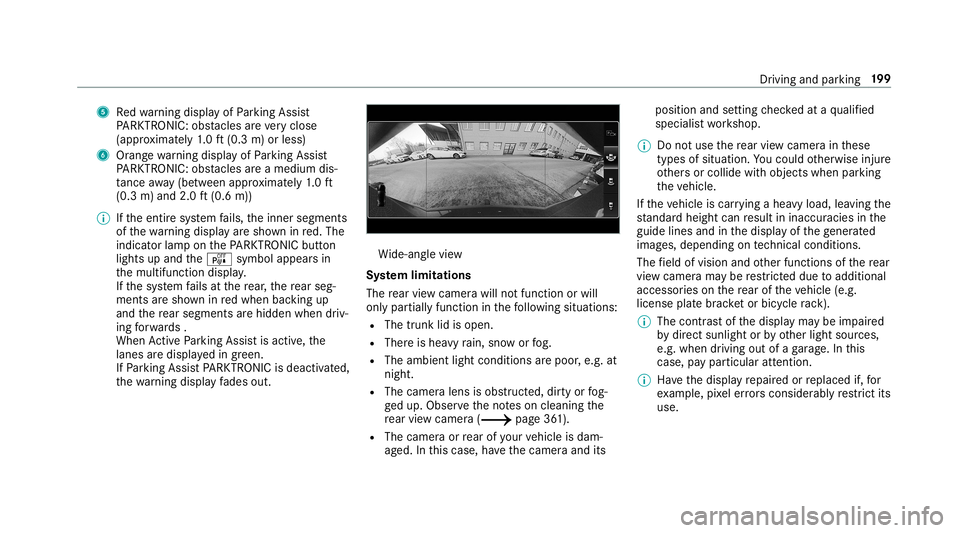
5
Redwa rning displa yof Parking Assist
PA RK TRONI C:obs tacles areve ry clos e
(a ppr oximat ely1. 0 ft (0.3 m)orless)
6 Orang ewa rning displa yof Parking Assist
PA RK TRONI C:obs tacles areamed iumdis‐
ta nce away (be tween appr oximat ely1. 0 ft
(0.3 m)and 2.0ft(0.6 m))
0009 Ifth eent ire sy stem fails, theinner segment s
of thewa rning displa yar esho wninred. The
indicat orlam pon thePA RK TRONI Cbut ton
light sup and theé symbol appearsin
th emultifunc tiondispla y.
If th esy stem fails atthere ar,th ere ar seg‐
men tsaresho wninredwhen backingup
and there ar segm entsar ehidde nwhen driv‐
ing forw ards .
When ActivePa rking Assistis act ive, the
lanes aredispla yedin green.
If Pa rking AssistPA RK TRONI Cis deac tiva ted,
th ewa rning displa yfa des out. Wi
de-ang levie w
Sy stem limita tions
The rear vie wcam erawill notfun ction orwill
on lypa rtiall yfunc tion inthefo llo wing situat ions:
R The trunk lidisopen .
R Ther eis hea vyrain, sno wor fog.
R The ambient lightcondit ionsarepoor ,e.g. at
night.
R The camer alens isobs truct ed, dirtyor fog‐
ge dup. Obser vetheno teson cleaning the
re ar vie wcam era(0013 page36 1).
R The cam eraor rear ofyour vehicle isdam‐
ag ed. Inthis case, have thecamer aand its position
andsetting checkedat aqu alif ied
spec ialistwo rkshop.
0009 Donotuse there ar vie wcam erain these
types ofsituation .Yo uco uld other wise injure
ot her sor collide withobject swhen parking
th eve hicle.
If th eve hicle iscar rying ahea vyload, leavingth e
st andar dheigh tcan result ininaccur aciesinthe
guide linesandinthedispla yof thege ner ated
ima ges,depending ontech nica lcond itions.
The field ofvision andother funct ionsofthere ar
vie wcam erama ybe restrict ed dueto addit ional
acc esso ries on there ar oftheve hicle (e.g.
license platebr ac ketor bicy cle rack ).
0009 The contras tof thedispla yma ybe impair ed
by direct sunlight orby other light sources,
e.g. when driving outofaga rage .In this
case, paypar ticular attent ion.
0009 Have thedispla yre pair edorreplaced if,for
ex am ple, pixelerro rs consi derablyrestrict its
us e. Dr
iving and parking 19
9
Page 203 of 534
When
Parking AssistPA RK TRONI Cis oper ational
and noobj ectis de tected, thesegment sof the
wa rning displa yar esho wningray .
0009 Ifth eent ire sy stem fails, thesegment sof
th ewa rning displa yar esho wninred. The
indicat orlam pon thePA RK TRONI Cbut ton
light sup and theé symbol appearsin
th emultifunc tiondispla y.
If th esy stem fails atthere ar,th edispla yof
th esegment sch ang esasfollo ws :
R The rear segm entsar esho wninred
when backingup.
R The rear segm entsar ehidde nwhen driv‐
ing forw ards.
If Pa rking AssistPA RK TRONI Cis deac tiva ted,
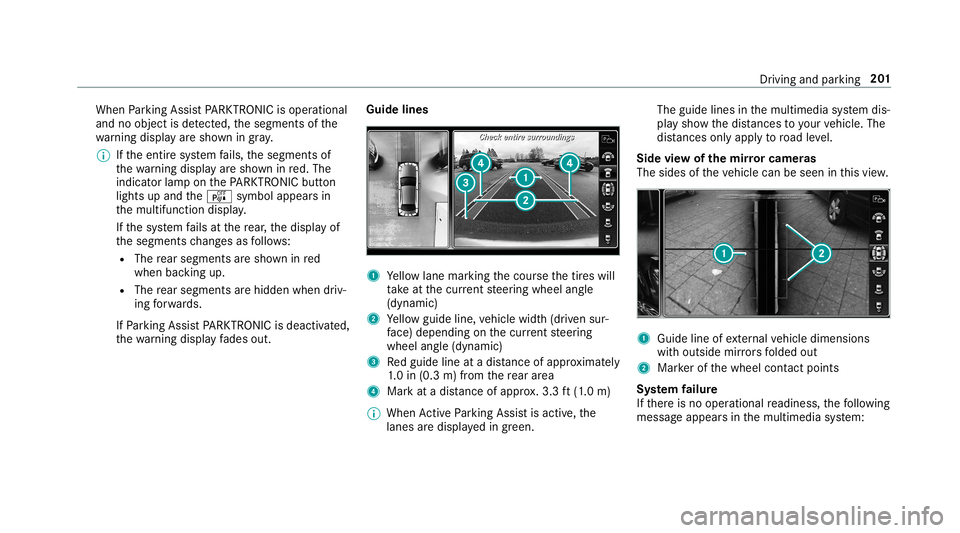
th ewa rning displa yfa des out. Guid
elines 1
Yello wlane markingth ecour sethetir es will
ta ke atthecur rent steer ing wheel angle
(dynamic)
2 Yello wguide line,vehicle width(dr iven sur‐
fa ce) dep endi ngon thecur rent steer ing
wheel angle(dynamic)
3 Redguide lineatadis tance ofapprox imat ely
1. 0 in (0.3 m)from there ar area
4 Markat adis tance ofappr ox.3.3 ft(1.0 m)
0009 When ActivePa rking Assistis act ive, the
lanes aredispla yedin green. The
guide linesinthemultimedia system dis‐
pla ysho wthedis tances toyour vehicle. The
dis tances onlyapply toroad leve l.
Side viewof themir rorca mer as
The side sof theve hicle canbeseen inthis vie w. 1
Guide lineofextern al vehicle dimensions
wit houtside mirrors folded out
2 Markerof thewheel contact poi nts
Sy stem failur e
If th er eis no oper ational readin ess, thefo llo wing
mess ageappear sin themultimedia system: Dr
iving andparking 20
1
Page 204 of 534
Sy
stem limita tions
The 360°Camera willnotfun ction orwill only
par tiall yfun ction inthefo llo wing situat ions:
R The door sar eopen .
R The side mirrors arefo lded in.
R The trunk lidisopen .
R Ther eis hea vyrain, sno wor fog.
R The ambient lightcondit ionsarepoor ,e.g. at
night.
R The camer alens isobs truct ed, dirtyor fog‐
ge dup.
R Ifcamera sor vehicle component sin whic h
th ecamer asareins talled aredamag ed.In th
is eve nt,have thecamer as,their position s
and their setting checkedat aqu alif ied spe‐
cialis two rkshop.
Do notuse the360° Camer aunder suchcir cum‐
st anc es.Youco uld other wise injureot her sor
collide withobject swhen parking ormaneuv er‐
ing theve hicle.
On vehicles withheight-adjus table suspension or
if th eve hicle iscar rying ahea vyload, leavingth e
st andar dheigh tcan result ininaccur aciesinthe
guide linesandinthedispla yof thege ner ated
ima ges,depending ontech nica lcond itions.
The field ofvision andother funct ionsofthe
came rasystem maybe restrict ed dueto addi‐
tio nal attachme ntson theve hicle (e.g.license
plat ebr ac ket,bicy cle rack ).
See theno teson cleaning the360° Camer a
(0013 page36 1).
Selecting avie wforthe 360° Camer a
Re quirement s:
R The Auto.Rear View Cam. function isselec‐
te din themultimedia system. 0007
Engage reve rsege ar. 0007
Inthemultimedia system, select thedesir ed
vie w.
Opening thecam eraco verof the rear vie w
camer a
Mul timedi asy stem:
0018 Vehicle 0019
k Assist ance
0019 Camera &Parkin g 0007
Select OpenCamera Cover.
0009 The camer aco vercloses automatical lyafte r
some timeorafte ran ignitio ncy cle.
Se tting thecam eraas afa vo rite
Yo ucan callupthecamer avie wdir ect lyin the
multime diasystem bysettin git as afa vo rite . 0007
Press the00E2 buttonon thecon trol ele‐
ment .
The main functionsar edispla yed. 0007
Navig atedo wn wardstwice.
The Favorite smenu appears. 0007
Select New Favorite. 0007
Select Veh icle. 0007
Select Camera. 202
Driving and parking
Page 214 of 534
Tr
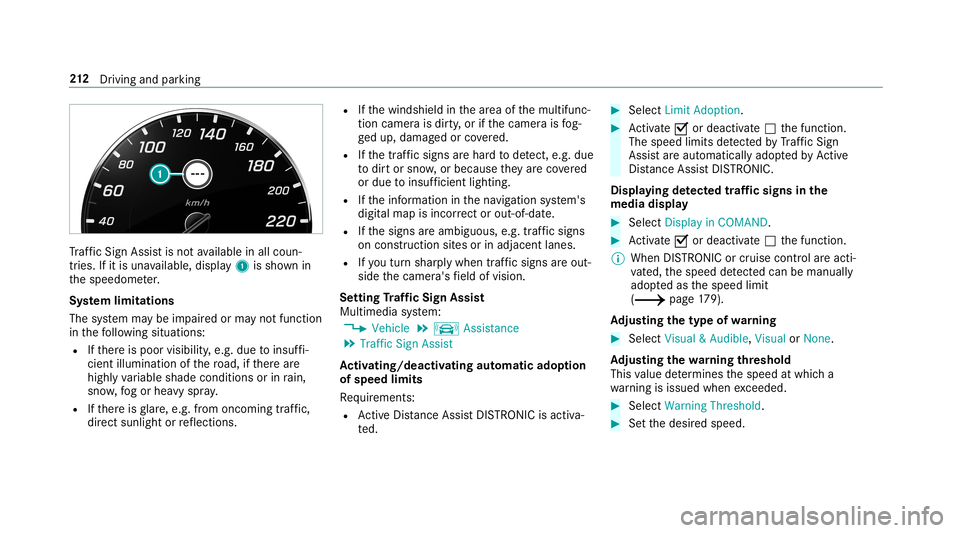
af fic Sign Assistisno tav ailable inall coun ‐
tr ies. Ifit is una vailable, display1 issho wnin
th espeedome ter.
Sy stem limita tions
The system maybe impair edorma yno tfunc tion
in thefo llo wing situat ions:
R Ifth er eis poor visibility ,e.g. due toinsuf fi‐
cie ntillu mina tionofthero ad, ifth er ear e
highl yva riable shade condition sor inrain,
sno w,fogor hea vyspr ay.
R Ifth er eis glar e, e.g .fr om oncom ingtraf fic,
di re ct sunli ght orreflect ions. R
Ifth ewindshield inthear ea ofthemultifunc ‐
tion camer ais dir ty,or ifth ecamer ais fog‐
ge dup, damag edorcovered.
R Ifth etra ffic sign sar ehar dto detect, e.g. due
to dir tor sno w,orbecause they areco vered
or due toinsuf ficie ntlighti ng.
R Ifth einf ormation inthena vig ation system's
digit almap isincor rect or out-of-da te.
R Ifth esigns areambiguous, e.g.traf fic sig ns
on cons tructi onsites orinad jacent lanes.
R Ifyo utur nshar plywhen traffic sig ns areou t‐
sid eth ecamer a'sfield ofvision.
Se tting Traf fic Sign Assis t
Mult imed iasystem:
0018 Vehicle 0019
k Assist ance
0019 Traffic SignAssist
Ac tiv atin g/deac tivatin gaut omati cadop tion
of spe edlimits
Re quiremen ts:
R ActiveDis tance AssistDIS TRONI Cis acti va‐
te d. 0007
Select LimitAdopt ion. 0007
Activate0073 ordeacti vate 0053 thefunc tion.
The speed limitsdetected byTraf fic Sign
Assi stareaut omat icallyadop tedby Active
Dis tance AssistDIS TRONI C.
Di spl aying detected traf fic signs inthe
med iadis pla y 0007
Select Display inCOMA ND. 0007
Activate0073 ordeacti vate 0053 thefunc tion.
0009 When DISTRONIC orcruise control areacti‐
va ted, thespeed detected can bemanu ally
ad op tedas thespeed limit
(0013 page17 9).
Ad jus tingthe type ofwa rning 0007
Selec tVisual &Audible ,Visual orNon e.
Ad jus tingthe warning threshold
This value determ ines thespeed atwhic ha
wa rning isissued whenexceeded. 0007
Select Warning Threshold. 0007
Setth edesir edspeed. 21
2
Driving and parking