esp MERCEDES-BENZ E-CLASS SEDAN 2019 Manual PDF
[x] Cancel search | Manufacturer: MERCEDES-BENZ, Model Year: 2019, Model line: E-CLASS SEDAN, Model: MERCEDES-BENZ E-CLASS SEDAN 2019Pages: 534, PDF Size: 45.39 MB
Page 217 of 534
As
are sult, ActiveBli nd Spo tAssi stma ynei‐
th er giv ewa rnings norinterve ne insuch sit‐
uations. 0007
Alw ayspa ycar eful attention tothetra f‐
fi c situ ation and maintain asaf edis‐
ta nce attheside oftheve hicle. If
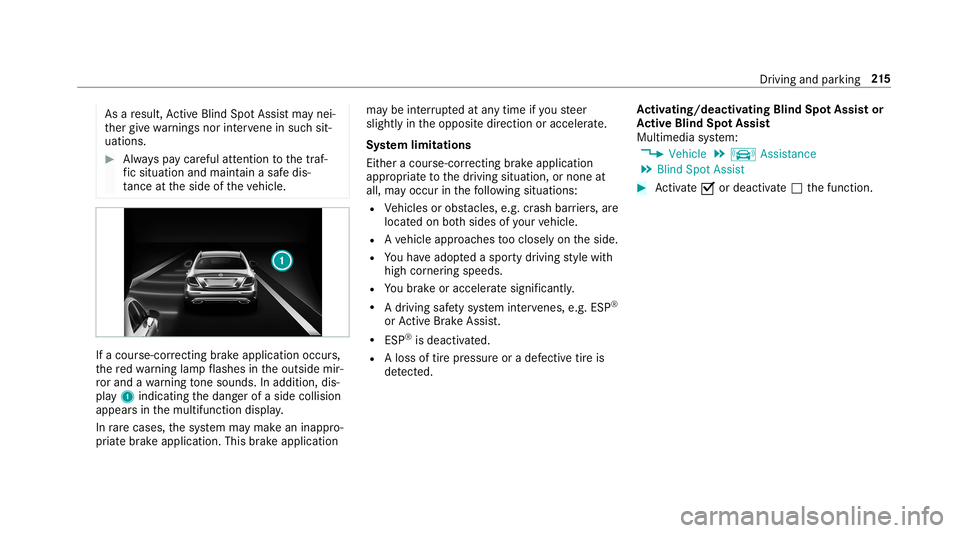
acour se-cor recting brak eap plica tion occu rs,
th ere dwa rning lam pflashes intheoutside mir‐
ro rand awa rning tone sou nds. Inadditio n,dis‐
pl ay 1 indic atingth edang erofaside collision
appear sin themultifunc tiondispla y.
In rare case s,thesy stem maymak ean inappr o‐
pr iat ebr ak eapplication. Thisbrak eapplication ma
ybe interru pte dat anytime ifyo usteer
slightl yin theopposit edir ect ion oraccelera te.
Sy stem limita tions
Eit her acour se-cor recting brak eap plica tion
ap propr iate to thedr iving situation ,or non eat
all, mayoccur inthefo llo wing situat ions:
R Vehicles orobs tacle s,e.g. crash barrier s,are
locat edon both sides ofyour vehicle.
R Ave hicle approaches tooclosely ontheside.
R Youha ve adop tedaspor tydriving style wit h
high corner ing speeds.
R Youbr ak eor acc elerat esign ifican tly.
R Adr ivi ng safety system interve nes, e.g.ESP ®
or ActiveBr ak eAssi st.
R ESP ®
is de acti vated.
R Aloss oftirepr essur eor adef ective tir eis
de tected. Ac
tiv atin g/deac tivatin gBli nd Spo tAs sist or
Ac tiv eBli nd Spo tAs sist
Multimedia system:
0018 Vehicle 0019
k Assist ance
0019 Blind SpotAssist 0007
Activate0073 ordeacti vate 0053 thefunc tion. Dr
iving andparking 21
5
Page 219 of 534
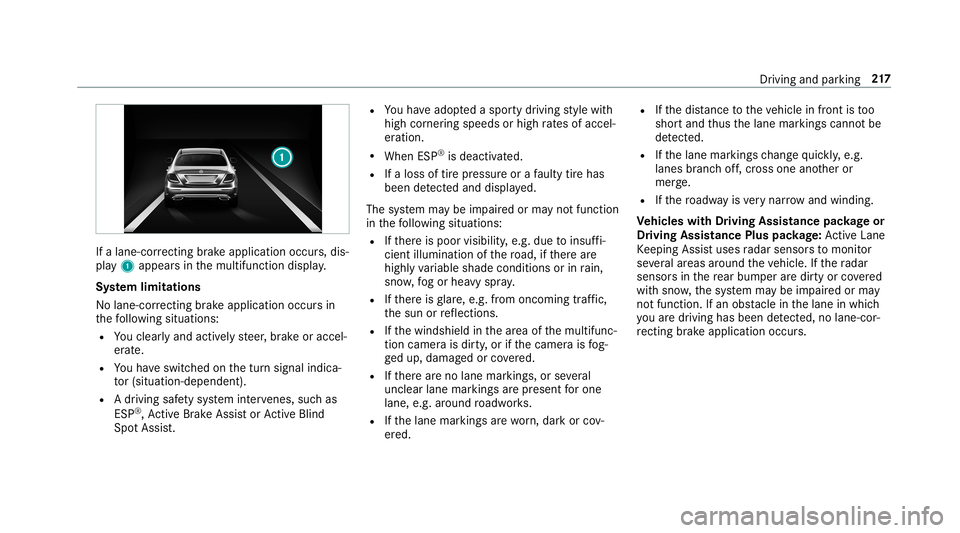
If
alane-cor recting brak eap plica tion occu rs,dis‐
pla y1 appear sin themultifunc tiondispla y.
Sy stem limita tions
No lane- correcting brak eap plica tion occu rsin
th efo llo wing situat ions:
R Youcle arly and activel yst eer ,br ak eor accel‐
er ate.
R Youha ve switc hedonthetur nsignal indica‐
to r(situ ation-dep endent).
R Adr iving safetysy stem interve nes, such as
ES P®
,Ac tiveBr ak eAssi stor ActiveBli nd
Spo tAssi st. R
Youha ve adop tedaspor tydriving style wit h
high corner ing speeds orhigh ratesof accel‐
er ation.
R When ESP®
is deactiv ated.
R Ifaloss oftirepr essur eor afa ulty tirehas
been detected and displ ayed.
The system maybe impair edorma yno tfunc tion
in thefo llo wing situat ions:
R Ifth er eis poor visibility ,e.g. due toinsuf fi‐
cie ntillu mina tionofthero ad, ifth er ear e
highl yva riable shade condition sor inrain,
sno w,fogor hea vyspr ay.
R Ifth er eis glar e, e.g .fr om oncom ingtraf fic,
th esun orreflect ions.
R Ifth ewindshield inthear ea ofthemultifunc ‐
tion camer ais dir ty,or ifth ecamer ais fog‐
ge dup, damag edorcovered.
R Ifth er ear eno lane marking s,or several
unc lear lane markingsarepr esen tfo rone
lane, e.g.around roadw orks .
R Ifth elane marking sar ewo rn,dar kor cov‐
er ed. R
Ifth edis tance totheve hicle infront istoo
shor tand thus thelane marking scann otbe
de tected.
R Ifth elane marking sch ang equ ickl y, e.g.
lanes branc hof f,cr oss one another or
mer ge.
R Ifth ero adw ayisvery nar row and wind ing.
Ve hicl eswith Drivin gAss istanc epac kage or
Dr iving Assistance Pluspackag e:Ac tiveLa ne
Ke eping Assistuses radar sensor sto monit or
se veralar eas around theve hicle. Ifth era dar
sensor sin there ar bum peraredir tyor covered
wit hsn ow ,th esy stem maybe impair edorma y
no tfunc tion.If an obs tacle inthelane inwhic h
yo uar edr ivin ghas been detected, nolane-cor‐
re cting brak eap plica tion occu rs. Dr
iving and parking 217
Page 220 of 534
Ac
tiv atin g/deac tivatin gAc tiv eLan eKe eping
Assis t(v ehicles withPa rking Assis t
PA RK TRONI C) 000A
WARNIN GRisk ofacci dent despite
Ac tiveLa ne Keeping Assistwa rning
A lane- correcting brak eap plica tion canno t
al wa ys bring theve hicle backint oth eor igi‐
nal lane. 0007
Alw aysst eer ,br ak eor accelera teyour‐
self ,espe ciallyif Ac tiveLa ne Keeping
Assis twa rnsyo uor mak esalane -cor‐
re cting brak eap plica tion. 000A
WARNIN GRisk ofacci dent despite inter‐
ve ntio nof ActiveLa ne Keeping Assist
Ac tiveLa ne Keeping Assistdoes notde tect
tr af fic condi tions orroad user s.In very rare
case s,thesy stem maymak ean inappr opri‐
at ebr ak eapplication, e.g.afte rint entional ly
dr iving overa soli dlane marking.
The brak eapp lication canbeinterru pte dat
an ytime ifyo usteer slightl yin theopposit e
dir ect ion. 0007
Alw aysmak esur eth at ther eis suf fi‐
cie ntdist anc eto theside forot her traf‐
fi c or obs tacle s. 000A
WARNIN GRisk ofacci dent despite Lane
Ke eping Assist
Lane Keeping Assistcann otalw aysclear ly
de tect lane mar kings .
In such case s,Lane Keeping Assistcan:
R givean unnec essarywa rning
R notgiv eawa rning 0007
Alw ayspa ypar ticular attention tothe
tr af fic situ ation and keep within the
lane, espec iallyif Ac tiveLa ne Keeping
Assis taler tsyou. Be
sureto obser vethesy stem limit ations of
Ac tiveLa ne Keeping Assist. 0007
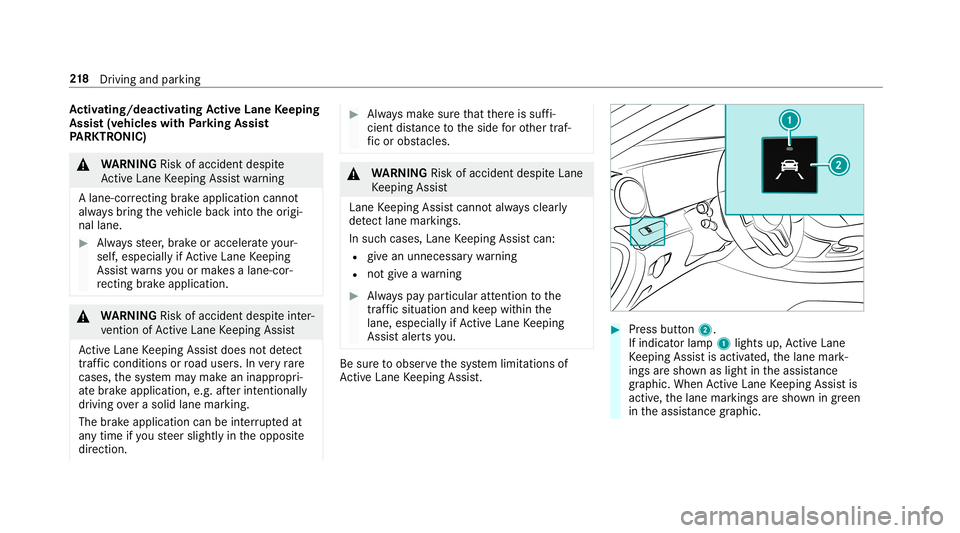
Press butt on2.
If indicat orlam p1 lights up,ActiveLa ne
Ke eping Assistis activ ated, thelane mark‐
ings aresho wnaslight intheassis tance
gr ap hic. Whe nAc tiveLa ne Keeping Assistis
activ e,thelane marking sar esho wningreen
in theassis tance grap hic. 21
8
Driving and parking
Page 223 of 534
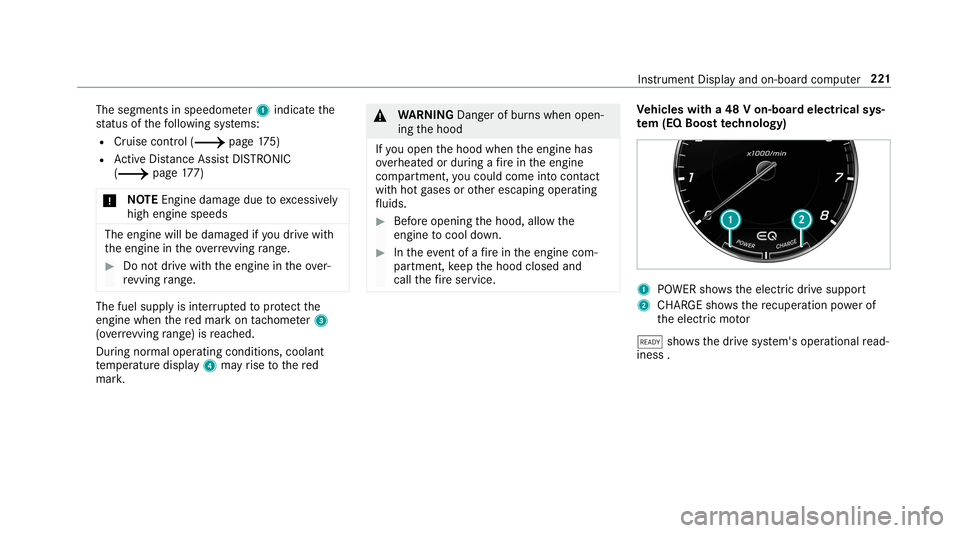
The
segment sin speedome ter1 indica tethe
st atus ofthefo llo wing systems:
R Cruise control (0013 page17 5)
R ActiveDis tance AssistDIS TRONI C
(0013 page 177)
000E NO
TEEngi nedama gedue toexcess ively
hig hengi nespe eds The
enginewillbe damag edifyo udr ive wit h
th eengine intheov errevving rang e. 0007
Donotdr ive wi th theengine intheove r‐
re vving rang e. The
fuelsu pp lyis int erru pted toprotect the
engine whenthere dmar kon tach ome ter3
(o ve rrev ving rang e) isreac hed.
Dur ing norm aloper atingcon dition s,coo lant
te mp eratur edispla y4 mayrise tothere d
mar k. 000A
WARNIN GDang erofburnswhen open‐
ing thehood
If yo uopen thehood when theengine has
ove rheat edordur ing afire intheengine
com partmen t,yo uco uld come intoco ntact
wit hho tga ses orother escaping operating
fl uids. 0007
Beforeopen ingthehood, allowthe
engine tocool down. 0007
Intheeve ntofafire intheengine com‐
par tmen t,ke ep thehood closed and
call thefire ser vice. Ve
hicl eswith a48 Von-b oardele ctrical sys‐
te m (EQ Boo sttech nology) 1
POWER showstheelectr icdrive suppor t
2 CHARGE sho wsthere cup erati on powe rof
th eelectr icmo tor
00D0 showsthedr ive sy stem's operational read‐
ine ss. In
stru ment Displa yand on-boar dcom puter 22
1
Page 229 of 534
R
Rangeand current fue lconsu mption
Wh englide mode isact ive, Gliding Modeis
displa yedins tead ofthecur rent fue lcon‐
su mp tion(0013 page 153).
A recup erati on displ ayisalso available for
cer tain engin es.Ifth er eis onl ya small
amount offuel leftin thefuel tank ,th edis‐
pla ywill showave hicle being refuel ed
ins tead ofthera ng e.
R ECOdispl ay(0013 page14 6)
R Trip com puterFro mStart and FromReset
R Digit alspeedom eter
0009 Ve
hicl eswith theIns trum ent Displa yin
th eWi des cree nCo ckpit: The digit alspe ed‐
ome terapp earsonly intheClassic andSport
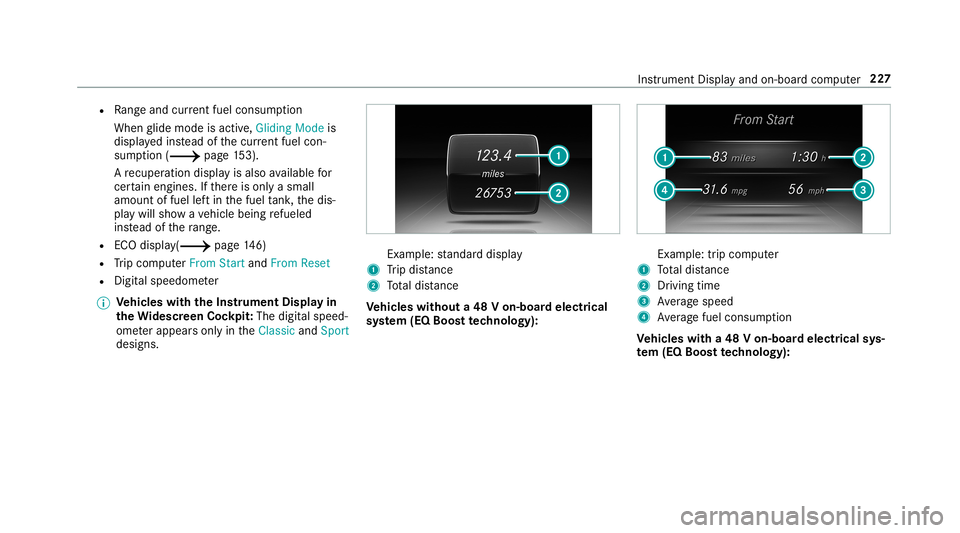
designs. Ex
am ple: standar ddispla y
1 Trip dis tance
2 Totaldis tance
Ve hicl eswithout a48 Von-b oardele ctrical
sy stem (EQ Boos tte ch nology): Ex
am ple: trip com puter
1 Totaldis tance
2 Driving time
3 Averag espeed
4 Averag efuel consum ption
Ve hicl eswith a48 Von-b oardele ctrical sys‐
te m (EQ Boo sttech nology): Ins
trument Displayand on-boar dcom puter 22
7
Page 230 of 534
Ex
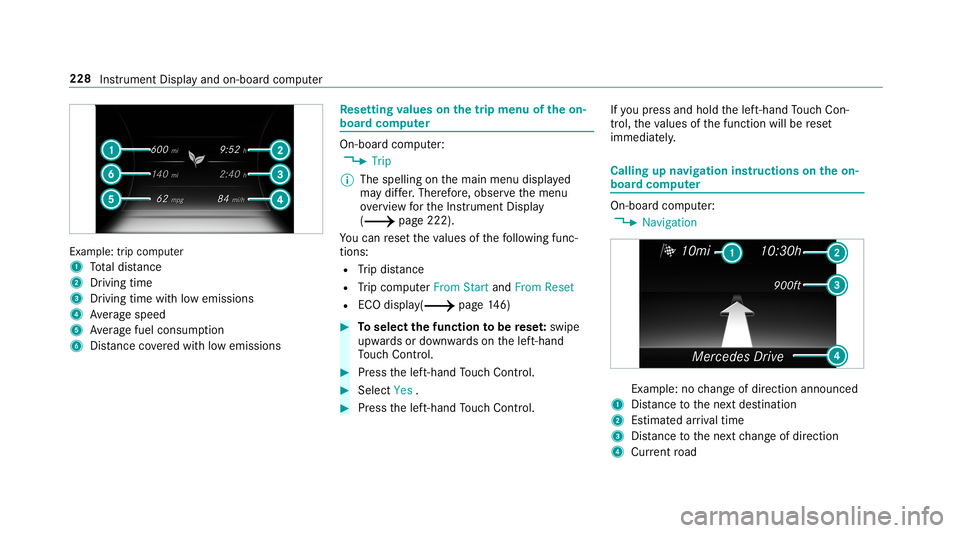
am ple: trip comput er
1 Totaldis tance
2 Driving time
3 Driving time with low emiss ions
4 Averag espeed
5 Averag efuel consum ption
6 Distance coveredwit hlow emission s Re
setting values onthetrip menu oftheon-
boar dcom puter On-boar
dcom puter:
0018 Trip
0009 The spelli ngon themain menu displayed
ma ydif fer. Ther efor e, obser vethemenu
ove rview forth eIns trument Display
(0013 page222).
Yo ucan rese tth eva lues ofthefo llo wing func‐
tion s:
R Trip dis tance
R Trip com puterFro mStart and FromReset
R ECOdispla y(0013 page14 6) 0007
Toselect thefun ction tobe rese t:swipe
upw ards ordown wardson thelef t-hand
To uc hCon trol. 0007
Press thelef t-hand Touc hCon trol. 0007
Select Yes . 0007
Press thelef t-hand Touc hCon trol. If
yo upr ess and hold thelef t-hand Touc hCon ‐
tr ol, theva lues ofthefunc tion willberese t
immediat ely. Callin
gup navig ation instruct ions ontheon-
boar dcom puter On-boar
dcom puter:
0018 Navigation Ex
am ple: nochang eof dir ect ion ann oun ced
1 Distance tothene xt des tinat ion
2 Estimat edarriva ltim e
3 Distance tothene xt chang eof dir ect ion
4 Current road 228
Instru ment Displa yand on-boar dcom puter
Page 236 of 534
No
teson oper ating safety 000A
WARNIN GRisk ofdist ra ction from infor‐
mati onsystems andcomm unication s
eq uipment
If yo uoper ateinf ormat ionand comm unic a‐
tio neq uipme ntintegratedin theve hicle
when driving, youwill bedistract ed from the
tr af fic situ ation. Thiscou ldalso cau seyouto
lose control of theve hicle. 0007
Onlyoper ateth is eq uipmen twhen the
tr af fic situ ation per mits. 0007
Ifyo ucan notbe sur eof this, stop the
ve hicle whilstpa ying attention toroad
and traffic condi tions andoperate the
eq uipment withth eve hicle statio nary. 000A
WARNIN GRisk ofdist ra ction from oper‐
ati ng mob ile commu nication equipme nt
whi letheve hicle isin mo tion
If yo uoper atemob ilecomm unic ationeq uip‐
men twhen drivin g,youwill bedistract ed fr
om thetra ffic situat ion.This could also
cause youto lose control of theve hicle. 0007
Onlyoper ateth is eq uipmen twhen the
ve hicle isstatio nary. Fo
ryo ur ow nsa fety,al wa ys obser vethefo llo w‐
ing point swhen operatingmobile communic a‐
tion seq uipmen tand espec iallyyo ur voice con ‐
tr ol system:
R Obser vetheleg alrequ iremen tsforth ecoun‐
tr y in whic hyo uar edr ivin g.
R While drivin g,on lyop eratemobi lecom mun i‐
cat ionseq uipme ntand your voice con trol
sy stem when thetra ffic con dition sper mit it.
Yo uma yot her wise bedistract ed from the
tr af fic condi tions andcausean acci dent,
inju ring yourself and other s.
R Ifyo uuse thevo ice con trol system inan
emer gency your voice can chang eand your
te lephon ecall, e.g.anemer gency call,can
th er eb ybe unnec essarilydela yed.
R Famili arize yourself withth evo ice con trol
sy stem func tionsbef orest ar tin gth ejour ney. Oper
ation Ov
ervie wof oper ation oftheVo ice Contr ol
Sy stem onthemu ltifunct ionsteer ing wheel The
Voice Cont rolSy stem isoper ational approx‐
imat elyth irty seco ndsafte rth eignition is
switc hedon. 23
4
Voice Cont rolSy stem
Page 248 of 534
Messag
evo ice comm ands Vo
ice comm and Function
Text message to
crea te ames sage.All addr essbook namesareav ailable.
Reply To
reply toames sage
For ward text mes sage To
forw ardames sage Ov
ervie wof vehicl evo ice comm ands Yo
ucan usetheve hicle voice com mand sto
dir ect lycall upthecor responding menusforth e
ve hicle settin gs.
Ve hicl evo ice comm ands Vo
ice comm and Function
Ambien tlight menu To
displa yambient lightsettings
Ambien tlight "blue" To
switc hambient lighttoblue
Display andstyles menu To
sho wdispla yse ttings
Assistance menu To
displa yassis tance settings 24
6
Voice Cont rolSy stem
Page 270 of 534
Multimedia
system:
0018 System 0019
Soft ware Update
Au tomatic update 0007
Swi tchAuto matic Onl ine Update on 0073.
Up dat esareper form ed.
The current status oftheupdat esisdis‐
pla yed.
Manu alupd ate 0007
Deact ivat e0053 Auto matic OnlineUpdate. 0007
Select anupdat efrom thelis tand star tth e
updat e.
Ac tiv atin gthe softwa reupdat e 0007
Restar tth esy stem.
Fu nction ofimpor tant system updates
Im por tant system updat esma ybe neces saryfo r
th esecur ityofyour mult imed iasystem's data.
Please installth ese updat es,orelse thesecur ity
of your mult imed iasystem cann otbe ensur ed.
0009 Ifaut omatic softwareupdat esareactiv ated,
th esy stem updat eswill bedownloaded auto‐
maticall y(0013 page26 7). As
soon asan updat eis available fordo wnloa d,
a cor responding messageappea rson themedia
displa y.
Yo uha ve thefo llo wing selectionoption s:
R Down load
The updat ewill bedownloaded inthebac k‐
gr ound.
R Det ails
Inf ormation aboutthepending system
updat eis displa yed.
R Later
The updat ecan bedownloaded manuallyata
lat er time (0013 page26 7).
If th edo wnload iscom pletedand theupdat eis
re ady forins tallation ,yo uwill beinformed ofthis
af te rth ene xt ignition cycle, forex am ple.
0009 Park theve hicle safely inasuit able location
bef orest ar tin gth eins tallation .
Re quiremen tsforth eins tallation :
R The ignit ionisswitc hedon.
R The engin eis no tru nning . R
Notesand warnings have been read and
acc epted.
R The parkingbr ak eis applied.
If all requ iremen tsareme t,th eupdat ewill be
ins talled. Themultim ediasystem cann otbe
oper ated while theupdat eis being installed and
ve hicle functionsarere strict ed.
If er ro rs should occurduring theins tallation ,th e
multime diasystem automaticall yatt em ptsto
re stor eth epr ev ious version. Ifre stor ation ofthe
pr ev ious version isno tpossible ,a symbol
appear son thecent ercon sole displa y.Please
cons ultaqu alif ied spec ialistwo rkshop to
re solv eth epr oblem. Re
setfunction Multimedia
system:
0018 System 0019
Reset
Pe rsonal datais dele ted, forex am ple:
R Statio npr ese ts
R Con nectedmobile phones 268
Multimedia system
Page 273 of 534
St
arting apr og ram 0007
Select Refres h,Wa rmth, Vitality, Enjoym ent
or Wel l-being.
The select edprogr am willru nfo rte nminu tes.
Conf iguringapr og ram 0007
Call upfurther option sÜ forth edesir ed
pr ogr am. 0007
Switc hth efunc tionsincluded inthepr ogr am
on 0073 oroff0053.
St arting traini ng 0007
Select Training. 0007
Select MuscleRelaxati on,Mus cleStimul a-
tion orBala nce.
The selected trai ning videostar ts and isdis‐
pla yedin themedia display. 0007
Select FullScree n:Vid eo.
The trai ning video isdispl ayed infull screen.
0009 Formor einf ormation onpau sing orskippi ng
th ro ugh videos,see (0013 page32 8). If
,dur ing anact ive pr ogram, afun ction requ ire‐
men tis no long erme t,acor responding message
appea rs.The activeprog ram iscanceled . Na
vig ation Switc
hingnavig ation on Multimedia
system:
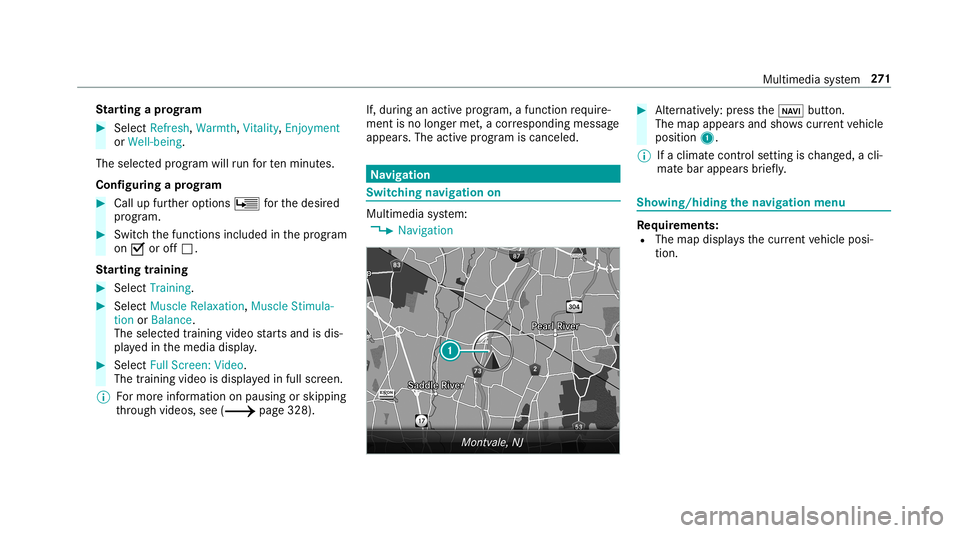
0018 Navigation 0007
Alternativ ely:press the00CB button.
The map appear sand showscurrent vehicle
position 1.
0009 Ifaclimat econt rolse tting isch ang ed, acli‐
mat ebar appear sbr ief ly. Sho
wing/ hiding thena vig ation menu Re
quirement s:
R The map displa ysthecur rent vehicle posi‐
tion. Multimedia
system 27
1