ECU MERCEDES-BENZ E-CLASS SEDAN 2020 Workshop Manual
[x] Cancel search | Manufacturer: MERCEDES-BENZ, Model Year: 2020, Model line: E-CLASS SEDAN, Model: MERCEDES-BENZ E-CLASS SEDAN 2020Pages: 550, PDF Size: 45.61 MB
Page 212 of 550
Wi
de-ang levie w
Ve hicl eswith Activ ePa rking Assis t
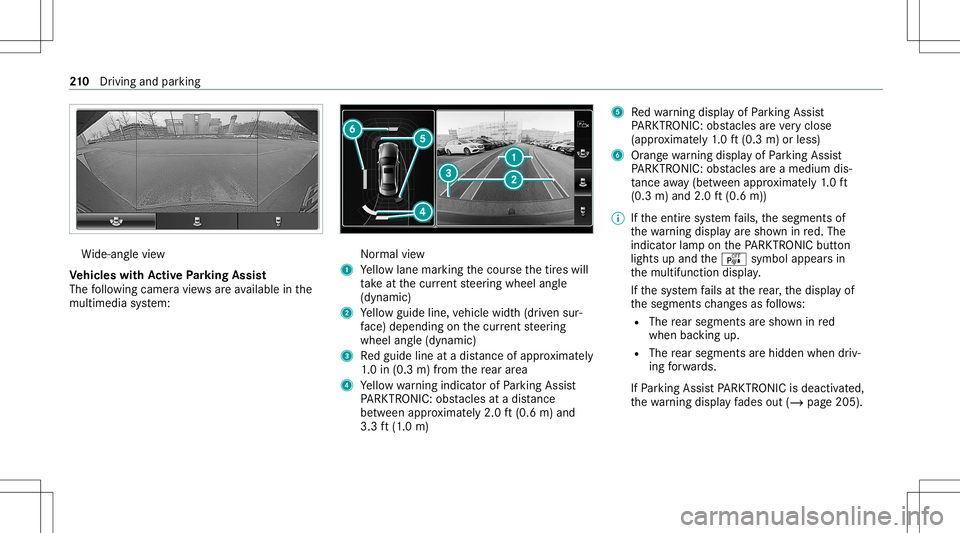
The follo wing camera views areav ailable inthe
multime diasystem: Nor
mal view
1 Yello wlane markingth ecour sethetir es will
ta ke atthecur rent steer ing wheel angle
(dynamic)
2 Yello wguide line,vehicle width(dr iven sur‐
fa ce) dep endi ngon thecur rent steer ing
wheel angle(dynamic)
3 Redguide lineatadis tance ofapprox imat ely
1. 0 in (0.3 m)from there ar area
4 Yello wwa rning indic ator ofParking Assist
PA RK TRONI C:obs tacles atadis tance
be twee nap prox imat ely2. 0ft (0.6 m)and
3.3 ft(1.0 m) 5
Redwa rning displa yof Parking Assist
PA RK TRONI C:obs tacles areve ry clos e
(a ppr oximat ely1. 0 ft (0.3 m)orless)
6 Orang ewa rning displa yof Parking Assist
PA RK TRONI C:obs tacles areamed iumdis‐
ta nce away (be tween appr oximat ely1. 0 ft
(0.3 m)and 2.0ft(0.6 m))
% Ifth eent ire sy stem fails, thesegmen tsof
th ewa rning displa yar esho wninred. The
indicat orlam pon thePA RK TRONI Cbut ton
light sup and theé symbol appearsin
th emultifunc tiondispla y.
If th esy stem fails atthere ar,th edispla yof
th esegment sch ang esasfollo ws :
R The rear segm entsar esho wninred
when backingup.
R The rear segm entsar ehidde nwhen driv‐
ing forw ards.
If Pa rking AssistPA RK TRONI Cis deac tiva ted,
th ewa rning displa yfa des out(/ page205 ). 21
0
Driving and parking
Page 214 of 550
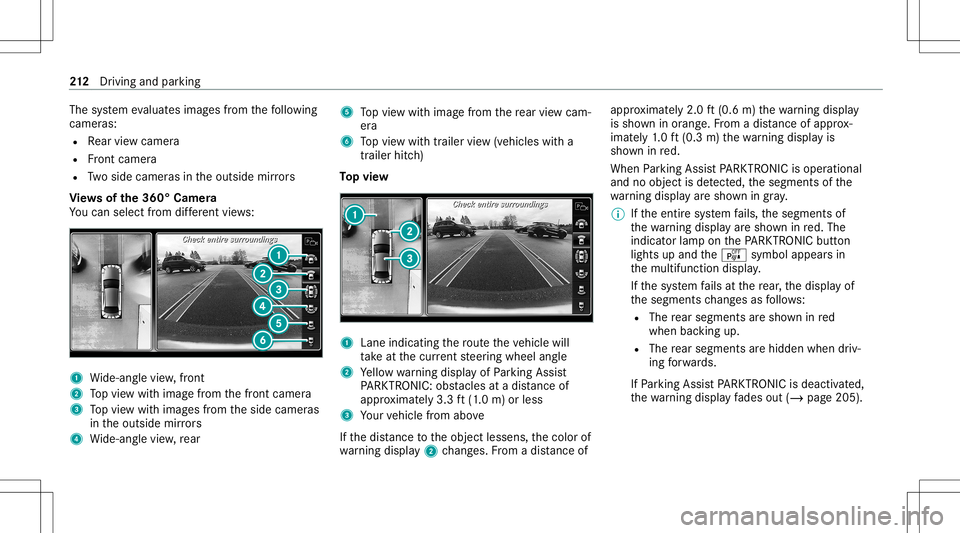
The
system evaluat esimag esfrom thefo llo wing
cameras:
R Rear vie wcam era
R Front camer a
R Twoside camer asintheoutside mirrors
Vi ew sof the360° Camera
Yo ucan selectfrom differe nt vie ws: 1
Wide-ang levie w, front
2 Topvie wwit himag efrom thefront camer a
3 Topvie wwit himag esfrom theside camer as
in theoutside mirrors
4 Wide-ang levie w, rear 5
Topvie wwit himag efrom there ar vie wcam ‐
er a
6 Topvie wwit htrailer view(vehicles witha
tra iler hitch)
To pvie w 1
Lane indicati ngthero uteth eve hicle will
ta ke atthecur rent steer ing wheel angle
2 Yello wwa rning displa yof Parking Assist
PA RK TRONI C:obs tacles atadis tance of
ap prox imat ely3. 3ft (1.0 m) orless
3 Your vehicle from above
If th edis tance totheobjec tlessens, thecolor of
wa rning displa y2 chang es.From adis tance of ap
prox imat ely2. 0ft (0.6 m)thewa rning displa y
is sho wninorang e.From adis tance ofapprox ‐
imat ely1. 0 ft (0.3 m)thewa rning displa yis
sho wninred.
When Parking AssistPA RK TRONI Cis oper ational
and noobj ectis de tected, thesegment sof the
wa rning displa yar esho wningray .
% Ifth eent ire sy stem fails, thesegmen tsof
th ewa rning displa yar esho wninred. The
indicat orlam pon thePA RK TRONI Cbut ton
light sup and theé symbol appearsin
th emultifunc tiondispla y.
If th esy stem fails atthere ar,th edispla yof
th esegment sch ang esasfollo ws :
R The rear segm entsar esho wninred
when backingup.
R The rear segm entsar ehidde nwhen driv‐
ing forw ards.
If Pa rking AssistPA RK TRONI Cis deac tiva ted,
th ewa rning displa yfa des out(/ page205 ). 21
2
Driving and parking
Page 215 of 550
Guide
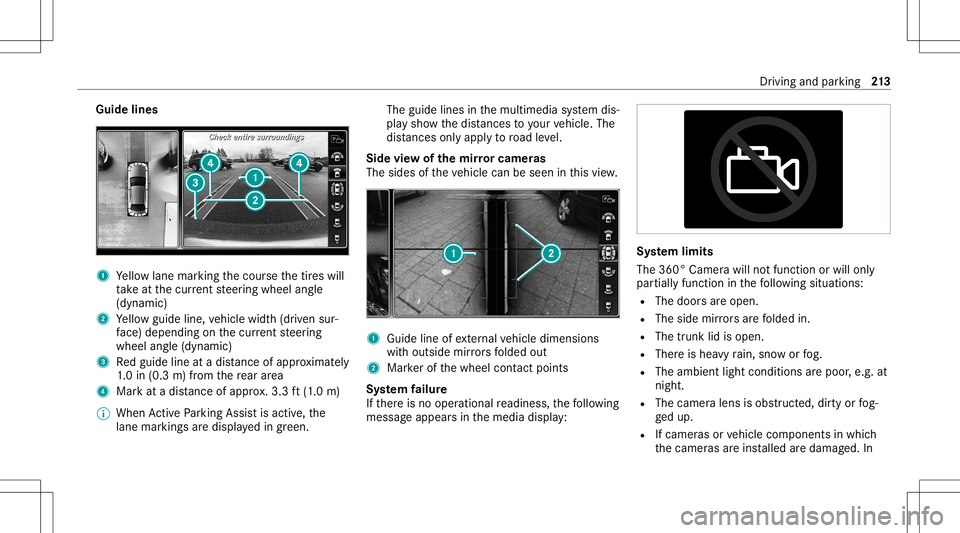
lines 1
Yello wlane markingth ecour sethetir es will
ta ke atthecur rent steer ing wheel angle
(dynamic)
2 Yello wguide line,vehicle width(dr iven sur‐
fa ce) dep endi ngon thecur rent steer ing
wheel angle(dynamic)
3 Redguide lineatadis tance ofapprox imat ely
1. 0 in (0.3 m)from there ar area
4 Markat adis tance ofappr ox.3.3 ft(1.0 m)
% When ActivePa rking Assistis act ive, the
lane markingsaredispla yedin green. The
guide linesinthemultimedia system dis‐
pla ysho wthedis tances toyour vehicle. The
dis tances onlyapply toroad leve l.
Side viewof themir rorca mer as
The side sof theve hicle canbeseen inthis vie w. 1
Guide lineofextern al vehicle dimensions
wit houtside mirrors folded out
2 Markerof thewheel contact poi nts
Sy stem failur e
If th er eis no oper ational readin ess, thefo llo wing
mess ageappear sin themedia display: Sy
stem limit s
The 360° Camera willnotfun ction orwill only
par tiall yfun ction inthefo llo wing situat ions:
R The door sar eopen .
R The side mirrors arefo lded in.
R The trunk lidisopen .
R Ther eis hea vyrain, sno wor fog.
R The ambient lightcondit ionsarepoor ,e.g. at
night.
R The camer alens isobs truct ed, dirtyor fog‐
ge dup.
R Ifcamera sor vehicle component sin whic h
th ecamer asareins talled aredamag ed.In Dr
ivin gand parking 21
3
Page 219 of 550
#
Con firm select edpar king space 4.
% The turnsignal indicat orisswitc hedonaut o‐
matically whenthepar king procedur e
begins. Theturnsignal indicat orisswitc hed
of faut omaticall ywhen youswit chto005B .
Yo uar ere sponsible forsele cting thetur nsignal
indicat orinaccor dance withth etraf fic condi ‐
tions .If neces sary,select thetur nsignal indica‐
to raccor dingly. &
WARNIN GRisk ofacci dent dueto vehi‐
cle swinging outwhile parking orpulli ng
out ofapar king space
While parking orexitin gapar kingspace, the
ve hicle swings outand candrive ont oar eas
of theonc oming lane.
This could cause youto coll ide wi th object s
or other road user s. #
Payatt ention toobject sand other road
user s. #
Wher enec essar y,stop theve hicle or
cancel thepar king procedur ewit h
Ac tivePa rking Assist. #
If,forex am ple, thePlease Engage Reverse
Gear messag eappear sin themedia display:
select thecor responding transmission posi‐
tion.
The vehicle drives intoth eselect edpar king
space.
On com pletion ofthepar king procedur e,the
Parking AssistFinished, TakeContr olof Vehicle
displa ymessag eappear s.Fu rther maneuv ering
ma yst ill be nec essar y. #
Aftercom pletion ofthepar king procedur e,
saf eguar dth eve hicle agains tro lling away.
When requ ired bylegalrequ iremen tsor local
con dition s:tur nth ewheels towa rdsth ecurb.
% Youcan stop theve hicle andchang eth e
tr ans missi on positio ndu ring thepar king pro‐
cedur e.The system then calculat esane w
ve hicle path.The parking procedur ecan
th en be con tinued. Ifno newvehicle pathis
av ailable, thetransmission positionwillbe
ch ang edagain. Ifth eve hicle hasnotye t
re ac hed thepar king space, thepar king pro‐
cedur ewill becanc eled, should age ar be
ch ang ed. Exit
ingapa rking spacewit hAc tiv ePa rking
Assis t
Re quirement s:
R The vehicle hasbeen parkedwit hAc tive
Pa rking Assist.
% Depe ndingon theve hicle's equipment, the
butt onmayalso belocat edatadif fere nt
po sitio nin thecent ercon sole.
Please note that youar ere sponsible forth eve hi‐
cle and surround ingsdur ing theent ire par king
pr ocedur e. #
Startth eve hicle. Dr
iving andparking 217
Page 234 of 550
0076
Rejects /end sa cal l
5 00E2 Calls up thehome screen
6 Touc hCon trol mult imed iasystem
7 0038 Backbutt on Oper
ating theon-boa rdcom puter &
WARNIN GRisk ofdist ra ction from infor‐
mati onsystems andcomm unication s
eq uipment
If yo uoper ateinf ormat ionand comm unic a‐
tio neq uipme ntintegratedin theve hicle
when driving, youwill bedistract ed from the
tr af fic situ ation. Thiscou ldalso cau seyouto
lose control of theve hicle. #
Onlyoper ateth is eq uipmen twhen the
tr af fic situ ation per mits. #
Ifyo ucan notbe sur eof this, stop the
ve hicle whilstpa ying attention toroad
and traffic condi tions andoperate the
eq uipment withth eve hicle statio nary. Obser
vetheleg alrequ iremen tsforth ecount ry
in whic hyo uar ecur rently drivi ng when operat‐
ing theon- boar dcom puter.
% The on-boar dcom puterdispla yswill appear
on themultifunc tiondispla y(/ page234). The
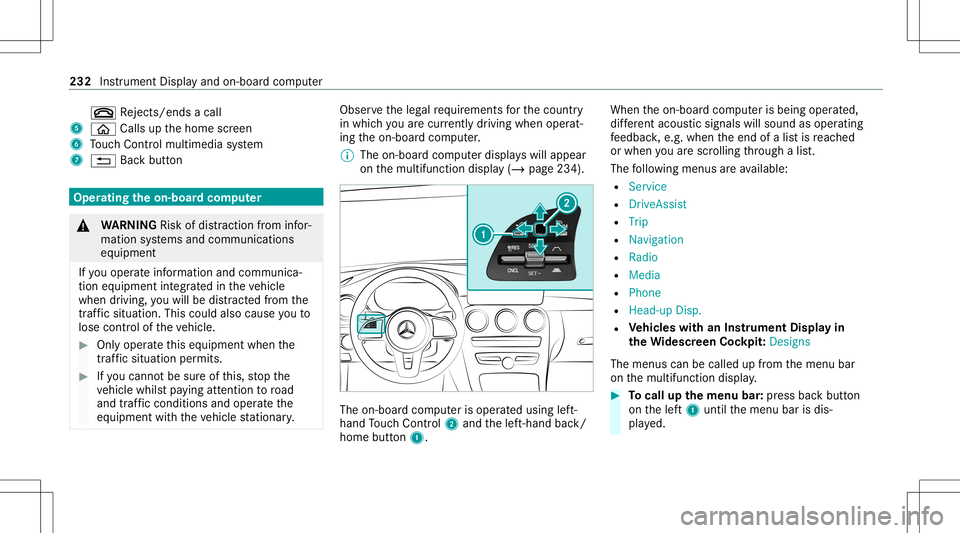
on-boar dcom puterisoper ated using left-
hand Touc hCon trol 2 and thelef t-hand back/
home button1. When
theon- boar dcom puterisbeing operated,
dif fere nt aco ustic signa lswillsou ndasoperati ng
fe edbac k,e.g. when theend ofalis tis reac hed
or when youar esc rolling thro ugh alis t.
The follo wing menusareav ailable:
R Service
R DriveA ssist
R Trip
R Navi gation
R Radio
R Media
R Phon e
R Head -upDisp.
R Vehicl eswith anIns trument Displayin
th eWi des cree nCo ckpit: Desi gns
The menu scan becalled up from themenu bar
on themultifunc tiondispla y. #
Tocall upthemenu bar:press backbutt on
on thelef t1 until themenu barisdis‐
pla yed. 232
Instrument Displayand on-boar dcom puter
Page 238 of 550
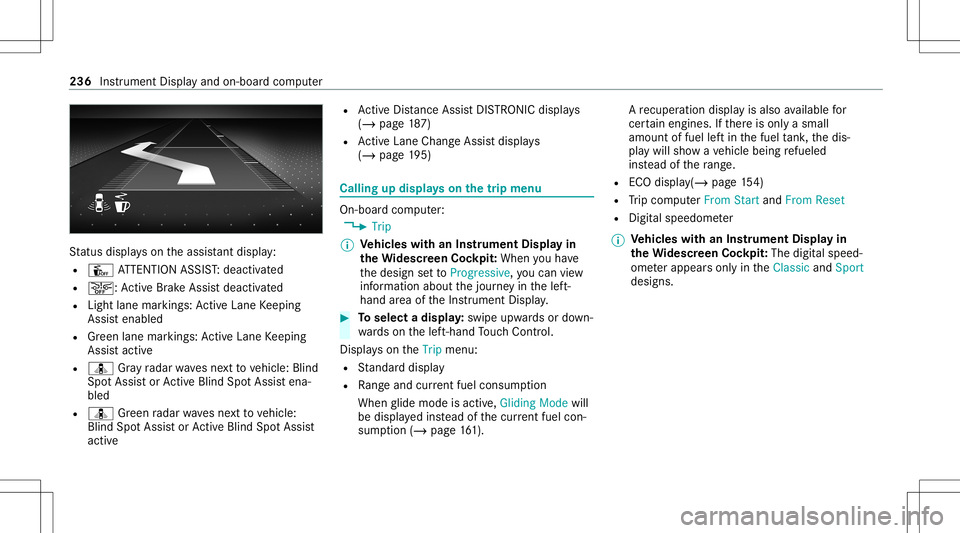
St
atus displa yson theassis tant displ ay:
R Û ATTENTION ASSIST: deactiv ated
R 00D4: ActiveBr ak eAssi stdeactiv ated
R Light lanemarkings: ActiveLa ne Keeping
Assis tenabled
R Green lane marking s:Ac tiveLa ne Keeping
Assis tactiv e
R ¸ Gray radar wavesnext to vehicle: Blind
Spo tAssis tor ActiveBli nd Spo tAssi stena‐
bled
R ¸ Green radar wavesne xt to vehicle:
Blind SpotAssis tor ActiveBli nd Spo tAssi st
act ive R
ActiveDis tance AssistDIS TRONI Cdisp lays
( / pag e18 7)
R ActiveLa ne Chang eAssi stdispla ys
( / pag e19 5) Ca
lling up displ ayson thetrip menu On
-bo ardcom puter:
4 Trip
% Ve
hicl eswith anIns trument Displayin
th eWi des cree nCo ckpit: Whe nyo uha ve
th edesign setto Progressive ,yo ucan view
inf ormat ionabout thejour neyin thelef t-
hand area oftheIns trument Display. #
Toselect adispla y:swipe upwards ordown‐
wa rdson thelef t-hand Touc hCon trol.
Dis playson theTrip menu:
R Standar ddispla y
R Rangeand current fue lconsu mption
Wh englide mode isact ive, Gliding Modewill
be displa yedins tead ofthecur rent fue lcon‐
su mp tion(/ page 161). A
recup erati on displ ayisalso available for
cer tain engin es.Ifth er eis onl ya small
amount offuel leftin thefuel tank ,th edis‐
pla ywill showave hicle being refuel ed
ins tead ofthera ng e.
R ECOdispl ay(/ pag e15 4)
R Trip com puterFro mStart and FromReset
R Digit alspeedom eter
% Ve
hicl eswith anIns trument Displayin
th eWi des cree nCo ckpit: The digit alspe ed‐
ome terapp earsonly intheClassic andSport
designs. 236
Instrument Displayand on-boar dcom puter
Page 241 of 550
R
New Route... orCal culating Route...:a ne w
ro uteis bein gcalc ulated.
R Road NotMappe d:th ero ad isunk nown, e.g.
fo rne wly builtro ads.
R NoRout e: no routeco uld becalc ulatedto
th eselect eddes tinat ion.
R Off Map: themap forth ecur rent locati onis
no tav ailable.
R Area ofDe stinat ionReach ed:youha ve
re ac hed thear ea ofthedes tinat ion.
R 004B: youha ve reac hed thedes tinat ionoran
int ermediat edes tinat ion. #
Toexitth emenu :pr ess thebac kbutt onon
th elef t.
Ve hicl eswith theCOMAN Dmu ltim edia sys‐
te m: Youcan also star tna vig atio nto one ofthe
re cent destina tions ontheNavigation menu: #
Press thelef t-hand Touc hCon trol. #
Toselect ades tinat ion:swipe upwards or
do wn wardson thelef t-hand Touc hCon trol. #
Press thelef t-hand Touc hCon trol.
Ro uteguidan cewill star t. If
ro uteguidan cehas already been activat ed,
a qu erywill appear askingwhether youwish
to end thecur rent routeguidan ce. #
Select Yes. #
Press thelef t-hand Touc hCon trol.
Ro uteguidan cewill star t. Select
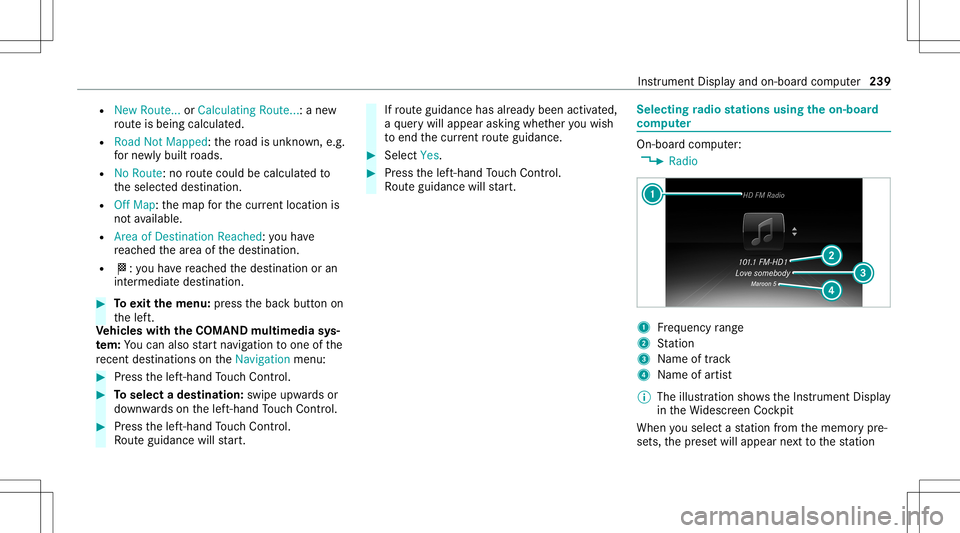
ingradio station susin gth eon-boa rd
com puter On-boar
dcom puter:
4 Radio 1
Freq uency rang e
2 Statio n
3 Name oftrac k
4 Name ofartis t
% The illus tration showstheIns trument Display
in theWi descr eenCockpit
When yousele ctast atio nfrom thememor ypr e‐
se ts, thepr ese twill appear next to thest atio n In
stru ment Displa yand on-boar dcom puter 239
Page 246 of 550
No
teson oper ating safety &
WARNIN GRisk ofdist ra ction from infor‐
mati onsystems andcomm unication s
eq uipment
If yo uoper ateinf ormat ionand comm unic a‐
tio neq uipme ntintegratedin theve hicle
when driving, youwill bedistract ed from the
tr af fic situ ation. Thiscou ldalso cau seyouto
lose control of theve hicle. #
Onlyoper ateth is eq uipmen twhen the
tr af fic situ ation per mits. #
Ifyo ucan notbe sur eof this, stop the
ve hicle whilstpa ying attention toroad
and traffic condi tions andoperate the
eq uipment withth eve hicle statio nary. &
WARNIN GRisk ofan acci dent from
ope rating mob ile comm unicati onequip ‐
ment while th eve hicle isin mo tion
Mobile communication sde vices distract the
dr iver from thetraf fic situ ation. Thiscou ld al
so cau sethedr iver tolose control of the
ve hicle. #
Asthedr iver ,onl yoper atemobile com‐
municat ionsdevices when theve hicle is
st atio nary. #
Asave hicle occupant, onlyuse mobile
communication sde vices inthear eas
int ended forth is pur pose, e.g.inthe
re ar passe nger com partment . &
WARNIN GRisk ofinju rydue toobject s
being stowe dincor rectl y
If obje ctsintheve hicle interior arestowe d
inc orrectly ,th ey can slide orbe throw n
ar oun dand hitvehicle occupants. Inaddi‐
tion, cupholder s,open stow agespac esand
mobi lephon ere cep tacle scanno tal wa ys
re tain all obje ctsth ey cont ain.
The reisarisk ofinjur y,par ticular lyin the
ev ent ofsudden braking orasudden chang e
in dir ect ion. #
Alw aysst ow object sso that they can‐
no tbe throw nar ou nd insuch situa‐
tions. #
Alw aysmak esur eth at obj ect sdo not
pr otru de from stow agespac es,lugg age
ne ts or stow agene ts. #
Close theloc kable stow agespac es
bef orest ar tin gajo ur ne y. #
Alw aysst ow and securehea vy,har d,
poin ted, shar p-edg ed,fragile orbulky
objec tsinthetrunk/ loadcompartmen t. Fo
ryo ur ow nsa fety,al wa ys obser vethefo llo w‐
ing point swhen operatingmobile communic a‐
tion seq uipmen tand espec iallyyo ur voice con ‐
tr ol system:
R Obser vetheleg alrequ iremen tsforth ecoun‐
tr y in whic hyo uar edr ivin g.
R While drivin g,on lyop eratemobi lecom mun i‐
cat ionseq uipme ntand your voice con trol
sy stem when thetra ffic con dition sper mit it.
Yo uma yot her wise bedistract ed from the
tr af fic condi tions andcausean acci dent,
inju ring yourself and other s. 24
4
Voice Cont rolSy stem
Page 248 of 550
Oper
ablefunctions Yo
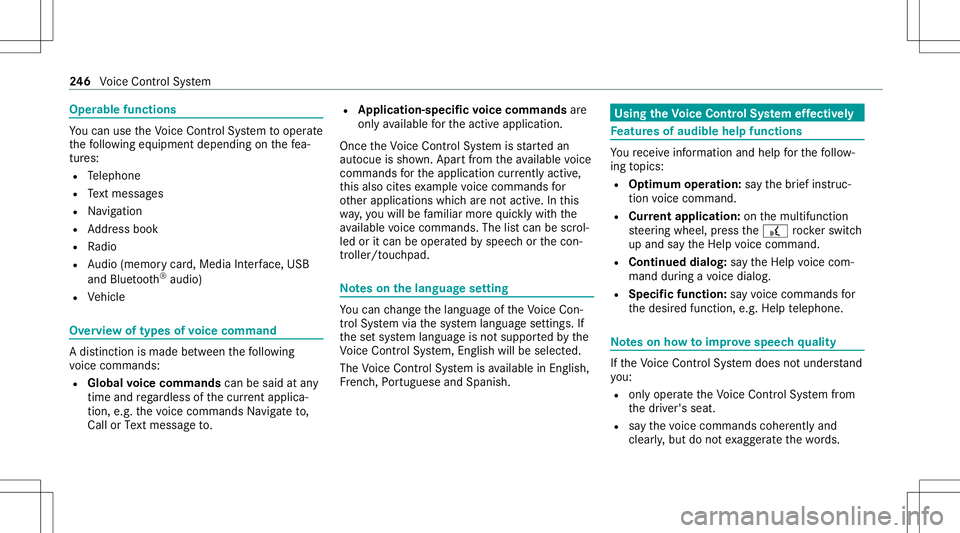
ucan usetheVo ice Cont rolSy stem tooper ate
th efo llo wing equipmen tdepen dingonthefe a‐
tur es:
R Telephon e
R Text mes sage s
R Navig ation
R Address book
R Radio
R Audio (memor ycar d,Media Interface, USB
and Bluetoo th®
audio)
R Vehicle Ov
ervie wof types ofvoice comm and A
dis tinction ismade between thefo llo wing
vo ice com mand s:
R Global voice comm andscan besaid atany
time andrega rdless ofthecur rent applica ‐
tio n,e.g .th evo ice com mand sNavigat eto,
Call orText mess ageto. R
App licat ion-sp ecificvo ice comm andsar e
onl yav ailable forth eactiv eapplication.
Onc eth eVo ice Cont rolSy stem isstar tedan
aut ocue issho wn. Apar tfr om theav ailable voice
com mand sfo rth eapplication currently active,
th is also cites exam ple voice com mand sfo r
ot her appli cations whichar eno tactiv e.In this
wa y,yo uwill befamili armor equ ickl ywit hth e
av ailable voice com mand s.The listcan bescrol‐
led oritcan beopera tedby speec hor thecon ‐
tr oller/t ouchpad. No
teson thelangu agese tting Yo
ucan chang eth elanguag eof theVo ice Con‐
tr ol Sy stem viathesy stem languag ese ttings. If
th ese tsy stem languag eis no tsuppor tedby the
Vo ice Cont rolSy stem, English will beselec ted.
The Voice Cont rolSy stem isavailable inEn glish,
Fr enc h,Po rtuguese andSpan ish. Using
theVo ice Contr olSy stem effectiv ely Fe
atur esofaudibl ehelp functions Yo
ure cei veinformatio nand help forth efo llo w‐
ing topics:
R Optim um oper ation: sayth ebrief instruc-
tion voice com mand .
R Cur rent app lication: onthemultifunc tion
st eer ing wheel, press the£ rock er switc h
up and sayth eHelp voice com mand .
R Continu eddia log: sayth eHelp voice com ‐
mand during avo ice dialog.
R Specif icfunct ion:sayvo ice com mand sfo r
th edesir edfunc tion,e.g. Help telephon e. No
teson howto improve speec hqu ality If
th eVo ice Cont rolSy stem does notunder stand
yo u:
R onlyop erateth eVo ice Cont rolSy stem from
th edr iver's seat.
R sayth evo ice com mand scohe rentl yand
cle arly,bu tdo notex agg erateth ewo rds. 24
6
Voice Cont rolSy stem
Page 255 of 550
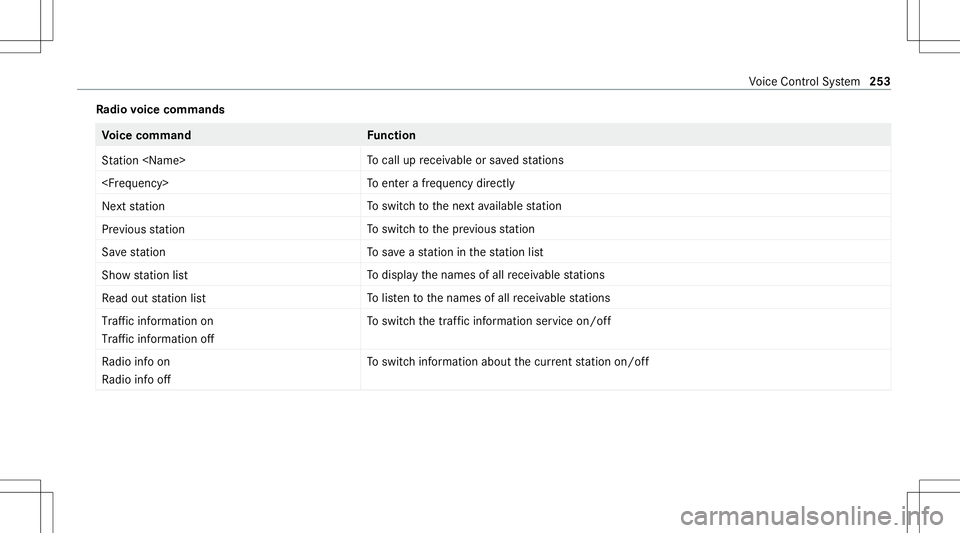
Ra
dio voice comm ands Vo
ice comm and Function
St ation
cal lup recei vable orsave dstatio ns
ent erafreq uency direct ly
Next station To
switc hto thene xt available statio n
Prev ious statio n To
switc hto thepr ev ious statio n
Sav est atio n To
save ast atio nin thest atio nlis t
Sh ow statio nlist To
displa yth enames ofall recei vable statio ns
Read outstatio nlist To
listento thenames ofall recei vable statio ns
Traf ficinform ationon
Traf ficinform ationoff To
switc hth etraf fic inf ormati onser vice on/of f
Ra dio info on
Ra dio info off To
switc hinf ormation aboutthecur rent statio non /of f Vo
ice Cont rolSy stem 253