navi MERCEDES-BENZ E-Class WAGON 2011 S212 Comand Manual
[x] Cancel search | Manufacturer: MERCEDES-BENZ, Model Year: 2011, Model line: E-Class WAGON, Model: MERCEDES-BENZ E-Class WAGON 2011 S212Pages: 234, PDF Size: 8.64 MB
Page 190 of 234

i
Bypre ssing this functi onbutton
rep eatedl y,yo uc an cha nge theoperating
mod eint he follow ing order:
R au dioC D/DVD, video DVD orMP3 disc
in the DVD changer
R memo rycard mode
R MUSIC REGISTER
R USB stora gedev ice
R Med iaInterfa ceoraudioA UX mod e
R Blu etoo th®
au diom ode
X Sele ctMedi a by
sliding VÆ andturni ng
cVd theCOMAND controllera nd pre ss
W toconfir m.
X Sele ctaý video DVD from themed ialist
(Y page 190).
Optio n3 X
Sele ctVide o in
the mainfuncti onbarb y
sli ding ZV andturni ngcVd theCOMAND
control lera nd pre ssW toconfi rm.
Vi de oD VD mod eiss witch edon. Hidi
ng/show ingt he nav igatio nmenu
X To dis play :sl id e ZVÆ theCOMAND
contro ller.
i Thisfun ctio nisn otavail able while the
DVD's ownmenu (Ypage 190)isbeing
displa yed.
X To hide: slideZVÆ theCOMAND
cont roller.
or
X Wait forapproximately eightseconds. Navigation
menudisplayed
: Disc type
; Current title
= Current scene
? Track time
A Toshow themenu Showin
g/hiding themenu
This function isnot avail able while theDVD's
own menu (Ypage 190)isbeing displayed.
X To display: infull-screen mode,pressW
the COMAND controller.
or
X Select Menu while
thenavigation menuis
shown andpress Wtoconfirm.
X To hide: slideZVtheCOMAND controller
and confirm FullScreen by
pressing W. Menu
shown
: Video DVDoptions
; Pause function
= Stop function 188
Video
DVDmodeVideo
Page 191 of 234
?
Media selection
A Sound settings Fast
forward ing/rew inding
X In full-screen mode,slideXVY andhold the
COMAND controller untilthedesired
position hasbeen reached.
or
X Press andhold theE orF button
until thedesired position isreached.
You seethenavigation menu. Stop
function
X Press Wthe COMAND controller toshow
the menu.
X To interru ptplayback: selectÉby
turning cVdtheCOMAND controller and
press Wtoconfirm .
The Ë displa ychanges toÌ.T he
video image ishidden.
X To continue playback: selectÌand
press Wtoconfirm .
Play back continues fromthepoint where it
was interrupted.
X To stop playback: whileplayback is
interrupted, selectÉagain andpress
W toconfirm .
or
X During playback, confirm Ébypressing
W twice inrapid succession.
Ì ishighlighted.
X To restar tplayback: confirmtheÌ
selection bypressing W.
Play back restarts fromthebeginning. Pause
function
X Press Wthe COMAND controller toshow
the menu.
X To pause playback: selectËby
turning cVdtheCOMAND controller and
press Wtoconfirm .
The Ë displa ychanges toÌ.
X To continue playback: selectÌand
press Wtoconfirm .
The menu ishidden. Selec
tingascene/ch apter
If th ef ilm isdivi ded intos cene so rchapters ,
you can selectthem dire ctly while thef ilm is
run ning,or skip for wards step- by-s tep. So me
DV Ds donotpermit thisatcert ainpoint s(e.g.
during theopenin gcredit s).
It may alsobepossible toselect thescen e/
chapter fromwithin themenu storedon the
DVD .
X To skip forwar dsorback: infull-scr een
mode, turncVd orslide XVY the
COMAND controller.
or
X Press theE orF button onthe
con trol panel.
The navigation menu(Ypage 188)appears
for approximat elyeight secon ds. Selecting
afilm/t itle
This function isonly available ifthe DVD is
divided intos ever alfilms /titles .Ift he DVD
cont ains several films,these canbeselected
directly. Afilm can beselec tedeitherwhen
the DVDisb eing playedback orwhen itis
stopped.
The film canalso beselected fromthemenu
on the DVD itself. Video
DVDmode
189Video Z
Page 194 of 234

Int
era ctive cont ent
DV Ds can contain interac tive conten t(e.g. a
vide ogame ).In av ide og ame ,for example ,
you may beable toinfluen ceeve ntsb y
sele cting and trigge ringa ction s.The typeand
num berofact ionsdepe ndontheD VD.
X Se lec tana ction bysliding ZVÆ orXVY the
CO MAND controllera nd pre ssW to
exe cute it.
Am enu appe arsa nd the first entry ,
Sel ect ,i
sh ighl ighted .
X Pre ssW the COMAND controller. AU
Xv ideo mode Co
nnectin ge xtern alvideo source s
If yo ur veh iclei se quippe dwithaM edia
Inter face (Y pa ge 178) ,you can conne ctan
exte rnalvideo sou rce (AUXvideo).
The 1/8inch audio/vi deoj ack sareinthe
cen terc onsole stowage compartment.
i Invehicles witharear view camera, the
AUX video jackcann otbe used forexter nal
video sources. Switching
toAUX video mode
X Select Video in
the main functionbar by
sliding ZVandturnin gcVd theCOMAND
cont roller andpress Wtoconf irm.
If AUX video mode wasthelast mode
selected, itwill now beactive.
If another videosource isswitched on,you
can now switch toAUX video mode inthe
video menu.
X Select Video and
press Wtoconf irm.
X Select Aux and
press Wtoconf irm.
The AUX video menu appears. Youwillhear
and seethecont entofthe exter nalvideo
source ifit is conn ected andswitched to
playb ack. AUX
video mode
For details onhow tooperate theexter nal
video source, seetherespect ivedevice's
operating instructions. Showing/hiding
themenu
X To show: pressWthe COMAND
cont roller.
X To hide: slideZVtheCOMAND controller
and conf irmFull Screen by
pressing W. Volume
andsound settings
You willfind details onvolume (Ypage 33)
and sound (Ypage 34)settings inthe "Ata
glance" section. G
WARNIN
G
Ext ernal video sources mayhave different
volumes, whichcanmean thatsystem
messages suchastraffic announc ementsand
navigation systemannounc ementsaremuch
louder. Ifnecessary, pleasedeactivate the
system messages oradjust theirvolume
manually.
i Itmay bethe case thatadevice which is
conn ected asan exter nalvideo source
seems quieter orlouder inthe vehicle, or
that theusual maximum volumecannotbe
reached. Onsome devices, itis possible to
adjust thevolume separately. Inthis case,
start atam edium volume andincrease it
graduall y.This enables youtodetermin e 192
AUX
video modeVideo
Page 216 of 234
i
The headphones' volumesettingdoes not
affect themain loudspeakers. Adjust
ingthe sound settings
You canselect thesound settings inthe audio
CD/D VD/MP3, video DVDandAUX modes.
X Switc honano perating mode(e.g.audio
CD mode) (Ypage 217).
X Select Treble or
Bass using
the :=; buttonsonthe remote
cont roland press the9button toconf irm.
An adjustmen tscal ea ppears.
X Sel ect asetti ngusing the 9:
bu ttons andpressthe 9button toconfi rm. Multi
pleusers
Simul taneoususeofthe rear-
co mpartment discdrive The
two rear-comp artmentscree nscan be
ope rate dalmost entir elyi nd epe ndentl yfrom
one another. However,there canbeaconfl ict
in some menusifthe two scree nsare used
sim ultaneo usly.
If the rear-comp artmentdisc drive isbei ng
us ed for both scree nssim ultaneo usly,
sel ecting certainmenu sorsetti ngs onone of
the scree nsalso affe ctsthe othe rscree n.
The followi ng functi onsaffectboth scree ns:
R cha nging play ba ck opti ons
R sel ecting atrack (fromat rack list or folder)
R us ing the play ,p ause and stopfunctio ns
R fast for wa rding/r ewind ing orscro lling
R cal ling up the DVD menu andnavigati ng
wi thi nit
R setting thelangua ge,subtitles andcamera
angle
R calling upinteract iveDVD content The
followi ngfunction saffect onlyone
screen:
R audi oand video function sasw ellaspicture
settings
R switching betweenfullscreen andthe
menu
Switching betweenoperating modes When
youexit anoperating mode(e.g.audio
CD mode), thecurrent settingissaved. Ifyou
call upthis operating modeagainlate r,th ere
are two poss ibilities:
R theo per atin gmodeh asbeen chang edon
th eo ther scree n.
R theo per atin gmodeh asnotb een changed.
In the first case, theoperatin gmode appears
as itis on the other screen .
In the secon dcase, thesett ingappears onthe
screen asitwas when youlast exitedthe
operatin gmode. Pictur
esettings
Overview You
canselect thesesettings invideo DVD
and AUX mode. Instruct ions forAUX mode
are detailed later(Y page 228).
Adju sting thebright ness,contra stand
color X
Switc honvideo DVD mode (Ypage 221).
X To show themenu: pressthe9button
on the remot econtrol.
or
X Select (Ypage 188)Menu while
the
navigation menuisshown andpress the
9 button tocon firm.
X Select DVD-Vid eo using
the :=; buttonsand press the
9 button tocon firm. 214
Ba
sic functionsRear
Seat
Entert ainment System
Page 223 of 234

X
Sel ect Displa yTrack Inf ormation us
ing the 9: buttons andpressthe
9 button toconfi rm.
The functi onissw itche donOor offª,
de pe ndi ng on the previous statu s. Vide
oDVD mode Gen
eral informati on
Here youw illf ind further informa tion onthe
fol lowi ng topi cs:
R sa fety notes (Ypage 154)
R notes onDVDs (Y pa ge 186) DVD
playbackcondit ions
Playback problems mayoccurwhen playing
cop ieddisc s.Ther eisal arge varietyo fdisc s,
DV Da uth oring sof twar e,writ ingsoftwar eand
writ ersavailab le.This varietym ean sthat
th ere isno guaran teet hatthe Rear Seat
En tertainm entS yst em will beable toplay
vid eo DVDs that you havecopied yourself.
You willfind further informationinthe Video
section (Ypage 187). Information regarding
COMAND alsoapplies tothe Rear Seat
En tert ainment System. Function
restrictions
Dependin gonthe DVD ,iti sp ossible that
cert ainfunct ionsoractions described inthis
section willbetemporarily blockedormay not
funct ionatall. Assoon asyou trytoactivate
these functionsoractions ,you will see the
K symbol inthe display . Inserting
andremoving aCD/DVD
X Proc eed asdes cribed inthe" Audio CD/
DV Da ndMP3 mode"sec tion
(Y page 216) . Sw
itchin gtov ideo DVD mode
X Inse rtav ideo DVD.
The RearSea tEnterta inmentSys tem load s
the disc.
If disc mod ewasthe last mod eselecte d,it
wi llnow beacti ve.
If it wa sn ot, switch onvideo DVD modeas
de scri bedint he followi ng instructio n.
X Sel ect Disc in
the menu using the
9=; buttons onthe rem ote
contro land confi rmbypre ssing the 9
bu tton.
If the video DVD fulfillst he play ba ck
cri teri a,the filme ithe rstar tsautoma tically
or the menu saved onthe DVD appe ars. If
the DVD menu appe ars, yo um usts tart the
fi lm ma nua lly.
X Sel ect the corr espo ndi ngmenu itemi nthe
DVD menu. Hiding/show
ingthe navigation menu
X To show: pressthe9 or: button
on the remote control.
X To hide: press the9 or: button.
or
X Wait forapproximately eightseconds. Navigation
menu
: Disc type
; Current title
= Current scene Video
DVDmode
221RearSeatEntertainment System Z
Page 224 of 234
?
Track time
A Toshow themenu Showing/hiding
themenu
X To show: pressthe9button onthe
remote control.
or
X Select Menu while
thenavigation menuis
shown andpress the9button toconf irm.
X To hide: press the9 button ,select
Full Screen and
press the9button to
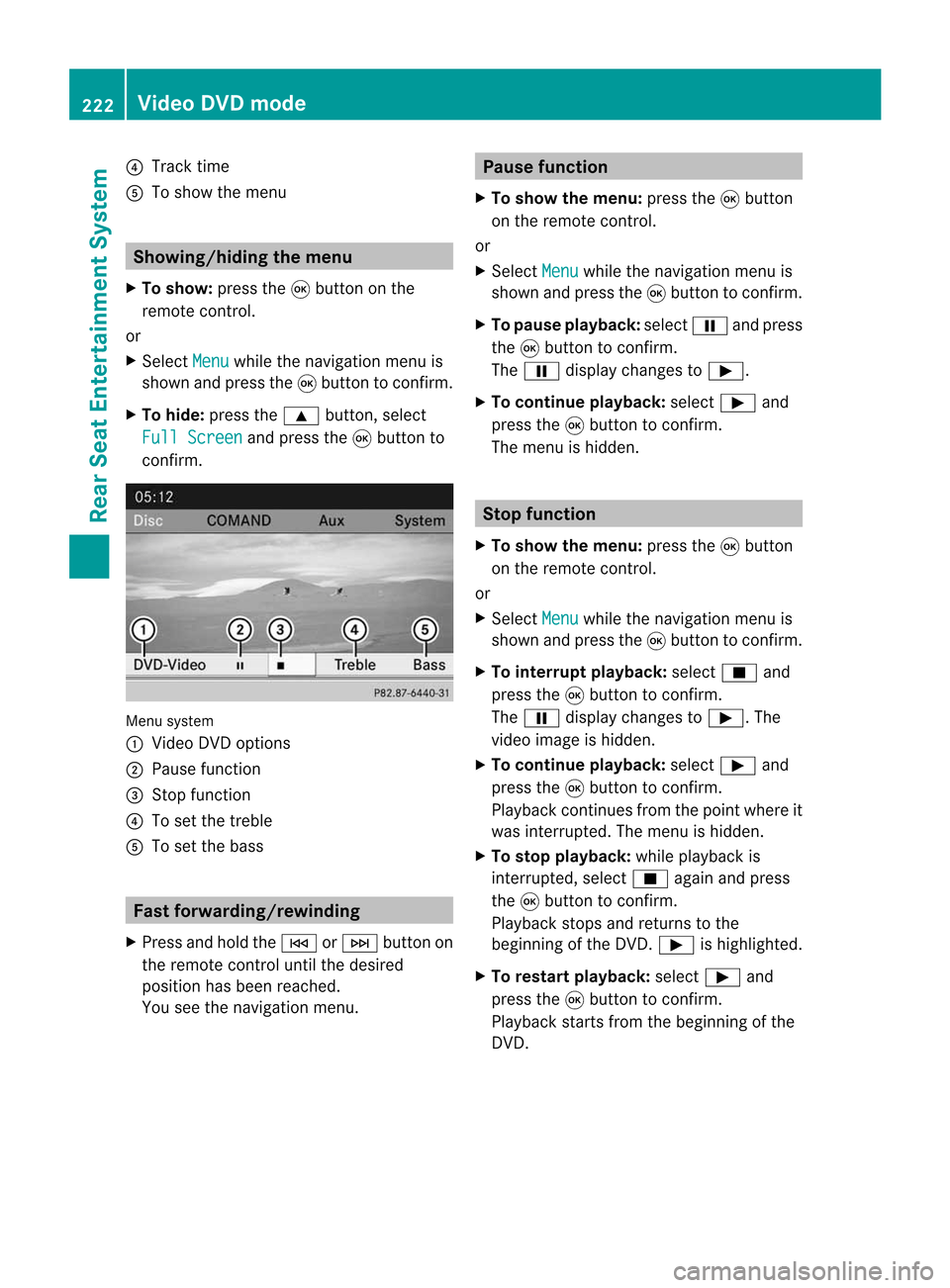
conf irm. Menu
system
: Video DVDoptions
; Pause function
= Stop funct ion
? Toset the treble
A Toset the bass Fast
forwar ding/rewinding
X Press andhold theE orF button on
the remote controluntil thedesired
position hasbeen reached.
You seethenavigation menu. Pause
function
X To show themenu: pressthe9button
on the remote control.
or
X Select Menu while
thenavigation menuis
shown andpress the9button toconf irm.
X To pause playback: selectËandpress
the 9button toconf irm.
The Ë display changes toÌ.
X To continue playback: selectÌand
press the9button toconf irm.
The menu ishidden. Stop
function
X To show themenu: pressthe9button
on the remote control.
or
X Select Menu while
thenavigation menuis
shown andpress the9button toconf irm.
X To interr uptplayback: selectÉand
press the9button toconf irm.
The Ë display changes toÌ.T he
video image ishidden.
X To continue playback: selectÌand
press the9button toconfirm .
Play back continues fromthepoint where it
was interrupted. Themenu ishidden.
X To stop playback: whileplayback is
interrupted, selectÉagain andpress
the 9button toconfirm .
Play back stops andreturns tothe
beginning ofthe DVD .Ì ishighlighted.
X To restar tplayback: selectÌand
press the9button toconfirm .
Play back starts fromthebeginning ofthe
DVD . 222
Video
DVDmodeRear
Seat
Entertainment System
Page 225 of 234
Selec
tingascene/ch apter
Not e Fur
ther inform ation onthis fun ction is
availab lein the" Vide o"sec tion
(Y page 189).
Ski pping forwar ds/back wards X
Pre ssthe= or; buttono nthe
rem otec ontro l.
or
X Pre sstheE orF button.
The navigat ionmen u(Ypage 188)appear s
for appr oximat elyeigh tsecon ds.
Selecting ascene/ch apter directl y The
example sillust rateh ow tosele ctscen e/
ch apt er5.
X Op tion1 :while thef ilm isplayin g,pre ss
th eh buttono nthe rem otec ontro l.
X Pre ssthec orrespo nding num berkey,suc h
as 5.
X Op tion2 :while thef ilm isplayin g,pre ss
th e9 buttono nthe rem otec ontro land
sho wthe men u.
X Se lec tDVD -Vi deo and
pressthe9 but ton
to confirm .
X Se lec tDVD Functi ons and
pressthe9
but tont oc onfirm.
X Se lec tSce ne Selection and
pressthe
9 buttont oc onfirm.
X Se lec t5 usin
gthe 9 or: buttona nd
pre ssthe 9button toconfi rm.
In bo th cas es, play ba ck willbe ginf rom the
fifth scene/chap terafter abriefp ause. Select
ingafilm/t itle
Not e Furt
herinformat iononthis func tion is
available inthe "Video" section
(Y page 189). Opt
ion 1 X
Press the9butt ononthe remo tecon trol
and show themen u.
X Selec tDVD- Video and
press the9butt on
on the remo tecon trol to con firm . X
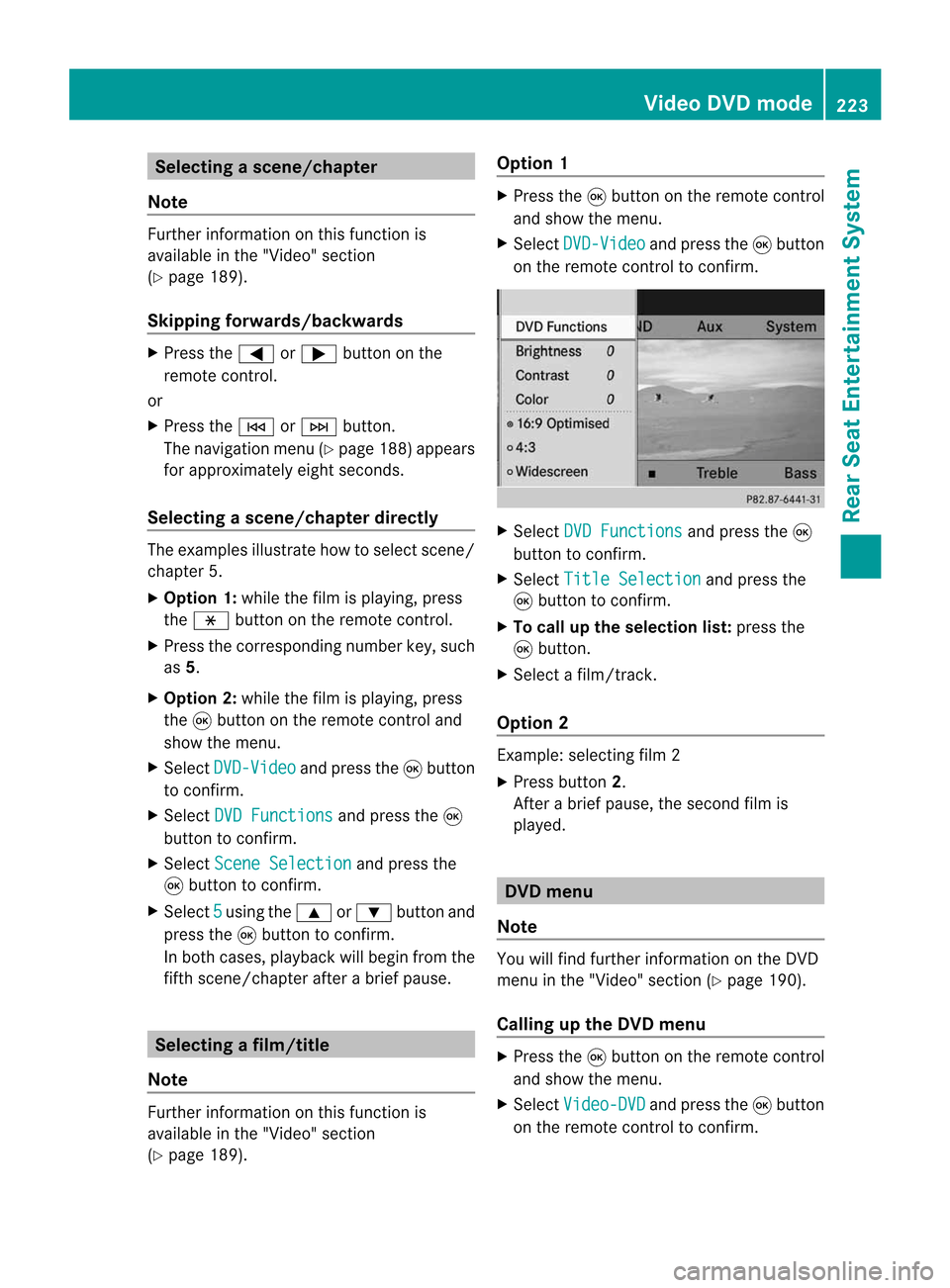
Selec tDVD Functions and
press the9
butt ontocon firm .
X Selec tTitl eSelectio n and
press the
9 butt ontocon firm .
X To call upthes election list:press the
9 butt on.
X Selec tafilm/ track .
Opt ion 2 Ex
ample: selectingf ilm 2
X Press button2.
Af ter abrief pause, theseco ndfilm is
played. DVD
menu
Not e You
willfindf urt her informat iononthe DVD
men uint he "Video" section(Ypage 190).
Calling uptheD VD menu X
Press the9butt ononthe remo tecon trol
and show themen u.
X Selec tVide o-DVD and
press the9butt on
on the remo tecon trol to con firm . Vid
eoDVD mode
223Rea rS
eat Enter tainment
System Z