ad blue MERCEDES-BENZ E-Class WAGON 2011 S212 Comand Manual
[x] Cancel search | Manufacturer: MERCEDES-BENZ, Model Year: 2011, Model line: E-Class WAGON, Model: MERCEDES-BENZ E-Class WAGON 2011 S212Pages: 234, PDF Size: 8.64 MB
Page 37 of 234
X
Sel ect abalan ce setti ngbysliding XVY the
CO MAND controllera nd pre ssW to
confi rm.
X Sel ect afader setting byslidin gZVÆ the
COM AND controllera nd press Wto
con firm.
The settingisstor edand youexit themenu. Sur
round sound
General information If
your vehicle isequipped withtheharman/
kardon ®
Logic7 ®
surround soundsystem,
you can setthe optimum surround soundin
the vehicle interior.
The harman/ kardon®
Logic7 ®
surround
sound system isavailable forthe following
operatin gmodes:
R radio (FMonly)
R satellite radio
R audio CD
R audio DVD(MLP, dts,PCM andDolby
Digit alaudio format s)
R MP3 (including SDmemory cardandUSB
stor age device)
R Media Interface
R Bluetoot h®
audio mode
R video DVD(PCM, dtsand Dolby Digital
audio format s)
R AUX
Because someDVDscontain both stereoand
multichan nelaudio format s,itmay be
nec essary toset the audio format
(Y page 163).
i The Logic7 ®
On func
tion creat esa
surround soundexperien cefor every
passenger whenplaying, forexample,
ster eorecor dings. Itenables optimum
playback ofmusic andfilms onCD, audio
DVD orvideo DVDwithmultichan nelaudio
format s,such asMLP, dtsorDolby Digital.
This results insound charact eristicslike those
intended bythe sound engineer
when theoriginal wasrecor ded.
i Ifyou select Logic7 ®
Off ,a
llpermissible
format sareplayed asstor edon the
medium. Duetothe design ofthe
passenger compartment,ano ptimum
audio experien cecann otbe guaranteed for
all passengers .
i Disc swhich support theaudio format s
ment ioned havethefollowing logos: Dolby
Digital dts
MLP
Switching surround sound on/off The
example describes howtoset the
surround soundforradio mode.
X Press the$ function button .
The radio display appears. Youwillhear the
last stationplayed onthe last waveband. Ba
sic functions ofCOMAND
35Atag lance Z
Page 41 of 234
COMAN
Dfeatures <003B003B003B003B003B003B003B003B003B003B003B003B003B003B003B003B
003B003B003B003B003B003B003B003B003B003B003B003B003B003B003BV 40
Display settings <003B003B003B003B003B003B003B003B003B003B003B003B003B003B003B003B
003B003B003B003B003B003B003B003B003B003B003B003B003B003B003B003B
003B003B> 40
Tim esettings .......... .................. .... .... .. . 40
Fuel consump tiondispla y<003B003B003B003B003B003B003B003B003B003B003B003B003B003B003B003B
003B003BV 41
ON&OFFROAD display........ .......... ...... . 42
Text readersett ings ........ .......... ...... .... 42
Voice Control System settings .......... 42
Bluet ooth®
sett ings <003B003B003B003B003B003B003B003B003B003B003B003B003B003B003B003B
003B003B003B003B003B003B003B003B003B003B003B003BV 44
Sett ingthe system language .............45
Assigning thefavor itesbutton.......... 45
Impor ting/expor tingdata<003B003B003B003B003B003B003B003B003B003B003B003B003B003B003B003B
003B003BV 46
Reset function <003B003B003B003B003B003B003B003B003B003B003B003B003B003B003B003B
003B003B003B003B003B003B003B003B003B003B003B003B003B003B003B003B
003B003B003B003B003B> 47 39System
sett
ings
Page 46 of 234
X
Sel ect Yes or
No and
pressW toconfi rm.
If yo us elect No ,i
nd ividu aliza tion willbe
cance led. The data from thefirst partis
store dautoma tically.
If yo us elect Yes ,t
he seco ndpartwi llbe gin.
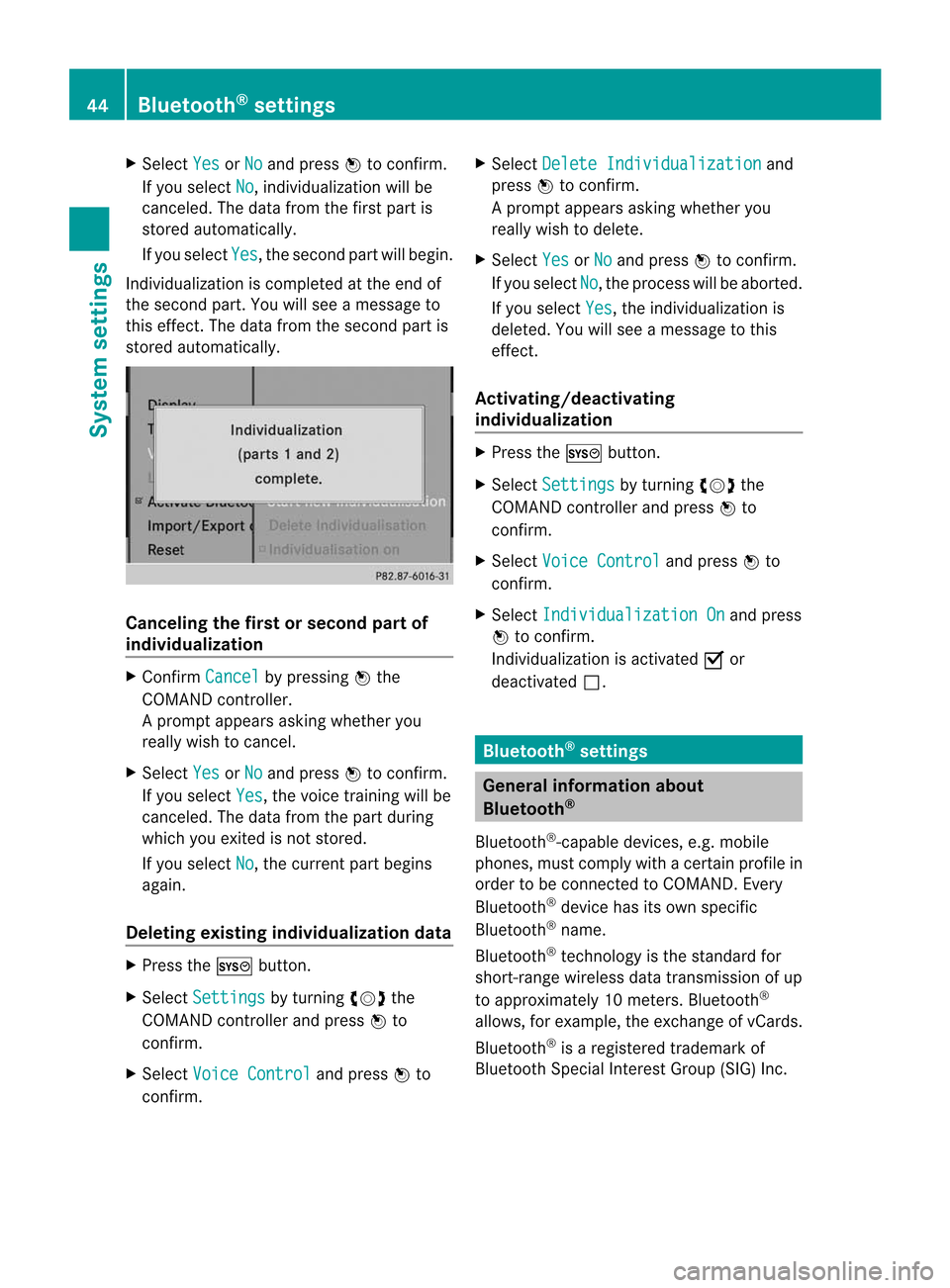
Indi vidualizati oniscomp leted atthe end of
the seco ndpart. Youw ills ee am essage to
this effect.The data from theseco ndpartis
store dautoma tically. Can
celing the firstorsecond partof
indi vidualiza tion X
Conf irmCancel by
pres singW the
COMA NDcontroller .
Ap rompt appears asking whethe ryou
really wishtocancel.
X Select Yes or
No and
press Wtoconf irm.
If you select Yes ,t
he voice trainin gwillbe
canceled. Thedata from thepart during
which youexited isnot stored.
If you select No ,t
he current partbegins
again.
Dele ting existing individualiza tiondata X
Press theW button .
X Select Settings by
turnin gcVd the
COMAND controller andpress Wto
conf irm.
X Select Voice Control and
press Wto
conf irm. X
Select Delete Individualiz ation and
press Wtoconf irm.
Ap rompt appears asking whethe ryou
really wishtodelete.
X Select Yes or
No and
press Wtoconf irm.
If you select No ,t
he process willbeaborted.
If you select Yes ,t
he individuali zationis
deleted. Youwillsee amessage tothis
effect .
<0034001F00180023002C002A00180023002800110032001C001B002A001F0018
0023002C002A00189 ing
individualiza tion X
Press theW button .
X Select Settings by
turnin gcVd the
COMAND controller andpress Wto
conf irm.
X Select Voice Control and
press Wto
conf irm.
X Select Individualiz ationOn and
press
W toconf irm.
<002F00310025002C0035002C0025002E00330029002C002A00330021002C0030
0031V isactivated Oor
deactivated ª. Bluetooth
®
settings General
informationabout
Bluetooth ®
Bluetooth ®
-capable devices,e.g.mobile
phones, mustcomply withacertain profile in
order tobe conn ected toCOMAND. Every
Bluetooth ®
device hasitsown specific
Bluetooth ®
name.
Bluetooth ®
techn ology isthe standard for
short- range wireless datatrans mission ofup
to approximately 10meters. Bluetooth ®
allows, forexample, theexchan geofvCards.
Bluetooth ®
is ar egistered trademark of
Bluetooth SpecialInterest Group (SIG)Inc. 44
Bluetooth ®
settingsSystem settings
Page 47 of 234
Acti
vating/d eactivating Blu eto oth ®
X Pre sstheW button.
The systemmen uappear s.
X Se lec tSet tin gs by
turnin gcVd the
COMA NDcontrol ler and pressW to
co nfirm .
X Se lec tAct iva teBlu etooth and
press
W toconfirm .
This switches Blue tooth®
on O oroff ª. Set
ting thes ystem langua ge
This function allows youtodet erm inethe
lan guage forthem enud isplays andthe
nav igat ionann oun cemen ts.T he navigation
announcemen tsare not availa bleinall
language s.Ifal anguage isnot availa ble,the
navigation announcemen tswill beinEnglish.
The selected language affectsthecharacters
availa bleforentr y.
When yousetthe system language ,the
language ofthe Voice Control System will
change accordingly. Ifthe selected language
is not supported bythe Voice Control System,
English willbeselected.
X Press theW button.
X Select Settings by
turning cVdthe
COMAND controller andpress Wto
confirm .
X Select Language and
press Wtoconfirm .
The listoflanguage sappea rs.The #dot
indicates thecurrent setting. X
Select thelanguage byturning cVdthe
COMAND controller andpress Wto
confirm .
COMAND loadstheselected language and
sets it. Assign
ingthe favorites button
This funct ionisavaila ble,e.g. forthe M-Class.
Depending onthe vehicle equipment, youcan
assign oneortwo favorites buttons.Theyare
located onthe left (one favorites button
installed) oron the left and right (twofavorites
buttons installed) besidetheCOMAND
cont roller (Ypage 19).
You canselect thefollowing predefined
funct ionsinam enu:
R Display On/Off :y
ou can switch the
displa yoffor on.
R Full Screen: 'Clock' :y
ou can show the
clock infull screen .
R Full Screen: 'Map' :y
ou can show the
map infull screen .
R Spoken Driving Tip :y
ou can callupthe
current drivingrecomm endation.
R Display Traffic Messages :y
ou can call
up traffic reports.
R Navigate Home :y
ou can start route
guidance toyour home address ifyou have
already enteredand saved theaddress
(Y page 57).
R Detour Menu :y
ou can callupthe Detour
menu andthen avoid asection ofthe route
and recalculate theroute (Ypage 82).
R Compass Screen :y
ou can callupthe
compass.
X To assign afavorite sbutton: pressthe
W button.
X Sele ctSettin gs by
sliding VÆandturning
cVd theCOM AND controll erand press
W toconfirm. As
sig nin gthe favorite sbutton
45Systems
ettin
gs
Page 80 of 234
Cha
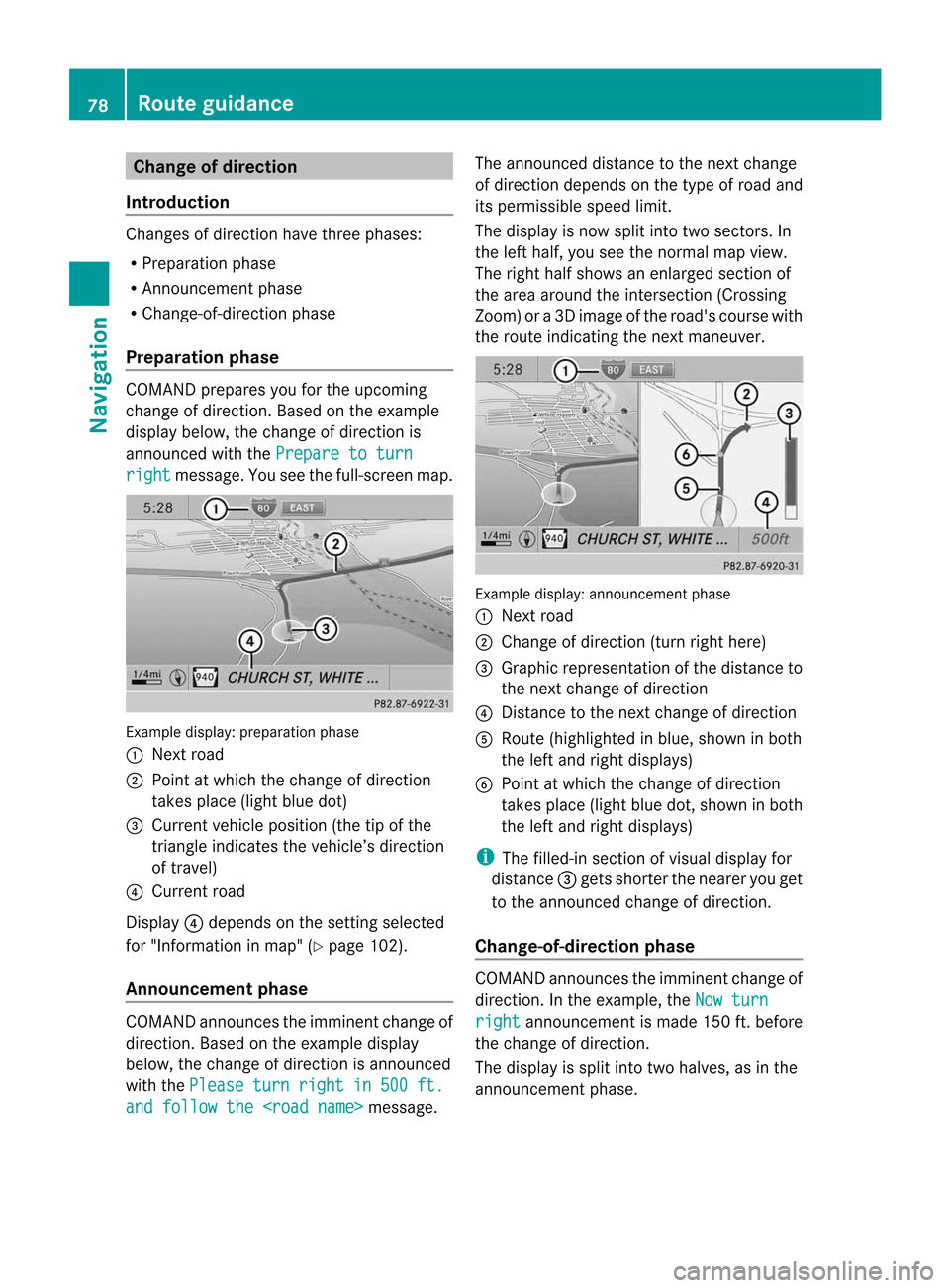
nge ofdir ection
Int rod uction Chan
gesofdire ction have three phase s:
R Pre parat ionphase
R An nounc emen tphase
R Chan ge-of-dire ction phase
Pr epa ration phase COMA
NDprep ares youfortheu pco min g
ch ang eofdirection .Based onthee xample
displ aybelow, thec hang eo fdirection is
ann oun ced withthe Pre paret oturn rig
ht mes
sage. Youseethef ull- scree nm ap. Ex
ample display:preparat ionphas e
: Nex troad
; Poin tatw hich thechange ofdirection
takes place(lightbluedot)
= Current vehicleposition (thetipofthe
triangle indicates thevehicle’s direction
of travel)
? Current road
Display ?depends onthe settin gselected
for "Information inmap" (Ypage 102).
Announc ementphase COMAND
announces theimminent changeof
direction. Basedonthe example display
below, thechange ofdirection isannounced
with thePlease turn right in 500 ft.
and
follow the
announced distancetothe next change
of direction dependsonthe type ofroad and
its permissible speedlimit.
The displa yisn ow split intotwosectors. In
the left half, youseethenormal mapview.
The right halfshows anenlarged sectionof
the area around theintersec tion(Crossing
Zoom) ora3 Dimage ofthe road's course with
the route indicating thenext maneuver. Example
display:annou nceme ntpha se
: Next road
; Chang eofdirecti on(turnright her e)
= Graphicrepresent ationofthe distanc eto
the nextchange ofdirect ion
? Dist ance tothe nextchange ofdirect ion
A Route (highlighted inblue, shown inboth
the left and right displays)
B Point atwhich thechange ofdirect ion
takes place(lightbluedot,shown inboth
the left and right displays)
i The filled-in sectionofvisual display for
distanc e= gets short erthe nearer youget
to the announ cedchange ofdirect ion.
Change-of- direction phase COMAND
announcestheimminen tchange of
direction. Inthe example, theNow turn right announcemen
tism ade 150 ft.before
the change ofdirection.
The displa yiss plit into twohalves, asinthe
announcemen tphase. 78
Route
guidanceNavigation
Page 81 of 234

Exam
pled ispl ay :c hange-of-direct ionphase
: Current vehicleposition (thetipofthe
triangle indicates thevehicle’s direction
of travel)
; Graphic representation ofthe distance to
the next change ofdirection
= Distanc etot he next change ofdirection
Once thechange ofdirection iscompleted,
COMAND automatically switchesbacktofull-
screen display. Example
ofad ispla ywithout changes
of dir ection :
Route (highlight edinblue)
; Curren tvehicle position
= Current road
? Map orient ationselect ed
A Map scale select ed Lane
recomm endations
Overview On
multilane roads,COMAND candisplay
lane recom mendat ionsforthe nextchange of
direction. Thecorresponding datamust be
availa bleinthe digital map.
COMAND displayslane recommen dations
B based onthe next twochanges of
direction. Thenumber oflanes appliestothe
point atwhich thenext change ofdirection is
required. Example
display
: Point ofthe next change indirection (light
blue circle)
; Point ofthe change ofdirection afternext
= Next change ofdirection (inthis case, turn
off tothe right)
? Graphic representat ionofthe distance to
the next change ofdirection
A Distanc etot he next change ofdirection
B Possible lane(light blue)
C Recommended lane(dark blue)
D Lane notrecommen ded(gray)
E Current vehicleposition: thetipofthe
triangle indicates thevehicle’s direction
of travel Route
guidance
79Navigation Z
Page 82 of 234

Disp
layandd escri ption oflane recom mendation s The
colo rsused inthel ane recomm endatio ndisplay varydepen dingonwhet herday ornigh t
design isswitc hedon. Lane Day
design Nigh
tdesign Recom
mendedlane C
In this lane, youwillbeable tocom pletethe
nex ttwo chan gesofdirec tionw itho ut
chan ginglanes. Dar
kblue Light
blue Possib
lelane B
In this lane, youwillonly beable tocom plete
the nextchange ofdirection without
changing lanes. Light
blue Dark
blue Lane
notrecommen dedD
In this lane, youwillnotbeable tocomplete
the next change ofdirection without
changing lanes. Gray Gray
HOV
orcarpool lanes
Ar oute maybecalculated takingthe use of
HOV orcarpool lanesintoaccount .You can
use HOV orcarpool lanesdepending onthe
number ofpersons inthe vehicle aswell as
the local andtime limitation conditions.
i This inform ationisstored inthe map data.
i You canenter thenumber ofpersons in
the vehicle (Ypage 53).Inthis section ,you
can also findmore inform ationonHOV or
carpool lanes.
When thesystem guidesyouontooraway
from HOVorcarpool lanes,COMAND issues
visual andacoustic drivinginstructions. :
HOV symbol onthe road sign
; HOV symbol onthe carpool lane Announci
ngstreet names
If the funct ionisswitched on,the name ofthe
street whichyouareturnin ginto is
announc ed.
Ann ouncemen tsare not made inthese
languages inall count ries.They aremade
when relevant streetnames forthe selected
language areavaila bleinthe database.
X To switch onnavigation mode:pressthe
Ø functionbutton . 80
Rout
eguidanceNavigation
Page 88 of 234

cVd
theCOMAND controller andpress
W toconfirm.
Displaying andediting therecorded
route X
Insert theSDmemory card(Ypage 157).
X Select List in
the Routes menubyturning
cVd theCOMAND controller andpress
W toconfirm.
Previousl yrecorded routesaredispla yed. X
Select aroute andpress Wtoconfirm.
The map appea rswith amenu. The
recorded routeisshown inthe map witha
blue dotted line. Tur
ning offfrom theroute onthe map
X Select Demo by
turning cVdtheCOMAND
cont roller andpress Wtoconfirm.
The map withthecrosshair appears.
X Proceed asdescribed inthe "Rou te
demonstration" section(Ypage 84). Start
ingroute calculation
X Select Start in
the menu byturning cVd
the COMAND controller andpress Wto
confirm.
COMAND attemptstoalig nthe recorded
route withthedigital map.
Editing theroute
You canchange theroute name andtheicon.
X Select Edit in
the menu byturning cVd
the COMAND controller andpress Wto
confirm . X
To change theroute name: select
Rename and
press Wtoconfirm .
i The name cannot bechanged whilethe
vehicle isin motion.
X To change theicon: select Change Icon and
press Wtoconfirm .
X Ad escript ionforboth entries canbefound
in the "Personal POIs"sectionunder
"Managing categoriesforperson alPOIs"
(Y page 73).
Changing directionforrout ecalculation
You cansetthe icon forthe route tothe
start ingpoint ortothe destin ation, thereby
changin gthe direct ionforroute calculation .
i Durin groute calculation ,one- way streets
or turn restrictions, forexample, aretaken
int oa ccoun t.Therefor e,the outward and
return routes maydiffer fromeach other. 86
Rout
eguida nceNavigation
Page 89 of 234

X
Sel ect Swap in
the menu byturni ngcVd
the COMAND controllera nd pre ssW to
confi rm.
De letin gthe route
X Sel ect Delete in
the menu byturning
cVd theCOMAND controller and press
W toconfi rm.
Ap rompt appears asking whethe rthe route
should bedeleted.
X Select Yes or
No and
press Wtoconfirm .
If you select Yes ,t
he route willbedeleted.
If you select No ,t
he process willbe
canceled.
Scanning thememory The
SDmemory cardisinserted.
X Select Memory in
the Routes menu
(Y page 85)byturning cVdtheCOMAND
cont roller andpress Wtoconfirm .
The route memory isdispla yed. Off-r
oadand off-ma p
Import antsafety note G
WARNING
The COMAND navigation systemmaydirect
you tooff-road routesthatyour vehicle may
not becapable oftraversing throughwithout
damaging yourtires, wheels orvehicle. Itis
the driver's soleresponsibility todetermine
the suitabili tyof the route. Off-roadroutes
may beofvarying conditions andtheir appropriateness
foruse may beaffected by
various factorssuchastime ofday, time of
year andimmediate weatherconditions that
cannot bejudged ortaken intoconsideration
by the COMAND system.
Route guidance toad estination thatis
not onadigitized road COMAND
canguide youtodestinations
which arewithin thearea covered bythe
digital map,butwhich arenot themselves
recorded onthe map.
These destinations areknown asoff-r oad
destinations, whichyoucan enter using the
map, forexample. Inthese cases, COMAND
guides youforaslong aspossible with
navigation announcemen tsand displa yson
roads known tothe system. Example:
routeguidance toan off-road destination
: Off-r oaddestination
; Off-r oadroute section (dashed blue)
= Current vehicleposition (thetipofthe
triangle indicates thevehicle’s direction
of travel)
? Off-r oad(ifavaila ble)
If the vehicle reaches anarea which isnot part
of the digital map,thedispla yappea rsas a
split-screen view.Onthe right-hand side,an
arrow appearswhich points tooff-r oad
destination :.Youwill hear the
announc ement:"Please followthearrow on
the display" .Asthe vehicle approachesthe
destination, theArea ofdestination reached message
appears. Route
guidance
87Navigation Z
Page 90 of 234
Route
guidanc efrom anoff-road
lo cati ontoad esti nation If
th ev ehicle posit ioniswith inthea rea
cov ered bythed igit almap, butthem apdoes
no tc ontain anyinform ationabout that
locat ion,the veh icle isin an off-road locat ion.
COMA NDisalso able toguide youtoa
dest inationeven from anoff-road locat ion.
At thes tart of ther out eguidan ce,you willsee
th eOff Mapped Road mes
sage, anarro w
and thed istanc etot he destina tion .The arrow
shows thecompass headingtothe actual
destin ation.
The route ishighlighted blue,startingfrom
the last recogn izedstreet the vehicle wason
before itleft themap.
As soon asthe vehicle isback onaroad
kn own tothe system, routeguidance
con tinues inthe usual way.
Rout eguida ncefrom anoff-m ap
location toad esti nation If
th ev ehicle posit ionisouts idethea rea
cov ered bythed igitalmap, then thev ehicle
is in an off-map locat ion.COMAND isalso
able toguide youtoad estination evenfrom
an off-map location.
At the start ofthe route guidance,youwillsee
the Off Mapped Road message,
anarrow
and thedistance tothe destination. The
direction arrowshows thecompass heading
to the destination.
The route ishighlig htedbluefrom thenearest
road known tothe system.
As soon asthe vehicle isback onaroad
known tothe system, routeguidance
cont inues inthe usua lway.
Off-road duringrouteguidance Due
toroadworks, forexample, theremaybe
differences betweenthedata onthe digital
map andtheactual course ofthe road.
In such cases, thesystem willtemporarily be
unable tolocate thevehicle position onthe digital
mapandthus considers thevehicle to
be inan off-road position.
In the displa y,you willsee theOff Mapped Road message,
anarrow andthedistance to
the destination. Thedirection arrowshows
the compass headingtothe destination.
As soon asthe system canassign thevehicle
position tothe map again,route guidance
cont inues inthe usua lway. Tra
ffic reports Condition
s
To receive real-time trafficreports via
satellite radio,yourequire:
R optionally available satellite radio
equi pment
R as ubscription toSIRIUS XMSatellite Radio
Traffic Message Service
Further information onsatellite radiois
avail able inthe "Satellite radio"section
(Y page 148).
COMAND canreceive trafficreports via
satellite radioandtake account ofthese for
route guidanceinthe navigation system.
Received trafficreports aredispla yedinthe
map either astext oras icons. Real-time
traffic report sint he map
COMAND canshow certain trafficincidents
on the map. Traffic reports areshown onthe
map atscales of0.05 mito20 mi.
X To hide themenu: slideZVtheCOMAND
cont roller and,when theFull Screen menu
itemisshown, pressWtoconfirm.
The map canbeseen inthe full-screen
displa y.
X Turn cVd theCOMAND controller untilthe
desired mapscale isset. 88
Tr
affic report sNavigation