radio MERCEDES-BENZ E-Class WAGON 2011 S212 Comand Manual
[x] Cancel search | Manufacturer: MERCEDES-BENZ, Model Year: 2011, Model line: E-Class WAGON, Model: MERCEDES-BENZ E-Class WAGON 2011 S212Pages: 234, PDF Size: 8.64 MB
Page 26 of 234
Navi
gationsyste mm enu
Rou teguid ance inactive The
display showsther oad onwhic hthe
veh icle iscur ren tlytravelin g,prov ided the
digit almap contain sit.
Rou teguid ance active The
display shows:
R thed istanc etot he dest ination
R thed istanc etot he nex tchange ofdirection
R current street
R the travel direction arrow
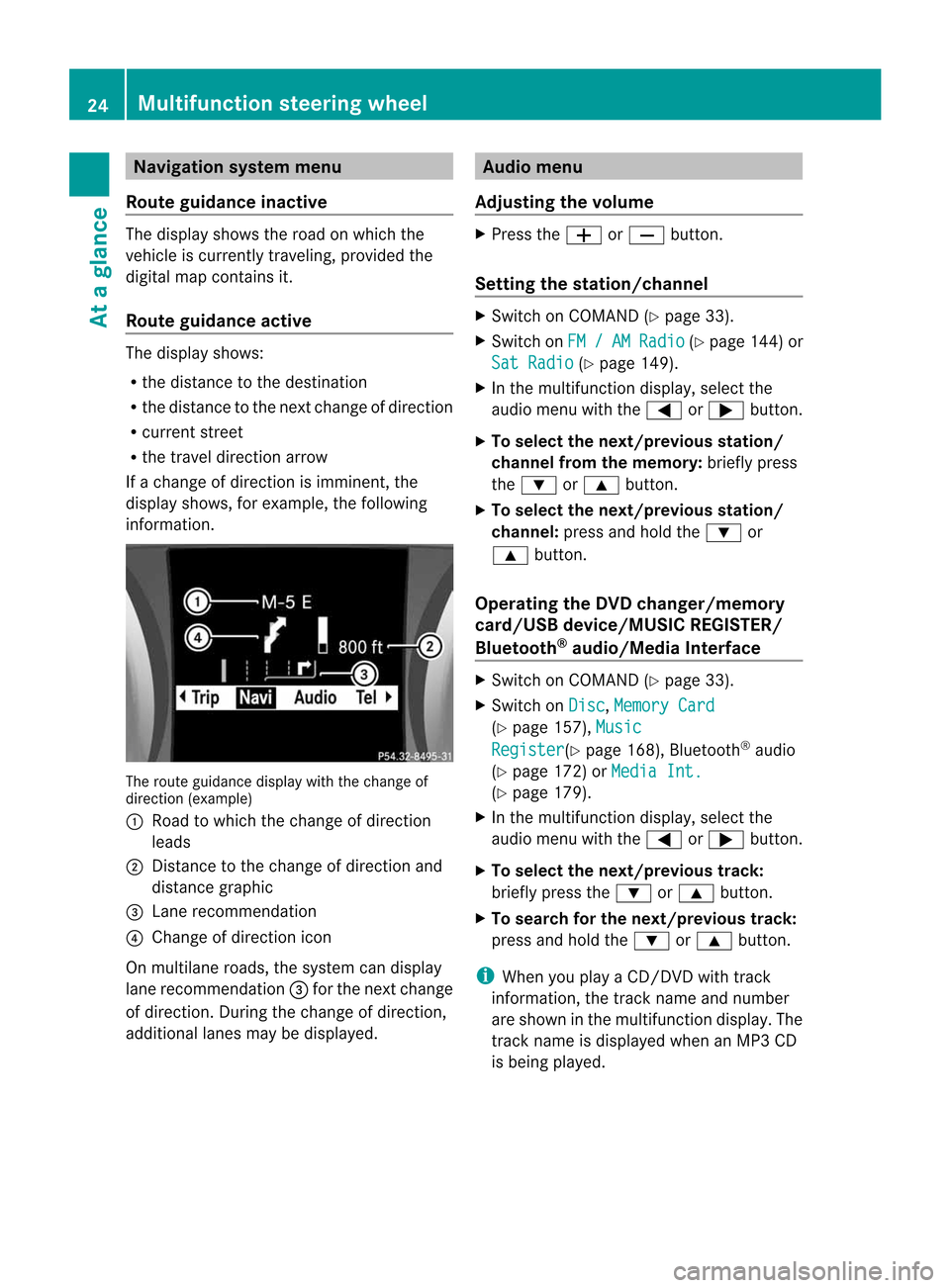
If ac hange ofdirection isimminent ,the
displa yshows, forexample, thefollowing
information . The
route guidance displaywiththechange of
direction (example)
: Road towhich thechange ofdirection
leads
; Distanc etot he change ofdirection and
distance graphic
= Lane recommen dation
? Change ofdirection icon
On multilane roads,thesystem candispla y
lane recommen dation=for the next change
of direction. Duringthechange ofdirection,
additional lanesmaybedispla yed. Audio
menu
Adjust ingthe volume X
Press theW orX button.
Setting thestat ion/c hannel X
Switch onCOMAND (Ypage 33).
X Switch onFM / AM Radio (Y
page 144)or
Sat Radio (Y
page 149).
X In the multifunction display,select the
audi omenu with the= or; button.
X To selec tthe nex t/previo usstation /
chann elfrom thememory: brieflypress
the : or9 button.
X To selectthe next/previo usstation /
chann el:press andhold the: or
9 button.
Operating theDVD chang er/memo ry
card/US Bdevice/MU SICREG ISTER /
Blu etoot h®
au dio/M ediaInterface X
Swit chon COMA ND(Ypage 33).
X Swit chon Dis c ,
Mem ory Card (Y
page 157), Mus ic Reg
ister (Y
page 168), Bluet ooth®
audio
(Y page 172)or Med ia Int. (Y
page 179).
X In them ultifun ction display, selectthe
audi omenu with the= or; button.
X To selec tthe nex t/previo ustrack:
brie flypress the: or9 button.
X To searc hfor the next/previo ustrack:
press andhold the: or9 button.
i When youplayaC D/DVD withtrack
informa tion,thetrack name andnumbe r
are show nint he multifunction display.The
track name isdispla yedwhen anMP3 CD
is being played. 24
Multifunction
steeringwheelAtag
lance
Page 29 of 234
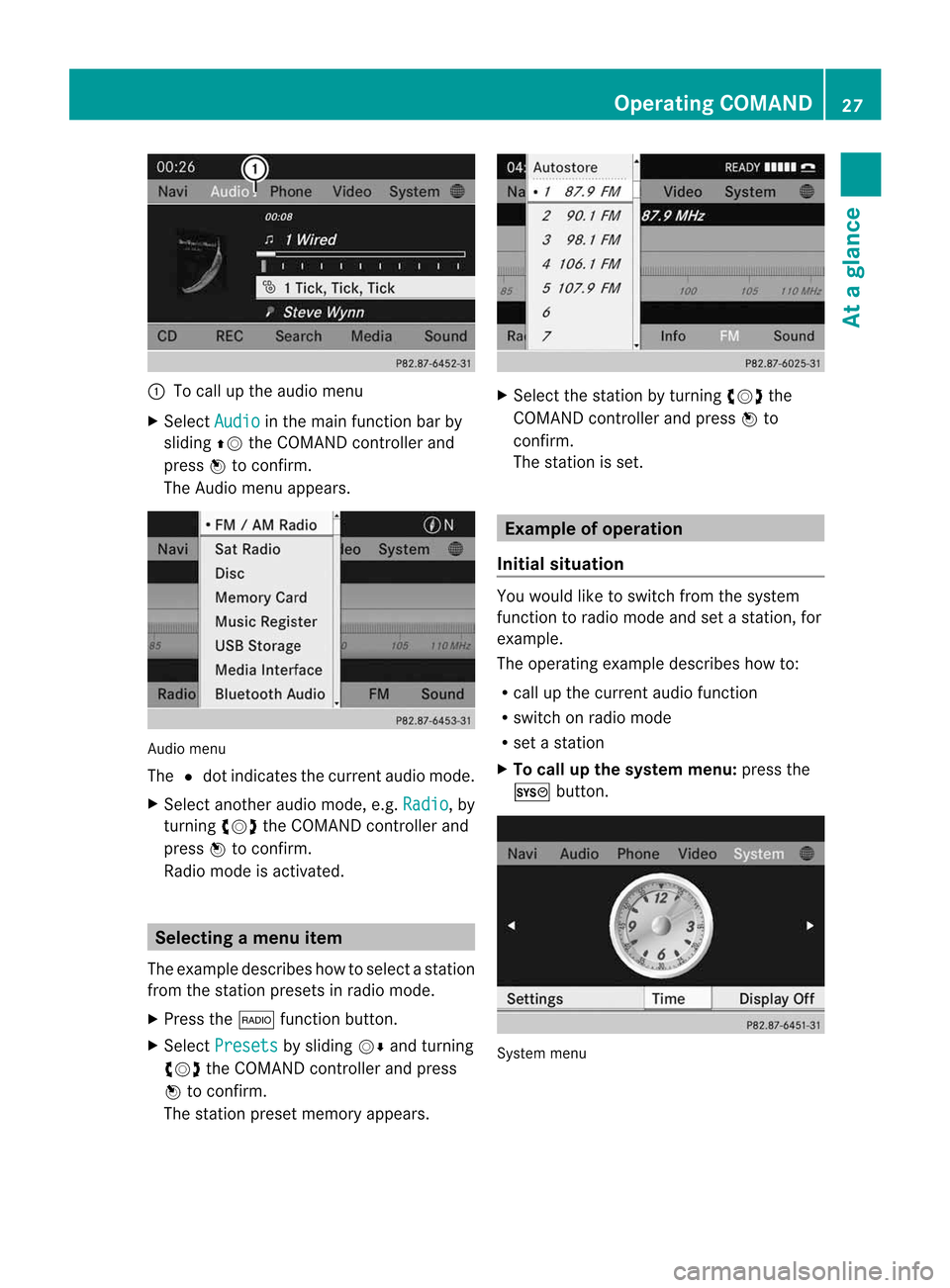
:
Tocall upthe audio menu
X Select Audio in
the main functionbar by
sliding ZVtheCOMAND controller and
press Wtoconf irm.
The Audio menuappears. Audio
menu
The #dot indicates thecurren taudio mode.
X Se lec tanothe raudio mode,e.g. Rad io ,b
y
tur nin gcVd theC OMA NDcontrol ler and
pre ssW toconfirm .
Radio modeisa ctivat ed. Select
ingam enu item
The exam pledesc ribes howtoselec tastation
from thestation presets inradio mode.
X Press the$ function button.
X Select Presets by
sliding VÆandturning
cVd theCOMAND controller andpress
W toconfirm.
The station presetmemory appears. X
Select thestation byturning cVdthe
COMAND controller andpress Wto
confirm.
The station isset. Example
ofoperation
Initial situation You
woul dlike toswitch fromthesystem
function toradio mode andsetastation, for
example.
The operating exampledescribes howto:
R call upthe current audiofunction
R switch onradio mode
R set astation
X To call upthe system menu:pressthe
W button. System
menu Operat
ingCOMAND
27Atag lance Z
Page 30 of 234
Callin
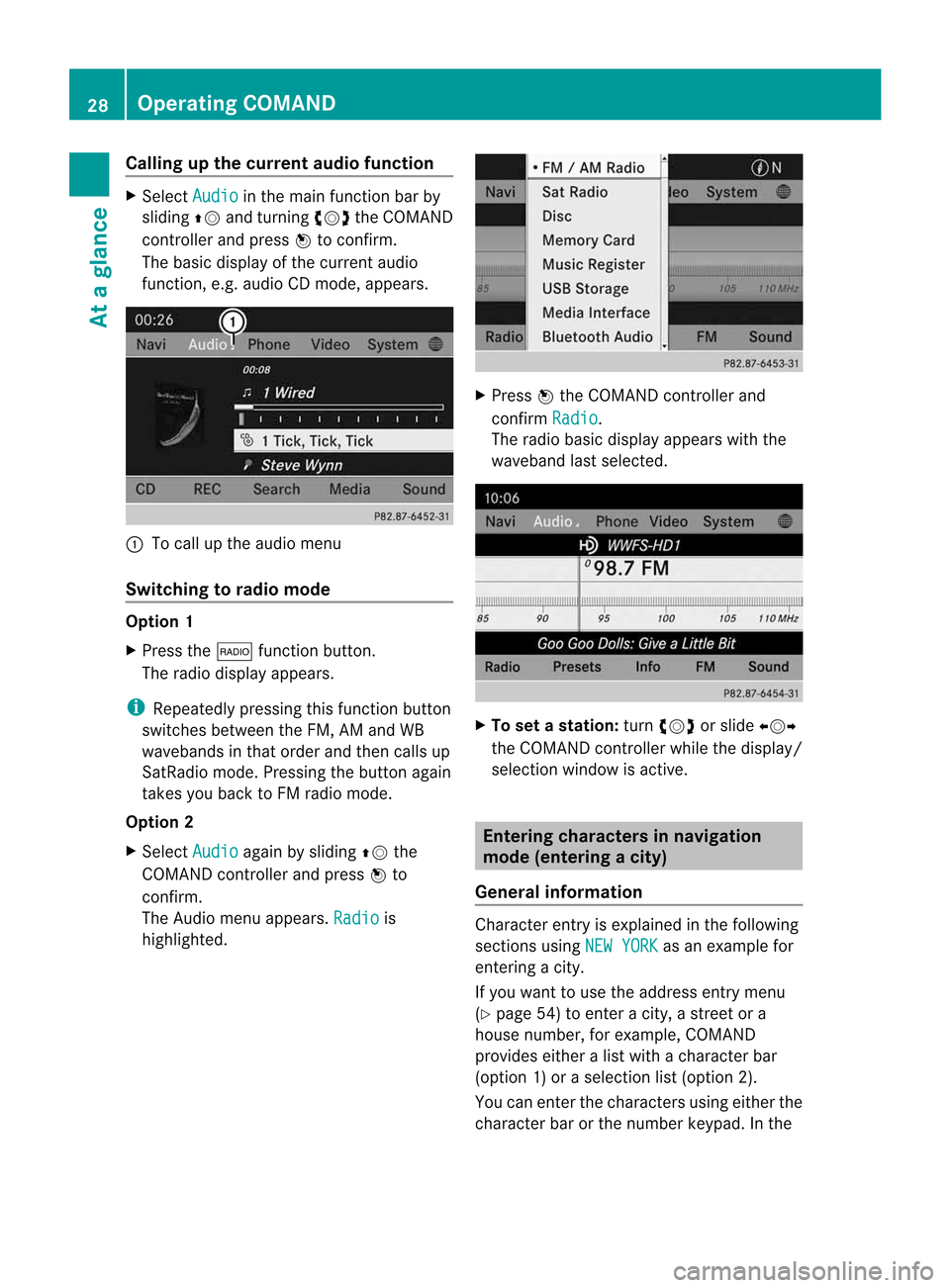
gupthe cur ren taudiofunct ion X
Sel ect Audio in
them ainfunction bar by
slidin gZV andturnin gcVd theC OMA ND
co ntroll erand pres sW toconfirm .
The basic displayofthec urren taudio
fun ction ,e.g.a udio CDmod e,appear s. :
Tocall upthea udio menu
Swit chingtor adiomod e Op
tion1
X Pre ssthe$ function button.
The radio displayappear s.
i Repeat edlypressin gthisf un ction button
swit ches bet ween theF M, AM and WB
waveb andsint hato rder and then call sup
Sat Radio mode.Pre ssin gthe but tona gain
takes youback toFM radio mode.
Option 2
X Select Audio again
bysliding ZVthe
COMAND controller andpress Wto
conf irm.
The Audio menuappears. Radio is
highlighted. X
Press Wthe COMAND controller and
conf irmRadio .
The radio basic display appears withthe
waveband lastselected. X
To set astation: turn cVd orslide XVY
the COMAND controller while thedisplay /
selection windowisactive. Entering
characters innavigation
mode (entering acity)
Gener alinfor mation Charact
erent ryisexplain edinthe followin g
sect ions using NEWYORK as
an exam plefor
ent erin gac ity.
If you want touse theaddress entrymen u
(Y page 54)toent erac ity, as treet ora
house numbe r,for exam ple,COMAN D
prov ides eitheralist with achar acterbar
(optio n1)oras elect ionlist(option 2).
You canenterthe charac tersu sing either the
charac terbar orthe number keypad. Inthe 28
Oper
ating COMANDAtag
lance
Page 36 of 234
Adj
usting thev olu me forphone calls You
canadjust thev olume forhan ds-free
mod eduring ateleph onec all.
X Turn theq control knob.
or
X Pre sstheW orX buttono nthe
mult ifunction steer ing whee l. Adj
usting thes oun dsettings
Callin gupthe sound menu You
canmak evarious soun dsettin gs for the
diff eren taudio andvide osour ces. Thismean s
th at itis poss ibletoset mor ebass forradio
mod ethanf or audio CDmod e,for example .
You cancallupther espec tive soun dmenu
fr om them enuo fthe desi redmod e.
The example describeshow tocall upthe
soun dmenuinr adio mode.
X Pre ssthe$ function button.
The radio displayappear s.You willhear the
last stati on played onthel ast waveb and. X
Se lec tSou nd by
slidi ngVÆ andturnin g
cVd theC OMA NDcontrol ler and press
W toconfirm .
You cannows etthet reble and bass orthe
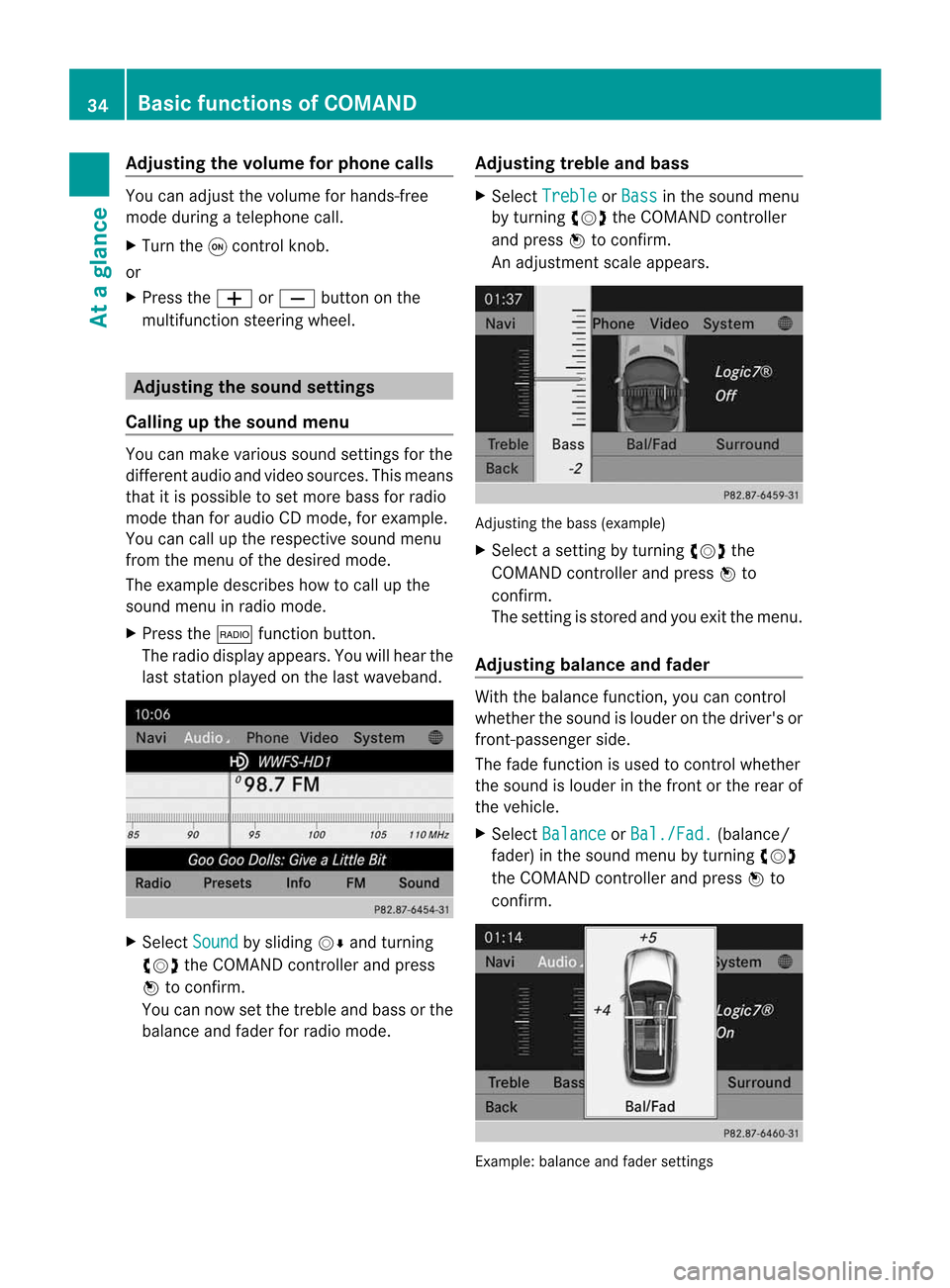
balan ceand fade rfor radio mode. Adjust
ingtreble andbass X
Select Treble or
Bass in
the sound menu
by turnin gcVd theCOMAND controller
and press Wtoconf irm.
An adjustmen tscal ea ppears. Adju
sting thebass (exa mple)
X Sel ect asetti ngbyturni ngcVd the
CO MAND controllera nd pre ssW to
confi rm.
The setti ngisstor edand youe xitt he menu.
Adjust ingbalance andfader With
thebala nce funct ion,youcan cont rol
whether thesound islouder onthe driver's or
front -passenger side.
The fade funct ionisused tocont rolwhether
the sound islouder inthe front orthe rear of
the vehicle.
X Select Balance or
Bal./Fad. (bala
nce/
fader) inthe sound menubyturning cVd
the COMAND controller andpress Wto
confirm . Example:
balanceandfader settings 34
Basic
functions ofCOMANDAt ag
lance
Page 37 of 234
X
Sel ect abalan ce setti ngbysliding XVY the
CO MAND controllera nd pre ssW to
confi rm.
X Sel ect afader setting byslidin gZVÆ the
COM AND controllera nd press Wto
con firm.
The settingisstor edand youexit themenu. Sur
round sound
General information If
your vehicle isequipped withtheharman/
kardon ®
Logic7 ®
surround soundsystem,
you can setthe optimum surround soundin
the vehicle interior.
The harman/ kardon®
Logic7 ®
surround
sound system isavailable forthe following
operatin gmodes:
R radio (FMonly)
R satellite radio
R audio CD
R audio DVD(MLP, dts,PCM andDolby
Digit alaudio format s)
R MP3 (including SDmemory cardandUSB
stor age device)
R Media Interface
R Bluetoot h®
audio mode
R video DVD(PCM, dtsand Dolby Digital
audio format s)
R AUX
Because someDVDscontain both stereoand
multichan nelaudio format s,itmay be
nec essary toset the audio format
(Y page 163).
i The Logic7 ®
On func
tion creat esa
surround soundexperien cefor every
passenger whenplaying, forexample,
ster eorecor dings. Itenables optimum
playback ofmusic andfilms onCD, audio
DVD orvideo DVDwithmultichan nelaudio
format s,such asMLP, dtsorDolby Digital.
This results insound charact eristicslike those
intended bythe sound engineer
when theoriginal wasrecor ded.
i Ifyou select Logic7 ®
Off ,a
llpermissible
format sareplayed asstor edon the
medium. Duetothe design ofthe
passenger compartment,ano ptimum
audio experien cecann otbe guaranteed for
all passengers .
i Disc swhich support theaudio format s
ment ioned havethefollowing logos: Dolby
Digital dts
MLP
Switching surround sound on/off The
example describes howtoset the
surround soundforradio mode.
X Press the$ function button .
The radio display appears. Youwillhear the
last stationplayed onthe last waveband. Ba
sic functions ofCOMAND
35Atag lance Z
Page 38 of 234
X
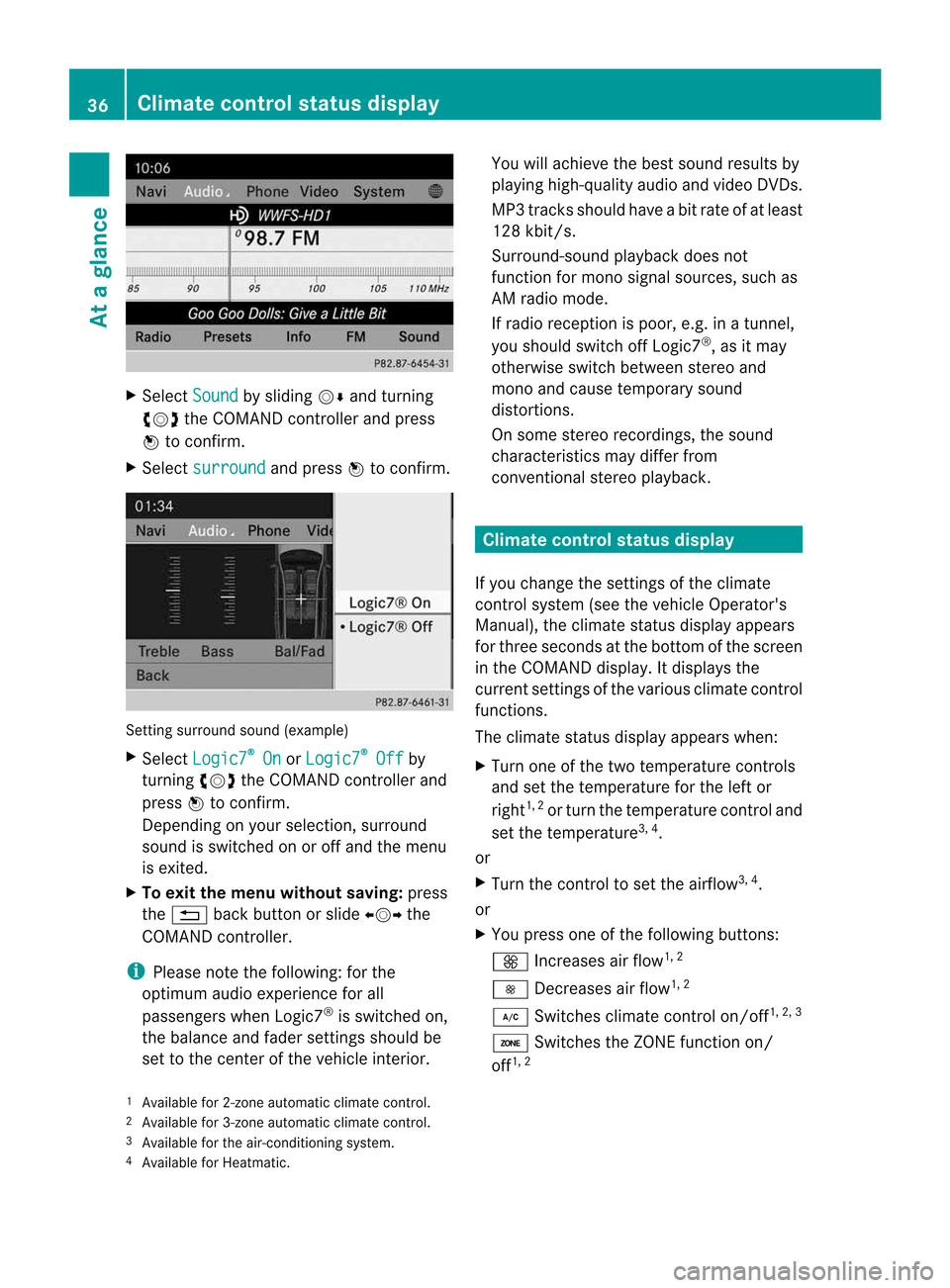
Sel ect Sound by
sliding VÆ andturni ng
cVd theCOMAND controllera nd pre ss
W toconfi rm.
X Sel ect surround and
pressW toconfi rm. Setting
surrou ndsou nd(examp le)
X Sel ect Logic7 ®
On or
Log ic7 ®
Off by
turni ngcVd theCOMAND controllera nd
pre ssW toconfi rm.
Depe nding on your sel ecti on, surrou nd
sou ndissw itche donoroffand themenu
is exi ted.
X To exitthe men uwithout saving:pre ss
the % back button orslide XVY the
CO MAND controller.
i Plea se note thefollowi ng: forthe
opti mum audioe xpe rience forall
pa sse nger swhenL ogic7 ®
is sw itche don,
the balance and fadersetti ngsshouldb e
set tothe center ofthe vehiclei nter ior. Yo
uw illa ch ieve the best sou ndresults by
pl ay ing high-q uality audioa nd video DVDs.
MP3 tracks shouldh aveab itrat eo fatleast
128 kbit/s.
Surr ound- soundplayback doesnot
func tion formon osign alsourc es,such as
AM radio mode.
If radio receptio nisp oor, e.g.inat unnel,
you should switchoffLogic7 ®
,a sitm ay
otherwise switchbetween stereoand
mono andcause temporary sound
distortions.
On some stereo recordings, thesound
characteristics maydiffer from
conven tionalstereo playback. Climate
controlstatusdisplay
If you change thesettings ofthe climate
cont rolsystem (seethevehicle Operator's
Manual ),the climate statusdisplayappea rs
for three seconds atthe bottom ofthe screen
in the COMAND display.Itdispla ysthe
current settings ofthe various climate control
function s.
The climate statusdisplayappea rswhen:
X Turn oneofthe two temperature controls
and setthe temperature forthe left or
right 1,
2
or turn thetemperature controland
set the temperature 3,
4
.
or
X Turn thecont roltoset the airflow 3,
4
.
or
X You press oneofthe followi ngbuttons:
K Increases airflow 1,
2
I Decreases airflow 1,
2
¿ Switches climatecontrolon/off 1,
2, 3
á Switches theZONE function on/
off 1,
2
1 Available for2-zon eautomatic climatecontrol.
2 Available for3-zon eautomatic climatecontrol.
3 Available forthe air-conditioning system.
4 Available forHeatmatic. 36
Cli
mat econtrol stat usdisplayAt ag
lance
Page 45 of 234
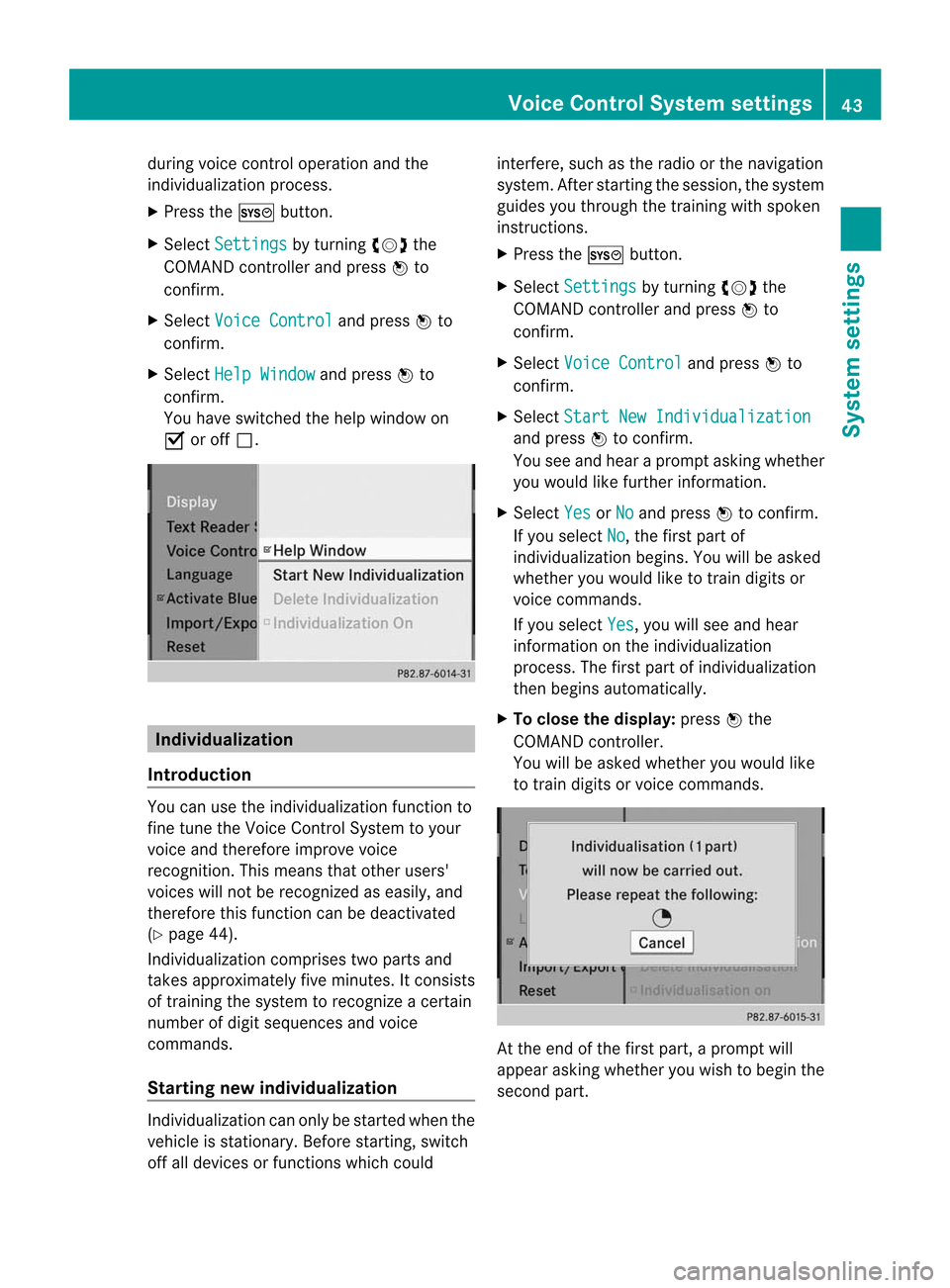
during
voicecontroloperation andthe
<002C00310025002C0035002C0025002E00330029002C002A00330021002C0030
0031V process.
X Press theW button.
X Select Settin gs by
turn ingcVd the
COMAND controller and press Wto
con firm.
X Select Voice Control and
press Wto
con firm.
X Select HelpWindow and
press Wto
con firm.
You have switchedthehelp window on
O oroff ª. Individu
alization
Intr oduct ion You
canusethe<002C00310025002C0035002C0025002E00330029002C002A00330021002C0030
0031V function to
fine tune theVoice ControlSyst emtoyour
voice andtherefore improve voice
recog nition. This means thatother users'
voices willnotberecog nized aseasily, and
ther efore thisfunc tion canbedeactiv ated
(Y page 44).
Indiv idualization comprisestwoparts and
tak esapproximat elyfive minut es.Itcon sists
of train ingthe system torecog nizeac ertain
number ofdigit sequenc esand voice
comm ands.
Sta rting new individu alization Indiv
idualization canonly bestart edwhen the
vehicle isstat ionary. Beforestart ing, switc h
off alldevices orfunc tionswhich could int
erfer e,such asthe radio orthe navigat ion
system. Afterstart ingthe session ,the system
guides youthrough thetrain ingwith spoken
inst ruct ions.
X Press theW button.
X Select Settin gs by
turn ingcVd the
COMAND controller and press Wto
con firm.
X Select Voice Control and
press Wto
con firm.
X Select Start NewIndivi dualization and
press Wtocon firm.
You seeand hear aprompt askingwhether
you would likefurther infor mation .
X Select Yes or
No and
press Wtocon firm.
If you select No ,t
he first part of
<002C00310025002C0035002C0025002E00330029002C002A00330021002C0030
0031V begins.Youwillbeasked
whether youwould liketotrain digits or
voice comm ands.
If you select Yes ,y
ou will see and hear
infor mation onthe <002C00310025002C0035002C0025002E00330029002C002A00330021002C0030
0031V
proces s.The first part of<002C00310025002C0035002C0025002E00330029002C002A00330021002C0030
0031V
then begins automatic ally.
X To close thedispla y:press Wthe
COMAND controller.
You willbeasked whether youwould like
to train digits orvoice comm ands. At
the end ofthe first part, aprompt will
appear askingwhether youwish tobegin the
secon dpart. Voice
Control Systemsett ings
43System
sett ings
Page 90 of 234
Route
guidanc efrom anoff-road
lo cati ontoad esti nation If
th ev ehicle posit ioniswith inthea rea
cov ered bythed igit almap, butthem apdoes
no tc ontain anyinform ationabout that
locat ion,the veh icle isin an off-road locat ion.
COMA NDisalso able toguide youtoa
dest inationeven from anoff-road locat ion.
At thes tart of ther out eguidan ce,you willsee
th eOff Mapped Road mes
sage, anarro w
and thed istanc etot he destina tion .The arrow
shows thecompass headingtothe actual
destin ation.
The route ishighlighted blue,startingfrom
the last recogn izedstreet the vehicle wason
before itleft themap.
As soon asthe vehicle isback onaroad
kn own tothe system, routeguidance
con tinues inthe usual way.
Rout eguida ncefrom anoff-m ap
location toad esti nation If
th ev ehicle posit ionisouts idethea rea
cov ered bythed igitalmap, then thev ehicle
is in an off-map locat ion.COMAND isalso
able toguide youtoad estination evenfrom
an off-map location.
At the start ofthe route guidance,youwillsee
the Off Mapped Road message,
anarrow
and thedistance tothe destination. The
direction arrowshows thecompass heading
to the destination.
The route ishighlig htedbluefrom thenearest
road known tothe system.
As soon asthe vehicle isback onaroad
known tothe system, routeguidance
cont inues inthe usua lway.
Off-road duringrouteguidance Due
toroadworks, forexample, theremaybe
differences betweenthedata onthe digital
map andtheactual course ofthe road.
In such cases, thesystem willtemporarily be
unable tolocate thevehicle position onthe digital
mapandthus considers thevehicle to
be inan off-road position.
In the displa y,you willsee theOff Mapped Road message,
anarrow andthedistance to
the destination. Thedirection arrowshows
the compass headingtothe destination.
As soon asthe system canassign thevehicle
position tothe map again,route guidance
cont inues inthe usua lway. Tra
ffic reports Condition
s
To receive real-time trafficreports via
satellite radio,yourequire:
R optionally available satellite radio
equi pment
R as ubscription toSIRIUS XMSatellite Radio
Traffic Message Service
Further information onsatellite radiois
avail able inthe "Satellite radio"section
(Y page 148).
COMAND canreceive trafficreports via
satellite radioandtake account ofthese for
route guidanceinthe navigation system.
Received trafficreports aredispla yedinthe
map either astext oras icons. Real-time
traffic report sint he map
COMAND canshow certain trafficincidents
on the map. Traffic reports areshown onthe
map atscales of0.05 mito20 mi.
X To hide themenu: slideZVtheCOMAND
cont roller and,when theFull Screen menu
itemisshown, pressWtoconfirm.
The map canbeseen inthe full-screen
displa y.
X Turn cVd theCOMAND controller untilthe
desired mapscale isset. 88
Tr
affic report sNavigation
Page 110 of 234

X
Sel ect SIRIUS Service and
pressW to
confi rm.
The window onthe right halfof the displ ay
sho wsthe telephone numb erofthe
pro vider(SIR IUSXM) andtheserialn umb er
of your ser vice modulef or rece iving traf fic
mes sages .
Reg isteri ngfor the SIRIU SXMt raffic
repo rtse rvic e X
Ca llthe trafficrep ort provider'sp hone
numb ersho wnonthe scre en.
i Youc an also have the satel lite ser vice
acti vate donline .Tod oso,visit theSIRIUS
XM Radio website at
htt <0019000F00320032001E001E001E00460017002300160023002500170046001F
002700149 (USA)or
htt <0019000F00320032001E001E001E0046001700230016002300250017001F002A
0028002A001C002A9 .com
(Canada) .
Once theconn ection hasbeen established:
X Follow theinstr uctions ofthe operator.
The activation processmaytake uptoten
minutes.
If registrat ionisnot included when
purchasing thesystem, yourcredit card
details willberequired toactivate your
account . Compass
function
In the compass view,youcan seethecurrent
direction oftravel, thecurrent heightabove
sea level andthecoordinat esofthe vehicle
position, forexample.
X To switch onnavigation mode:pressthe
Ø functionbutton .
X To show themenu: pressWthe COMAND
cont roller.
X Select Pos. in
the navigation systemmenu
bar bysliding VÆandturnin gcVd the
COMAND controller andpress Wto
conf irm.
X Select Compass and
press Wtoconf irm. Compass
(example)
: Current direction oftravel
; Current heightaboveaverage sealevel,
rounded
= Current vehicleposition: longitude
coordinat es
? Number ofGPS satellites currentlybeing
used
A Current vehicleposition: latitude
coordinat es
B Currently setsteerin gangle ofthe front
wheels
i Todisplay current height;,thesystem
must beable toreceive atleast four
satellites. Steeringangle Bcan bea
maximum of35° inboth direction s.
X To exit thedisplay: confirmBack by
pressing Worpress the% button . Showing
themap dataversion
X To show themenu: pressWthe COMAND
cont roller.
X Select Navi in
the main functionbar by
sliding ZVandturnin gcVd theCOMAND
cont roller andpress Wtoconf irm.
X Select MapVersion and
press Wto
conf irm.
The map data version number isshown.
Infor mation aboutnewversions ofthe
digital mapcanbeobtained froman
authorized Mercedes-B enzCenter. 108
Additional
settingsNavigation
Page 111 of 234
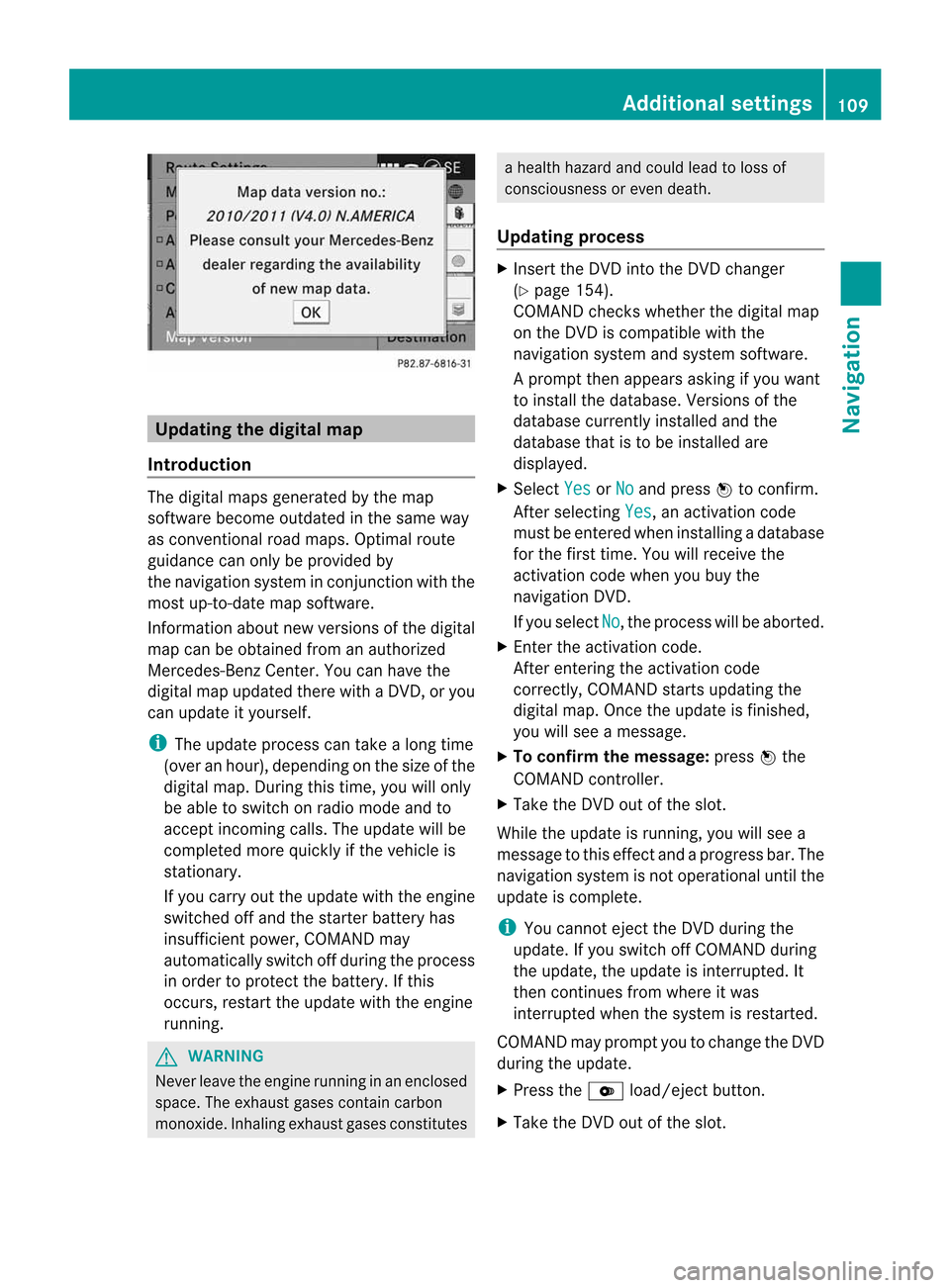
Upd
ating the digit alma p
Intr oduct ion The
digital mapsgeneratedbythe map
soft ware becom eoutdate dint he same way
as con vent ional roadmaps. Optimalroute
guidance canonly beprovided by
the navigat ionsystem incon junction with the
most up-to-dat emapsoft ware.
Inf ormat ionabout newversion softhe digital
map canbeobtain edfrom anauthoriz ed
Merc edes-B enzCent er.You canhave the
digital mapupdated therewithaD VD,ory ou
can update ityourself.
i The update processcan takeal ong time
(over anhour), dependingonthe size ofthe
digit almap. During this time,you willonly
be able toswitc honradio mode andto
acc ept incomin gcalls. Theupdate willbe
com plete dmoreq uick lyifthe vehic leis
st ation ary.
If you carryoutthe update withtheengine
switc hedoffand thestart erbatt eryhas
insuf ficient power, COMANDmay
autom atically switc hoffdurin gthe proc ess
in order toprot ectthe batt ery. Ifthis
occ urs, restartthe update withtheengine
runn ing. G
WARN
ING
Neve rleave theengine runninginan enclos ed
space. Theexhaust gasescontain carbon
monox ide.Inhaling exhaustgasesconstitutes ah
ealth hazard andcould leadtoloss of
con sciousnes soreven death.
Upda tingprocess X
Inser tthe DVD intotheDVD changer
(Y page 154).
COMAND checkswhether thedigital map
on the DVD iscompat iblewith the
navigation systemandsystem software.
Ap rompt thenappears asking ifyou want
to install thedata base.Versio nsofthe
data basecurrently installedand the
data basethat isto be install edare
disp layed.
X Select Yes or
No and
press Wtoconfirm.
After selecting Yes ,a
na ctiva tioncode
must beentered wheninstall ingadata base
for the first time. Youwillreceive the
activati oncode when youbuy the
naviga tionDVD.
If you sele ctNo ,t
he process willbea borted.
X Enter theactiva tioncode.
After entering theactivati oncode
correctly, COMAND startsupdating the
digi talmap. Once theupdate isfinishe d,
you willsee am essa ge.
X To confirm themessage :press Wthe
COMAND controller.
X Take theDVD outofthe slot.
Whil ethe upd ate isrunning, youwillsee a
messa getothis effect andaprogre ssbar. The
naviga tionsystem isnot opera tional untilthe
upd ate iscomple te.
i You cannot ejecttheDVD duringthe
upd ate. Ifyou switch offCOMAND during
the update, theupdate isinterrup ted.It
then continues fromwhere itwa s
interrup tedwhen thesystem isrestarted.
COMAND mayprompt youtochange theDVD
duri ngthe update.
X Press theV load/eject button.
X Take theDVD outofthe slot. Additio
nalsetting s
109Navigatio n Z