tailgate MERCEDES-BENZ E-Class WAGON 2013 W212 User Guide
[x] Cancel search | Manufacturer: MERCEDES-BENZ, Model Year: 2013, Model line: E-Class WAGON, Model: MERCEDES-BENZ E-Class WAGON 2013 W212Pages: 420, PDF Size: 14.26 MB
Page 92 of 420
can simultaneously close and lock the trunk
lid.
Wagon: on vehicles with KEYLESS-GO, you
can simultaneously close and lock the
tailgate.
X
To close: press closing button : in the
trunk lid/tailgate.
X To close and lock simultaneously:
Press closing button ; in the trunk lid/
tailgate.
i If you leave a KEYLESS-GO key in the
trunk/cargo compartment, the trunk lid/
tailgate will not lock. Opening/closing automatically from
inside
Important safety notes G
WARNING
Keep an eye on the area at the rear end of the
vehicle when operating the trunk lid/tailgate
with
the remote operating switch on the door.
Monitor the entire closing procedure to
ensure that there is no risk of injury to anyone
near the vehicle.
Release the switch on the door to interrupt
the closing procedure.
The remote operating switch can also be used
if the SmartKey has been removed from the
starter switch or the KEYLESS-GO key has
been removed from the vehicle. Never leave
children with no adult supervision in the
vehicle or with access to an unlocked vehicle.
If unsupervised children have access to a
vehicle, it could lead to an accident and/or
serious injury. G
WARNING
Ensure that the trunk lid/tailgate is closed
when
the engine is running and the vehicle is
in motion. Among other dangers, deadly
carbon monoxide (CO) may enter the vehicle
interior and cause unconsciousness and even
death. Opening/closing
X
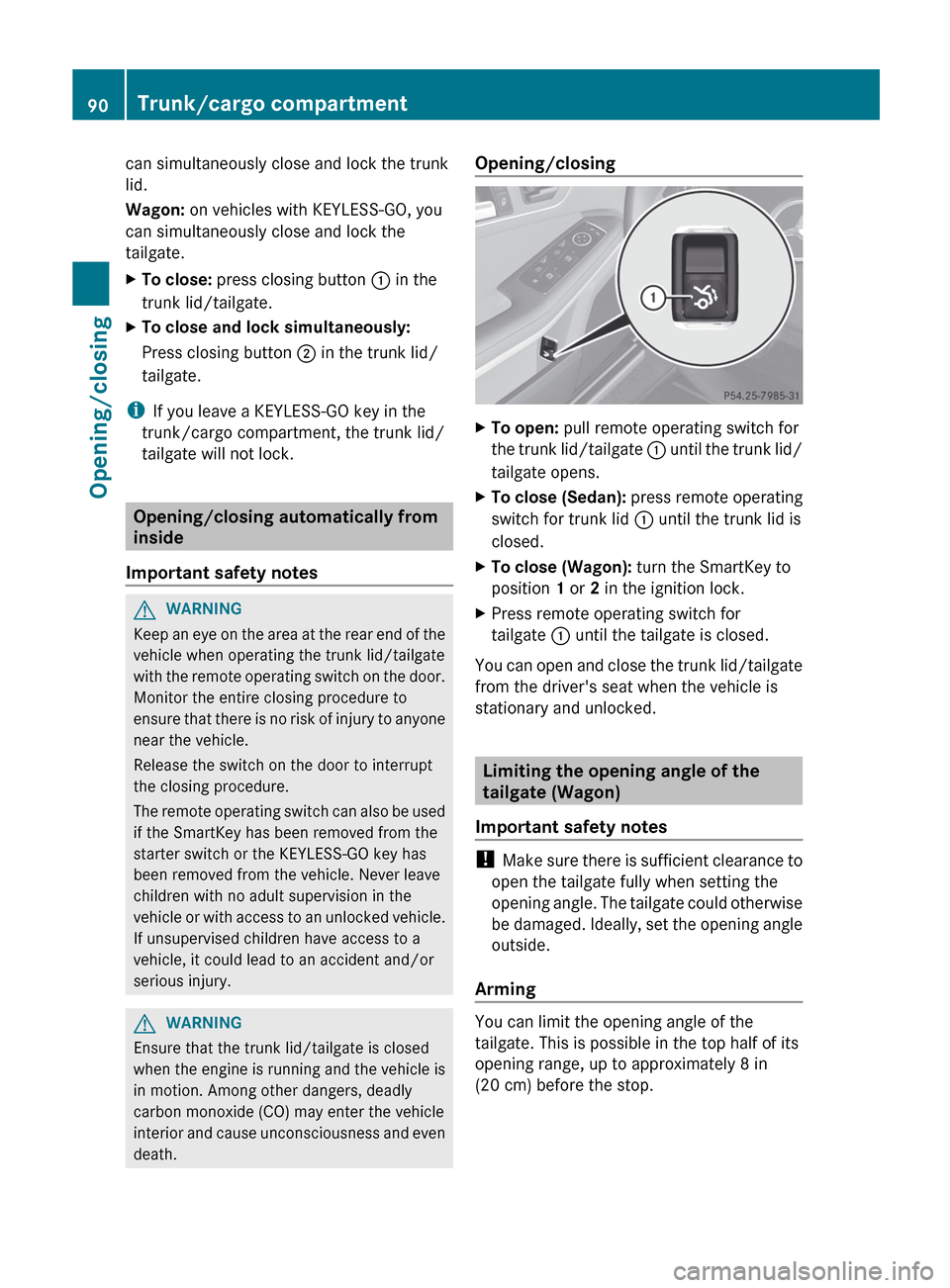
To open: pull remote operating switch for
the
trunk lid/tailgate : until the trunk lid/
tailgate opens.
X To close (Sedan): press remote operating
switch for trunk lid : until the trunk lid is
closed.
X To close (Wagon): turn the SmartKey to
position 1 or 2 in the ignition lock.
X Press remote operating switch for
tailgate : until the tailgate is closed.
You can open and close the trunk lid/tailgate
from the driver's seat when the vehicle is
stationary and unlocked. Limiting the opening angle of the
tailgate (Wagon)
Important safety notes !
Make
sure there is sufficient clearance to
open the tailgate fully when setting the
opening angle. The tailgate could otherwise
be damaged. Ideally, set the opening angle
outside.
Arming You can limit the opening angle of the
tailgate. This is possible in the top half of its
opening range, up to approximately
8 in
(20 cm) before the stop. 90
Trunk/cargo compartment
Opening/closing
Page 93 of 420
X
To open the tailgate: pull the handle on
the tailgate.
X To stop the opening procedure at the
desired
position: press the closing button
(Y page 89) in the tailgate or pull the handle
on the outside of the tailgate again.
X To store the position: press and hold the
closing
button in the tailgate until you hear
a short tone.
The opening angle limiter is activated. The
tailgate will now stop in the stored position
when opening.
Disarming X
Press and hold the closing button
(Y page 89) in the tailgate until you hear
two short tones. Opening the tailgate from inside the
vehicle (Wagon with a folding bench
seat)
General notes i
Opening dimensions of the trunk lid/
tailgate ( Y page 414).
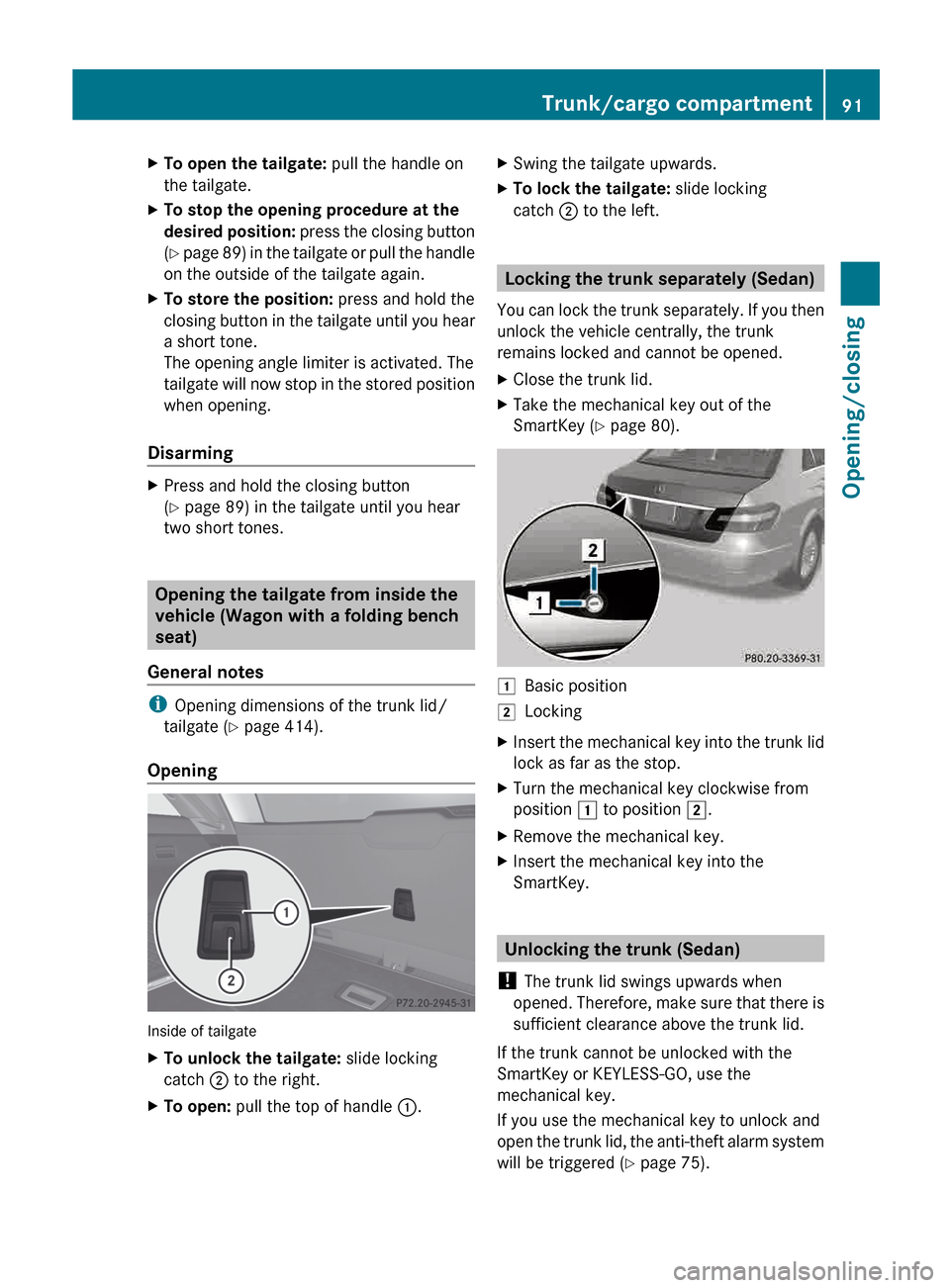
Opening Inside of tailgate
X
To unlock the tailgate: slide locking
catch ; to the right.
X To open: pull the top of handle :.X
Swing the tailgate upwards.
X To lock the tailgate: slide locking
catch ; to the left. Locking the trunk separately (Sedan)
You
can lock the trunk separately. If you then
unlock the vehicle centrally, the trunk
remains locked and cannot be opened.
X Close the trunk lid.
X Take the mechanical key out of the
SmartKey (Y page 80). 1
Basic position
2 Locking
X Insert the mechanical key into the trunk lid
lock as far as the stop.
X Turn the mechanical key clockwise from
position 1 to position 2.
X Remove the mechanical key.
X Insert the mechanical key into the
SmartKey. Unlocking the trunk (Sedan)
! The trunk lid swings upwards when
opened.
Therefore, make sure that there is
sufficient clearance above the trunk lid.
If the trunk cannot be unlocked with the
SmartKey or KEYLESS-GO, use the
mechanical key.
If you use the mechanical key to unlock and
open the trunk lid, the anti-theft alarm system
will be triggered ( Y page 75). Trunk/cargo compartment
91
Opening/closing Z
Page 94 of 420
X
Take the mechanical key out of the
SmartKey (Y page 80).
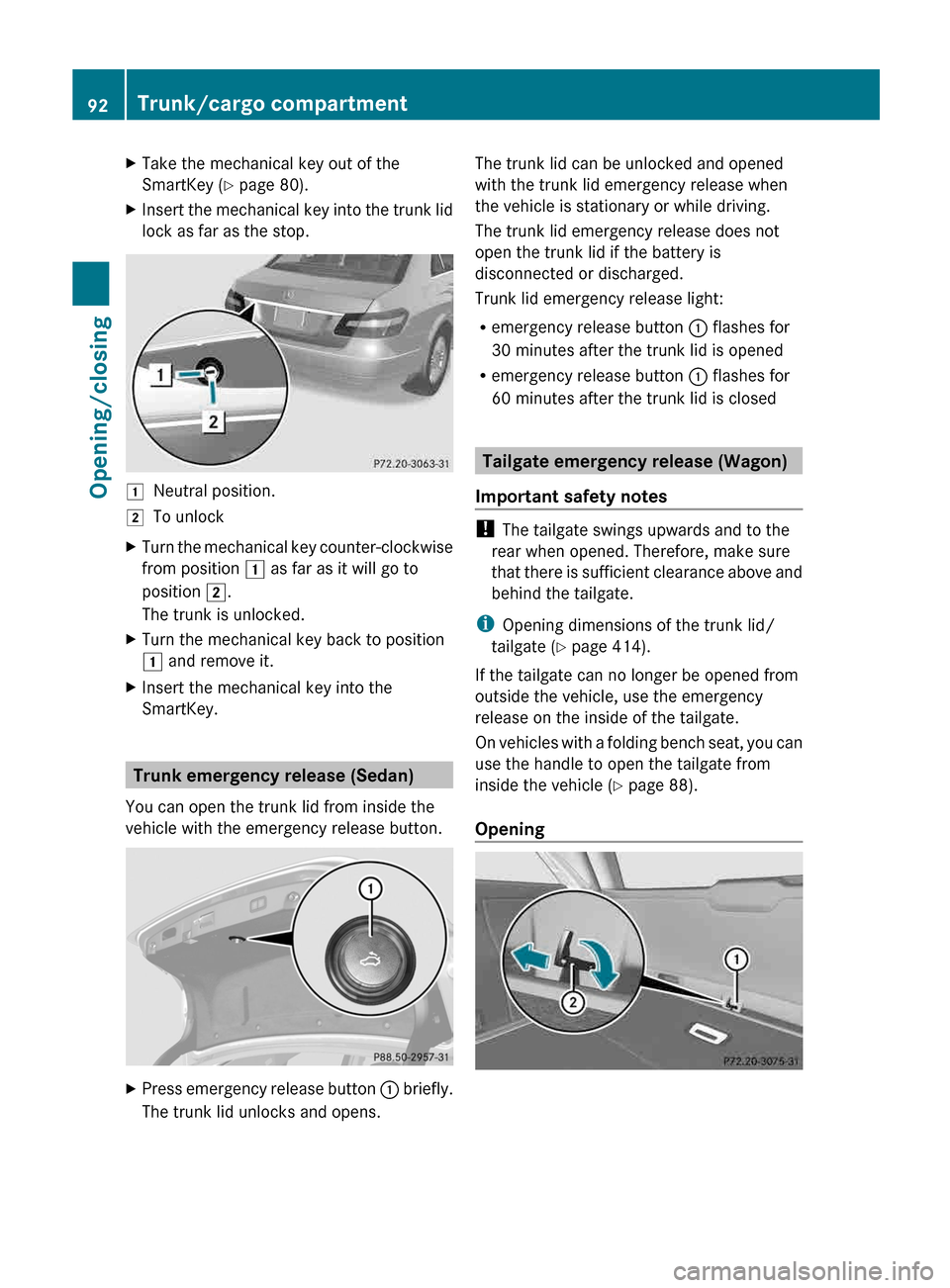
X Insert the mechanical key into the trunk lid
lock as far as the stop. 1
Neutral position.
2 To unlock
X Turn the mechanical key counter-clockwise
from position 1 as far as it will go to
position 2.
The trunk is unlocked.
X Turn the mechanical key back to position
1 and remove it.
X Insert the mechanical key into the
SmartKey. Trunk emergency release (Sedan)
You can open the trunk lid from inside the
vehicle with the emergency release button. X
Press emergency release button : briefly.
The trunk lid unlocks and opens. The trunk lid can be unlocked and opened
with the trunk lid emergency release when
the vehicle is stationary or while driving.
The trunk lid emergency release does not
open the trunk lid if the battery is
disconnected or discharged.
Trunk lid emergency release light:
R
emergency release button : flashes for
30 minutes after the trunk lid is opened
R emergency release button : flashes for
60 minutes after the trunk lid is closed Tailgate emergency release (Wagon)
Important safety notes !
The tailgate swings upwards and to the
rear when opened. Therefore, make sure
that
there is sufficient clearance above and
behind the tailgate.
i Opening dimensions of the trunk lid/
tailgate ( Y page 414).
If the tailgate can no longer be opened from
outside the vehicle, use the emergency
release on the inside of the tailgate.
On vehicles with a folding bench seat, you can
use the handle to open the tailgate from
inside the vehicle ( Y page 88).
Opening 92
Trunk/cargo compartment
Opening/closing
Page 95 of 420
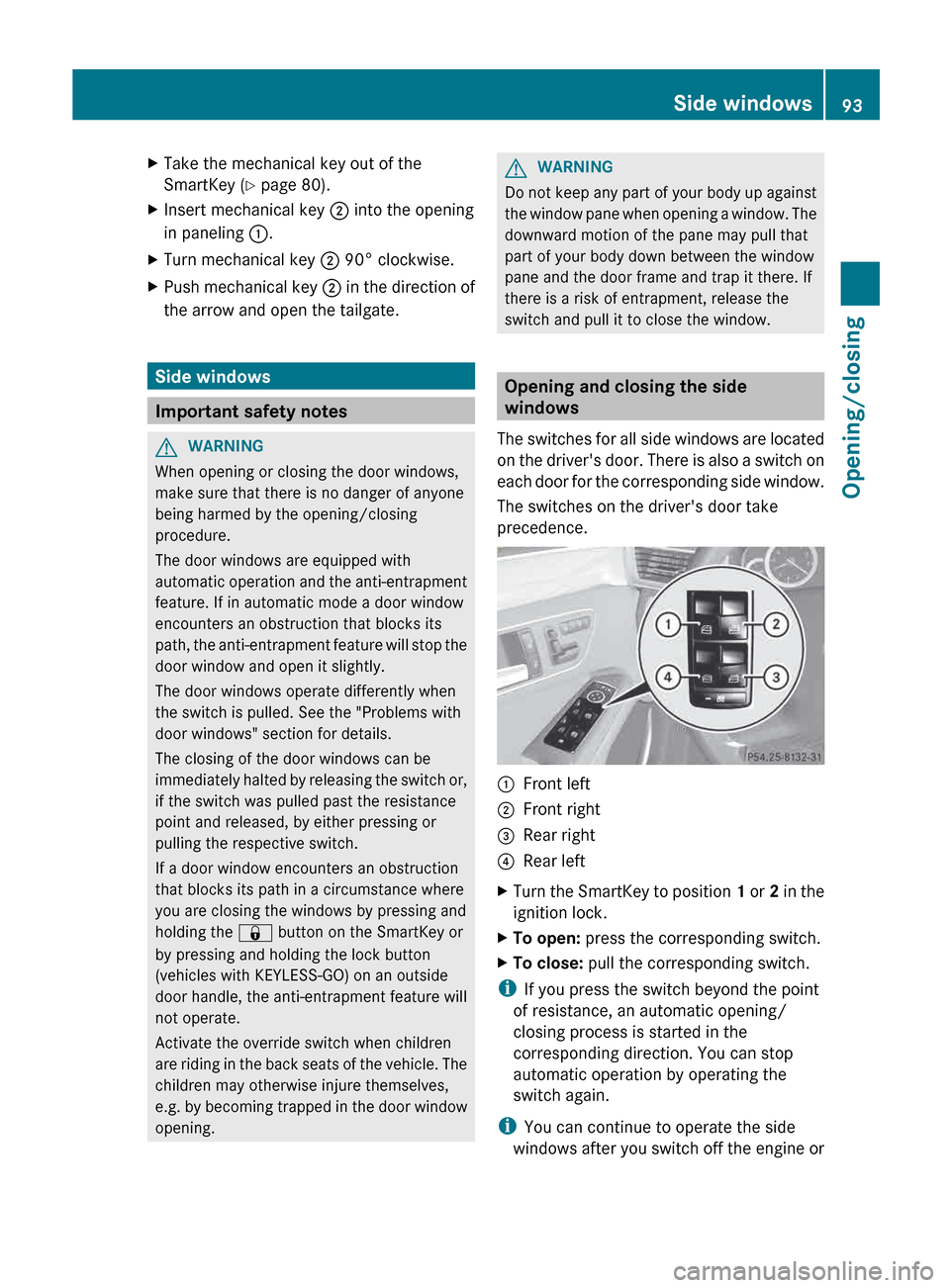
X
Take the mechanical key out of the
SmartKey (Y page 80).
X Insert mechanical key ; into the opening
in paneling :.
X Turn mechanical key ; 90° clockwise.
X Push mechanical key ; in the direction of
the arrow and open the tailgate. Side windows
Important safety notes
G
WARNING
When opening or closing the door windows,
make sure that there is no danger of anyone
being harmed by the opening/closing
procedure.
The door windows are equipped with
automatic
operation and the anti-entrapment
feature. If in automatic mode a door window
encounters an obstruction that blocks its
path, the anti-entrapment feature will stop the
door window and open it slightly.
The door windows operate differently when
the switch is pulled. See the "Problems with
door windows" section for details.
The closing of the door windows can be
immediately halted by releasing the switch or,
if the switch was pulled past the resistance
point and released, by either pressing or
pulling the respective switch.
If a door window encounters an obstruction
that blocks its path in a circumstance where
you are closing the windows by pressing and
holding the & button on the SmartKey or
by pressing and holding the lock button
(vehicles with KEYLESS-GO) on an outside
door handle, the anti-entrapment feature will
not operate.
Activate the override switch when children
are riding in the back seats of the vehicle. The
children may otherwise injure themselves,
e.g. by becoming trapped in the door window
opening. G
WARNING
Do not keep any part of your body up against
the
window pane when opening a window. The
downward motion of the pane may pull that
part of your body down between the window
pane and the door frame and trap it there. If
there is a risk of entrapment, release the
switch and pull it to close the window. Opening and closing the side
windows
The
switches for all side windows are located
on the driver's door. There is also a switch on
each door for the corresponding side window.
The switches on the driver's door take
precedence. :
Front left
; Front right
= Rear right
? Rear left
X Turn the SmartKey to position 1
or 2 in the
ignition lock.
X To open: press the corresponding switch.
X To close: pull the corresponding switch.
i If you press the switch beyond the point
of resistance, an automatic opening/
closing process is started in the
corresponding direction. You can stop
automatic operation by operating the
switch again.
i You can continue to operate the side
windows
after you switch off the engine or Side windows
93
Opening/closing Z
Page 173 of 420
X
Sedan: insert the fuel filler cap into the
bracket on the inside of fuel filler flap ;.
or
X Wagon: insert the fuel filler cap into the
recesses in the fuel filler flap hinge arm
horizontally from above.
X Completely insert the filler neck of the fuel
pump nozzle into the tank and refuel.
X Only fill the tank until the pump nozzle
switches off.
i Do not add any more fuel after the pump
stops filling for the first time. Otherwise,
fuel may leak out.
Closing X
Replace the cap on the filler neck and turn
clockwise until it engages audibly.
X Press the fuel filler flap closed until it
engages audibly.
i Close the fuel filler flap before locking the
vehicle. Otherwise, the locking pin of the
central locking prevents the fuel filler flap
from closing.
i The 8 reserve fuel light flashes if you
are driving with the fuel filler cap open. In
addition, the ; Check Engine warning
lamp may light up. A message appears in
the multifunction display (Y page 260).
For further information on warning and
indicator lamps in the instrument cluster,
see ( Y page 282). Fuel filler flap emergency release
X Sedan: open the trunk lid. X
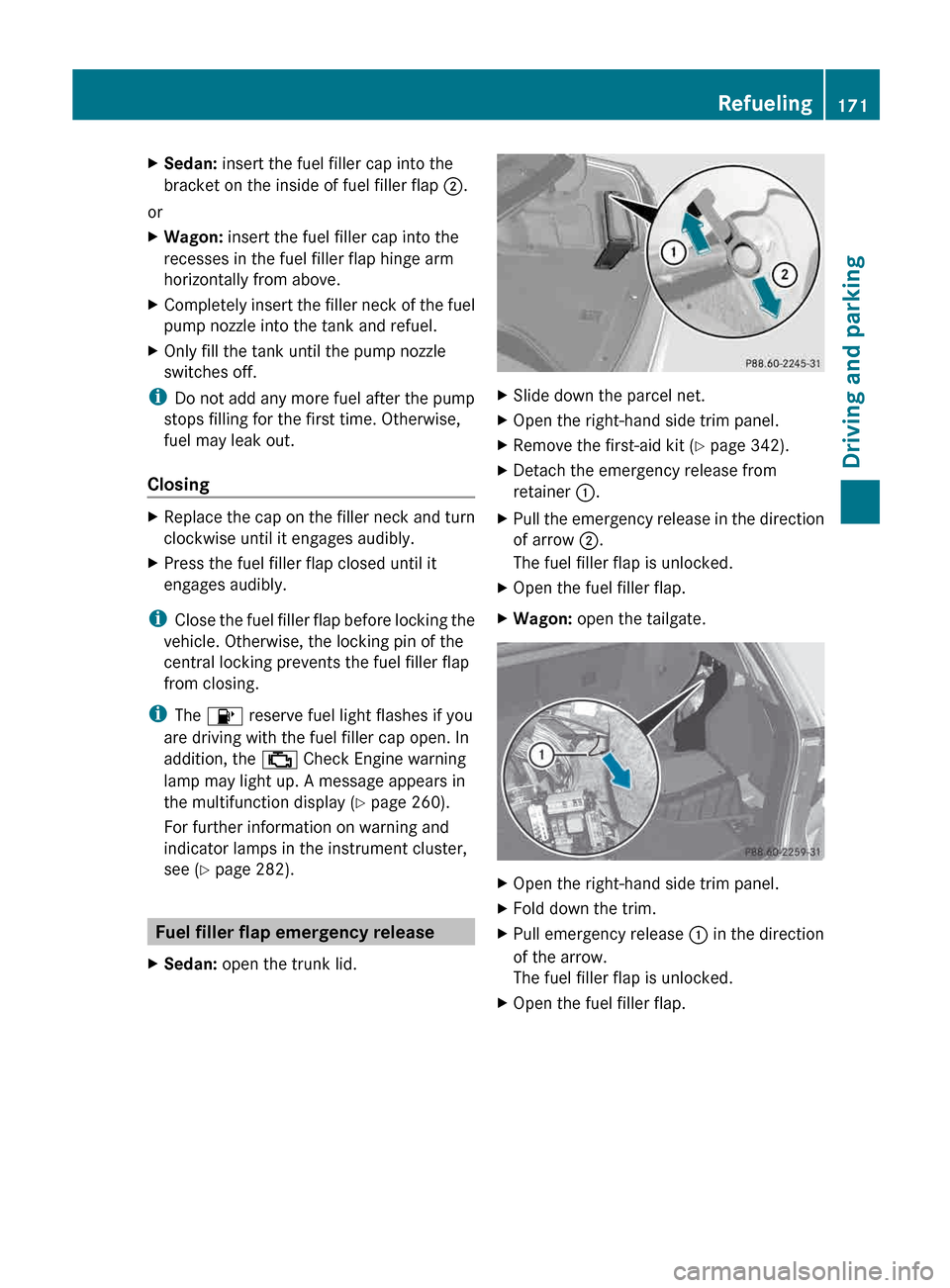
Slide down the parcel net.
X Open the right-hand side trim panel.
X Remove the first-aid kit (Y page 342).
X Detach the emergency release from
retainer :.
X Pull the emergency release in the direction
of arrow ;.
The fuel filler flap is unlocked.
X Open the fuel filler flap.
X Wagon: open the tailgate. X
Open the right-hand side trim panel.
X Fold down the trim.
X Pull emergency release : in the direction
of the arrow.
The fuel filler flap is unlocked.
X Open the fuel filler flap. Refueling
171
Driving and parking Z
Page 175 of 420
Problem Possible causes/consequences and
M SolutionsThe fuel filler flap
cannot be opened. The fuel filler flap is not unlocked.
or
The SmartKey battery is discharged.
X
Unlock the vehicle using the mechanical key ( Y page 80).
X Open the trunk lid or the tailgate.
X Manually unlock the fuel filler flap using the emergency release
(Y page 171). The fuel filler flap is unlocked, but the opening mechanism is
jammed.
X
Consult a qualified specialist workshop. DEF (BlueTEC vehicles only)
Important notes on use To function properly, BlueTEC exhaust gas
aftertreatment must be operated with the
reducing
agent DEF. Adding DEF is one of the
tasks performed during maintenance. Under
normal operating conditions, a tank of DEF
lasts until the next service due date.
When the supply of DEF is almost used up,
the Check Additive See Operator's
Manual message is shown in the
multifunction display.
When the DEF supply drops to a minimum, the
Remaining Starts: 16 message is shown
in the multifunction display.
If the Remaining Starts: 16 message
appears in the multifunction display, you can
start the engine another 16 times. If DEF is
not added, it will then not be possible to
restart the engine. Fill the DEF tank with
about 1 gal (3.8l) of DEF or have the DEF tank
refilled at a qualified specialist workshop.
Use the special DEF refill bottle when filling
between maintenance intervals. Contact an
authorized Mercedes-Benz Center with any
questions or, if necessary, contact Roadside
Assistance ( Y page 23).
If the outside temperature is lower than
12 ‡ ( Ò11) †, damage may occur when adding DEF. If DEF is frozen and there is an
active warning indicator, it may not be
possible to add DEF. Park the vehicle in a
warmer place, e.g. in a garage, until DEF has
become
fluid again. It will then be possible to
add DEF again. Alternatively, have the DEF
tank refilled at a qualified specialist
workshop.
Further information about BlueTEC exhaust
gas aftertreatment and DEF is available at any
authorized Mercedes-Benz Center.
Important notes on topping up G
WARNING
Make sure
R DEF does not come into contact with skin,
eyes, or clothing
R to keep DEF out of the reach of children
If you and/or others have come into contact
with DEF:
R If DEF has gotten into contact with eyes,
flush with plenty of water immediately and
seek medical help.
R Clean
affected skin immediately with plenty
of water.
R If DEF was swallowed, rinse mouth
immediately with plenty of water and drink
plenty of water. Consult a physician. Refueling
173
Driving and parking Z
Page 210 of 420
The Please Steer Wheel to the Left
or Please Steer Wheel to the Right
message appears in the multifunction
display.
X Countersteering: while the vehicle is
stationary, turn the steering wheel in the
specified direction until the arrow is white
and a warning tone sounds.
X To reverse into the parking space:
maintain the steering wheel angle and
reverse carefully.
X Stop as soon as you hear a warning tone,
at
the latest when PARKTRONIC sounds the
continuous warning tone.
The Parking Guidance Finished
message appears in the multifunction
display and a tone sounds. You may be
asked to steer in a different direction and
then change gear. In this case, further
displays in the multifunction display will
direct you to the final position.
X Maneuver if necessary.
X Always observe the warning messages
displayed by PARKTRONIC
(Y page 203).
Canceling Parking Guidance X
Press the PARKTRONIC button on the
center console
(Y page 204).
Parking Guidance is canceled immediately
and PARKTRONIC is deactivated.
Parking Guidance is canceled automatically if
it is no longer possible to guide you into the
parking space, or if a malfunction occurs.
The parking space symbol goes out and a
warning tone sounds. The Parking
Guidance
Canceled message appears in the
multifunction display. Rear view camera
Important safety notes G
WARNING
Make sure that no persons or animals are in
the maneuvering range. Otherwise, they
could be injured.
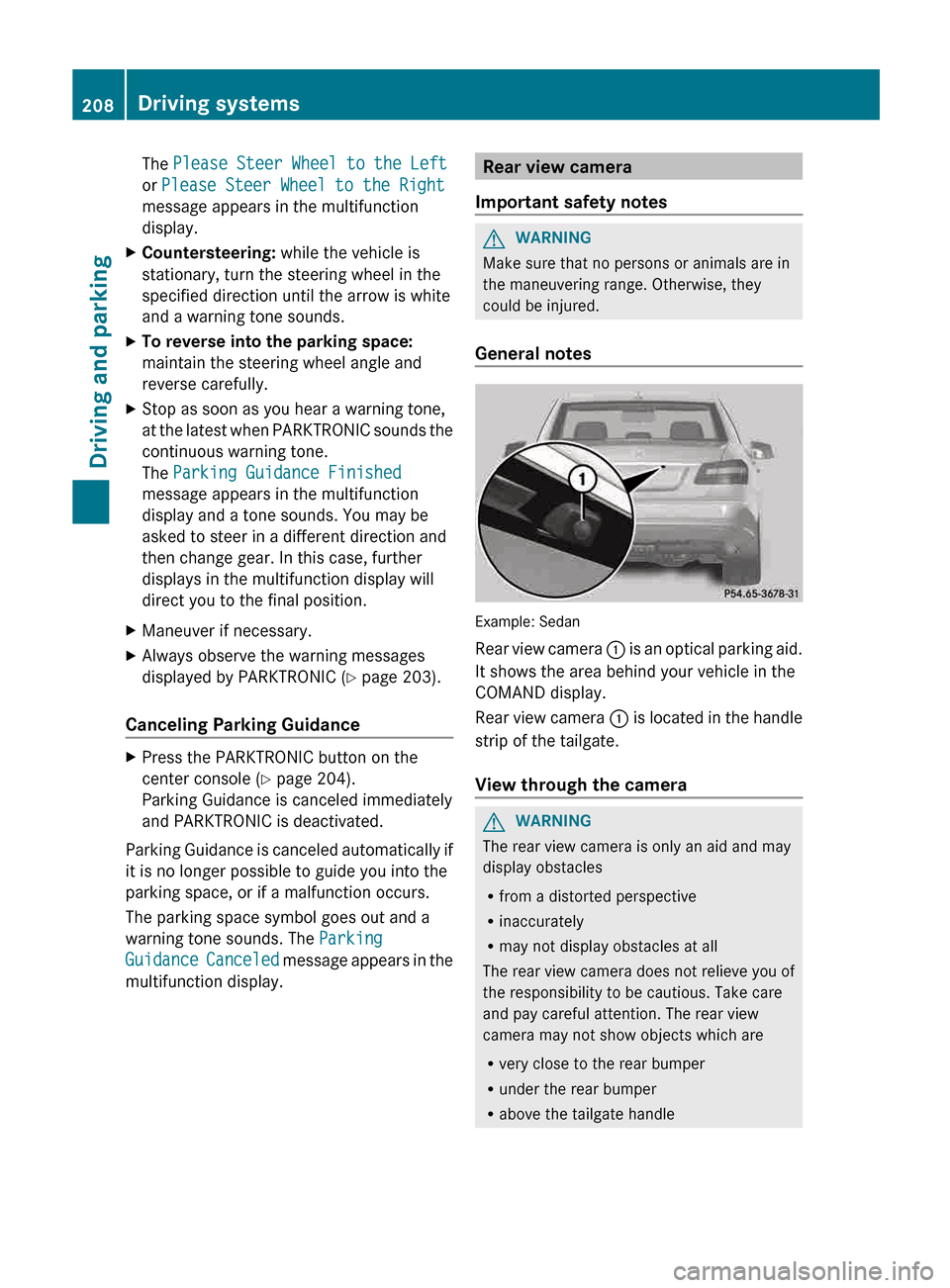
General notes Example: Sedan
Rear
view camera : is an optical parking aid.
It shows the area behind your vehicle in the
COMAND display.
Rear view camera : is located in the handle
strip of the tailgate.
View through the camera G
WARNING
The rear view camera is only an aid and may
display obstacles
R from a distorted perspective
R inaccurately
R may not display obstacles at all
The rear view camera does not relieve you of
the responsibility to be cautious. Take care
and pay careful attention. The rear view
camera may not show objects which are
R very close to the rear bumper
R under the rear bumper
R above the tailgate handle208
Driving systems
Driving and parking
Page 211 of 420
You are responsible for safety at all times and
must continue to pay attention to the
immediate surroundings when parking and
maneuvering. This includes the area behind,
in front of, and beside the vehicle. Otherwise
you could endanger yourself and/or others.
G
WARNING
The rear view camera will not function or will
not fully function if:
R the tailgate is open
R it is raining or snowing strongly or if it is
foggy
R it is night or if you are parking/
maneuvering your vehicle in a very dark
area
R a very bright white light is affecting the
camera
R the immediate vicinity is illuminated with
fluorescent light (the display can flicker)
R temperature
changes abruptly, for example
if you drive out of the cold into a heated
garage (condensation on the lens)
R the camera lens is dirty or covered
R the rear of your vehicle is damaged
In this case, have the position and the
setting of the camera checked at a
specialist workshop. Mercedes-Benz
recommends that you consult a Mercedes-
Benz Center for this purpose.
Do not use the rear view camera in these
situations. You could otherwise injure
yourself and other people and/or cause
damage - including damage to your vehicle -
while parking/maneuvering.
The area behind the vehicle is displayed as a
mirror image, as in the rear view mirror.
Activating the rear view camera X
Make sure that the SmartKey is in position
2 in the ignition lock.
X Make sure that the rear view camera
function is selected in COMAND (see the separate operating instructions for
COMAND).
X Engage reverse gear.
The
area behind the vehicle is shown in the
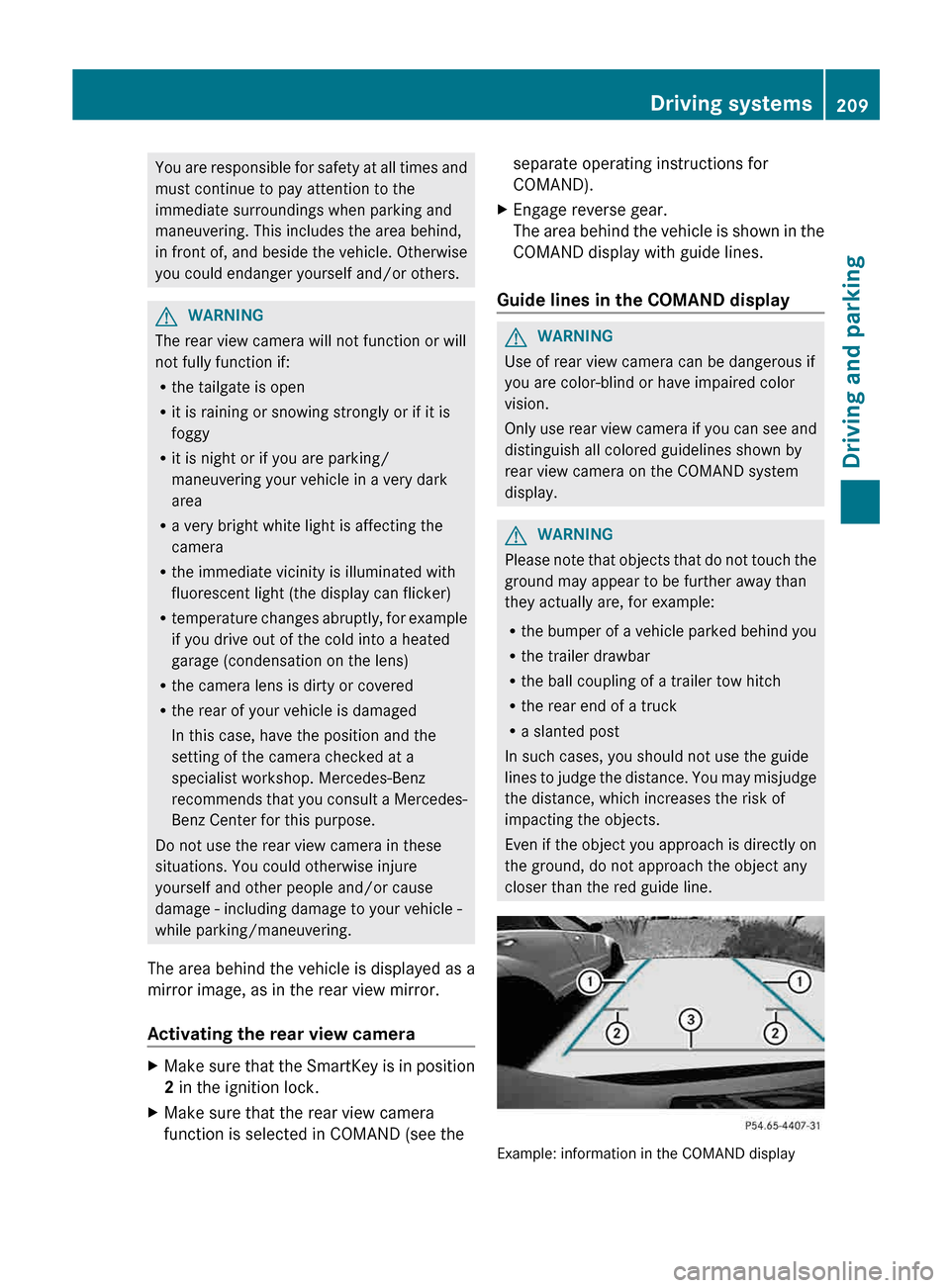
COMAND display with guide lines.
Guide lines in the COMAND display G
WARNING
Use of rear view camera can be dangerous if
you are color-blind or have impaired color
vision.
Only
use rear view camera if you can see and
distinguish all colored guidelines shown by
rear view camera on the COMAND system
display. G
WARNING
Please note that objects that do not touch the
ground may appear to be further away than
they actually are, for example:
R the
bumper of a vehicle parked behind you
R the trailer drawbar
R the ball coupling of a trailer tow hitch
R the rear end of a truck
R a slanted post
In such cases, you should not use the guide
lines to judge the distance. You may misjudge
the distance, which increases the risk of
impacting the objects.
Even if the object you approach is directly on
the ground, do not approach the object any
closer than the red guide line. Example: information in the COMAND display Driving systems
209
Driving and parking Z
Page 242 of 420
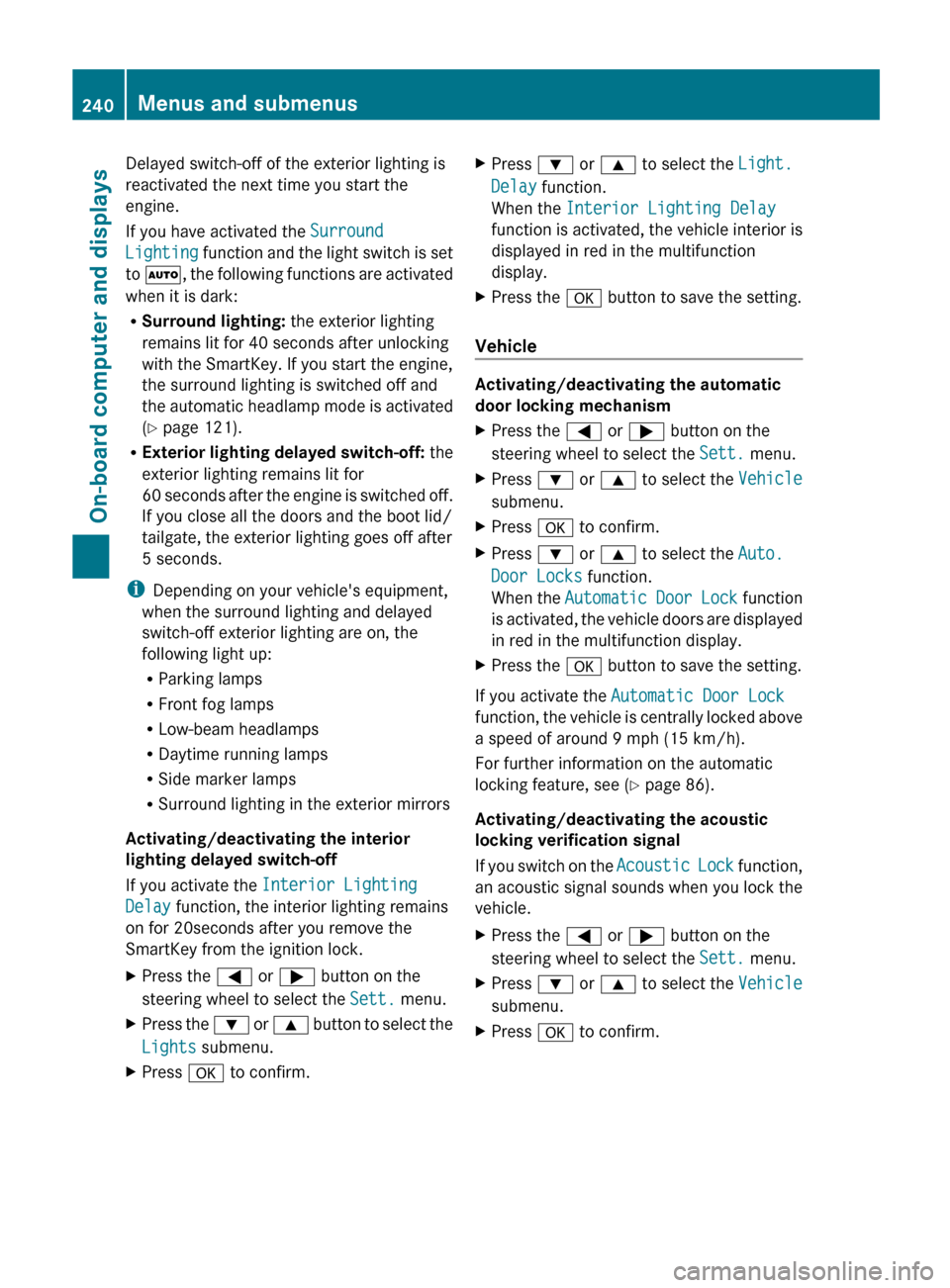
Delayed switch-off of the exterior lighting is
reactivated the next time you start the
engine.
If you have activated the
Surround
Lighting
function and the light switch is set
to Ã, the following functions are activated
when it is dark:
R Surround lighting: the exterior lighting
remains lit for 40 seconds after unlocking
with the SmartKey. If you start the engine,
the surround lighting is switched off and
the automatic headlamp mode is activated
(Y page 121).
R Exterior lighting delayed switch-off: the
exterior lighting remains lit for
60 seconds after the engine is switched off.
If you close all the doors and the boot lid/
tailgate, the exterior lighting goes off after
5 seconds.
i Depending on your vehicle's equipment,
when the surround lighting and delayed
switch-off exterior lighting are on, the
following light up:
R Parking lamps
R Front fog lamps
R Low-beam headlamps
R Daytime running lamps
R Side marker lamps
R Surround lighting in the exterior mirrors
Activating/deactivating the interior
lighting delayed switch-off
If you activate the Interior Lighting
Delay function, the interior lighting remains
on for 20seconds after you remove the
SmartKey from the ignition lock.
X Press the = or ; button on the
steering wheel to select the Sett. menu.
X Press the :
or 9 button to select the
Lights submenu.
X Press a to confirm. X
Press : or 9 to select the Light.
Delay function.
When the Interior Lighting Delay
function
is activated, the vehicle interior is
displayed in red in the multifunction
display.
X Press the a button to save the setting.
Vehicle Activating/deactivating the automatic
door locking mechanism
X
Press the = or ; button on the
steering wheel to select the Sett. menu.
X Press : or 9 to select the Vehicle
submenu.
X Press a to confirm.
X Press : or 9 to select the Auto.
Door Locks function.
When
the Automatic Door Lock function
is activated, the vehicle doors are displayed
in red in the multifunction display.
X Press the a button to save the setting.
If you activate the Automatic Door Lock
function,
the vehicle is centrally locked above
a speed of around 9 mph (15 km/h).
For further information on the automatic
locking feature, see ( Y page 86).
Activating/deactivating the acoustic
locking verification signal
If you switch on the Acoustic Lock function,
an acoustic signal sounds when you lock the
vehicle.
X Press the = or ; button on the
steering wheel to select the Sett. menu.
X Press : or 9 to select the Vehicle
submenu.
X Press a to confirm.240
Menus and submenus
On-board computer and displays
Page 274 of 420
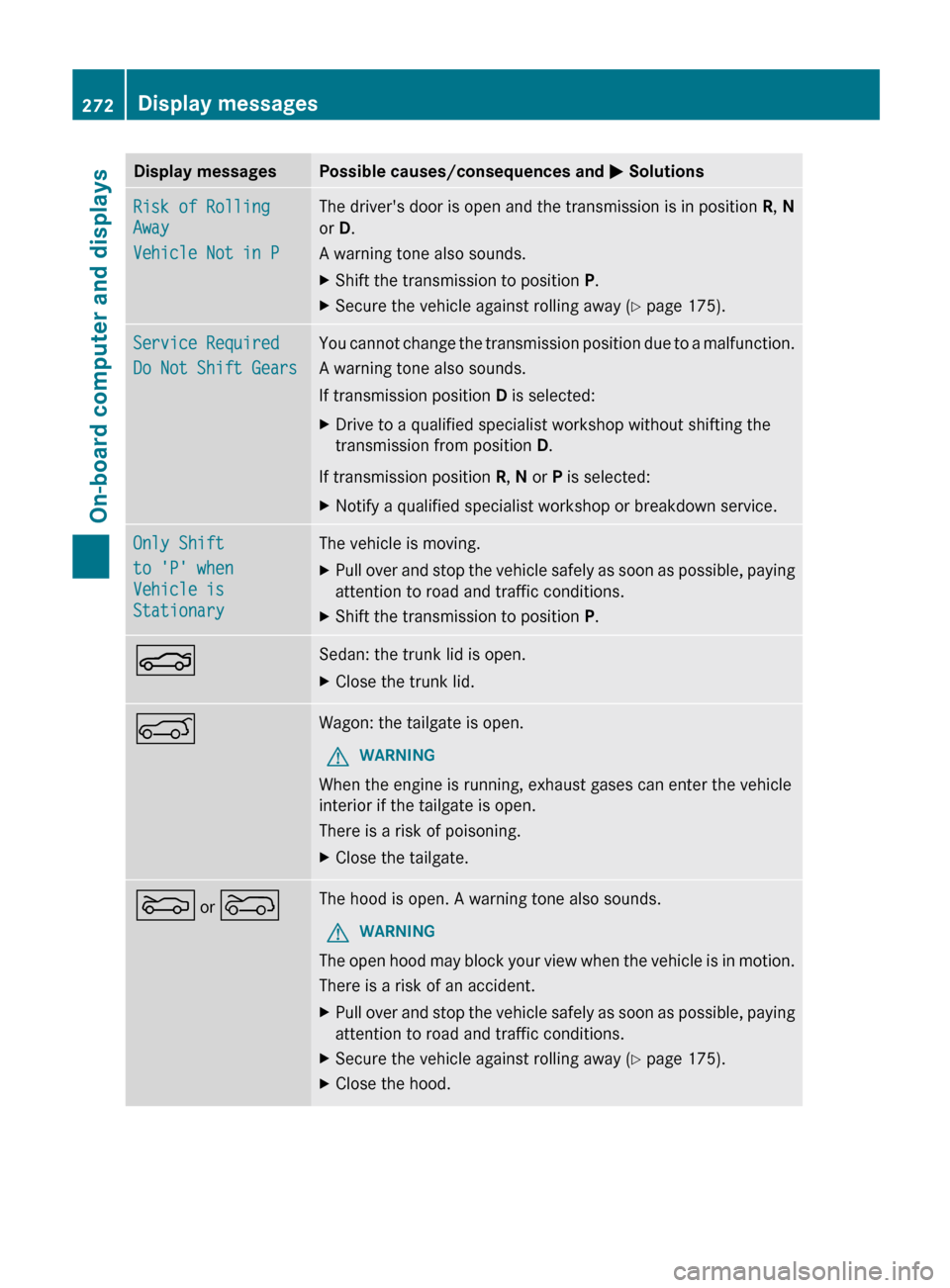
Display messages Possible causes/consequences and
M SolutionsRisk of Rolling
Away
Vehicle Not in P The driver's door is open and the transmission is in position
R, N
or D.
A warning tone also sounds.
X Shift the transmission to position P.
X Secure the vehicle against rolling away ( Y page 175).Service Required
Do Not Shift Gears You cannot change the transmission position due to a malfunction.
A warning tone also sounds.
If transmission position
D is selected:
X Drive to a qualified specialist workshop without shifting the
transmission from position D.
If transmission position R, N or P is selected:
X Notify a qualified specialist workshop or breakdown service. Only Shift
to 'P' when
Vehicle is
Stationary The vehicle is moving.
X
Pull over and stop the vehicle safely as soon as possible, paying
attention to road and traffic conditions.
X Shift the transmission to position P.N Sedan: the trunk lid is open.
X
Close the trunk lid. A Wagon: the tailgate is open.
G WARNING
When the engine is running, exhaust gases can enter the vehicle
interior if the tailgate is open.
There is a risk of poisoning.
X Close the tailgate. M or ? The hood is open. A warning tone also sounds.
G WARNING
The open hood may block your view when the vehicle is in motion.
There is a risk of an accident.
X Pull over and stop the vehicle safely as soon as possible, paying
attention to road and traffic conditions.
X Secure the vehicle against rolling away ( Y page 175).
X Close the hood.272
Display messagesOn-board computer and displays