warning MERCEDES-BENZ E-Class WAGON 2013 W212 Owner's Manual
[x] Cancel search | Manufacturer: MERCEDES-BENZ, Model Year: 2013, Model line: E-Class WAGON, Model: MERCEDES-BENZ E-Class WAGON 2013 W212Pages: 420, PDF Size: 14.26 MB
Page 312 of 420
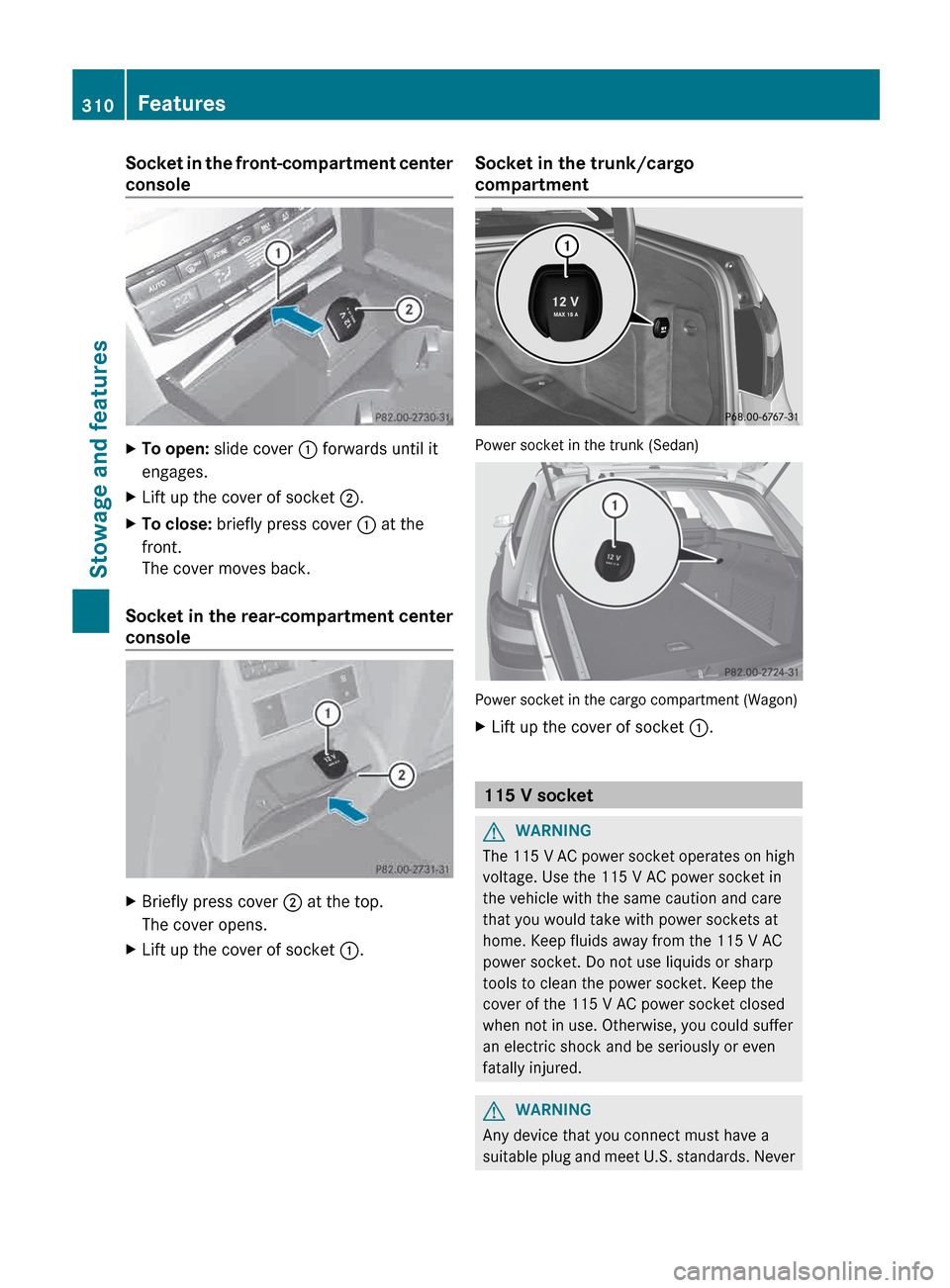
Socket in the front-compartment center
console
X
To open: slide cover : forwards until it
engages.
X Lift up the cover of socket ;.
X To close: briefly press cover : at the
front.
The cover moves back.
Socket in the rear-compartment center
console X
Briefly press cover ; at the top.
The cover opens.
X Lift up the cover of socket :.Socket in the trunk/cargo
compartment
Power socket in the trunk (Sedan)
Power socket in the cargo compartment (Wagon)
X
Lift up the cover of socket :. 115 V socket
G
WARNING
The 115 V AC power socket operates on high
voltage. Use the 115 V AC power socket in
the vehicle with the same caution and care
that you would take with power sockets at
home. Keep fluids away from the 115 V AC
power socket. Do not use liquids or sharp
tools to clean the power socket. Keep the
cover of the 115 V AC power socket closed
when not in use. Otherwise, you could suffer
an electric shock and be seriously or even
fatally injured. G
WARNING
Any device that you connect must have a
suitable
plug and meet U.S. standards. Never310
Features
Stowage and features
Page 313 of 420
pull at a cable to disconnect a plug from a
115
V AC power socket. Never use a damaged
connection cable. The 115 V AC power socket
must never be connected to another 115 V
AC power source. Do not use a converter with
an earthed plug for the 115 V AC power
socket. This could cause serious injury to you
and/or other people. G
WARNING
If the 115 V AC power socket is damaged or
pulled
out of the trim, do not use or touch the
115 V AC power socket. The use of a 115 V
AC power socket that has been damaged or
pulled out of the trim could cause serious
injury to you or others. X
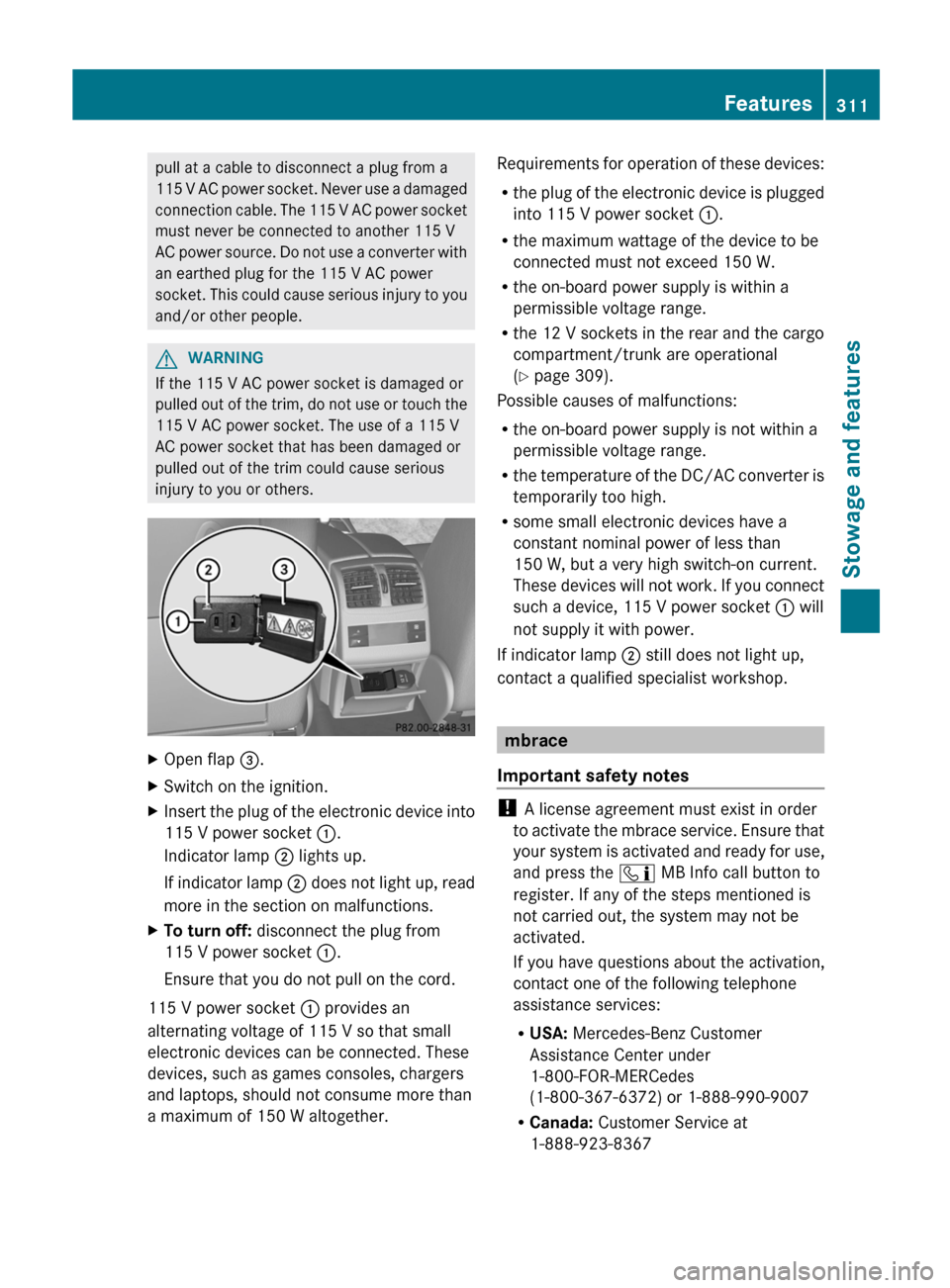
Open flap =.
X Switch on the ignition.
X Insert the plug of the electronic device into
115 V power socket :.
Indicator lamp ; lights up.
If
indicator lamp ; does not light up, read
more in the section on malfunctions.
X To turn off: disconnect the plug from
115 V power socket :.
Ensure that you do not pull on the cord.
115 V power socket : provides an
alternating voltage of 115 V so that small
electronic devices can be connected. These
devices, such as games consoles, chargers
and laptops, should not consume more than
a maximum of 150 W altogether. Requirements for operation of these devices:
R
the
plug of the electronic device is plugged
into 115 V power socket :.
R the maximum wattage of the device to be
connected must not exceed 150 W.
R the on-board power supply is within a
permissible voltage range.
R the 12 V sockets in the rear and the cargo
compartment/trunk are operational
(Y page 309).
Possible causes of malfunctions:
R the on-board power supply is not within a
permissible voltage range.
R the temperature of the DC/AC converter is
temporarily too high.
R some small electronic devices have a
constant nominal power of less than
150 W, but a very high switch-on current.
These devices will not work. If you connect
such a device, 115 V power socket : will
not supply it with power.
If indicator lamp ; still does not light up,
contact a qualified specialist workshop. mbrace
Important safety notes !
A license agreement must exist in order
to
activate the mbrace service. Ensure that
your system is activated and ready for use,
and press the ï MB Info call button to
register. If any of the steps mentioned is
not carried out, the system may not be
activated.
If you have questions about the activation,
contact one of the following telephone
assistance services:
R USA: Mercedes-Benz Customer
Assistance Center under
1-800-FOR-MERCedes
(1-800-367-6372) or 1-888-990-9007
R Canada: Customer Service at
1-888-923-8367 Features
311
Stowage and features Z
Page 314 of 420
Shortly after successfully registering with the
mbrace
service (Canada: TELEAID), a user ID
and password will be sent to you by post. USA
only: you can use this password to log onto
the mbrace area under "Owners Online" at
http://www.mbusa.com .
The mbrace system is available if:
R it has been activated and is operational
R the corresponding mobile phone network
is available for transmitting data to the
Customer Center
R a service subscription is available
R the starter battery is sufficiently charged
i Determining the location of the vehicle on
a map is only possible if:
R GPS reception is available
R the vehicle position can be forwarded to
the Customer Assistance Center
The mbrace system To adjust the volume during an mbrace call,
proceed as follows:
X
Press the W or X button on the
multifunction steering wheel.
or
X Use the volume controller of the audio
system/COMAND.
The mbrace system provides various
services, e.g.:
R automatic and manual emergency call
R Roadside Assistance call
R MB Info call
USA only: you can find information and a
description of all available features under
"Owners
Online" at http://www.mbusa.com.
System self-test After you have switched on the ignition, the
system carries out a self-diagnosis. A malfunction in the system has been
detected if one of the following conditions
occurs:
R
the indicator lamp in the SOS button does
not come on during the system self-test.
R the indicator lamp in the F Roadside
Assistance button does not light up during
self-diagnosis of the system.
R the
indicator lamp in the ï MB-Info call
button does not light up during self-
diagnosis of the system.
R the indicator lamp in one or more of the
following buttons continues to light up red
after the system self-diagnosis:
-SOS button
- Roadside Assistance call button F
- MB Info call button ï
R The mbrace Inoperative or mbrace
Service Not Activated message
appears in the multifunction display after
the system self-diagnosis.
If a malfunction is indicated as outlined
above, the system may not operate as
expected. In the event of an emergency,
assistance must be summoned by other
means.
Have the system checked at the nearest
authorized Mercedes-Benz Center or contact
the following service hotlines:
R USA: Mercedes-Benz Customer Assistance
center at
1-800-FOR-MERCedes (1-800-367-6372)
or 1-888-990-9007
R Canada: Customer Service at
1-888-923-8367
Emergency call Important safety notes
G
WARNING
If the indicator lamp in the SOS button is
flashing continuously and no voice
connection with the Response center has
been established, then the mbrace system 312
Features
Stowage and features
Page 315 of 420
has not been able to initiate an emergency call
(e.g.
the relevant mobile phone network is not
available).
The Call Failed message is displayed in the
multifunction display and must be confirmed.
Should this occur, assistance must be
summoned by other means.
! A license agreement must exist in order
to activate the mbrace service. Ensure that
your system is activated and ready for use,
and press the ï MB Info call button to
register. If any of the steps mentioned is
not carried out, the system may not be
activated.
If you have questions about the activation,
contact one of the following telephone
assistance services:
R USA: Mercedes-Benz Customer
Assistance Center under
1-800-FOR-MERCedes
(1-800-367-6372) or 1-888-990-9007
R Canada: Customer Service at
1-888-923-8367
An emergency call is dialed automatically if
an air bag or Emergency Tensioning Device is
triggered.
i You cannot end an automatically
triggered emergency call yourself.
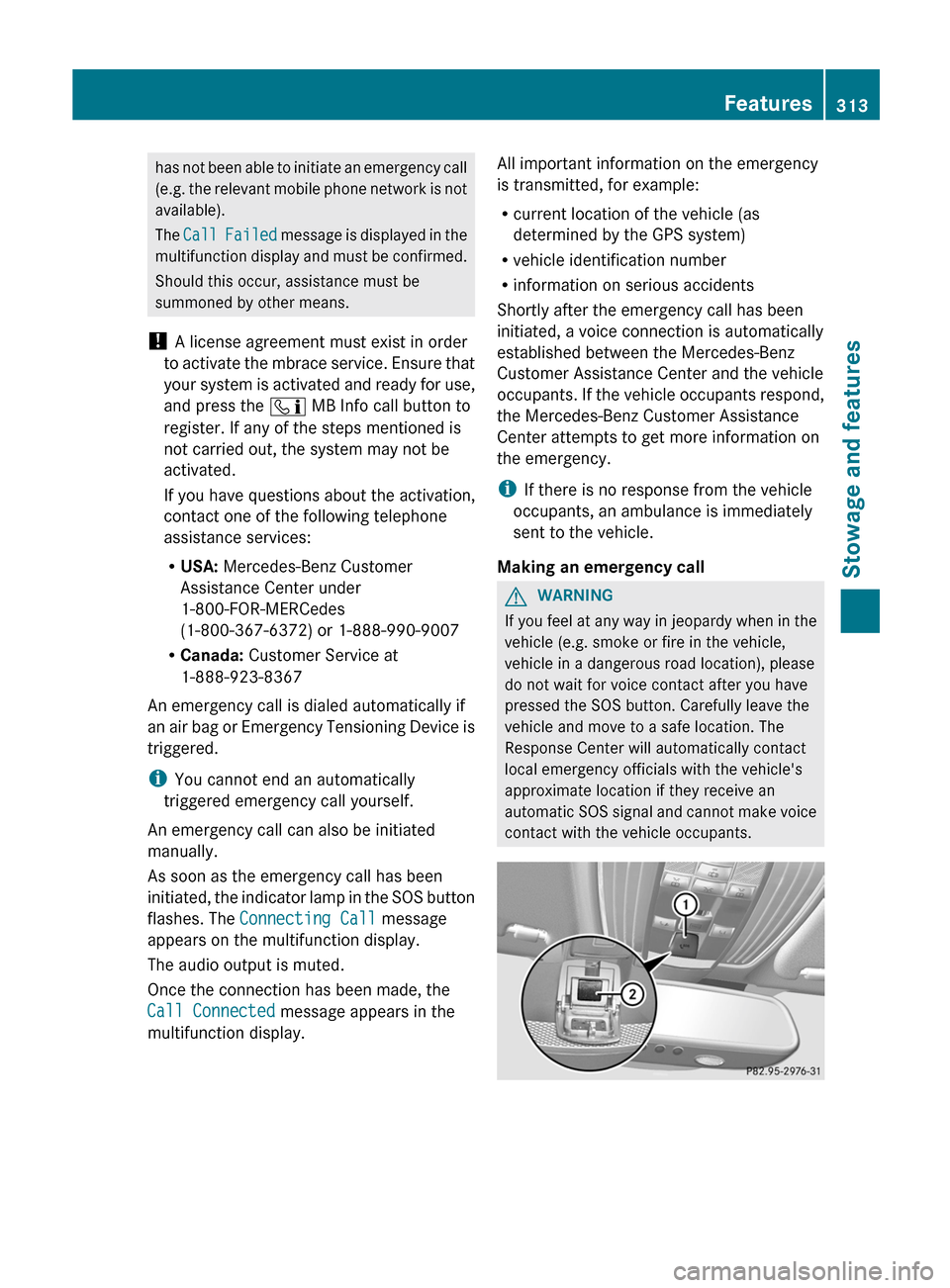
An emergency call can also be initiated
manually.
As soon as the emergency call has been
initiated, the indicator lamp in the SOS button
flashes. The Connecting Call message
appears on the multifunction display.
The audio output is muted.
Once the connection has been made, the
Call Connected message appears in the
multifunction display. All important information on the emergency
is transmitted, for example:
R
current location of the vehicle (as
determined by the GPS system)
R vehicle identification number
R information on serious accidents
Shortly after the emergency call has been
initiated, a voice connection is automatically
established between the Mercedes-Benz
Customer Assistance Center and the vehicle
occupants.
If the vehicle occupants respond,
the Mercedes-Benz Customer Assistance
Center attempts to get more information on
the emergency.
i If there is no response from the vehicle
occupants, an ambulance is immediately
sent to the vehicle.
Making an emergency call G
WARNING
If you feel at any way in jeopardy when in the
vehicle (e.g. smoke or fire in the vehicle,
vehicle in a dangerous road location), please
do not wait for voice contact after you have
pressed the SOS button. Carefully leave the
vehicle and move to a safe location. The
Response Center will automatically contact
local emergency officials with the vehicle's
approximate location if they receive an
automatic
SOS signal and cannot make voice
contact with the vehicle occupants. Features
313
Stowage and features Z
Page 322 of 420
simultaneously. Different settings are
possible for each area.
USA only: these settings can be called up
under "Owners Online" at http://
www.mbusa.com.
Alternatively, you can trigger an MB Info call
and inform the customer service
representative that you wish to activate geo
fencing.
Currently inactive areas can be activated by
SMS.
Triggering the vehicle alarm
With this function, you can trigger the
vehicle's panic alarm via SMS. An alarm
sounds and the exterior lighting flashes.
Depending on the setting, the panic alarm
lasts five or ten seconds. Afterwards, the
alarm switches off.
Garage door opener
Important safety notes G
WARNING
Before programming the integrated remote
control to a garage door opener or gate
operator, make sure people and objects are
out of the way of the device to prevent
potential harm or damage. When
programming
a garage door opener, the door
moves up or down. When programming a gate
operator, the gate opens or closes.
Do not use the integrated remote control with
any garage door opener that lacks safety stop
and reverse features as required by U.S.
federal safety standards (this includes any
garage door opener model manufactured
before April 1, 1982). A garage door that
cannot detect an object - signaling the door
to stop and reverse - does not meet current
U.S. federal safety standards.
When programming a garage door opener,
park vehicle outside the garage. Do not run the engine while programming the
integrated remote control. Inhalation of
exhaust gas is hazardous to your health. All
exhaust gas contains carbon monoxide (CO),
and inhaling it can cause unconsciousness
and possible death. All exhaust gas contains
carbon monoxide (CO), and inhaling it can
cause unconsciousness and possible death.
The HomeLink ®
garage door opener
integrated in the rear-view mirror allows you
to
operate up to three different door and gate
systems.
i Certain garage door drives are
incompatible with the integrated garage
door opener. If you have difficulty
programming the integrated garage door
opener, contact an authorized Mercedes-
Benz Center.
Alternatively, you can call the following
telephone assistance services:
R USA: Mercedes-Benz Customer
Assistance Center at
1-800-FOR-MERCedes
R Canada: Customer Service at
1-800-387-0100
R HomeLink ®
hotline 1-800-355-3515
(free of charge)
More information on HomeLink ®
and/or
compatible products is also available
online at http://www.homelink.com.
i USA only:
This device complies with part 15 of the
FCC Rules. Operation is subject to the
following two conditions:
1. This device may not cause harmful
interference, and
2. this device must accept any interference
received, including interference that may
cause undesired operation.
Any unauthorized modification to this
device could void the user's authority to
operate the equipment.
FCC ID: CB2HMIHL4 320
Features
Stowage and features
Page 323 of 420
i
Canada only:
This device complies with the RSS-210
Rules of Industry Canada. Operation is
subject to the following two conditions:
1. This device may not cause harmful
interference, and
2.
this device must accept any interference
received, including interference that may
cause undesired operation of the device.
Any unauthorized modification to this
device could void the user's authority to
operate the equipment.
IC: 279B-HMIHL4
Programming Programming buttons
G
WARNING
Only press the button on the integrated
garage
door opener if there are no persons or
objects present within the sweep of the
garage door. Persons could otherwise be
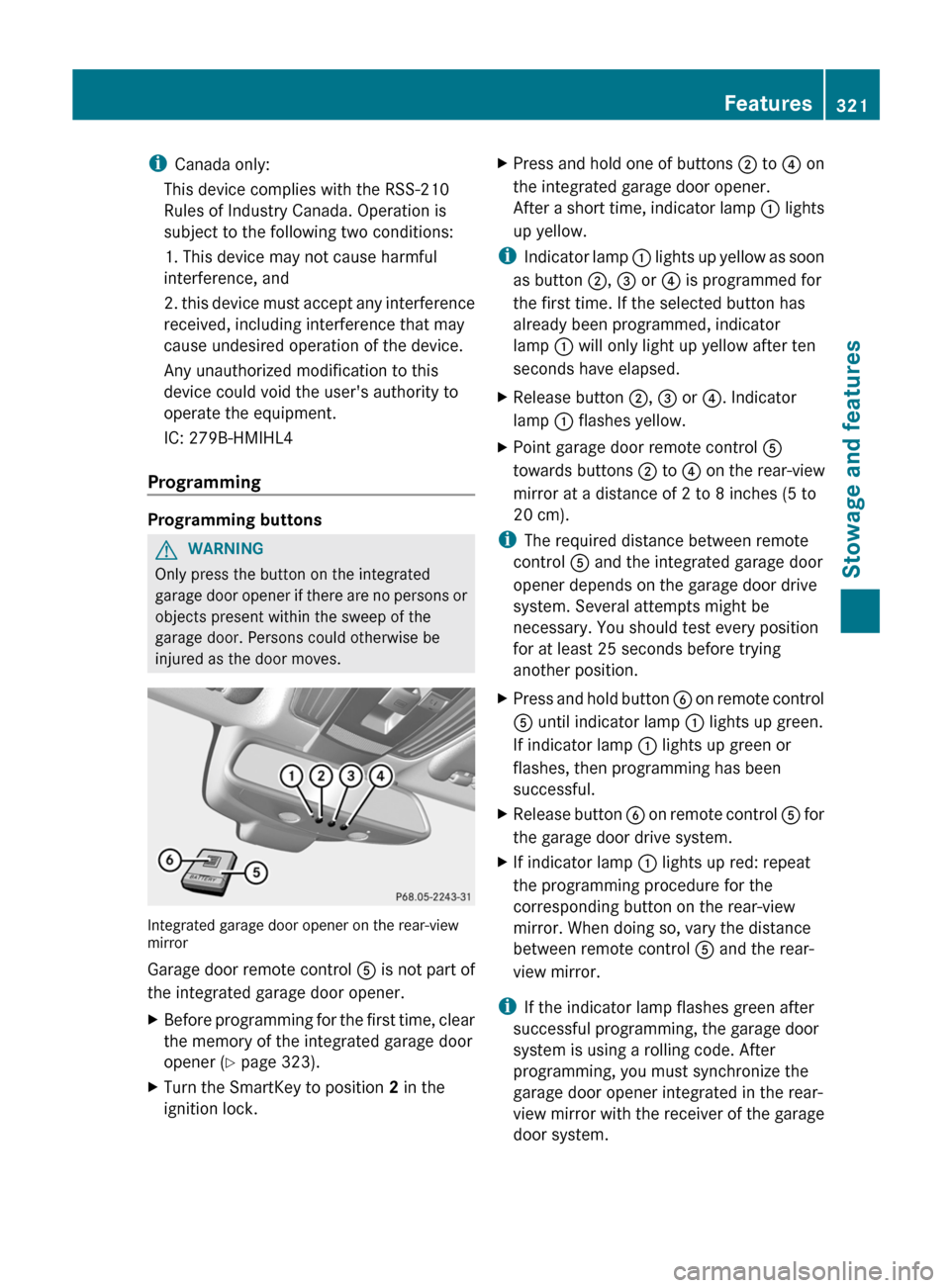
injured as the door moves. Integrated garage door opener on the rear-view
mirror
Garage door remote control
A is not part of
the integrated garage door opener.
X Before programming for the first time, clear
the memory of the integrated garage door
opener (Y page 323).
X Turn the SmartKey to position 2 in the
ignition lock. X
Press and hold one of buttons ; to ? on
the integrated garage door opener.
After
a short time, indicator lamp : lights
up yellow.
i Indicator
lamp : lights up yellow as soon
as button ;, = or ? is programmed for
the first time. If the selected button has
already been programmed, indicator
lamp : will only light up yellow after ten
seconds have elapsed.
X Release button ;, = or ?. Indicator
lamp : flashes yellow.
X Point garage door remote control A
towards buttons ; to ? on the rear-view
mirror at a distance of 2 to 8 inches
(5 to
20 cm).
i The required distance between remote
control A and the integrated garage door
opener depends on the garage door drive
system. Several attempts might be
necessary. You should test every position
for at least 25 seconds before trying
another position.
X Press and hold button B
on remote control
A until indicator lamp : lights up green.
If indicator lamp : lights up green or
flashes, then programming has been
successful.
X Release button B
on remote control A for
the garage door drive system.
X If indicator lamp : lights up red: repeat
the programming procedure for the
corresponding button on the rear-view
mirror. When doing so, vary the distance
between remote control A and the rear-
view mirror.
i If the indicator lamp flashes green after
successful programming, the garage door
system is using a rolling code. After
programming, you must synchronize the
garage door opener integrated in the rear-
view
mirror with the receiver of the garage
door system. Features
321
Stowage and features Z
Page 326 of 420
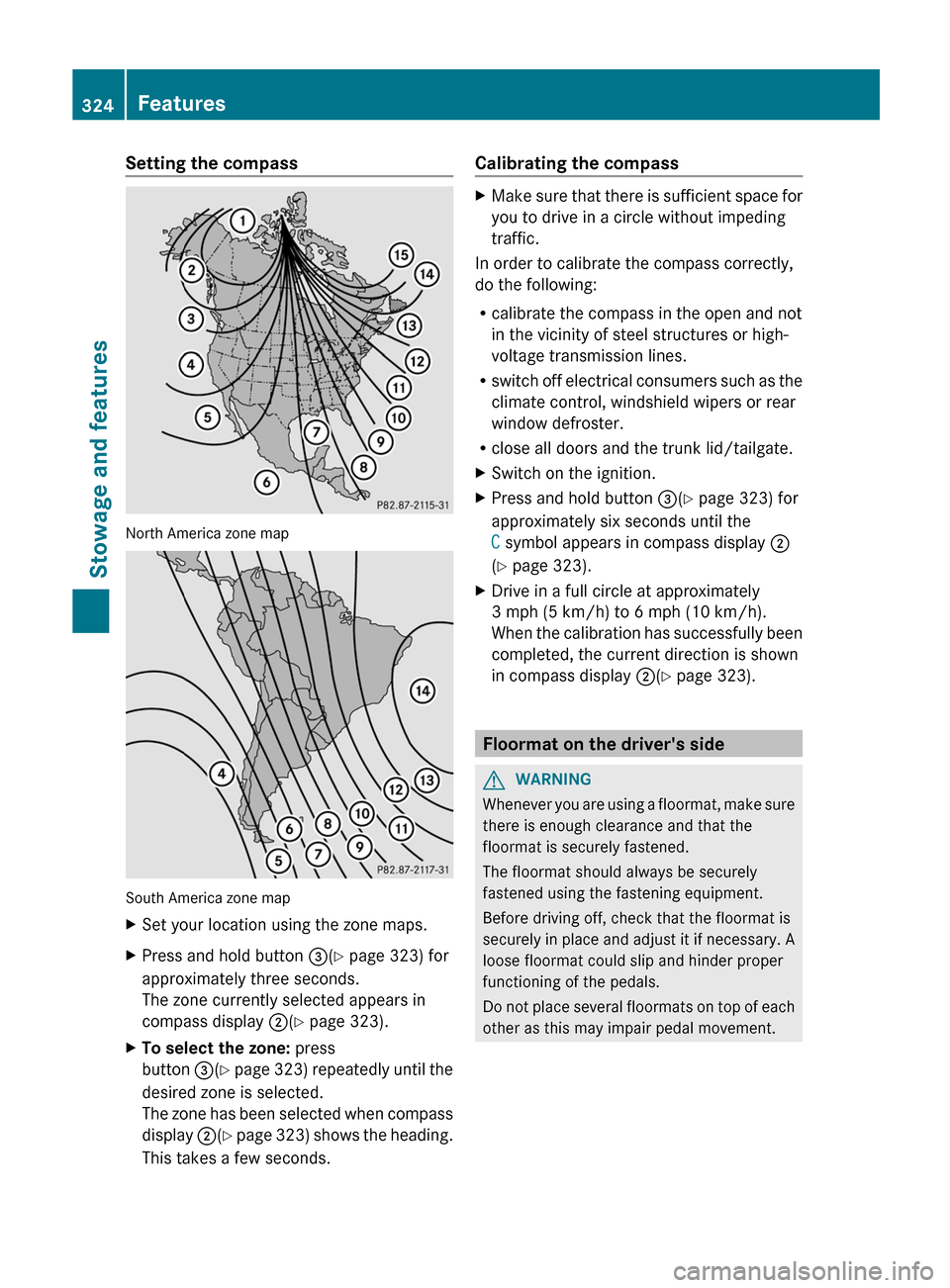
Setting the compass
North America zone map
South America zone map
X
Set your location using the zone maps.
X Press and hold button =(Y page 323) for
approximately three seconds.
The zone currently selected appears in
compass display ;(Y page 323).
X To select the zone: press
button =(Y
page 323) repeatedly until the
desired zone is selected.
The zone has been selected when compass
display ;(Y page 323) shows the heading.
This takes a few seconds. Calibrating the compass X
Make sure that there is sufficient space for
you to drive in a circle without impeding
traffic.
In order to calibrate the compass correctly,
do the following:
R calibrate the compass in the open and not
in the vicinity of steel structures or high-
voltage transmission lines.
R switch
off electrical consumers such as the
climate control, windshield wipers or rear
window defroster.
R close all doors and the trunk lid/tailgate.
X Switch on the ignition.
X Press and hold button =(Y page 323) for
approximately six seconds until the
C symbol appears in compass display ;
(Y page 323).
X Drive in a full circle at approximately
3 mph (5 km/h) to
6 mph (10 km/h).
When the calibration has successfully been
completed, the current direction is shown
in compass display ;(Y page 323). Floormat on the driver's side
G
WARNING
Whenever you are using a floormat, make sure
there is enough clearance and that the
floormat is securely fastened.
The floormat should always be securely
fastened using the fastening equipment.
Before driving off, check that the floormat is
securely
in place and adjust it if necessary. A
loose floormat could slip and hinder proper
functioning of the pedals.
Do not place several floormats on top of each
other as this may impair pedal movement. 324
Features
Stowage and features
Page 330 of 420
Useful information
i This Operator's Manual describes all
models and all standard and optional
equipment of your vehicle available at the
time of publication of the Operator's
Manual. Country-specific differences are
possible.
Please note that your vehicle may
not be equipped with all features
described. This also applies to safety-
related systems and functions.
i Read the information on qualified
specialist workshops: ( Y page 25).Engine compartment
Hood
Opening the hood G
WARNING
Do not pull the release lever while the vehicle
is in motion. Otherwise, the hood could be
forced open by passing air flow.
This
could cause the hood to come loose and
injure you and/or others. G
WARNING
Hybrid vehicles: be sure to read the "HYBRID"
supplement. Otherwise, you could fail to
recognize dangers. G
WARNING
Do not open the hood when the engine is
overheated. You could be seriously injured.
Observe the coolant temperature gauge to
determine whether the engine may be
overheated. If you see flames or smoke
coming from the engine compartment, move
away from the vehicle. Wait until the engine
has cooled. If necessary, call the fire
department. G
WARNING
There is a risk of injury if the hood is open,
even if the engine is not running. Some engine components can become very
hot.
To avoid the risk of burns, only touch those
components described in the Operator's
Manual
and observe the relevant safety notes. G
WARNING
To avoid injury, stay clear of moving parts
when the hood is open and the engine is
running.
The radiator fan may continue to run for
approximately 30seconds
or may even restart
after the engine has been switched off. For
this reason, you must not reach into the fan
rotation area. G
WARNING
Vehicles with gasoline engine:
The engine is equipped with a transistorized
ignition system. Because of the high voltage
it is dangerous to touch any components
(ignition coils, spark plug sockets, diagnostic
socket) of the ignition system
R with the engine running
R while starting the engine
R when the ignition is switched on and the
engine is turned manually G
WARNING
Vehicles with diesel engine:
The engine is equipped with a high-voltage
electronic control unit for the injection
system. Because of the high voltage it is
dangerous to touch any components of the
injection system (injectors, electrical wires)
R with the engine running
R while starting the engine
R when the ignition is switched on G
WARNING
The windshield wipers and wiper linkage
could be set in motion.
When the hood is open, you or others could
be injured by the wiper linkage. 328
Engine compartment
Maintenance and care
Page 331 of 420
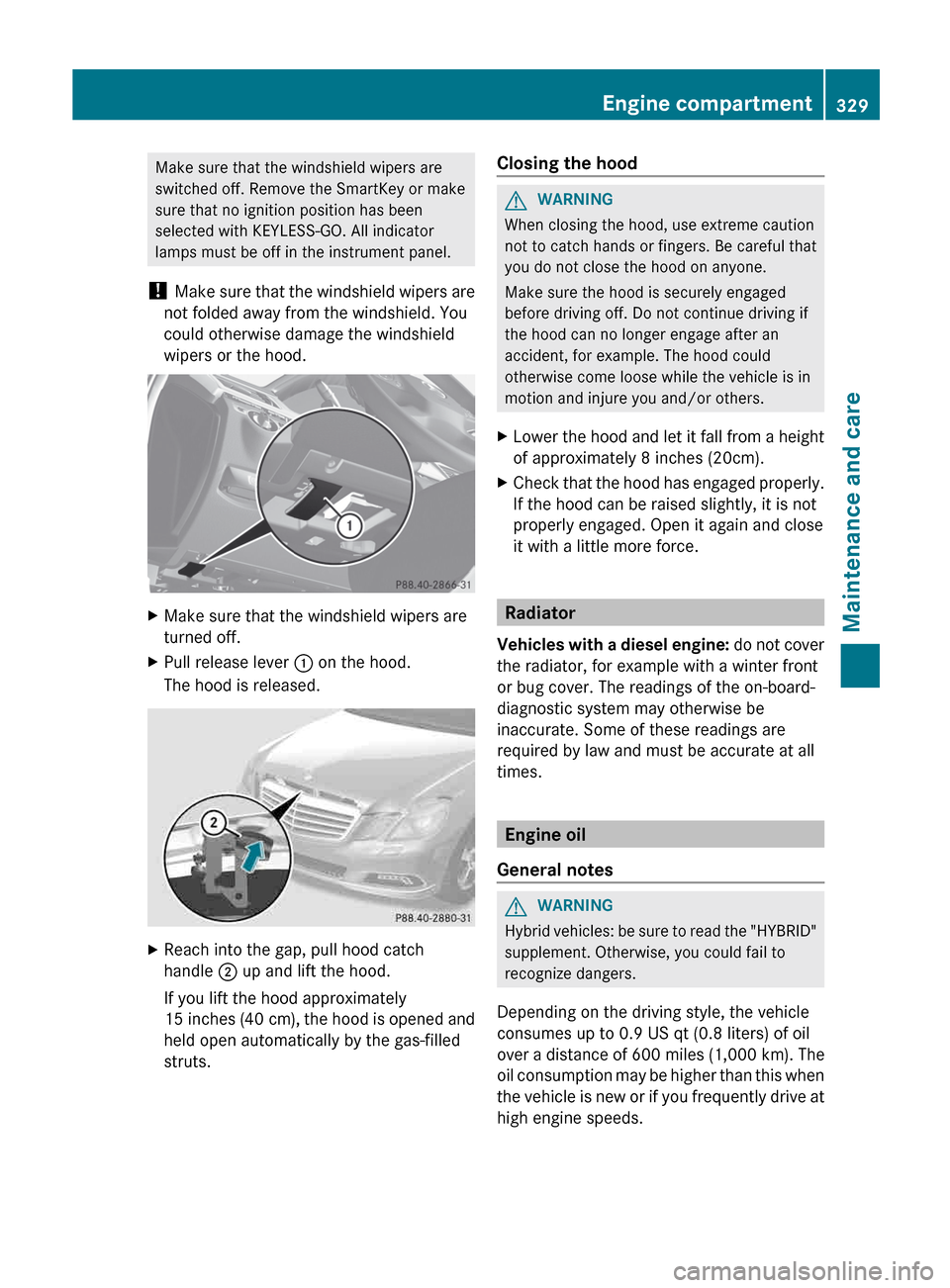
Make sure that the windshield wipers are
switched off. Remove the SmartKey or make
sure that no ignition position has been
selected with KEYLESS-GO. All indicator
lamps must be off in the instrument panel.
! Make
sure that the windshield wipers are
not folded away from the windshield. You
could otherwise damage the windshield
wipers or the hood. X
Make sure that the windshield wipers are
turned off.
X Pull release lever : on the hood.
The hood is released. X
Reach into the gap, pull hood catch
handle ; up and lift the hood.
If you lift the hood approximately
15 inches
(40 cm), the hood is opened and
held open automatically by the gas-filled
struts. Closing the hood G
WARNING
When closing the hood, use extreme caution
not to catch hands or fingers. Be careful that
you do not close the hood on anyone.
Make sure the hood is securely engaged
before driving off. Do not continue driving if
the hood can no longer engage after an
accident, for example. The hood could
otherwise come loose while the vehicle is in
motion and injure you and/or others.
X Lower the hood and let it fall from a height
of approximately
8 inches (20cm).
X Check that the hood has engaged properly.
If the hood can be raised slightly, it is not
properly engaged. Open it again and close
it with a little more force. Radiator
Vehicles
with a diesel engine: do not cover
the radiator, for example with a winter front
or bug cover. The readings of the on-board-
diagnostic system may otherwise be
inaccurate. Some of these readings are
required by law and must be accurate at all
times. Engine oil
General notes G
WARNING
Hybrid vehicles: be sure to read the "HYBRID"
supplement. Otherwise, you could fail to
recognize dangers.
Depending on the driving style, the vehicle
consumes up to 0.9 US qt
(0.8 liters) of oil
over a distance of 600 miles (1,000 km). The
oil consumption may be higher than this when
the vehicle is new or if you frequently drive at
high engine speeds. Engine compartment
329
Maintenance and care Z
Page 332 of 420
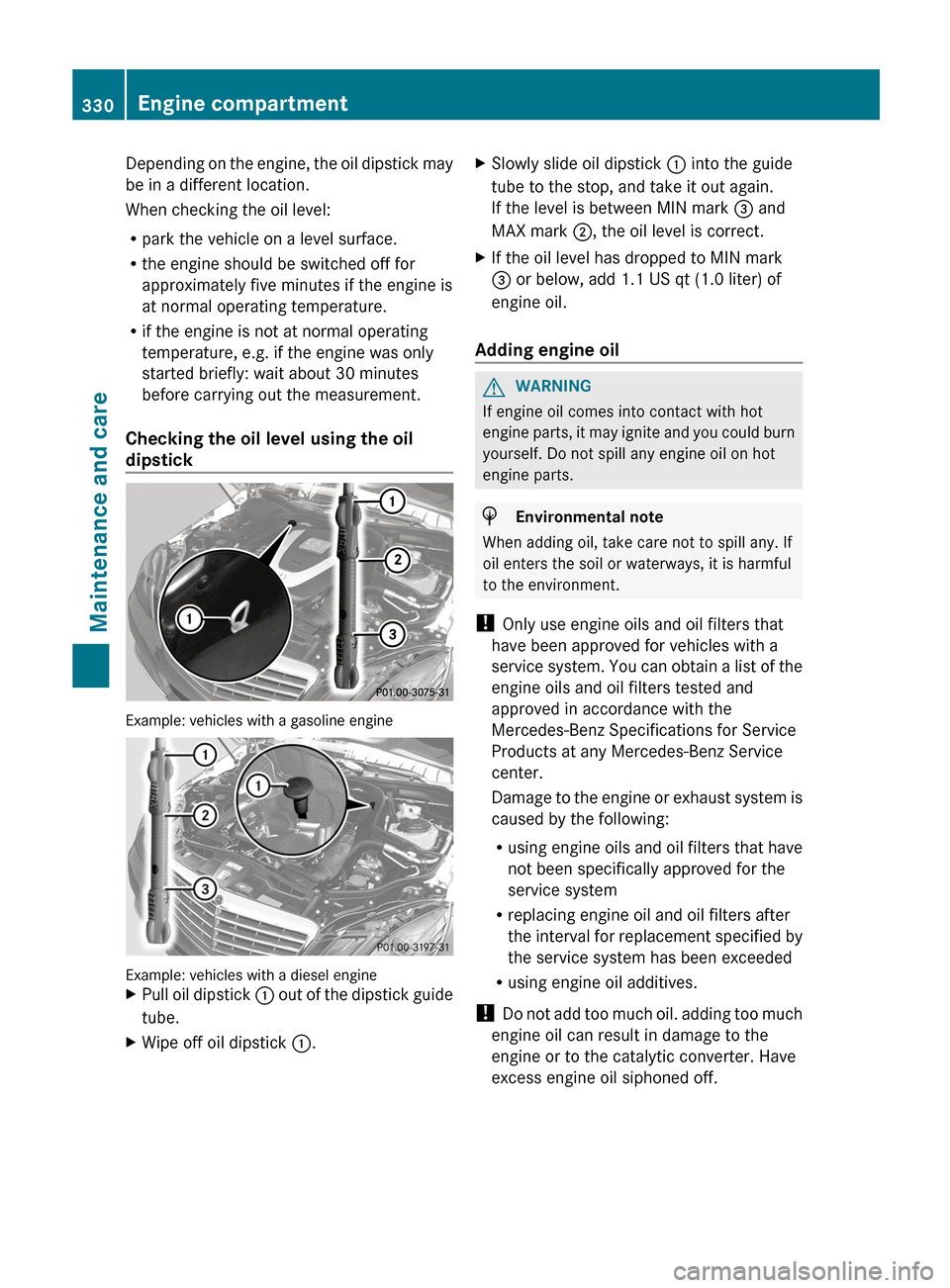
Depending on the engine, the oil dipstick may
be in a different location.
When checking the oil level:
R
park the vehicle on a level surface.
R the engine should be switched off for
approximately five minutes if the engine is
at normal operating temperature.
R if the engine is not at normal operating
temperature, e.g. if the engine was only
started briefly: wait about
30 minutes
before carrying out the measurement.
Checking the oil level using the oil
dipstick Example: vehicles with a gasoline engine
Example: vehicles with a diesel engine
X
Pull oil dipstick :
out of the dipstick guide
tube.
X Wipe off oil dipstick :. X
Slowly slide oil dipstick : into the guide
tube to the stop, and take it out again.
If the level is between MIN mark = and
MAX mark ;, the oil level is correct.
X If the oil level has dropped to MIN mark
= or below, add
1.1 US qt (1.0 liter) of
engine oil.
Adding engine oil G
WARNING
If engine oil comes into contact with hot
engine
parts, it may ignite and you could burn
yourself. Do not spill any engine oil on hot
engine parts. H
Environmental note
When adding oil, take care not to spill any. If
oil enters the soil or waterways, it is harmful
to the environment.
! Only use engine oils and oil filters that
have been approved for vehicles with a
service
system. You can obtain a list of the
engine oils and oil filters tested and
approved in accordance with the
Mercedes-Benz Specifications for Service
Products at any Mercedes-Benz Service
center.
Damage to the engine or exhaust system is
caused by the following:
R using engine oils and oil filters that have
not been specifically approved for the
service system
R replacing engine oil and oil filters after
the interval for replacement specified by
the service system has been exceeded
R using engine oil additives.
! Do not add too much oil. adding too much
engine oil can result in damage to the
engine or to the catalytic converter. Have
excess engine oil siphoned off. 330
Engine compartment
Maintenance and care