light MERCEDES-BENZ E-CLASS WAGON 2018 Owner's Guide
[x] Cancel search | Manufacturer: MERCEDES-BENZ, Model Year: 2018, Model line: E-CLASS WAGON, Model: MERCEDES-BENZ E-CLASS WAGON 2018Pages: 506, PDF Size: 6.73 MB
Page 69 of 506
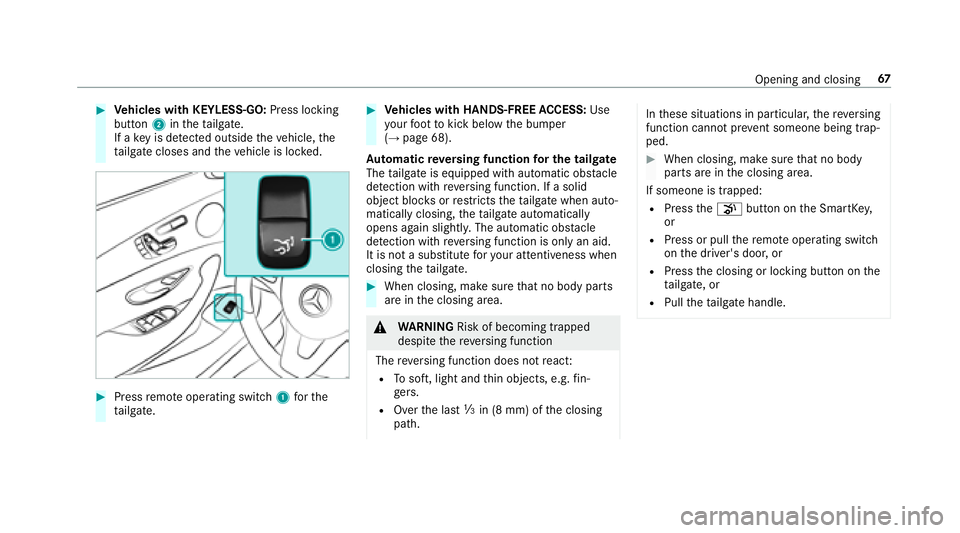
#Vehicles with KEYLESS-GO: Press locking
button 2inthetai lgate.
If a keyis de tected outside theve hicle, the
ta ilgate closes and theve hicle is loc ked.
#Press remo teoperating switch 1forth e
ta ilgate.
#Ve hicles with HANDS-FREE ACCESS: Use
yo ur foot to kick below the bumper
(
→page 68).
Au tomatic reve rsing function for the tail gate
The tailgate is equipped with automatic obs tacle
de tection wi threve rsing function. If a solid
object bloc ksorrestricts theta ilgate when auto‐
matically closing, theta ilgate automatically
opens again slightly . The automatic obs tacle
de tection wi threve rsing function is only an aid.
It is not a substitute foryo ur attentiveness when
closing theta ilgate.
#When closing, make sure that no body parts
are in the closing area.
&
WARNING Risk of becoming trapped
despite there ve rsing function
The reve rsing function does not react:
RTo soft, light and thin objects, e.g. fin‐
ge rs.
ROver the last Óin (8 mm) of the closing
path.
In these situations in particular, there ve rsing
function cannot pr event someone being trap‐
ped.
#When closing, make surethat no body
parts are in the closing area.
If someone is trapped:
RPress thep button on the SmartK ey,
or
RPress or pull there mo teoperating switch
on the driver's door, or
RPress the closing or locking button on the
ta ilgate, or
RPull theta ilgate handle.
Opening and closing 67
Page 74 of 506
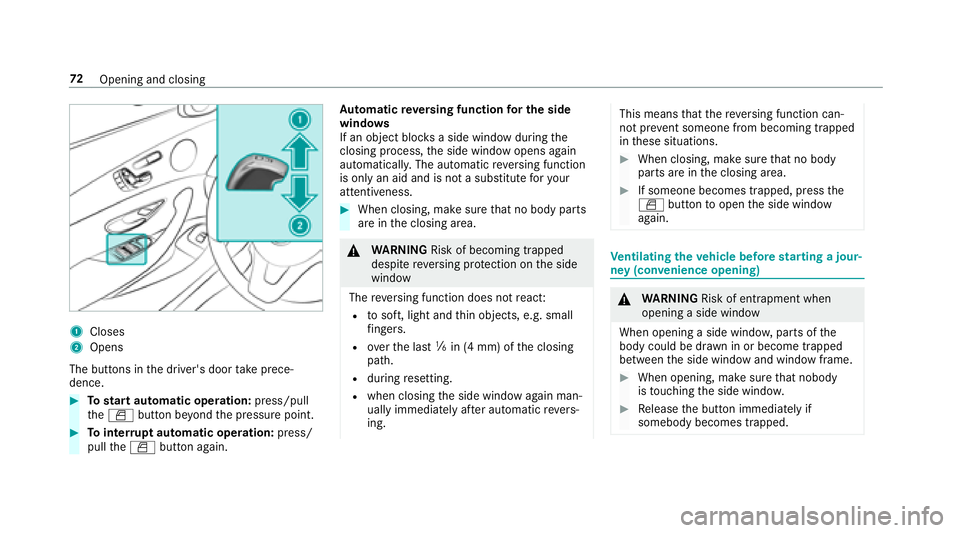
1Closes
2Opens
The butto ns inthe driver's door take prece‐
dence.
#To start automatic operation: press/pull
th eW button be yond the pressure point.
#To inter rupt automatic operation: press/
pull theW button again. Au
tomatic reve rsing function for the side
windo ws
If an object bloc ksa side wind owduring the
closing process, the side window opens again
automaticall y.The automatic reve rsing function
is only an aid and is not a substitute foryo ur
attentiveness.
#When closing, make sure that no body parts
are in the closing area.
&
WARNING Risk of becoming trapped
despite reve rsing pr otection on the side
window
The reve rsing function does not react:
Rto soft, light and thin objects, e.g. small
fi ngers.
Rove rth e last ãin (4 mm) of the closing
path.
Rduring resetting.
Rwhen closing the side window again man‐
ually immediately af ter au tomatic reve rs‐
ing.
This means that there ve rsing function can‐
not pr event someone from becoming trapped
in these situations.
#When closing, make sure that no body
parts are in the closing area.
#If someone becomes trapped, press the
W button toopen the side window
again.
Ve ntilating theve hicle before starting a jour‐
ney (con venience opening)
&
WARNING Risk of entrapment when
opening a side window
When opening a side windo w,parts of the
body could be dr awn in or become trapped
between the side window and window frame.
#When opening, make sure that nobody
is touching the side windo w.
#Release the button immediately if
somebody becomes trapped.
72 Opening and closing
Page 76 of 506
ProblemPossible causes/consequences and MSolutions
& WARNING Risk of becoming trapped or fata lly injured if reve rsing pr otection is not activated
If yo u close a side windowagain immediately af ter it has been bloc ked or reset, the side window closes
with increased or maximum forc e. The reve rsing feature is then not active.
Pa rts of the body could become trapped in the closing area in the process.
#Make sure that no parts of the body are in the closing area.
#To stop the closing process, release the button or press the button again toreopen the side win‐
do w.
If a side window is obstructed during closing and reopens again slightly:
#Immediately af terth e window is obstructed, pull the cor responding button again until the side window
has closed, and hold the button for an additional second.
The side window is closed with increased forc e.
If a side window is obstructed again during closing and reopens again slightly:
#Re peat the pr evious step.
The side window is closed without the automatic reve rsing function.
74
Opening and closing
Page 78 of 506
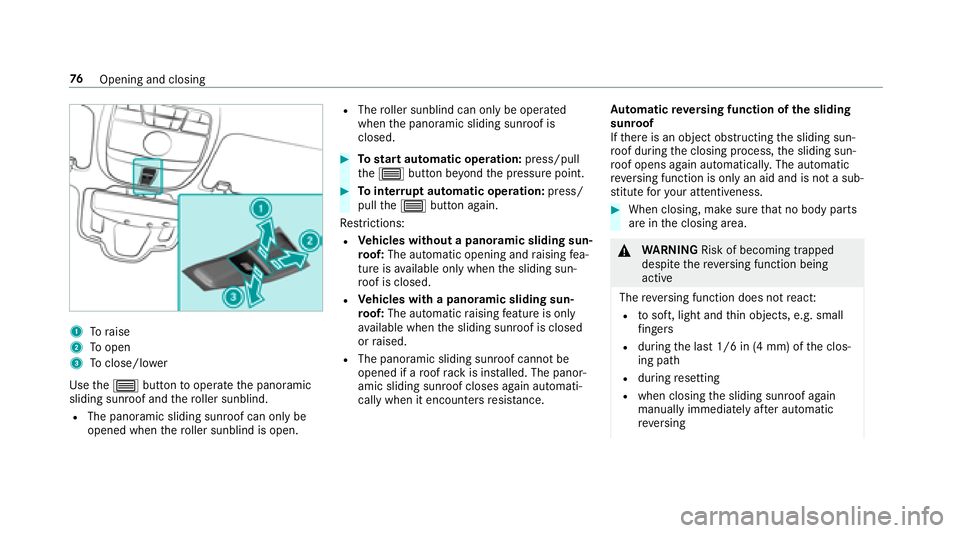
1Toraise
2To open
3Toclose/lowe r
Use the3 button tooperate the panoramic
sliding sunroof and thero ller sunblind.
RThe panoramic sliding sunroof can only be
opened when thero ller sunblind is open.
RThe roller sunblind can only be opera ted
when the panoramic sliding sunroof is
closed.
#To start automatic operation: press/pull
th e3 button be yond the pressure point.
#To inter rupt automatic operation: press/
pull the3 button again.
Re strictions:
RVe hicles without a panoramic sliding sun‐
ro of: The automatic opening and raising fea‐
ture is available only whenthe sliding sun‐
ro of is closed.
RVe hicles with a panoramic sliding sun‐
ro of: The automatic raising feature is only
av ailable when the sliding sunroof is closed
or raised.
RThe panoramic sliding sunroof cannot be
opened if a roof rack is ins talled. The panor‐
amic sliding sunroof closes again automati‐
cally when it encounters resis tance. Au
tomatic reve rsing function of the sliding
sunroof
If th ere is an object obstructing the sliding sun‐
ro of during the closing process, the sliding sun‐
ro of opens again automatically. The automatic
re ve rsing function is only an aid and is not a sub‐
st itute foryo ur attentiveness.
#When closing, make sure that no body parts
are in the closing area.
&
WARNING Risk of becoming trapped
despite there ve rsing function being
active
The reve rsing function does not react:
Rto soft, light and thin objects, e.g. small
fi ngers
Rdu ring the last 1/6 in (4 mm) of the clos‐
ing path
Rduring resetting
Rwhen closing the sliding sunroof again
manually immediately af ter au tomatic
re ve rsing
76
Opening and closing
Page 79 of 506
This meansthat there ve rsing function can‐
not pr event someone being trapped in these
situations.
#When closing, make sure that no body
parts are in the closing area.
#Re lease the button immediately if
somebody becomes trapped.
or
#Press the button in any direction during
th e automatic closing process.
The closing process is stopped.
Au tomatic reve rsing function of thero ller
sunblind
If th ere is an object obstructing thero ller sun‐
blind during the closing process, thero ller sun‐
blind opens again automaticall y.The automatic
re ve rsing function is only an aid and is not a sub‐
st itute foryo ur attentiveness.
#When opening or closing thero ller sunblind,
make sure that no body parts are in the
sweep.
& WARNING Risk of becoming trapped
despite there ve rsing function being
active
In particular, there ve rsing function does not
re act tosoft, light and thin objects, forex am‐
ple small fingers.
This means that there ve rsing function can‐
not pr event entrapment in these situations.
#When opening or closing thero ller sun
blind, make sure that no body parts are
in the sweep.
#Re lease the button immediately if
somebody becomes trapped.
or
#Press the button in any direction during
th e automatic closing process.
The closing process is stopped.
Au tomatic features of the sliding sunroof
%
The term "sliding sunro of" alsorefers to the
panoramic sliding sunroof. By pushing or pulling
the3 button, you can
inter rupt the automatic functions: "Rain closing
function when driving" and "Automatic lo wering
fe ature".
Ra in closing function when driving
Ve hicles with a panoramic sliding sunroof: If
it starts torain, thera ised sliding sunroof is
automatically lo wered while theve hicle is in
motion.
Au tomatic lo weringfeature
Ve hicles with a panoramic sliding sunroof: If
th e sliding sunroof is raised at there ar, the slid‐
ing sunroof is automatically lo wered slightly at
higher speeds. Atlow speeds, it is raised again
automaticall y.
&
WARNING Risk of entrapment byauto‐
matic lo wering of the sliding sunroof
At high speeds thera ised sliding sunroof
automatically lo wersslightly at there ar.
This could trap you or other persons.
Opening and closing 77
Page 80 of 506
#Make surethat nobody reaches into the
sweep of the sliding sunroof whilst the
ve hicle is in motion.
#If somebody becomes trapped, immedi‐
ately pull back the sliding sunroof but‐
to n.
The sliding sunroof li fts during opening.
Problems with the sliding sunroof
%
The term "sliding sunro of" alsorefers to the
panoramic sliding sunroof.
Problem Possible causes/consequences and MSolutions
The sliding sunroof cann otbe closed
and you cannot see the cause. &
WARNING Risk of becoming trapped or fata l injury byclosing the sliding sunroof again
If yo u close the sliding sunroof again immediately af ter it has been bloc ked or reset, the sliding sunroof
closes with increased or maximum forc e.
The reve rsing feature is then not active. Parts of the body could become trapped in the closing area in
th e process.
#Make sure that no parts of the body are in the closing area.#Re lease the button immediately if somebody becomes trapped.
or
#Press the button in any direction during the automatic closing process.
The closing process is stopped.
If th e sliding sunroof is obstructed during closing and reopens again slightly:
78
Opening and closing
Page 81 of 506
ProblemPossible causes/consequences and MSolutions
#Immediately after au tomatic reve rsing, pull and hold the3 button down again tothe point of resist‐
ance until the sliding sunroof is closed.
The sliding sunroof is closed with increased forc e.
If th e sliding sunroof is obstructed again and reopens again slightly:
#Re peat the pr evious step.
The sliding sunroof is closed again with increased forc e.
Ve hicles without a panoramic slid‐
ing sunroof: The sliding sunroof does
not operate smoo thly.
#Ra ise the sliding sunroof fully at there ar.
#Press the3 button for ano ther second.
#Use automatic operation tofully raise and then close the sliding sunroof.
Ve hicles with a panoramic sliding
sunroof: The sliding sunroof or the
ro ller sunblind does not opera te
smoo thly.
#Pull the3 button down repeatedly tothe point of resis tance until the sliding sunroof is fully closed.
#Pull the3 button for ano ther second.
#Pull and hold the3 button down until thero ller sunblind is comple tely closed.
#Pull the3 button for ano ther second.
#Use automatic operation tofully open and then close the sliding sunroof.
Opening and closing 79
Page 84 of 506
Notes onthe cor rect driver's seat position
&
WARNING Risk of injury from adjusting
th eve hicle settings while theve hicle is in
motion
Yo u could lose cont rol of theve hicle in the
fo llowing situations:
Rifyo u adjust the driver's seat, the head
re stra int, thesteering wheel or the mir ror
while theve hicle is in motion
Rifyo ufa sten your seat belt while theve hi‐
cle is in motion
#Before starting the engine: adjust the
driver's seat, the head restra int, the
st eering wheel or the mir ror and fasten
yo ur seat belt.
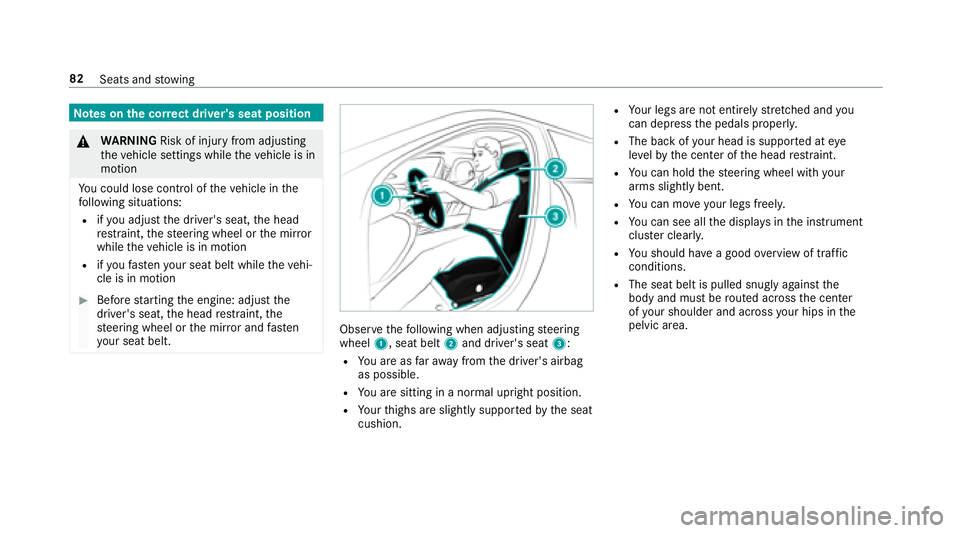
Obser vethefo llowing when adjusting steering
wheel 1, seat belt 2and driver's seat 3:
RYou are as faraw ay from the driver's airbag
as possible.
RYo u are sitting in a no rmal upright position.
RYour thighs are slightly suppor tedby the seat
cushion.
RYo ur legs are not entirely stre tched and you
can dep ress the pedals proper ly.
RThe back of your head is support ed ateye
le ve lby the center of the head restra int.
RYo u can hold thesteering wheel with your
arms slightly bent.
RYo u can mo veyour legs freel y.
RYou can see all the displa ysinthe instrument
clus ter clearl y.
RYou should ha vea good overview of traf fic
conditions.
RThe seat belt is pulled snug lyagainst the
body and must be routed across the center
of your shoulder and across your hips in the
pelvic area.
82 Seats and stowing
Page 89 of 506
#Toselect the front passenger seat: press
button 1.
When the indicator lamp lights up, the front
passenger seat is selected.
#Ad just the front passenger seat using the
buttons in the door control panel on the driv‐
er's side.
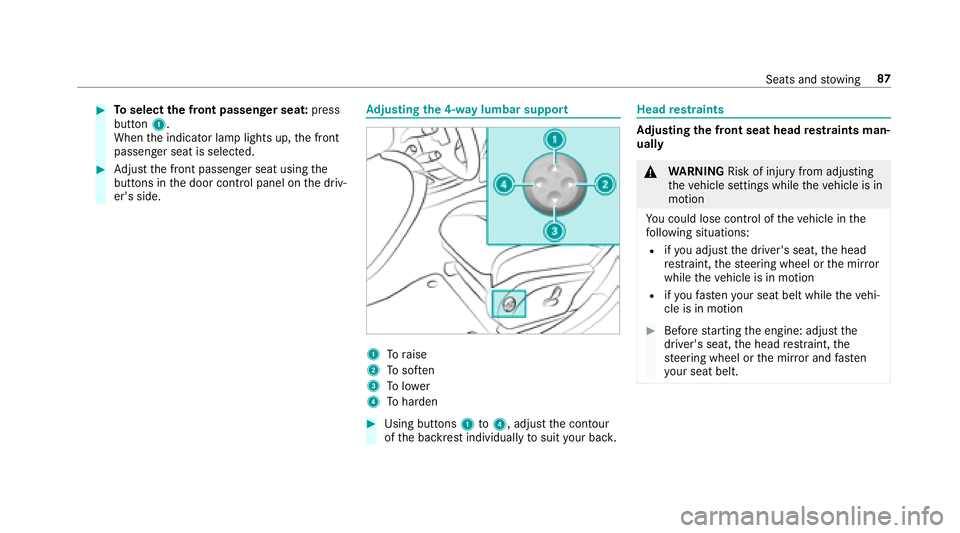
Ad justing the 4-w aylumbar support
1Toraise
2To sof ten
3To lowe r
4To harden
#Using buttons 1to4, adjust the conto ur
of the backrest individually tosuit your bac k.
Headrestra ints
Ad justing the front seat head restra ints man‐
ually
& WARNING Risk of injury from adjusting
th eve hicle settings while theve hicle is in
motion
Yo u could lose cont rol of theve hicle in the
fo llowing situations:
Rifyo u adjust the driver's seat, the head
re stra int, thesteering wheel or the mir ror
while theve hicle is in motion
Rifyo ufa sten your seat belt while theve hi‐
cle is in motion
#Before starting the engine: adjust the
driver's seat, the head restra int, the
st eering wheel or the mir ror and fasten
yo ur seat belt.
Seats and stowing 87
Page 91 of 506
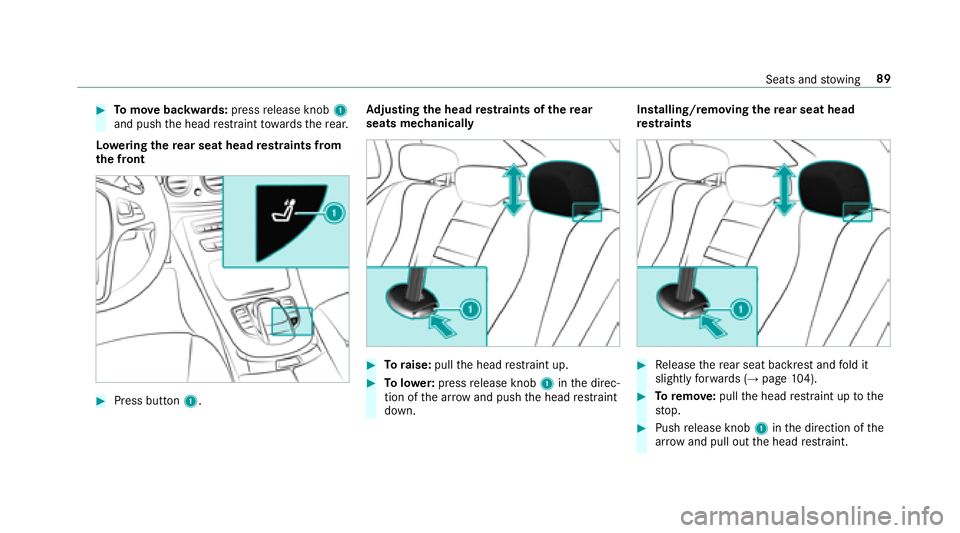
#Tomo vebackwards: pressrelease knob 1
and push the head restra int towa rdsth ere ar.
Lo weri ngthere ar seat head restra ints from
th e front
#Press button 1. Ad
justing the head restra ints of there ar
seats mechanically
#To raise: pullthe head restra int up.
#To lowe r:press release knob 1inthe direc‐
tion of the ar row and push the head restra int
down. Installing/removing
there ar seat head
re stra ints
#Re lease there ar seat backrest and fold it
slightly forw ards (→page 104).
#To remo ve:pull the head restra int up tothe
st op.
#Push release knob 1inthe direction of the
ar row and pull out the head restra int.
Seats and stowing 89