maintenance MERCEDES-BENZ E-CLASS WAGON 2018 Owner's Guide
[x] Cancel search | Manufacturer: MERCEDES-BENZ, Model Year: 2018, Model line: E-CLASS WAGON, Model: MERCEDES-BENZ E-CLASS WAGON 2018Pages: 506, PDF Size: 6.73 MB
Page 340 of 506
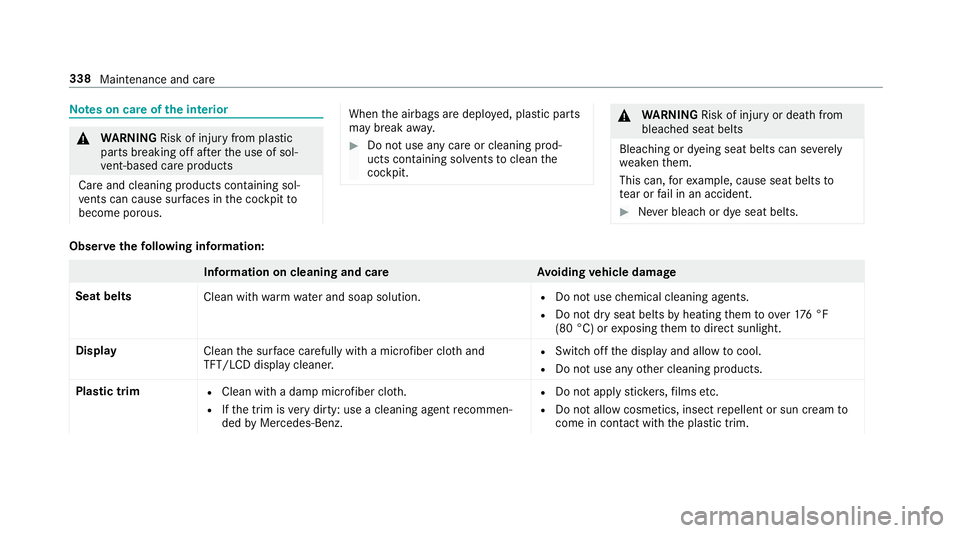
Notes on care of the interior
&
WARNING Risk of injury from plastic
parts breaking off af terth e use of sol‐
ve nt-based care products
Ca reand cleaning products con taining sol‐
ve nts can cause surf aces inthe cockpit to
become porous.
When the airbags are deplo yed, plastic parts
may break away.
#Do not use any care or cleaning prod‐
ucts containing sol vents toclean the
cockpit.
& WARNING Risk of injury or death from
bleached seat belts
Bleaching or dyeing seat belts can se verely
we aken them.
This can, forex ample, cause seat belts to
te ar or fail in an accident.
#Ne ver bleach or dye seat belts.
Observethefo llowing information:
Information on cleaning and car eAvoiding vehicle damage
Seat belts Clean withwarm wate r and soap solution.
RDo not use chemical cleaning agents.
RDo not dry seat belts byheating them toove r17 6 °F
(80 °C) or exposing them todirect sunlight.
Display Cleanthe sur face carefully wi tha micro fiber clo thand
TFT/LCD display cleaner.
RSwit choff the display and allow tocool.
RDo not use any other cleaning products.
Plastic trim
RClean with a damp microfiber clo th.
RIfth e trim is very dirty: use a cleaning agent recommen‐
ded byMercedes-Benz.
RDo not apply sticke rs,fi lms etc.
RDo not allow cosmetics, insect repellent or sun cream to
come in contact wi th the plastic trim.
338
Maintenance and care
Page 341 of 506
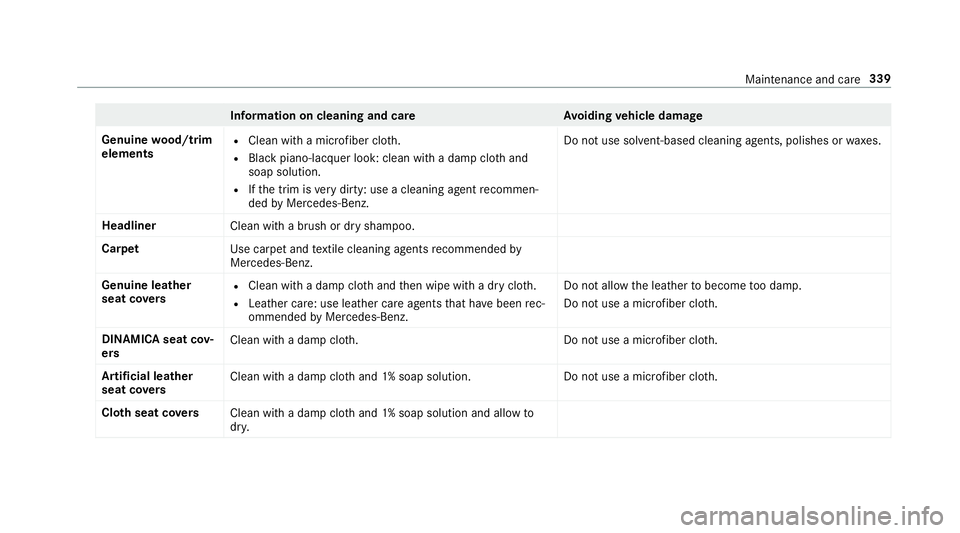
Information on cleaning and careAvoiding vehicle damage
Genuine wood/t rim
elements
RClean wi tha micro fiber clo th.
RBla ckpiano-lac quer look: clean with a damp clo thand
soap solution.
RIf th e trim is very dirty: use a cleaning agent recommen‐
ded byMercedes-Benz. Do not use solvent-based cleaning agents, polishes or
waxes.
Headliner Clean with a brush or dry shampoo.
Carpet Use carpet andtextile cleaning agents recommended by
Mercedes-Benz.
Genuine leather
seat co vers
RClean with a damp clo thand then wipe with a dry clo th.
RLeather care: use leath er care agentsthat ha vebeen rec‐
ommended byMercedes-Benz. Do not allow
the leather tobecome too damp.
Do not use a microfiber clo th.
DINAMIC Asea tcov‐
er s Clean wit
h adam pclo th.D o not use a microfiber cloth.
Ar tificial leather
seat co vers Clean
with a damp clo thand 1% soap solution.D o not use a microfiber cloth.
Clo thseat co vers
Cleanwith a damp clo thand 1% soap solution and allow to
dr y.
Maintenance and care 339
Page 367 of 506
Further related subjects:
RNo tes on tire pressure (→page 361)
RTire pressure table (→page 363)
RTire and Loading Info rmation placard
(→page 367)
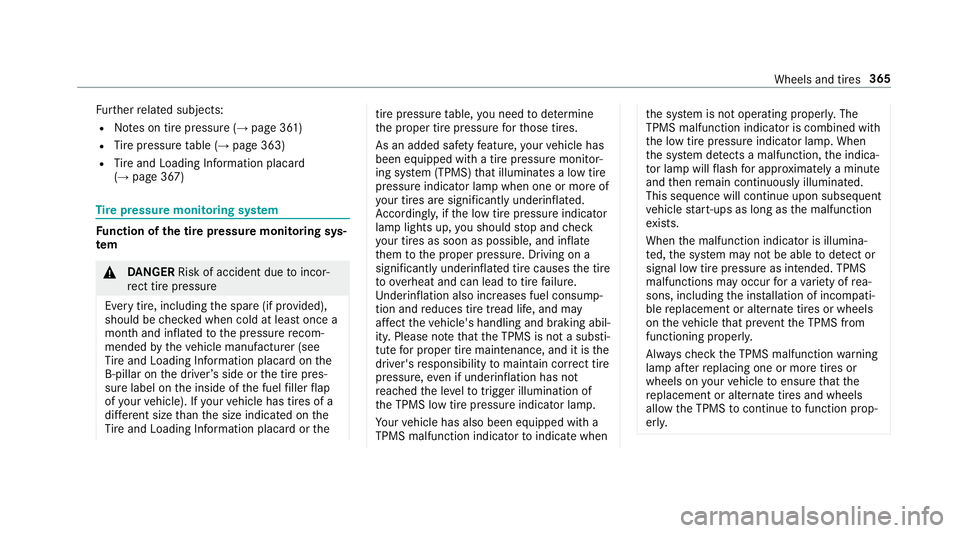
Ti re pressure moni toring sy stem
Fu nction of the tire pressure moni toring sys‐
te m
&
DANG ER Risk of accident due toincor‐
re ct tire pressure
Every tire, including the spare (if pr ovided),
should be checked when cold at least once a
month and inflated tothe pressure recom‐
mended bytheve hicle manufacturer (see
Ti re and Loading Info rmation placard on the
B-pillar on the driver ’sside or the tire pres‐
sure label on the inside of the fuel filler flap
of your vehicle). If your vehicle has tires of a
dif fere nt size than the size indicated on the
Ti re and Loading Info rmation placard or the
tire pressure table, you need todeterm ine
th e proper tire pressure forth ose tires.
As an added saf etyfe ature, your vehicle has
been equipped with a tire pressure monitor‐
ing sy stem (TPMS) that illuminates a low tire
pressure indicator lamp when one or more of
yo ur tires are signif icantly underinflated.
Ac cording ly, if the low tire pressure indicator
lamp lights up, you should stop and check
yo ur tires as soon as possible, and inflate
th em tothe proper pressure. Driving on a
significantly underinflated tire causes the tire
to ove rheat and can lead totire failure.
Un derinflation also increases fuel consump‐
tion and reduces tire tread life, and may
af fect theve hicle's handling and braking abil‐
ity. Please no tethat the TPMS is not a substi‐
tute for proper tire maintenance, and it is the
driver's responsibility tomaintain cor rect tire
pressure, even if underinflation has not
re ached the le velto trig ger illumination of
th e TPMS low tire pressure indicator lamp.
Yo ur vehicle has also been equipped with a
TPMS malfunction indicator toindicate whenthe sy stem is not operating proper ly. The
TPMS malfunction indica tor is combined with
th e low tire pressure indicator lamp. When
th e sy stem de tects a malfunction, the indica‐
to r lamp will flash for app roxima tely a minute
and then remain continuously illumina ted.
This sequence will continue upon subsequent
ve hicle start-ups as long as the malfunction
ex ists.
When the malfunction indicator is illumina‐
te d, the sy stem may not be able todetect or
signal low tire pressure as intended. TPMS
malfunctions may occur for a variet yof rea‐
sons, including the ins tallation of incompati‐
ble replacement or alternate tires or wheels
on theve hicle that pr eventthe TPMS from
functioning properly.
Alw aysch eck the TPMS malfunction warning
lamp af terre placing one or more tires or
wheels on your vehicle toensure that the
re placement or alternate tires and wheels
allow the TPMS tocontinue tofunction prop‐
erly.
Wheels and tires 365
Page 488 of 506
Turn signal light ................................... 124
Limited Warranty
Ve hicle .................................................. 26
Limiting the opening angle (tailgate) ...... 69
Live Traf fic Information
Displaying subscri ption information .... .274
Displ aying the tra ffic map .................... 274
Displ aying traf fic incidents .................. 275
Extending a subscription ...................... 274
Issuing hazard alert s ........................... 275
Load index (tires) .................................... .375
Load-bea ring capacity (tires) .................375
Loading Definitions .......................................... .377
Loading guidelines .................................. 101
Loading information table ...................... 367
Loads Securing .............................................. 101
Locking/unlocking .................................... 64
KEYLESS-GO .......................................... 61
Un locking and opening doors from
th e inside ............................................... 61Low beam
Swit ching on/off ................................ .123
Lu bricant additives
see Additives
Lu ggage
Securing ...
...........................................
101
Lu mbar support
see Lumbar support (4-w ay)
Lu mbar support (4-w ay).......................... .87
M
Maintenance Vehicle ................................................... 21
Maintenance see ASS YST PLUS
Making a call via theove rhead con‐
trol panel
Mercedes-Benz mbrace
®(USA) .......... .294
Malfunction Restra int sy stem ................................... 32
Malfunction message see Display message Map
................................................... 274, 276
Av oiding an area ..................................2 78
Av oiding an area (o verview) ................ .278
Changing an area ................................ 279
Del eting an area .................................. 279
Displ aying the compass ....................... 280
Displaying the map version .................. 278
Displ aying the next intersecting
st re et ................................................... 278
Displ aying the satellite map ............... .280
Display ingthe traf fic map .................... 274
Displ aying weather information .......... .281
Map data ............................................. 280
Moving ................................................ 277
Overview ..............................................2 76
Selecting POI symbols ......................... 277
Selecting text information ................... 278
Selecting the map orientation ............ .277
Se tting
the map scale ..
........................276
Setting the map scale automatically ... .280
Up dating .............................................. 279
Map and compass Overview .............................................. 276
Massage prog ram
Selecting the front seats ....................... 92
486
Index
Page 502 of 506
Trip distance
see Dis tance recorder
see Trip me ter
Tr ip me ter ................................................ 220
Tr unk lid
see Tailgate
Tu rn signal indicator
see Turn signal light
Tu rn signal light ....................................... 124
Ac tivating/deactivating .......................1 24
Tw o-w ayradios
Fr equencies ......................................... 391
No tes on ins tallation .......................... .390
Tr ansmission output (maximum) .......... 391
U
Un its of measurement
Setting ................................................ .252
Un locking setting ...................................... 57
USB devices Connecting .......................................... 308
USB port .................................................. .120 User profile
.............................................. 254
Creating .............................................. 254
Importing/exporting ........................... 255
Options ................................................ 255
Selecting ............................................. 254
Using thete lephone
see Calls
V
Ve hicle .............................................. 144, 145
Ac tivating/deactivating standby
mode .................................................. .165
Cor rect use ........................................... 25
Data acquisition .............................. 26, 28
Diagnostics connection ......................... 24
Equipment ............................................. 20
Limited Warranty .................................. .26
Locking (auto matically) ......................... 63
Locking (from inside) ............................. 61
Locking (KEYLESS-GO) ........................... 61
Locking (mechanical key) ...................... 63
Lo we ring ............................................. 388
Maintenance .......................................... 21
Pa rking ................................................ 165
Problem notification .............................. 25 QR code
rescue card ............................. 26
Qualifi ed specialist workshop ................2 5
Ra ising ................................................ 385
St arting (eme rgency operation
mode) .................................................. 145
St arting (smartphone) ........................ .145
St arting (s tart/s top button) ................ 144
Switching off (s tart/s top button) ........ .157
Un locking (from inside) ........................ ..
61
Un lock
ing (KEYLESS-GO) ...................... .61
Ve ntilating (co nvenience opening) ......... 72
Vo ice commands (Voice Cont rol Sys‐
te m) ..................................................... 237
Ve hicle data
Display ing (DYNAMIC SELECT) ............ .151
Ro of load ............................................. 400
Tu rning radius ...................................... 400
Ve hicle height ...................................... 400
Ve hicle length ...................................... 400
Ve hicle width ....................................... 400
Wheelbase ...........................................4 00
Ve hicle data storage
Electronic control units ........................ .26
Ve hicle dimensions ................................. 400
500
Index
Page 503 of 506
Vehicle identification number
see VIN
Ve hicle identification plate
Pa int code .......................................... .392
VIN ...................................................... 392
Ve hicle identification plate
see Model type
Ve hicle interior
Cooling or heating (smart phone) .........144
Ve hicle key
see SmartK ey
Ve hicle maintenance
see ASS YST PLUS
Ve hicle operation
Outside the USA or Canada .................. .21
Ve hicle position
Tr ansmitting ........................................ 248
Ve hicle tool kit
To wing eye .......................................... 355
Ve ntilating
Con venience opening ............................ 72
Ve ntilation
see Climate cont rol Ve
nts
see Air vents
Vi deo mode ............................................... 311
Ac tivating ............................................ 309
Ac tivating/deactivating full-screen
mode .................................................... 311
Overview ..............................................3 10
Settings ................................................ 311
VIN ............................................................ 392
Identification plate .............................. 392
Seat ..................................................... 392
Wi ndshield ........................................... 392
Vi sibility
Defrosting the windo ws....................... 139
Wi ndshield hea ter ................................ 141
Vo ice command types (Voice Control
Sy stem) .................................................... 228
Vo ice Control Sy stem .............................. 227
Application-specif ic
voic
e commands
............................................................ .228
Au dible help functions .........................2 29
Entering numbe rs................................ 229
Global voice commands ...................... 228
Impr oving speech quality .................... 229 Language setting ................................
.229
Media pla yervo ice commands ............ 235
Message voice commands .................. 236
Multifunction steering wheel (operat‐
ing) ...................................................... 227
Na vigation voice commands ................ 231
Operable functions .............................. 228
Operating saf ety .................................. 22 7
Ra dio voice commands ...................... .234
Switch voice commands ...................... 229
Te lephone voice controls .................... .233
Te xt message voice commands .......... .236
Ty pes of voice commands .................. .228
Ve hicle voice commands .................... .237
Vo ice prom pting .................................. 228
Vo ice control sy
stem
see Voic
e Cont rol Sy stem
W
Wa rning lamp
see Warning/indicator lamps
Wa rning sy stem
see ATA (anti-theft alarm sy stem)
Index 501