Door MERCEDES-BENZ E-CLASS WAGON 2018 Owner's Guide
[x] Cancel search | Manufacturer: MERCEDES-BENZ, Model Year: 2018, Model line: E-CLASS WAGON, Model: MERCEDES-BENZ E-CLASS WAGON 2018Pages: 506, PDF Size: 6.73 MB
Page 155 of 506
#Depress the brake pedal and shift toneutral
i.
#Re lease the brake pedal.
#Switch the ignition off.
% Ifyo uth en exitth eve hicle leaving the
SmartK eyintheve hicle, the automatic trans‐
mission remains in neutral i
Engaging park position P
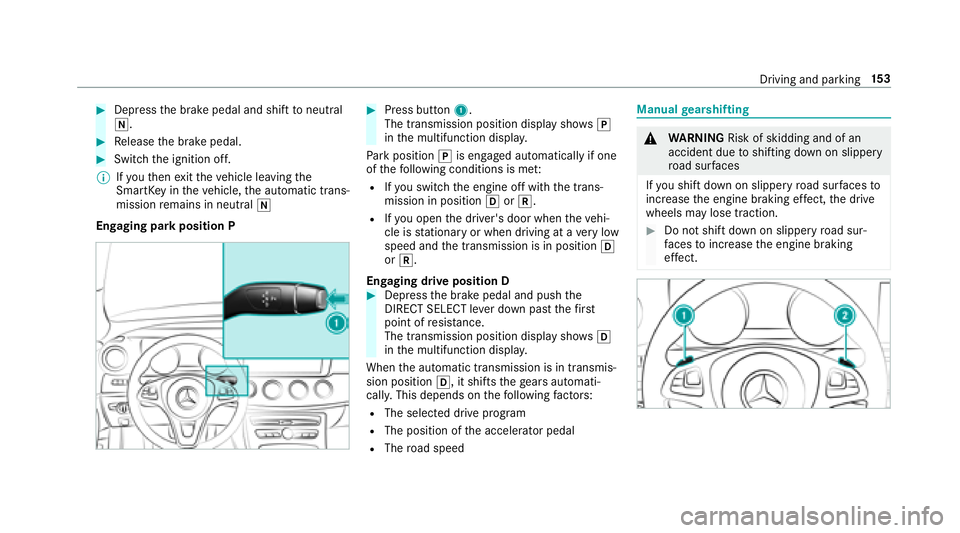
#Press button 1.
The transmission position display sho wsj
in the multifunction displa y.
Pa rk position jis engaged automatically if one
of thefo llowing conditions is me t:
RIfyo uswit chthe engine off with the trans‐
mission in position hork.
RIfyo u open the driver's door when theve hi‐
cle is stationary or when driving at a very low
speed and the transmission is in position h
or k.
Engaging drive position D
#Depress the brake pedal and push the
DIRECT SELECT le ver down past thefirs t
point of resis tance.
The transmission position displ aysho wsh
in the multifunction displa y.
When the automatic transmission is in transmis‐
sion position h, it shiftsthege ars automati‐
call y.This depends on thefo llowing factors:
RThe selected drive program
RThe position of the accelera tor pedal
RThe road speed
Manual gearshifting
&
WARNING Risk of skidding and of an
accident due toshifting down on slippery
ro ad sur faces
If yo u shift do wnon slippery road sur faces to
inc rease the engine braking ef fect, the drive
wheels may lose traction.
#Do not shift down on slippery road sur‐
fa ces toinc rease the engine braking
ef fect.
Driving and park ing15
3
Page 160 of 506
&WARNING Risk of accident and injury
due tochildren left unatte nded inthe
ve hicle
If yo u lea vechildren unaccompanied in the
ve hicle, they may be able toset theve hicle in
motion, forex ample by:
RRe leasing the parking brake.
RShifting the transmission out of park
position j.
RStarting the engine.
In addition, they may operate vehicle equip‐
ment.
#Ne ver lea vechildren and animals unat‐
te nded in theve hicle.
#When leaving theve hicle, alw aysta ke
th e SmartK eywith you and lock the
ve hicle.
* NO
TEDama getotheve hicle or the driv‐
et ra in caused bytheve hicle rolling away
#Alw ays proper lysecure theve hicle
against rolling away.
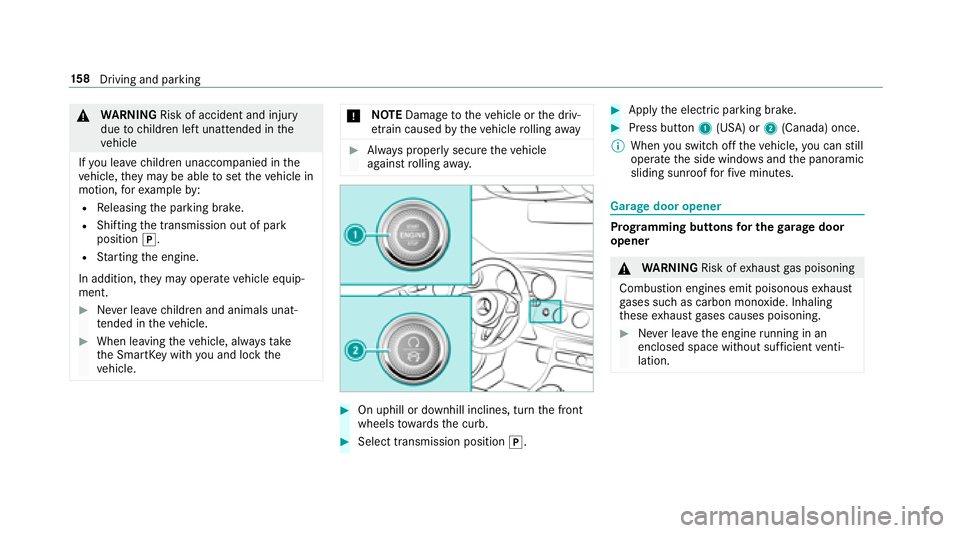
#On uphill or downhill inclines, turn the front
wheels towa rdsth e curb.
#Select transmission position j.
#Applythe electric parking brake.
#Press button 1(USA) or 2(Canada) once.
% When you switch offtheve hicle, you can still
opera tethe side windo wsand the panoramic
sliding sunroof forfive minutes.
Garage door opener
Prog ramming buttons for the garage door
opener
& WARNING Risk ofexhaust gas poisoning
Combustion engines emit poisonous exhaust
ga ses such as carbon monoxide. Inhaling
th ese exhaust gases causes poisoning.
#Ne ver lea vethe engine running in an
enclosed space wi thout suf ficient venti‐
lation.
15 8
Driving and pa rking
Page 161 of 506
&WARNING Risk of injury and entrapment
when opening thega rage door using the
ga rage door opener
When you operate or program thega rage
door with the integrated garage door opener,
persons in thera nge of mo vement of the
ga rage door can become trapped or stru ck
by thega rage door.
#When using the integrated garage door
opener, alw ays make sure that nobody
is within the sweep of thega rage door.
Only operate thega rage door opener on thefo l‐
lowing garage doors:
RGarage doors with a saf etyst op and reve rs‐
ing feature.
RGarage doors which con form tothe cur rent
U. S. safe tystandards.
Prior toprogramming a garage door opener, park
th eve hicle outside thega rage and switch offthe
engine.
#Check if the transmit ter frequency of the
re mo tecontrol has the frequency range of
280 to868 MHz.
Ra dio equipment appr oval number:
RNZLMUA HL5 (USA)
R4112 A-MUAHL5 (Canada)
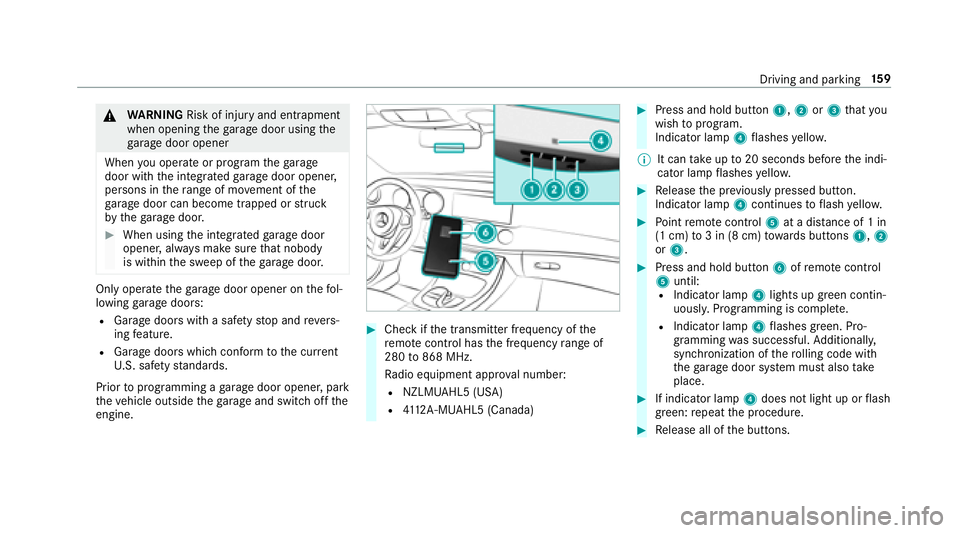
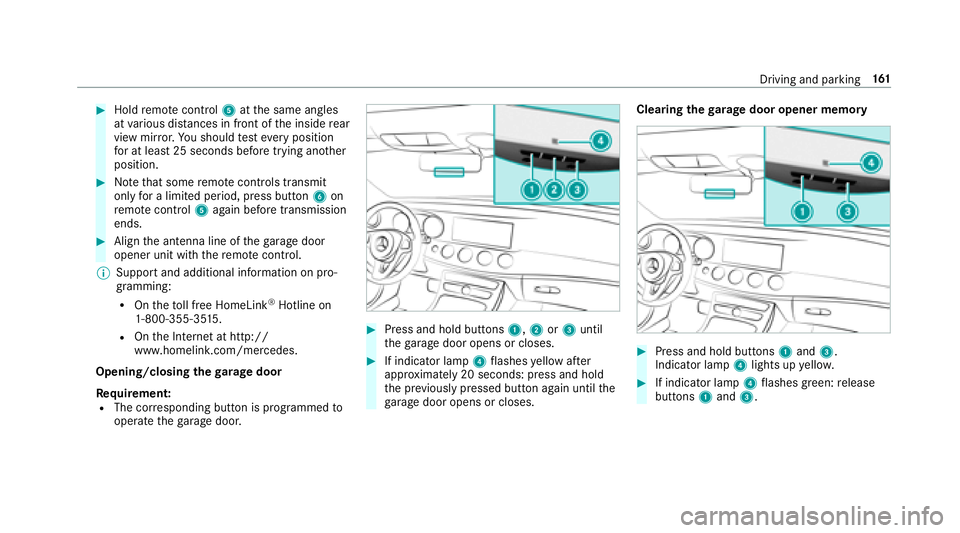
#Press and hold button 1,2or3 that you
wish toprog ram.
Indicator lamp 4flashes yello w.
% It can take up to20 seconds before the indi‐
cator lamp flashes yello w.
#Re lease the pr eviously pressed button.
Indicator lamp 4continues toflash yello w.
#Po int remo tecontrol 5at a dist ance of 1 in
(1 cm) to3 in (8 cm) towa rds buttons 1,2
or 3.
#Press and hold button 6ofremo tecontrol
5 until:
RIndicator la mp4lights up greencontin‐
uousl y.Programming is comple te.
RIndicator lamp 4flashes green. Pro‐
gr amming was successful. Additionally,
synchronization of thero lling code with
th ega rage door sy stem must also take
place.
#If indicator lamp 4does not light up or flash
green: repeat the procedure.
#Re lease all of the buttons.
Driving and parking 15
9
Page 162 of 506
%The remo tecontrol forth ega rage door drive
is not included in the scope of delivery of the
ga rage door opener.
Synchronizing thero lling code
Re quirements:
RThe garage door sy stem uses a rolling code.
RThe vehicle must be within range of the
ga rage door or exterior gate drive.
RThe vehicle as well as persons and objects,
are located outside the sweep of thega rage
door.
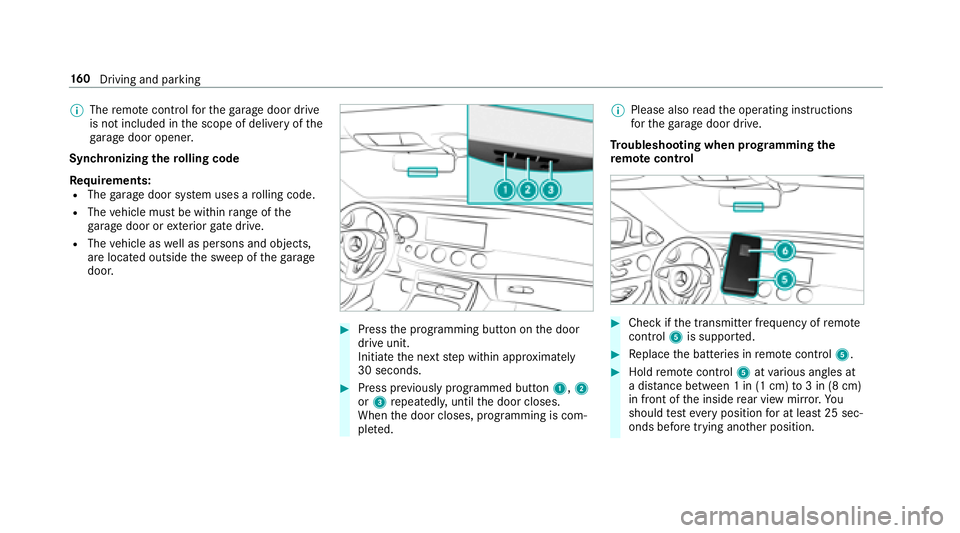
#Press the programming button on the door
drive unit.
Initiate the next step within appr oximately
30 seconds.
#Press pr eviously prog rammed button 1,2
or 3 repeatedl y,until the door closes.
When the door closes, programming is com‐
ple ted. %
Please also read the operating instructions
fo rth ega rage door drive.
Tr oubleshooting when prog ramming the
re mo tecontro l
#Check if the transmit ter frequency of remo te
control 5is suppo rted.
#Re place the batteries in remo tecontrol 5.
#Holdremo tecontrol 5atvarious angles at
a dis tance between 1 in (1 cm) to3 in (8 cm)
in front of the inside rear view mir ror.Yo u
should test eve ryposition for at least 25 sec‐
onds before trying ano ther position.
16 0
Driving and pa rking
Page 163 of 506
#Holdremo tecontrol 5atthe same angles
at various dis tances in front of the inside rear
view mir ror.Yo u should test eve ryposition
fo r at least 25 seconds before trying ano ther
position.
#No tethat some remo tecontrols transmit
only for a limite d period, press button 6on
re mo tecontrol 5again before transmission
ends.
#Align the antenna line of thega rage door
opener unit with there mo tecontrol.
% Support and additional information on pro‐
gramming:
ROntheto ll free HomeLink®Hotline on
1-800-355-35 15.
ROn the Internet at http://
www.homelink. com/mercedes.
Opening/closing thega rage door
Requ irement:
RThe cor responding button is programmed to
operate thega rage door.
#Press and hold buttons 1,2or3 until
th ega rage door opens or closes.
#If indicator lamp 4flashes yellow af ter
appr oximately 20 seconds: press and hold
th e pr eviously pressed button again until the
ga rage door opens or closes. Clearing
thega rage door opener memory#Press and hold buttons 1and 3.
Indicator lamp 4lights up yello w.
#If indicator lamp 4flashes green: release
buttons 1and 3.
Driving and parking 16
1
Page 164 of 506
Radio equipment appr oval numbers for the
ga rage door opener
Ra dio equipment appr oval numbers
Countr yRadio equipment appr oval
number
Egyp tT AC.25 111 51293.WIR
Andor ra CE
Au stra lia R-NZ
Barbados MED1 578
Chile 2488/DFRS205 76/F-74
European
Union CE
Gibral tarC E
Iceland CE
Jordan TRC/LPD/20 15/299
Canad aI C:4112 A-MUAHL5
Ku wa it CE
Country Radio equipment appr oval
number
Liechten‐
st ein CE
Mexico RCPGEMU15-0 448
Monaco CE
New Zea‐
land R-
NZ
Nor wayC E
Ru ssian
Fe dera‐
tion not
requ ired
Saudi Ara‐
bia TA
10525
Switzer‐
land CECountr
yRadio equipment appr oval
number
South
Africa
TA -20 15/1386
Tu rkey notrequ ired
Uni ted
Arab Emi‐
ra tes ER4
1849/15
Dealer No: DA35176/14
United
St ates FCC ID: NZLMUA
HL5
162
Driving and pa rking
Page 165 of 506
Brazil
Este equipamento opera em caráter secundário,
is to é, não tem direito à pr oteção contra inter fer‐
ência prejudicial, mesmo de es tações do mesmo
tipo, e não pode causar inter ferê ncia a sist emas
operando em caráter primário.
Pa ra maio res informações acessar
www.anatel.go v.br
Fu rther information on the declaration of con‐
fo rm ity for wireless vehicle components
(
→page 23).
Electric parking brake
Au tomatically applying the electric parking
brake
& WARNING Risk of accident and injury
due tochildren left unatte nded inthe
ve hicle
If yo u lea vechildren unaccompanied in the
ve hicle, they may be able toset theve hicle in
motion, forex ample by:
RRe leasing the parking brake.
RShifting the transmission out of park
position j.
RStarting the engine.
In addition, they may operate vehicle equip‐
ment.
#Ne ver lea vechildren and animals unat‐
te nded in theve hicle.
#When leaving theve hicle, alw aysta ke
th e SmartK eywith you and lock the
ve hicle.
The electric parking brake is applied if the trans‐
mission is in position jand one of thefo llow‐
ing conditions is fulfilled:
RThe engine is switched off.
RThe seat belt tongue is not inser ted in the
seat belt buckle of the driver's seat and the
driver's door is opened.
% Toprev ent application: pull the handle of the
electric parking brake.
In thefo llowing situations, the electric parking
brake is also engaged:
RThe Active Dis tance Assist ant DISTRO NIC
brings theve hicle toast andstill.
RThe HOLD function is keeping theve hicle sta‐
tionar y.
RActive Parking Assist is keeping theve hicle
st ationar y.
This is only the case if one of thefo llowing con‐
ditions is also fulfilled:
RThe engine is switched off.
Driving and parking 16
3
Page 166 of 506
RThe seat belttongue is not inser ted in the
seat belt buckle of the driver's seat and the
driver's door is opened.
RThere is a sy stem malfunction.
RThe po wer supp lyis insuf ficient.
RThe vehicle is stationary for a lengt hyperiod.
When the electric parking brake is applied, the
F (USA) or !(Canada) indicator lamp
lights up in the instrument clus ter.
The electric parking brake is not automatically
applied if the engine is switched off bythe ECO
st art/ stop function.
Re leasing the electric pa rking brake auto‐
matically
The elect ric park ing brake is released when the
fo llowing conditions are fulfilled:
RThe engine is running.
RThe seat belt tongue is inser ted into the seat
belt buckle of the driver's seat.
RThe transmission is in position hork and
yo udepr essthe accelera tor pedal or you shift from transmission position
jtoh or
k.
RIf th e transmission is in position k,the
trunk lid must be closed.
If th e seat belt tongue is not inser ted into the
seat belt buckle of the driver's seat, thefo llow‐
ing conditions must be fulfilled:
RThe driver's door is closed.
RYo u mo vethe transmission out of transmis‐
sion position joryou ha veprev iously
driven fasterthan 2 mph (3 km/h).
RIfth e transmission is in position k,the
trunk lid must be closed.
If th e elect
ric parking brake is released, the
F (USA) or !(CANADA) indicator lamp in
th e instrument clus ter goes out. Applying or
releasing the electric pa rking
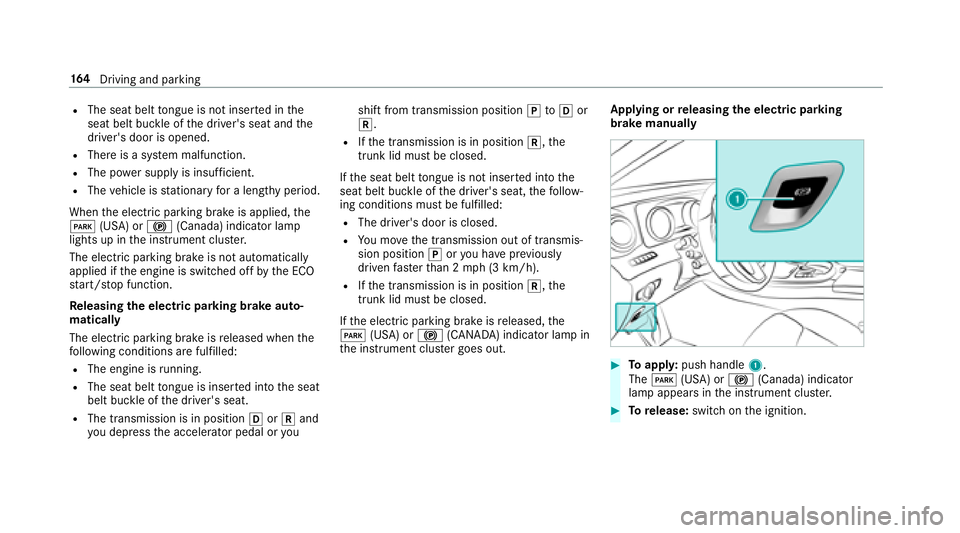
brake manually
#To appl y:push handle 1.
The F (USA) or !(Canada) indicator
lamp appears in the instrument clus ter.
#To release: switch on the ignition.
16 4
Driving and pa rking
Page 183 of 506
#Take into account the tra ffic situation
before calling up thestored speed.
&
WARNING Risk of accident due toinsuf‐
fi cient decele ration byActive Dis tance
Assist DISTRONIC
Ac tive Dis tance Assist DISTRONIC brakes
yo ur vehicle with up to50 % of the maximum
possible deceleration. If this decele ration is
not suff icient,Active Dis tance Assist
DISTRONIC alerts youwit h a visual and
acoustic warning.
#In these cases, adjust your speed and
ke ep a suf ficient dist ance.
#Braketheve hicle yourself and/or take
ev asive action.
&
WARNING Risk of accident due toActive
Dis tance Assist DISTRONIC still being
activated when you lea vethe driver's
seat
If yo u lea vethe driver's seat while theve hicle
is being braked byActive Dis tance Assist
DISTRONIC only, theve hicle can rollaw ay.
#Alw ays deactivate Active Dis tance
Assist DISTRONIC and secure theve hi‐
cle topreve nt it from rolling away
before you lea vethe driver's seat.
Re quirements:RThe vehicle's engine must be switched on.
RThe electric parking brake must be released.
RAc tive Parking Assist is not being used to
park theve hicle or toexit from a parking
space.
RESP®must be activated, but not inter vening.
RThe transmission must be in positionh.
RThe driver door, front passenger door and the
re ar doors must be closed.
RThe engine hood must be closed.
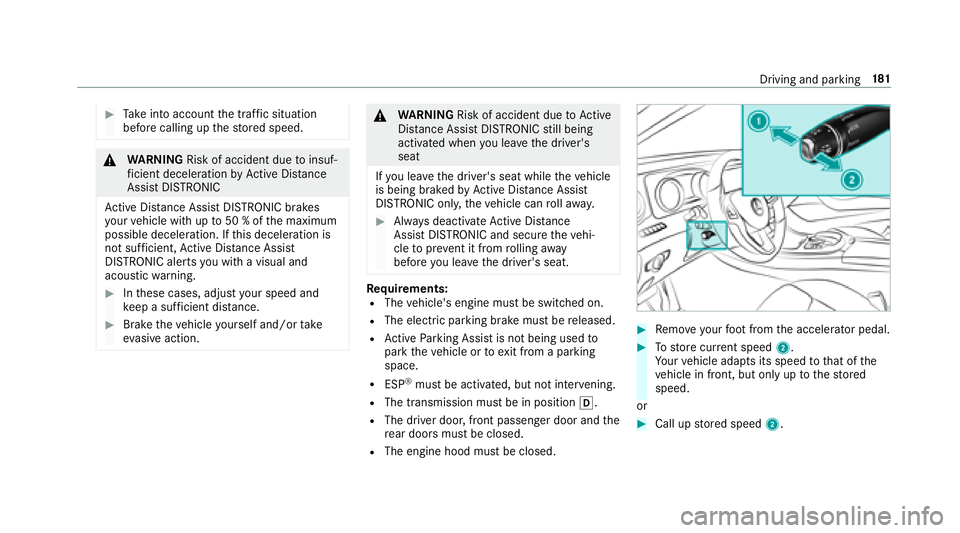
#Re mo veyour foot from the accelerator pedal.
#To store cur rent speed 2.
Yo ur vehicle adapts its speed tothat of the
ve hicle in front, but only up tothestored
speed.
or
#Call up stored speed 2.
Driving and parking 18
1
Page 188 of 506
pedal. Never attem pttolea vetheve hi‐
cle if it is being held byHill Start Assist.
HOLD function
HOLD function
The HOLD function holds theve hicle at a stand‐
st ill without requ iring youto depress the brake
pedal, e.g. when pulling away on steep slopes.
Sy stem limitations
The incline must not be greaterth an 30%.
Ac tivating/deactivating the HOLD function
&
WARNING Risk of an accident due tothe
HOLD function being activated when you
lea vetheve hicle
If yo u lea vetheve hicle while only the HOLD
function is braking theve hicle, theve hicle
can rollaw ay inthefo llowing situations:
RIf th ere is a malfunction in the sy stem or
in the po wer supp ly.
RIf th e HOLD function is deactivated by
depressing the accelera tor pedal or the
brake pedal, e.g. byave hicle occupant.
RIfth e electrics in the engine compart‐
ment, the battery or the fuses are tam‐
pered with or if the battery is disconnec‐
te d.
#Alw ays deactivate the HOLD function
and secure theve hicle against rolling
aw ay before leaving theve hicle.
* NO
TEDama gefrom au tomatic braking
When Active Brake Assi st,Ac tive Dis tance
Assist DISTRONIC or the HOLD function are
activated, theve hicle brakes autonomously
in cer tain situations.
To avo id damage totheve hicle, deactivate
th ese sy stems in thefo llowing or similar sit‐
uations:
#During towing
#In a car wash
Requirements:RThe vehicle is stationar y.
RThe driver's door is closed or the seat belt on
th e driver's side is fastened.
RThe engine is running or has been au tomati‐
cally switched off bythe ECO start/ stop
function.
RThe electric parking brake is released.
RAc tive Dis tance Assist DISTRONIC is not acti‐
va ted.
RThe transmission is in position h,kori.
Ac tivating the HOLD function
#Dep ress the brake pedal and af ter a short
time depress fur ther until theë display
appears in the multifunction displa y.
#Release the brake pedal.
Deactivating the HOLD function
#Depress the accelerator pedal topull away.
or
#Depress the brake pedal until theë dis‐
play disappears from the multifunction dis‐
pla y.
186
Driving and pa rking