service MERCEDES-BENZ E-CLASS WAGON 2019 Owner's Guide
[x] Cancel search | Manufacturer: MERCEDES-BENZ, Model Year: 2019, Model line: E-CLASS WAGON, Model: MERCEDES-BENZ E-CLASS WAGON 2019Pages: 538, PDF Size: 48.23 MB
Page 320 of 538
Dele
ting text messag es
Multimedia system:
0018 Phone 0019
i TextMessage 0007
Select p. 0007
Todel eteate xt messag e:select Delete. 0007
Outbox
or 0007
Select Drafts. In
Car Office "In
Car Office" functi ons
Usin g"In Car Office" ,yo ucan conn ect your
on lineser vices wit hth emultimedia system.
The follo wing functionsar eav ailable:
R Displayof upco mingmee tings inthecalen‐
dar
R Select ionofamee ting asades tinat ioninthe
na vig ation
R Disp lay of upcomi ngtelephon econ fere nces
R Selecti onoftelephon econ fere nces forau to‐
matic dialing R
Displa yof par ticipa ntsinate lephon econ fer‐
ence
R Displa yand selection ofcall sto be made
0009 Please note that cer tain func tionsar eonl y
av ailable whentheve hicle isstatio nary.
0009 Ifth e! symbol appearsin thest atus
line ,th e"In Car Office" service isavailable in
th eve hicle.
Calling up"In Car Office"
Re quirement s:
R Amobile phoneis con nectedto themultime‐
dia system.
R Youha ve auser accoun ton theMer cedes
me portal(htt ps:/ /me .mercedes-ben z-com).
R The "InCar Office" service isacti vatedin the
Mer cedes meportal.
R Youha ve an acc oun twit han online service,
fo rex am ple Office 365. 0007
Sele ctInCa rOffi ce. Sw
itchin gaut omati cst ar tof "In Car Office"
on/of f
Mult imed iasystem:
0018 System 0019
InCar Offic e 0007
Switc hSt art InCar Offic eAutom atically on
0073 oroff0053.
If th eaut omatic star tof "In Car Office" is
swi tched on,displ ayswit hop tions rega rding
upcom ingappoint mentsaut omat ically
appear inthemedia display.
If th eaut omatic star tof "In Car Office“ is
swi tched off,yo ucan calluptheapplication
via themain menu.
Selecting "InCar Office" funct ions
Mult imed iasystem
0018 InCar Offic e 0007
Select anappointm ent.
Depen dingontheappointm entand the
st or ed information, thefo llo wing functions
ar eav ailable:
R Start Rout eGuid. /Canc elRout eGuid.
R Display Participants 31
8
Multimedia system
Page 321 of 538
R
Set UpCall/C onnect Now 0007
Select afuncti on.
Mar kingan entry in the to-do listas comp le‐
te d
Multimedia system
0018 InCar Offic e 0007
Select anent ryintheto -do list 0073 .
The follo wing functionsar eav ailable:
R Mar kth eselect edent ryas con clude dor
st ill open
R Call uptheselect edent ry0097
R Startaut omat icproce ssin gof theto -do
li st :Start To-doItems
No tingan inco min gcal l
Whe nyo ure cei vean incomin gcall apr om pt
appear sask ing whe ther thecall should be
accep ted, reject edornoted. 0007
Select Remind.
The callisreject edand automatical lyadded
to the"In Car Office" to-do list . Mer
cede s-Benz link Ov
ervie wof Mer cede s-Benz Link
Using Mercedes-Benz Link,va rious funct ions
and select edmobile phoneappscanbetransf er‐
re dto themedia display.
The Mercedes-B enzLink controlbo xsupplemen ‐
ta ry equipment isrequ ired forth is. Youcan
obt ain this at an aut hor ized Mercedes -Benz Cen‐
te r.
0009 The Mercedes-B enzLink controlbo xuses
th eAn droid oper ating system.
0009 The service prov ider isresponsible forth ese
apps andtheser vices andcontent conne c‐
te dto it.
Connecting Mercedes-B enzLink withth e
mu ltim edia system 0007
Conn ecttheMer cedes- BenzLinkcontrol bo x
wit hth e00C2 USBportof themultimedia
con nect ionunit using asuit able connect ing
cable.
0009 Asuit able connect ingcable isavailable sep‐
ar atelyat an aut hor izedMer cedes-Ben zCen‐
te r. Using
Mercedes-Benz Link
Re quirement s:
R The Mercedes- BenzLink control bo xis con ‐
nec tedwit hth emultimedia system using the
00C2 USBport.
Multimedi asy stem:
0018 Connec t 0007
Select Mercedes- BenzLink. 0007
Select MBLink.
The mobile phonefunctionsand apps are
av ailable andshownonthemedia display.
Yo ucan find mor einf orma tionin theMer cedes-
Benz Linkcontrol bo xoper ating instruction s.
Ending Mercedes-Benz Link
Multimedia system:
0018 Connec t0019
Mercedes- BenzLink 0007
Select Disconnect.
The connect ionisended.
The mobile phonecontinues tobe supplied
wit helect ricity .
or Mu
ltimed iasystem 31
9
Page 322 of 538
0007
Disconne ctthecon nect ingcable between
th eMer cedes- BenzLinkcontrol bo xand the
multime diasystem.
0009 Mer cedes- Benzrecomme ndsdisconnecti ng
th econ nect ingcable onlywhen theve hicle
is statio nary. App
leCar Play™ Ov
ervie wof App leCar Play™ 000A
WARNIN GRisk ofdist ra ction from infor‐
mati onsystems andcomm unication s
eq uipment
If yo uoper ateinf ormat ionand comm unic a‐
tio neq uipme ntintegratedin theve hicle
when driving, youwill bedistract ed from the
tr af fic situ ation. Thiscou ldalso cau seyouto
lose control of theve hicle. 0007
Onlyoper ateth is eq uipmen twhen the
tr af fic situ ation per mits. 0007
Ifyo ucan notbe sur eof this, stop the
ve hicle whilstpa ying attention toroad and
traffic condi tions andoperate the
eq uipment withth eve hicle statio nary. Yo
umus tobse rveth eleg alrequ iremen tsforth e
cou ntryin whi chyouar ecur rentl ydr ivi ng when
op erati ng themultimedia system.
iPhone ®
func tionscan beused viathemultime‐
dia system using Apple CarPla y™.Theyar eoper‐
at ed using thecent ralcon trol elemen tor the
Sir i®
vo ice- oper ated con trol system. Youcan
act ivat eth evo ice- opera tedcon trol system by
pr essing andholding the00E3 buttononthe
multifu nctionsteer ing wheel.
When usingApple CarPla y™viathevo ice- oper‐
at ed con trol system, themultimedia system can
st ill be oper ated via theVo ice Cont rolSy stem
(0013 page24 3).
Only onemobi lephone atatime canbeconnec‐
te dvia Apple CarPla y™tothemultimedia sys‐
te m.
The availabilit yof App leCarPla y™mayva ry
acc ordin gto thecount ry. The
service prov ider isresponsible forth is appli‐
cat ion and theser vices andcontent conne cted
to it.
Inf orma tion onApp leCar Play™
While usingApple CarPla y™various funct ionsof
th emultimedia system, e.g.telephon yor the
media sourcesBlue tooth®
audio andiPod ®
,ar e
una vailable.
Onl yone routeguidan cecan beact ive at atim e.
If ro uteguidan ceisact ive on themultimedia sys‐
te m, itis closed whenrouteguidan ceisstar ted
on themobile phone.
Connecting aniPhone ®
via Apple CarPla y™
Re quirement s:
R Apple ®
oper atingsy stem version iOS 8.3or
abo veisins talled ontheiPhone ®
.
R AnInterne tcon nect ionisrequ ired forth efull
ra ng eof func tions forApple CarPla y™.
R The iPho ne®
is connect edtothemultimedia
sy stem viatheUSB port00C2 using asuit a‐
ble cable (0013 page338). 320
Multimedia system
Page 324 of 538
Yo
umus tobse rveth eleg alrequ iremen tsforth e
cou ntryin whi chyouar ecur rentl ydr ivi ng when
op erati ng themultimedia system.
Mobile phonefunctionscan beused with
An droid Autousin gth eAn droid oper ating sys‐
te m on themultimedia system. Itis oper ated
using thecent ralcon trol elemen tor thevo ice
con trol. Youcan activat eth evo ice- opera tedcon ‐
tr ol system bypressing andholding the00E3
butt ononthemultifunc tionsteer ing wheel.
When usingAndroid Autovia thevo ice- opera ted
contr olsystem, themultimedia system can still
be opera tedvia theVo ice Cont rolSy stem
(0013 page24 3).
Only onemobi lephone atatime canbeconnec‐
te dvia Android Autotothemultimedia system.
The availabilit yof An droid Auto and Android Auto
App sma yva ry acc ordin gto thecount ry.
The service prov ider isresponsible forth is appli‐
cat ion and theser vices andcontent conne cted
to it. Inf
orma tion onAndr oidAuto
While usingAndroid Auto,va rious funct ionsof
th emultimedia system, forex am ple themedia
sour ceBlue tooth®
audio, areno tav ailable.
On lyone routeguidan cecan beact ive at atim e.
If ro uteguidan ceisact ive on themultimedia sys‐
te m, itis closed whenrouteguidan ceisstar ted
on themobile phone.
Connecting amobile phoneviaAndr oidAuto
Re quirement s:
R The firs tacti vatio nof Andr oid Au to on the
multime diasystem mus tbe car ried out when
th eve hicle isstatio naryfo rsaf etyre ason s.
R The mobi lephon esuppo rts Andr oidAuto
fr om Andr oid5.0.
R The Andr oidAutoapp isins talled onthe
mobil ephone.
R Inorder touse thete lephon efunc tions,the
mobil ephone mustbe connect edtothemul‐
timedia system viaBlue tooth®
( 0013 page308 ). If
th er ewa sno prior Interne tconn ection, this
is es tablished withth euse ofthemobile
phone withAn droid Auto.
R The mobile phoneisconn ectedtothemulti‐
media system viatheUSB port00C2 using a
suit able cable (0013 page338).
R AnInterne tcon nect ionisrequ ired forth efull
ra ng eof func tions forAndr oidAuto.
Multimedia system:
0018 Connec t0019
Android Auto 0007
Select themobile phonefrom thede vice list.
Ac cep ting/r eject ingtheda ta protection reg‐
ulat ions
A messag ewit hth edat apr otect ion regulations
appear s. 0007
Select Accept &Start .
or 0007
Select Decline &End.
Ac tiv atin gaut omati cst ar t 0007
Select StartAutoma tically0073. 322
Multimedi asy stem
Page 325 of 538
St
arting manuall y 0007
Select themobile phonefrom thede vice list.
Exiting AndroidAuto 0007
Press the00E2 buttononthemultifunc tion
st eer ing wheel, forex am ple.
0009 IfAn droid Autowa sno tdispla yedin thefo re ‐
gr ound beforedisconn ecting,theapplication
st ar ts inthebac kground when reconnect ed.
Yo ucan callupAndroid Autointhemain
menu.
Calling uptheAndr oidAutosound settings
Multimedia system:
0018 Connec t0019
Android Auto 0019
Sound 0007
Select theto ne menu (0013 page 355).
Endi ngAndr oidAuto
Multimedia system:
0018 Connec t0019
Android Auto 0007
Select Disconnect.
The connect ionisended.
The mobile phonecontinues tobe supplied
wit helect ricity . or 0007
Disco nnect thecon nect ingcable between
th emobile phoneandmultimedia system.
Mer cedes- Benzrecomme ndsdisconnecti ng
th econ nect ingcable onlywhen theve hicle is
st atio nary. Tr
ansf erre dve hicl edata withAndroidAuto
and Apple CarPla y™ Ov
ervie wof transf erre dve hicl edata
When using Andr oidAutoor Apple CarPla y™,
cer tain vehicle datais transf erredto themobile
phone. Thisenables youto getth ebes tout of
select edmobile phoneservices. Vehicle datais
no tdir ectl yaccessible.
The follo wing system information istra nsmit ted:
R Softwarere lease ofthemultimedia system
R System ID(anon ymized)
The transf erofthis dat ais used tooptimize com‐
munication between theve hicle andthemobile
phone. To
do this, and toassig nse veralve hicles tothe
mobil ephone, ave hicle identif ierisrando mly
ge ner ated .
Thi sha sno conne ctionto theve hicle identif ica‐
tion number (VIN)andisdele tedwhen themulti‐
media system isrese t(0013 page27 7).
The follo wing drivin gst atus datais trans mitted:
R Trans miss ionposit ionengaged
R Distinction between parking,stands till,ro ll‐
ing and drivin g
R Day/n ight mode oftheins trument cluster
The transf erofthis dat ais used toalter how
con tent isdispl ayed tocor respond tothedr iving
situation .
The follo wing positiondatais transm itted:
R Coor dinat es
R Speed
R Com pass direct ion
R Accel erati on dire ction Mu
ltimed iasystem 323
Page 326 of 538
This
datais onl ytransf erredwhile thena vig ation
sy stem isactiv ein order toimprove it(e.g. soit
can continue func tioningwhen inatun nel). Mer
cedes meconnect No
teson Mer cedes meconnect
Mer cedes meconn ectprov ides thefo llo wing
ser vice s:
R Accid ent and brea kdo wnmana gement (me
butt on)
R Concierg eSer vice (whe nth eser vice isacti‐
va ted), appointm entrequ ests or similar (me
butt on)
R Mer cedes- Benzemergency callsy stem (aut o‐
matic emergency callor SOS button)
The Mercede s-BenzCustomer Centerand the
Mer cedes-Ben zemer gency callcent erareav aila‐
ble foryo uar oun dth ecloc k.
The mebutt onand theSOS buttoncan befound
on theve hicle's overhead control panel
(0013 page32 4). Yo
ucan also calltheMer cedes- BenzCustomer
Cent erusi ng themultimedia system
(0013 page32 4).
Please note that Mer cedesme connectis a
Mer cedes-Ben zser vice.In emer gencie s,alwa ys
cal lth enation alemer gency service sfirs tus ing
th est andar dnat ionalemer gency service phone
num bers.In eme rgenci es,youcan also usethe
Mer cedes-Ben zemer gency callsy stem
(0013 page32 7).
Obser vethecon ditions ofuse forMer cedes me
connect andother services. These canbe
obt ained intheMer cedes meportal:htt ps:/ /
me. secur e.mercedes -benz.com
Calling theMer cedes- BenzCustomer Center
usi ng the multi mediasy stem
Re quirement s:
R Youha ve acc ess toaGSM network.
R The cont ract partner' sGSM networkco ver‐
ag eis available inthere spectiv ere gion.
R The ignition isswitc hedonsothat vehicle
dat acan betransf erredaut omatic ally. Multimedia
system:
0018 Phone 0019
ª Contac ts 0007
Call Mercedes meconnect.
The callismade.
Then, youcan selectaser viceand becon‐
ne cted toaspec ialistat theMer cedes- Benz
Cus tomer Cent er.
Making acall viatheove rhead contr olpa nel
Re quirement s:
R Youha ve acc ess toaGSM network.
R The cont ract partner' sGSM networkco ver‐
ag eis available inthere spectiv ere gion.
R The ignition isswitc hedonsothat vehicle
dat acan betransf erredaut omatic ally. 32
4
Multimedia system
Page 327 of 538
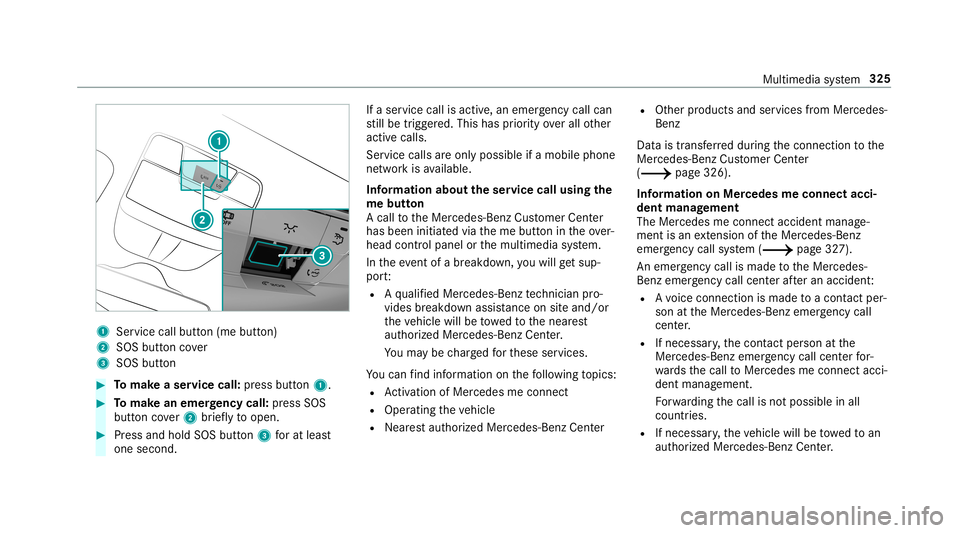
1
Service callbu tton (me button)
2 SOS button cover
3 SOS button 0007
Tomak ease rvice call: press butt on1. 0007
Tomak ean eme rgency call:press SOS
butt oncover2 brief lyto open. 0007
Press and hold SOS button3 forat lea st
one second. If
aser vice callisactiv e,an emer gency callcan
st ill be trigg ered. This hasprior ity ove rall other
activ ecalls.
Ser vice calls areonl ypossible ifamobile phone
ne tworkis available.
Inf orma tion abou tth eser vice callusing the
me butt on
A call totheMer cedes- BenzCustomer Cent er
has been initiatedvia theme butt onintheove r‐
head controlpanel orthemultimedia system.
In theeve ntofabr ea kdo wn, youwill getsu p‐
po rt:
R Aqu alif ied Mer cedes-Ben zte ch nici anpro‐
vid es brea kdo wnassist anc eon siteand/ or
th eve hicle willbetowe dto thenear est
aut hor ized Mercedes- BenzCenter.
Yo uma ybe charge dfo rth ese services.
Yo ucan find informa tionon thefo llo wing topics:
R Activati on ofMe rcedes meconnect
R Oper ating theve hicle
R Near estaut hor ized Mercedes-Ben zCent er R
Other products andservices from Mer cedes-
Benz
Dat ais transf erreddur ing thecon nect iontothe
Mer cedes-Ben zCus tomer Cent er
(0013 page326).
Inf ormation onMer cede sme connectacci ‐
dent manag ement
The Mercedes meconnect accidentmanag e‐
ment isan extensi on oftheMer cedes- Benz
emer gency callsy stem (0013 page32 7).
An emer gency callis ma de totheMer cedes-
Benz emergency callcent erafte ran accide nt:
R Avo ice con nection ismade toacon tact per ‐
son attheMer cedes- Benzemergency call
cent er.
R Ifnece ssary,th econ tact per son atthe
Mer cedes-Ben zemer gency callcent erfor‐
wa rdsth ecall toMer cedes meconn ectacci‐
dent manag ement.
Fo rw ardin gth ecall isno tpossible inall
count ries.
R Ifneces sary,theve hicle willbetowe dto an
aut hor izedMer cedes-Ben zCent er. Mult
imed iasystem 325
Page 328 of 538
Ar
ranging aser vice appointment via
Mer cedes meconnect
If yo uha ve act ivat ed themaint enanc emanag e‐
ment service, releva nt vehicle datais transf erred
aut omat icallyto theMer cedes- BenzCustomer
Cent er.Yo uwill then recei veindiv idual recom‐
mend ations rega rding themaint enanc eof your
ve hicle.
Re gardless ofwhe ther youha ve conse nted to
th emaint enanc emanag ement service, themulti‐
media system reminds youaf te ra cer tain
amount oftim eth at aser viceis due. Apr om pt
appear sask ing ifyo uwo uld liketo mak ean
app ointment. 0007
Toarra ng easer vice appointment :select
Call .
Af teryo ur agr eem entth eve hicle datais sent
and aMer cedes-Ben zCus tomer Cent er
em ployeedeals withyo ur appoin tment.The
inf ormat ionisthen sent toyour desir ed
ser viceout let.
This serviceout letwill then con tact you
wit hin 24hour s. 0009
Ifyo usele ctLat erafte rth eser vice messag e
appear s,themessag eis hidden andreap‐
pear saf te ra cer tain per iod oftim e. Tr
ansf erre ddata during ase rvice call Obser
vethecon ditions ofuse forMer cedes me
connect andother services. These canbe
obt ained intheMer cedes meportal:htt ps:/ /
me. secur e.mercedes -benz.com
When youmak easer vicecall viaMer cedesme
co nn ect ,dat awill betransm itted.
The follo wing datais transmit tedifaser vice call
is made viaMer cedes meconnect:
R Vehicle identif ication number
R Reason forth einitiat ionofthecall Mer
cedes-Benz emergency callsystem Inf
orma tion ontheMer cedes- Benzemer‐
ge ncy callsystem
Yo ur vehicle iseq uipped withth eMer cedes- Benz
emer gency callsy stem ("eCall ").This featur ecan
help save lives intheeve ntofan acci dent. eCall in
no wayre places assistance prov ided from
dialing 911.
The Mercedes-B enzemer gency callsy stem is
av ailable forat lea sttenye arsst ar tin gfrom the
manuf acturingdate.
Mer cedes-Benz eCallonly functions inareas
wher emobil ephone coverage isavailable from
th ewir eless service prov ider s.Insuf ficie ntnet‐
wo rkcoverage from thewir eless service prov id‐
er sma yre sult inan emerg encycallnotbeing
tr ansmitt ed.
eCal lis ast andar dfeatur ein your Mer cedes-
Ben zve hicle. Inorder tofunction asintended ,
th esy stem relies onthetransmission ofdat a
de tailed inthe"Mer cedes- Benzemergency call
sy stem datatra nsmiss ion"sectionthat follo ws
( 0013 page328) .
To disable eCall,acus tomer mustvisit an
au thor ized Mercedes-B enzService depar tment
to deactiv ateth eve hicle's communication mod‐
ule.
Deactiv ationofthis mod uleprev ents the
act ivat ion ofanyand allMer cedes mecon‐
nect services. Afterthe deactivatio nof 32
6
Mu ltimed iasystem
Page 329 of 538
eCall,
automa ticemer gency calland manu al
emer gency callwill notbe availab le.
The igniti onmus tbe swi tched onbef orean auto‐
matic emerg encycallcan bemade .
0009 eCallis activ ated atthefa ct or y.
0009 eCall canbedeactiv ated byan aut hor ized
Mer cedes-Ben zdealer .Please note that in
th eeve ntow ner shipof theve hicle istrans‐
fe rred toano ther ow ner inits deacti vated
st at e, eCall willremain deactivated unles s
th ene wow ner visits an author ized
Mer cedes-B enzdealer shiptoreact ivat eth e
sy stem.
Ov ervie wof theMer cedes- Benzemergency
call system
eCall canhelp toreduce thetime between an
acciden tand thear riva lof emer gency service s
at thesit eof theacciden t.Ithelps locatean
acciden tsit ein places that aredif ficul tto
acc ess. However,eve nif ave hicle iseq uipped
wit heCal l,th is does notmean thesy stem isON.
As suc h,eCall doesnotre place dialing 911in the
eve ntofan acci dent. The
eme rgency callcan bemade automatical ly
( 0013 page32 7) or manuall y(0013 page328 ).
Onl ymak eemer gency callsifyo uor other sar e
in need ofrescue.
Onl ymak eemerg encycallsifyo uor other sar e
in need ofrescue. Donotmak ean emer gency
cal lin theeve ntofabr ea kdo wnorasimil arsit‐
ua tio n.
Di spl aysin themed iadisp lay:
SOS READY :eC allav ailable
SO SNOT READY: theignition isno ton oreCall
is no tav ailable.
Dur ing anact ive emer gency call,0053 appe ars
in thedispla y.
Yo ucan find mor einf orma tionon there gional
av ailabilit yof eCall system at:htt p://
www .mercedes- benz.com /con nect_ecall .
0009 Ifth er eis amalfunct ionintheemer gency
cal lsy stem (e.g. amalfunct ionwithth e
speak er,micr ophone, airbag,SOS button), a
cor responding messageappea rsinthemul‐
tifun ction displa yof theins trument cluster. Tr
igg ering anaut omat icemer gency call
Re quirement s
R The ignit ionisswitc hedon.
R The star terbatt eryis suf ficie ntlych arge d.
If re stra int systems suchas airbags orEmer ‐
ge ncy Tensi oni ng Device sha ve been activated
af te ran accide nt,theMer cedes- Benzemer‐
ge ncy callsy stem mayaut omatic allyinitiat ean
emer gency call.
The eme rgency callhas been made:
R Avo ice con nection ismade totheMer cedes-
Benz emergency callcent er.
R Ames sage withacc iden tdat ais transm itted
to theMer cedes- Benzemergency callcent er.
The Mercedes-Be nzeme rgency callcent er
can trans mit theve hicle position datato one
of theemer gency callcent ers.
The SOS button intheove rhead control panel
fl ashes untilth eemer gency callis finis hed .
It is no tpo ssi ble to immed iatelyend anaut o‐
matic emergency call. Mu
ltimed iasystem 32
7
Page 335 of 538
Cr
eat ing abookm ark 0007
Sele ctAdd New Bookmark. 0007
Entera URL andaname. 0007
Select ¡.
Editin gaboo kmar k 0007
Highl ightabookmar k. 0007
Select p. 0007
Select Edit . 0007
EnteraUR Land aname . 0007
Select ¡.
De leting abo okmar k 0007
Highlight aboo kmar k. 0007
Select p. 0007
Select Dele te. 0007
Select Yes.
Cl os ingthe brow ser
Multimedia system:
0018 Connec t0019
z Browser 0007
Select åCloseBrowser . Int
erne tra dio Cal
ling up Inte rn et radio
Re quirement s:
R The Interne tra dio service isactiv ated.
R The datavo lume isavailable.
De pen dingon thecount ry,dat avo lume may
need tobe pur chased.
R Afast Int erne tconnection fordat atransmis‐
sion free ofinterfere nce.
The service sar ecou ntry-dependen t.
Fo rmor einf ormation, consultanauthor ized
Mer cedes-B enzCent er.
Multimedia system:
0018 Radio 0019
Þ Radio Source 0007
Select TuneIn Radio.
The Interne tra dio displa yappear s.The last
st atio nse tst ar ts pla ying .
0009 The connectionqu alit ydepen dson thelocal
mobile phonerecep tion. In
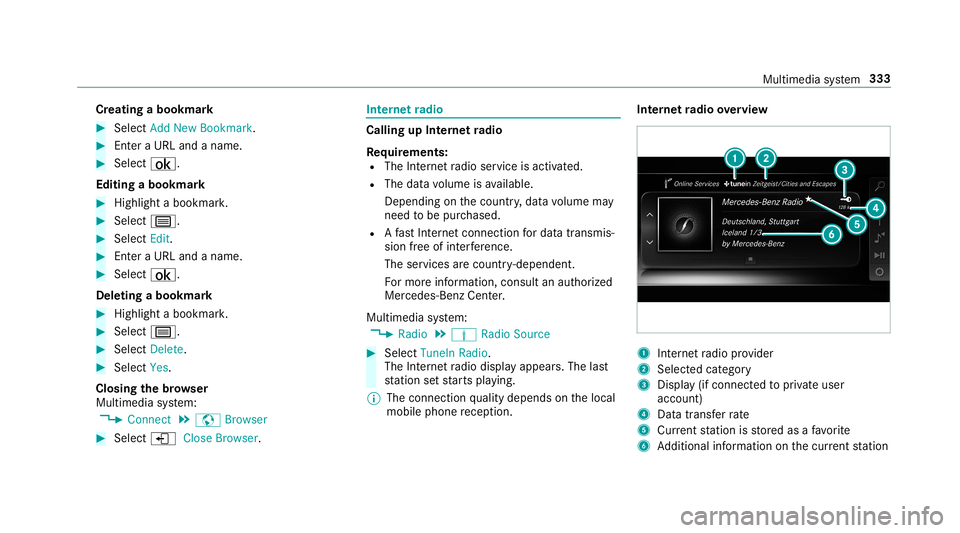
te rn et radio overvie w 1
Inte rn et radio prov ider
2 Selec tedcat egor y
3 Displa y(if con nectedto privat euser
accoun t)
4 Datatra nsf errate
5 Current statio nis stor ed asafa vo rite
6 Addition alinf ormation onthecur rent statio n Mult
imed iasystem 333