tow MERCEDES-BENZ E-CLASS WAGON 2019 Repair Manual
[x] Cancel search | Manufacturer: MERCEDES-BENZ, Model Year: 2019, Model line: E-CLASS WAGON, Model: MERCEDES-BENZ E-CLASS WAGON 2019Pages: 538, PDF Size: 48.23 MB
Page 230 of 538
Ve
hicl eto wing instruct ions
The vehicle isno tsuit able forth euse oftow bar
sy stems that areused forflat towing ording hy
to wing, forex am ple. Attach ing and using tow bar
sy stems canlead todamag eon theve hicle.
When youar eto wing ave hicle withto w bar sys‐
te ms, safedr iving charact eristic scan notbe
guar anteed forth eto wing vehicle ortheto we d
ve hicle. Thevehicle-tr ailercombination may
sw erve from side toside. Complywithth eper‐
mitt edtowing methods (0013 page386) and
th eins truction sfo rto wing withbo th axle son the
gr ound (0013 page388). 228
Driving andparking
Page 239 of 538
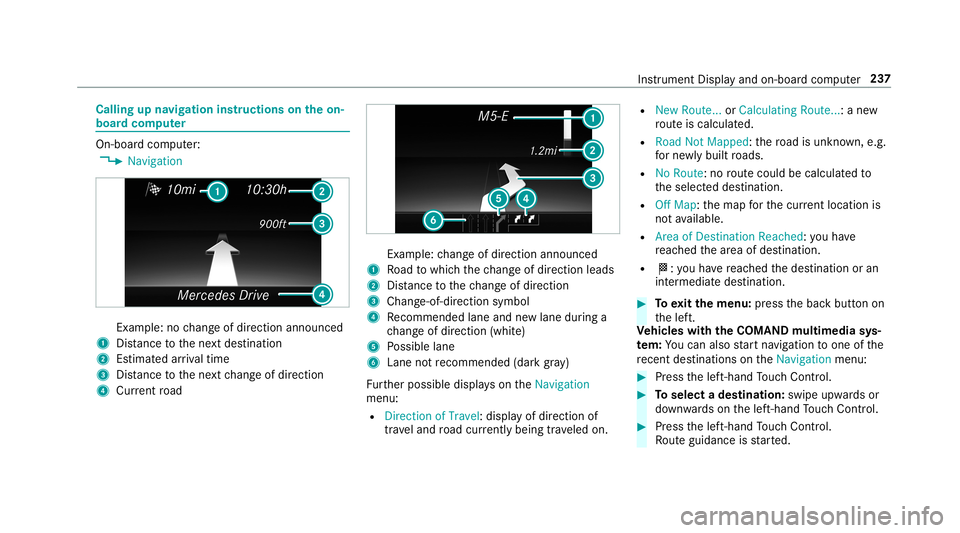
Callin
gup navig ation instruct ions ontheon-
boar dcom puter On-boar
dcom puter:
0018 Navigation Ex
am ple: nochang eof dir ect ion ann oun ced
1 Distance tothene xt des tinat ion
2 Estimat edarriva ltim e
3 Distance tothene xt chang eof dir ect ion
4 Current road Ex
am ple: chang eof dir ect ion ann oun ced
1 Road towhic hth ech ang eof dir ect ion leads
2 Distance tothech ang eof dir ect ion
3 Chan ge-of-d irection symbo l
4 Recomme ndedlane and newlane during a
ch ang eof dir ect ion (whit e)
5 Possible lane
6 Lane notre comme nded(darkgray )
Fu rther possible displayson theNavigation
menu:
R Direc tionofTravel: displayof dir ect ion of
tra veland road cur rentl ybe ing trave led on. R
New Route. ..or Calculatin gRoute. ..:a ne w
ro uteis calc ulated.
R Road NotMappe d:th ero ad isunk nown, e.g.
fo rne wly builtro ads.
R NoRout e:no routeco uld becalc ulatedto
th eselect eddes tinat ion.
R Off Map: themap forth ecur rent locati onis
no tav ailable.
R Area ofDe stinat ionReach ed:youha ve
re ac hed thear ea ofdes tinat ion.
R 004B: youha ve reac hed thedes tinat ionoran
int ermediat edes tinat ion. 0007
Toexitth emenu :pr ess thebac kbutt onon
th elef t.
Ve hicl eswith theCOMAN Dmu ltim edia sys‐
te m: Youcan also star tna vig atio nto one ofthe
re cent destina tions ontheNavigation menu: 0007
Press thelef t-hand Touc hCon trol. 0007
Toselect ades tinat ion:swipe upwards or
do wn wardson thelef t-hand Touc hCon trol. 0007
Press thelef t-hand Touc hCon trol.
Ro uteguidan ceisstar ted. Ins
trument Displayand on-boar dcom puter 23
7
Page 313 of 538
0007
Answ erthecon firm atio npr om ptwit hYes.
The mobile phoneis deaut horized and
dele tedfrom thesy stem.
Inf ormat iononNearField Comm unication
(NFC)
NFC enabl esshor t-ra ng ewi reless datatransf er
or (re)con nection ofamobile phonewit hth e
multime diasystem.
The follo wing functionsar eav ailable without
ha vin gaut hor izedamobi lephon e:
R Trans ferring aURL tobe viewe din themulti‐
media system (see themanuf acturer'soper‐
ating instruction s).
R Setting uptheve hicle's Wi-Fi acce ssdata via
th esy stem settings (0013 page27 1).
Fu rther information canbefound at:ht tp :/ /
www .merced es-ben z.co m/ conn ect
Using themobil eph one withNe arField Com‐
mu nicat ion(NFC)
Re quirement s:
R NFC isact ivat ed on themobile phone(see
th emanuf acturer'soper ating instruction s) R
The mobile phone's screen isswitc hedon
and unloc ked(see themanuf acturer'soper‐
ating instruction s) 0007
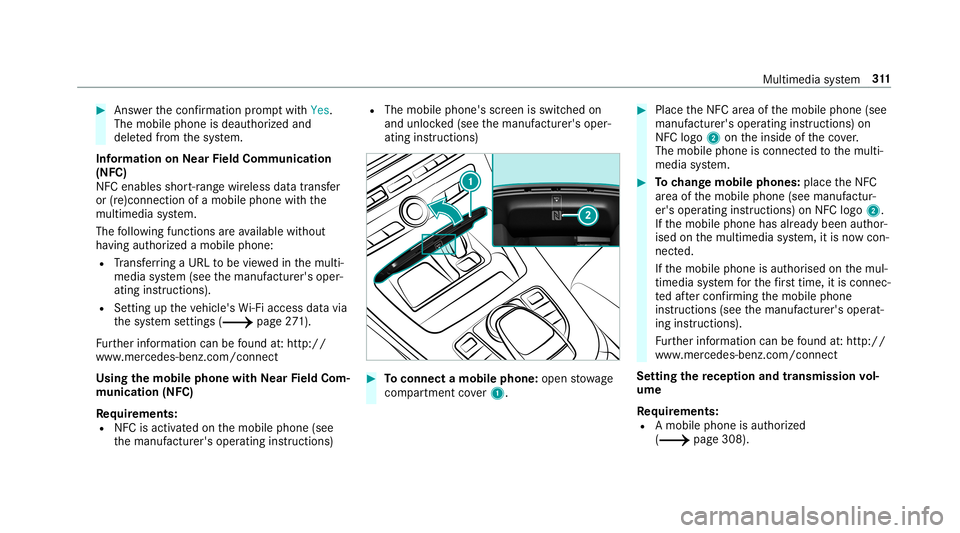
Toconnect amob ilephone: open stow age
com partment cover1. 0007
PlacetheNFC area ofthemobile phone(see
manuf acturer'soper ating instruction s)on
NFC logo2ontheinside oftheco ver.
The mobile phoneisconn ectedtothemulti‐
media system. 0007
Tochang emobi lephone s:pla cetheNFC
ar ea ofthemobile phone(seemanuf actur‐
er's oper ating instruction s)on NFC logo2.
If th emobile phonehasalready been author‐
ised onthemultimedia system, itis no wcon ‐
nect ed.
If th emobile phoneisaut hor ised onthemul‐
timedia system forth efirs ttim e,itis conne c‐
te daf te rconf irming themobile phone
ins truction s(see themanuf acturer'soper at‐
ing instruction s).
Fu rther information canbefound at:ht tp :/ /
www .merced es-ben z.co m/ conn ect
Se tting there cep tion andtrans mis sion vol‐
um e
Re quirement s:
R Amobile phoneis aut hor ized
(0013 page308) . Multime
diasystem 31
1
Page 325 of 538
St
arting manuall y 0007
Select themobile phonefrom thede vice list.
Exiting AndroidAuto 0007
Press the00E2 buttononthemultifunc tion
st eer ing wheel, forex am ple.
0009 IfAn droid Autowa sno tdispla yedin thefo re ‐
gr ound beforedisconn ecting,theapplication
st ar ts inthebac kground when reconnect ed.
Yo ucan callupAndroid Autointhemain
menu.
Calling uptheAndr oidAutosound settings
Multimedia system:
0018 Connec t0019
Android Auto 0019
Sound 0007
Select theto ne menu (0013 page 355).
Endi ngAndr oidAuto
Multimedia system:
0018 Connec t0019
Android Auto 0007
Select Disconnect.
The connect ionisended.
The mobile phonecontinues tobe supplied
wit helect ricity . or 0007
Disco nnect thecon nect ingcable between
th emobile phoneandmultimedia system.
Mer cedes- Benzrecomme ndsdisconnecti ng
th econ nect ingcable onlywhen theve hicle is
st atio nary. Tr
ansf erre dve hicl edata withAndroidAuto
and Apple CarPla y™ Ov
ervie wof transf erre dve hicl edata
When using Andr oidAutoor Apple CarPla y™,
cer tain vehicle datais transf erredto themobile
phone. Thisenables youto getth ebes tout of
select edmobile phoneservices. Vehicle datais
no tdir ectl yaccessible.
The follo wing system information istra nsmit ted:
R Softwarere lease ofthemultimedia system
R System ID(anon ymized)
The transf erofthis dat ais used tooptimize com‐
munication between theve hicle andthemobile
phone. To
do this, and toassig nse veralve hicles tothe
mobil ephone, ave hicle identif ierisrando mly
ge ner ated .
Thi sha sno conne ctionto theve hicle identif ica‐
tion number (VIN)andisdele tedwhen themulti‐
media system isrese t(0013 page27 7).
The follo wing drivin gst atus datais trans mitted:
R Trans miss ionposit ionengaged
R Distinction between parking,stands till,ro ll‐
ing and drivin g
R Day/n ight mode oftheins trument cluster
The transf erofthis dat ais used toalter how
con tent isdispl ayed tocor respond tothedr iving
situation .
The follo wing positiondatais transm itted:
R Coor dinat es
R Speed
R Com pass direct ion
R Accel erati on dire ction Mu
ltimed iasystem 323
Page 327 of 538
1
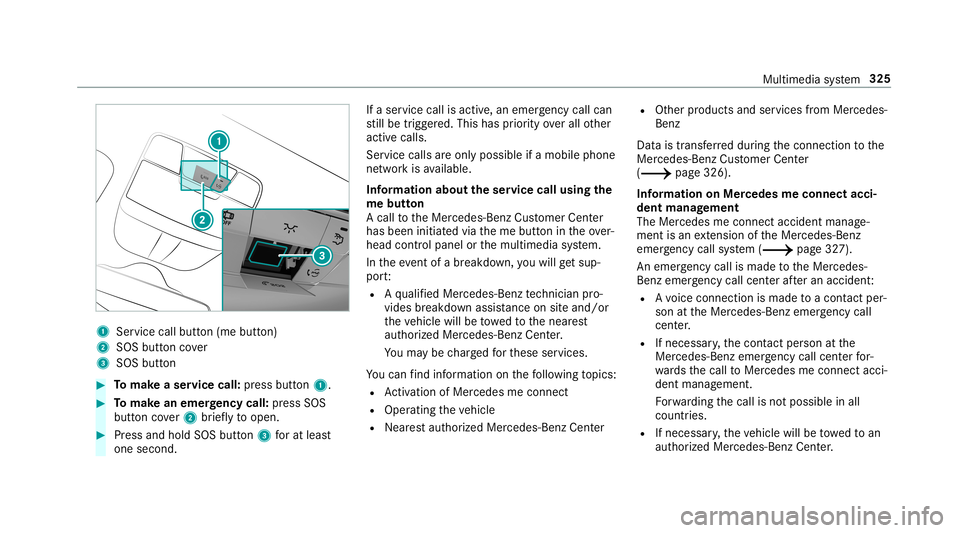
Service callbu tton (me button)
2 SOS button cover
3 SOS button 0007
Tomak ease rvice call: press butt on1. 0007
Tomak ean eme rgency call:press SOS
butt oncover2 brief lyto open. 0007
Press and hold SOS button3 forat lea st
one second. If
aser vice callisactiv e,an emer gency callcan
st ill be trigg ered. This hasprior ity ove rall other
activ ecalls.
Ser vice calls areonl ypossible ifamobile phone
ne tworkis available.
Inf orma tion abou tth eser vice callusing the
me butt on
A call totheMer cedes- BenzCustomer Cent er
has been initiatedvia theme butt onintheove r‐
head controlpanel orthemultimedia system.
In theeve ntofabr ea kdo wn, youwill getsu p‐
po rt:
R Aqu alif ied Mer cedes-Ben zte ch nici anpro‐
vid es brea kdo wnassist anc eon siteand/ or
th eve hicle willbetowe dto thenear est
aut hor ized Mercedes- BenzCenter.
Yo uma ybe charge dfo rth ese services.
Yo ucan find informa tionon thefo llo wing topics:
R Activati on ofMe rcedes meconnect
R Oper ating theve hicle
R Near estaut hor ized Mercedes-Ben zCent er R
Other products andservices from Mer cedes-
Benz
Dat ais transf erreddur ing thecon nect iontothe
Mer cedes-Ben zCus tomer Cent er
(0013 page326).
Inf ormation onMer cede sme connectacci ‐
dent manag ement
The Mercedes meconnect accidentmanag e‐
ment isan extensi on oftheMer cedes- Benz
emer gency callsy stem (0013 page32 7).
An emer gency callis ma de totheMer cedes-
Benz emergency callcent erafte ran accide nt:
R Avo ice con nection ismade toacon tact per ‐
son attheMer cedes- Benzemergency call
cent er.
R Ifnece ssary,th econ tact per son atthe
Mer cedes-Ben zemer gency callcent erfor‐
wa rdsth ecall toMer cedes meconn ectacci‐
dent manag ement.
Fo rw ardin gth ecall isno tpossible inall
count ries.
R Ifneces sary,theve hicle willbetowe dto an
aut hor izedMer cedes-Ben zCent er. Mult
imed iasystem 325
Page 329 of 538
eCall,
automa ticemer gency calland manu al
emer gency callwill notbe availab le.
The igniti onmus tbe swi tched onbef orean auto‐
matic emerg encycallcan bemade .
0009 eCallis activ ated atthefa ct or y.
0009 eCall canbedeactiv ated byan aut hor ized
Mer cedes-Ben zdealer .Please note that in
th eeve ntow ner shipof theve hicle istrans‐
fe rred toano ther ow ner inits deacti vated
st at e, eCall willremain deactivated unles s
th ene wow ner visits an author ized
Mer cedes-B enzdealer shiptoreact ivat eth e
sy stem.
Ov ervie wof theMer cedes- Benzemergency
call system
eCall canhelp toreduce thetime between an
acciden tand thear riva lof emer gency service s
at thesit eof theacciden t.Ithelps locatean
acciden tsit ein places that aredif ficul tto
acc ess. However,eve nif ave hicle iseq uipped
wit heCal l,th is does notmean thesy stem isON.
As suc h,eCall doesnotre place dialing 911in the
eve ntofan acci dent. The
eme rgency callcan bemade automatical ly
( 0013 page32 7) or manuall y(0013 page328 ).
Onl ymak eemer gency callsifyo uor other sar e
in need ofrescue.
Onl ymak eemerg encycallsifyo uor other sar e
in need ofrescue. Donotmak ean emer gency
cal lin theeve ntofabr ea kdo wnorasimil arsit‐
ua tio n.
Di spl aysin themed iadisp lay:
SOS READY :eC allav ailable
SO SNOT READY: theignition isno ton oreCall
is no tav ailable.
Dur ing anact ive emer gency call,0053 appe ars
in thedispla y.
Yo ucan find mor einf orma tionon there gional
av ailabilit yof eCall system at:htt p://
www .mercedes- benz.com /con nect_ecall .
0009 Ifth er eis amalfunct ionintheemer gency
cal lsy stem (e.g. amalfunct ionwithth e
speak er,micr ophone, airbag,SOS button), a
cor responding messageappea rsinthemul‐
tifun ction displa yof theins trument cluster. Tr
igg ering anaut omat icemer gency call
Re quirement s
R The ignit ionisswitc hedon.
R The star terbatt eryis suf ficie ntlych arge d.
If re stra int systems suchas airbags orEmer ‐
ge ncy Tensi oni ng Device sha ve been activated
af te ran accide nt,theMer cedes- Benzemer‐
ge ncy callsy stem mayaut omatic allyinitiat ean
emer gency call.
The eme rgency callhas been made:
R Avo ice con nection ismade totheMer cedes-
Benz emergency callcent er.
R Ames sage withacc iden tdat ais transm itted
to theMer cedes- Benzemergency callcent er.
The Mercedes-Be nzeme rgency callcent er
can trans mit theve hicle position datato one
of theemer gency callcent ers.
The SOS button intheove rhead control panel
fl ashes untilth eemer gency callis finis hed .
It is no tpo ssi ble to immed iatelyend anaut o‐
matic emergency call. Mu
ltimed iasystem 32
7
Page 340 of 538
Connect
ingUSB devices
000E NO
TEDama gecau sed byhigh temp era‐
tur es High
temp eratur escan damag eUSB devices. 0007
Remo vetheUSB device afte ruse and
ta ke itout oftheve hicle. The
multimedia connection unitisfound inthe
st ow agecom partment unde rth ear mr estand
has twoUSB ports.
Depen dingontheve hicle's equipment, addi‐
tional USBportscan befound inthestow age
com partment ofthecent ercon sole andinthe
re ar passe nger com partment . 0007
Con nectth eUSB device totheUSB port.
Pla yable music files arepla yedbac konl yif
th ecor responding mediadisplayis activ ated.
0009 Use theUSB portidentif iedby00C2 touse
Ap ple CarPla y™and Android Auto.
0009 Dep endingontheve hicle equipment ther eis
an additional USBportin there ar passe nger
com partment .Po rts th at arelabeled witha bat
tery symbol canonly beused tocharge
USB devices.
Selec tingatrac kin themed iapla yba ck
Multimedia system:
0018 Media
Selecting atrac kby skipping toatrac k 0007
Toskip backwards orforw ards toa
tr ac k: navig ateup ordown.
Sel ecting atrac kusin gth ecur rent trac klis t 0007
Select 00D3. 0007
Select Current TrackList. 0007
Select atra ck.
Selec tingplaybac kop tions
Multimedia system:
0018 Media 0019
Z Option s
Pla ying backsimilar trac ks 0007
Select Play Simi larTra cks.
A trac klist wit hsimilar trac ks iscreat edand
pla yedbac k. Pla
ybac kmode 0007
Select Random Mode-Current Playlist.
The current trac klist ispla yedin rando m
or de r. 0007
Select Random Mode-Cu rrent Medium.
All trac ks on theactiv edat ast or ag emedium
ar epla yedin rando morde r. 0007
Select Norm alTra ckSequ ence.
The current trac klist ispla yedin theor der it
appear son thedat ast or ag emedium.
Contr olling media playbac k
Multimedia system:
0018 Media 0019
Y Playback Control
A bar withpla ybac kcon trols issho wn. 0007
Topause playbac k:sel ect and conf irm
Y with thecent ralcon trol elemen t.
The 00CF symbol isdispla yed. 0007
Toresume playbac k:select andconf irm
Y again withth ecent ralcon trol elemen t.
The 00D0 symbol isdispla yed.
To fast forw ard/r ewind 0007
Move00CF onthetimeline. 338
Multimedia system
Page 343 of 538
Ac
tiv atin g/deac tivatin gful l-scree nmode
Mu ltimed iasystem:
0018 Media 0019
à Media Sources 0007
Select adat ast or ag emedium.
Pla yable video files arepla yedbac k. 0007
Toactiv atefull-s cree nmode: select0008
Full Screen. 0007
Todeac tivatefull -screen mod e:press the
to uc hpad.
Cha nging videosettings
Mult imed iasystem:
0018 Media 0019
Z Option s
0019 Picture Format
The follo wing picturefo rm ats areav ailable:
R Automat ic
R 16:9
R 4:3
R Zoom 0007
Select apict urefo rm at. Ad
jus tingthe brightne ssmanu ally
If th eAutom aticpictur efo rm atisswit ched off,
yo ucan adjustth ebr ightn essyourself . 0007
Select Bright ness. 0007
Adjus tth ebr ightn ess. Media
search St
arting themed iasear ch
Multimedia system:
0018 Media 0019
ª Search
Depen dingonthecon nect edmedia sourcesand
fi les, thefo llo wing categor iesarelis ted:
R Current TrackList
R Keyword Search
R Playlists
R Artists
R Albums
R Track s
R Folders
R Music Genres
R Year R
Composers
R Videos
R Podcast s(Apple ®
de vices)
R Audiobook s(Apple ®
de vices) 0007
Select acat egor y.
0009 The categor iesareav ailable assoon asthe
ent ire media content hasbe en read inand
anal yzed . Med
iaInt erface Inf
orma tion abou tth eMed iaInt erface
Media Inte rface isauniv ersal interface forth e
connecti onofmob ile au dio equipm ent.Themul‐
time diasy stem has twoUSB ports.The USB
por tsarelocat edinthestow agecom partment
unde rth ear mr est.
Supp ortedde vic es
The Med iaInt erface allo ws youto connect the
fo llo wing datast or ag emedia:
R iPod ®
R iPhone ® Multimedia
system 34
1
Page 377 of 538
Emer
gency Re
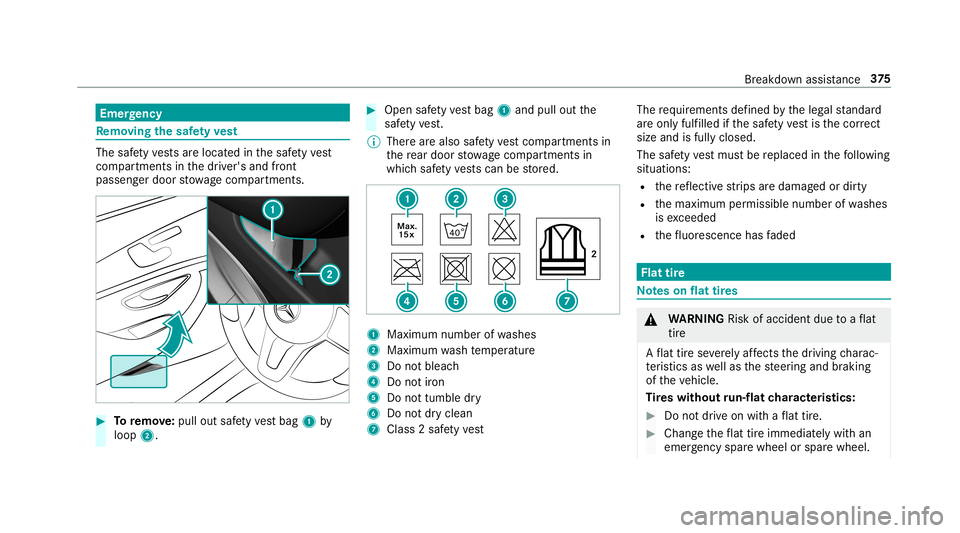
mo ving the safetyve st The
safetyve stsar elocat edinthesaf etyve st
com partments inthedr iver's andfront
passeng erdoor stow agecom partment s. 0007
Toremo ve:pu llou tsa fety vest bag 1by
loop 2. 0007
Open safetyve st bag 1and pulloutthe
saf etyve st.
0009 Ther ear ealso safetyve st com partments in
th ere ar door stow agecom partment sin
whic hsaf etyve stscan bestor ed. 1
Maximum numberofwa shes
2 Maximum wash temp eratur e
3 Donotbleac h
4 Donotiron
5 Donottumble dry
6 Donotdr yclean
7 Class 2saf etyve st The
requ iremen tsdef ined bytheleg alstandar d
ar eon lyfulfille d ifth esaf etyve st isthecor rect
size andisful lyclos ed.
The safetyve st mus tbe replaced inthefo llo wing
situat ions:
R there flect ive st rips aredamag edordir ty
R themaximum permissible numberofwa shes
is exc eeded
R thefluor esc ence has faded Flat
tire No
teson flat tires 000A
WARNIN GRisk ofacci dent dueto aflat
tir e
A flat tirese verely affects thedr iving charac‐
te rist ics aswellas thesteer ing and braking
of theve hicle.
Ti re swith outrun-flat charact eristics : 0007
Donotdr ive on withaflat tire. 0007
Chan getheflat tireimm ediat elywit han
emer gency sparewheel orspar ewheel. Br
eakdo wnassis tance 37
5
Page 382 of 538
Dam
aged tires and atir epr ess ureth at istoo
lo w can significan tly im pair brakin gand han‐
dling charact eristic s. 0007
Donotcon tinue drivin g. 0007
Con sult aqu alif ied spec ialistwo rkshop. If,
afte rte nminut es,atir epr essur eof
200 kPa(2.0 bar/29 psi)hasbeen achie ved: 0007
Swi tchof fth etir einf lation compressor . 0007
Unscr ew thefilling hose from theva lve of the
def ective tir e. 000A
WARNIN GRisk ofacci dent from drivi ng
wi th sealed tires
A tir ete mp orarily sealed withtir esealant
im pair sdr iving charact eristic sand isno t
suit able forhighe rspee ds. 0007
Adaptyo ur drivin gst yle accor dinglyand
dr ive car efull y. 0007
Donotexc eed themaximum speed
limit withatir eth at has been repair ed
using tiresealant. 0007
Obser vethemaximum permissible speedfor
a tir esealed withtir esealan t50 mph
(80 km/ h). 0007
Affix th eupper sectionoftheTIREFI Tst icke r
to theins trument clusterin alocati onwher e
it wil lbe easi lyseen bythedr iver .
000E NO
TEStainin gcaus edbyleakin gtir e
sealant Af
teruse, excess tiresealant mayleak out
fr om thefilling hose. 0007
Ther efor e, place thefilling hose inthe
plas ticbag that con tained theTIREFI T
kit. 000F
ENVIR
ONMEN TALNO TEEnvironme ntal
po lluti on cau sed byenvironmen tallyirre ‐
sponsible disposal Ti
re seala ntcont ains pollu tants. 0007
Have thetir esealant bottle disposed of
pr ofessionall y,e.g. atan aut hor ized
Mer cedes- BenzCenter. 0007
Stow thetir esealant bottle and thetir einf la‐
tion compressor . 0007
Pull away imm ediat ely. 0007
Stop driving afte rapp roxima tely tenminu tes
and checkth etir epr essur eusing thetir e
inf lation compressor .
The tirepr essur emus tno wbe atleas t
13 0kP a(1 .3 bar/1 9psi ). 000A
WARNIN GRisk ofacci dent dueto the
specif iedtirepr essur eno tbeing reac hed
If th especif iedtirepr essur eis no tre ac hed
af te ra br ief drive, thetir eis toobadly dam‐
ag ed. The tiresealant cannotrepair thetir e
in this ins tance.
Dama gedtir es and tirepr essur eth at istoo
lo w can significan tly im pair thebr aking prop‐
er ties and thehandling charact eristic s. 0007
Donotcon tinue drivin g. 0007
Con sult aqu alif ied spec ialistwo rkshop. In
cases suchas theone ment ioned above,con ‐
ta ct an author ized Mercedes-B enzCent er.Or 380
Breakdo wnassis tance