engine MERCEDES-BENZ E-SEDAN 2014 Owners Manual
[x] Cancel search | Manufacturer: MERCEDES-BENZ, Model Year: 2014, Model line: E-SEDAN, Model: MERCEDES-BENZ E-SEDAN 2014Pages: 430, PDF Size: 5.8 MB
Page 228 of 430
Activating ATTENTION ASSIST
X
Activate ATTENTION ASSIST using the on-
board computer (Y page 248).
The system determines the attention level
of the driver depending on the setting
selected:
Standard selected: the sensitivity with
which the system determines the attention
level is set to normal.
Sensitive selected: the sensitivity is set
higher. The attention level detected by
Attention Assist is adapted accordingly and
the driver is warned earlier.
When ATTENTION ASSIST is deactivated, the
À symbol and OFF appear in the
multifunction display in the assistance
display when the engine is running.
When ATTENTION ASSIST has been
deactivated, it is automatically reactivated
after the engine has been stopped. The
sensitivity selected corresponds to the last
selection activated (standard/sensitive).
Warning in the multifunction display If fatigue or increasing lapses in
concentration are detected, a warning
appears in the multifunction display:
Attention Assist: Take a Break!
Attention Assist: Take a Break!
In addition to the message shown in the
multifunction display, you will then hear a
warning tone.
X If necessary, take a break.
X Confirm the message by pressing the
a button on the steering wheel.
On long journeys, take regular breaks in good
time to allow yourself to rest properly. If you
do not take a break and ATTENTION ASSIST
still detects increasing lapses in
concentration, you will be warned again after
15 minutes at the earliest. This will only
happen if ATTENTION ASSIST still detects
typical indicators of fatigue or increasing
lapses in concentration. Lane Tracking package
General notes The Lane Tracking package consists of Blind
Spot Assist (Y page 226) and Lane Keeping
Assist (Y page 228).
Blind Spot Assist General notes
Blind Spot Assist uses a radar sensor system
to monitor the areas on both sides of your
vehicle. It supports you from a speed of
approximately 20 mph (30 km/h). A warning
display in the exterior mirrors draws your
attention to vehicles detected in the
monitored area. If you then switch on the
corresponding turn signal to change lanes,
you will also receive a visual and audible
collision warning. Blind Spot Assist uses
sensors in the rear bumper for monitoring
purposes.
Important safety notes G
WARNING
Blind Spot Assist does not react to:
R vehicles overtaken too closely on the side,
placing them in the blind spot area
R vehicles which approach with a large speed
differential and overtake your vehicle
As a result, Blind Spot Assist may not give
warnings in such situations. There is a risk of
an accident.
Always observe the traffic conditions
carefully, and maintain a safe lateral distance.
Blind Spot Assist is only an aid. It may fail to
detect some vehicles and is no substitute for
attentive driving. Always ensure that there is
sufficient distance to the side for other road
users and obstacles.
i USA only:
This device has been approved by the FCC
as a "Vehicular Radar System". The radar
sensor is intended for use in an automotive
radar system only. Removing, tampering 226
Driving systemsDriving and parking
ProCarManuals.com
Page 240 of 430
Useful information
i This Operator's Manual describes all
models and all standard and optional
equipment of your vehicle available at the
time of publication of the Operator's
Manual. Country-specific differences are
possible. Please note that your vehicle may
not be equipped with all features
described. This also applies to safety-
related systems and functions.
i Read the information on qualified
specialist workshops: (Y page 26).Important safety notes
G
WARNING
If you operate information systems and
communication equipment integrated in the
vehicle while driving, you will be distracted
from traffic conditions. You could also lose
control of the vehicle. There is a risk of an
accident.
Only operate the equipment when the traffic
situation permits. If you are not sure that this
is possible, park the vehicle paying attention
to traffic conditions and operate the
equipment when the vehicle is stationary. G
WARNING
If the instrument cluster has failed or
malfunctioned, you may not recognize
function restrictions in systems relevant to
safety. The operating safety of your vehicle
may be impaired. There is a risk of an
accident.
Drive on carefully. Have the vehicle checked
at a qualified specialist workshop
immediately.
You must observe the legal requirements for
the country in which you are currently driving
when operating the on-board computer.
The on-board computer only shows messages
or warnings from certain systems in the multifunction display. You should therefore
make sure your vehicle is operating safely at
all times. Otherwise, a vehicle that is not
operating safely may cause an accident.
Hybrid vehicles: Always read the HYBRID
operating instructions. You could otherwise
fail to recognize dangers, e.g. due to high-
voltage.
For an overview, see the instrument panel
illustration (Y
page 31). Displays and operation
Coolant temperature display
G
WARNING
Opening the hood when the engine is
overheated or when there is a fire in the
engine compartment could expose you to hot
gases or other service products. There is a
risk of injury.
Let an overheated engine cool down before
opening the hood. If there is a fire in the
engine compartment, keep the hood closed
and contact the fire department.
! A display message is shown if the coolant
temperature is too high.
If the coolant temperature is over
248 ‡(120 †), do not continue driving. The
engine will otherwise be damaged.
The coolant temperature gauge is in the
instrument cluster on the left-hand side
(Y page 31).
Under normal operating conditions and with
the specified coolant level, the coolant
temperature may rise to 248 ‡ (120 †). Tachometer
! Do not drive in the overrevving range, as
this could damage the engine.
The red band in the tachometer indicates the
engine's overrevving range. 238
Displays and operationOn-board computer and displays
ProCarManuals.com
Page 241 of 430
The fuel supply is interrupted to protect the
engine when the red band is reached. Outside temperature display
You should pay special attention to road
conditions when temperatures are around
freezing point.
The outside temperature display is in the
multifunction display (Y page 240).
Changes in the outside temperature are
displayed after a short delay. Speedometer with segments
The segments in the speedometer indicate
which speed range is available.
R Cruise control activated (Y page 189):
The segments light up from the stored
speed to the maximum speed.
R DISTRONIC PLUS activated (Y page 191):
One or two segments in the set speed
range light up.
R DISTRONIC PLUS detects a vehicle in front:
The segments between the speed of the
vehicle in front and the stored speed light
up. Operating the on-board computer
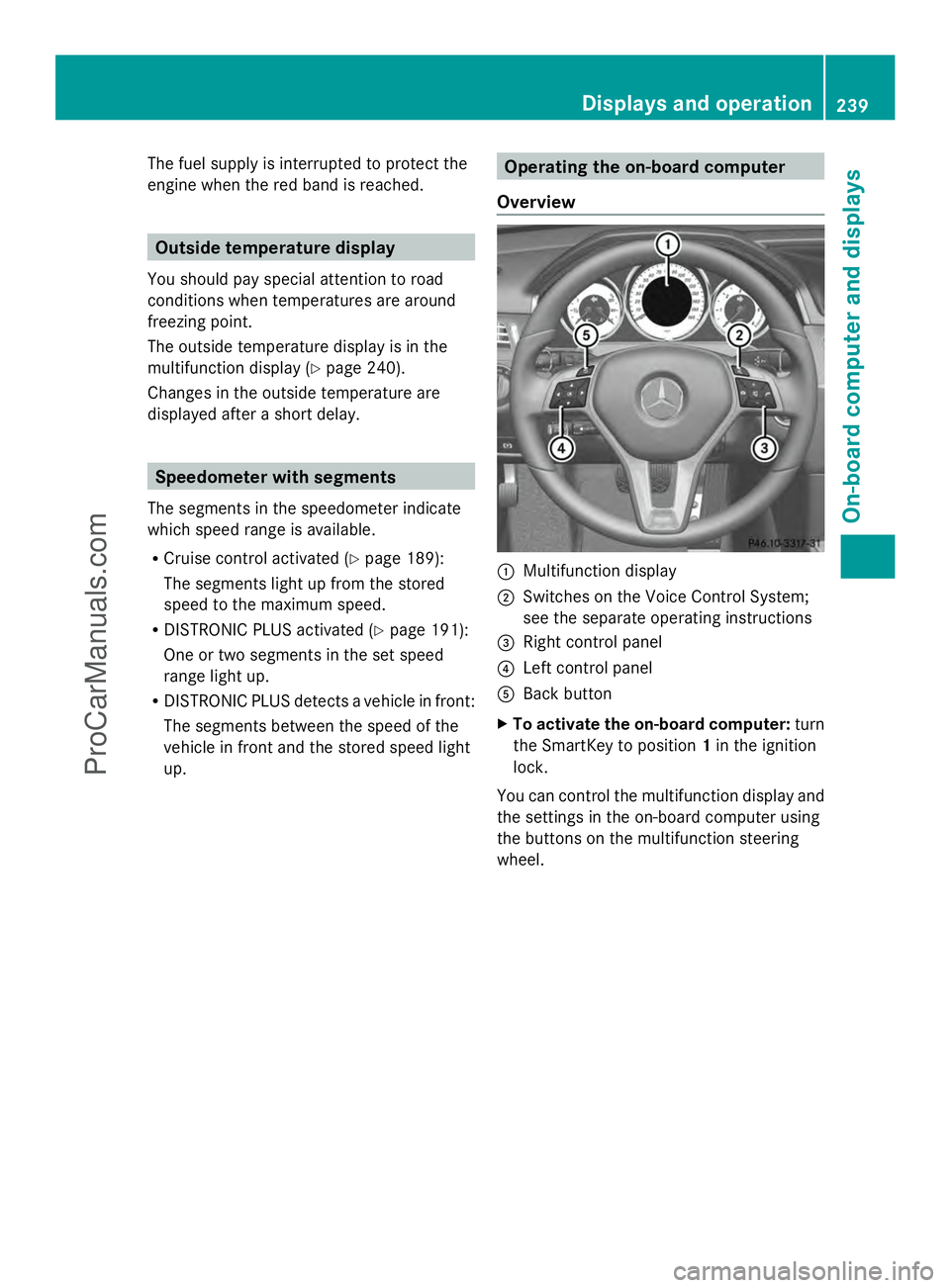
Overview :
Multifunction display
; Switches on the Voice Control System;
see the separate operating instructions
= Right control panel
? Left control panel
A Back button
X To activate the on-board computer: turn
the SmartKey to position 1in the ignition
lock.
You can control the multifunction display and
the settings in the on-board computer using
the buttons on the multifunction steering
wheel. Displays and operation
239On-board computer and displays Z
ProCarManuals.com
Page 249 of 430
The assistance graphic can display the status
of and information from other driving systems
or driving safety systems.
The assistance graphic shows:
R the é symbol when ATTENTION ASSIST
(Y page 225) is deactivated.
R the lane markings as bright lines when Lane
Keeping Assist (Y page 228) or Active Lane
Keeping Assist (Y page 233) is activated.
R the æ symbol when the distance
warning function (Y page 70) is
deactivated.
R the æ symbol when PRE-SAFE ®
Brake
(Y page 76) is deactivated.
Deactivating/activating ESP ®i
Observe the "Important safety notes"
section in the description of ESP
(Y page 72). G
WARNING
If you deactivate ESP ®
, ESP ®
no longer
stabilizes the vehicle. There is an increased
risk of skidding and an accident.
Only deactivate ESP ®
in the situations
described in the following.
It may be best to deactivate ESP ®
in the
following situations:
R when using snow chains
R in deep snow
R on sand or gravel
Activating/deactivating ESP ®
on AMG
vehicles (Y page 74).
For further information about ESP ®
, see
(Y page 72).
X Start the engine.
X Press the =or; button on the
steering wheel to select the DriveAssist
DriveAssist
menu.
X Press the 9or: button to select
ESP
ESP. X
Press the abutton.
The current selection is displayed.
X To activate/deactivate: press thea
button again.
ESP ®
is deactivated if the åwarning lamp
in the instrument cluster lights up
continuously when the engine is running.
If the ÷ warning lamp and the å
warning lamp are lit continuously, ESP ®
is not
available due to a malfunction.
Observe the information on warning lamps
(Y page 289).
Observe the information on display messages
(Y page 258).
Activating/deactivating PRE-SAFE ®
Brake PRE-SAFE
®
Brake is only available in vehicles
with DISTRONIC PLUS.
X Press =or; on the steering wheel
to select the DriveAssist DriveAssist menu.
X Press the 9or: button to select
PRE-SAFE Brake
PRE-SAFE Brake .
X Press the abutton.
The current selection is displayed.
X To activate/deactivate: press thea
button again.
When PRE-SAFE ®
Brake is deactivated, the
assistance graphic shows the æsymbol
in the multifunction display.
For more information on PRE-SAFE ®
Brake,
see (Y page 76).
Activating/deactivating the distance
warning function X
Press the =or; button on the
steering wheel to select the DriveAssist
DriveAssist
menu.
X Press 9or: to select Distance Distance
Warning
Warning . Menus and submenus
247On-board computer and displays Z
ProCarManuals.com
Page 253 of 430
X
Press ato confirm.
X Press the :or9 button to set the
color to SOLAR
SOLAR ,NEUTRAL
NEUTRAL orPOLAR
POLAR .
X Press the aor% button to save the
setting.
Activating/deactivating surround
lighting and exterior lighting delayed
switch-off
X Press the =or; button on the
steering wheel to select the Sett.
Sett. menu.
X Press the :or9 button to select the
Lights
Lights submenu.
X Press ato confirm.
X Press :or9 to select the
Surround Lighting Surround Lighting function.
If the Surround Lighting
Surround Lighting function is
activated, the light cone and the area
around the vehicle are displayed in orange
in the multifunction display.
X Press the abutton to save the setting.
Deactivating delayed switch-off of the
exterior lighting temporarily:
X Before leaving the vehicle, turn the
SmartKey to position 0in the ignition lock.
X Turn the SmartKey to position 2in the
ignition lock.
The exterior lighting delayed switch-off is
deactivated.
Delayed switch-off of the exterior lighting is
reactivated the next time you start the
engine.
If you have activated the Surround
Surround
Lighting Lighting function and the light switch is set
to Ã, the following functions are activated
when it is dark:
R surround lighting: the exterior lighting
remains lit for 40 seconds after unlocking
with the SmartKey. If you start the engine,
the surround lighting is switched off and
automatic headlamp mode is activated
(Y page 129).
R exterior lighting delayed switch-off: the
exterior lighting remains lit for 60 seconds after the engine is switched off.
If you close all the doors and the trunk lid/
tailgate, the exterior lighting goes off after
5 seconds.
i Depending on your vehicle's equipment,
when the surround lighting and delayed
switch-off exterior lighting are on, the
following light up:
R Parking lamps
R Low-beam headlamps
R Daytime running lamps
R Side marker lamps
R Surround lighting in the exterior mirrors
Activating/deactivating the interior
lighting delayed switch-off
If you activate the Light. Delay
Light. Delay function,
the interior lighting remains on for
20 seconds after you remove the key from the
ignition lock.
X Press the =or; button on the
steering wheel to select the Sett.
Sett. menu.
X Press the :or9 button to select the
Lights Lights submenu.
X Press ato confirm.
X Press the :or9 button to select the
Light. Delay
Light. Delay function.
If the Light. Delay
Light. Delay function has been
switched on, the vehicle interior is
displayed in orange in the multifunction
display.
X Press the abutton to save the setting.
Vehicle Activating/deactivating the automatic
door locking mechanism
X
Press the =or; button on the
steering wheel to select the Sett.
Sett. menu.
X Press :or9 to select the Vehicle Vehicle
submenu.
X Press ato confirm. Menus and submenus
251On-board computer and displays Z
ProCarManuals.com
Page 255 of 430
When you activate the
Auto. Mirror
Auto. Mirror
Folding
Folding function, the exterior mirrors are
folded in when the vehicle is locked. If you
unlock the vehicle and then open a door, the
exterior mirrors fold out again.
X Press the =or; button on the
steering wheel to select the Sett. Sett.menu.
X Press the :or9 button to select the
Convenience
Convenience submenu.
X Press ato confirm.
X Press the :or9 button to select the
Auto. Mirror Folding
Auto. Mirror Folding function.
If the Auto. Mirror Folding
Auto. Mirror Folding function is
activated, the vehicle's exterior mirror is
displayed in orange in the multifunction
display.
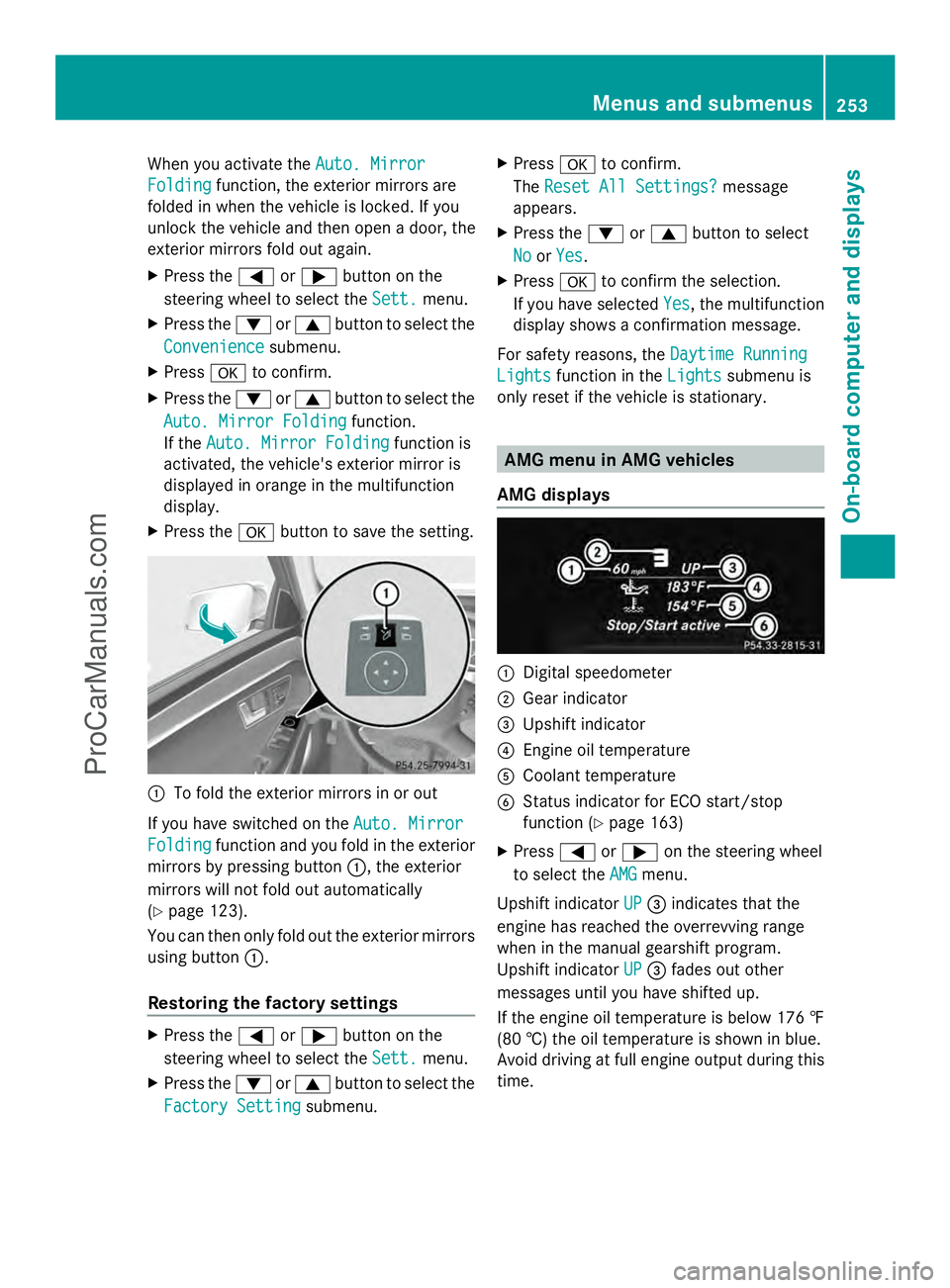
X Press the abutton to save the setting. :
To fold the exterior mirrors in or out
If you have switched on the Auto. Mirror Auto. Mirror
Folding
Folding function and you fold in the exterior
mirrors by pressing button :, the exterior
mirrors will not fold out automatically
(Y page 123).
You can then only fold out the exterior mirrors
using button :.
Restoring the factory settings X
Press the =or; button on the
steering wheel to select the Sett. Sett.menu.
X Press the :or9 button to select the
Factory Setting
Factory Setting submenu. X
Press ato confirm.
The Reset All Settings?
Reset All Settings? message
appears.
X Press the :or9 button to select
No
No orYes
Yes.
X Press ato confirm the selection.
If you have selected Yes
Yes, the multifunction
display shows a confirmation message.
For safety reasons, the Daytime Running
Daytime Running
Lights
Lights function in the Lights
Lightssubmenu is
only reset if the vehicle is stationary. AMG menu in AMG vehicles
AMG displays :
Digital speedometer
; Gear indicator
= Upshift indicator
? Engine oil temperature
A Coolant temperature
B Status indicator for ECO start/stop
function (Y page 163)
X Press =or; on the steering wheel
to select the AMG AMGmenu.
Upshift indicator UP
UP= indicates that the
engine has reached the overrevving range
when in the manual gearshift program.
Upshift indicator UP UP= fades out other
messages until you have shifted up.
If the engine oil temperature is below 176 ‡
(80 †) the oil temperature is shown in blue.
Avoid driving at full engine output during this
time. Menus and submenus
253On-board computer and displays Z
ProCarManuals.com
Page 256 of 430
SETUP
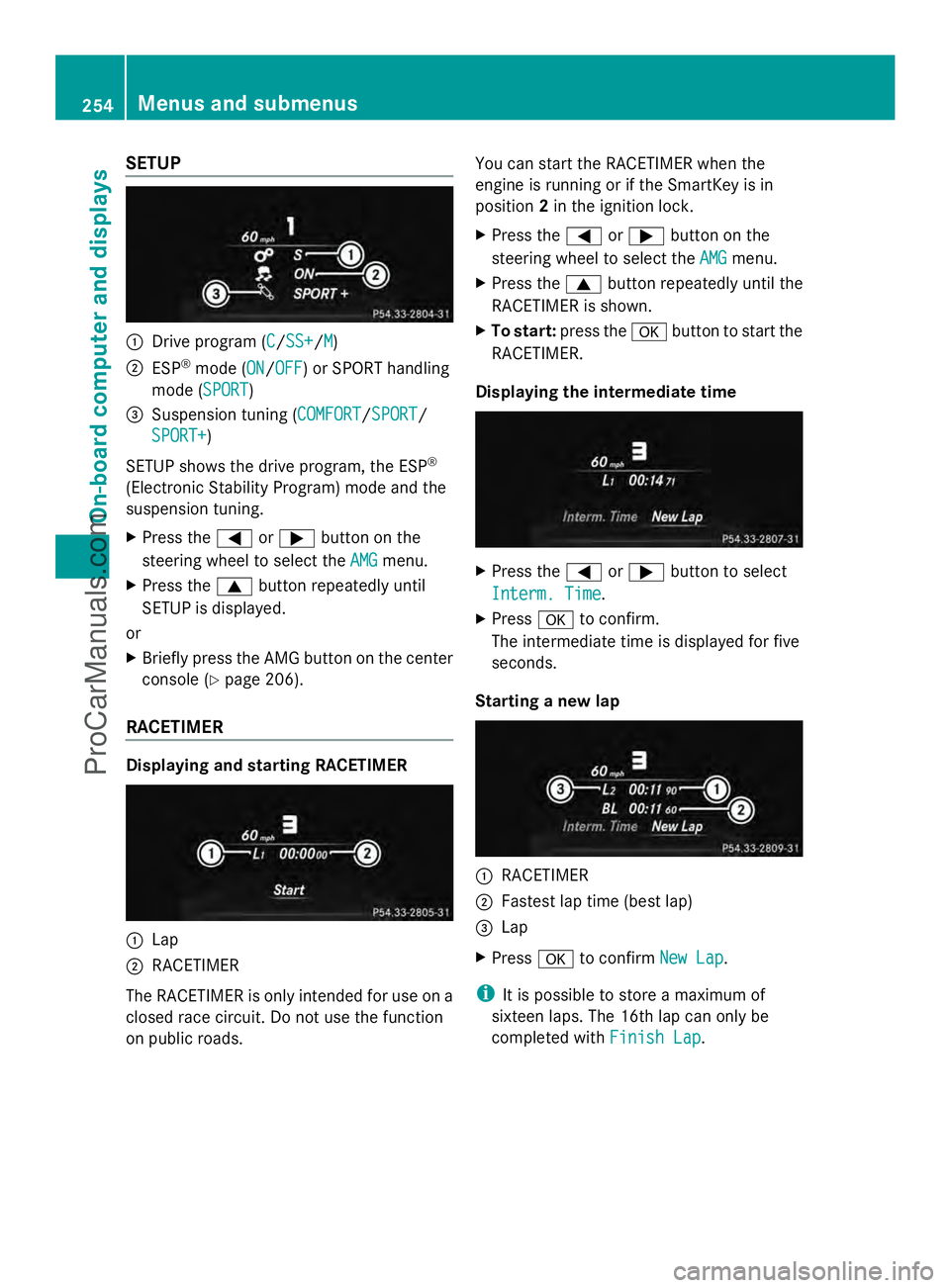
:
Drive program (C C/SS+SS+/M M)
; ESP ®
mode (ON ON/OFFOFF) or SPORT handling
mode (SPORT SPORT)
= Suspension tuning (COMFORT COMFORT/SPORTSPORT/
SPORT+
SPORT+)
SETUP shows the drive program, the ESP ®
(Electronic Stability Program) mode and the
suspension tuning.
X Press the =or; button on the
steering wheel to select the AMG
AMG menu.
X Press the 9button repeatedly until
SETUP is displayed.
or
X Briefly press the AMG button on the center
console (Y page 206).
RACETIMER Displaying and starting RACETIMER
:
Lap
; RACETIMER
The RACETIMER is only intended for use on a
closed race circuit. Do not use the function
on public roads. You can start the RACETIMER when the
engine is running or if the SmartKey is in
position
2in the ignition lock.
X Press the =or; button on the
steering wheel to select the AMG
AMG menu.
X Press the 9button repeatedly until the
RACETIMER is shown.
X To start: press the abutton to start the
RACETIMER.
Displaying the intermediate time X
Press the =or; button to select
Interm. Time Interm. Time.
X Press ato confirm.
The intermediate time is displayed for five
seconds.
Starting a new lap :
RACETIMER
; Fastest lap time (best lap)
= Lap
X Press ato confirm New Lap New Lap.
i It is possible to store a maximum of
sixteen laps. The 16th lap can only be
completed with Finish Lap Finish Lap.254
Menus and submenusOn-board computer and displays
ProCarManuals.com
Page 257 of 430
Stopping the RACETIMER
X
Press the %button on the steering
wheel.
X Confirm Yes
Yes with a.
The RACETIMER interrupts timing when you
stop the vehicle and turn the SmartKey to
position 1in the ignition lock. If you turn the
key to position 2or 3and then press ato
confirm Start
Start, timing is continued.
Resetting the current lap
X Stop the RACETIMER.
X Press the =or; button to select
Reset Lap Reset Lap.
X Press ato reset the lap time to "0".
Deleting all laps If you switch off the engine, the RACETIMER
is reset to "0" after 30 seconds. All laps are
deleted.
You cannot delete individual stored laps. If
you have stopped 16 laps, the current lap
does not have to be reset.
X Reset the current lap.
X Press ato confirm Reset
Reset.
Reset Race Timer? Reset Race Timer? appears in the
multifunction display.
X Press the :button to select Yes Yesand
press the abutton to confirm.
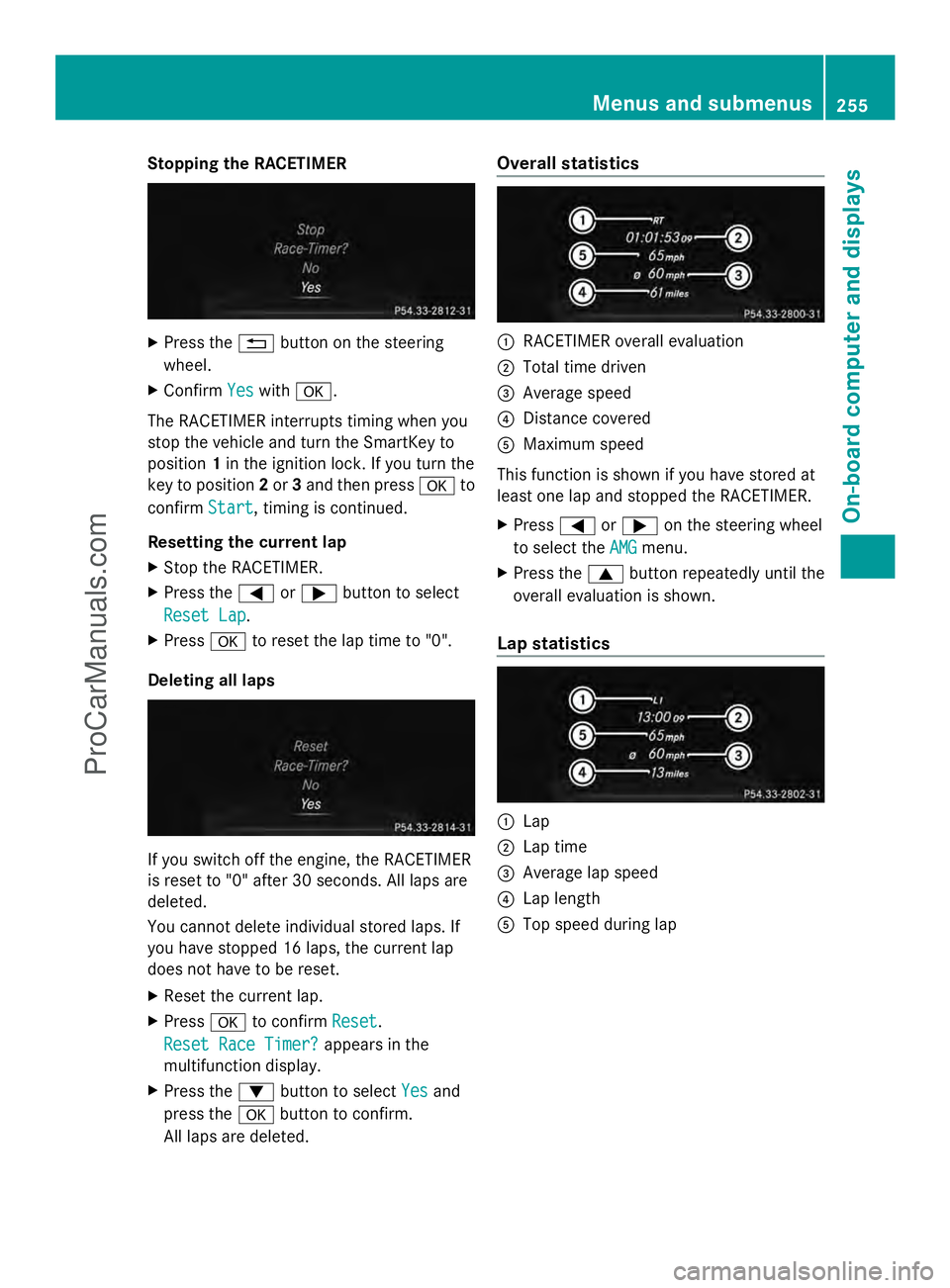
All laps are deleted. Overall statistics
:
RACETIMER overall evaluation
; Total time driven
= Average speed
? Distance covered
A Maximum speed
This function is shown if you have stored at
least one lap and stopped the RACETIMER.
X Press =or; on the steering wheel
to select the AMG AMGmenu.
X Press the 9button repeatedly until the
overall evaluation is shown.
Lap statistics :
Lap
; Lap time
= Average lap speed
? Lap length
A Top speed during lap Menus and submenus
255On-board computer and displays Z
ProCarManuals.com
Page 263 of 430
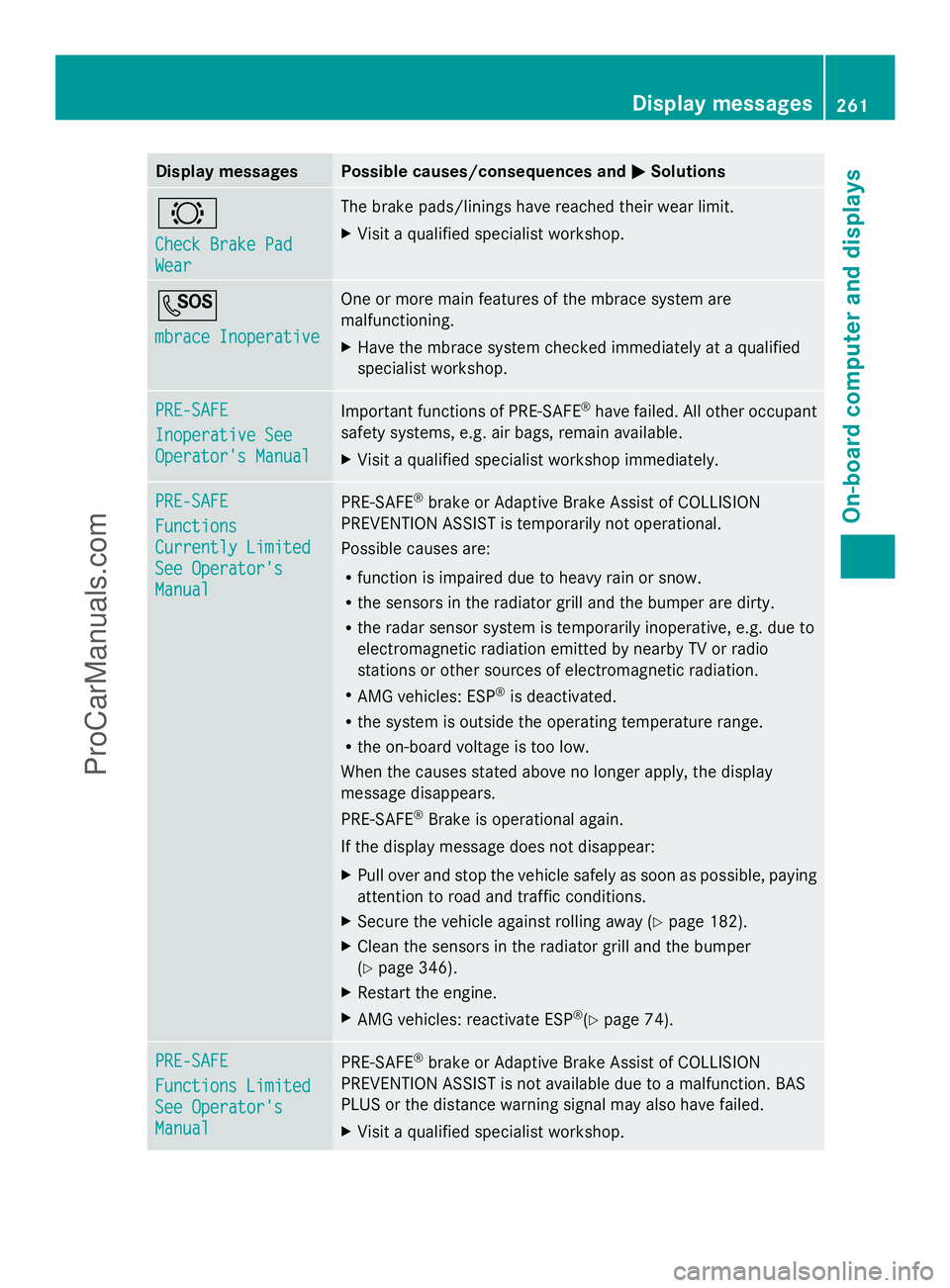
Display messages Possible causes/consequences and
M
MSolutions #
Check Brake Pad Check Brake Pad
Wear Wear The brake pads/linings have reached their wear limit.
X
Visit a qualified specialist workshop. G
mbrace Inoperative mbrace Inoperative One or more main features of the mbrace system are
malfunctioning.
X
Have the mbrace system checked immediately at a qualified
specialist workshop. PRE-SAFE PRE-SAFE
Inoperative See Inoperative See
Operator's Manual Operator's Manual
Important functions of PRE-SAFE
®
have failed. All other occupant
safety systems, e.g. air bags, remain available.
X Visit a qualified specialist workshop immediately. PRE-SAFE PRE-SAFE
Functions Functions
Currently Limited Currently Limited
See Operator's See Operator's
Manual Manual
PRE-SAFE
®
brake or Adaptive Brake Assist of COLLISION
PREVENTION ASSIST is temporarily not operational.
Possible causes are:
R function is impaired due to heavy rain or snow.
R the sensors in the radiator grill and the bumper are dirty.
R the radar sensor system is temporarily inoperative, e.g. due to
electromagnetic radiation emitted by nearby TV or radio
stations or other sources of electromagnetic radiation.
R AMG vehicles: ESP ®
is deactivated.
R the system is outside the operating temperature range.
R the on-board voltage is too low.
When the causes stated above no longer apply, the display
message disappears.
PRE-SAFE ®
Brake is operational again.
If the display message does not disappear:
X Pull over and stop the vehicle safely as soon as possible, paying
attention to road and traffic conditions.
X Secure the vehicle against rolling away ( Ypage 182).
X Clean the sensors in the radiator grill and the bumper
(Y page 346).
X Restart the engine.
X AMG vehicles: reactivate ESP ®
(Y page 74). PRE-SAFE PRE-SAFE
Functions Limited Functions Limited
See Operator's See Operator's
Manual Manual
PRE-SAFE
®
brake or Adaptive Brake Assist of COLLISION
PREVENTION ASSIST is not available due to a malfunction. BAS
PLUS or the distance warning signal may also have failed.
X Visit a qualified specialist workshop. Display
messages
261On-board computer and displays Z
ProCarManuals.com
Page 271 of 430
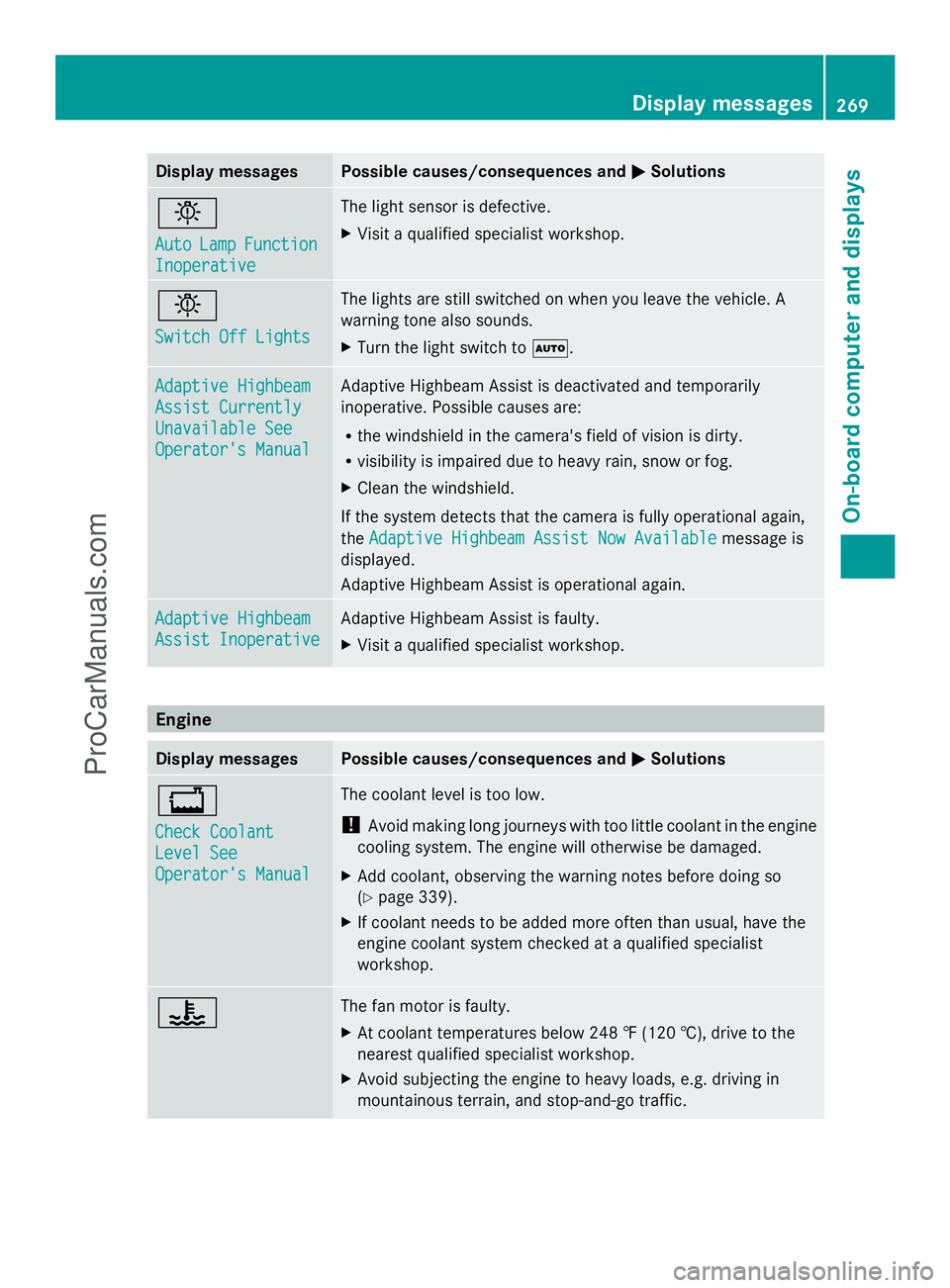
Display messages Possible causes/consequences and
M
MSolutions b
Auto Auto
Lamp
LampFunction
Function
Inoperative
Inoperative The light sensor is defective.
X
Visit a qualified specialist workshop. b
Switch Off Lights Switch Off Lights The lights are still switched on when you leave the vehicle. A
warning tone also sounds.
X
Turn the light switch to Ã.Adaptive Highbeam Adaptive Highbeam
Assist Currently Assist Currently
Unavailable See Unavailable See
Operator's Manual Operator's Manual Adaptive Highbeam Assist is deactivated and temporarily
inoperative. Possible causes are:
R
the windshield in the camera's field of vision is dirty.
R visibility is impaired due to heavy rain, snow or fog.
X Clean the windshield.
If the system detects that the camera is fully operational again,
the Adaptive Highbeam Assist Now Available Adaptive Highbeam Assist Now Available message is
displayed.
Adaptive Highbeam Assist is operational again. Adaptive Highbeam Adaptive Highbeam
Assist Inoperative Assist Inoperative Adaptive Highbeam Assist is faulty.
X
Visit a qualified specialist workshop. Engine
Display messages Possible causes/consequences and
M MSolutions +
Check Coolant Check Coolant
Level See Level See
Operator's Manual Operator's Manual The coolant level is too low.
!
Avoid making long journeys with too little coolant in the engine
cooling system. The engine will otherwise be damaged.
X Add coolant, observing the warning notes before doing so
(Y page 339).
X If coolant needs to be added more often than usual, have the
engine coolant system checked at a qualified specialist
workshop. ? The fan motor is faulty.
X
At coolant temperatures below 248 ‡ (120 †), drive to the
nearest qualified specialist workshop.
X Avoid subjecting the engine to heavy loads, e.g. driving in
mountainous terrain, and stop-and-go traffic. Display
messages
269On-board computer and displays Z
ProCarManuals.com