sensor MERCEDES-BENZ E-SEDAN 2014 User Guide
[x] Cancel search | Manufacturer: MERCEDES-BENZ, Model Year: 2014, Model line: E-SEDAN, Model: MERCEDES-BENZ E-SEDAN 2014Pages: 430, PDF Size: 5.8 MB
Page 70 of 430
ABS works from a speed of about 5 mph
(8 km/h), regardless of road-surface
conditions. ABS works on slippery surfaces,
even if you only brake gently.
Braking X
If ABS intervenes: continue to depress the
brake pedal vigorously until the braking
situation is over.
X To make a full brake application:
depress the brake pedal with full force.
If ABS intervenes when braking, you will feel
a pulsing in the brake pedal.
The pulsating brake pedal can be an
indication of hazardous road conditions, and
functions as a reminder to take extra care
while driving. BAS (Brake Assist System)
General information BAS operates in emergency braking
situations. If you depress the brake pedal
quickly, BAS automatically boosts the braking
force, thus shortening the stopping distance.
Important safety notes i
Observe the "Important safety notes"
section ( Ypage 67). G
WARNING
If BAS is malfunctioning, the braking distance
in an emergency braking situation is
increased. There is a risk of an accident.
In an emergency braking situation, depress
the brake pedal with full force. ABS prevents
the wheels from locking.
Braking X
Keep the brake pedal firmly depressed until
the emergency braking situation is over.
ABS prevents the wheels from locking. The brakes will function as usual once you
release the brake pedal. BAS is deactivated. BAS PLUS (Brake Assist System
PLUS) with Cross-Traffic Assist
General information i
Observe the "Important safety notes"
section ( Ypage 67).
BAS PLUS is only available on vehicles with
the Driving Assistance package.
For BAS PLUS to assist you when driving, the
radar sensor system and the camera system
must be operational.
With the help of a sensor system and a
camera system, BAS PLUS can detect
obstacles:
R that are in the path of your vehicle for an
extended period of time
R that cross the path of your vehicle
In addition, pedestrians in the path of your
vehicle can be detected.
BAS PLUS detects pedestrians by using
typical characteristics such as the body
contours and posture of a person standing
upright.
If the radar sensor system or the camera
system is malfunctioning, BAS PLUS
functions are restricted or no longer
available. The brake system is still available
with complete brake boosting effect and BAS.
i Observe the restrictions described in the
"Important safety notes"
section“ (Y page 69).
BAS PLUS can help you to minimize the risk
of a collision with a vehicle or a pedestrian
and reduce the effects of such a collision. If
BAS PLUS detects a danger of collision, you
are assisted when braking. 68
Driving safety systemsSafety
ProCarManuals.com
Page 71 of 430
Important safety notes
G
WARNING
BAS PLUS cannot always clearly identify
objects and complex traffic situations.
In such cases, BAS PLUS may:
R intervene unnecessarily
R not intervene
There is a risk of an accident.
Always pay careful attention to the traffic
situation and be ready to brake. Terminate the
intervention in a non-critical driving situation. G
WARNING
BAS PLUS does not react:
R to small people, e.g. children
R to animals
R to oncoming vehicles
R when cornering
As a result, BAS PLUS may not intervene in all
critical situations. There is a risk of an
accident.
Always pay careful attention to the traffic
situation and be ready to brake.
In the event of snowfall or heavy rain, the
recognition can be impaired.
Recognition by the radar sensor system is
also impaired in the event of:
R dirt on the sensors or anything else
covering the sensors
R interference by other radar sources
R there are strong radar reflections, for
example in parking garages
R a narrow vehicle traveling in front, e.g. a
motorbike
R a vehicle traveling in front on a different line
R vehicles quickly moving into the radar
sensor system detection range Recognition by the camera system is also
impaired in the event of:
R
dirt on the camera or if the camera is
covered
R there is glare on the camera system, e.g.
from the sun being low in the sky
R darkness
R if:
-pedestrians move quickly, e.g. into the
path of the vehicle
- the camera system no longer recognizes
a pedestrian as a person due to special
clothing or other objects
- a pedestrian is concealed by other
objects
- the typical outline of a person is not
distinguishable from the background
Following damage to the front end of the
vehicle, have the configuration and operation
of the radar sensors checked at a qualified
specialist workshop. This also applies to
collisions at low speeds where there is no
visible damage to the front of the vehicle.
Following damage to the windshield, have the
configuration and operation of the camera
system checked at a qualified specialist
workshop.
Function To avoid a collision, BAS PLUS calculates the
brake force necessary if:
R
you approach an obstacle, and
R BAS PLUS has detected a risk of collision
When driving at a speed under 20 mph
(30 km/h) : if you depress the brake pedal,
BAS PLUS is activated. The increase in brake
pressure will be carried out at the last
possible moment.
When driving at a speed above 20 mph
(30 km/h) : if you depress the brake pedal
sharply, BAS PLUS automatically raises the
brake pressure to a value adapted to the
traffic situation. Driving safety systems
69Safety Z
ProCarManuals.com
Page 73 of 430
front. An intermittent warning tone will then
sound, and the ·distance warning lamp
will light up in the instrument cluster.
X Brake immediately in order to increase the
distance from the vehicle in front.
or
X Take evasive action, provided it is safe to
do so.
Due to the nature of the system, particularly
complicated but non-critical driving
conditions may also cause the system to
display a warning.
With the help of the radar sensor system, the
distance warning function can detect
obstacles that are in the path of your vehicle
for an extended period of time.
From a speed of around 40 mph (70 km/h),
the distance warning function can also react
to stationary obstacles, such as stopped or
parked vehicles.
If you approach an obstacle and the distance
warning function detects a risk of a collision,
the system will initially alert you both visually
and acoustically.
In particular, the detection of obstacles can
be impaired if:
R dirt on the sensors or anything else
covering the sensors
R snow or heavy rain
R interference by other radar sources
R there are strong radar reflections, for
example in parking garages
R a narrow vehicle traveling in front, e.g. a
motorbike
R a vehicle traveling in front on a different line
relative to the center of your vehicle
Following damage to the front end of the
vehicle, have the configuration and operation
of the radar sensor checked at a qualified
specialist workshop. This also applies to
collisions at low speeds where there is no
visible damage to the front of the vehicle. Adaptive Brake Assist i
Observe the "Important safety notes"
section (Y page 67). G
WARNING
Adaptive Brake Assist cannot always clearly
identify objects and complex traffic
situations.
In such cases, Adaptive Brake Assist may:
R intervene unnecessarily
R not intervene
There is a risk of an accident.
Always pay careful attention to the traffic
situation and be ready to brake. Terminate the
intervention in a non-critical driving situation. G
WARNING
Adaptive Brake Assist does not react:
R to people or animals
R to oncoming vehicles
R to crossing traffic
R to stationary obstacles
R when cornering
As a result, Adaptive Brake Assist may not
intervene in all critical conditions. There is a
risk of an accident.
Always pay careful attention to the traffic
situation and be ready to brake.
Adaptive Brake Assist aids you in braking
during hazardous situations at speeds above
4 mph (7 km/h) and uses the radar sensor
system to evaluate the traffic situation.
With the help of Adaptive Brake Assist, the
distance warning signal can detect obstacles
that are in the path of your vehicle for an
extended period of time.
Should you approach an obstacle and
Adaptive Brake Assist has detected a risk of
collision, Adaptive Brake Assist calculates the
braking force necessary to avoid a rear-end
collision. Should you apply the brakes
vigorously, Adaptive Brake Assist will Driving safety systems
71Safety Z
ProCarManuals.com
Page 74 of 430
automatically increase the braking force to a
level suitable for the traffic conditions.
X Keep the brake pedal depressed until the
emergency braking situation is over.
ABS prevents the wheels from locking.
The brakes will work normally again if:
R you release the brake pedal
R there is no longer any danger of a rear-end
collision
R no obstacle is detected in front of your
vehicle
Adaptive Brake Assist is then deactivated.
Up to vehicle speeds of around 155 mph
(250 km/h), adaptive Brake Assist is capable
of reacting to moving objects that have
already been recognized as such at least once
over the period of observation. Adaptive
Brake Assist does not react to stationary
obstacles.
If Adaptive Brake Assist is not available due
to a malfunction in the radar sensor system,
the brake system remains available with full
brake boosting effect and BAS.
In particular, the detection of obstacles can
be impaired if there is:
R dirt on the sensors or anything else
covering the sensors
R snow or heavy rain
R interference by other radar sources
R there are strong radar reflections, for
example in parking garages
R a narrow vehicle traveling in front, e.g. a
motorbike
R a vehicle traveling in front on a different line
relative to the center of your vehicle
Following damage to the front end of the
vehicle, have the configuration and operation
of the radar sensor checked at a qualified
specialist workshop. This also applies to
collisions at low speeds where there is no
visible damage to the front of the vehicle. ESP
®
(Electronic Stability Program)
General notes i
Observe the "Important safety notes"
section (Y page 67).
ESP ®
monitors driving stability and traction,
i.e. power transmission between the tires and
the road surface.
If ESP ®
detects that the vehicle is deviating
from the direction desired by the driver, one
or more wheels are braked to stabilize the
vehicle. The engine output is also modified to
keep the vehicle on the desired course within
physical limits. ESP ®
assists the driver when
pulling away on wet or slippery roads. ESP ®
can also stabilize the vehicle during braking.
ETS/4ETS (Electronic Traction System) ETS/4ETS traction control is part of ESP
®
.
Traction control brakes the drive wheels
individually if they spin. This enables you to
pull away and accelerate on slippery surfaces,
for example if the road surface is slippery on
one side. In addition, more drive torque is
transferred to the wheel or wheels with
traction.
Traction control remains active, even if you
deactivate ESP ®
.
Important safety notes i
Observe the "Important safety notes"
section (Y page 67). G
WARNING
If ESP ®
is malfunctioning, ESP ®
is unable to
stabilize the vehicle. Additionally, further
driving safety systems are deactivated. This
increases the risk of skidding and an accident.
Drive on carefully. Have ESP ®
checked at a
qualified specialist workshop.
! Vehicles with 4MATIC: switch off the
ignition when the parking brake is being
tested on a brake dynamometer. 72
Driving safety systemsSafety
ProCarManuals.com
Page 78 of 430
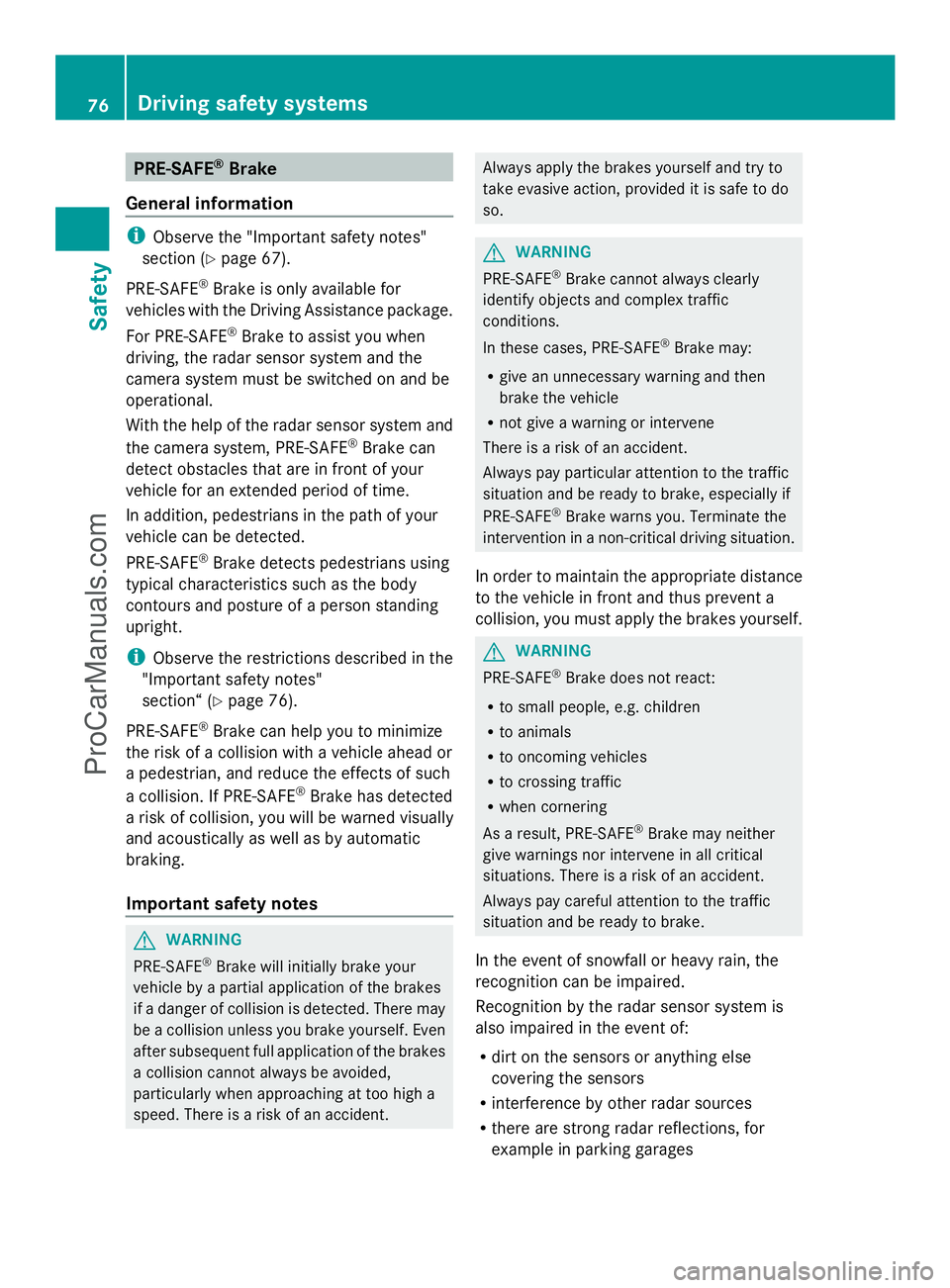
PRE-SAFE
®
Brake
General information i
Observe the "Important safety notes"
section (Y page 67).
PRE-SAFE ®
Brake is only available for
vehicles with the Driving Assistance package.
For PRE-SAFE ®
Brake to assist you when
driving, the radar sensor system and the
camera system must be switched on and be
operational.
With the help of the radar sensor system and
the camera system, PRE-SAFE ®
Brake can
detect obstacles that are in front of your
vehicle for an extended period of time.
In addition, pedestrians in the path of your
vehicle can be detected.
PRE-SAFE ®
Brake detects pedestrians using
typical characteristics such as the body
contours and posture of a person standing
upright.
i Observe the restrictions described in the
"Important safety notes"
section“ (Y page 76).
PRE-SAFE ®
Brake can help you to minimize
the risk of a collision with a vehicle ahead or
a pedestrian, and reduce the effects of such
a collision. If PRE-SAFE ®
Brake has detected
a risk of collision, you will be warned visually
and acoustically as well as by automatic
braking.
Important safety notes G
WARNING
PRE-SAFE ®
Brake will initially brake your
vehicle by a partial application of the brakes
if a danger of collision is detected. There may
be a collision unless you brake yourself. Even
after subsequent full application of the brakes
a collision cannot always be avoided,
particularly when approaching at too high a
speed. There is a risk of an accident. Always apply the brakes yourself and try to
take evasive action, provided it is safe to do
so.
G
WARNING
PRE-SAFE ®
Brake cannot always clearly
identify objects and complex traffic
conditions.
In these cases, PRE-SAFE ®
Brake may:
R give an unnecessary warning and then
brake the vehicle
R not give a warning or intervene
There is a risk of an accident.
Always pay particular attention to the traffic
situation and be ready to brake, especially if
PRE-SAFE ®
Brake warns you. Terminate the
intervention in a non-critical driving situation.
In order to maintain the appropriate distance
to the vehicle in front and thus prevent a
collision, you must apply the brakes yourself. G
WARNING
PRE-SAFE ®
Brake does not react:
R to small people, e.g. children
R to animals
R to oncoming vehicles
R to crossing traffic
R when cornering
As a result, PRE-SAFE ®
Brake may neither
give warnings nor intervene in all critical
situations. There is a risk of an accident.
Always pay careful attention to the traffic
situation and be ready to brake.
In the event of snowfall or heavy rain, the
recognition can be impaired.
Recognition by the radar sensor system is
also impaired in the event of:
R dirt on the sensors or anything else
covering the sensors
R interference by other radar sources
R there are strong radar reflections, for
example in parking garages 76
Driving safety systemsSafety
ProCarManuals.com
Page 79 of 430
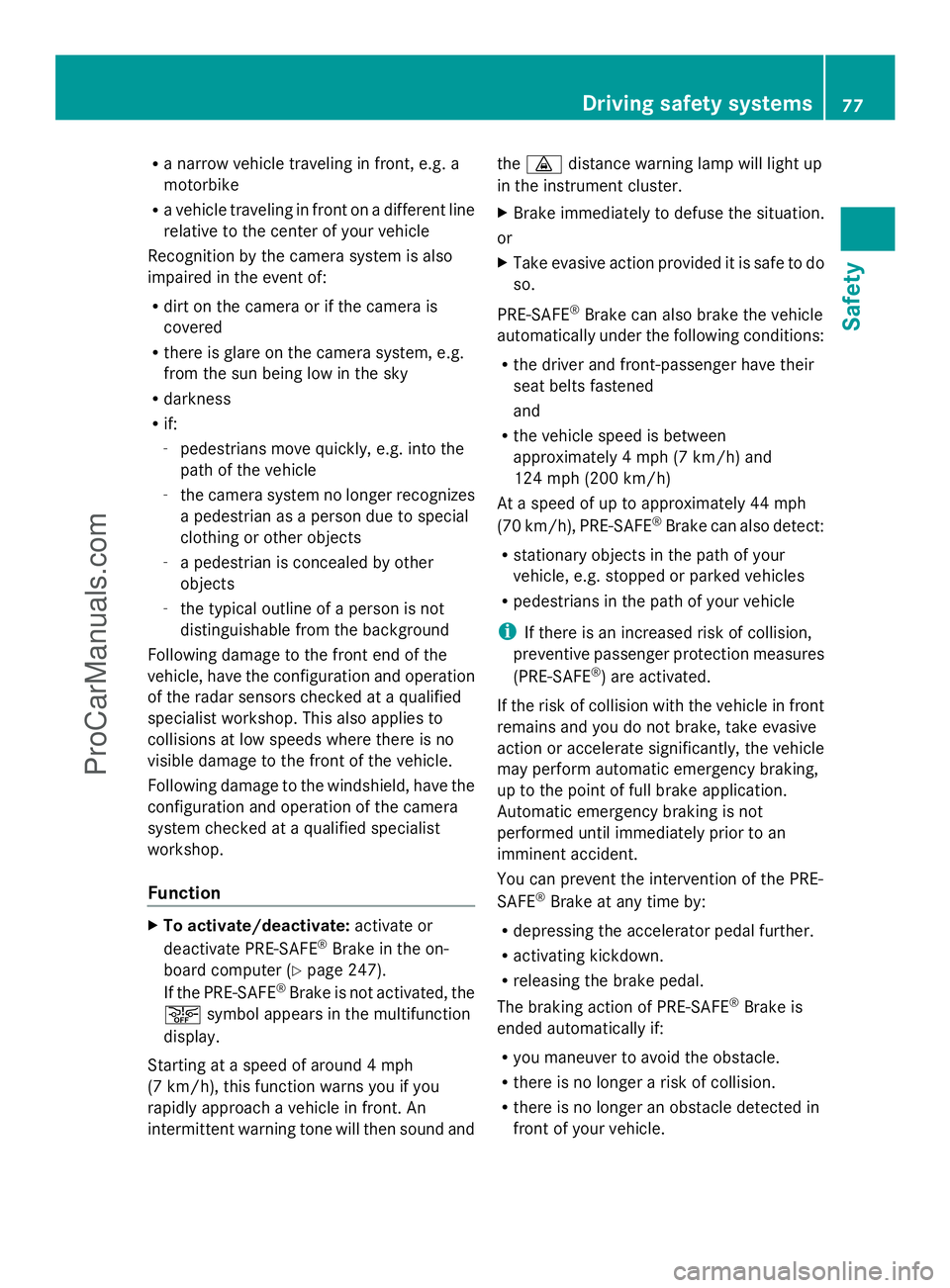
R
a narrow vehicle traveling in front, e.g. a
motorbike
R a vehicle traveling in front on a different line
relative to the center of your vehicle
Recognition by the camera system is also
impaired in the event of:
R dirt on the camera or if the camera is
covered
R there is glare on the camera system, e.g.
from the sun being low in the sky
R darkness
R if:
-pedestrians move quickly, e.g. into the
path of the vehicle
- the camera system no longer recognizes
a pedestrian as a person due to special
clothing or other objects
- a pedestrian is concealed by other
objects
- the typical outline of a person is not
distinguishable from the background
Following damage to the front end of the
vehicle, have the configuration and operation
of the radar sensors checked at a qualified
specialist workshop. This also applies to
collisions at low speeds where there is no
visible damage to the front of the vehicle.
Following damage to the windshield, have the
configuration and operation of the camera
system checked at a qualified specialist
workshop.
Function X
To activate/deactivate: activate or
deactivate PRE-SAFE ®
Brake in the on-
board computer (Y page 247).
If the PRE-SAFE ®
Brake is not activated, the
æ symbol appears in the multifunction
display.
Starting at a speed of around 4 mph
(7 km/h), this function warns you if you
rapidly approach a vehicle in front. An
intermittent warning tone will then sound and the
· distance warning lamp will light up
in the instrument cluster.
X Brake immediately to defuse the situation.
or
X Take evasive action provided it is safe to do
so.
PRE-SAFE ®
Brake can also brake the vehicle
automatically under the following conditions:
R the driver and front-passenger have their
seat belts fastened
and
R the vehicle speed is between
approximately 4 mph (7 km/h) and
124 mph (200 km/h)
At a speed of up to approximately 44 mph
(70 km/h), PRE-SAFE ®
Brake can also detect:
R stationary objects in the path of your
vehicle, e.g. stopped or parked vehicles
R pedestrians in the path of your vehicle
i If there is an increased risk of collision,
preventive passenger protection measures
(PRE-SAFE ®
) are activated.
If the risk of collision with the vehicle in front
remains and you do not brake, take evasive
action or accelerate significantly, the vehicle
may perform automatic emergency braking,
up to the point of full brake application.
Automatic emergency braking is not
performed until immediately prior to an
imminent accident.
You can prevent the intervention of the PRE-
SAFE ®
Brake at any time by:
R depressing the accelerator pedal further.
R activating kickdown.
R releasing the brake pedal.
The braking action of PRE-SAFE ®
Brake is
ended automatically if:
R you maneuver to avoid the obstacle.
R there is no longer a risk of collision.
R there is no longer an obstacle detected in
front of your vehicle. Driving safety systems
77Safety Z
ProCarManuals.com
Page 85 of 430
If you do not open the vehicle within
approximately 40 seconds of unlocking:
R
the vehicle is locked again.
R the theft deterrent locking system is
armed again.
X To lock centrally: press the&button.
The SmartKey centrally locks/unlocks:
R the doors
R the trunk lid/tailgate
R the fuel filler flap
The turn signals flash once when unlocking
and three times when locking.
You can also set an audible signal to confirm
that the vehicle has been locked. The audible
signal can be activated and deactivated using
the on-board computer (Y page 252).
When it is dark, the surround lighting also
comes on if it is activated in the on-board
computer (Y page 251). KEYLESS-GO
General notes Bear in mind that the engine can be started
by any of the vehicle occupants if there is a
KEYLESS-GO key in the vehicle.
Locking/unlocking centrally
You can start, lock or unlock the vehicle using
KEYLESS-GO. To do this, you only need carry
the SmartKey with you. You can combine the
functions of KEYLESS-GO with those of a
conventional SmartKey. Unlock the vehicle
by using KEYLESS-GO, for instance, and lock
it using the
&button on the SmartKey.
When locking or unlocking with KEYLESS-GO,
the distance between the SmartKey and the
corresponding door handle must not be
greater than 3 ft (1 m). A check which periodically establishes a radio
connection between the vehicle and the
SmartKey determines whether a valid
SmartKey is in the vehicle. This occurs, for
example:
R
when the external door handles are
touched
R when starting the engine
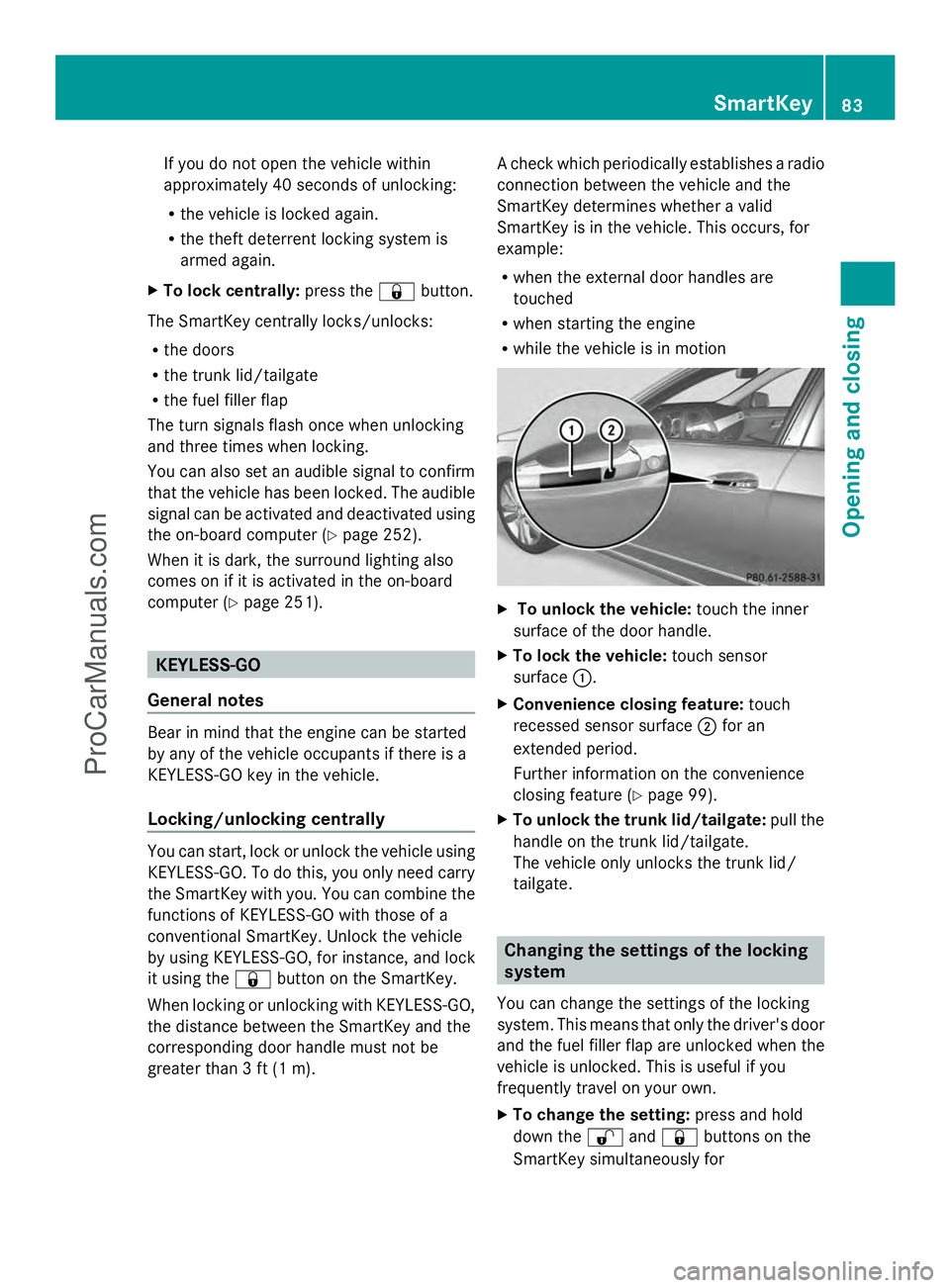
R while the vehicle is in motion X
To unlock the vehicle: touch the inner
surface of the door handle.
X To lock the vehicle: touch sensor
surface :.
X Convenience closing feature: touch
recessed sensor surface ;for an
extended period.
Further information on the convenience
closing feature (Y page 99).
X To unlock the trunk lid/tailgate: pull the
handle on the trunk lid/tailgate.
The vehicle only unlocks the trunk lid/
tailgate. Changing the settings of the locking
system
You can change the settings of the locking
system. This means that only the driver's door
and the fuel filler flap are unlocked when the
vehicle is unlocked. This is useful if you
frequently travel on your own.
X To change the setting: press and hold
down the %and& buttons on the
SmartKey simultaneously for SmartKey
83Opening and closing Z
ProCarManuals.com
Page 86 of 430
approximately six seconds until the battery
check lamp flashes twice (Y page 85).
i If the setting of the locking system is
changed within the signal range of the
vehicle, pressing the &or% button:
R locks or
R unlocks the vehicle
The SmartKey now functions as follows:
X To unlock the driver's door: press the
% button once.
X To unlock centrally: press the%
button twice.
X To lock centrally: press the&button.
The KEYLESS-GO function is changed as
follows:
X To unlock the driver's door: touch the
inner surface of the door handle on the
driver's door.
X To unlock centrally: touch the inner
surface of the door handle on the front-
passenger door or the rear door.
X To lock centrally: touch the outer sensor
surface on one of the door handles.
X To restore the factory settings: press
and hold down the %and& buttons
simultaneously for approximately six
seconds until the battery check lamp
flashes twice ( Ypage 85). Mechanical key
General notes If the vehicle can no longer be locked or
unlocked with the SmartKey, use the
mechanical key.
If you use the mechanical key to unlock and
open the driver's door or the trunk lid/
tailgate, the anti-theft alarm system will be
triggered (Y page 78). There are several ways to turn off the alarm:
X
To turn the alarm off with the
SmartKey: press the%or& button
on the SmartKey.
or
X Insert the SmartKey into the ignition lock.
or
X To disarm the alarm with KEYLESS-GO:
press the Start/Stop button in the ignition
lock. The SmartKey must be in the vehicle.
or
X Lock or unlock the vehicle using KEYLESS-
GO. The SmartKey must be outside the
vehicle.
If you unlock the vehicle using the mechanical
key, the fuel filler flap will not be unlocked
automatically.
X To unlock the fuel filler flap: insert the
SmartKey into the ignition lock.
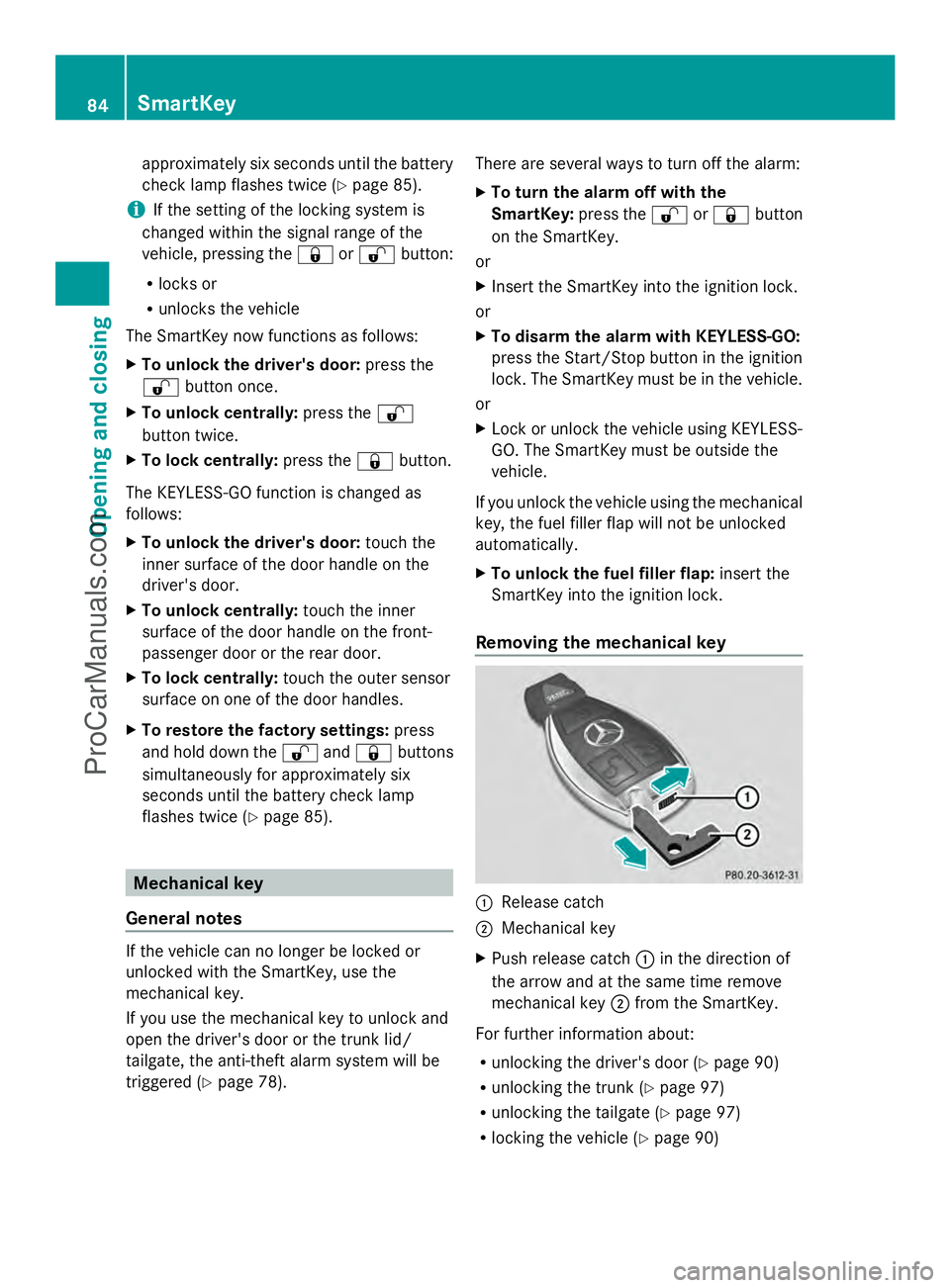
Removing the mechanical key :
Release catch
; Mechanical key
X Push release catch :in the direction of
the arrow and at the same time remove
mechanical key ;from the SmartKey.
For further information about:
R unlocking the driver's door (Y page 90)
R unlocking the trunk (Y page 97)
R unlocking the tailgate (Y page 97)
R locking the vehicle (Y page 90)84
SmartKeyOpening and closing
ProCarManuals.com
Page 95 of 430
Closing
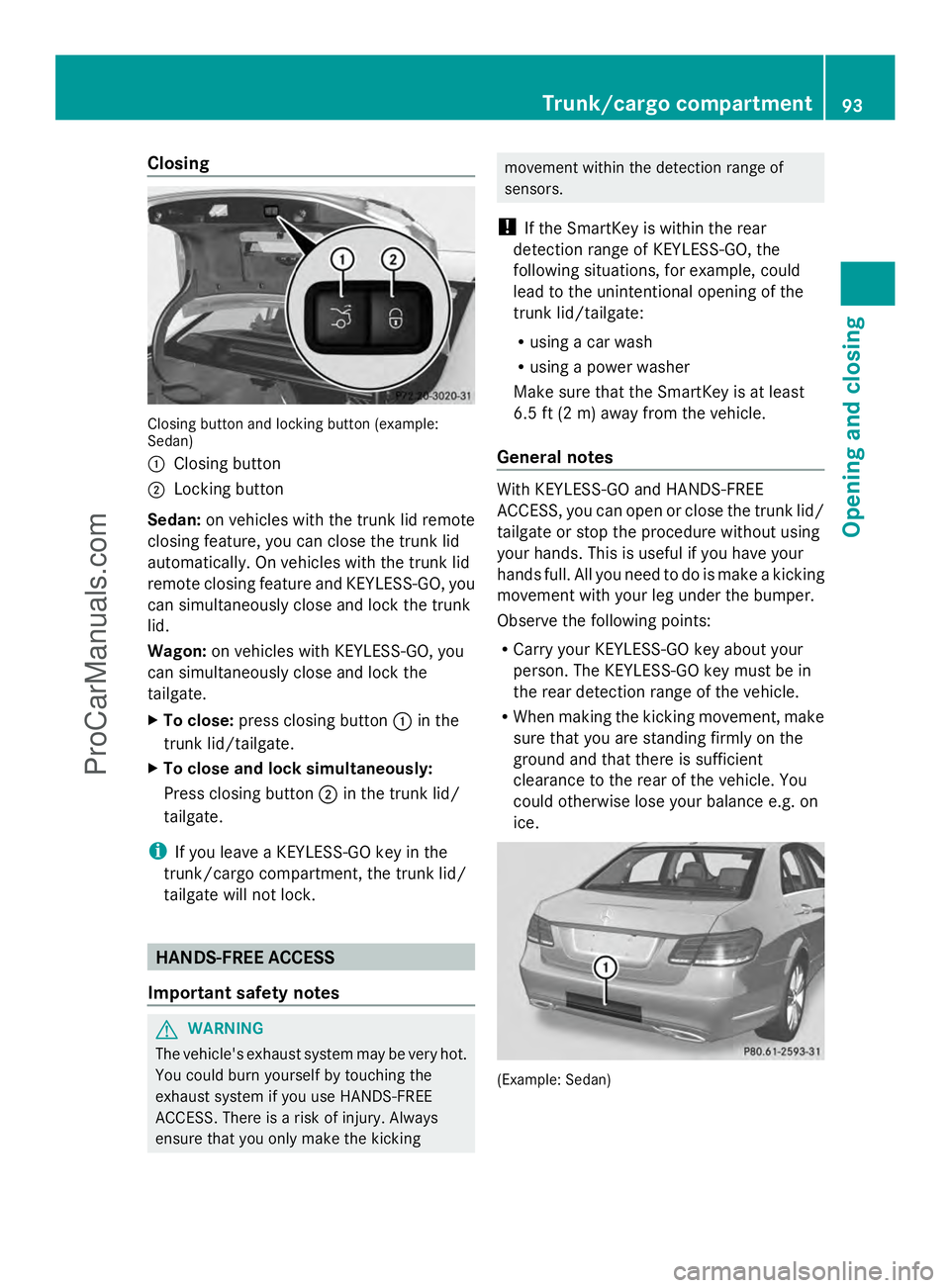
Closing button and locking button (example:
Sedan)
: Closing button
; Locking button
Sedan: on vehicles with the trunk lid remote
closing feature, you can close the trunk lid
automatically. On vehicles with the trunk lid
remote closing feature and KEYLESS-GO, you
can simultaneously close and lock the trunk
lid.
Wagon: on vehicles with KEYLESS-GO, you
can simultaneously close and lock the
tailgate.
X To close: press closing button :in the
trunk lid/tailgate.
X To close and lock simultaneously:
Press closing button ;in the trunk lid/
tailgate.
i If you leave a KEYLESS-GO key in the
trunk/cargo compartment, the trunk lid/
tailgate will not lock. HANDS-FREE ACCESS
Important safety notes G
WARNING
The vehicle's exhaust system may be very hot.
You could burn yourself by touching the
exhaust system if you use HANDS-FREE
ACCESS. There is a risk of injury. Always
ensure that you only make the kicking movement within the detection range of
sensors.
! If the SmartKey is within the rear
detection range of KEYLESS-GO, the
following situations, for example, could
lead to the unintentional opening of the
trunk lid/tailgate:
R using a car wash
R using a power washer
Make sure that the SmartKey is at least
6.5 ft (2 m) away from the vehicle.
General notes With KEYLESS-GO and HANDS-FREE
ACCESS, you can open or close the trunk lid/
tailgate or stop the procedure without using
your hands. This is useful if you have your
hands full. All you need to do is make a kicking
movement with your leg under the bumper.
Observe the following points:
R
Carry your KEYLESS-GO key about your
person. The KEYLESS-GO key must be in
the rear detection range of the vehicle.
R When making the kicking movement, make
sure that you are standing firmly on the
ground and that there is sufficient
clearance to the rear of the vehicle. You
could otherwise lose your balance e.g. on
ice. (Example: Sedan) Trunk/cargo compartment
93Opening and closing Z
ProCarManuals.com
Page 96 of 430
R
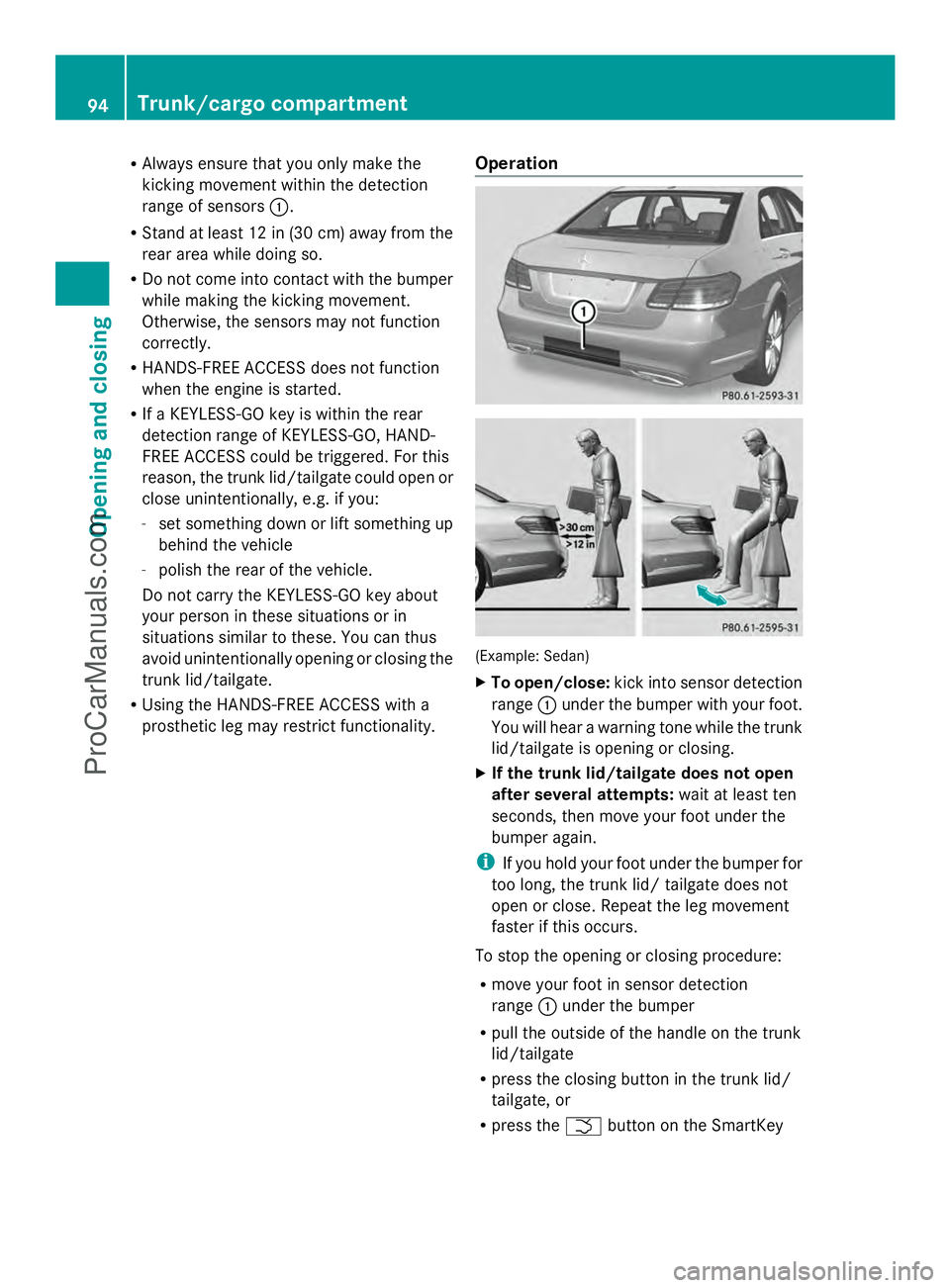
Always ensure that you only make the
kicking movement within the detection
range of sensors :.
R Stand at least 12 in (30 cm) away from the
rear area while doing so.
R Do not come into contact with the bumper
while making the kicking movement.
Otherwise, the sensors may not function
correctly.
R HANDS-FREE ACCESS does not function
when the engine is started.
R If a KEYLESS-GO key is within the rear
detection range of KEYLESS-GO, HAND-
FREE ACCESS could be triggered. For this
reason, the trunk lid/tailgate could open or
close unintentionally, e.g. if you:
- set something down or lift something up
behind the vehicle
- polish the rear of the vehicle.
Do not carry the KEYLESS-GO key about
your person in these situations or in
situations similar to these. You can thus
avoid unintentionally opening or closing the
trunk lid/tailgate.
R Using the HANDS-FREE ACCESS with a
prosthetic leg may restrict functionality. Operation (Example: Sedan)
X
To open/close: kick into sensor detection
range :under the bumper with your foot.
You will hear a warning tone while the trunk
lid/tailgate is opening or closing.
X If the trunk lid/tailgate does not open
after several attempts: wait at least ten
seconds, then move your foot under the
bumper again.
i If you hold your foot under the bumper for
too long, the trunk lid/ tailgate does not
open or close. Repeat the leg movement
faster if this occurs.
To stop the opening or closing procedure:
R move your foot in sensor detection
range :under the bumper
R pull the outside of the handle on the trunk
lid/tailgate
R press the closing button in the trunk lid/
tailgate, or
R press the Fbutton on the SmartKey 94
Trunk/cargo compartmentOpening and closing
ProCarManuals.com