start stop button MERCEDES-BENZ E-SEDAN 2014 Owner's Manual
[x] Cancel search | Manufacturer: MERCEDES-BENZ, Model Year: 2014, Model line: E-SEDAN, Model: MERCEDES-BENZ E-SEDAN 2014Pages: 430, PDF Size: 5.8 MB
Page 167 of 430
X
To switch off (AMG vehicles): press
button :in drive program C.
or
X Switch to drive program S,S+ orM
(Y page 171).
Indicator lamp ;and the ¤symbol in
the multifunction display go out.
The Stop/Start active
Stop/Start active orStop/Start Stop/Start
inactive
inactive message in the AMG menu in the
multifunction display goes out.
X To switch on (AMG vehicles): press
button :.
Indicator lamp ;lights up. If drive
program S,S+ orMis active, the automatic
transmission switches to drive program C.
If all conditions for automatic engine
switch-off ( Ypage 163) are fulfilled, the
¤ symbol is shown in green in the
multifunction display. In addition, the
Stop/Start active
Stop/Start active message is shown in
the AMG menu in the multifunction display.
If conditions for automatic engine switch-
off (Y page 163) have not been fulfilled, the
¤ symbol will be shown in yellow. If this
is the case, the ECO start/stop function is
not available. In addition, the Stop/Start
Stop/Start
inactive inactive display message is shown in the
AMG menu in the multifunction display.
i If indicator lamp ;is off, the ECO start/
stop function has been deactivated
manually or as the result of a malfunction.
The engine will then not be switched off
automatically when the vehicle stops. Driving
165Driving an d parking Z
ProCarManuals.com
Page 168 of 430
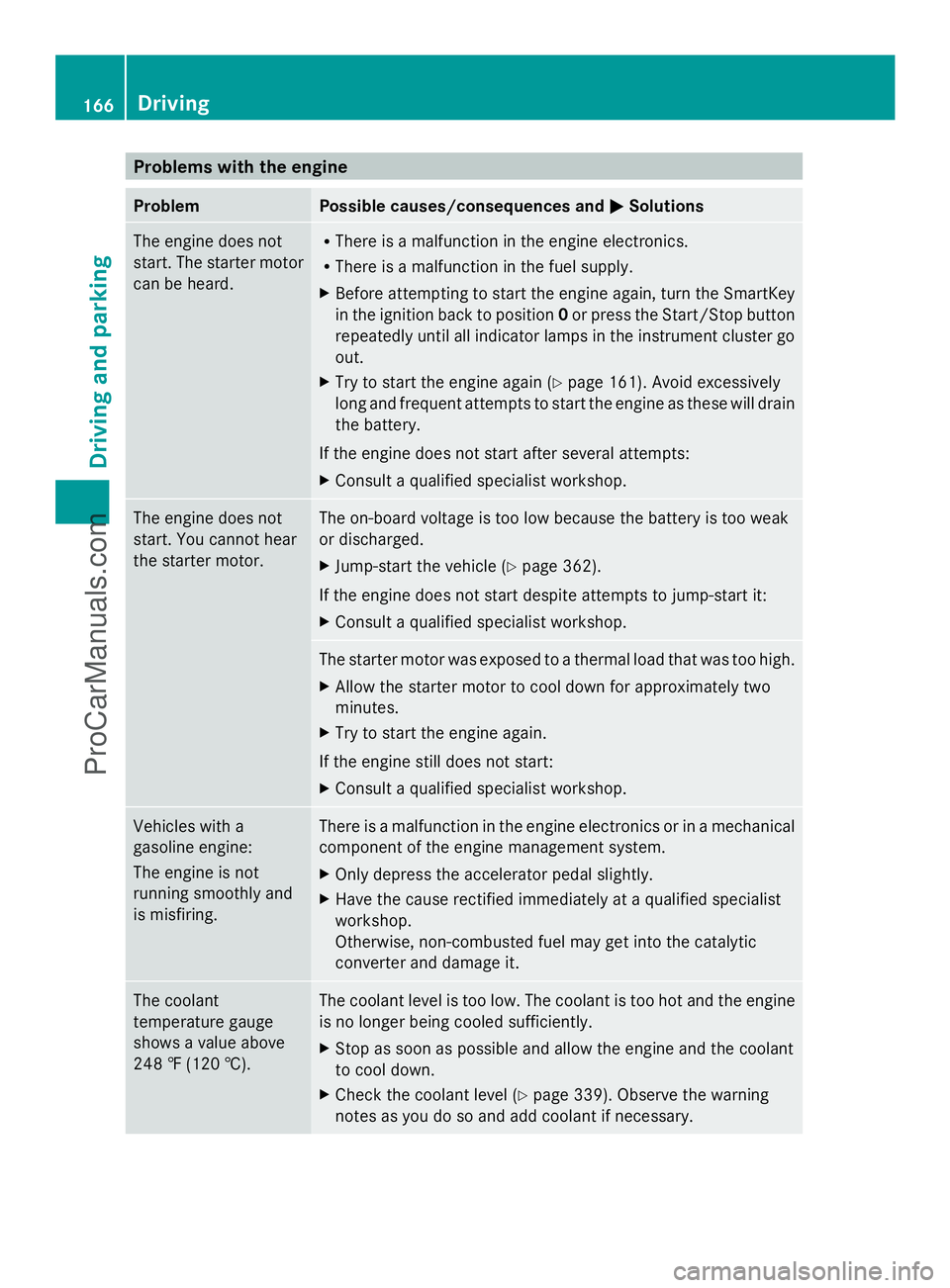
Problems with the engine
Problem Possible causes/consequences and
M
MSolutions The engine does not
start. The starter motor
can be heard. R
There is a malfunction in the engine electronics.
R There is a malfunction in the fuel supply.
X Before attempting to start the engine again, turn the SmartKey
in the ignition back to position 0or press the Start/Stop button
repeatedly until all indicator lamps in the instrument cluster go
out.
X Try to start the engine again (Y page 161). Avoid excessively
long and frequent attempts to start the engine as these will drain
the battery.
If the engine does not start after several attempts:
X Consult a qualified specialist workshop. The engine does not
start. You cannot hear
the starter motor. The on-board voltage is too low because the battery is too weak
or discharged.
X
Jump-start the vehicle (Y page 362).
If the engine does not start despite attempts to jump-start it:
X Consult a qualified specialist workshop. The starter motor was exposed to a thermal load that was too high.
X
Allow the starter motor to cool down for approximately two
minutes.
X Try to start the engine again.
If the engine still does not start:
X Consult a qualified specialist workshop. Vehicles with a
gasoline engine:
The engine is not
running smoothly and
is misfiring. There is a malfunction in the engine electronics or in a mechanical
component of the engine management system.
X
Only depress the accelerator pedal slightly.
X Have the cause rectified immediately at a qualified specialist
workshop.
Otherwise, non-combusted fuel may get into the catalytic
converter and damage it. The coolant
temperature gauge
shows a value above
248 ‡ (120 †). The coolant level is too low. The coolant is too hot and the engine
is no longer being cooled sufficiently.
X Stop as soon as possible and allow the engine and the coolant
to cool down.
X Check the coolant level (Y page 339). Observe the warning
notes as you do so and add coolant if necessary. 166
DrivingDriving and parking
ProCarManuals.com
Page 171 of 430
HOLD function or DISTRONIC PLUS:
if the
vehicle is braked using the HOLD function or
DISTRONIC PLUS, the automatic
transmission shifts automatically to
transmission position P. In addition, at least
one of the following conditions must be
fulfilled:
R the engine is switched off.
R the driver's door is open and the seat belt
is not in the buckle.
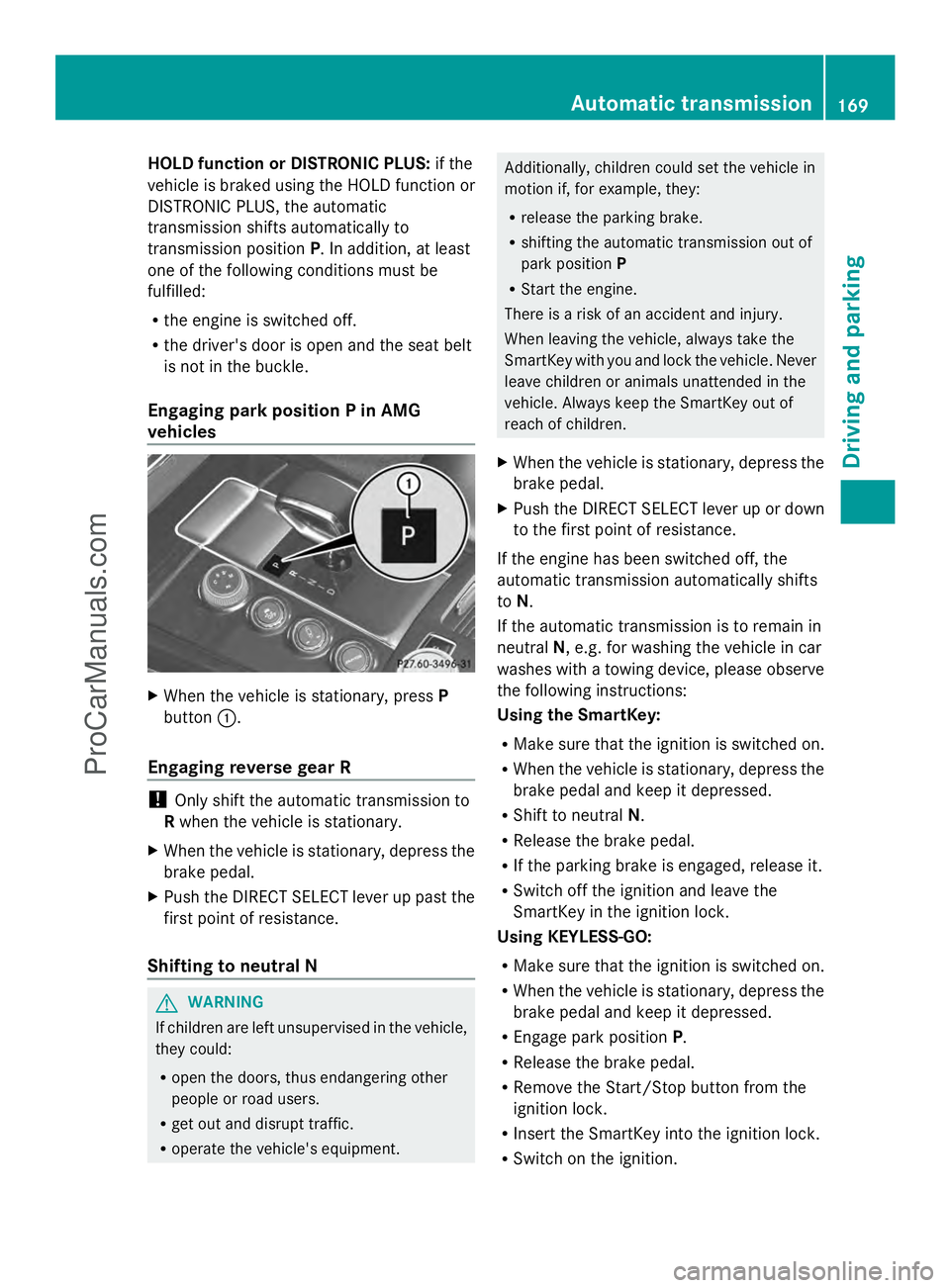
Engaging park position P in AMG
vehicles X
When the vehicle is stationary, press P
button :.
Engaging reverse gear R !
Only shift the automatic transmission to
R when the vehicle is stationary.
X When the vehicle is stationary, depress the
brake pedal.
X Push the DIRECT SELECT lever up past the
first point of resistance.
Shifting to neutral N G
WARNING
If children are left unsupervised in the vehicle,
they could:
R open the doors, thus endangering other
people or road users.
R get out and disrupt traffic.
R operate the vehicle's equipment. Additionally, children could set the vehicle in
motion if, for example, they:
R
release the parking brake.
R shifting the automatic transmission out of
park position P
R Start the engine.
There is a risk of an accident and injury.
When leaving the vehicle, always take the
SmartKey with you and lock the vehicle. Never
leave children or animals unattended in the
vehicle. Always keep the SmartKey out of
reach of children.
X When the vehicle is stationary, depress the
brake pedal.
X Push the DIRECT SELECT lever up or down
to the first point of resistance.
If the engine has been switched off, the
automatic transmission automatically shifts
to N.
If the automatic transmission is to remain in
neutral N, e.g. for washing the vehicle in car
washes with a towing device, please observe
the following instructions:
Using the SmartKey:
R Make sure that the ignition is switched on.
R When the vehicle is stationary, depress the
brake pedal and keep it depressed.
R Shift to neutral N.
R Release the brake pedal.
R If the parking brake is engaged, release it.
R Switch off the ignition and leave the
SmartKey in the ignition lock.
Using KEYLESS-GO:
R Make sure that the ignition is switched on.
R When the vehicle is stationary, depress the
brake pedal and keep it depressed.
R Engage park position P.
R Release the brake pedal.
R Remove the Start/Stop button from the
ignition lock.
R Insert the SmartKey into the ignition lock.
R Switch on the ignition. Automatic transmission
169Driving and parking Z
ProCarManuals.com
Page 177 of 430
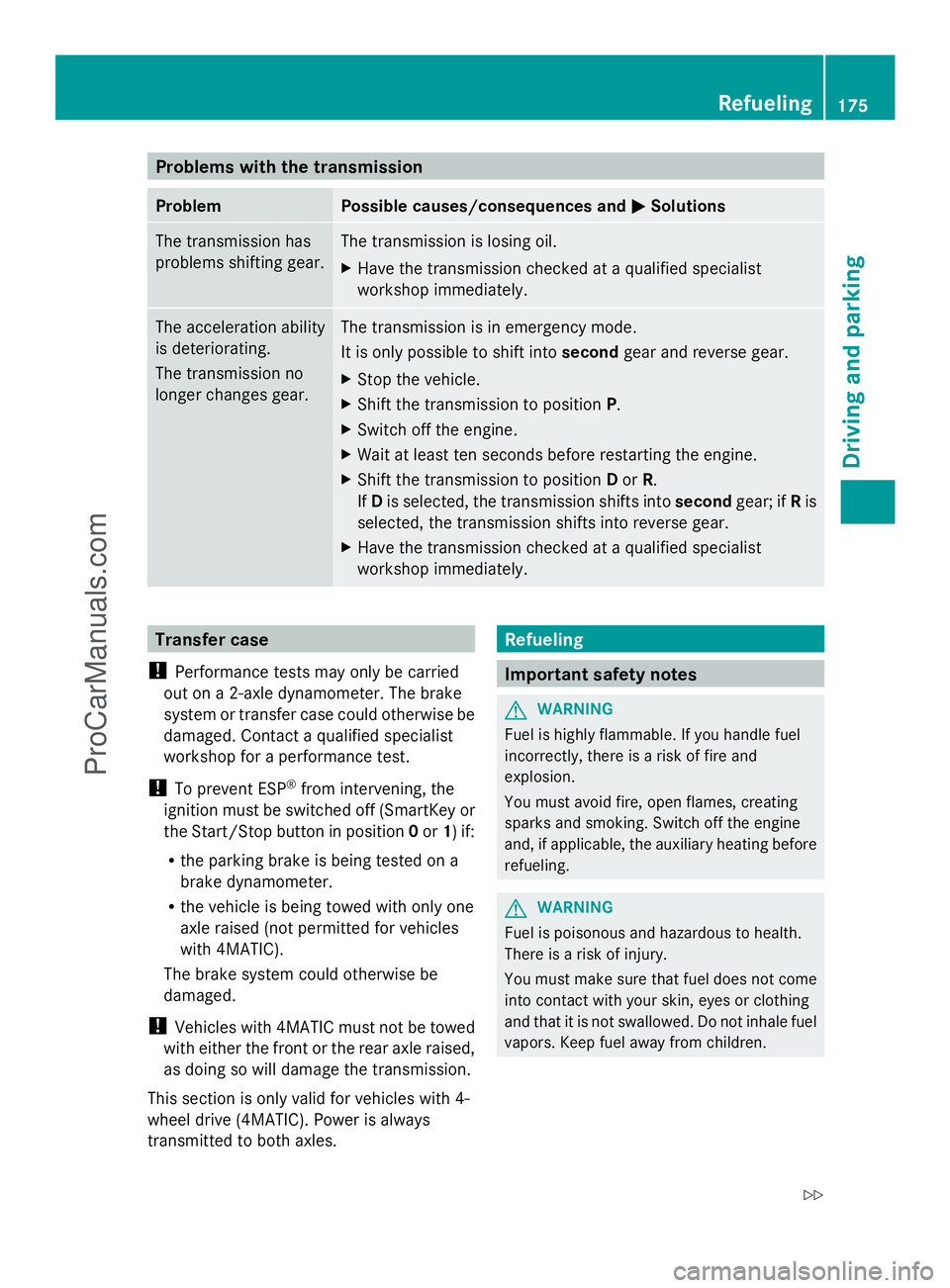
Problems with the transmission
Problem Possible causes/consequences and
M
MSolutions The transmission has
problems shifting gear. The transmission is losing oil.
X
Have the transmission checked at a qualified specialist
workshop immediately. The acceleration ability
is deteriorating.
The transmission no
longer changes gear. The transmission is in emergency mode.
It is only possible to shift into
secondgear and reverse gear.
X Stop the vehicle.
X Shift the transmission to position P.
X Switch off the engine.
X Wait at least ten seconds before restarting the engine.
X Shift the transmission to position Dor R.
If D is selected, the transmission shifts into secondgear; ifRis
selected, the transmission shifts into reverse gear.
X Have the transmission checked at a qualified specialist
workshop immediately. Transfer case
! Performance tests may only be carried
out on a 2-axle dynamometer. The brake
system or transfer case could otherwise be
damaged. Contact a qualified specialist
workshop for a performance test.
! To prevent ESP ®
from intervening, the
ignition must be switched off (SmartKey or
the Start/Stop button in position 0or 1) if:
R the parking brake is being tested on a
brake dynamometer.
R the vehicle is being towed with only one
axle raised (not permitted for vehicles
with 4MATIC).
The brake system could otherwise be
damaged.
! Vehicles with 4MATIC must not be towed
with either the front or the rear axle raised,
as doing so will damage the transmission.
This section is only valid for vehicles with 4-
wheel drive (4MATIC). Power is always
transmitted to both axles. Refueling
Important safety notes
G
WARNING
Fuel is highly flammable. If you handle fuel
incorrectly, there is a risk of fire and
explosion.
You must avoid fire, open flames, creating
sparks and smoking. Switch off the engine
and, if applicable, the auxiliary heating before
refueling. G
WARNING
Fuel is poisonous and hazardous to health.
There is a risk of injury.
You must make sure that fuel does not come
into contact with your skin, eyes or clothing
and that it is not swallowed. Do not inhale fuel
vapors. Keep fuel away from children. Refueling
175Driving and parking
Z
ProCarManuals.com
Page 185 of 430
Vehicles with automatic transmission
X
Shift the transmission to position P.
Using the SmartKey
X Turn the SmartKey to position 0in the
ignition lock and remove it.
The immobilizer is activated.
X Apply the parking brake firmly.
i If you turn off the engine with the
SmartKey and then remove it from the
ignition lock or open a front door, the
automatic transmission shifts to P
automatically.
Using KEYLESS-GO
X Press the Start/Stop button (Y page 159).
The engine stops and all the indicator
lamps in the instrument cluster go out.
X Apply the parking brake firmly.
i If you turn off the engine with the Start/
Stop button, the automatic transmission
shifts to N. If you then open the driver's or
front-passenger door, the automatic
transmission shifts to Pautomatically.
i In the event of an emergency, the engine
can be turned off while the vehicle is in
motion by pressing and holding the Start/
Stop button for three seconds. Parking brake
G
WARNING
If you must brake the vehicle with the parking
brake, the braking distance is considerably
longer and the wheels could lock. There is an
increased danger of skidding and accidents.
Only use the parking brake to brake the
vehicle when the service brake is faulty. Do
not apply the parking brake too firmly. If the
wheels lock, release the parking brake until
the wheels begin turning again. G
WARNING
If you leave children unsupervised in the
vehicle, they could set it in motion by, for
example:
R releasing the parking brake
R shifting the automatic transmission out of
the parking position P
R starting the engine.
They could also operate the vehicle's
equipment. There is a risk of an accident and
injury.
When leaving the vehicle, always take the
SmartKey with you and lock the vehicle. Never
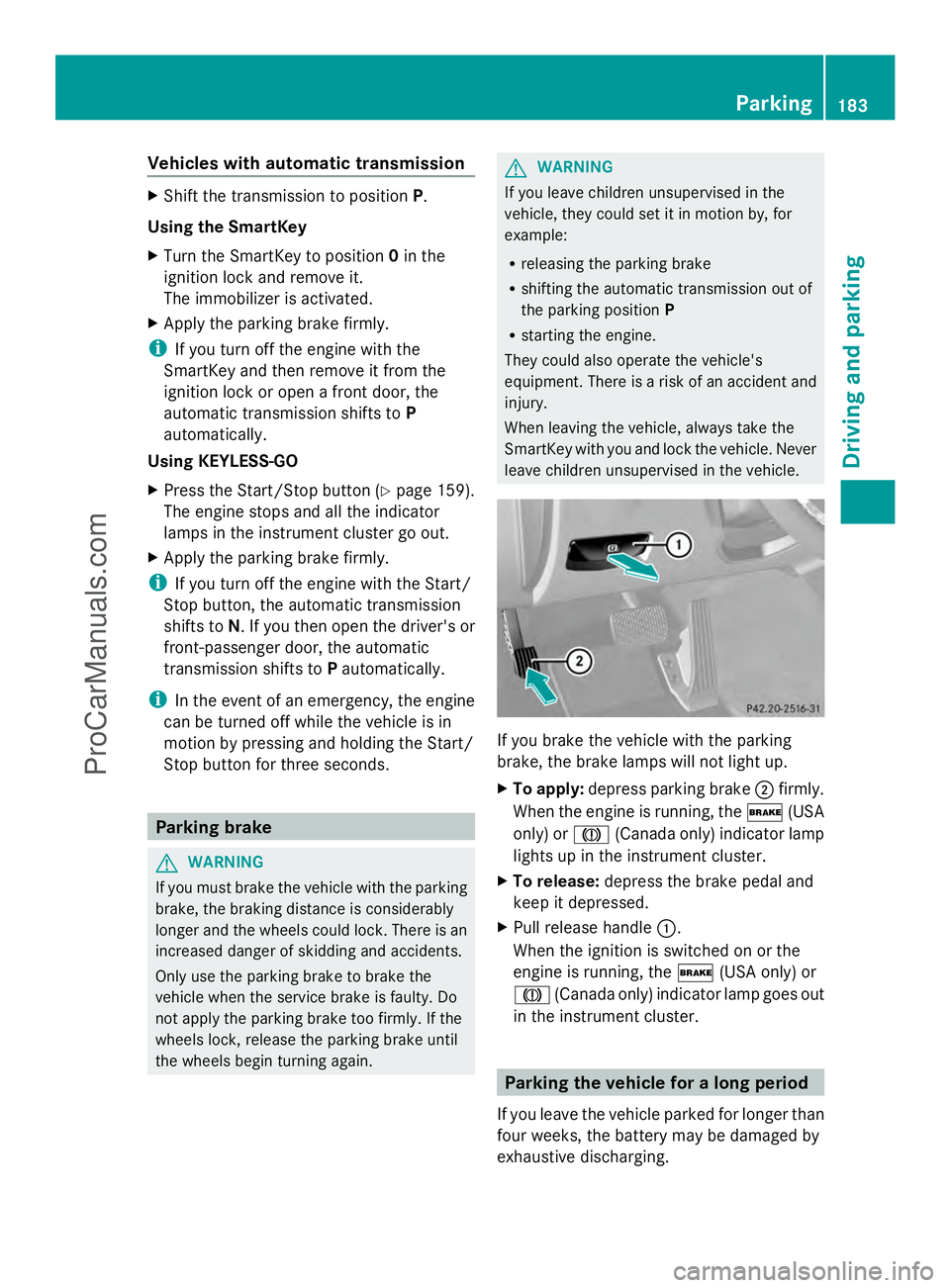
leave children unsupervised in the vehicle. If you brake the vehicle with the parking
brake, the brake lamps will not light up.
X
To apply: depress parking brake ;firmly.
When the engine is running, the $(USA
only) or J(Canada only) indicator lamp
lights up in the instrument cluster.
X To release: depress the brake pedal and
keep it depressed.
X Pull release handle :.
When the ignition is switched on or the
engine is running, the $(USA only) or
J (Canada only) indicator lamp goes out
in the instrument cluster. Parking the vehicle for a long period
If you leave the vehicle parked for longer than
four weeks, the battery may be damaged by
exhaustive discharging. Parking
183Driving an d parking Z
ProCarManuals.com
Page 189 of 430
R
Brake occasionally to remove any possible
salt residue. Make sure that you do not
endanger other road users when doing so.
R Carefully depress the brake pedal and the
beginning and end of a journey.
R Maintain a greater distance to the vehicle
ahead.
Servicing the brakes !
If the red brake warning lamp lights up in
the instrument cluster and you hear a
warning tone while the engine is running,
the brake fluid level may be too low.
Observe additional warning messages in
the multifunction display.
The brake fluid level may be too low due to
brake pad wear or leaking brake lines.
Have the brake system checked
immediately. This work should be carried
out at a qualified specialist workshop.
! Vehicles with 4MATIC: function or
performance tests may only be carried out
on a 2-axle dynamometer. If you are
planning to have the vehicle tested on such
a dynamometer, contact an authorized
Mercedes-Benz Center to obtain further
information first. Otherwise, you could
damage the drive train or the brake system.
! Vehicles with 4MATIC: as the ESP®
system operates automatically, the engine
and the ignition must be switched off
(SmartKey in position 0or 1in the ignition
lock or Start/Stop button in position 0or
1) while the parking brake is being tested
on a brake dynamometer.
Braking maneuvers triggered automatically
by ESP ®
may seriously damage the brake
system. !
Vehicles with 4MATIC: as the ESP®
system operates automatically, the engine
and the ignition system must be switched
off (SmartKey in position 0or 1in the
ignition lock or Start/Stop button in
position 0or 1) when:
R testing the parking brake on a brake
dynamometer.
R you intend to have the vehicle towed with
one of the axles raised.
Braking maneuvers triggered automatically
by ESP ®
may seriously damage the brake
system.
All checks and maintenance work on the
brake system must be carried out at a
qualified specialist workshop. Consult a
qualified specialist workshop to arrange this.
Have brake pads installed and brake fluid
replaced at a qualified specialist workshop.
If the brake system has only been subject to
moderate loads, you should test the
functionality of your brakes at regular
intervals. To do so, press firmly on the brake
pedal when driving at a high speed. This
improves the grip of the brake pads.
You can find a description of Brake Assist
(BAS) at (Y page 68) or of BAS PLUS with
Intersection Assist at (Y page 68).
The braking characteristics of the vehicle can
be seriously impaired if:
R brake pads other than those recommended
are installed
R the recommended brake fluid is not used
Safe braking can no longer be guaranteed.
AMG high-performance and ceramic
brakes The AMG brake systems are designed for
heavy loads. This may lead to noise when
braking. This will depend on:
R
Speed
R Braking force
R Environmental conditions, such as
temperature and humidity Driving tips
187Driving and parking Z
ProCarManuals.com
Page 216 of 430
Active Parking Assist is switched on
automatically when driving forwards. The
system is operational at speeds of up to
approximately 22 mph (35 km/h). While in
operation, the system independently locates
and measures parking spaces on both sides
of the vehicle.
Active Parking Assist will only detect parking
spaces:
R that are parallel or at right-angles to the
direction of travel
R that are parallel to the direction of travel
and at least 59 in (1.5 m) wide
R that are parallel to the direction of travel
and at least 39.5 in (1.0 m) longer than your
vehicle
R that are at right angles to the direction of
travel and at least 39.5 in (1.0 m) wider
than your vehicle
i In the case of parking spaces that are at
right angles to the direction of travel,
please ensure that the parking space is
long enough to accommodate your vehicle.
When driving at speeds below 19 mph
(30 km/h), you will see parking symbol as a
status indicator in the instrument cluster.
When a parking space has been detected, an
arrow towards the right or the left also
appears. By default, Active Parking Assist
only displays parking spaces on the front-
passenger side. Parking spaces on the
driver's side are displayed as soon as the turn
signal on the driver's side is activated. When
parking on the driver's side, this must remain
switched on until you acknowledge the use of
Active Parking Assist by pressing the a
button on the multifunction steering wheel.
The system automatically determines
whether the parking space is parallel or at
right-angles to the direction of travel.
A parking space is displayed while you are
driving past it, and until you are
approximately 50 ft (15 m) away from it. Parking i
Vehicles with automatic transmission:
When PARKTRONIC detects obstacles,
Active Parking Assist brakes automatically
during the parking process. You are
responsible for braking in good time.
X Stop the vehicle when the parking space
symbol shows the desired parking space in
the instrument cluster.
X Shift the transmission to position R.
The Start Park Assist? Yes: OK No: Start Park Assist? Yes: OK No:
% message appears in the multifunction
display.
X To cancel the procedure: press the
% button on the multifunction steering
wheel or pull away.
or
X To park using Active Parking Assist:
press the abutton on the multifunction
steering wheel.
The Park Assist Active Accelerate Park Assist Active Accelerate
and Brake Observe Surroundings
and Brake Observe Surroundings
message appears in the multifunction
display.
X Let go of the multifunction steering wheel.
X Back up the vehicle, being ready to brake
at all times. When backing up, drive at a
speed below approximately 6 mph
(10 km/h). Otherwise Active Parking Assist
will be canceled.
Active Parking Assist brakes the vehicle to
a standstill when the vehicle is in the
parking space.
Maneuvering may be required in tight
parking spaces.
The Park Assist Active Select D Park Assist Active Select D
Observe
Observe Surroundings
Surroundings message appears in
the multifunction display.
X Shift the transmission to position Dwhile
the vehicle is stationary.
Active Parking Assist immediately steers in
the other direction. 214
Driving systemsDriving an
d parking
ProCarManuals.com
Page 242 of 430
Left control panel
=
; R
Calls up the menu and menu bar 9
:
Press briefly:
R
Scrolls in lists
R Selects a submenu or function
R In the Audio Audio menu: selects a
stored station, an audio track or
a video scene
R In the Tel Tel(telephone) menu:
switches to the phone book and
selects a name or telephone
number 9
:
Press and hold:
R
In the Audio Audio menu: selects the
previous/next station or selects
an audio track or a video scene
using rapid scrolling
R In the Tel Tel(Telephone) menu:
starts rapid scrolling if the phone
book is open a R
Confirms a selection/display
message
R In the Tel Tel(telephone) menu:
switches to the telephone book
and starts dialing the selected
number
R In the Audio Audio menu: stops the
station search function at the
desired station Right control panel
~ R
Rejects or ends a call
R Exits phone book/redial
memory 6 R
Makes or accepts a call
R Switches to the redial memory W
X R
Adjusts the volume 8 R
Mute Back button
%
Press briefly:
R
Back
R Switches off the Voice Control
System; see the separate
operating instructions
R Hides display messages/calls
up the last Trip Tripmenu function
used
R Exits the telephone book/redial
memory %
Press and hold:
R
Calls up the standard display in
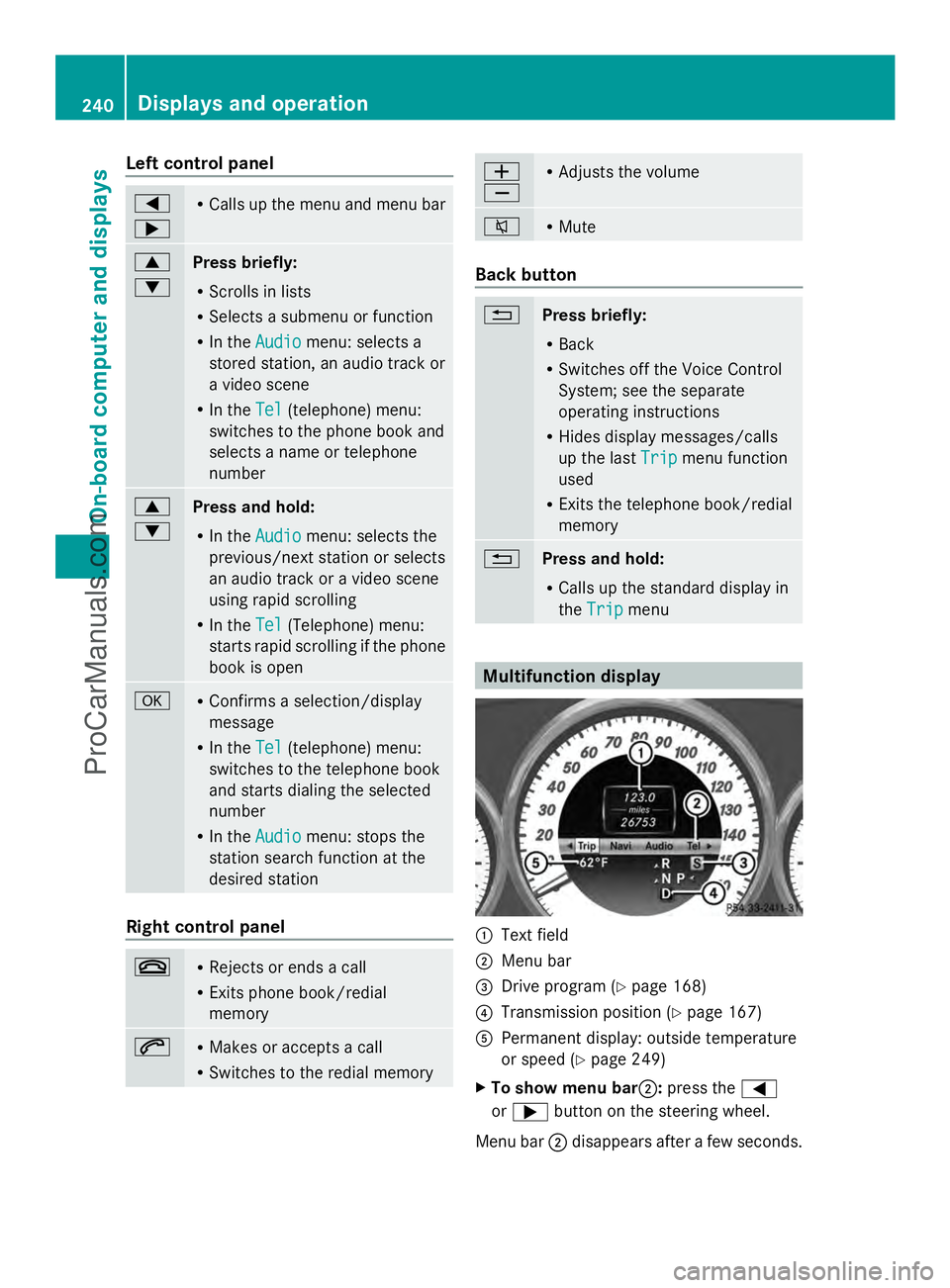
the Trip Trip menu Multifunction display
:
Text field
; Menu bar
= Drive program (Y page 168)
? Transmission position (Y page 167)
A Permanent display: outside temperature
or speed (Y page 249)
X To show menu bar ;:press the =
or ; button on the steering wheel.
Menu bar ;disappears after a few seconds. 240
Displays and operationOn-board computer and displays
ProCarManuals.com
Page 243 of 430
Text field
:shows the selected menu or
submenu as well as display messages.
The following messages may appear in the
multifunction display:
Z Shift recommendation
(Ypage 172)
XjY Active Parking Assist (Y page 212)
CRUISE
CRUISE Cruise control (Y
page 189)
_ Adaptive Highbeam Assist
(Ypage 134)
¤ ECO start/stop function
(Ypage 163)
ë HOLD function (Y page 202) Menus and submenus
Menu overview
Press the =or; button on the
steering wheel to call up the menu bar and
select a menu.
Operating the on-board computer
(Y page 239).
Depending on the equipment installed in the
vehicle, you can call up the following menus:
R Trip Trip menu (Y page 241)
R Navi
Navi menu (navigation instructions)
(Y page 243)
R Audio
Audio menu (Y page 244)
R Tel
Tel menu (telephone) (Y page 245)
R DriveAssist
DriveAssist menu (assistance)
(Y page 246)
R Serv.
Serv. menu (Y page 249)
R Settings
Settings menu (settings) (Y page 249)
R AMG
AMG menu in AMG vehicles (Y page 253) Trip menu
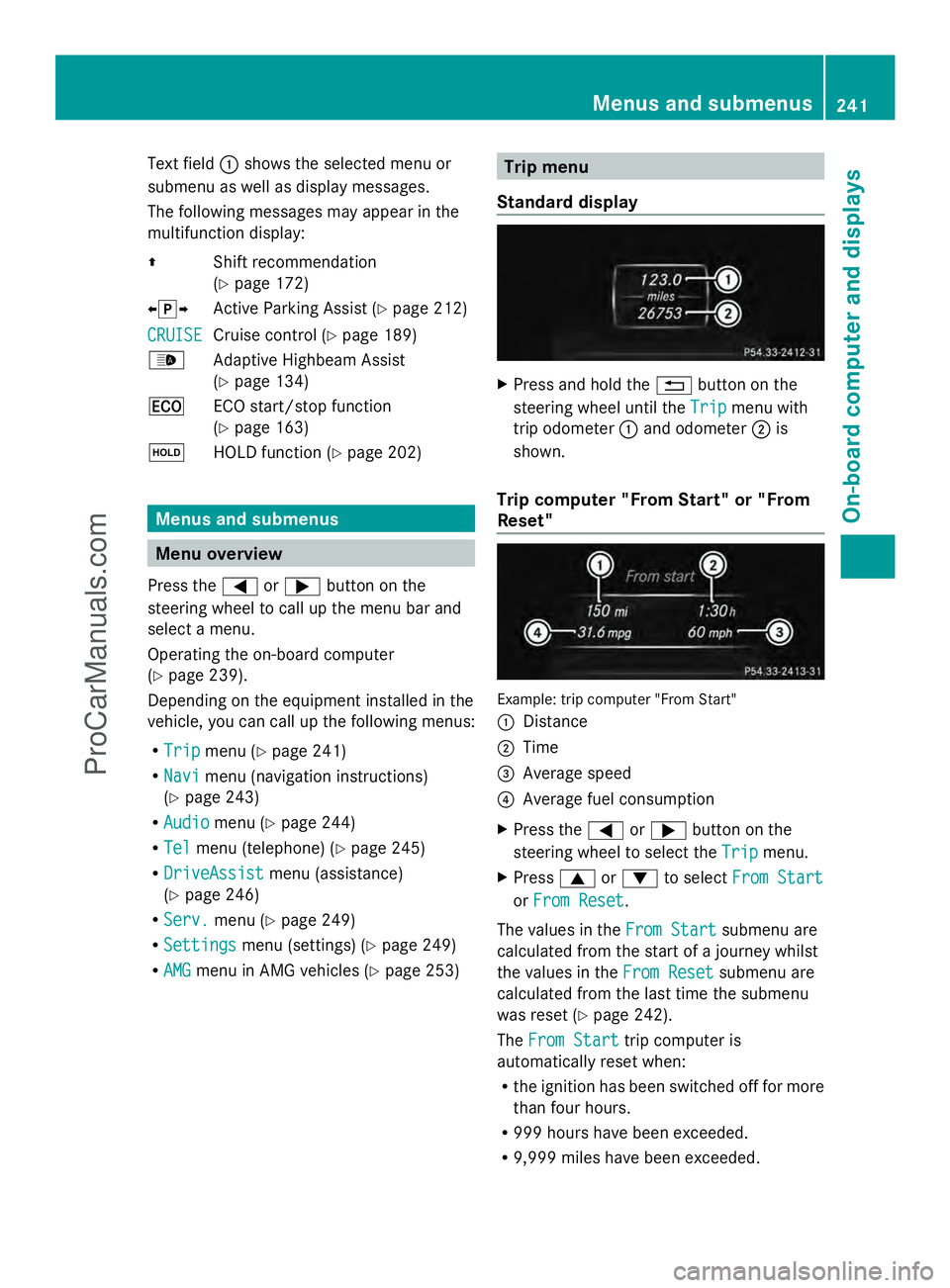
Standard display X
Press and hold the %button on the
steering wheel until the Trip
Trip menu with
trip odometer :and odometer ;is
shown.
Trip computer "From Start" or "From
Reset" Example: trip computer "From Start"
:
Distance
; Time
= Average speed
? Average fuel consumption
X Press the =or; button on the
steering wheel to select the Trip
Trip menu.
X Press 9or: to select From Start From Start
or From Reset
From Reset .
The values in the From Start
From Startsubmenu are
calculated from the start of a journey whilst
the values in the From Reset From Resetsubmenu are
calculated from the last time the submenu
was reset (Y page 242).
The From Start From Start trip computer is
automatically reset when:
R the ignition has been switched off for more
than four hours.
R 999 hours have been exceeded.
R 9,999 miles have been exceeded. Menus and submenus
241On-board computer and displays Z
ProCarManuals.com
Page 248 of 430
X
Press the 9or: button to select the
desired name.
or
X To begin rapid scrolling: press and hold
the 9 or: button for longer than
one second.
Rapid scrolling stops when you release the
button or reach the end of the list.
X If only one telephone number is stored
for a name: press the6ora button
to start dialing.
or
X If there is more than one number for a
particular name: press the6ora
button to display the numbers.
X Press the 9or: button to select the
number you want to dial.
X Press the 6ora button to start
dialing.
or
X To exit the telephone book: press the
~ or% button.
Redialing The on-board computer saves the last names
or numbers dialed in the redial memory.
X Press the =or; button on the
steering wheel to select the Tel
Tel menu.
X Press the 6button to switch to the
redial memory.
X Press the 9or: button to select the
desired name or number.
X Press the 6ora button to start
dialing.
or
X To exit the redial memory: press the
~ or% button. Assistance menu
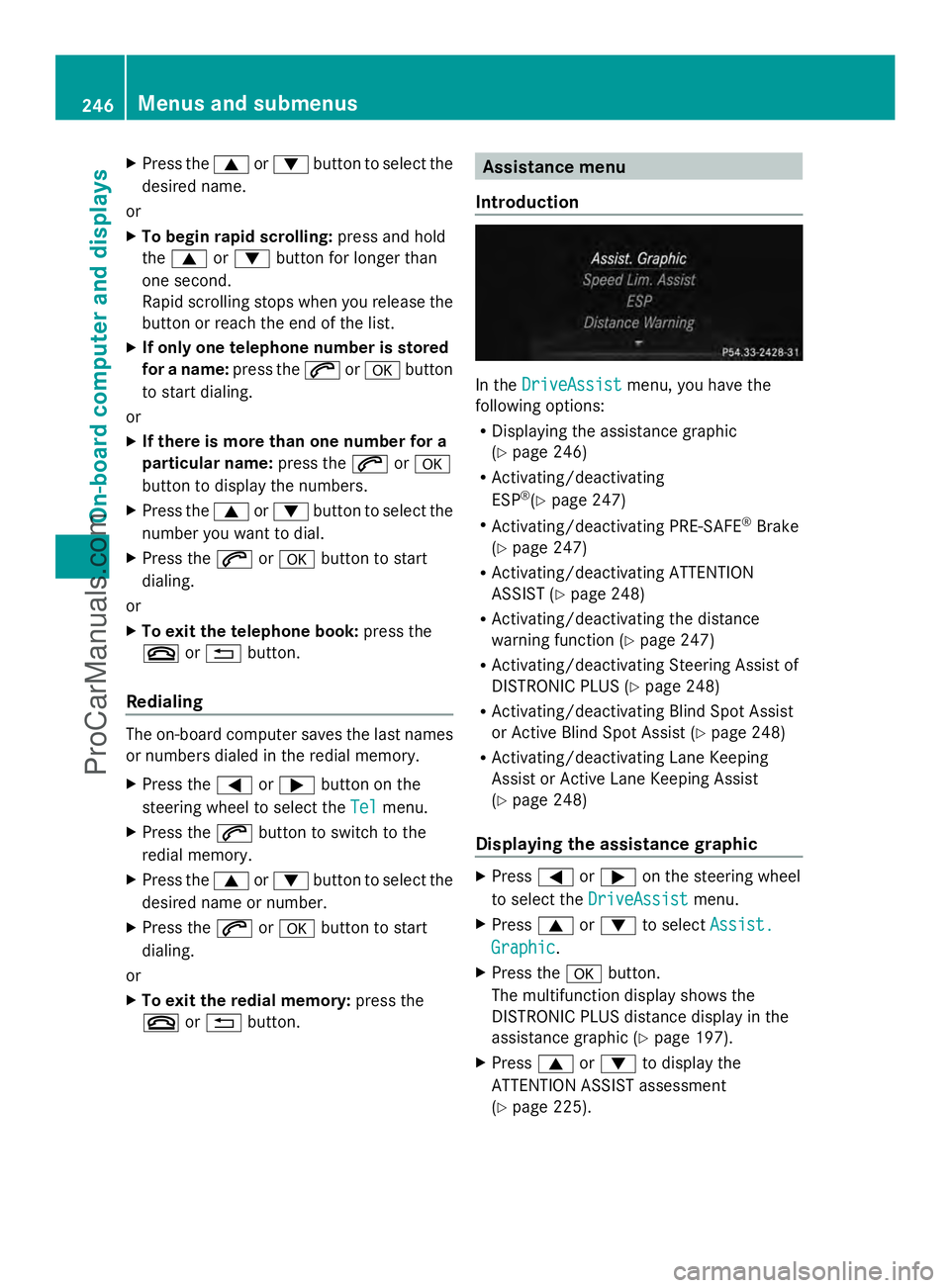
Introduction In the
DriveAssist DriveAssist menu, you have the
following options:
R Displaying the assistance graphic
(Y page 246)
R Activating/deactivating
ESP ®
(Y page 247)
R Activating/deactivating PRE-SAFE ®
Brake
(Y page 247)
R Activating/deactivating ATTENTION
ASSIST (Y page 248)
R Activating/deactivating the distance
warning function (Y page 247)
R Activating/deactivating Steering Assist of
DISTRONIC PLUS (Y page 248)
R Activating/deactivating Blind Spot Assist
or Active Blind Spot Assist (Y page 248)
R Activating/deactivating Lane Keeping
Assist or Active Lane Keeping Assist
(Y page 248)
Displaying the assistance graphic X
Press =or; on the steering wheel
to select the DriveAssist DriveAssist menu.
X Press 9or: to select Assist.
Assist.
Graphic
Graphic .
X Press the abutton.
The multifunction display shows the
DISTRONIC PLUS distance display in the
assistance graphic (Y page 197).
X Press 9or: to display the
ATTENTION ASSIST assessment
(Y page 225). 246
Menus and submenusOn-board computer and displays
ProCarManuals.com