low beam MERCEDES-BENZ E-SEDAN 2014 Owners Manual
[x] Cancel search | Manufacturer: MERCEDES-BENZ, Model Year: 2014, Model line: E-SEDAN, Model: MERCEDES-BENZ E-SEDAN 2014Pages: 430, PDF Size: 5.8 MB
Page 8 of 430
Bottle holder
...................................... 316
Box (trunk) ......................................... 309
Brake Assist see BAS (Brake Assist System)
Brake fluid
Display message ............................ 260
Notes ............................................. 423
Brake lamps
Display message ............................ 267
Brakes
ABS .................................................. 67
Adaptive Brake Assist ......................71
BAS .................................................. 68
BAS PLUS with Cross-Traffic Assist .68
Brake fluid (notes) .........................423
Display message ............................ 258
Driving tips .................................... 186
High-performance brake system ....187
HOLD function ............................... 202
Important safety notes ..................186
Maintenance .................................. 187
Parking brake ................................ 183
Warning lamp ................................. 287
Breakdown
see Flat tire
Bulbs
see Replacing bulbs C
California Important notice for retail
customers and lessees ....................24
Calling up a malfunction
see Display messages
Car
see Vehicle
Care
360° camera ................................. 346
Carpets .......................................... 349
Car wash ........................................ 342
Display ........................................... 347
Exhaust pipe .................................. 347
Exterior lights ................................ 345
Gear or selector lever ....................347
Interior ........................................... 347
Matte finish ................................... 344
Notes ............................................. 341Paint
.............................................. 344
Plastic trim .................................... 347
Power washer ................................ 343
Rear view camera .......................... 346
Roof lining ...................................... 349
Seat belt ........................................ 348
Seat cover ..................................... 348
Sensors ......................................... 346
Steering wheel ............................... 347
Trim pieces .................................... 348
Washing by hand ........................... 343
Wheels ........................................... 344
Windows ........................................ 345
Wiper blades .................................. 345
Wooden trim .................................. 348
Cargo compartment cover ...............307
Cargo compartment enlargement ...304
Cargo compartment floor .................313
Cargo net Attaching ....................................... 309
Important safety information .........309
Cargo tie down rings .........................306
Car keys see SmartKey
Car wash (care) ................................. 342
CD player/CD changer (on-board
computer) .......................................... 244
Center console Lower section .................................. 35
Lower section (AMG vehicles) ..........36
Upper section .................................. 34
Central locking
Automatic locking (on-board
computer) ...................................... 251
Locking/unlocking (SmartKey) ........82
Changing bulbs
High-beam headlamps ...................137
Turn signals (front) ......................... 138
Child-proof locks
Important safety notes ....................65
Rear doors ....................................... 66
Children
In the vehicle ................................... 60
Restraint systems ............................ 60
Special seat belt retractor ...............63 6
IndexProCarManuals.com
Page 14 of 430
Important safety notes
..................336
Opening ......................................... 336
Hydroplaning ..................................... 188I
Ignition lock see Key positions
Immobilizer .......................................... 78
Indicator lamps see Warning and indicator lamps
Insect protection on the radiator ....337
Instrument cluster Overview .......................................... 31
Settings ......................................... 249
Warning and indicator lamps ...........32
Instrument cluster lighting ..............250
Interior lighting ................................. 135
Automatic control ..........................136
Delayed switch-off (on-board
computer) ...................................... 251
Emergency lighting ........................136
Manual control ............................... 136
Overview ........................................ 135
Reading lamp ................................. 135
Setting the brightness of the
ambient lighting (on-board
computer) ...................................... 250
Setting the brightness of the
display/switch (on-board
computer) ...................................... 250
Setting the color of the ambient
lighting (on-board computer) .........250 J
Jack Storage location ............................ 352
Using ............................................. 397
Jump starting (engine) ......................362 K
KEYLESS-GO Convenience closing feature .......... 100
Display message ............................ 284
Locking ............................................ 83
Start/Stop button .......................... 159 Starting the engine
........................161
Unlocking ......................................... 83
Key positions
KEYLESS-GO .................................. 159
SmartKey ....................................... 159
Kickdown
Driving tips .................................... 171
Manual drive program ....................174
Knee bag .............................................. 45 L
Lamps see Warning and indicator lamps
Lane Keeping Assist
Activating/deactivating .................248
Display message ............................ 275
Function/informatio n.................... 228
Lane Tracking package .....................226
Lap time (RACETIMER) ......................254
LATCH-type (ISOFIX) child seat
anchors ................................................ 63
License plate lamp (display
message) ............................................ 267
Light function, active Display message ............................ 268
Lighting
Light switch ................................... 128
Lights
Activating/deactivating the
interior lighting delayed switch-off .251
Active light function .......................133
Automatic headlamp mode ............129
Cornering light function .................133
Driving abroad ............................... 128
Hazard warning lamps ...................132
High beam flasher .......................... 132
High-beam headlamps ...................132
Low-beam headlamps ....................130
Parking lamps ................................ 130
Rear fog lamp ................................ 130
Setting the brightness of the
ambient lighting (on-board
computer) ...................................... 250
Setting the brightness of the
display/switch (on-board
computer) ...................................... 25012
IndexProCarManuals.com
Page 15 of 430
Setting the color of the ambient
lighting (on-board computer)
.........250
Standing lamps .............................. 131
Switching the daytime running
lamps on/off (on-board computer) 250
Switching the exterior lighting
delayed switch-off on/off (on-
board computer) ............................ 251
Switching the surround lighting
on/off (on-board computer) ..........251
Turn signals ................................... 131
see Interior lighting
see Replacing bulbs
Light sensor (display message) .......269
Loading guidelines ............................298
Locking see Central locking
Locking (doors)
Automatic ........................................ 89
Emergency locking ........................... 90
From inside (central locking
button) ............................................. 89
Locking centrally
see Central locking
Locking verification signal (on-
board computer) ............................... 252
Low-beam headlamps Display message ............................ 266
Setting for driving abroad
(symmetrical) ................................. 128
Switching on/off ........................... 130
Luggage holder (EASY-PACK load-
securing kit) ....................................... 311
Lumbar support Adjusting the 4-way lumbar
support .......................................... 114
Luxury head restraints .....................111 M
M+S tires ............................................ 374
Malfunction message see Display messages
Massage function (PULSE) ...............113
Matte finish (cleaning instructions) 344
mbrace Call priority .................................... 326
Display message ............................ 261Downloading destinations
(COMAND)
..................................... 326
Downloading routes .......................330
Emergency call .............................. 323
General notes ................................ 322
Geo fencing ................................... 330
Locating a stolen vehicle ...............328
MB info call button ........................325
Remote vehicle locking ..................328
Roadside Assistance button ..........325
Search & Send ............................... 327
Self-test ......................................... 323
Speed alert .................................... 330
System .......................................... 323
Triggering the vehicle alarm ........... 330
Vehicle remote malfunction
diagnosis ....................................... 329
Vehicle remote unlocking ..............328
Mechanical key
Function/notes ................................ 84
Locking vehicle ................................ 90
Unlocking the driver's door ..............90
Memory card (audio) .........................244
Memory function ............................... 125
Message memory (on-board
computer) .......................................... 257
Messages see Display messages
Mirrors
see Exterior mirrors
see Rear-view mirror
see Vanity mirror (in the sun visor)
Mobile phone
Menu (on-board computer) ............245
Modifying the programming
(SmartKey) ........................................... 83
MOExtended tires .............................. 354
Mounting wheels Lowering the vehicle ......................400
Mounting a new wheel ...................399
Raising the vehicle .........................397
Removing a wheel ..........................399
Securing the vehicle against
rolling away ................................... 396
MP3
Operation ....................................... 244
see separate operating instructions Index
13ProCarManuals.com
Page 34 of 430
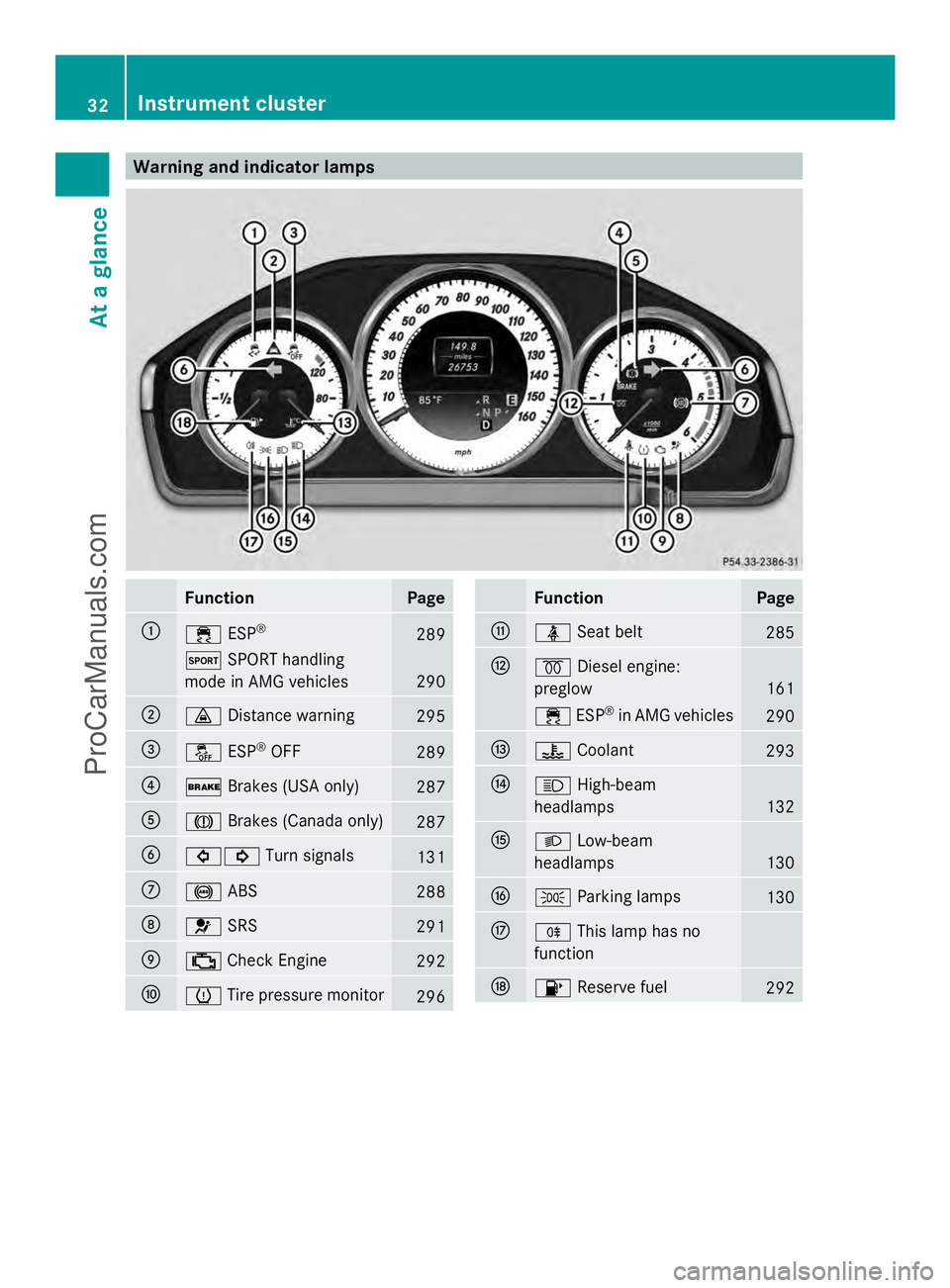
Warning and indicator lamps
Function Page
:
÷
ESP® 289
M
SPORT handling
mode in AMG vehicles 290
;
·
Distance warning 295
=
å
ESP®
OFF 289
?
$
Brakes (USA only) 287
A
J
Brakes (Canada only) 287
B
#!
Turn signals 131
C
!
ABS 288
D
6
SRS 291
E
;
Check Engine 292
F
h
Tire pressure monitor 296 Function Page
G
ü
Seat belt 285
H
%
Diesel engine:
preglow 161
÷
ESP®
in AMG vehicles 290
I
?
Coolant 293
J
K
High-beam
headlamps 132
K
L
Low-beam
headlamps 130
L
T
Parking lamps 130
M
R
This lamp has no
function N
8
Reserve fuel 29232
Instrument clusterAt a glance
ProCarManuals.com
Page 130 of 430
Useful information
i This Operator's Manual describes all
models and all standard and optional
equipment of your vehicle available at the
time of publication of the Operator's
Manual. Country-specific differences are
possible. Please note that your vehicle may
not be equipped with all features
described. This also applies to safety-
related systems and functions.
i Read the information on qualified
specialist workshops: (Y page 26).Exterior lighting
General notes
For reasons of safety, Mercedes-Benz
recommends that you drive with the lights
switched on even during the daytime.
Therefore, your vehicle is equipped with
special daytime running lamps. In some
countries, operation of the headlamps varies
due to legal requirements and self-imposed
obligations.
If you wish to drive during the daytime without
lights, switch off the daytime running lamps
function in the on-board computer
(Y page 250). Driving abroad
Symmetrical low-beam headlamps Switch the headlamps to symmetrical low
beam in countries in which traffic drives on
the opposite side of the road from the country
where the vehicle is registered. This prevents
glare to oncoming traffic. When using
symmetrical lights, the edge of the road is not
lit as widely and as far ahead as normal.
Have the headlamps converted at a qualified
specialist workshop as close to the border as
possible before driving in these countries. Asymmetrical low beam Have the headlamps converted back to
asymmetrical low-beam headlamps at a
qualified specialist workshop as soon as
possible after crossing the border again.
Setting the exterior lighting
Setting options Exterior lighting can be set using:
R
the light switch
R the combination switch (Y page 131)
R the on-board computer (Y page 250)
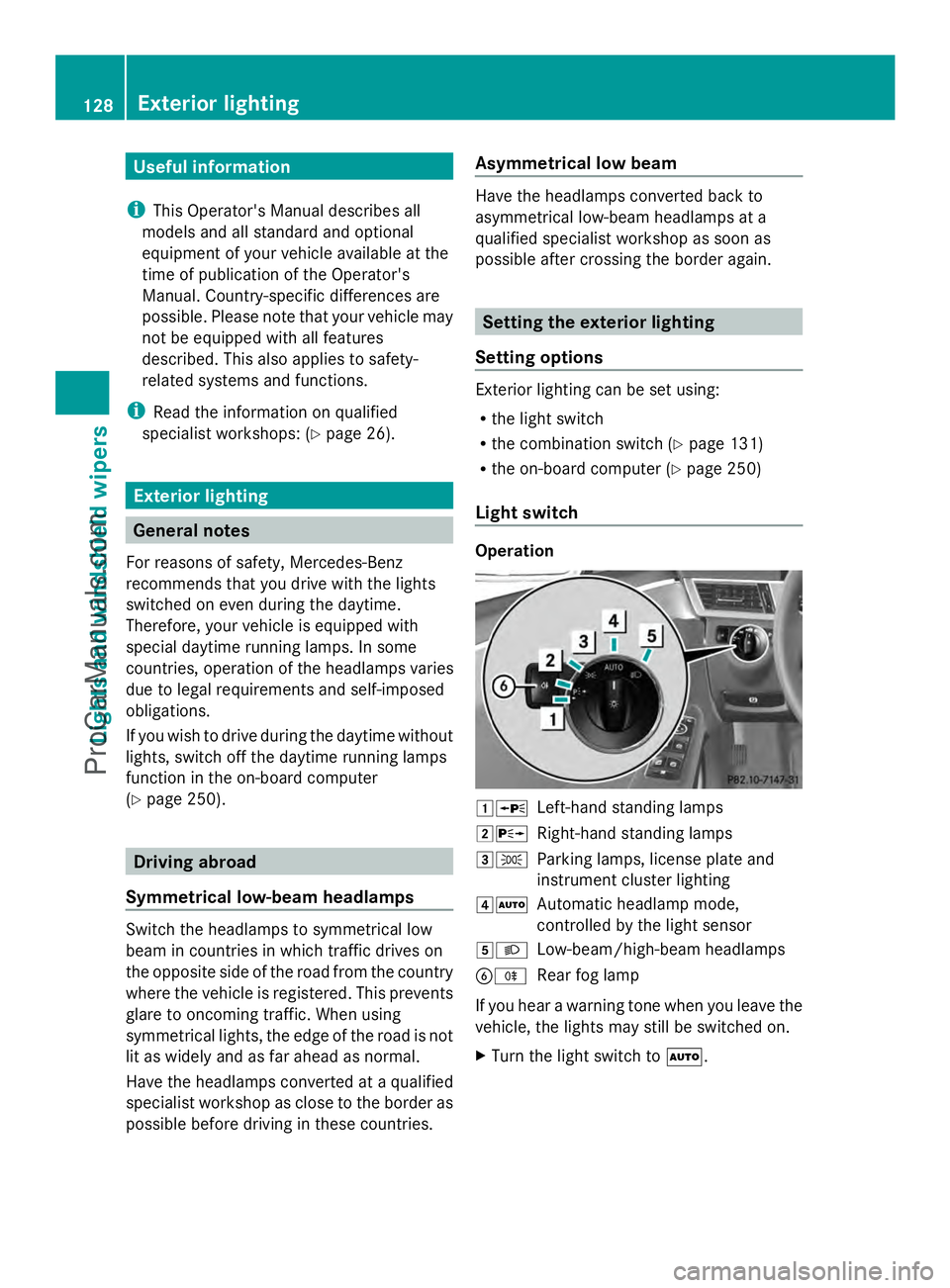
Light switch Operation
1W
Left-hand standing lamps
2X Right-hand standing lamps
3T Parking lamps, license plate and
instrument cluster lighting
4Ã Automatic headlamp mode,
controlled by the light sensor
5L Low-beam/high-beam headlamps
BR Rear fog lamp
If you hear a warning tone when you leave the
vehicle, the lights may still be switched on.
X Turn the light switch to Ã.128
Exterior lightingLights and windshield wipers
ProCarManuals.com
Page 131 of 430
The exterior lighting (except the parking/
standing lamps) switches off automatically if
you:
R remove the SmartKey from the ignition lock
R open the driver's door with the SmartKey
in position 0.
Automatic headlamp mode G
WARNING
When the light switch is set to Ã, the low-
beam headlamps may not be switched on
automatically if there is fog, snow or other
causes of poor visibility due to the weather
conditions such as spray. There is a risk of an
accident.
In such situations, turn the light switch to
L.
The automatic headlamp feature is only an
aid. The driver is responsible for the vehicle's
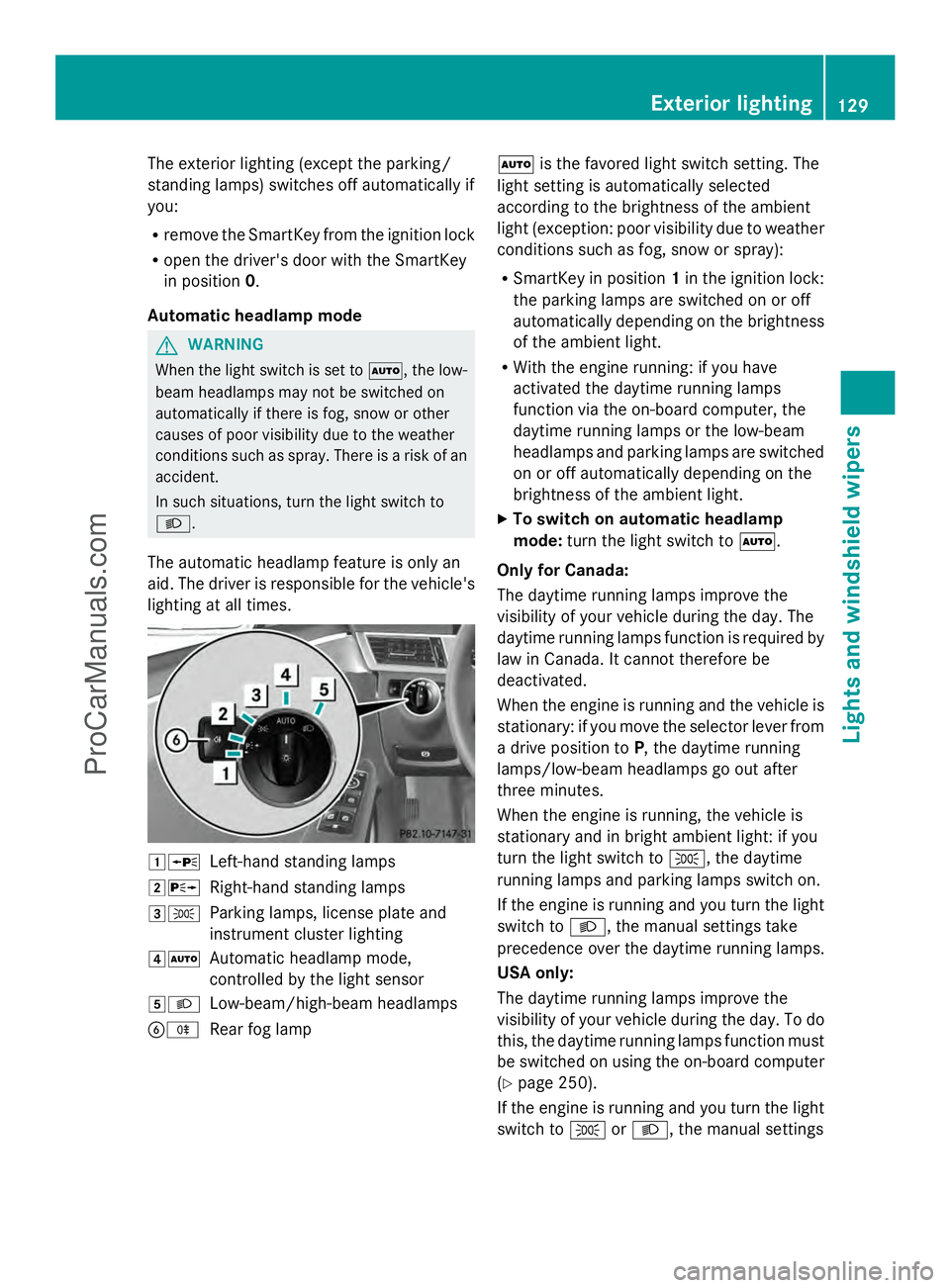
lighting at all times. 1W
Left-hand standing lamps
2X Right-hand standing lamps
3T Parking lamps, license plate and
instrument cluster lighting
4Ã Automatic headlamp mode,
controlled by the light sensor
5L Low-beam/high-beam headlamps
BR Rear fog lamp Ã
is the favored light switch setting. The
light setting is automatically selected
according to the brightness of the ambient
light (exception: poor visibility due to weather
conditions such as fog, snow or spray):
R SmartKey in position 1in the ignition lock:
the parking lamps are switched on or off
automatically depending on the brightness
of the ambient light.
R With the engine running: if you have
activated the daytime running lamps
function via the on-board computer, the
daytime running lamps or the low-beam
headlamps and parking lamps are switched
on or off automatically depending on the
brightness of the ambient light.
X To switch on automatic headlamp
mode: turn the light switch to Ã.
Only for Canada:
The daytime running lamps improve the
visibility of your vehicle during the day. The
daytime running lamps function is required by
law in Canada. It cannot therefore be
deactivated.
When the engine is running and the vehicle is
stationary: if you move the selector lever from
a drive position to P, the daytime running
lamps/low-beam headlamps go out after
three minutes.
When the engine is running, the vehicle is
stationary and in bright ambient light: if you
turn the light switch to T, the daytime
running lamps and parking lamps switch on.
If the engine is running and you turn the light
switch to L, the manual settings take
precedence over the daytime running lamps.
USA only:
The daytime running lamps improve the
visibility of your vehicle during the day. To do
this, the daytime running lamps function must
be switched on using the on-board computer
(Y page 250).
If the engine is running and you turn the light
switch to TorL, the manual settings Exterior lighting
129Lights and windshield wipers Z
ProCarManuals.com
Page 132 of 430
take precedence over the daytime running
lamps.
Low-beam headlamps G
WARNING
When the light switch is set to Ã, the low-
beam headlamps may not be switched on
automatically if there is fog, snow or other
causes of poor visibility due to the weather
conditions such as spray. There is a risk of an
accident.
In such situations, turn the light switch to
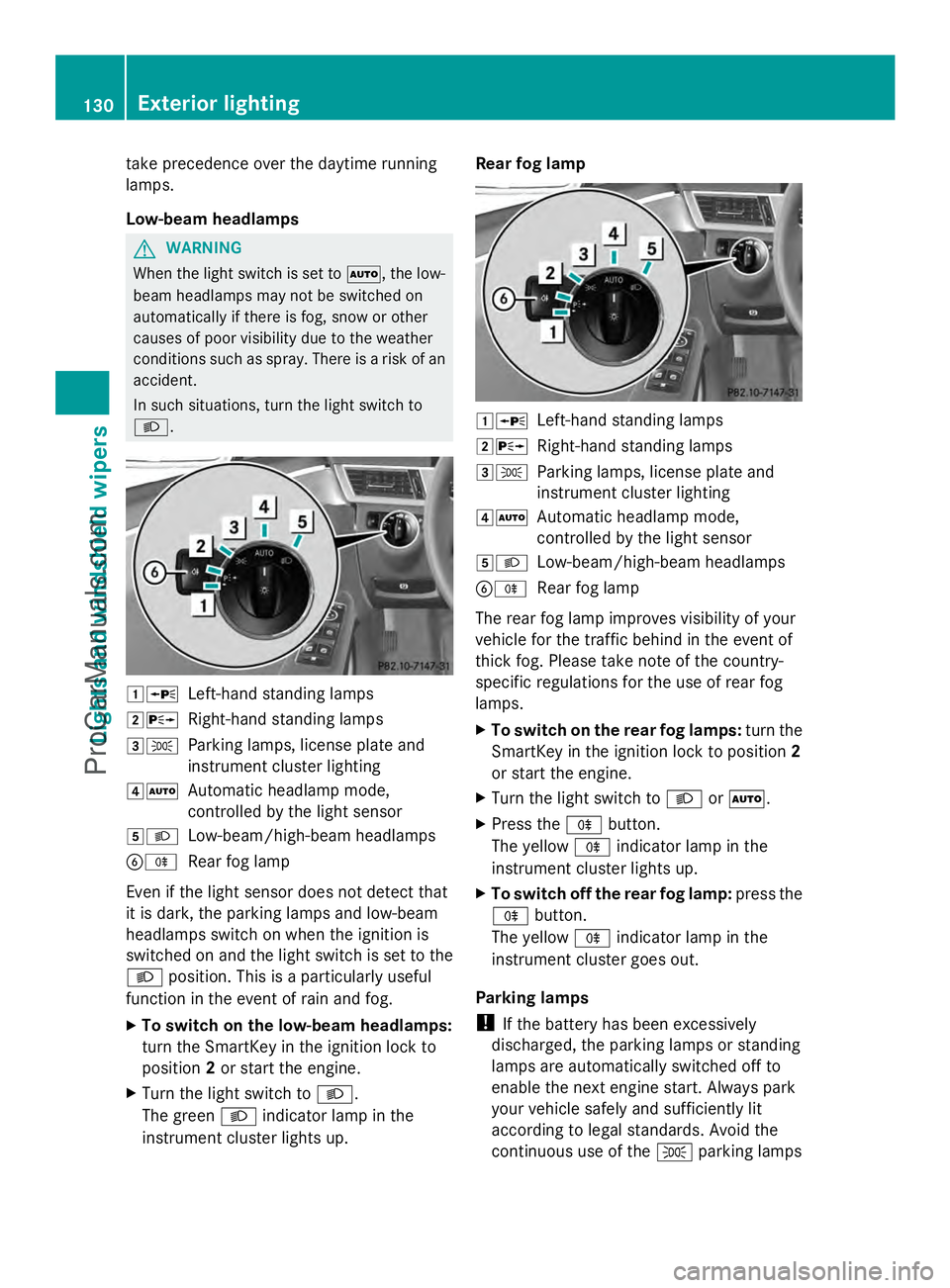
L. 1W
Left-hand standing lamps
2X Right-hand standing lamps
3T Parking lamps, license plate and
instrument cluster lighting
4Ã Automatic headlamp mode,
controlled by the light sensor
5L Low-beam/high-beam headlamps
BR Rear fog lamp
Even if the light sensor does not detect that
it is dark, the parking lamps and low-beam
headlamps switch on when the ignition is
switched on and the light switch is set to the
L position. This is a particularly useful
function in the event of rain and fog.
X To switch on the low-beam headlamps:
turn the SmartKey in the ignition lock to
position 2or start the engine.
X Turn the light switch to L.
The green Lindicator lamp in the
instrument cluster lights up. Rear fog lamp
1W
Left-hand standing lamps
2X Right-hand standing lamps
3T Parking lamps, license plate and
instrument cluster lighting
4Ã Automatic headlamp mode,
controlled by the light sensor
5L Low-beam/high-beam headlamps
BR Rear fog lamp
The rear fog lamp improves visibility of your
vehicle for the traffic behind in the event of
thick fog. Please take note of the country-
specific regulations for the use of rear fog
lamps.
X To switch on the rear fog lamps: turn the
SmartKey in the ignition lock to position 2
or start the engine.
X Turn the light switch to LorÃ.
X Press the Rbutton.
The yellow Rindicator lamp in the
instrument cluster lights up.
X To switch off the rear fog lamp: press the
R button.
The yellow Rindicator lamp in the
instrument cluster goes out.
Parking lamps
! If the battery has been excessively
discharged, the parking lamps or standing
lamps are automatically switched off to
enable the next engine start. Always park
your vehicle safely and sufficiently lit
according to legal standards. Avoid the
continuous use of the Tparking lamps 130
Exterior lightingLights and
windshield wipers
ProCarManuals.com
Page 133 of 430
for several hours. If possible, switch on the
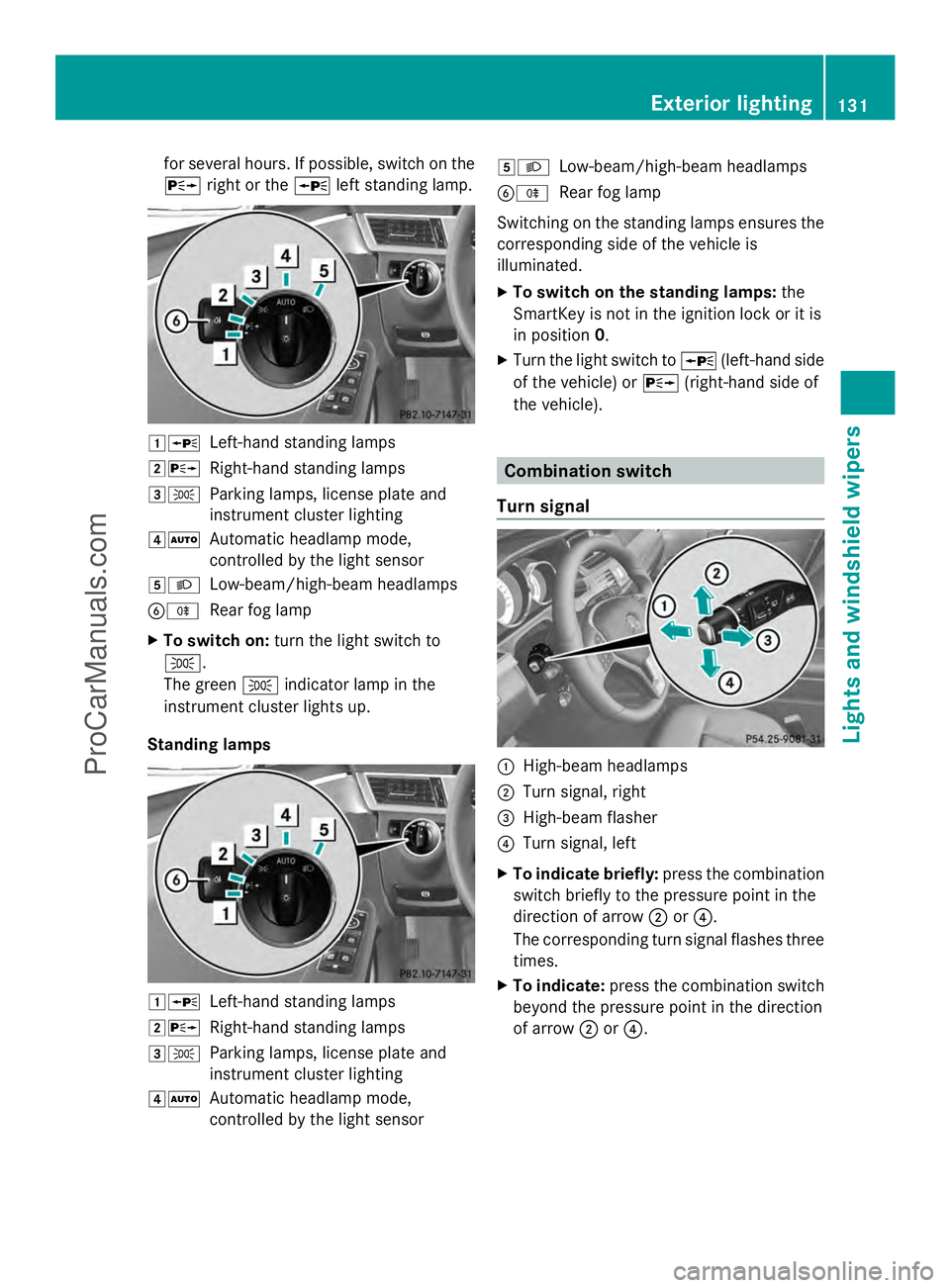
X right or the Wleft standing lamp. 1W
Left-hand standing lamps
2X Right-hand standing lamps
3T Parking lamps, license plate and
instrument cluster lighting
4Ã Automatic headlamp mode,
controlled by the light sensor
5L Low-beam/high-beam headlamps
BR Rear fog lamp
X To switch on: turn the light switch to
T.
The green Tindicator lamp in the
instrument cluster lights up.
Standing lamps 1W
Left-hand standing lamps
2X Right-hand standing lamps
3T Parking lamps, license plate and
instrument cluster lighting
4Ã Automatic headlamp mode,
controlled by the light sensor 5L
Low-beam/high-beam headlamps
BR Rear fog lamp
Switching on the standing lamps ensures the
corresponding side of the vehicle is
illuminated.
X To switch on the standing lamps: the
SmartKey is not in the ignition lock or it is
in position 0.
X Turn the light switch to W(left-hand side
of the vehicle) or X(right-hand side of
the vehicle). Combination switch
Turn signal :
High-beam headlamps
; Turn signal, right
= High-beam flasher
? Turn signal, left
X To indicate briefly: press the combination
switch briefly to the pressure point in the
direction of arrow ;or?.
The corresponding turn signal flashes three
times.
X To indicate: press the combination switch
beyond the pressure point in the direction
of arrow ;or?. Exterior lighting
131Lights and windshield wipers Z
ProCarManuals.com
Page 135 of 430
The hazard warning lamps automatically
switch on if:
R
an air bag is deployed
R the vehicle decelerates rapidly from a
speed of above 45 mph (70 km/h) and
comes to a standstill
The hazard warning lamps switch off
automatically if the vehicle reaches a speed
of above 6 mph (10 km/h) again after a full
brake application.
i The hazard warning lamps still operate if
the ignition is switched off. Cornering light function
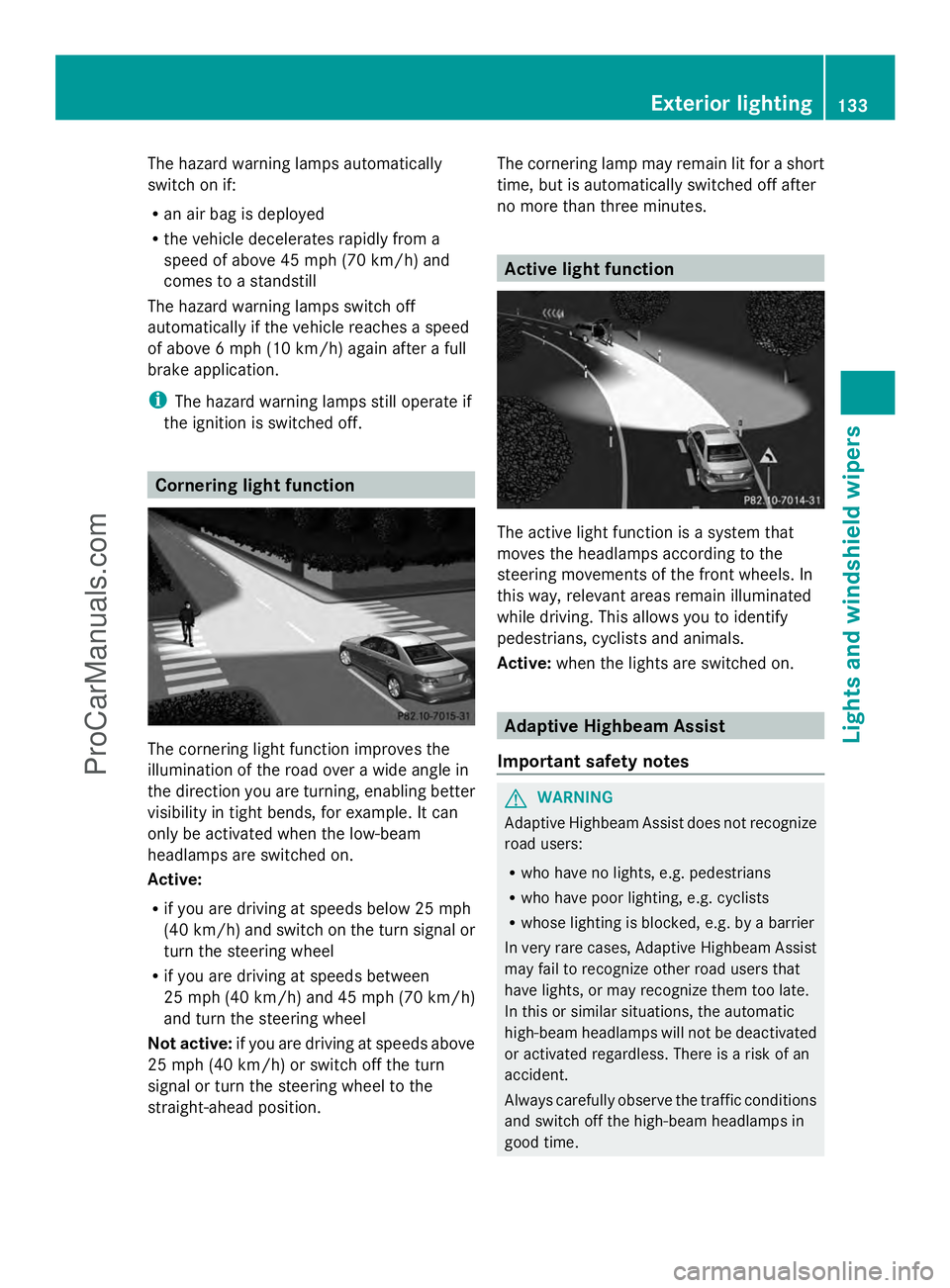
The cornering light function improves the
illumination of the road over a wide angle in
the direction you are turning, enabling better
visibility in tight bends, for example. It can
only be activated when the low-beam
headlamps are switched on.
Active:
R if you are driving at speeds below 25 mph
(40 km/h) and switch on the turn signal or
turn the steering wheel
R if you are driving at speeds between
25 mph (40 km/h) and 45 mph (70 km/h)
and turn the steering wheel
Not active: if you are driving at speeds above
25 mph (40 km/h) or switch off the turn
signal or turn the steering wheel to the
straight-ahead position. The cornering lamp may remain lit for a short
time, but is automatically switched off after
no more than three minutes. Active light function
The active light function is a system that
moves the headlamps according to the
steering movements of the front wheels. In
this way, relevant areas remain illuminated
while driving. This allows you to identify
pedestrians, cyclists and animals.
Active:
when the lights are switched on. Adaptive Highbeam Assist
Important safety notes G
WARNING
Adaptive Highbeam Assist does not recognize
road users:
R who have no lights, e.g. pedestrians
R who have poor lighting, e.g. cyclists
R whose lighting is blocked, e.g. by a barrier
In very rare cases, Adaptive Highbeam Assist
may fail to recognize other road users that
have lights, or may recognize them too late.
In this or similar situations, the automatic
high-beam headlamps will not be deactivated
or activated regardless. There is a risk of an
accident.
Always carefully observe the traffic conditions
and switch off the high-beam headlamps in
good time. Exterior lighting
133Lights and windshield wipers Z
ProCarManuals.com
Page 136 of 430
Adaptive Highbeam Assist cannot take into
account road, weather or traffic conditions.
Adaptive Highbeam Assist is only an aid. You
are responsible for adjusting the vehicle's
lighting to the prevailing light, visibility and
traffic conditions.
In particular, the detection of obstacles can
be restricted if there is:
R poor visibility, e.g. due to fog, heavy rain or
snow
R dirt on the sensors or the sensors are
obscured
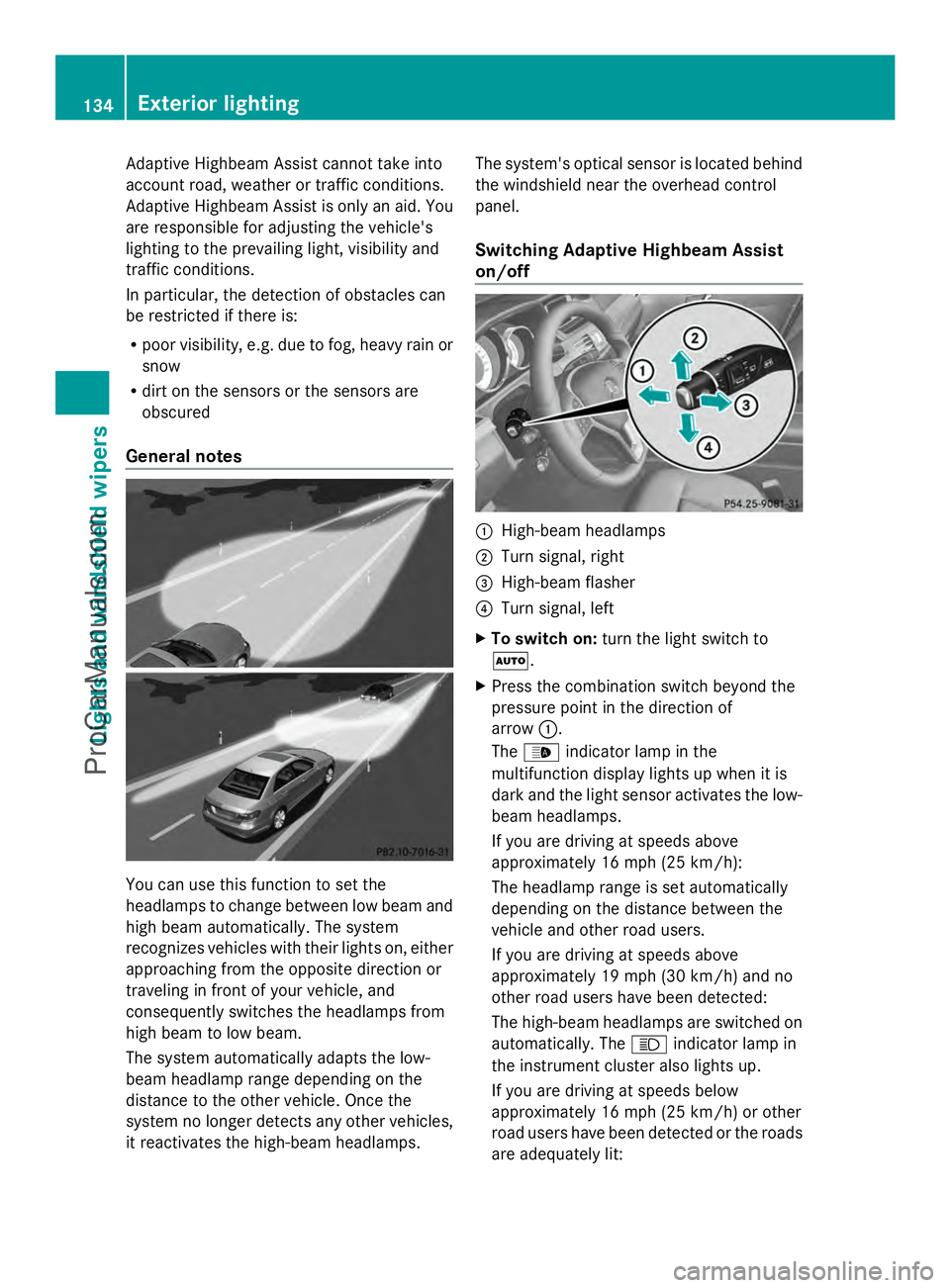
General notes You can use this function to set the
headlamps to change between low beam and
high beam automatically. The system
recognizes vehicles with their lights on, either
approaching from the opposite direction or
traveling in front of your vehicle, and
consequently switches the headlamps from
high beam to low beam.
The system automatically adapts the low-
beam headlamp range depending on the
distance to the other vehicle. Once the
system no longer detects any other vehicles,
it reactivates the high-beam headlamps. The system's optical sensor is located behind
the windshield near the overhead control
panel.
Switching Adaptive Highbeam Assist
on/off
:
High-beam headlamps
; Turn signal, right
= High-beam flasher
? Turn signal, left
X To switch on: turn the light switch to
Ã.
X Press the combination switch beyond the
pressure point in the direction of
arrow :.
The _ indicator lamp in the
multifunction display lights up when it is
dark and the light sensor activates the low-
beam headlamps.
If you are driving at speeds above
approximately 16 mph (25 km/h):
The headlamp range is set automatically
depending on the distance between the
vehicle and other road users.
If you are driving at speeds above
approximately 19 mph (30 km/h) and no
other road users have been detected:
The high-beam headlamps are switched on
automatically. The Kindicator lamp in
the instrument cluster also lights up.
If you are driving at speeds below
approximately 16 mph (25 km/h) or other
road users have been detected or the roads
are adequately lit: 134
Exterior lightingLights and
windshield wipers
ProCarManuals.com