warning MERCEDES-BENZ E-SEDAN 2016 Workshop Manual
[x] Cancel search | Manufacturer: MERCEDES-BENZ, Model Year: 2016, Model line: E-SEDAN, Model: MERCEDES-BENZ E-SEDAN 2016Pages: 350, PDF Size: 6.71 MB
Page 84 of 350
You can select between the following states
of ESP®:
RESP®is activated.
RESP®is deactivated.
GWARNING
If you deactivate ESP
®, ESP®no longer sta-
bilizes the vehicle. There is an increased risk
of skidding and an accident.
Only deactivate ESP
®in the situations descri-
bed in the following.
!Avoid spinning the driven wheels for an
extended period with ESP®deactivated.
You could otherwise damage the drivetrain.
It may be best to deactivate ESP
®in the fol-
lowing situations:
Rwhen using snow chains
Rin deep snow
Ron sand or gravel
iActivate ESP®as soon as the situations
described above no longer apply. ESP®will
otherwise not be able to stabilize the vehi-
cle if the vehicle starts to skid or a wheel
starts to spin.
Deactivating/activating ESP
®
You can deactivate or activate ESP®via the
on-board computer (
Ypage 190).
ESP
®deactivated:
The å ESP
®OFF warning lamp in the
instrument cluster lights up.
ESP
®activated:
The å ESP
®OFF warning lamp in the
instrument cluster goes out.
Characteristics when ESP
®is deactivated
If ESP
®is deactivated and one or more wheels
start to spin, the ÷ESP®warning lamp in
the instrument cluster flashes. In such situa-
tions, ESP
®will not stabilize the vehicle. If you deactivate ESP
®:
RESP®no longer improves driving stability.
Rengine torque is no longer limited and the
drive wheels are able to spin.
The spinning of the wheels results in a cut-
ting action for better traction on loose sur-
faces.
Rtraction control is still activated.
RESP®still provides support when you
brake.
Deactivating/activating ESP®(AMG
vehicles)
Important safety notes
iObserve the "Important safety notes" sec-
tion (
Ypage 75).
You can select between the following states
of ESP
®:
RESP®is activated.
RSPORT handling mode is activated.
RESP®is deactivated.
GWARNING
When SPORT handling mode is activated,
there is a greater risk of skidding and acci-
dents.
Only activate SPORT handling mode in the sit-
uations described in the following.
GWARNING
If you deactivate ESP
®, ESP®no longer sta-
bilizes the vehicle. There is an increased risk
of skidding and an accident.
Only deactivate ESP
®in the situations descri-
bed in the following.
!Avoid spinning the driven wheels for an
extended period with ESP®deactivated.
You could otherwise damage the drivetrain.
82Driving safety systems
Safety
Page 85 of 350
In the following situations, it may be better to
activate SPORT handling mode or deactivate
ESP
®:
Rwhen using snow chains
Rin deep snow
Ron sand or gravel
Ron specially designated roads when the
vehicle's own oversteering and understeer- ing characteristics are desired
Driving in SPORT handling mode or without
ESP
®requires an extremely qualified and
experienced driver.
iActivate ESP®as soon as the situations
described above no longer apply. ESP®will
otherwise not be able to stabilize the vehi-
cle if the vehicle starts to skid or a wheel
starts to spin.
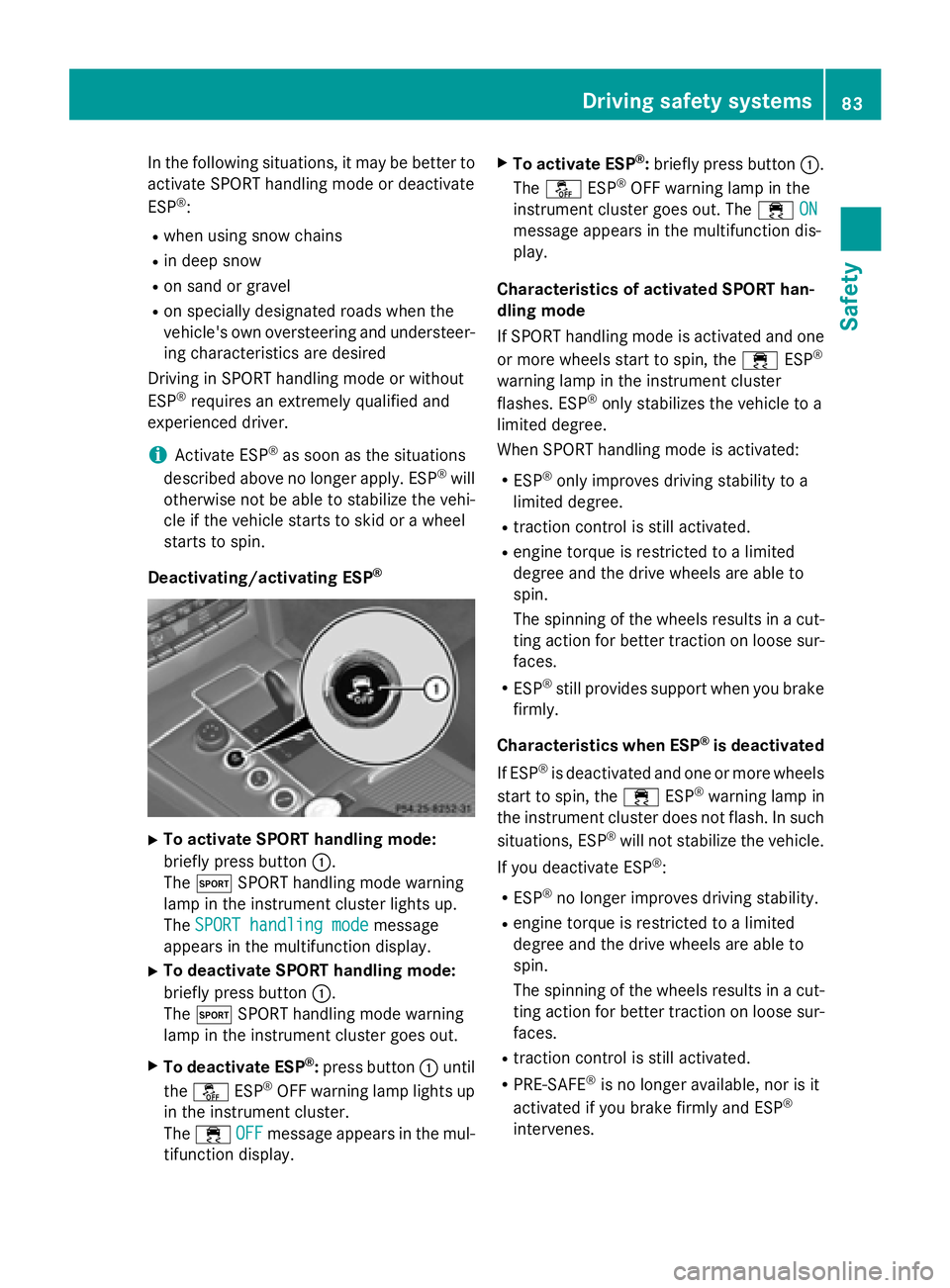
Deactivating/activating ESP
®
XTo activate SPORT handling mode:
briefly press button :.
The M SPORT handling mode warning
lamp in the instrument cluster lights up.
The SPORT handling mode
message
appears in the multifunction display.
XTo deactivate SPORT handling mode:
briefly press button :.
The M SPORT handling mode warning
lamp in the instrument cluster goes out.
XTo deactivate ESP®: press button :until
the å ESP®OFF warning lamp lights up
in the instrument cluster.
The ÷ OFF
message appears in the mul-
tifunction display.
XTo activate ESP®: briefly press button :.
The å ESP®OFF warning lamp in the
instrument cluster goes out. The ÷ON
message appears in the multifunction dis-
play.
Characteristics of activated SPORT han-
dling mode
If SPORT handling mode is activated and one
or more wheels start to spin, the ÷ESP
®
warning lamp in the instrument cluster
flashes. ESP®only stabilizes the vehicle to a
limited degree.
When SPORT handling mode is activated:
RESP®only improves driving stability to a
limited degree.
Rtraction control is still activated.
Rengine torque is restricted to a limited
degree and the drive wheels are able to
spin.
The spinning of the wheels results in a cut-
ting action for better traction on loose sur-
faces.
RESP®still provides support when you brake
firmly.
Characteristics when ESP
®is deactivated
If ESP
®is deactivated and one or more wheels
start to spin, the ÷ESP®warning lamp in
the instrument cluster does not flash. In such
situations, ESP
®will not stabilize the vehicle.
If you deactivate ESP
®:
RESP®no longer improves driving stability.
Rengine torque is restricted to a limited
degree and the drive wheels are able to
spin.
The spinning of the wheels results in a cut-
ting action for better traction on loose sur-
faces.
Rtraction control is still activated.
RPRE-SAFE®is no longer available, nor is it
activated if you brake firmly and ESP®
intervenes.
Driving safety systems83
Safety
Z
Page 86 of 350
RPRE-SAFE®Brake is no longer available, it
is also not activated if you brake firmly and
ESP
®intervenes.
RESP®still provides support when you brake
firmly.
ESP®trailer stabilization
General information
If your vehicle/trailer combination begins to
swerve, ESP
®assists you in this situation.
ESP®slows the vehicle down by braking and
limiting the engine output until the vehicle/
trailer combination has stabilized.
Important safety notes
GWARNING
If road and weather conditions are poor,
trailer stabilization will not be able to prevent
the vehicle/trailer combination from swerv-
ing. Trailers with a high center of gravity can
tip over before ESP
®can detect this. There is
a risk of an accident.
Always adapt your driving style to the prevail-
ing road and weather conditions.
If your vehicle with trailer (vehicle/trailer
combination) begins to lurch, you can only
stabilize the vehicle/trailer combination by
depressing the brake firmly.
ESP
®trailer stabilization is active above
speeds of about 65 km/ h.
ESP
®trailer stabilization does not work if
ESP®is deactivated or disabled because of a
malfunction.
EBD (electronic brake force distribu-
tion)
General information
EBD monitors and controls the brake pres-
sure on the rear wheels to improve driving
stability while braking.
Important safety notes
iObserve the "Important safety notes" sec-
tion for driving safety systems (
Ypage 75).
GWARNING
If EBD is malfunctioning, the rear wheels can
lock, e.g. under full braking. This increases the
risk of skidding and an accident.
You should therefore adapt your driving style
to the different handling characteristics. Have
the brake system checked at a qualified spe-
cialist workshop.
Observe information regarding indicator and
warning lamps (
Ypage 205) as well as dis-
play messages (
Ypage 194).
ADAPTIVE BRAKE
i
Observe the "Important safety notes" sec-
tion (
Ypage 75).
ADAPTIVE BRAKE enhances braking safety
and offers increased braking comfort. In addi-
tion to the braking function, ADAPTIVE BRAKE
also has the HOLD function (
Ypage 165 )and
hill start assist (
Ypage 141).
PRE-SAFE®Brake
General information
iObserve the "Important safety notes" sec-
tion (
Ypage 75).
PRE‑SAFE
®Brake is only available for vehi-
cles with the Driving Assistance package.
For PRE-SAFE
®Brake to assist you when driv-
ing, the radar sensor system and the camera
system must be switched on and be opera-
tional.
With the help of the radar sensor system and
the camera system, PRE-SAFE
®Brake can
detect obstacles that are in front of your vehi-
cle for an extended period of time.
In addition, pedestrians in the path of your
vehicle can be detected.
84Driving safety systems
Safety
Page 87 of 350
PRE-SAFE®Brake detects pedestrians using
typical characteristics such as the body con-
tours and posture of a person standing
upright.
Observe the restrictions described in the
"Important safety notes" sec-
tion“ (
Ypage 85).
PRE-SAFE
®Brake can help you to minimize
the risk of a collision with a vehicle ahead or a
pedestrian, and reduce the effects of such a
collision. If PRE-SAFE
®Brake has detected a
risk of collision, you will be warned visually
and acoustically as well as by automatic brak-
ing.
Important safety notes
GWARNING
PRE-SAFE
®Brake will initially brake your vehi-
cle by a partial application of the brakes if a
danger of collision is detected. There may be
a collision unless you brake yourself. Even
after subsequent full application of the brakes
a collision cannot always be avoided, partic-
ularly when approaching at too high a speed.
There is a risk of an accident.
Always apply the brakes yourself and try to
take evasive action, provided it is safe to do
so.
GWARNING
PRE-SAFE
®Brake cannot always clearly iden-
tify objects and complex traffic conditions.
In these cases, PRE-SAFE
®Brake may:
Rgive an unnecessary warning and then
brake the vehicle
Rnot give a warning or intervene
There is a risk of an accident.
Always pay particular attention to the traffic
situation and be ready to brake, especially if
PRE-SAFE
®Brake warns you. Terminate the
intervention in a non-critical driving situation.
In order to maintain the appropriate distance
to the vehicle in front and thus prevent a col-
lision, you must apply the brakes yourself.
PRE-SAFE
®Brake can also brake the vehicle
automatically under the following conditions:
Rthe driver and front-passenger have their
seat belts fastened
and
Rthe vehicle speed is between approx-
imately 4 mph (7 km/h) and 124 mph
(200 km/h)
At a speed of up to approximately 44 mph
(70 km/h), PRE-SAFE
®Brake can also detect:
Rstationary objects in the path of your vehi-
cle, e.g. stopped or parked vehicles
Rpedestrians in the path of your vehicle
GWARNING
PRE-SAFE
®Brake does not react:
Rto small people, e.g. children
Rto animals
Rto oncoming vehicles
Rto crossing traffic
Rwhen cornering
As a result, PRE-SAFE
®Brake may neither
give warnings nor intervene in all critical sit-
uations. There is a risk of an accident.
Always pay careful attention to the traffic sit- uation and be ready to brake.
In the event of snowfall or heavy rain, the rec-
ognition can be impaired.
Recognition by the radar sensor system is
also impaired in the event of:
Rthere is dirt on the sensors or anything elsecovering the sensors
Rthere is interference by other radar sources
Rthere are strong radar reflections, for
example in parking garages
Ra narrow vehicle traveling in front, e.g. a
motorbike
Ra vehicle traveling in front on a different line
relative to the center of your vehicle
Driving safety systems85
Safety
Z
Page 92 of 350
Useful information
i
This Operator's Manual describes all
models and all standard and optional equip-
ment of your vehicle available at the time of
publication of the Operator's Manual.
Country-specific differences are possible.
Please note that your vehicle may not be
equipped with all features described. This
also applies to safety-related systems and
functions.
iRead the information on qualified special-
ist workshops (
Ypage 31).
SmartKey
Important safety notes
GWARNING
If children are left unsupervised in the vehicle,
they could:
Ropen the doors, thus endangering other
people or road users.
Rget out and disrupt traffic.
Roperate the vehicle's equipment.
Additionally, children could set the vehicle in
motion if, for example, they:
Rrelease the parking brake.
Rshifting the automatic transmission out of
park position P
RStart the engine.
There is a risk of an accident and injury.
When leaving the vehicle, always take the
SmartKey with you and lock the vehicle. Never
leave children or animals unattended in the
vehicle. Always keep the SmartKey out of
reach of children.
GWARNING
If you attach heavy or large objects to the
SmartKey, the SmartKey could be uninten-
tionally turned in the ignition lock. This could
cause the engine to be switched off. There is a risk of an accident.
Do not attach any heavy or large objects to theSmartKey. Remove any bulky key rings before
inserting the SmartKey into the ignition lock.
!Keep the SmartKey away from strong
magnetic fields. Otherwise, the remote
control function could be affected.
Strong magnetic fields can occur in the
vicinity of powerful electrical installations.
Do not keep the SmartKey:
Rwith electronic devices, e.g. a mobile
phone or another SmartKey.
Rwith metallic objects, e.g. coins or metal
foil.
Rinside metallic objects, e.g. a metal case.
This can affect the functionality of the
SmartKey.
SmartKey functions
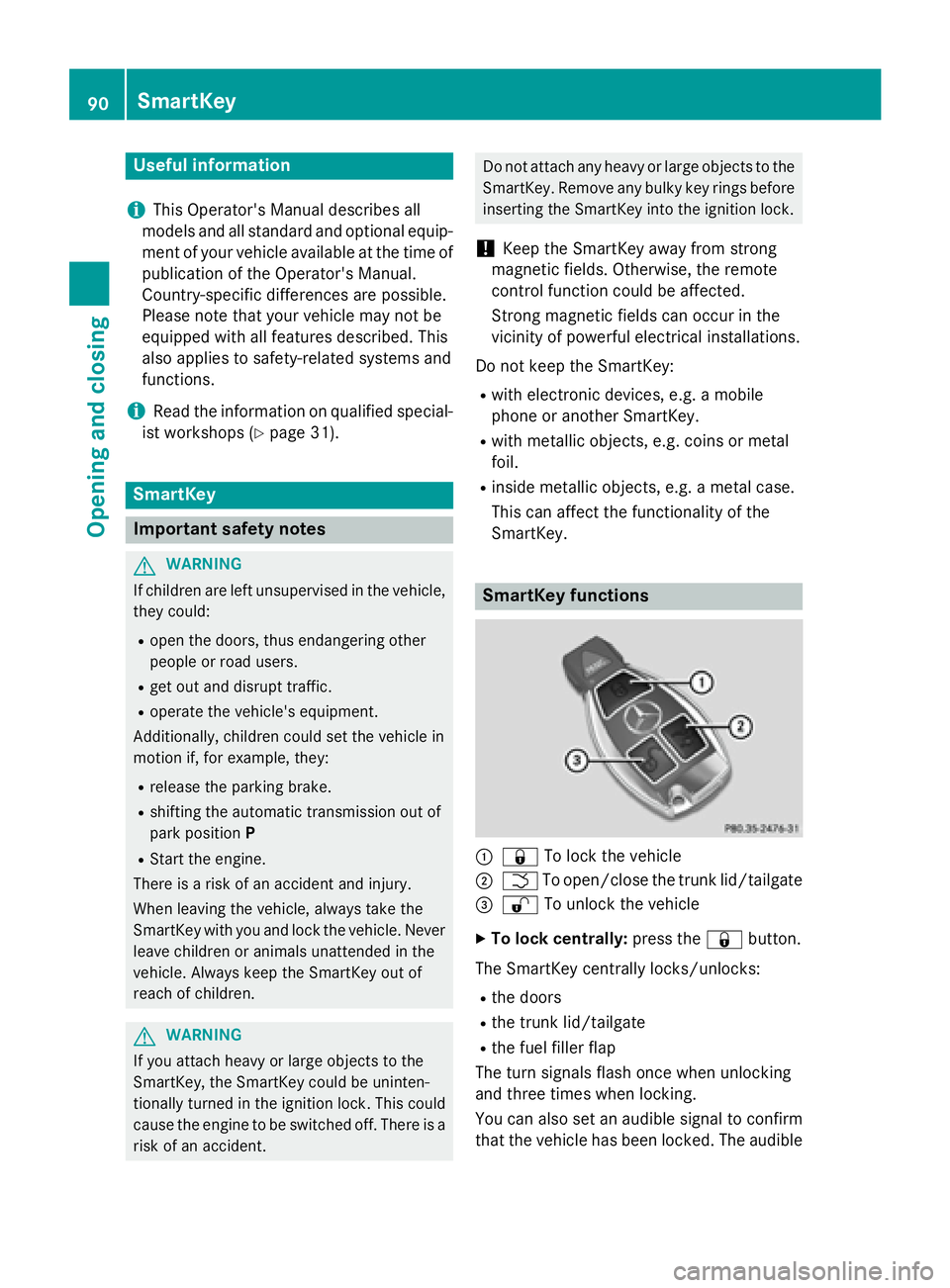
:& To lock the vehicle
;FTo open/close the trunk lid/tailgate
=% To unlock the vehicle
XTo lock centrally: press the&button.
The SmartKey centrally locks/unlocks:
Rthe doors
Rthe trunk lid/tailgate
Rthe fuel filler flap
The turn signals flash once when unlocking
and three times when locking.
You can also set an audible signal to confirm
that the vehicle has been locked. The audible
90SmartKey
Opening and closing
Page 97 of 350
ProblemPossible causes/consequences andMSolutions
You have lost the
mechanical key.XReport the loss immediately to the vehicle insurers.
XIf necessary, have the locks changed as well.
The engine cannot be
started using the
SmartKey.the on-board voltage is too low.
XSwitch off non-essential consumers, e.g. seat heating or interior
lighting, and try to start the engine again.
If this does not work:
XCheck the starter battery and charge it if necessary
(
Ypage 278).
or
XJump-start the vehicle (Ypage 279).
or
XConsult a qualified specialist workshop.
The engine cannot be
started using KEYLESS-
GO. The SmartKey is in
the vehicle.The vehicle is locked.
XUnlock the vehicle and try to start the vehicle again.
There is interference from a powerful source of radio waves.
XStart your vehicle with the SmartKey in the ignition lock.
Doors
Important safety notes
GWARNING
If children are left unsupervised in the vehicle,
they could:
Ropen the doors, thus endangering other
people or road users.
Rget out and disrupt traffic.
Roperate the vehicle's equipment.
Additionally, children could set the vehicle in
motion if, for example, they:
Rrelease the parking brake.
Rshifting the automatic transmission out of
park position P
RStart the engine.
There is a risk of an accident and injury.
When leaving the vehicle, always take the
SmartKey with you and lock the vehicle. Never
leave children or animals unattended in the
vehicle. Always keep the SmartKey out of
reach of children.
Ideally, place luggage or loads in the trunk/
cargo compartment. Observe the loading
guidelines (
Ypage 238).
Information in the Digital Operator's
Manual
In the Digital Operator's Manual you will find
information on the following topics:
RUnlocking and opening doors from the
inside
RCentrally locking and unlocking the vehicle
from the inside
RAutomatic locking feature
Doors95
Opening and closing
Z
Page 98 of 350
Unlocking the driver's door (mechan-
ical key)
If the vehicle can no longer be unlocked with
the SmartKey, use the mechanical key.
XTake the mechanical key out of the Smart-
Key (
Ypage 92).
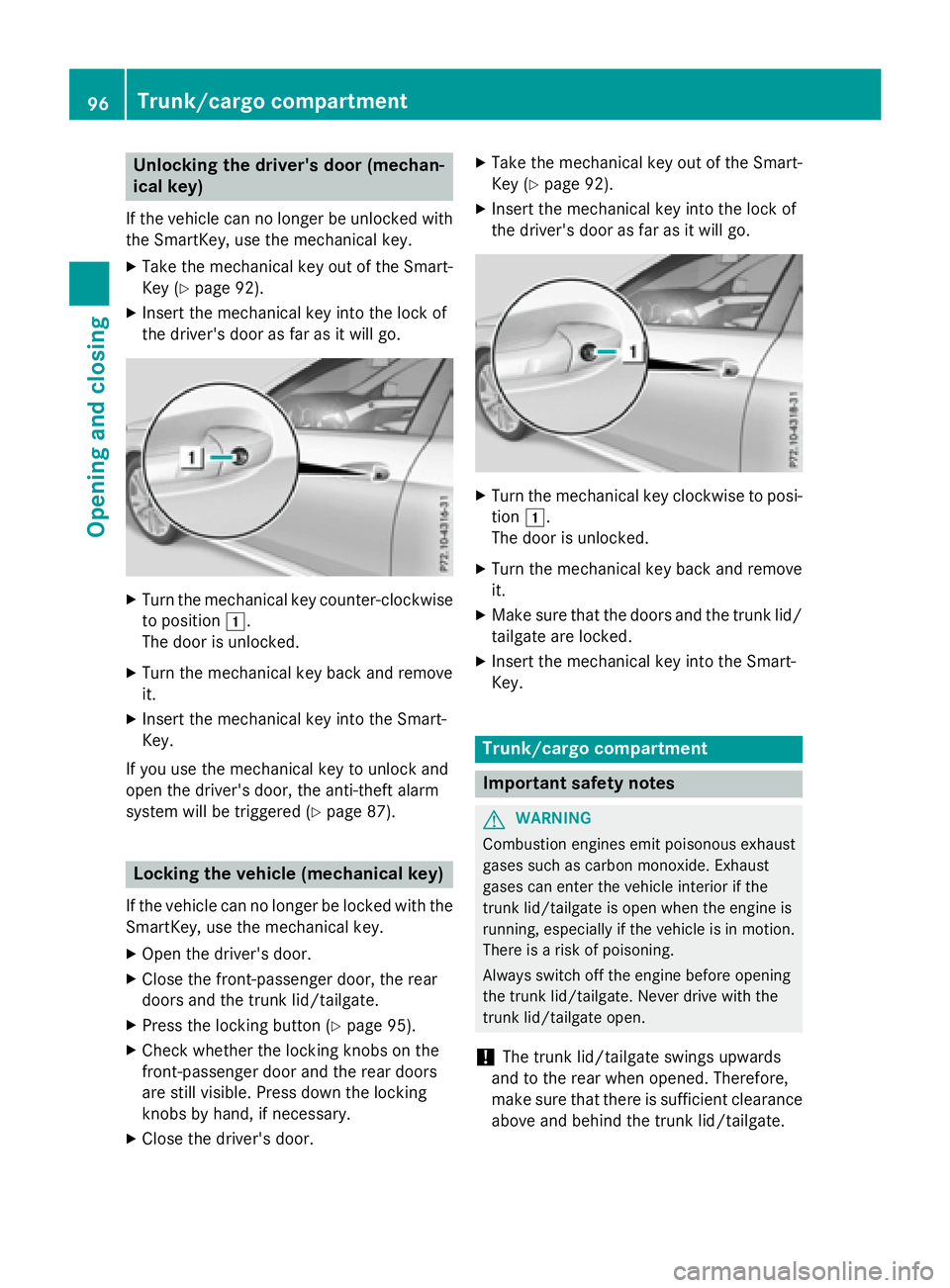
XInsert the mechanical key into the lock of
the driver's door as far as it will go.
XTurn the mechanical key counter-clockwise
to position1.
The door is unlocked.
XTurn the mechanical key back and remove
it.
XInsert the mechanical key into the Smart-
Key.
If you use the mechanical key to unlock and
open the driver's door, the anti-theft alarm
system will be triggered (
Ypage 87).
Locking the vehicle (mechanical key)
If the vehicle can no longer be locked with the
SmartKey, use the mechanical key.
XOpen the driver's door.
XClose the front-passenger door, the rear
doors and the trunk lid/tailgate.
XPress the locking button (Ypage 95).
XCheck whether the locking knobs on the
front-passenger door and the rear doors
are still visible. Press down the locking
knobs by hand, if necessary.
XClose the driver's door.
XTake the mechanical key out of the Smart-
Key (
Ypage 92).
XInsert the mechanical key into the lock of
the driver's door as far as it will go.
XTurn the mechanical key clockwise to posi-
tion 1.
The door is unlocked.
XTurn the mechanical key back and remove
it.
XMake sure that the doors and the trunk lid/
tailgate are locked.
XInsert the mechanical key into the Smart-
Key.
Trunk/cargo compartment
Important safety notes
GWARNING
Combustion engines emit poisonous exhaust
gases such as carbon monoxide. Exhaust
gases can enter the vehicle interior if the
trunk lid/tailgate is open when the engine is
running, especially if the vehicle is in motion.
There is a risk of poisoning.
Always switch off the engine before opening
the trunk lid/tailgate. Never drive with the
trunk lid/tailgate open.
!The trunk lid/tailgate swings upwards
and to the rear when opened. Therefore,
make sure that there is sufficient clearance
above and behind the trunk lid/tailgate.
96Trunk/cargo compartment
Opening and closing
Page 99 of 350
Ideally, place luggage or loads in the trunk/
cargo compartment. Observe the loading
guidelines (
Ypage 238).
Do not leave the SmartKey in the trunk/cargo compartment. You could otherwise lock your-
self out.
Sedan without the trunk lid convenience
closing feature: the trunk lid can be:
Ropened and closed manually from outside
Ropened automatically from outside
Ropened automatically from inside
Rlocked separately
Ropened with the emergency release button
Runlocked with the mechanical key
Sedan with the trunk lid convenience
closing feature: the trunk lid can be:
Ropened and closed manually from outside
Ropened and closed automatically from out-
side
Ropened and closed automatically from
inside
Rlocked separately
Ropened with the emergency release button
Runlocked with the mechanical key
Wagon: you can:
Ropen and close the tailgate manually from
outside
Ropen the tailgate manually from inside
(Wagon with a folding bench seat)
Ropen and close the tailgate automatically
from outside
Ropen and close the tailgate automatically
from inside
Rlimit the opening angle of the tailgate
Runlock the tailgate using the mechanical
key
Trunk lid/tailgate reversing feature
The trunk lid/tailgate is equipped with an
automatic reversing feature. It reacts if a solid
object obstructs or restricts the trunk lid/
tailgate during the closing procedure. The trunk lid/tailgate opens again automatically.
The automatic reversing feature is only an aid
and is not a substitute for your attentiveness to the trunk lid/tailgate while it is closing.
GWARNING
The reversing feature does not react:
Rto soft, light and thin objects, e.g. small fin-
gers
Rover the last 1/3 in (8 mm) of the closing
movement
This means that the reversing feature cannot
prevent someone being trapped in these sit-
uations. There is a risk of injury.
Make sure that no body parts are in close
proximity during the closing procedure.
If somebody becomes trapped:
Rpress the Fbutton on the SmartKey, or
Rpull or press the remote operating switch
on the driver's door or
Rpress the closing or locking button on the
trunk lid/tailgate, or
Rpull the handle on the trunk lid/tailgate
Opening/closing from outside
Opening
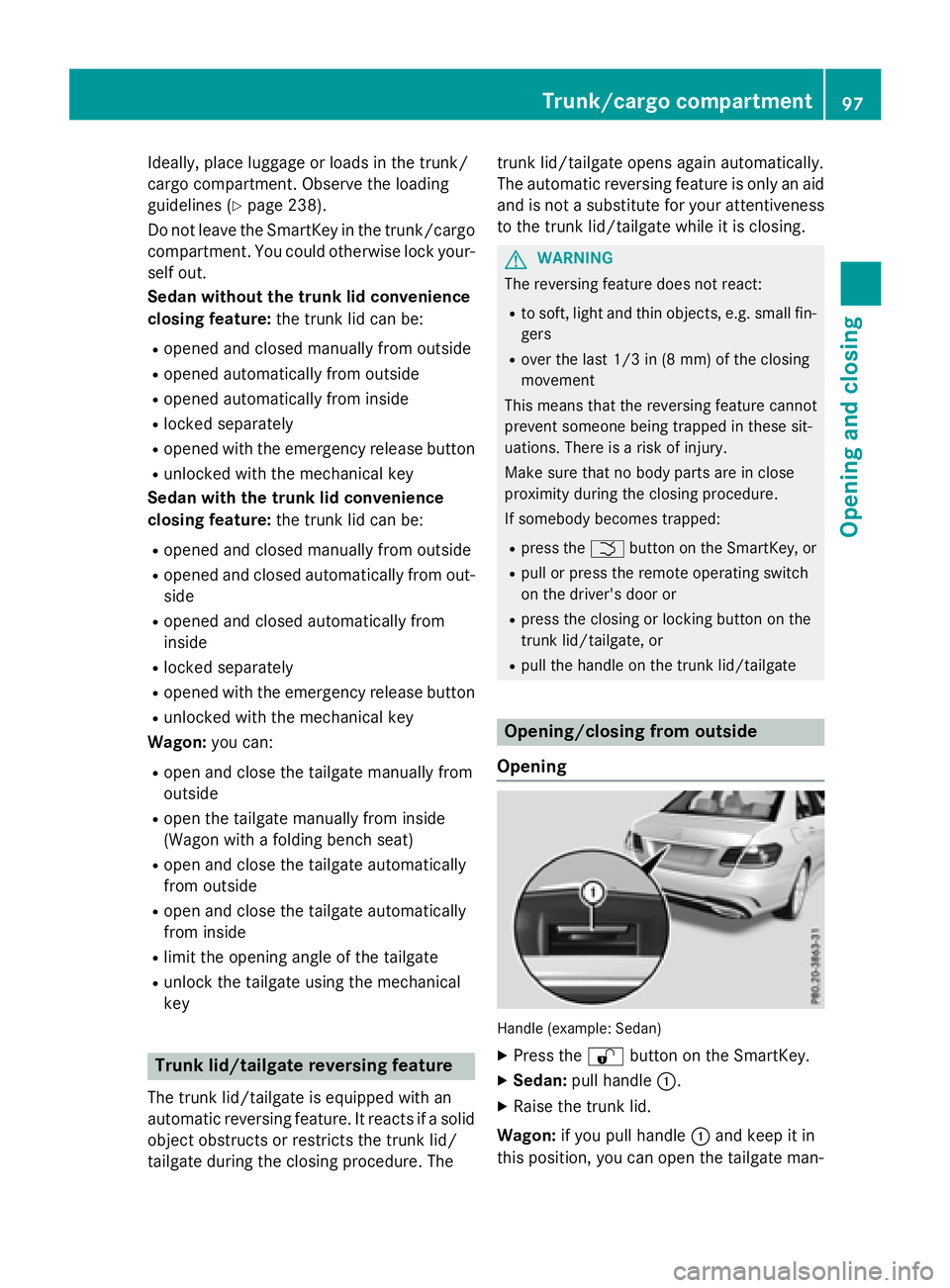
Handle (example: Sedan)
XPress the %button on the SmartKey.
XSedan: pull handle :.
XRaise the trunk lid.
Wagon: if you pull handle :and keep it in
this position, you can open the tailgate man-
Trunk/cargo compartment97
Opening and closing
Z
Page 100 of 350
ually.Ifyou release the handle, the tailgate
opens automatically.
Closing
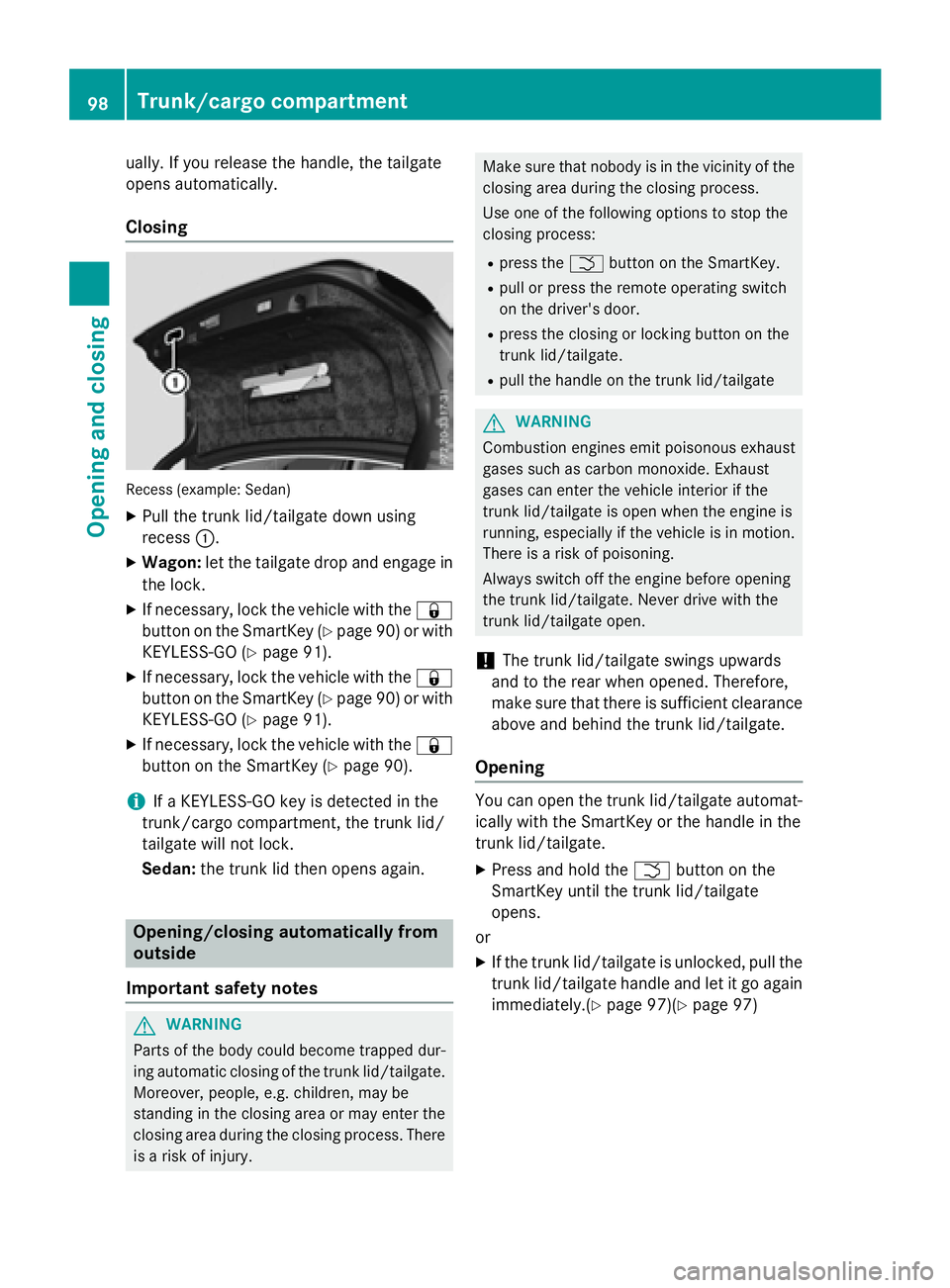
Recess (example: Sedan )
XPull the trunk lid/tailgate downusing
recess :.
XWagon: let the tailgate drop and engage in
the lock.
XIf necessary, lock the vehicle with the &
button on the SmartKey (
Ypage 90) or with
KEYLESS -GO (
Ypage 91).
XIfnecessary, lock the vehicle with the &
button on the SmartKey (
Ypage 90) or with
KEYLESS -GO (
Ypage 91).
XIfnecessary, lock the vehicle with the &
button on the SmartKey (
Ypage 90).
iIfa KEYLESS -GO keyisdetected in the
trunk /cargo compartment, the trunk lid/
tailgate willnot lock.
Sedan: the trunk lid then opens again.
Opening/closing automatically from
outside
Important safety notes
GWARNIN G
Part sof th ebody could become trapped dur-
ing automatic closin gof th etrunk lid/tailgate.
Moreover, people, e.g. children ,may be
standing in th eclosin garea or may ente rth e
closin garea durin gth eclosin gprocess. Ther e
is aris kof injury.
Mak esure that nobody is in th evicinity of th e
closin garea durin gth eclosin gprocess.
Use on eof th efollowin goption sto stop th e
closin gprocess:
Rpress th eF buttonon th eSmartKey.
Rpull or press th eremot eoperating switch
on th edriver' sdoor .
Rpress th eclosin gor lockin gbutto non th e
trunk lid/tailgate.
Rpull th ehandle on th etrunk lid/tailgat e
GWARNING
Combustion engines emit poisonous exhaust
gase ssuc has carbon monoxide. Exhaust
gase scan ente rth evehicl einterio rif th e
trunk lid/tailgat eis open when th eengin eis
running, especially if th evehicl eis in motion .
Ther eis aris kof poisoning .
Always switch off th eengin ebefore opening
th etrunk lid/tailgate. Never driv ewit hth e
trunk lid/tailgat eopen .
!The trunk lid/tailgate swings upwards
and to the rear when opened. Therefore,
make sure that there issufficient clearance
above and behind the trunk lid/tailgate.
Opening
You can open the trunk lid/tailgate automat-
ical ly wit h the SmartKey or the handle inthe
trunk lid/tailgate.
XPress and hold the Fbutton on the
Sm artKey unt ilthe trunk lid/tailgate
opens.
or
XIf the trunk lid/tailgate isunlocked, pullthe
trunk lid/tailgate handle and let itgo again
immediately.(
Ypage 97)(Ypage 97)
98Trunk/cargo compartment
Opening and closing
Page 101 of 350
Closing
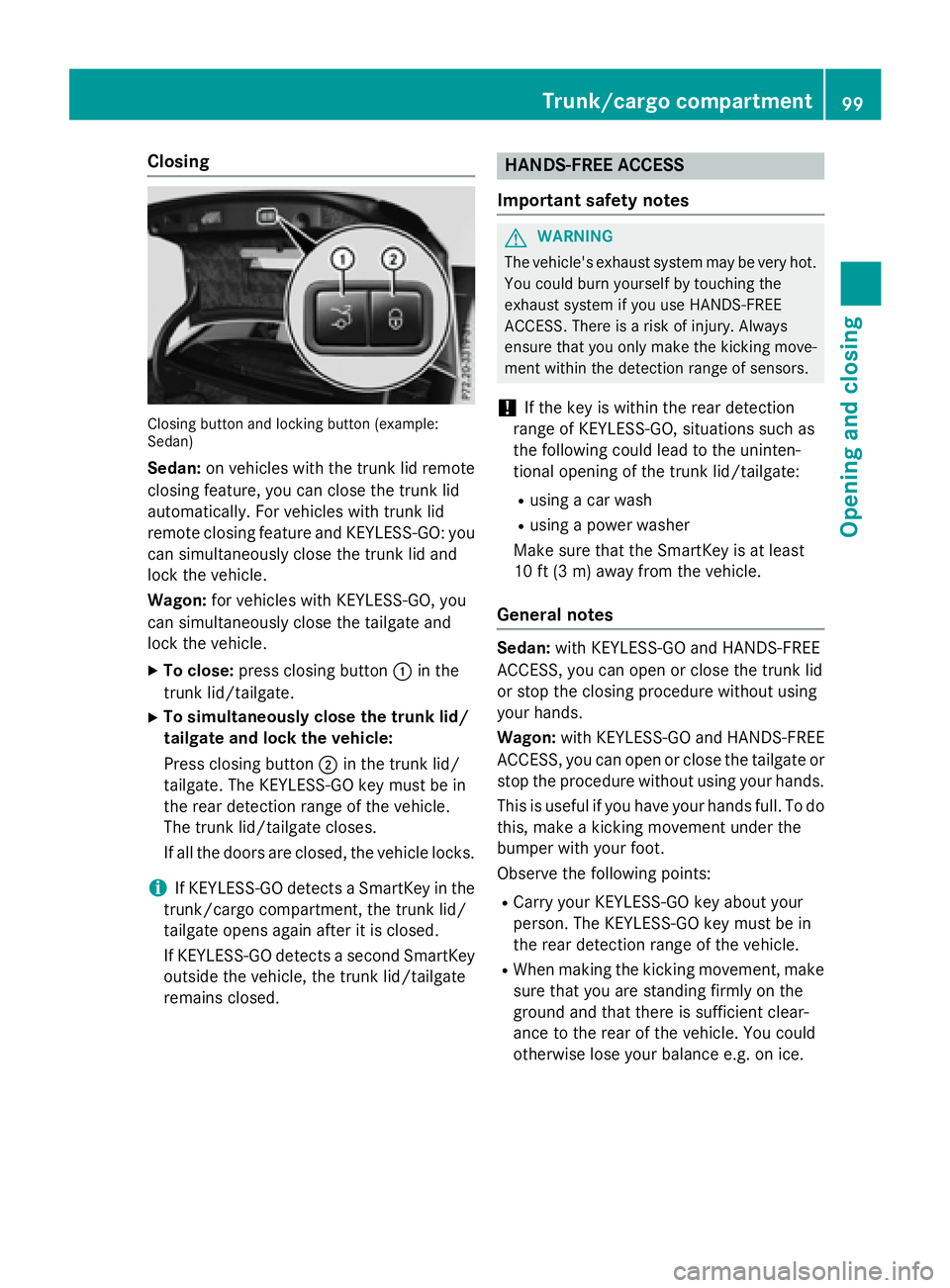
Closingbutto nand lockin gbutto n(example :
Sedan)
Sedan: on vehicles with the trunk lid remote
closing feature, you can close the trunk lid
automatically. For vehicles with trunk lid
remote closing feature and KEYLESS-GO: you
can simultaneously close the trunk lid and
lock the vehicle.
Wagon: for vehicles with KEYLESS-GO, you
can simultaneously close the tailgate and
lock the vehicle.
XTo close: press closing button :in the
trunk lid/tailgate.
XTo simultaneously close the trunk lid/
tailgate and lock the vehicle:
Press closing button ;in the trunk lid/
tailgate. The KEYLESS-GO key must be in
the rear detection range of the vehicle.
The trunk lid/tailgate closes.
If all the doors are closed, the vehicle locks.
iIf KEYLESS-GO detects a SmartKey in the
trunk/cargo compartment, the trunk lid/
tailgate opens again after it is closed.
If KEYLESS-GO detects a second SmartKey
outside the vehicle, the trunk lid/tailgate
remains closed.
HANDS-FREE ACCESS
Important safety notes
GWARNING
The vehicle's exhaust system may be very hot. You could burn yourself by touching the
exhaust system if you use HANDS-FREE
ACCESS. There is a risk of injury. Always
ensure that you only make the kicking move-
ment within the detection range of sensors.
!If the key is within the rear detection
range of KEYLESS-GO, situations such as
the following could lead to the uninten-
tional opening of the trunk lid/tailgate:
Rusing a car wash
Rusing a power washer
Make sure that the SmartKey is at least
10 ft (3 m) away from the vehicle.
General notes
Sedan: with KEYLESS-GO and HANDS-FREE
ACCESS, you can open or close the trunk lid
or stop the closing procedure without using
your hands.
Wagon: with KEYLESS-GO and HANDS-FREE
ACCESS, you can open or close the tailgate or
stop the procedure without using your hands.
This is useful if you have your hands full. To do
this, make a kicking movement under the
bumper with your foot.
Observe the following points:
RCarry your KEYLESS-GO key about your
person. The KEYLESS-GO key must be in
the rear detection range of the vehicle.
RWhen making the kicking movement, make
sure that you are standing firmly on the
ground and that there is sufficient clear-
ance to the rear of the vehicle. You could
otherwise lose your balance e.g. on ice.
Trunk/cargo compartment99
Opening and closing
Z