phone MERCEDES-BENZ E WAGON 2021 User Guide
[x] Cancel search | Manufacturer: MERCEDES-BENZ, Model Year: 2021, Model line: E WAGON, Model: MERCEDES-BENZ E WAGON 2021Pages: 466, PDF Size: 42.07 MB
Page 127 of 466
#
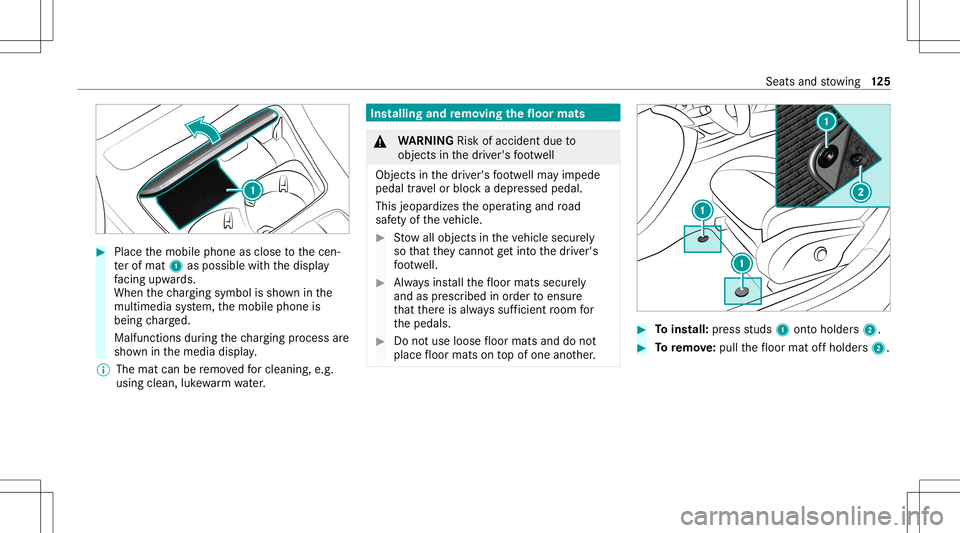
Place themobile phoneasclose tothecen‐
te rof mat 1aspossi blewithth edispla y
fa cing upwa rds.
When thech argin gsymbo lis sho wninthe
multime diasystem, themobile phoneis
being charge d.
Malfunct ionsduring thech argin gpr oce ssare
sho wninthemedia display.
% The mat canberemo vedfo rclea ning, e.g.
usi ng clea n,luk ewa rmwater. Ins
tallin gand remo ving the floor mats &
WARNIN GRisk ofacci dent dueto
object sin thedr iver's foot we ll
Obj ectsin thedr iver's foot we llma yim pede
pedal trav el or bloc kadepr essed pedal.
This jeopar dizestheoper ating androad
saf etyof theve hicle. #
Stow allobj ect sin theve hicle secur ely
so that they canno tget intoth edr iver's
fo ot we ll. #
Alw aysins tallth efloor mats securely
and asprescr ibed inorder toensur e
th at ther eis alw ayssuf ficie ntroom for
th epedals. #
Donotuse loose floor mats anddonot
place floor mats ontopof one another. #
Toins tall: press studs 1onto holder s2. #
Toremo ve:pu llth efloor mat offholder s2. Seats
andstow ing 12
5
Page 156 of 466
Cha
rging thest ar terbatt erybe fore star ting
th ejou rney
If th eve hicle batteryis disc harged, youcan
re cei veames sageon your smar tphon e.Youcan
th en star tth eve hicle withth esmar tphon eto
ch arge thebatt ery. The vehicle isaut omatically
switc hedoffaf te rte nminu tes.
Ensur eth efo llo wing beforest ar tin gth eengine:
R The legalstipulation sin thear ea wher eyo ur
ve hicle ispar kedallo wengin est ar tin gvia
smar tphon e.
R Itis saf eto star tand runth eengine where
yo ur vehicle ispar ked.
R The fuel tank issu fficien tly full.
St arting theve hicl e(R emo teOnline) &
WARNIN GRisk ofcrus hing orentr ap‐
ment dueto unin tentio nalstar tin gof the
engine
Limbs couldbecrushed ortrapped ifth e
engine isstar tedunint entionall ydur ing
ser vice ormaint enanc ewo rk. #
Alw ayssecur eth eengine agains tunin‐
te ntio nalstar tin gbef orecar rying out
maint enanceorrepair work. Re
quirement s:
R Park position 005Disselect ed.
R The anti- theftalar msystem isno tactiv ated.
R The panic alarmisno tactiv ated.
R The hazar dwa rning light system isswitc hed
of f.
R The hood isclosed.
R The door sar eclosed andlocked.
R The windo wsand slidin gsun roof areclosed. #
Startth eve hicle using thesmar tphon e.
Af tereve ryengine star t,th eengine runs for
te nminu tes.
Yo ucan carryout amaximum oftwoconsec u‐
tiv est ar tin gatt em pts. Yo umus tst ar tth eve hicle
once withth eSmar tKey bef oretrying tostar t
th eengine again withth esmar tphon e.youcan
st op theve hicle again atanytime. %
Further information canbefound inthe
smar tphone app.
Secur ingtheengine agains tst ar ting before
car rying out maintenance orrepair work: #
Swi tchon thehazar dwa rning light system.
or #
Unloc kth edoor s.
or #
Open aside windo wor thesliding sunroof. Br
eaking-in notes To
preser vetheengine during thefirs t
10 00 mile s(1 500 km):
R Drive at varying road spee dsand engine
spee ds.
R Donotdr ive at spee dsgrea terth an 85 mph
(1 40 km/ h).
R Drive th eve hicle indrive pr ogr am A
or ;.
R Shif tto thene xt highes tge ar attheve ry lat‐
es twhen theneedle reac hes thelas tth ird
bef oreth ere dar ea intheta ch ome ter. 15
4
Driving and parking
Page 244 of 466
Disp
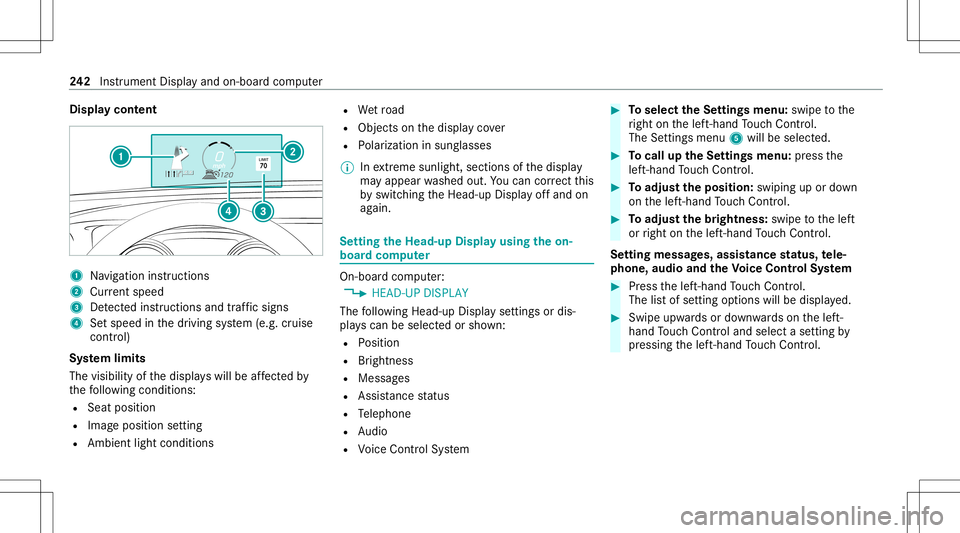
laycont ent 1
Navig ation instructions
2 Current speed
3 Detected instructi ons and traf fic sig ns
4 Setspe edinthedr iving system (e.g. cruise
con trol)
Sy stem limit s
The visib ilityofthedispla yswill beaffect ed by
th efo llo wing condition s:
R Seat position
R Imag eposit ionsetting
R Ambient lightcondition s R
Wetro ad
R Objectson thedispla yco ver
R Polar izat ion insung lasses
% Inextreme sunli ght, sectio nsofthedispla y
ma yappear washed out.Youcan correct this
by switc hingtheHead-up Displayof fand on
ag ain. Se
tting theHead -upDispla yusing theon-
boar dcom puter On-boar
dcom puter:
4 HEAD-UP DISPLA Y
The follo wing Head- upDisp lay se ttings ordis‐
pla yscan beselect edorsho wn:
R Position
R Brightness
R Messag es
R Assis tance status
R Telephon e
R Audio
R Voice Cont rolSy stem #
Toselect theSe ttings menu :swipe tothe
ri ght onthelef t-hand Touc hCon trol.
The Setting smen u5 will besele cted. #
Tocall uptheSe ttings menu :pr ess the
lef t-hand Touc hCon trol. #
Toadjus tth eposit ion:swipin gup ordown
on thelef t-hand Touc hCon trol. #
Toadjus tth ebr ight ness: swipe tothelef t
or right onthelef t-hand Touc hCon trol.
Se tting mes sages,assistance status, tele‐
phone, audioand theVo ice Contr olSy stem #
Press thelef t-hand Touc hCon trol.
The listof setting optio ns will bedispl ayed. #
Swipe upwards ordown wardson thelef t-
hand Touc hCon trol and selectase tting by
pr essing thelef t-hand Touc hCon trol. 24
2
Instrument Displayand on-boar dcom puter
Page 247 of 466
Home
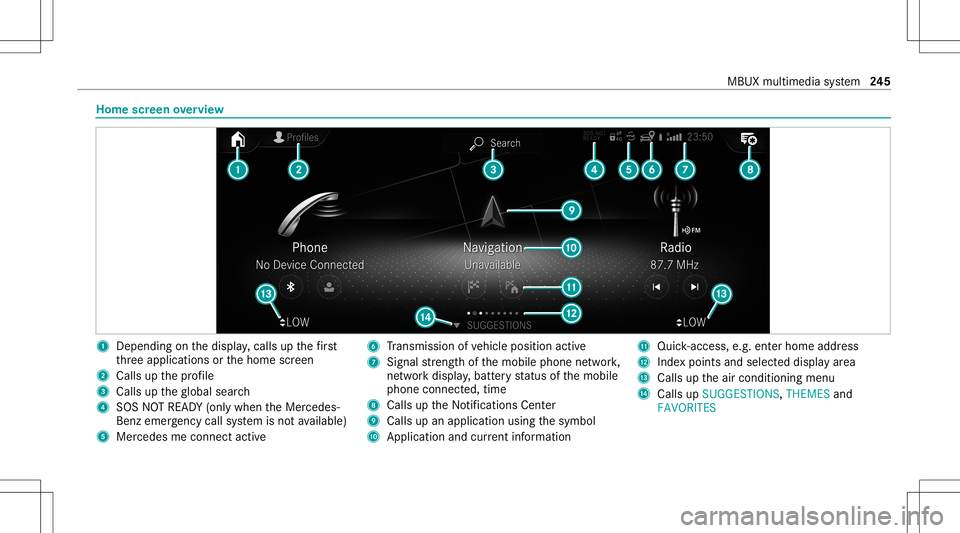
screen overvie w 1
Dep endingonthedispla y,cal lsup thefirs t
th re eapplications orthehome screen
2 Calls upthepr ofile
3 Calls uptheglobal search
4 SOS NOTREAD Y(only when theMer cedes-
Benz emergency callsy stem isno tav ailable)
5 Mercedesme connectact ive 6
Trans miss ionofvehicle position active
7 Signal stre ngt hof themobile phonenetwork,
ne tworkdispl ay,batt eryst atus ofthemobile
phone connect ed,time
8 Calls uptheNo tification sCent er
9 Calls upanapplication usingthesymbol
A Applicat ionand current informa tion B
Quick-acce ss,e.g.ent erhom ead dress
C Inde xpoi nts and select eddispl ayarea
D Calls uptheair con ditionin gmenu
E Calls upSUGGES TIONS,THEMES and
FAV ORITES MBUX
multimedia system 24
5
Page 264 of 466
Te
lephone Te
lephon y No
teson telephon y &
WARNIN GRisk ofdist ra ction from oper‐
ati ng integr ated commu nication equip‐
ment whiletheve hicle isin mo tion
If yo uoper ateco mm unic ationeq uipme nt
int egrat edintheve hicle when driving, you
cou ldbe dist ra cted from thetra ffic situat ion.
This could alsocause youto lose control of
th eve hicle. #
Onlyoper ateth is eq uipmen twhen the
tr af fic situ ation per mits. #
Ifyo ucan notbe sur eof this, stop the
ve hicle whilstpa ying attention toroad
and traffic condi tions andoperate the
eq uipment withth eve hicle statio nary. &
WARNIN GRisk ofan acci dent from
ope rating mob ile comm unicati onequip ‐
ment while th eve hicle isin mo tion
Mobile communication sde vices distract the
dr iver from thetraf fic situ ation. Thiscou ld
al so cau sethedr iver tolose control of the
ve hicle. #
Asthedr iver ,onl yoper atemobile com‐
municat ionsdevices when theve hicle is
st atio nary. #
Asave hicle occupant, onlyuse mobile
communication sde vices inthear eas
int ended forth is pur pose, e.g.inthe
re ar passe nger com partment . Yo
umus tobse rveth eleg alrequ iremen tsforth e
cou ntryin whi chyouar ecur rentl ydr ivi ng when
op erati ng mob ile comm unicati onequip ment in
th eve hicle. &
WARNIN GRisk ofinju rydue toobject s
being stowe dinco rrect ly
If objects intheve hicle interior arestowe d
inc orrectly ,th ey can slide orbe throw n
ar oun dand hitvehicle occupants. Inaddi‐
tion, cupholder s,open stow agespac esand
mobi lephon ere cep tacle scanno tal wa ys
re tain all obje ctswit hin.
Ther eis arisk ofinjur y,par ticular lyin the
ev ent ofsudden braking orasudden chang e
in dir ect ion. #
Alw aysst ow object sso that they can‐
no tbe throw nar ou nd insuch situa‐
tions. #
Alw aysmak esur eth at obj ect sdo not
pr otru de from stow agespac es,parcel
ne ts or stow agene ts. #
Close theloc kable stow agespac es
bef orest ar tin gajo ur ne y. #
Alw aysst ow and securehea vy,har d,
poin ted, shar p-edg ed,fragile orbulky
objec tsinthetrunk/ cargocom part‐
ment . 262
MBUX multimedia system
Page 265 of 466
Obser
vetheadditional information onstow ing
mobile communic ationsde vice scor rectly:
R Loa ding theve hicle (/page10 8)
Blue tooth®
connect ion:
The men uvie wand theav ailable function sin the
te lephon emen uar ein par tdepen dentonthe
Blu etoo th®
pr ofile ofthecon nect edmobile
phone. Fullfunc tionality isonl yav ailable ifth e
mobil ephone supports both ofthefo llo wing
Blue tooth®
pr ofiles:
R PBAP (Phone BookAccess Profile)
- The cont acts onthemobile phoneare
sho wnautomaticall yon themultimedia
sy stem.
R MAP (Messag eAc cess Profile)
- The mob ile pho nemess agefuncti onscan
be used on themultimedia system.
Ir re spectiv eof this, Blue tooth®
audio function al‐
ity can byused withan ymob ileradio unit.
Fo rinf ormation onthera ng eof func tions ofthe
mobil era dio unit tobe con nected, see theman‐
uf actur er'soper ating instruction s. Ne
tworkco nn ectio n:
The follo wing cases canlead tothecall being
discon nectedwhile theve hicle isin mo tion:
R Youswit chintoatransm ission /recep tion
st atio n,inwhic hno com mun ication chann el
is free.
R The SIM car dused isno tcom patible withth e
ne tworkav ailable
R Amobi lephon ewit h"T winc ard" islogg ed
int oth ene tworkwit hth esecon dSIM cardat
th esame time
The multimedia system suppor tscalls inHD
Vo ice ®
forim prov ed speec hqu alit y.Arequ ire‐
men tfo rth is isthat themobile phoneandthe
mobil ephone networkpr ov ider oftheper son
yo uar ecalli ngsuppo rtHD Voice ®
.
Depe ndingon thequ alit yof thecon nect ion,the
vo ice qualit yma yfluct uate.
Fu rther information canbeobt ained from an
aut hor ized Mercedes-Ben zCent eror at:
https: //www .mercedes-benz .com/connect MBUX
multimedia system 263
Page 266 of 466
Te
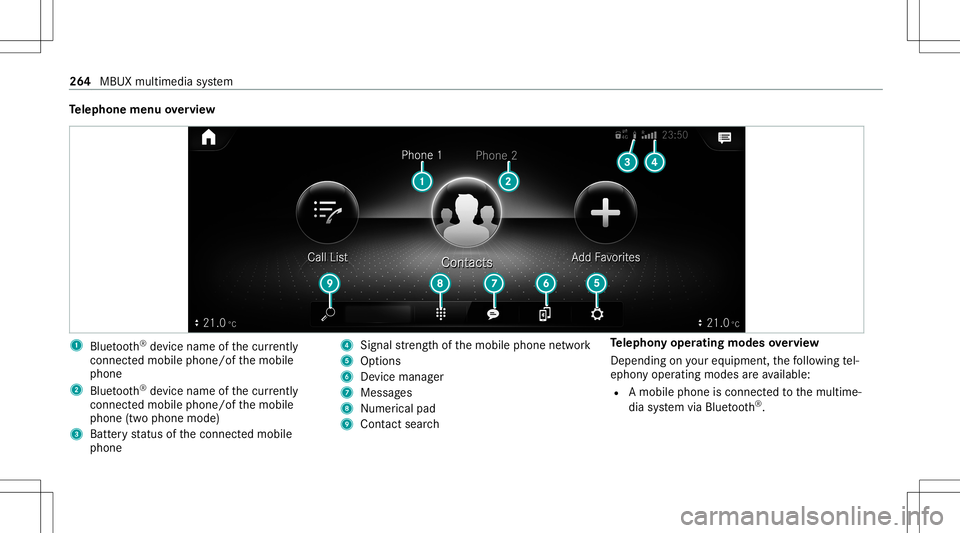
lephone menuoverview 1
Blue tooth®
de vice name ofthecur rently
conne cted mob ile pho ne/o fth emobile
phone
2 Blue tooth®
de vice name ofthecur rently
conne cted mob ile pho ne/o fth emobile
phone (twophone mode)
3 Batt eryst atus ofthecon nect edmobile
phone 4
Signal stre ngt hof themobile phonenetwork
5 Option s
6 Device manag er
7 Messag es
8 Nume rical pad
9 Contact search Te
lephon yoper ating mod esove rview
Depen dingonyour equipme nt,th efo llo wing tel‐
ephon yoper atingmodes areav ailable:
R Amobi lephon eis con nectedto themultime‐
dia system viaBlue tooth®
. 26
4
MBUX multimedia system
Page 267 of 466
R
Twomobile phones areconn ectedwithth e
multime diasystem viaBlue tooth®
(tw o
phone mode).
- Youcan useallthefunc tionsof themulti‐
media system withth emobile phonein
th efo re ground.
- Youcan recei veinc omin gcalls andmes‐
sag eswit hth emobile phoneinthebac k‐
gr ound.
Yo ucan interch ang eth emobile phonein
th efo re ground andbackground .
Connect ingamob ilephone
Re quirement s:
R Blue tooth®
is act ivat ed on themobile phone
(see themanuf acturer'soper ating instruc‐
tion s).
R Blue tooth®
is act ivat ed on themultimedia
sy stem. Multimedia
system:
4 © 5
Phone
Sear ching fora mob ile pho ne #
Select í. #
Select Connect NewDevice.
Co nnectin gamob ile pho ne
Au thor ization follo ws usin gsec uresim ple pair‐
ing . #
Select amob ilephon e.
A co de isdispl ayed inthemultimedia system
and onthemobile phone. #
Ifbo th code smatc h,conf irm thecode onthe
mobil ephone.
Fu nctions inthete lephon ymenu
In thete lephon ymen uyo uha ve thefo llo wing
func tions,forex am ple:
R Mak ingcalls ,e.g .:
- R Accep ta cal l
- k EndCall
- i Create Confer. Call -
Accep ting orrejecti ngawa itin gcall
R Managin gcon tacts, e.g.:
- Downl oading mob ile pho necont acts
- Managi ngthefo rm atofacon tact's name
- Saving acont actasafa vo rite
R Recei ving andsend ingmess ages, e.g.:
- Usingthere ad-al oudfunction
- Dictating ane wmes sage Mer
cede sme and apps Mer
cede sme connect Inf
ormation onMer cede sme connect
Mer cedes meconnect consistsof multi pleserv‐
ices.
Yo ucan usethefo llo wing service svia themulti‐
media system and theov erhead control panel,
fo rex am ple:
R Accid ent and Brea kdo wnManag eme nt(me
bu tton orsitu ation-de pendentdispl ayinthe
multime diasystem) MBUX
multimedia system 265
Page 269 of 466
%
These services aresubject totech nica l
re strictions such asthemobile phonecover‐
ag e, mobil ene tworkqu alit yand theability of
th epr ocessin gsy stems tointerpr et the
tr ans ferred dat a.In some circums tances,
th is can result indela ysorthefa ilur eof the
inf ormatio nto appear inthemultimedia sys‐
te m.
Mor einf ormation aboutMer cedes meconnect
ser vices canbeobt ained intheMer cedes me
Po rtal: http s:// me. secure.m erced es-ben z.com
Data trans ferre ddur ing Mer cedes mecon‐
ne ct cal lse rvices
The datatransf erreddur ing aMer cedes mecon‐
nec tcall depends on:
R The reason forinitia tionofthecall
R The service that isselec tedin thevo ice con ‐
tr ol system
R The activ ated Mer cedes meconnect services
Yo ucan find outwh ich da ta istransf erredwhen
using theser vices inthecur rentl yva lid
Mer cedes meconnectte rm sof use and thedat a
pr otect ion information forMer cedes mecon‐ nect.
Youcan find these inyour Mer cedesme
user accoun t. Mer
cedes mecalls Ma
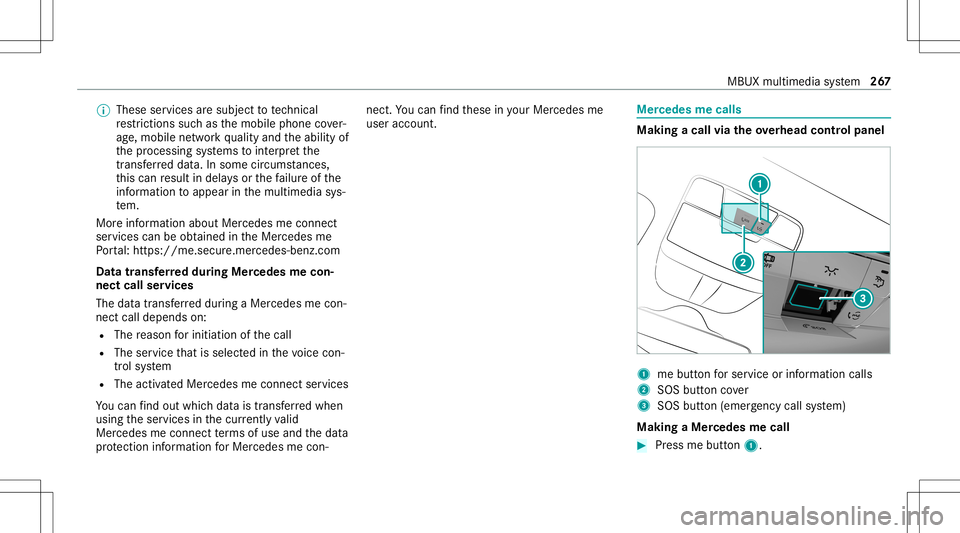
king acall viatheove rhead contr olpa nel 1
mebutt onforser vice orinformation calls
2 SOS buttoncover
3 SOS button (emerg ency callsy stem)
Making aMer cedes mecall #
Press mebutt on1. MBUX
multimedia system 26
7
Page 270 of 466
Making
anemer gency call #
Toopen theco verof SOS button2 ,pr ess it
br ief ly. #
Press and hold SOS button3 forat lea st
one second.
If aMer cedes mecall isactiv e,an emer gency
cal lcan still be trigg ered. This hasprior ity ove r
all other activ ecalls.
Inf ormat ionabout theMer cedes mecall
using theme button
A cal lto theMer cedes- BenzCustomer Cent er
has been initiatedvia theme butt onintheove r‐
head controlpanel orthemultimedia system
(/ page26 7).
Using thevo ice dialog system youacc ess the
desir edser vice:
R Accid ent and Brea kdo wnManag eme nt
R Mer cede s-Benz Customer Centerforge ner al
inf orma tionab ou tth eve hicle
Yo ucan find informa tionon thefo llo wing topics:
R Activati on ofMe rcedes meconnect
R Oper ating theve hicle R
Near estaut hor ized Mercedes-Ben zCent er
R Other products andservices from Mer cedes-
Benz
Dat ais transf erreddur ing thecon nect iontothe
Mer cedes-Ben zCus tomer Cent er(/ page269).
Call ingtheMer cedes- BenzCustomer Center
usi ng the multi mediasy stem
Re quirement s:
R Access toaGSM networkis available.
R The contract partner' sGSM networkco ver‐
ag eis available inthere spectiv ere gion.
R The ignition mustbe switc hedonsothat
ve hicle datacan betransf erredaut omati‐
cally .
Multimedia system:
4 © 5
Phone 5
g #
Call Mercedes meconnect.
Af terconf irmation, themultimedia system
sends there qu ired vehicle data.The data
tr ansf erissho wninthemedia display. Then,
youcan selectaser viceand beconn ect ed
to aspec ialistat theMer cedes- BenzCustomer
Cent er.
Call ingtheMer cedes- BenzCustomer Center
af te raut omat icac ciden tor break down
de tection
Re quirement s:
R The vehicle hasdetected anacci dent or
br ea kdo wnsitu ation.
R The vehicle isstatio nary.
R The hazar dwa rning light sar eswitc hedon.
% This function isno tav ailable inall coun tries.
The vehicle candetect acci dent orbrea kdo wn
situ ations undercer tain cir cums tances.
In theeve ntan acci dent or brea kdo wnisde tec‐
te d, theemer gency guide sho wssafetyno tesin
th emultimedia system displa y.
Af terqu itting theemer gency guide displ ayon
th emultimedia system, apr om ptappear sask ing
whe ther youwo uld liketo get suppor tfr om the
Mer cedes-Ben zCus tomer Cent er. 268
MBUX multime diasystem