air condition MERCEDES-BENZ E300 BLUETEC 2011 W212 Owner's Guide
[x] Cancel search | Manufacturer: MERCEDES-BENZ, Model Year: 2011, Model line: E300 BLUETEC, Model: MERCEDES-BENZ E300 BLUETEC 2011 W212Pages: 400, PDF Size: 16.3 MB
Page 211 of 400
Active Blind Spot Assist
Important safety notes
Active Blind Spot Assist uses a radar sensor
system to monitor the side areas of your
vehicle. In addition, it uses the radar sensor
system to monitor the front area as well.
Active Blind Spot Assist is activated at speeds
above approximately 20 mph (30 km/h). A
warning lamp in the exterior mirrors calls your
attention to a vehicle or certain obstacles in
the area monitored. If you switch on the
corresponding turn signal before changing
lane, you will also receive visual and audible
collision warnings. If a risk of lateral collision
is detected, corrective braking may help you
avoid a collision.
GWarning
Active Blind Spot Assist is only an aid, and
may detect vehicles/obstacles incorrectly or
not at all.
The system may be impaired or may not
function if:
R there is poor visibility, e.g. due to snow,
rain, fog or spray.
R the rear and/or front sensors are dirty.
Active Blind Spot Assist may not detect
narrow vehicles, such as motorcycles or
bicycles, or only detect them too late. It
cannot detect vehicles that are overtaken at
a small distance and then enter the blind spot
area.
Active Blind Spot Assist cannot detect road
and traffic conditions. It is not a substitute for
attentive driving. You are responsible for the
vehicle's speed, braking in good time, and
steering correctly. Always adapt your driving
style to suit the prevailing road and weather
conditions. Always pay attention to traffic
conditions and your surroundings. Otherwise,
you may fail to recognize dangers in time,
cause an accident and injure yourself and
others.
i USA only:
This device has been approved by the FCC
as a “Vehicular Radar System”. The radar
sensor is intended for use in an automotive
radar system only. Removal, tampering, or
altering of the device will void any
warranties, and is not permitted by the
FCC. Do not tamper with, alter, or use in
any non-approved way.
Any unauthorized modification to this
device could void the user’s authority to
operate the equipment.
For Active Blind Spot Assist to assist you
when driving, the radar sensor system must
be activated ( Y page 232) and operational.
Monitoring range
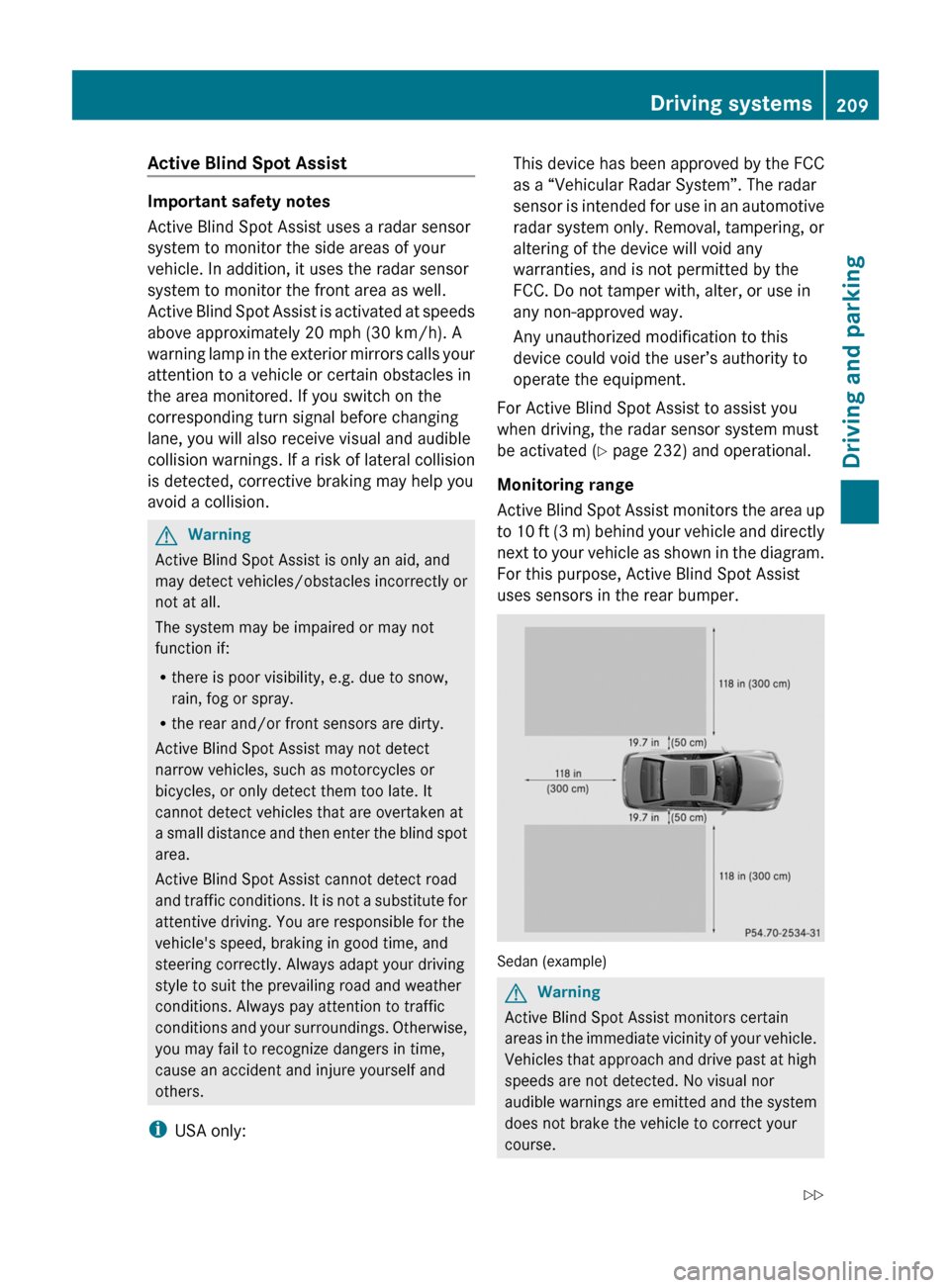
Active Blind Spot Assist monitors the area up
to 10 ft (3 m) behind your vehicle and directly
next to your vehicle as shown in the diagram.
For this purpose, Active Blind Spot Assist
uses sensors in the rear bumper.
Sedan (example)
GWarning
Active Blind Spot Assist monitors certain
areas in the immediate vicinity of your vehicle.
Vehicles that approach and drive past at high
speeds are not detected. No visual nor
audible warnings are emitted and the system
does not brake the vehicle to correct your
course.
Driving systems209Driving and parkingBA 212 USA, CA Edition B 2011; 1; 5, en-USdimargiVersion: 3.0.3.62010-05-20T13:33:46+02:00 - Seite 209Z
Page 214 of 400
Keeping Assist detects lane markings on the
road and warns you before you leave your
lane unintentionally. If you do not react to the
warning, a lane-correcting application of the
brakes can bring the vehicle back into the
original lane.
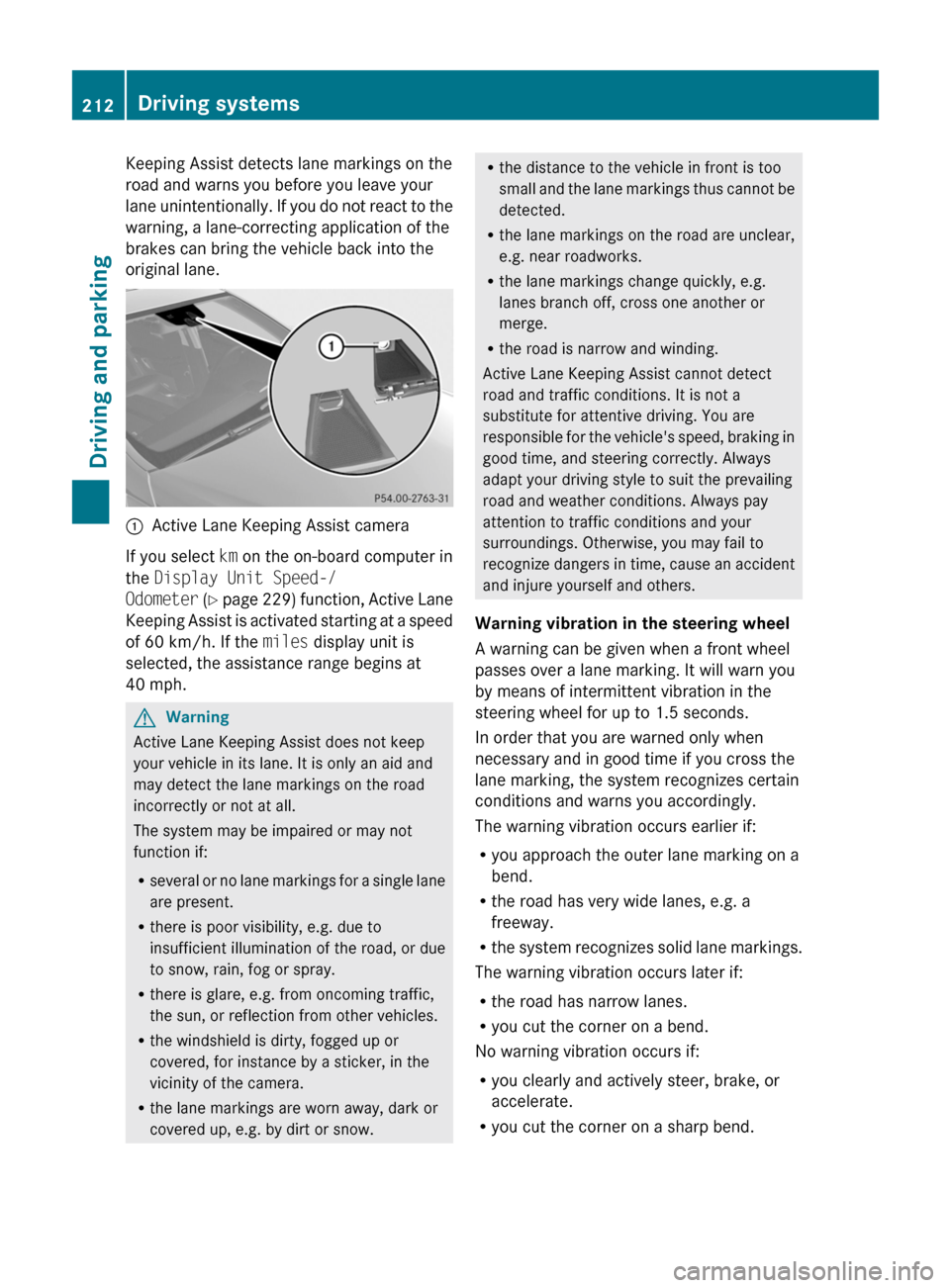
:Active Lane Keeping Assist camera
If you select km on the on-board computer in
the Display Unit Speed-/
Odometer (Y page 229) function, Active Lane
Keeping Assist is activated starting at a speed
of 60 km/h. If the miles display unit is
selected, the assistance range begins at
40 mph.
GWarning
Active Lane Keeping Assist does not keep
your vehicle in its lane. It is only an aid and
may detect the lane markings on the road
incorrectly or not at all.
The system may be impaired or may not
function if:
Rseveral or no lane markings for a single lane
are present.
Rthere is poor visibility, e.g. due to
insufficient illumination of the road, or due
to snow, rain, fog or spray.
Rthere is glare, e.g. from oncoming traffic,
the sun, or reflection from other vehicles.
Rthe windshield is dirty, fogged up or
covered, for instance by a sticker, in the
vicinity of the camera.
Rthe lane markings are worn away, dark or
covered up, e.g. by dirt or snow.
Rthe distance to the vehicle in front is too
small and the lane markings thus cannot be
detected.
Rthe lane markings on the road are unclear,
e.g. near roadworks.
Rthe lane markings change quickly, e.g.
lanes branch off, cross one another or
merge.
Rthe road is narrow and winding.
Active Lane Keeping Assist cannot detect
road and traffic conditions. It is not a
substitute for attentive driving. You are
responsible for the vehicle's speed, braking in
good time, and steering correctly. Always
adapt your driving style to suit the prevailing
road and weather conditions. Always pay
attention to traffic conditions and your
surroundings. Otherwise, you may fail to
recognize dangers in time, cause an accident
and injure yourself and others.
Warning vibration in the steering wheel
A warning can be given when a front wheel
passes over a lane marking. It will warn you
by means of intermittent vibration in the
steering wheel for up to 1.5 seconds.
In order that you are warned only when
necessary and in good time if you cross the
lane marking, the system recognizes certain
conditions and warns you accordingly.
The warning vibration occurs earlier if:
Ryou approach the outer lane marking on a
bend.
Rthe road has very wide lanes, e.g. a
freeway.
Rthe system recognizes solid lane markings.
The warning vibration occurs later if:
Rthe road has narrow lanes.
Ryou cut the corner on a bend.
No warning vibration occurs if:
Ryou clearly and actively steer, brake, or
accelerate.
Ryou cut the corner on a sharp bend.
212Driving systemsDriving and parking
BA 212 USA, CA Edition B 2011; 1; 5, en-USdimargiVersion: 3.0.3.62010-05-20T13:33:46+02:00 - Seite 212
Page 218 of 400
Vehicle equipment
i This manual describes all the standard
and optional equipment of your vehicle
which was available at the time of
purchase. Country-specific differences are
possible. Bear in mind that your vehicle
may not feature all functions described
here. This also refers to safety-related
systems and functions.
Important safety notes
You will find an illustration of the instrument
cluster in the "At a glance" section
( Y page 28).
GWarning
A driver's attention to the road and traffic
conditions must always be his/her primary
focus when driving.
For your safety and the safety of others,
selecting features through the multifunction
steering wheel should only be done by the
driver when traffic and road conditions permit
it to be done safely.
Bear in mind that at a speed of just 30 mph
(approximately 50 km/h ), your vehicle is
covering a distance of 44 feet (approximately
14 m) every second.
GWarning!
No messages will be displayed if either the
instrument cluster or the multifunction
display is inoperative.
As a result, you will not be able to see
information about your driving conditions,
such as
R speed
R outside temperature
R warning/indicator lamps
R malfunction/warning messages
R failure of any systems
Driving characteristics may be impaired.
If you must continue to drive, do so with added
caution. Contact an authorized Mercedes-
Benz Center as soon as possible.GWarning
Malfunction and warning messages are only
indicated for certain systems and are
intentionally not very detailed. The
malfunction and warning messages are
simply a reminder with respect to the
operation of certain systems. They do not
replace the owner's and/or driver's
responsibility to maintain the vehicle's
operating safety. Have all required
maintenance and safety checks performed on
the vehicle. Bring the vehicle to an authorized
Mercedes-Benz Center to address the
malfunction and warning messages.
Displays and operation
Coolant temperature gauge
GWarning
Driving when your engine is overheated can
cause some fluids which may have leaked into
the engine compartment to catch fire. You
could be seriously burned.
Steam from an overheated engine can cause
serious burns which can occur just by opening
the engine hood. Stay away from the engine
if you see or hear steam coming from it.
Stop the vehicle in a safe location away from
other traffic. Turn off the engine, get out of the
vehicle and do not stand near the vehicle until
the engine has cooled down.
The coolant temperature gauge is in the
instrument cluster on the right-hand side.
Under normal operating conditions and with
the specified coolant level, the coolant
temperature may rise to 248 ‡ (120 †).
! If the coolant temperature is too high a
display message is shown.
216Displays and operationOn-board computer and displays
BA 212 USA, CA Edition B 2011; 1; 5, en-USdimargiVersion: 3.0.3.62010-05-20T13:33:46+02:00 - Seite 216
Page 236 of 400
Display messages
Hiding display messages
GWarning
All categories of messages contain important information which should be taken note of and,
where a malfunction is indicated, addressed as soon as possible at an authorized Mercedes-Benz
Center.
Failure to repair the condition noted may cause damage not covered by the Mercedes-Benz
Limited Warranty, or result in property damage or personal injury.
Display messages appear in the multifunction display.
XPress the a or % button on the steering wheel to hide the display message.
The display message is cleared.
The multifunction display shows high-priority display messages in red.
You cannot hide display messages of the highest priority. The multifunction display shows
these messages continuously until the causes for the messages have been remedied.
Certain display messages are accompanied by an audible warning tone or a continuous tone.
Please respond in accordance with the display messages and follow the additional notes in
this Operator's Manual.
When you stop and park the vehicle, please observe the notes on HOLD ( Y page 188) and
parking ( Y page 169).
Message memory
The on-board computer saves certain display messages. You can call up the display messages
in the message memory .
XPress the = or ; button on the steering wheel to select the Service menu.
If there are display messages, the multifunction display shows, for example, 2 messages.XPress the 9 or : button to select the entry, e.g. 2 messages.XConfirm with a.XPress the 9 or : button to scroll through the display messages.
When the ignition is switched off, all display messages are deleted apart from some high-
priority display messages. Once the causes of the high-priority display messages have been
rectified, the corresponding display messages are also deleted.
234Display messagesOn-board computer and displays
BA 212 USA, CA Edition B 2011; 1; 5, en-USdimargiVersion: 3.0.3.62010-05-20T13:33:46+02:00 - Seite 234
Page 241 of 400
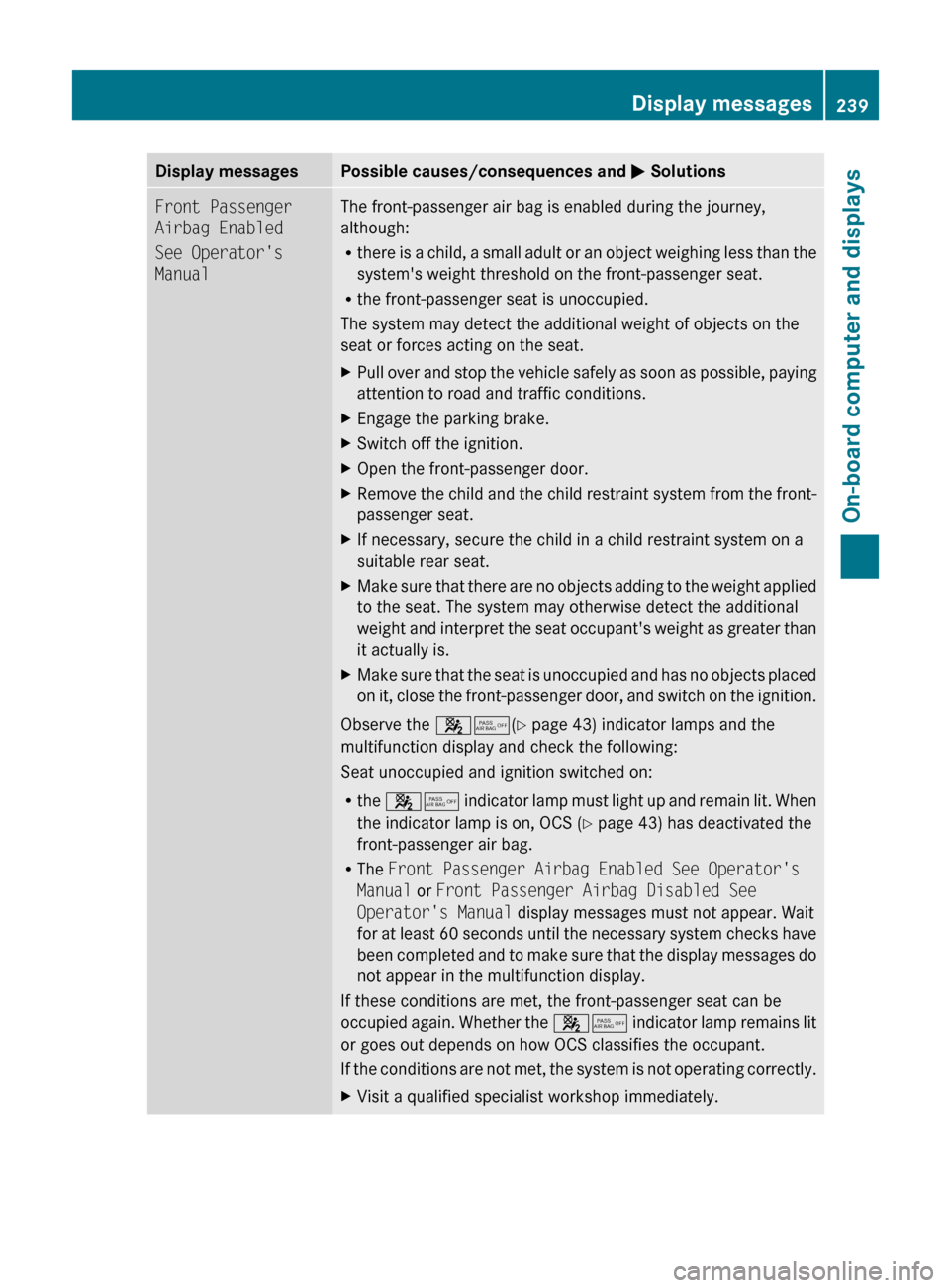
Display messagesPossible causes/consequences and M SolutionsFront Passenger
Airbag Enabled
See Operator's
ManualThe front-passenger air bag is enabled during the journey,
although:
R there is a child, a small adult or an object weighing less than the
system's weight threshold on the front-passenger seat.
R the front-passenger seat is unoccupied.
The system may detect the additional weight of objects on the
seat or forces acting on the seat.XPull over and stop the vehicle safely as soon as possible, paying
attention to road and traffic conditions.XEngage the parking brake.XSwitch off the ignition.XOpen the front-passenger door.XRemove the child and the child restraint system from the front-
passenger seat.XIf necessary, secure the child in a child restraint system on a
suitable rear seat.XMake sure that there are no objects adding to the weight applied
to the seat. The system may otherwise detect the additional
weight and interpret the seat occupant's weight as greater than
it actually is.XMake sure that the seat is unoccupied and has no objects placed
on it, close the front-passenger door, and switch on the ignition.
Observe the 45(Y page 43) indicator lamps and the
multifunction display and check the following:
Seat unoccupied and ignition switched on:
R the 45 indicator lamp must light up and remain lit. When
the indicator lamp is on, OCS ( Y page 43) has deactivated the
front-passenger air bag.
R The Front Passenger Airbag Enabled See Operator's
Manual or Front Passenger Airbag Disabled See
Operator's Manual display messages must not appear. Wait
for at least 60 seconds until the necessary system checks have
been completed and to make sure that the display messages do
not appear in the multifunction display.
If these conditions are met, the front-passenger seat can be
occupied again. Whether the 45 indicator lamp remains lit
or goes out depends on how OCS classifies the occupant.
If the conditions are not met, the system is not operating correctly.
XVisit a qualified specialist workshop immediately.Display messages239On-board computer and displaysBA 212 USA, CA Edition B 2011; 1; 5, en-USdimargiVersion: 3.0.3.62010-05-20T13:33:46+02:00 - Seite 239Z
Page 242 of 400
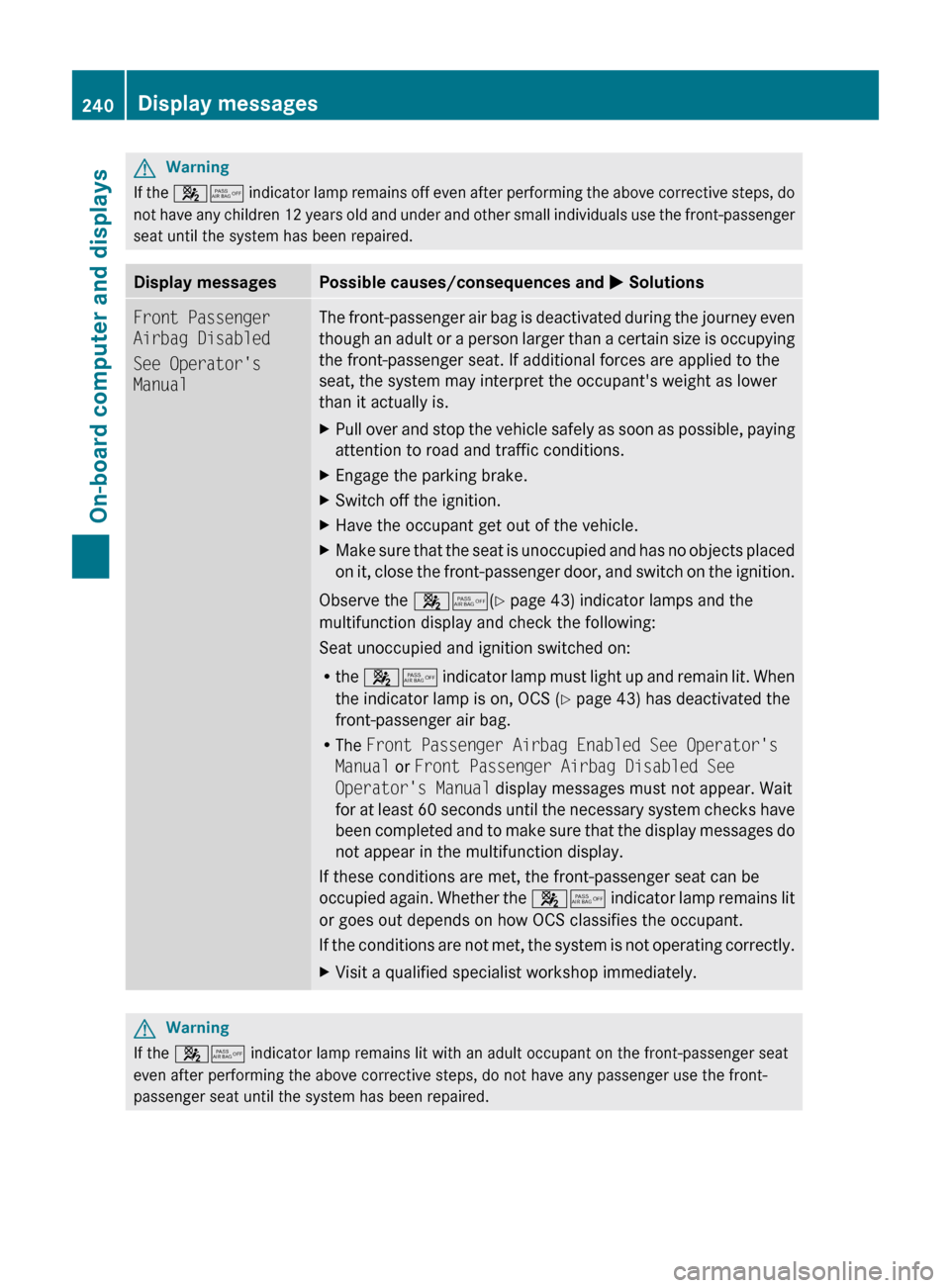
GWarning
If the 45 indicator lamp remains off even after performing the above corrective steps, do
not have any children 12 years old and under and other small individuals use the front-passenger
seat until the system has been repaired.
Display messagesPossible causes/consequences and M SolutionsFront Passenger
Airbag Disabled
See Operator's
ManualThe front-passenger air bag is deactivated during the journey even
though an adult or a person larger than a certain size is occupying
the front-passenger seat. If additional forces are applied to the
seat, the system may interpret the occupant's weight as lower
than it actually is.XPull over and stop the vehicle safely as soon as possible, paying
attention to road and traffic conditions.XEngage the parking brake.XSwitch off the ignition.XHave the occupant get out of the vehicle.XMake sure that the seat is unoccupied and has no objects placed
on it, close the front-passenger door, and switch on the ignition.
Observe the 45(Y page 43) indicator lamps and the
multifunction display and check the following:
Seat unoccupied and ignition switched on:
R the 45 indicator lamp must light up and remain lit. When
the indicator lamp is on, OCS ( Y page 43) has deactivated the
front-passenger air bag.
R The Front Passenger Airbag Enabled See Operator's
Manual or Front Passenger Airbag Disabled See
Operator's Manual display messages must not appear. Wait
for at least 60 seconds until the necessary system checks have
been completed and to make sure that the display messages do
not appear in the multifunction display.
If these conditions are met, the front-passenger seat can be
occupied again. Whether the 45 indicator lamp remains lit
or goes out depends on how OCS classifies the occupant.
If the conditions are not met, the system is not operating correctly.
XVisit a qualified specialist workshop immediately.GWarning
If the 45 indicator lamp remains lit with an adult occupant on the front-passenger seat
even after performing the above corrective steps, do not have any passenger use the front-
passenger seat until the system has been repaired.
240Display messagesOn-board computer and displays
BA 212 USA, CA Edition B 2011; 1; 5, en-USdimargiVersion: 3.0.3.62010-05-20T13:33:46+02:00 - Seite 240
Page 249 of 400
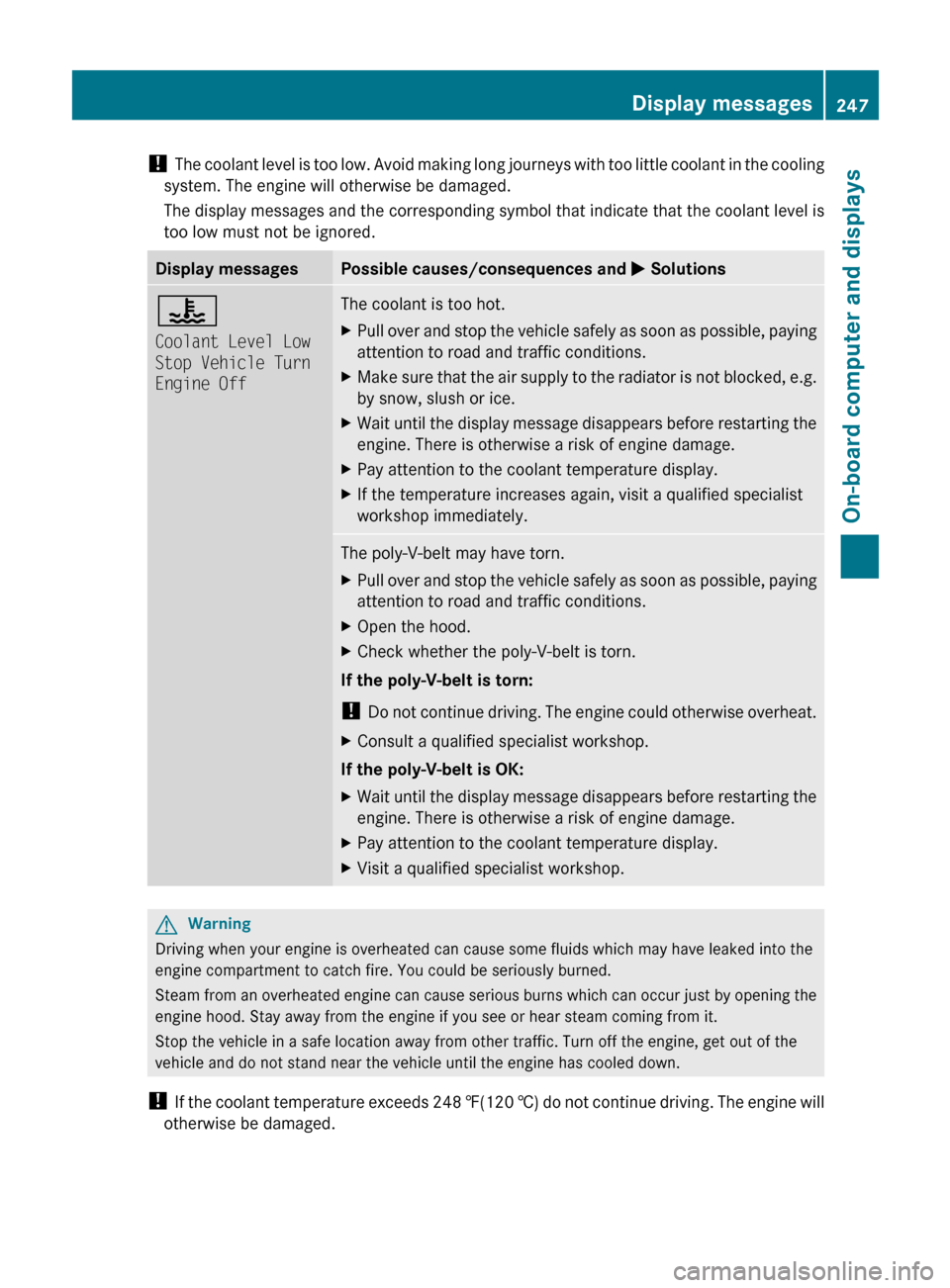
! The coolant level is too low. Avoid making long journeys with too little coolant in the cooling
system. The engine will otherwise be damaged.
The display messages and the corresponding symbol that indicate that the coolant level is
too low must not be ignored.Display messagesPossible causes/consequences and M Solutions?
Coolant Level Low
Stop Vehicle Turn
Engine OffThe coolant is too hot.XPull over and stop the vehicle safely as soon as possible, paying
attention to road and traffic conditions.XMake sure that the air supply to the radiator is not blocked, e.g.
by snow, slush or ice.XWait until the display message disappears before restarting the
engine. There is otherwise a risk of engine damage.XPay attention to the coolant temperature display.XIf the temperature increases again, visit a qualified specialist
workshop immediately.The poly-V-belt may have torn.XPull over and stop the vehicle safely as soon as possible, paying
attention to road and traffic conditions.XOpen the hood.XCheck whether the poly-V-belt is torn.
If the poly-V-belt is torn:
! Do not continue driving. The engine could otherwise overheat.
XConsult a qualified specialist workshop.
If the poly-V-belt is OK:
XWait until the display message disappears before restarting the
engine. There is otherwise a risk of engine damage.XPay attention to the coolant temperature display.XVisit a qualified specialist workshop.GWarning
Driving when your engine is overheated can cause some fluids which may have leaked into the
engine compartment to catch fire. You could be seriously burned.
Steam from an overheated engine can cause serious burns which can occur just by opening the
engine hood. Stay away from the engine if you see or hear steam coming from it.
Stop the vehicle in a safe location away from other traffic. Turn off the engine, get out of the
vehicle and do not stand near the vehicle until the engine has cooled down.
! If the coolant temperature exceeds 248 ‡(120 †) do not continue driving. The engine will
otherwise be damaged.
Display messages247On-board computer and displaysBA 212 USA, CA Edition B 2011; 1; 5, en-USdimargiVersion: 3.0.3.62010-05-20T13:33:46+02:00 - Seite 247Z
Page 252 of 400
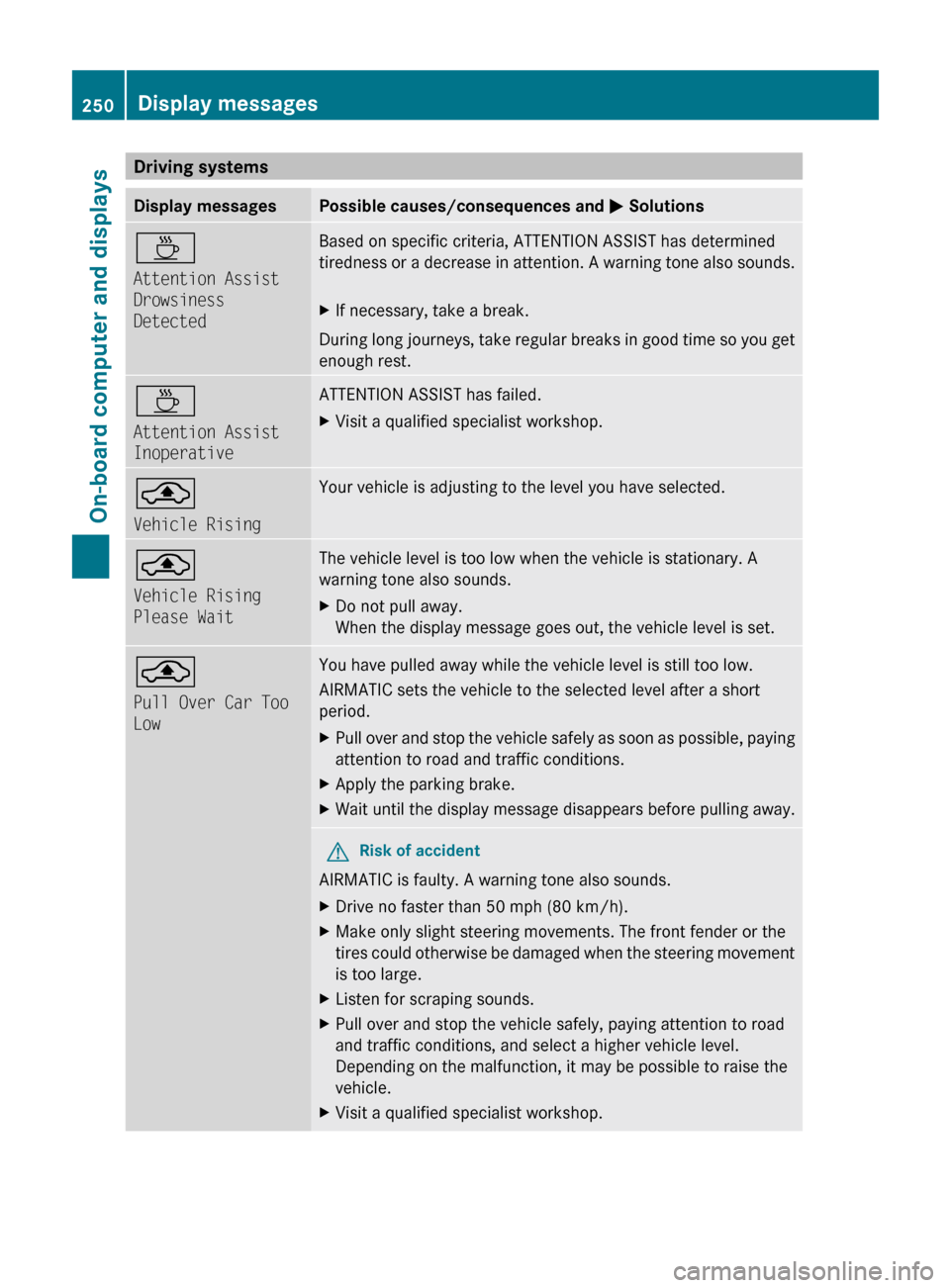
Driving systemsDisplay messagesPossible causes/consequences and M SolutionsÀ
Attention Assist
Drowsiness
DetectedBased on specific criteria, ATTENTION ASSIST has determined
tiredness or a decrease in attention. A warning tone also sounds.XIf necessary, take a break.
During long journeys, take regular breaks in good time so you get
enough rest.
À
Attention Assist
InoperativeATTENTION ASSIST has failed.XVisit a qualified specialist workshop.¨
Vehicle RisingYour vehicle is adjusting to the level you have selected. ¨
Vehicle Rising
Please WaitThe vehicle level is too low when the vehicle is stationary. A
warning tone also sounds.XDo not pull away.
When the display message goes out, the vehicle level is set.¨
Pull Over Car Too
LowYou have pulled away while the vehicle level is still too low.
AIRMATIC sets the vehicle to the selected level after a short
period.XPull over and stop the vehicle safely as soon as possible, paying
attention to road and traffic conditions.XApply the parking brake.XWait until the display message disappears before pulling away.GRisk of accident
AIRMATIC is faulty. A warning tone also sounds.
XDrive no faster than 50 mph (80 km/h).XMake only slight steering movements. The front fender or the
tires could otherwise be damaged when the steering movement
is too large.XListen for scraping sounds.XPull over and stop the vehicle safely, paying attention to road
and traffic conditions, and select a higher vehicle level.
Depending on the malfunction, it may be possible to raise the
vehicle.XVisit a qualified specialist workshop.250Display messagesOn-board computer and displays
BA 212 USA, CA Edition B 2011; 1; 5, en-USdimargiVersion: 3.0.3.62010-05-20T13:33:46+02:00 - Seite 250
Page 253 of 400
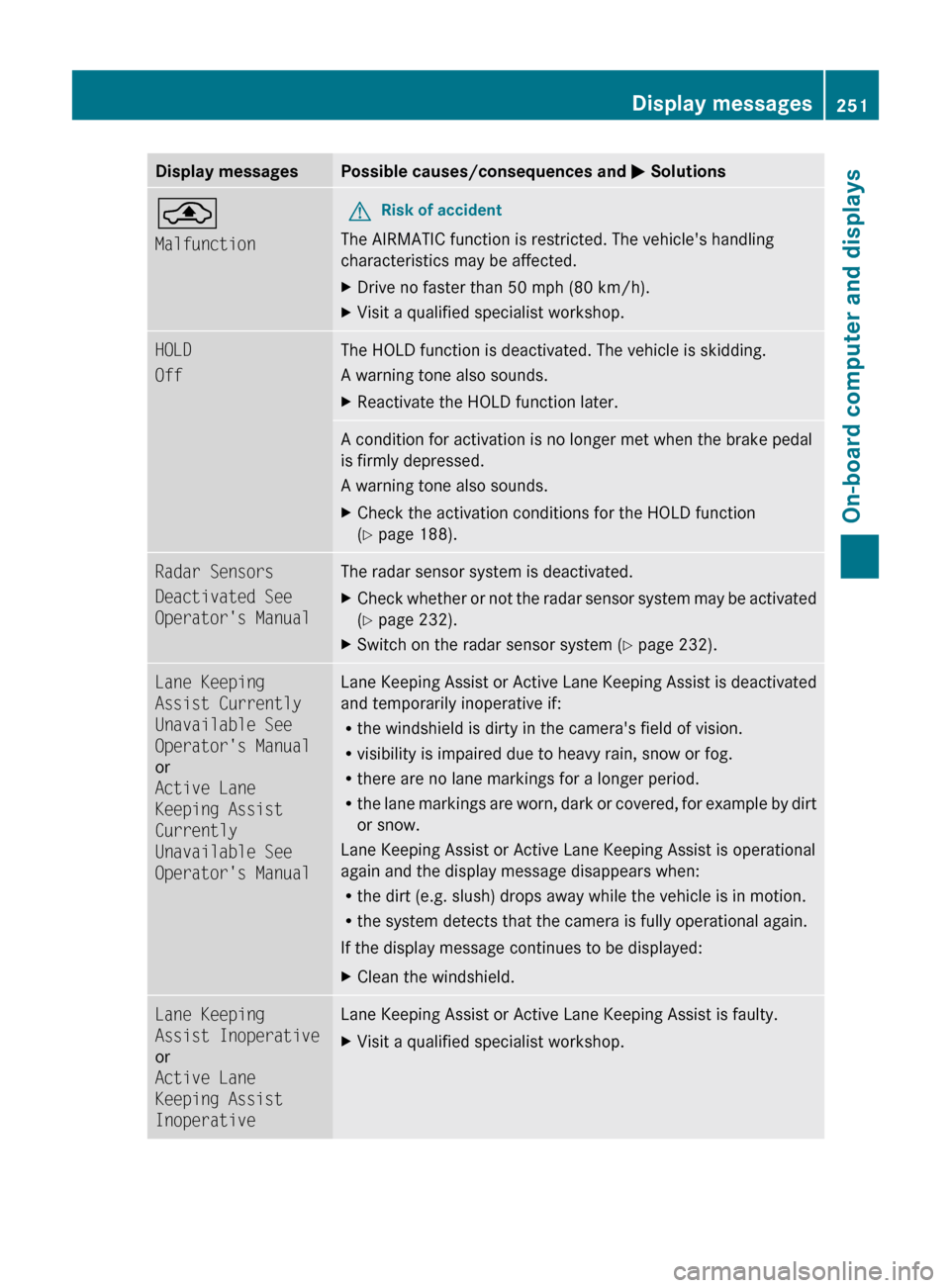
Display messagesPossible causes/consequences and M Solutions¨
MalfunctionGRisk of accident
The AIRMATIC function is restricted. The vehicle's handling
characteristics may be affected.
XDrive no faster than 50 mph (80 km/h).XVisit a qualified specialist workshop.HOLD
OffThe HOLD function is deactivated. The vehicle is skidding.
A warning tone also sounds.XReactivate the HOLD function later.A condition for activation is no longer met when the brake pedal
is firmly depressed.
A warning tone also sounds.XCheck the activation conditions for the HOLD function
( Y page 188).Radar Sensors
Deactivated See
Operator's ManualThe radar sensor system is deactivated.XCheck whether or not the radar sensor system may be activated
( Y page 232).XSwitch on the radar sensor system ( Y page 232).Lane Keeping
Assist Currently
Unavailable See
Operator's Manual
or
Active Lane
Keeping Assist
Currently
Unavailable See
Operator's ManualLane Keeping Assist or Active Lane Keeping Assist is deactivated
and temporarily inoperative if:
R the windshield is dirty in the camera's field of vision.
R visibility is impaired due to heavy rain, snow or fog.
R there are no lane markings for a longer period.
R the lane markings are worn, dark or covered, for example by dirt
or snow.
Lane Keeping Assist or Active Lane Keeping Assist is operational
again and the display message disappears when:
R the dirt (e.g. slush) drops away while the vehicle is in motion.
R the system detects that the camera is fully operational again.
If the display message continues to be displayed:XClean the windshield.Lane Keeping
Assist Inoperative
or
Active Lane
Keeping Assist
InoperativeLane Keeping Assist or Active Lane Keeping Assist is faulty.XVisit a qualified specialist workshop.Display messages251On-board computer and displaysBA 212 USA, CA Edition B 2011; 1; 5, en-USdimargiVersion: 3.0.3.62010-05-20T13:33:46+02:00 - Seite 251Z
Page 256 of 400
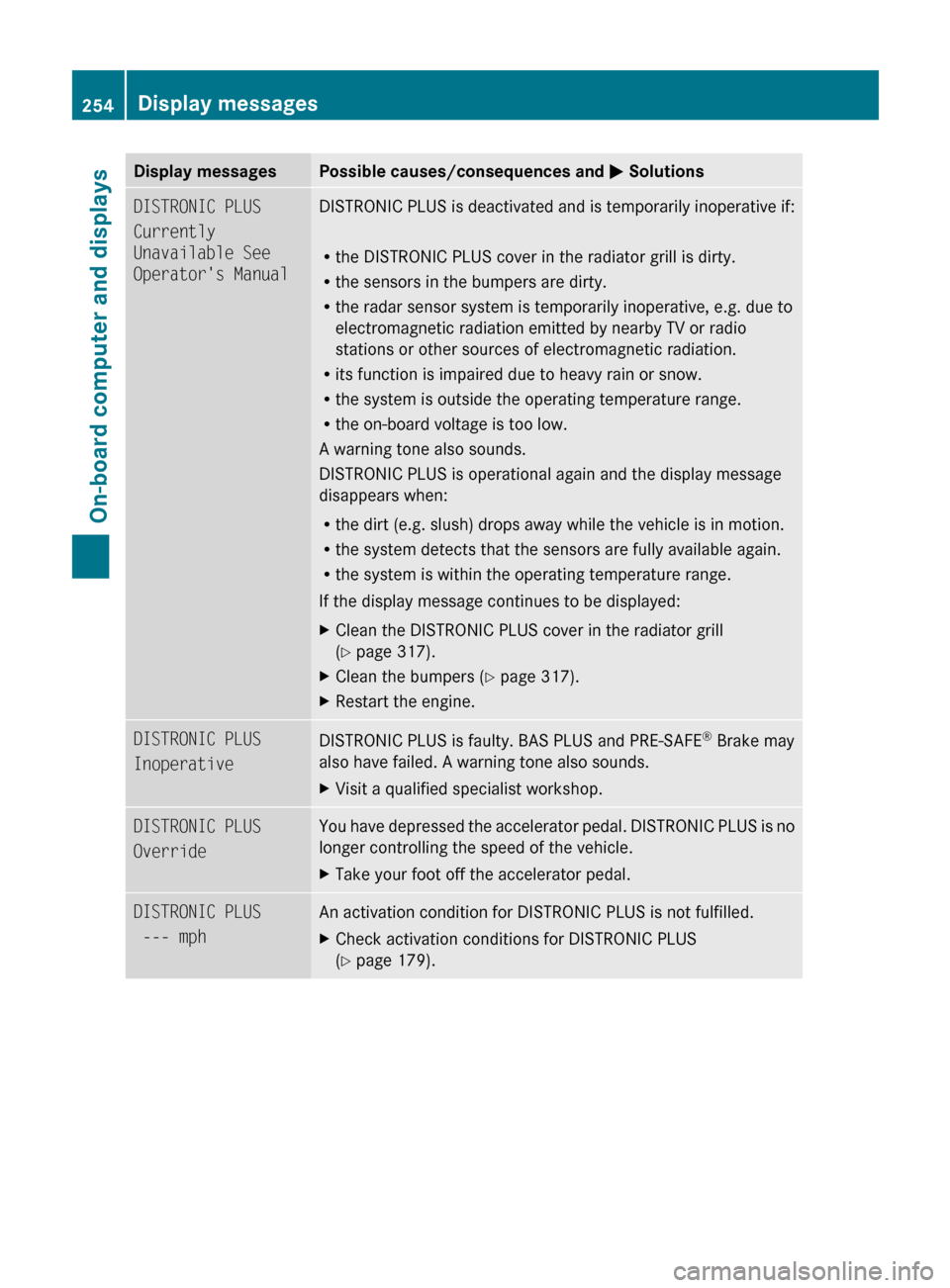
Display messagesPossible causes/consequences and M SolutionsDISTRONIC PLUS
Currently
Unavailable See
Operator's ManualDISTRONIC PLUS is deactivated and is temporarily inoperative if:
R the DISTRONIC PLUS cover in the radiator grill is dirty.
R the sensors in the bumpers are dirty.
R the radar sensor system is temporarily inoperative, e.g. due to
electromagnetic radiation emitted by nearby TV or radio
stations or other sources of electromagnetic radiation.
R its function is impaired due to heavy rain or snow.
R the system is outside the operating temperature range.
R the on-board voltage is too low.
A warning tone also sounds.
DISTRONIC PLUS is operational again and the display message
disappears when:
R the dirt (e.g. slush) drops away while the vehicle is in motion.
R the system detects that the sensors are fully available again.
R the system is within the operating temperature range.
If the display message continues to be displayed:XClean the DISTRONIC PLUS cover in the radiator grill
( Y page 317).XClean the bumpers ( Y page 317).XRestart the engine.DISTRONIC PLUS
InoperativeDISTRONIC PLUS is faulty. BAS PLUS and PRE-SAFE ®
Brake may
also have failed. A warning tone also sounds.XVisit a qualified specialist workshop.DISTRONIC PLUS
OverrideYou have depressed the accelerator pedal. DISTRONIC PLUS is no
longer controlling the speed of the vehicle.XTake your foot off the accelerator pedal.DISTRONIC PLUS
--- mphAn activation condition for DISTRONIC PLUS is not fulfilled.XCheck activation conditions for DISTRONIC PLUS
( Y page 179).254Display messagesOn-board computer and displays
BA 212 USA, CA Edition B 2011; 1; 5, en-USdimargiVersion: 3.0.3.62010-05-20T13:33:46+02:00 - Seite 254