wheel MERCEDES-BENZ E300 BLUETEC 2011 W212 Service Manual
[x] Cancel search | Manufacturer: MERCEDES-BENZ, Model Year: 2011, Model line: E300 BLUETEC, Model: MERCEDES-BENZ E300 BLUETEC 2011 W212Pages: 400, PDF Size: 16.3 MB
Page 107 of 400
Adjusting the head restraints
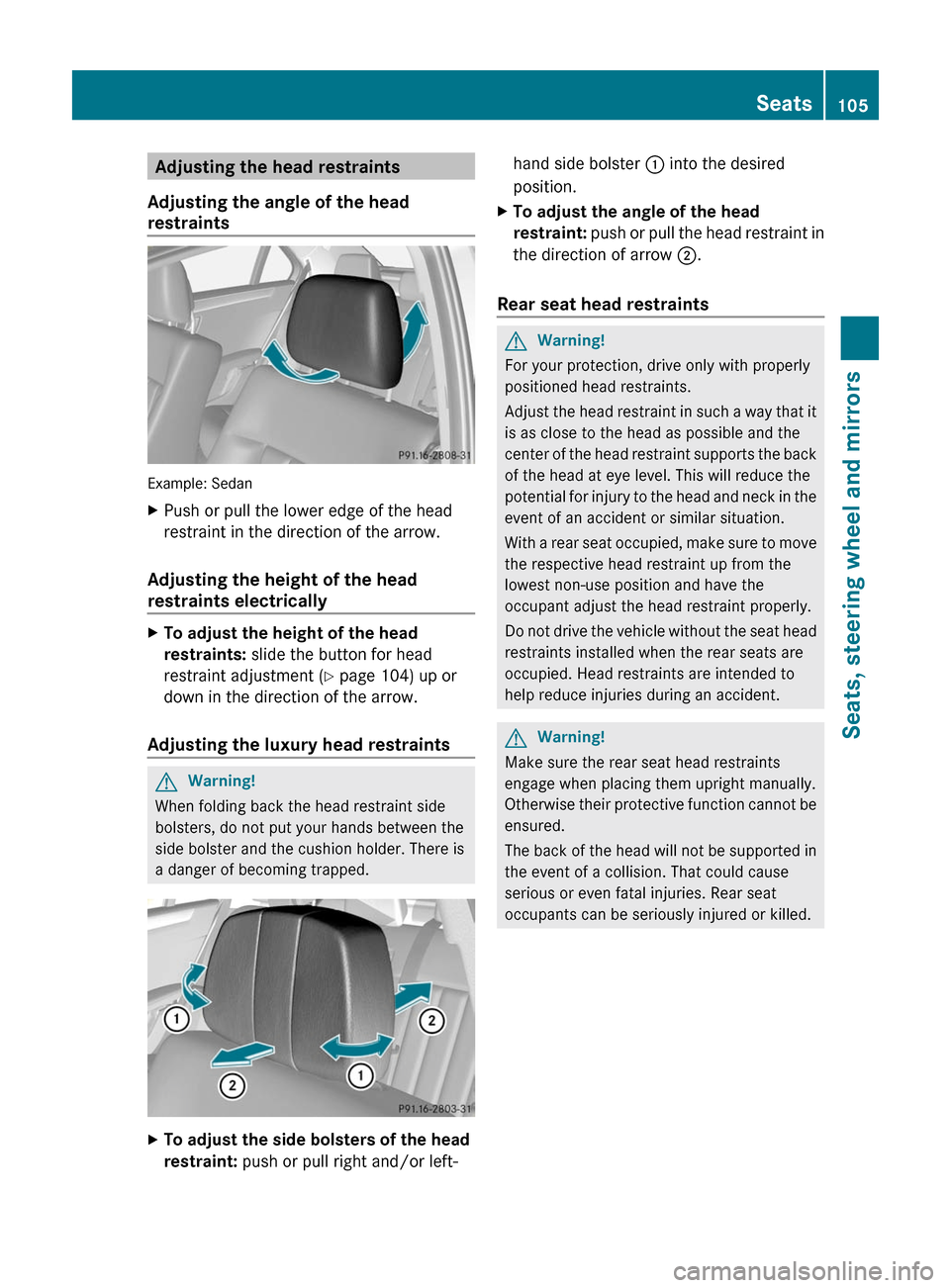
Adjusting the angle of the head
restraints
Example: Sedan
XPush or pull the lower edge of the head
restraint in the direction of the arrow.
Adjusting the height of the head
restraints electrically
XTo adjust the height of the head
restraints: slide the button for head
restraint adjustment (Y page 104) up or
down in the direction of the arrow.
Adjusting the luxury head restraints
GWarning!
When folding back the head restraint side
bolsters, do not put your hands between the
side bolster and the cushion holder. There is
a danger of becoming trapped.
XTo adjust the side bolsters of the head
restraint: push or pull right and/or left-
hand side bolster : into the desired
position.
XTo adjust the angle of the head
restraint: push or pull the head restraint in
the direction of arrow ;.
Rear seat head restraints
GWarning!
For your protection, drive only with properly
positioned head restraints.
Adjust the head restraint in such a way that it
is as close to the head as possible and the
center of the head restraint supports the back
of the head at eye level. This will reduce the
potential for injury to the head and neck in the
event of an accident or similar situation.
With a rear seat occupied, make sure to move
the respective head restraint up from the
lowest non-use position and have the
occupant adjust the head restraint properly.
Do not drive the vehicle without the seat head
restraints installed when the rear seats are
occupied. Head restraints are intended to
help reduce injuries during an accident.
GWarning!
Make sure the rear seat head restraints
engage when placing them upright manually.
Otherwise their protective function cannot be
ensured.
The back of the head will not be supported in
the event of a collision. That could cause
serious or even fatal injuries. Rear seat
occupants can be seriously injured or killed.
Seats105Seats, steering wheel and mirrorsBA 212 USA, CA Edition B 2011; 1; 5, en-USdimargiVersion: 3.0.3.62010-05-20T13:33:46+02:00 - Seite 105Z
Page 108 of 400
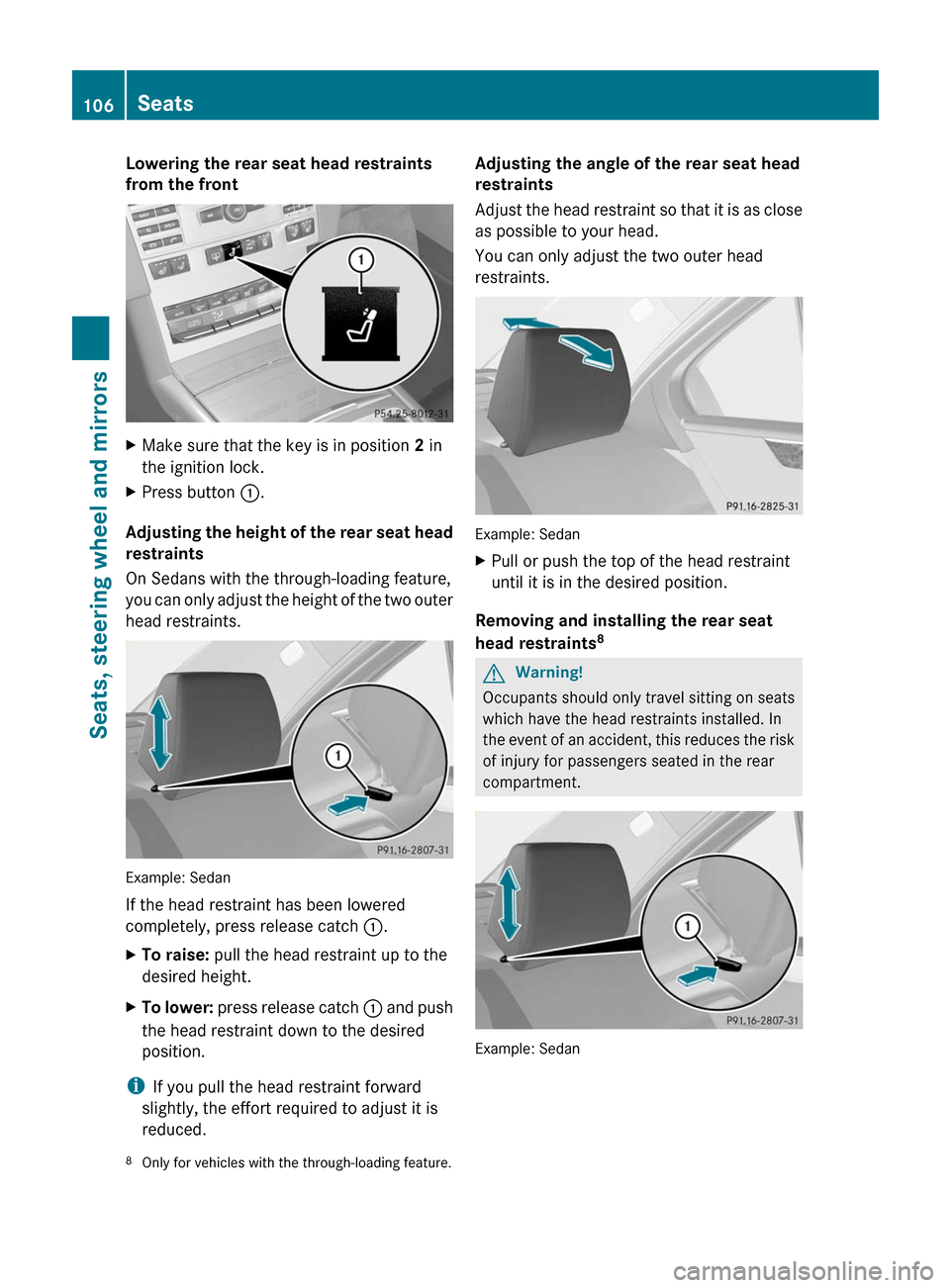
Lowering the rear seat head restraints
from the front
XMake sure that the key is in position 2 in
the ignition lock.
XPress button :.
Adjusting the height of the rear seat head
restraints
On Sedans with the through-loading feature,
you can only adjust the height of the two outer
head restraints.
Example: Sedan
If the head restraint has been lowered
completely, press release catch :.
XTo raise: pull the head restraint up to the
desired height.
XTo lower: press release catch : and push
the head restraint down to the desired
position.
iIf you pull the head restraint forward
slightly, the effort required to adjust it is
reduced.
Adjusting the angle of the rear seat head
restraints
Adjust the head restraint so that it is as close
as possible to your head.
You can only adjust the two outer head
restraints.
Example: Sedan
XPull or push the top of the head restraint
until it is in the desired position.
Removing and installing the rear seat
head restraints8
GWarning!
Occupants should only travel sitting on seats
which have the head restraints installed. In
the event of an accident, this reduces the risk
of injury for passengers seated in the rear
compartment.
Example: Sedan
8Only for vehicles with the through-loading feature.106SeatsSeats, steering wheel and mirrors
BA 212 USA, CA Edition B 2011; 1; 5, en-USdimargiVersion: 3.0.3.62010-05-20T13:33:46+02:00 - Seite 106
Page 109 of 400
XRelease the rear seat backrest and fold it
slightly forwards (Y page 278).
XTo remove: pull the head restraint up to
the stop.
XPress release catch : and pull the head
restraint out of the guides.
XTo refit: insert the head restraint so that
the notches on the bar are on the left when
viewed in the direction of travel.
XPush the head restraint down until you hear
it engage in position.
XFold back the rear seat backrest until it
engages.
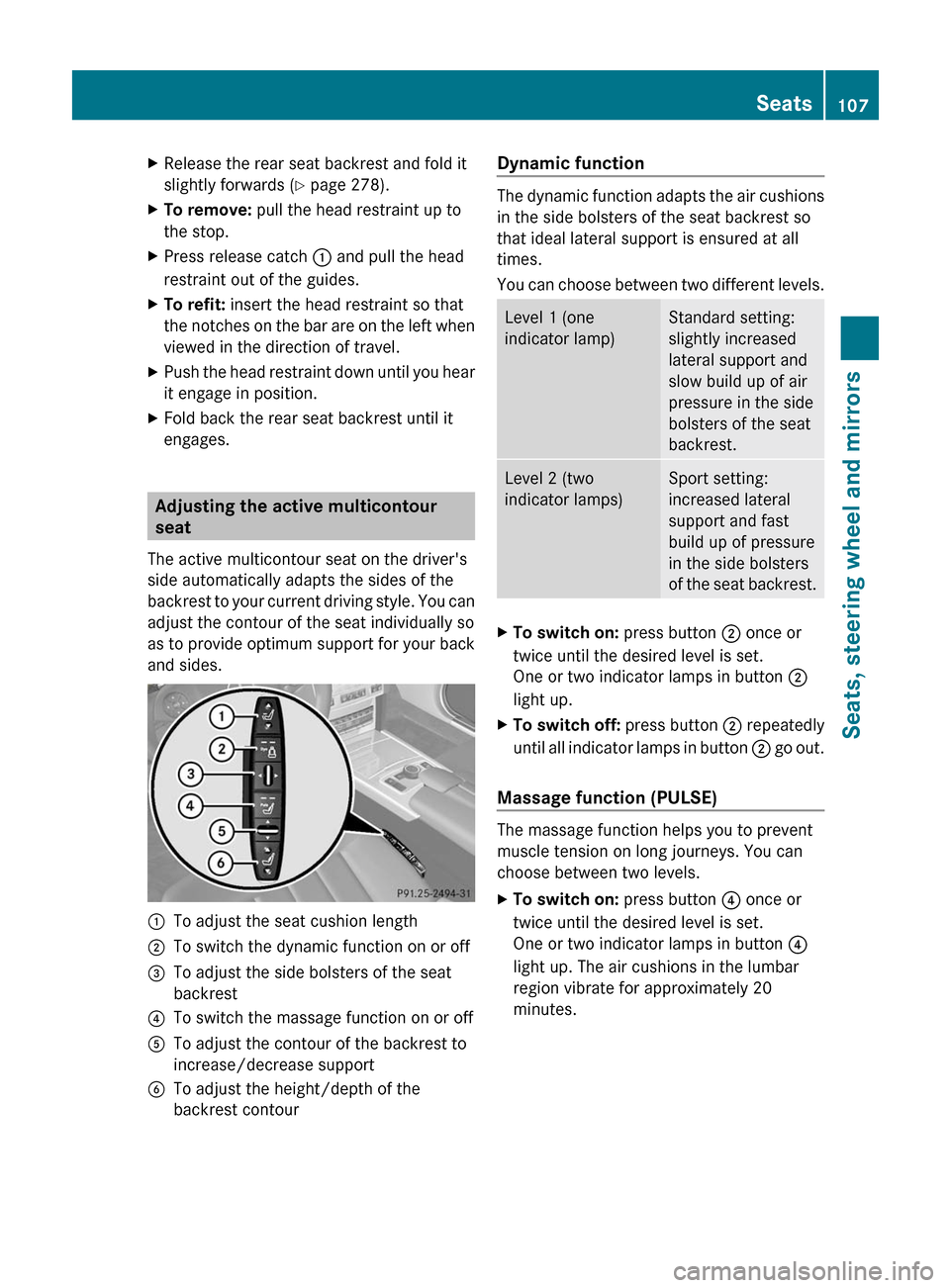
Adjusting the active multicontour
seat
The active multicontour seat on the driver's
side automatically adapts the sides of the
backrest to your current driving style. You can
adjust the contour of the seat individually so
as to provide optimum support for your back
and sides.
:To adjust the seat cushion length;To switch the dynamic function on or off=To adjust the side bolsters of the seat
backrest
?To switch the massage function on or offATo adjust the contour of the backrest to
increase/decrease support
BTo adjust the height/depth of the
backrest contour
Dynamic function
The dynamic function adapts the air cushions
in the side bolsters of the seat backrest so
that ideal lateral support is ensured at all
times.
You can choose between two different levels.
Level 1 (one
indicator lamp)
Standard setting:
slightly increased
lateral support and
slow build up of air
pressure in the side
bolsters of the seat
backrest.
Level 2 (two
indicator lamps)
Sport setting:
increased lateral
support and fast
build up of pressure
in the side bolsters
of the seat backrest.
XTo switch on: press button ; once or
twice until the desired level is set.
One or two indicator lamps in button ;
light up.
XTo switch off: press button ; repeatedly
until all indicator lamps in button ; go out.
Massage function (PULSE)
The massage function helps you to prevent
muscle tension on long journeys. You can
choose between two levels.
XTo switch on: press button ? once or
twice until the desired level is set.
One or two indicator lamps in button ?
light up. The air cushions in the lumbar
region vibrate for approximately 20
minutes.
Seats107Seats, steering wheel and mirrorsBA 212 USA, CA Edition B 2011; 1; 5, en-USdimargiVersion: 3.0.3.62010-05-20T13:33:46+02:00 - Seite 107Z
Page 110 of 400
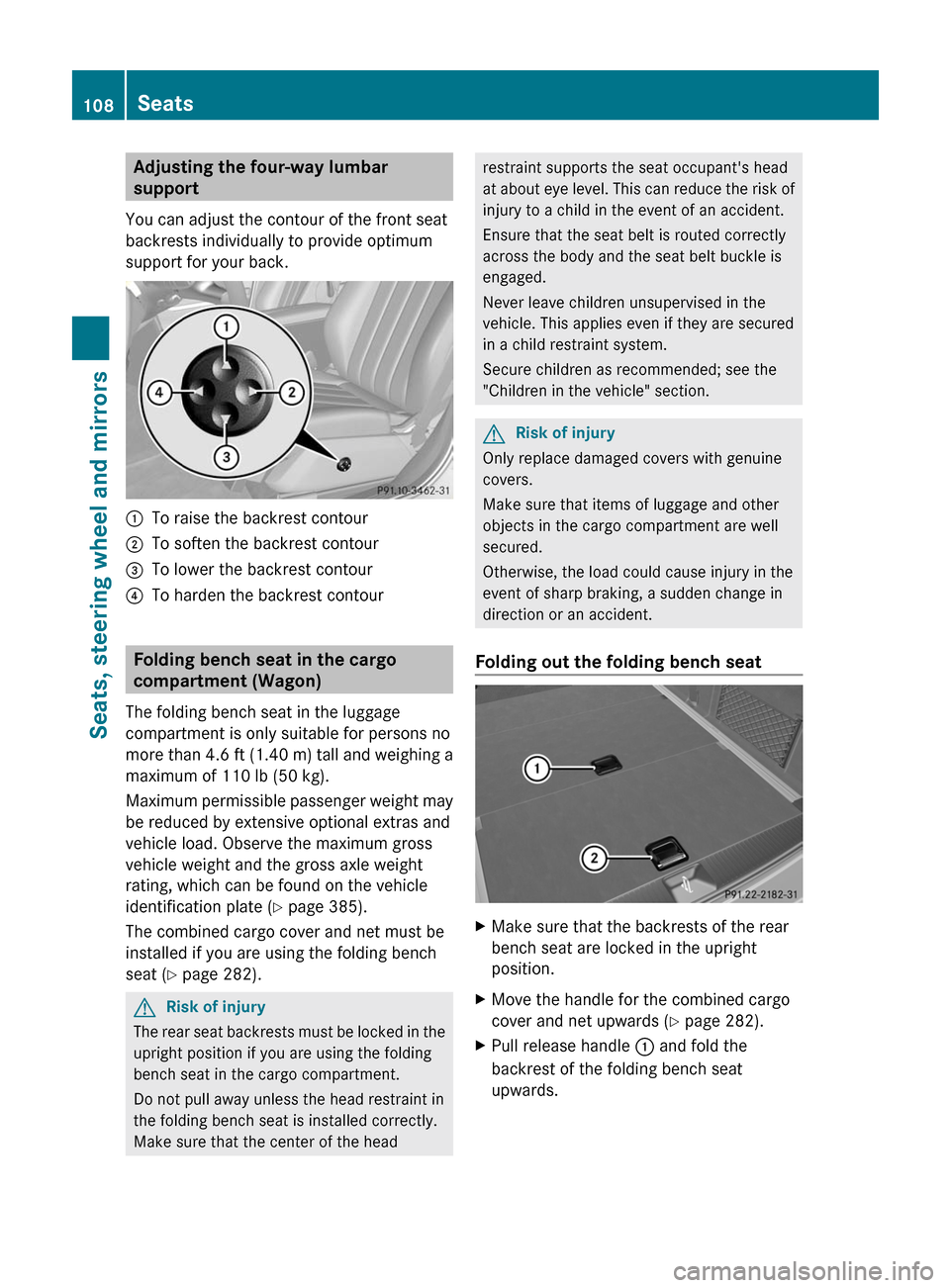
Adjusting the four-way lumbar
support
You can adjust the contour of the front seat
backrests individually to provide optimum
support for your back.
:To raise the backrest contour;To soften the backrest contour=To lower the backrest contour?To harden the backrest contour
Folding bench seat in the cargo
compartment (Wagon)
The folding bench seat in the luggage
compartment is only suitable for persons no
more than 4.6 ft (1.40 m) tall and weighing a
maximum of 110 lb (50 kg).
Maximum permissible passenger weight may
be reduced by extensive optional extras and
vehicle load. Observe the maximum gross
vehicle weight and the gross axle weight
rating, which can be found on the vehicle
identification plate (Y page 385).
The combined cargo cover and net must be
installed if you are using the folding bench
seat (Y page 282).
GRisk of injury
The rear seat backrests must be locked in the
upright position if you are using the folding
bench seat in the cargo compartment.
Do not pull away unless the head restraint in
the folding bench seat is installed correctly.
Make sure that the center of the head
restraint supports the seat occupant's head
at about eye level. This can reduce the risk of
injury to a child in the event of an accident.
Ensure that the seat belt is routed correctly
across the body and the seat belt buckle is
engaged.
Never leave children unsupervised in the
vehicle. This applies even if they are secured
in a child restraint system.
Secure children as recommended; see the
"Children in the vehicle" section.
GRisk of injury
Only replace damaged covers with genuine
covers.
Make sure that items of luggage and other
objects in the cargo compartment are well
secured.
Otherwise, the load could cause injury in the
event of sharp braking, a sudden change in
direction or an accident.
Folding out the folding bench seat
XMake sure that the backrests of the rear
bench seat are locked in the upright
position.
XMove the handle for the combined cargo
cover and net upwards (Y page 282).
XPull release handle : and fold the
backrest of the folding bench seat
upwards.
108SeatsSeats, steering wheel and mirrors
BA 212 USA, CA Edition B 2011; 1; 5, en-USdimargiVersion: 3.0.3.62010-05-20T13:33:46+02:00 - Seite 108
Page 111 of 400
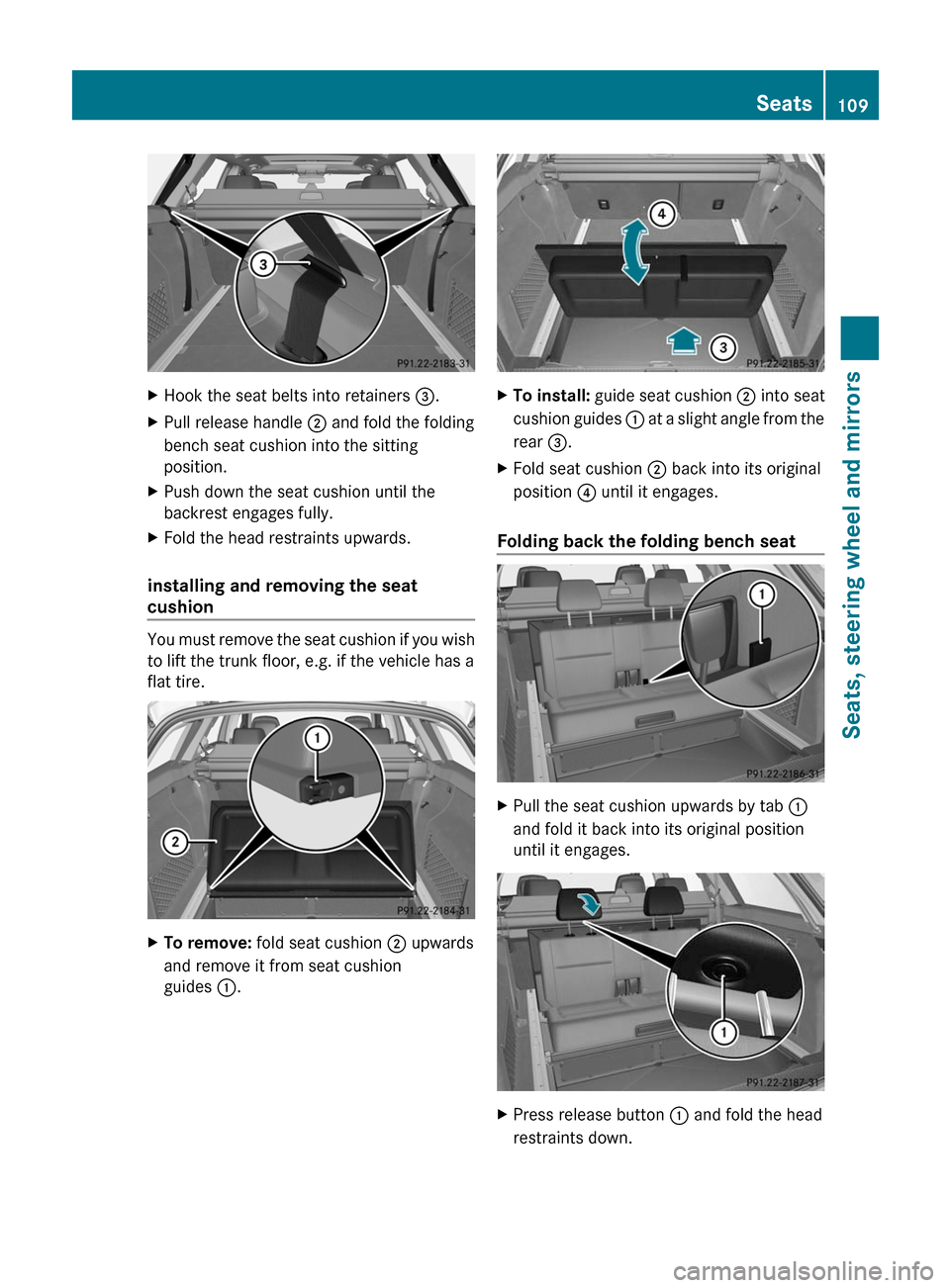
XHook the seat belts into retainers =.XPull release handle ; and fold the folding
bench seat cushion into the sitting
position.
XPush down the seat cushion until the
backrest engages fully.
XFold the head restraints upwards.
installing and removing the seat
cushion
You must remove the seat cushion if you wish
to lift the trunk floor, e.g. if the vehicle has a
flat tire.
XTo remove: fold seat cushion ; upwards
and remove it from seat cushion
guides :.
XTo install: guide seat cushion ; into seat
cushion guides : at a slight angle from the
rear =.
XFold seat cushion ; back into its original
position ? until it engages.
Folding back the folding bench seat
XPull the seat cushion upwards by tab :
and fold it back into its original position
until it engages.
XPress release button : and fold the head
restraints down.
Seats109Seats, steering wheel and mirrorsBA 212 USA, CA Edition B 2011; 1; 5, en-USdimargiVersion: 3.0.3.62010-05-20T13:33:46+02:00 - Seite 109Z
Page 112 of 400
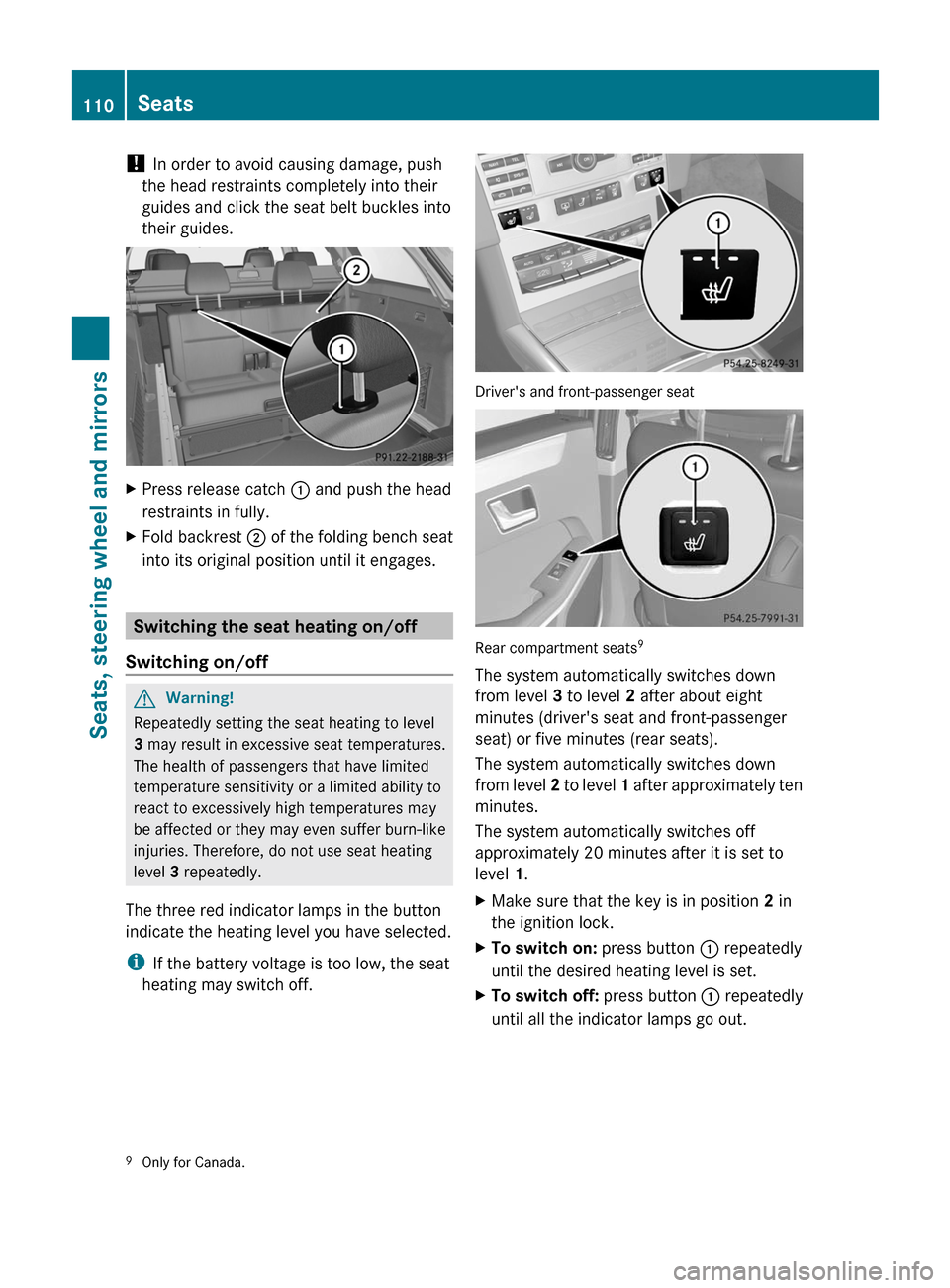
! In order to avoid causing damage, push
the head restraints completely into their
guides and click the seat belt buckles into
their guides.
XPress release catch : and push the head
restraints in fully.
XFold backrest ; of the folding bench seat
into its original position until it engages.
Switching the seat heating on/off
Switching on/off
GWarning!
Repeatedly setting the seat heating to level
3 may result in excessive seat temperatures.
The health of passengers that have limited
temperature sensitivity or a limited ability to
react to excessively high temperatures may
be affected or they may even suffer burn-like
injuries. Therefore, do not use seat heating
level 3 repeatedly.
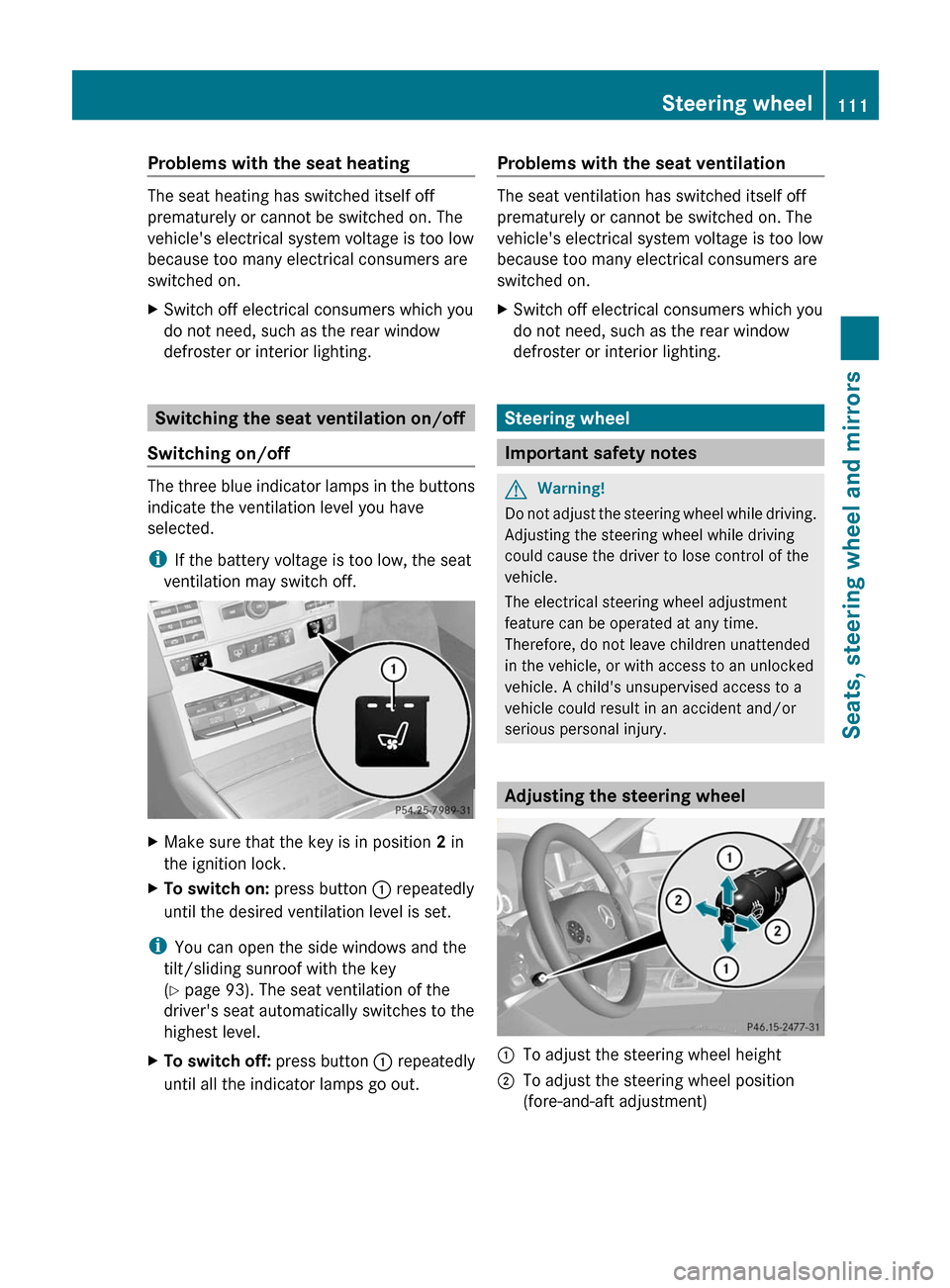
The three red indicator lamps in the button
indicate the heating level you have selected.
iIf the battery voltage is too low, the seat
heating may switch off.
Driver's and front-passenger seat
Rear compartment seats9
The system automatically switches down
from level 3 to level 2 after about eight
minutes (driver's seat and front-passenger
seat) or five minutes (rear seats).
The system automatically switches down
from level 2 to level 1 after approximately ten
minutes.
The system automatically switches off
approximately 20 minutes after it is set to
level 1.
XMake sure that the key is in position 2 in
the ignition lock.
XTo switch on: press button : repeatedly
until the desired heating level is set.
XTo switch off: press button : repeatedly
until all the indicator lamps go out.9Only for Canada.110SeatsSeats, steering wheel and mirrors
BA 212 USA, CA Edition B 2011; 1; 5, en-USdimargiVersion: 3.0.3.62010-05-20T13:33:46+02:00 - Seite 110
Page 113 of 400
Problems with the seat heating
The seat heating has switched itself off
prematurely or cannot be switched on. The
vehicle's electrical system voltage is too low
because too many electrical consumers are
switched on.
XSwitch off electrical consumers which you
do not need, such as the rear window
defroster or interior lighting.
Switching the seat ventilation on/off
Switching on/off
The three blue indicator lamps in the buttons
indicate the ventilation level you have
selected.
iIf the battery voltage is too low, the seat
ventilation may switch off.
XMake sure that the key is in position 2 in
the ignition lock.
XTo switch on: press button : repeatedly
until the desired ventilation level is set.
iYou can open the side windows and the
tilt/sliding sunroof with the key
(Y page 93). The seat ventilation of the
driver's seat automatically switches to the
highest level.
XTo switch off: press button : repeatedly
until all the indicator lamps go out.
Problems with the seat ventilation
The seat ventilation has switched itself off
prematurely or cannot be switched on. The
vehicle's electrical system voltage is too low
because too many electrical consumers are
switched on.
XSwitch off electrical consumers which you
do not need, such as the rear window
defroster or interior lighting.
Steering wheel
Important safety notes
GWarning!
Do not adjust the steering wheel while driving.
Adjusting the steering wheel while driving
could cause the driver to lose control of the
vehicle.
The electrical steering wheel adjustment
feature can be operated at any time.
Therefore, do not leave children unattended
in the vehicle, or with access to an unlocked
vehicle. A child's unsupervised access to a
vehicle could result in an accident and/or
serious personal injury.
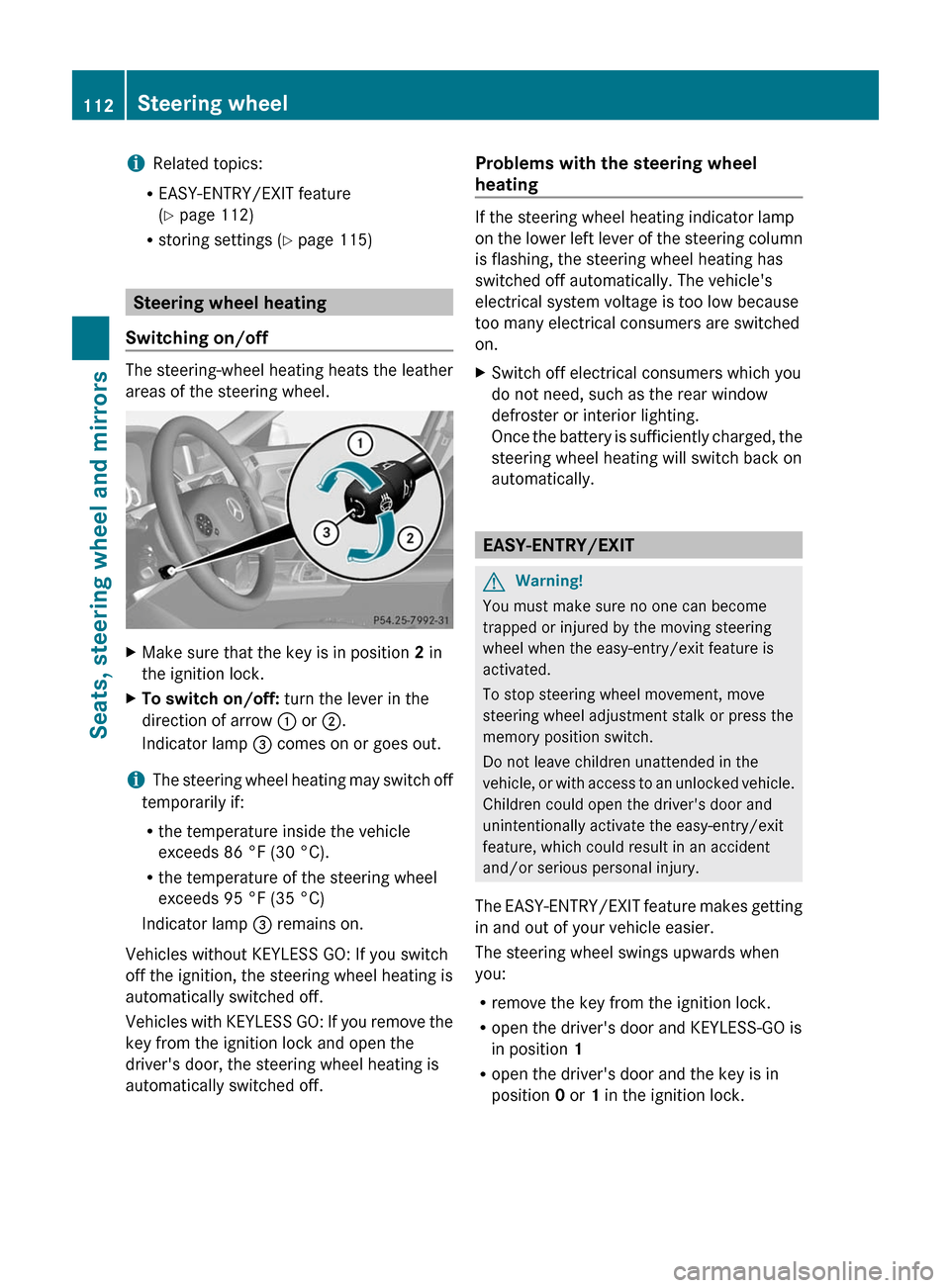
Adjusting the steering wheel
:To adjust the steering wheel height;To adjust the steering wheel position
(fore-and-aft adjustment)
Steering wheel111Seats, steering wheel and mirrorsBA 212 USA, CA Edition B 2011; 1; 5, en-USdimargiVersion: 3.0.3.62010-05-20T13:33:46+02:00 - Seite 111Z
Page 114 of 400
iRelated topics:
REASY-ENTRY/EXIT feature
(Y page 112)
Rstoring settings (Y page 115)
Steering wheel heating
Switching on/off
The steering-wheel heating heats the leather
areas of the steering wheel.
XMake sure that the key is in position 2 in
the ignition lock.
XTo switch on/off: turn the lever in the
direction of arrow : or ;.
Indicator lamp = comes on or goes out.
iThe steering wheel heating may switch off
temporarily if:
Rthe temperature inside the vehicle
exceeds 86 °F (30 °C).
Rthe temperature of the steering wheel
exceeds 95 °F (35 °C)
Indicator lamp = remains on.
Vehicles without KEYLESS GO: If you switch
off the ignition, the steering wheel heating is
automatically switched off.
Vehicles with KEYLESS GO: If you remove the
key from the ignition lock and open the
driver's door, the steering wheel heating is
automatically switched off.
Problems with the steering wheel
heating
If the steering wheel heating indicator lamp
on the lower left lever of the steering column
is flashing, the steering wheel heating has
switched off automatically. The vehicle's
electrical system voltage is too low because
too many electrical consumers are switched
on.
XSwitch off electrical consumers which you
do not need, such as the rear window
defroster or interior lighting.
Once the battery is sufficiently charged, the
steering wheel heating will switch back on
automatically.
EASY-ENTRY/EXIT
GWarning!
You must make sure no one can become
trapped or injured by the moving steering
wheel when the easy-entry/exit feature is
activated.
To stop steering wheel movement, move
steering wheel adjustment stalk or press the
memory position switch.
Do not leave children unattended in the
vehicle, or with access to an unlocked vehicle.
Children could open the driver's door and
unintentionally activate the easy-entry/exit
feature, which could result in an accident
and/or serious personal injury.
The EASY-ENTRY/EXIT feature makes getting
in and out of your vehicle easier.
The steering wheel swings upwards when
you:
Rremove the key from the ignition lock.
Ropen the driver's door and KEYLESS-GO is
in position 1
Ropen the driver's door and the key is in
position 0 or 1 in the ignition lock.
112Steering wheelSeats, steering wheel and mirrors
BA 212 USA, CA Edition B 2011; 1; 5, en-USdimargiVersion: 3.0.3.62010-05-20T13:33:46+02:00 - Seite 112
Page 115 of 400
iThe steering wheel only moves upwards if
it has not already reached the upper end
stop.
The steering wheel is moved to the last
selected position when:
Rthe driver's door is closed, and
Ryou insert the key into the ignition lock.
or
Rin vehicles with KEYLESS-GO, you press the
Start/Stop button once.
When you close the driver's door with the
ignition switched on, the steering wheel is
also automatically moved to the previously
set position.
The last position of the steering wheel is
stored after each manual setting or when you
store the setting with the memory function
(Y page 115).
You can activate and deactivate the EASY-
ENTRY/EXIT feature in the on-board
computer (Y page 232).
GWarning
Let the system complete the adjustment
procedure before setting the vehicle in
motion. All steering wheel adjustment must
be completed before setting the vehicle in
motion. Driving off with the steering wheel
still adjusting could cause the driver to lose
control of the vehicle.
iIf the crash-responsive EASY-EXIT feature
is triggered in an accident, the steering
column will move upwards when the
driver's door is opened. This occurs
irrespective of the position of the key in the
ignition lock. This makes it easier to exit the
vehicle and rescue the occupants.
The crash-responsive EASY-EXIT feature is
only operational after an accident if the
EASY-EXIT/ENTRY feature is activated in
the on-board computer.
Mirrors
Rear-view mirror
Rear-view mirror (manual anti-glare)
XAnti-glare mode: flick anti-glare
switch : forwards or back.
Exterior mirrors
Adjusting the exterior mirrors
GWarning
Exercise care when using the passenger-side
exterior rear view mirror. The mirror surface
is convex (outwardly curved surface for a
wider field of view). Objects in mirror are
closer than they appear. Check your interior
rear view mirror and glance over your
shoulder before changing lanes.
The exterior mirrors are automatically heated
if the rear window heating is switched on and
the outside temperature is low.
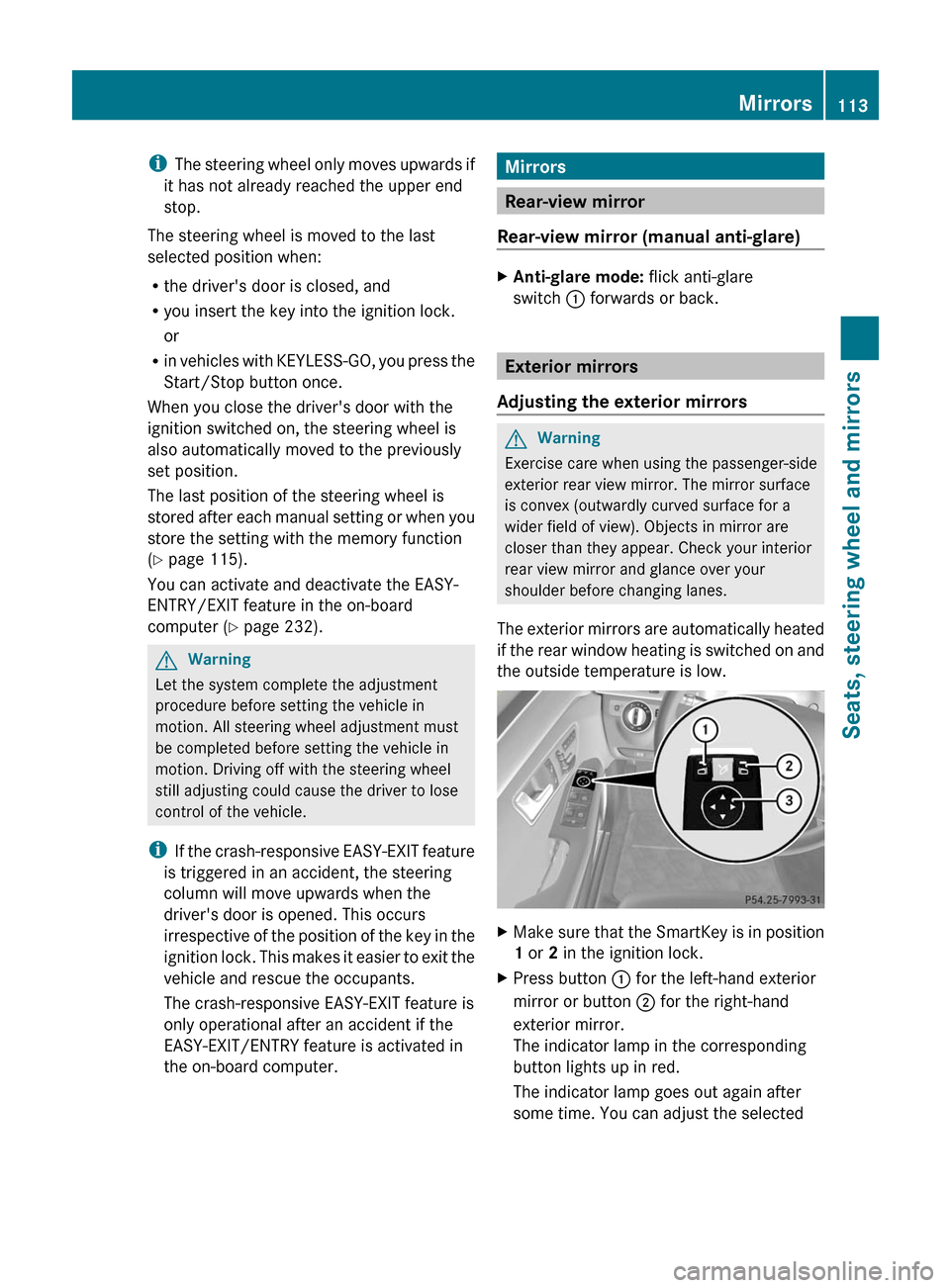
XMake sure that the SmartKey is in position
1 or 2 in the ignition lock.
XPress button : for the left-hand exterior
mirror or button ; for the right-hand
exterior mirror.
The indicator lamp in the corresponding
button lights up in red.
The indicator lamp goes out again after
some time. You can adjust the selected
Mirrors113Seats, steering wheel and mirrorsBA 212 USA, CA Edition B 2011; 1; 5, en-USdimargiVersion: 3.0.3.62010-05-20T13:33:46+02:00 - Seite 113Z
Page 116 of 400
mirror using adjustment button = as long
as the indicator lamp is lit.
XPress adjustment button = up, down, to
the right or to the left until the exterior
mirror is set to a position which provides
you with a good overview of traffic
conditions.
Exterior mirror out of position
If an exterior mirror has been pushed out of
position, proceed as follows:
XMove the exterior mirror into the correct
position manually.
Automatic anti-glare mirrors
GWarning!
The auto dimming function does not react if
incoming light is not aimed directly at sensors
in the interior rear view mirror.
The interior rear view mirror and the exterior
rear view mirror on the driver's side do not
react, for example, if the rear window
sunshade is in raised position.
Light hitting the mirror(s) at certain angles
(incident light) could blind you. As a result,
you may not be able to observe traffic
conditions and could cause an accident.
The rear-view mirror and the exterior mirror
on the driver's side automatically go into anti-
glare mode if the ignition is switched on and
incident light from headlamps strikes the
sensor in the rear-view mirror.
The mirrors do not go into anti-glare mode if
reverse gear is engaged or the interior lighting
is switched on.
Parking position for the exterior
mirror on the front-passenger side
Setting and storing the parking position
You can position the front-passenger side
exterior mirror in such a way that you can see
the rear wheel on that side as soon as you
engage reverse gear. You can store this
position.
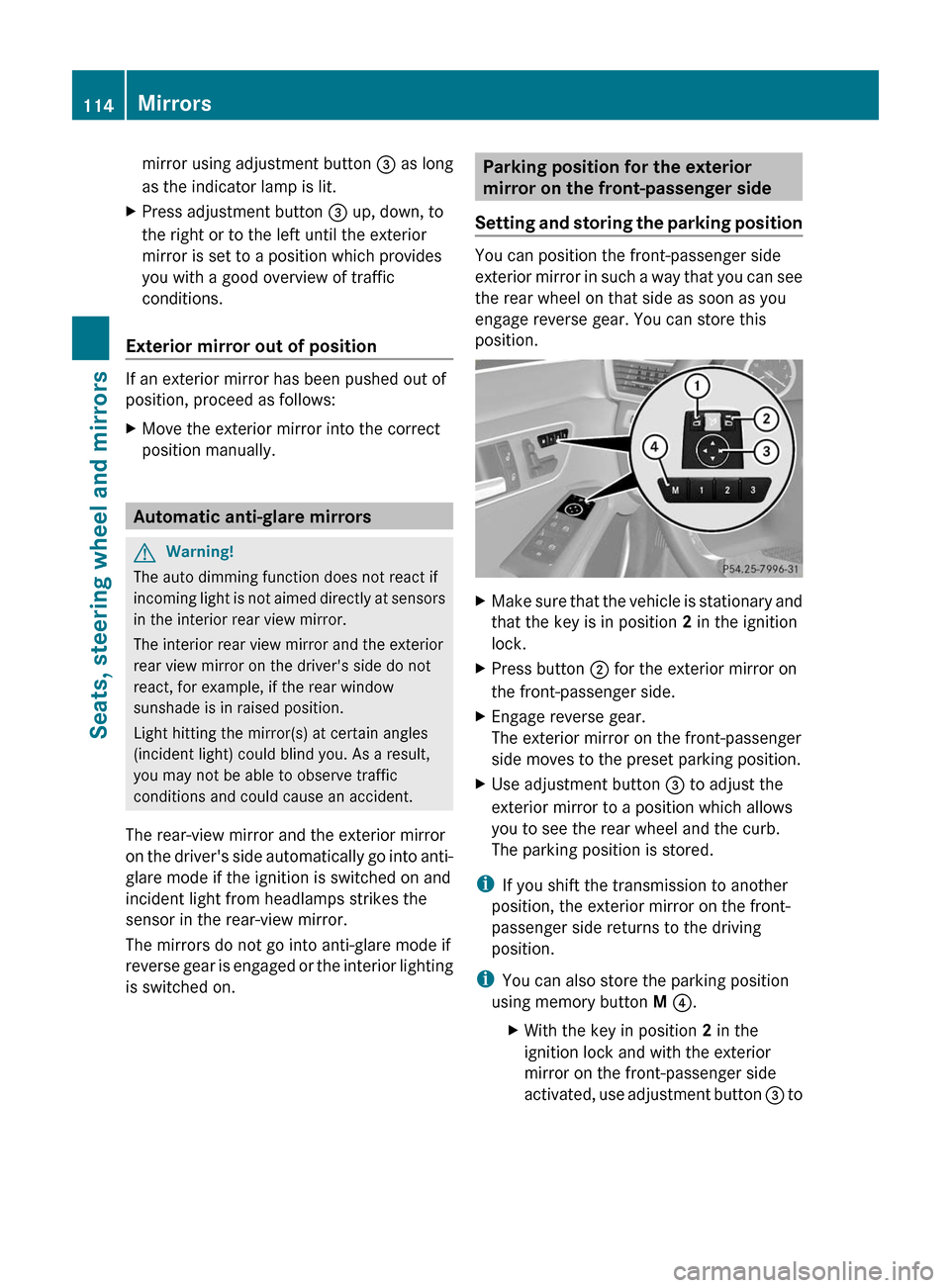
XMake sure that the vehicle is stationary and
that the key is in position 2 in the ignition
lock.
XPress button ; for the exterior mirror on
the front-passenger side.
XEngage reverse gear.
The exterior mirror on the front-passenger
side moves to the preset parking position.
XUse adjustment button = to adjust the
exterior mirror to a position which allows
you to see the rear wheel and the curb.
The parking position is stored.
iIf you shift the transmission to another
position, the exterior mirror on the front-
passenger side returns to the driving
position.
iYou can also store the parking position
using memory button M ?.
XWith the key in position 2 in the
ignition lock and with the exterior
mirror on the front-passenger side
activated, use adjustment button = to
114MirrorsSeats, steering wheel and mirrors
BA 212 USA, CA Edition B 2011; 1; 5, en-USdimargiVersion: 3.0.3.62010-05-20T13:33:46+02:00 - Seite 114