Switch MERCEDES-BENZ E320 2001 W210 Repair Manual
[x] Cancel search | Manufacturer: MERCEDES-BENZ, Model Year: 2001, Model line: E320, Model: MERCEDES-BENZ E320 2001 W210Pages: 341, PDF Size: 18.13 MB
Page 156 of 341
153 Audio system
Technical
data Instruments
and controlsOperationDrivingInstrument
cluster displayPractical hints Car care Index Accepting incoming call in telephone mode
With an incoming call, the ringing tone will be heard
and the message “CALL” appears in the display. Press
the SND key to answer the call.
Accepting incoming call in tape, CD or radio mode
If the telephone is activated in the background
(telephone symbol in the display), then a switch is made
automatically to telephone when an incoming call is
received. The audio source is muted, the ringing tone is
heard and the message “CALL” appears. After the call
has been terminated, the previously selected audio
source is resumed.
Terminating call
A current call can be terminated by pressing the END
key.Component malfunctions
The radio, CD changer
1, and Mercedes-Benz integrated
cellular telephone
1 are part of a fiberoptic networked
system. Failure of one of the components can lead to
malfunctions of the other components. Please contact
your authorized Mercedes-Benz Center or call
1-800-FOR-MERCedes for more information in the event
of a malfunction.
1 Optional equipment
Page 157 of 341
154 Interior equipment
Technical
data Instruments
and controlsOperationDrivingInstrument
cluster displayPractical hints Car care Index
Power w indows
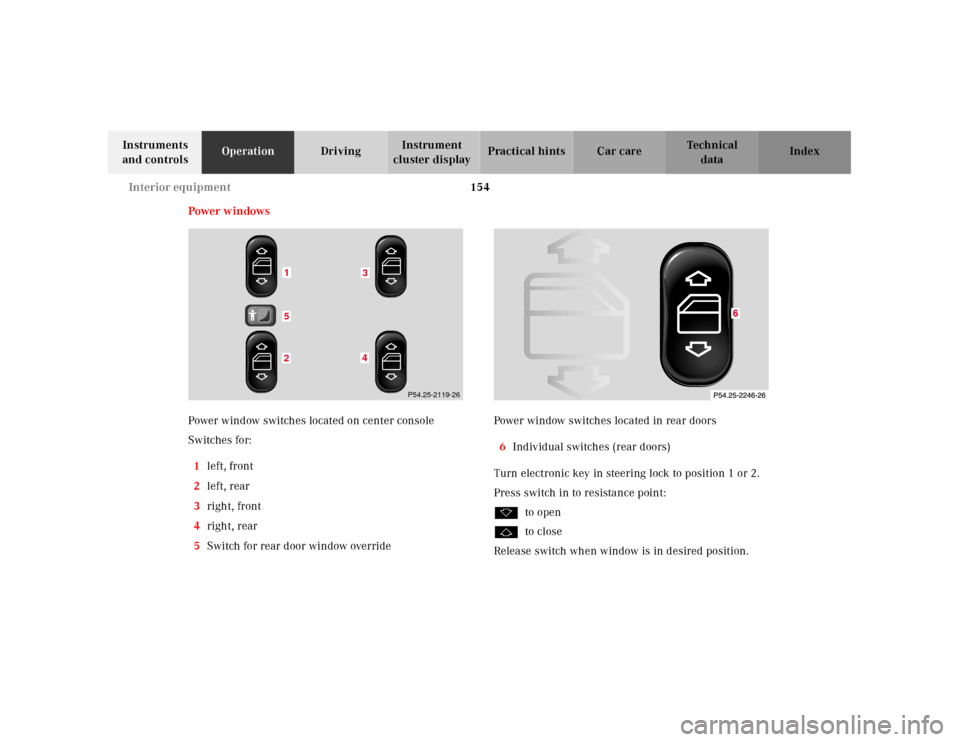
Power window switches located on center console
Switches for:
1left, front
2left, rear
3right, front
4right, rear
5Switch for rear door window overridePower window switches located in rear doors
6Individual switches (rear doors)
Turn electronic key in steering lock to position 1 or 2.
Press switch in to resistance point:
kto open
jto close
Release switch when window is in desired position.
152
43
P54.25-2119-26
Page 158 of 341
155 Interior equipment
Technical
data Instruments
and controlsOperationDrivingInstrument
cluster displayPractical hints Car care Index Express opening and closing
Press switch k or j past resistance point and
release — window opens or closes completely.
To interrupt procedure, briefly press k or j.
If the upward movement of the window is blocked
during the closing procedure, the window will stop
during the last few inches before closure and open
slightly.
When pressing and holding the switch j to close the
w ind ow, a nd u pward movement of t he window is
blocked during the last few inches before closure, it will
stop but not
open slightly.Blocking of rear door window operation
If no operation of the rear windows by switch (6) (for
instance by children) is desired, slide override
switch (5) to right, symbol N becomes visible.
Note:
The power windows can also be opened or closed with
the electronic main key while unlocking or locking the
vehicle doors, see page 33.
Wa r n i n g !
When leaving the vehicle, always remove the
electronic key from the steering lock, and lock the
vehicle. Do not leave children unattended in the
vehicle, or with access to an unlocked vehicle.
Unsupervised use of vehicle equipment can cause
serious personal injury.
Wa r n i n g !
When closing the windows, be sure that there is no
danger of anyone being harmed by the closing
procedure.In case of obstruction, the automatic reversal will
not operate if a window is being closed by pressing
the switch to its resistance point and holding it
there, or when using the remote control.The closing procedure can be immediately reversed
by either pressing the switch k, or pressing
button Πon the remote control, and holding it.
Page 159 of 341
156 Interior equipment
Technical
data Instruments
and controlsOperationDrivingInstrument
cluster displayPractical hints Car care Index
Synchronizing power windows
If the power supply was interrupted (battery
disconnected or low), the windows cannot be opened or
closed by the Express feature.
To resynchronize the express feature, press j side of
power window switch until the window is completely
closed and hold for additional 2 seconds. Repeat
procedure for each window.
The automatic full opening and closing procedure of the
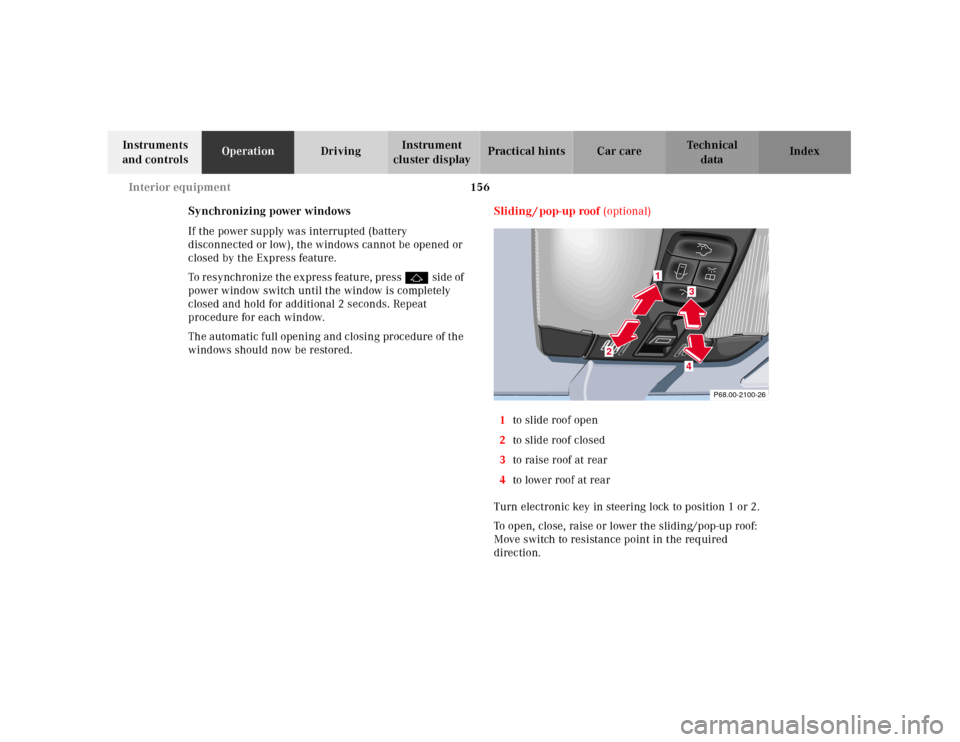
windows should now be restored.Sliding / pop-up roof (optional)
1to slide roof open
2to slide roof closed
3to raise roof at rear
4to lower roof at rear
Turn electronic key in steering lock to position 1 or 2.
To open, close, raise or lower the sliding/pop-up roof:
Move switch to resistance point in the required
direction.
P68.00-2100-26
1
2
34
Page 160 of 341
157 Interior equipment
Technical
data Instruments
and controlsOperationDrivingInstrument
cluster displayPractical hints Car care Index Release the switch when the roof has reached the
required position.
The switch is illuminated when the exterior lamps are
switched on (except standing lamps).
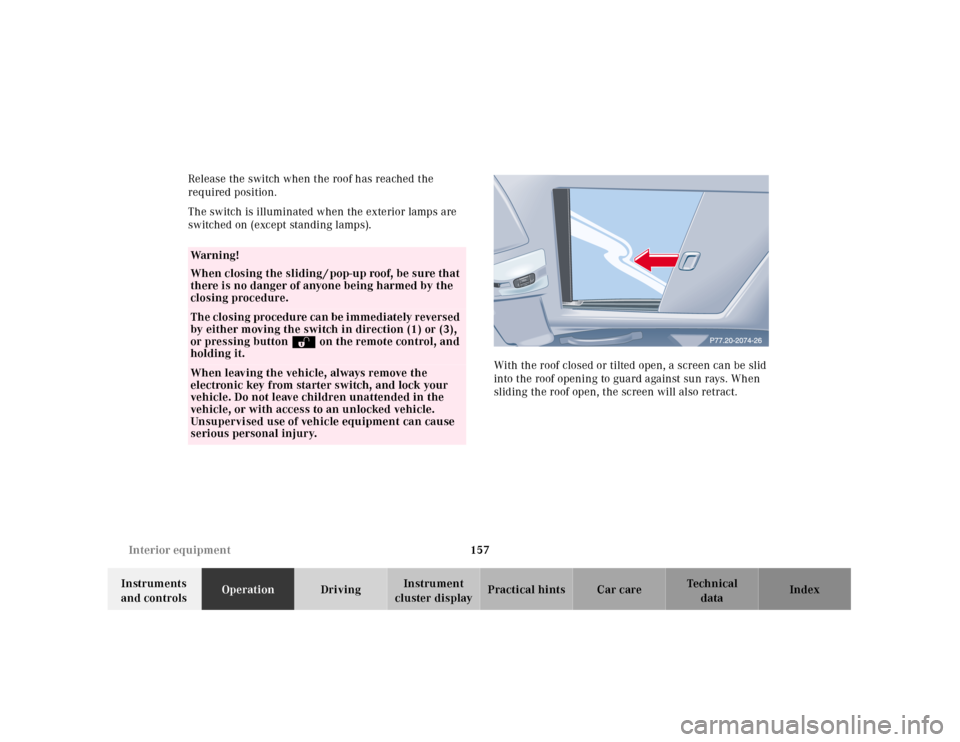
With the roof closed or tilted open, a screen can be slid
into the roof opening to guard against sun rays. When
sliding the roof open, the screen will also retract.
Wa r n i n g !
When closing the sliding / pop-up roof, be sure that
there is no danger of anyone being harmed by the
closing procedure.The closing procedure can be immediately reversed
by either moving the switch in direction (1) or (3),
or pressing button Πon the remote control, and
holding it.When leaving the vehicle, always remove the
electronic key from starter switch, and lock your
vehicle. Do not leave children unattended in the
vehicle, or with access to an unlocked vehicle.
Unsupervised use of vehicle equipment can cause
serious personal injury.
Page 161 of 341
158 Interior equipment
Technical
data Instruments
and controlsOperationDrivingInstrument
cluster displayPractical hints Car care Index
Express opening of sliding / pop-up roof
Move switch past resistance point and release — the
sliding / pop-up roof slides open automatically.
To interrupt procedure, brief ly move switch in any
direction.Synchronizing sliding / pop-up roof
If the power supply was interrupted (battery
disconnected or low), or if the sliding/pop-up roof is
blocked during closing/opening procedure, the system
has to be synchronized.
To do so, turn electronic key in steering lock to
position 2, move and hold switch in direction (3) until
the sliding/pop-up roof is completely raised at rear, and
hold for additional 1 second.
Notes:
The sliding / pop-up roof can be opened or closed
manually should an electrical malfunction occur, see
page 295.
The sliding / pop-up roof can also be opened or closed
with th e el ectronic ma in key wh il e u nl ock ing or locking
the vehicle doors, see page 33.
Page 162 of 341
159 Interior equipment
Technical
data Instruments
and controlsOperationDrivingInstrument
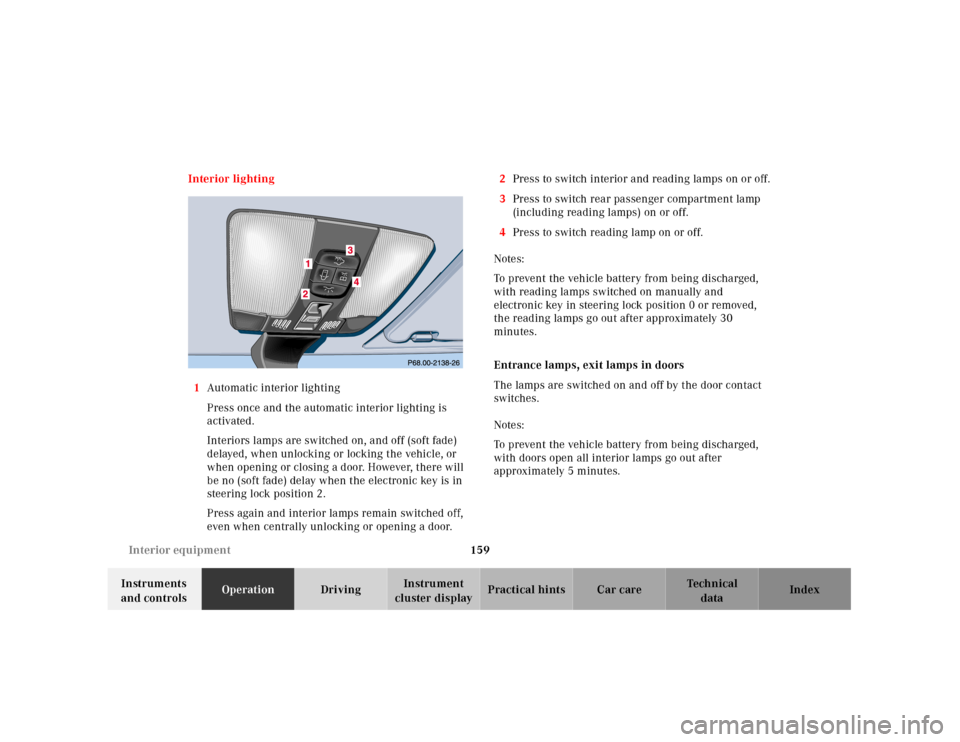
cluster displayPractical hints Car care Index Interior lighting
1Automatic interior lighting
Press once and the automatic interior lighting is
activated.
Interiors lamps are switched on, and off (soft fade)
delayed, when unlocking or locking the vehicle, or
when opening or closing a door. However, there will
be no (soft fade) delay when the electronic key is in
steering lock position 2.
Press again and interior lamps remain switched off,
even when centrally unlocking or opening a door.2Press to switch interior and reading lamps on or off.
3Press to switch rear passenger compartment lamp
(including reading lamps) on or off.
4Press to switch reading lamp on or off.
Notes:
To prevent the vehicle battery from being discharged,
with reading lamps switched on manually and
electronic key in steering lock position 0 or removed,
the reading lamps go out after approximately 30
minutes.
Entrance lamps, exit lamps in doors
The lamps are switched on and off by the door contact
switches.
Notes:
To prevent the vehicle battery from being discharged,
with doors open all interior lamps go out after
approximately 5 minutes.
Page 163 of 341
160 Interior equipment
Technical
data Instruments
and controlsOperationDrivingInstrument
cluster displayPractical hints Car care Index
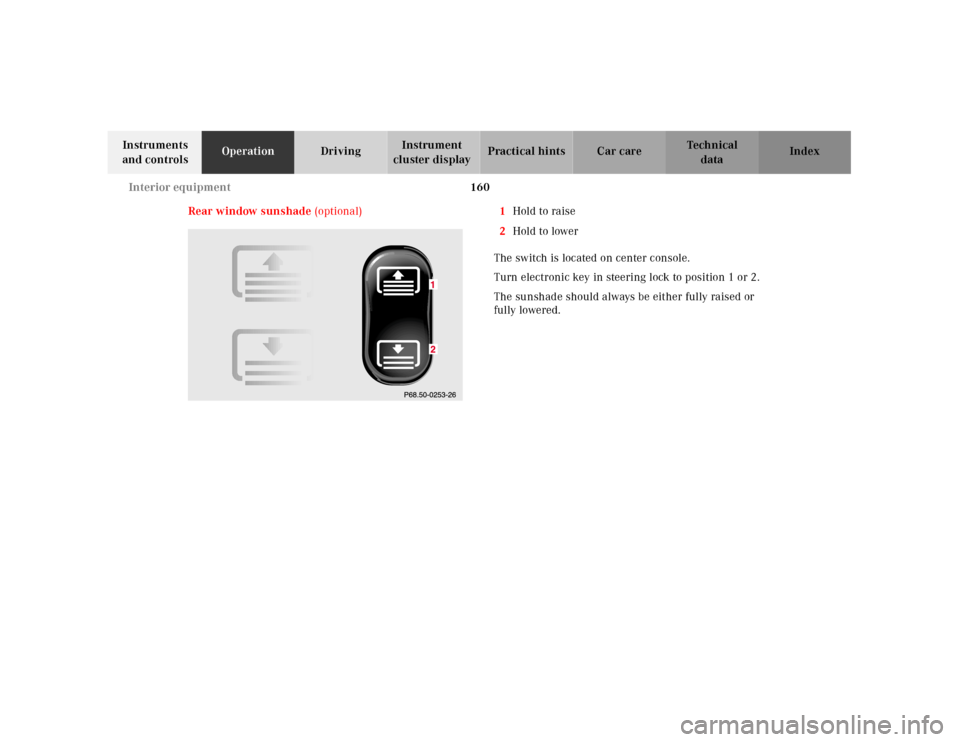
Rear window sunshade (optional)1Hold to raise
2Hold to lower
The switch is located on center console.
Turn electronic key in steering lock to position 1 or 2.
The sunshade should always be either fully raised or
fully lowered.
Page 164 of 341
161 Interior equipment
Technical
data Instruments
and controlsOperationDrivingInstrument
cluster displayPractical hints Car care Index Sun visors
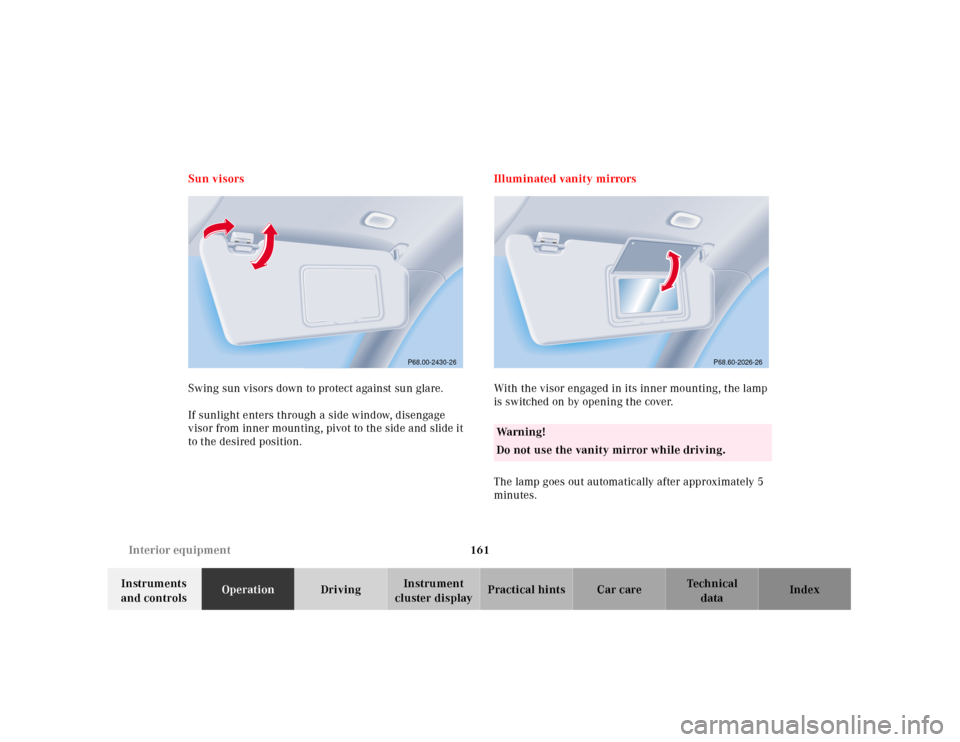
Swing sun visors down to protect against sun glare.
If sunlight enters through a side window, disengage
visor from inner mounting, pivot to the side and slide it
to the desired position.Illuminated vanity mirrors
With the visor engaged in its inner mounting, the lamp
is switched on by opening the cover.
The lamp goes out automatically after approximately 5
minutes.
P68.00-2430-26
Wa r n i n g !
Do not use the vanity mirror while driving.
P68.60-2026-26
Page 181 of 341
178 Tele Aid
Technical
data Instruments
and controlsOperationDrivingInstrument
cluster displayPractical hints Car care Index
Tele Aid
Important!
The initial activation of the Tele Aid system may only be
performed by completing the subscriber agreement and
placing an acquaintance call using the “SOS” button.
Failure to complete either of these steps will result in a
system that is not activated. If the system is not
activated the indicator lamp in the “SOS” button stays
on after turning electronic key in starter switch to
position 2 and the message “TELE AID – NOT
ACTIVATED” will be shown in the multifunction display
for approx. 10 seconds.
If you have any questions regarding activation, please
call the Response Center at 1-800-756-9018 (in the USA)
or 1-888-923-8367 (in Canada).
(Telematic Alarm Identification on Demand)
The Tele Aid system consists of three types of response;
automatic and manual emergency, roadside assistance
and information.
The Tele Aid system is operational providing that the
vehicle’s battery is charged, properly connected, not
damaged and cellular and GPS coverage is available.The speaker volume of a Tele Aid call can be adjusted
when using the volume control on the multifunction
steering wheel, for raising press buttonæ and for
lowering press buttonç.
To activate, press the “SOS” button, the Roadside
Assistance button or t he Informa tion bu tton¡,
depending on the type of response required.
Shortly after the completion of your Acquaintance Call,
you will receive a user ID and password via first call
mail. By visiting www.mbusa.com and selecting
“Tele Aid” (USA only), you will have access to account
information, remote door unlock, Info Services
* profile
and more.
* Optional – available only with COMAND System self-check
Initially, after turning the electronic key in starter
switch to position 2, malfunctions are detected and
indicated (the indicator lamps in the “SOS” button, the
Roadside Assistance button and the Information
button¡ stay on longer than 10 seconds or do not
come on). The message “TELE AID – VISIT
WORKSHOP” appears for approx. 10 seconds in the
multifunction display.