lock MERCEDES-BENZ E320 2002 W210 Repair Manual
[x] Cancel search | Manufacturer: MERCEDES-BENZ, Model Year: 2002, Model line: E320, Model: MERCEDES-BENZ E320 2002 W210Pages: 350, PDF Size: 21.88 MB
Page 141 of 350
138 Audio system
Technical
data Instruments
and controlsOperationDrivingInstrument
cluster displayPractical hints Car care Index
Entering the code number
Switch on the radio.“CODE” will appear on the display.
Using the buttons on the alpha-numeric keypad, enter
the five digit code. Confirm by pressing the “OK” key.
If an incorrect code has been entered and confirmed,
“CODE” will reappear on the display. The correct code
must be entered once again.
If an incorrect code is entered
three times, “WAIT” will
appear on the display and the
radio will be locked out for
about 10 minutes.
Note:
The lock out time will only count down if the radio is
left switched on.Button and soft key operation
In these instructions, the alpha-numeric keypad (right
side of radio face) and the function buttons (left side of
the radio face) are referred to as “buttons” and the four
keys under the display are referred to as “soft keys”.
Note:
Do not press directly on the radio display face.
W210.book Seite 138 Mittwoch, 30. Mai 2001 11:45 11
Page 142 of 350
139 Audio system
Technical
data Instruments
and controlsOperationDrivingInstrument
cluster displayPractical hints Car care Index Operation
Switching on and off
Press the control knob .
The radio is switched off when the ignition key is
turned to position 0 or removed from the ignition. The
radio is switched on again when the ignition key is
turned to position 1 or 2.
Note:
The radio can also be switched on even if the ignition
key is not inserted, but will switch itself off
automatically after one hour to conserve vehicle battery
power.
Adjusting the volume
Turn the control knob - turning the knob clockwise will
increase the volume, counterclockwise will decrease the
volume.Audio functions
The AUD key is used to select the BASS, TREBLE,
FADER and BALANCE functions. Settings for bass and
treble are stored separately for the cassette and CD
modes. Tone level settings are identified by the vertical
bars. The center (flat) setting is shown by one longer
bar in the center of the display.
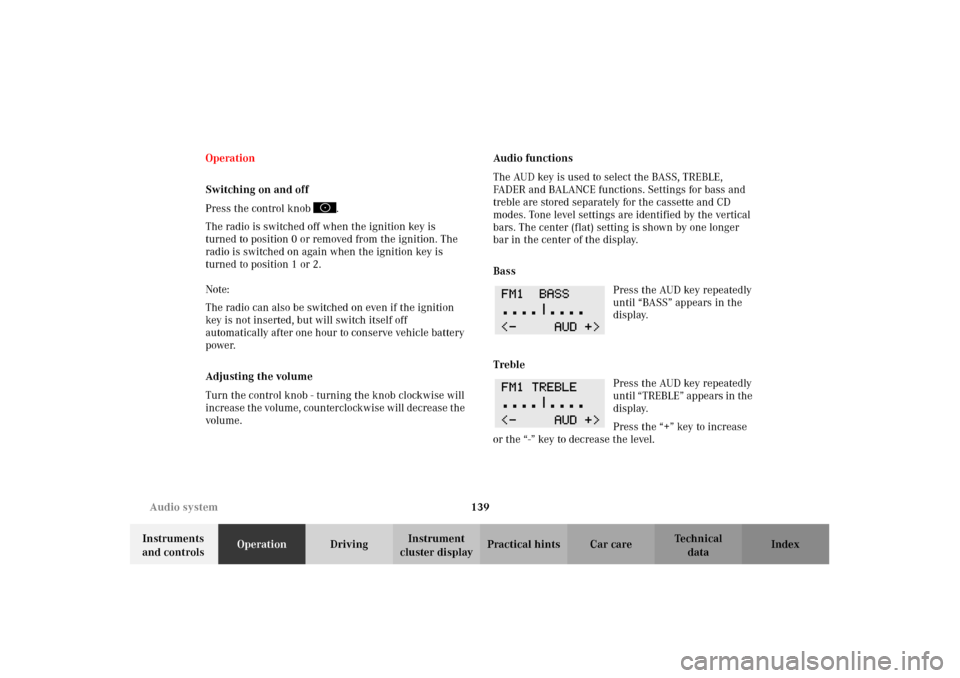
Bass
Press the AUD key repeatedly
until “BASS” appears in the
display.
Treble
Press the AUD key repeatedly
un til “ TREB LE” ap pears in the
display.
Press the “+” key to increase
or the “-” key to decrease the level.
W210.book Seite 139 Mittwoch, 30. Mai 2001 11:45 11
Page 146 of 350
143 Audio system
Technical
data Instruments
and controlsOperationDrivingInstrument
cluster displayPractical hints Car care Index Cassette mode
Note:
Vehicles equipped with the COMAND system do not
come with a factory installed cassette mechanism.
A standard 1/8” stereo phono plug for auxiliary audio
input (located in glove box) is provided for connection
of a portable battery operated cassette player or any
other portable device which uses a headphone output.
Please refer to the COMAND operating manual for
information concerning the activation of the audio
input.Playing cassettes
Press the “TAPE” button. When the eject (EJ) key is
pressed, the display folds down and the cassette slot
becomes visible. Push the cassette into the slot until it
engages. The cassette will be pulled in automatically.
Notes:
Do not press directly on the radio display face.
Return the display panel to its normal position by
folding it back up and pressing gently on the display
frame to lock in place.
When playing mono recorded tapes (e.g. books) through
a stereo system the sound from one track might bleed to
the other track, despite setting the balance to the full
left or full right speakers.
W210.book Seite 143 Mittwoch, 30. Mai 2001 11:45 11
Page 157 of 350
154 Interior equipment
Technical
data Instruments
and controlsOperationDrivingInstrument
cluster displayPractical hints Car care Index
Power windows
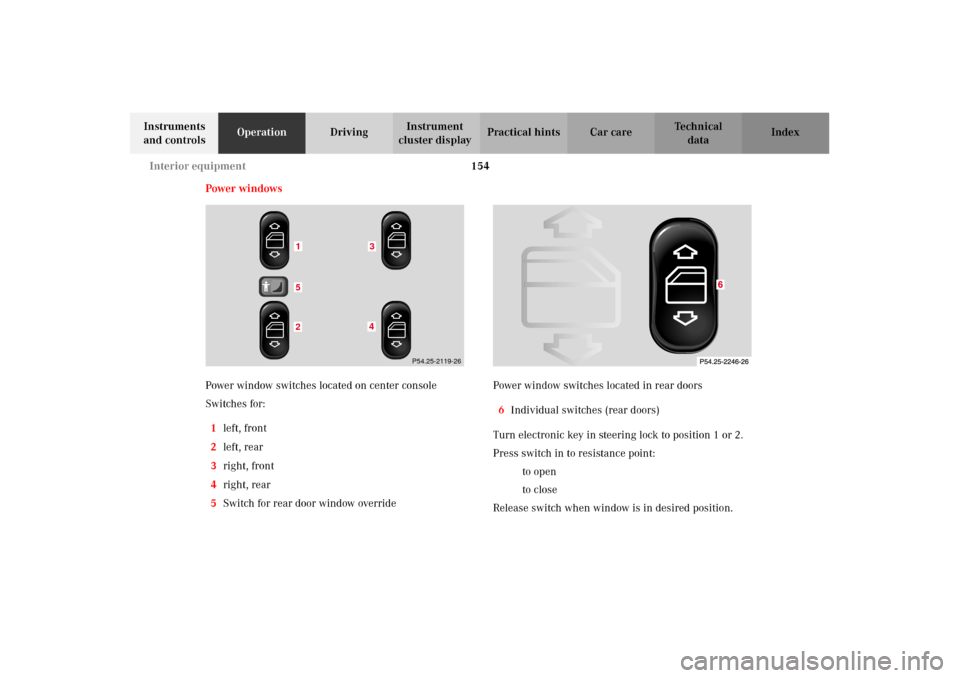
Power window switches located on center console
Switches for:
1left, front
2left, rear
3right, front
4right, rear
5Switch for rear door window overridePower window switches located in rear doors
6Individual switches (rear doors)
Turn electronic key in steering lock to position 1 or 2.
Press switch in to resistance point:
kto open
jto close
Release switch when window is in desired position.
152
43
P54.25-2119-26
W210.book Seite 154 Mittwoch, 30. Mai 2001 11:45 11
Page 158 of 350
155 Interior equipment
Technical
data Instruments
and controlsOperationDrivingInstrument
cluster displayPractical hints Car care Index Express opening and closing
Press switch k or j past resistance point and
release — window opens or closes completely.
To interrupt procedure, briefly press k or j.
If the upward movement of the window is blocked
during the closing procedure, the window will stop
during the last few inches before closure and open
slightly.
When pressing and holding the switch j to close the
window, and upward movement of the window is
blocked during the last few inches before closure, it will
stop but not
open slightly.Blocking of rear door window operation
If no operation of the rear windows by switch (6), (for
instance by children) is desired, slide override
switch (5) to right, symbol N becomes visible, see
page 154.
Note:
The power windows can also be opened and closed
using the summer opening/convenience feature, see
page 31.
Wa r n i n g !
When leaving the vehicle, always remove the
electronic key from the steering lock, and lock the
vehicle. Do not leave children unattended in the
vehicle, or with access to an unlocked vehicle.
Unsupervised use of vehicle equipment can cause
serious personal injury.
Wa r n i n g !
When closing the windows, be sure that there is no
danger of anyone being harmed by the closing
procedure.In case of obstruction, the automatic reversal will
not operate if a window is being closed by pressing
the switch to its resistance point and holding it
there, or when using the remote control.The closing procedure can be immediately
reversed by either pressing the switch k, or
pressing button Πon the remote control, and
holding it.
W210.book Seite 155 Mittwoch, 30. Mai 2001 11:45 11
Page 160 of 350
157 Interior equipment
Technical
data Instruments
and controlsOperationDrivingInstrument
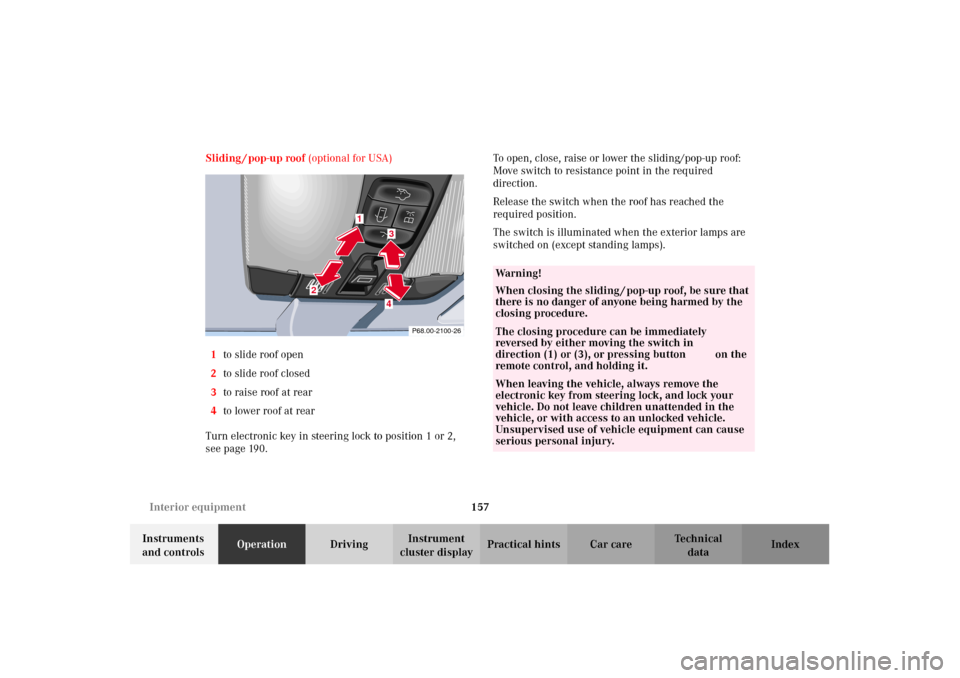
cluster displayPractical hints Car care Index Sliding / pop-up roof (optional for USA)
1to slide roof open
2to slide roof closed
3to raise roof at rear
4to lower roof at rear
Turn electronic key in steering lock to position 1 or 2,
see page 190.To open, close, raise or lower the sliding/pop-up roof:
Move switch to resistance point in the required
direction.
Release the switch when the roof has reached the
required position.
The switch is illuminated when the exterior lamps are
switched on (except standing lamps).
P68.00-2100-26
1
2
34
Wa r n i n g !
When closing the sliding / pop-up roof, be sure that
there is no danger of anyone being harmed by the
closing procedure.The closing procedure can be immediately
reversed by either moving the switch in
direction (1) or (3), or pressing button Πon the
remote control, and holding it.When leaving the vehicle, always remove the
electronic key from steering lock, and lock your
vehicle. Do not leave children unattended in the
vehicle, or with access to an unlocked vehicle.
Unsupervised use of vehicle equipment can cause
serious personal injury.
W210.book Seite 157 Mittwoch, 30. Mai 2001 11:45 11
Page 161 of 350
158 Interior equipment
Technical
data Instruments
and controlsOperationDrivingInstrument
cluster displayPractical hints Car care Index
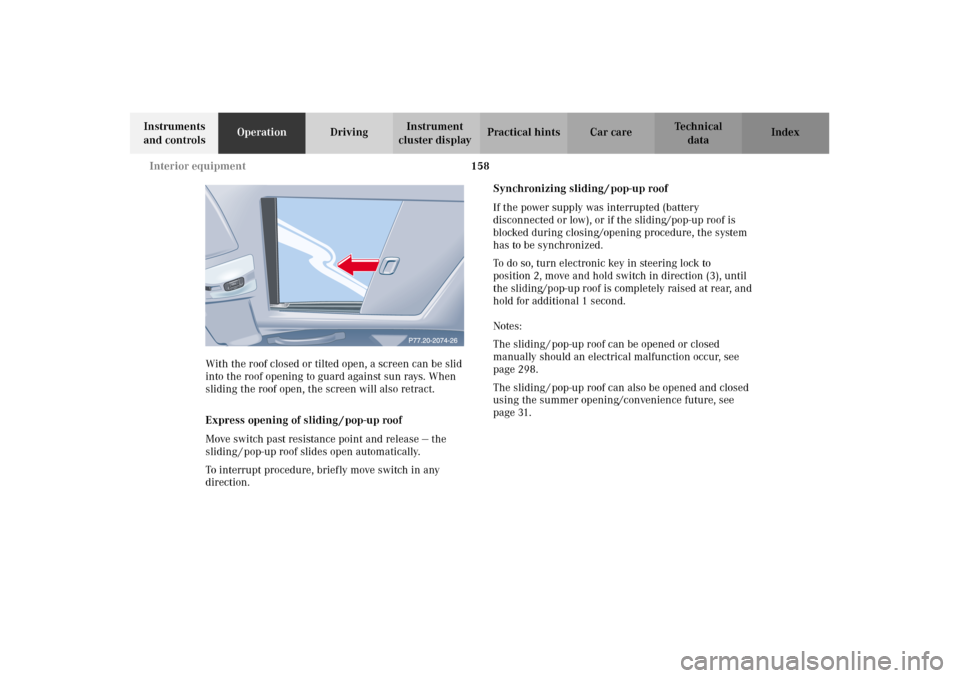
With the roof closed or tilted open, a screen can be slid
into the roof opening to guard against sun rays. When
sliding the roof open, the screen will also retract.
Express opening of sliding / pop-up roof
Move switch past resistance point and release — the
sliding / pop-up roof slides open automatically.
To interrupt procedure, briefly move switch in any
direction.Synchronizing sliding / pop-up roof
If the power supply was interrupted (battery
disconnected or low), or if the sliding/pop-up roof is
blocked during closing/opening procedure, the system
has to be synchronized.
To do so, turn electronic key in steering lock to
position 2, move and hold switch in direction (3), until
the sliding/pop-up roof is completely raised at rear, and
hold for additional 1 second.
Notes:
The sliding / pop-up roof can be opened or closed
manually should an electrical malfunction occur, see
page 298.
The sliding / pop-up roof can also be opened and closed
using the summer opening/convenience future, see
page 31.
W210.book Seite 158 Mittwoch, 30. Mai 2001 11:45 11
Page 162 of 350
159 Interior equipment
Technical
data Instruments
and controlsOperationDrivingInstrument
cluster displayPractical hints Car care Index Interior lighting
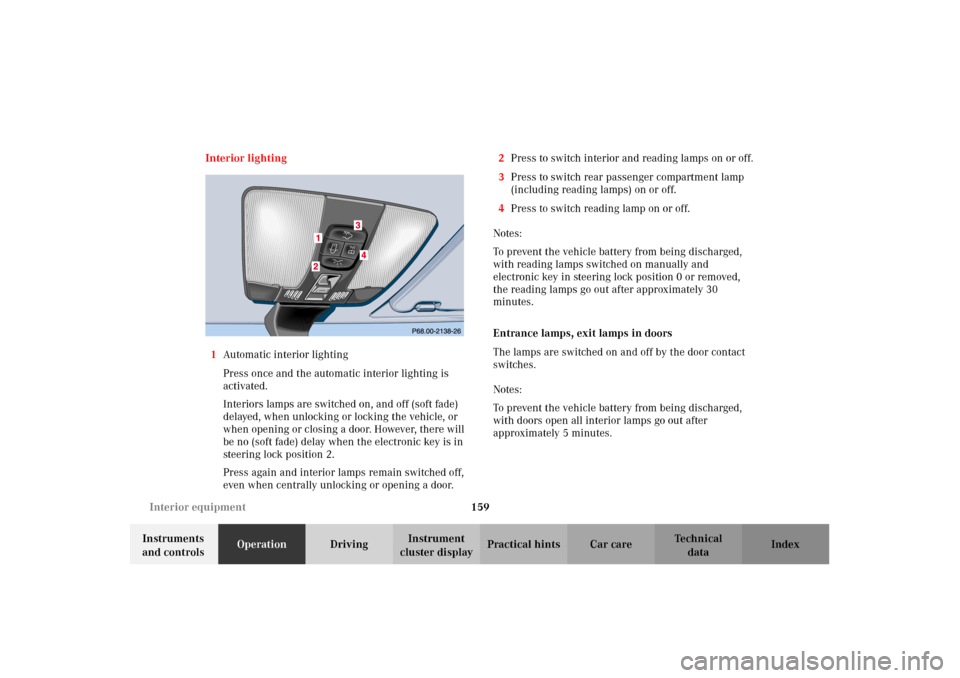
1Automatic interior lighting
Press once and the automatic interior lighting is
activated.
Interiors lamps are switched on, and off (soft fade)
delayed, when unlocking or locking the vehicle, or
when opening or closing a door. However, there will
be no (soft fade) delay when the electronic key is in
steering lock position 2.
Press again and interior lamps remain switched off,
even when centrally unlocking or opening a door.2Press to switch interior and reading lamps on or off.
3Press to switch rear passenger compartment lamp
(including reading lamps) on or off.
4Press to switch reading lamp on or off.
Notes:
To prevent the vehicle battery from being discharged,
with reading lamps switched on manually and
electronic key in steering lock position 0 or removed,
the reading lamps go out after approximately 30
minutes.
Entrance lamps, exit lamps in doors
The lamps are switched on and off by the door contact
switches.
Notes:
To prevent the vehicle battery from being discharged,
with doors open all interior lamps go out after
approximately 5 minutes.
W210.book Seite 159 Mittwoch, 30. Mai 2001 11:45 11
Page 163 of 350
160 Interior equipment
Technical
data Instruments
and controlsOperationDrivingInstrument
cluster displayPractical hints Car care Index
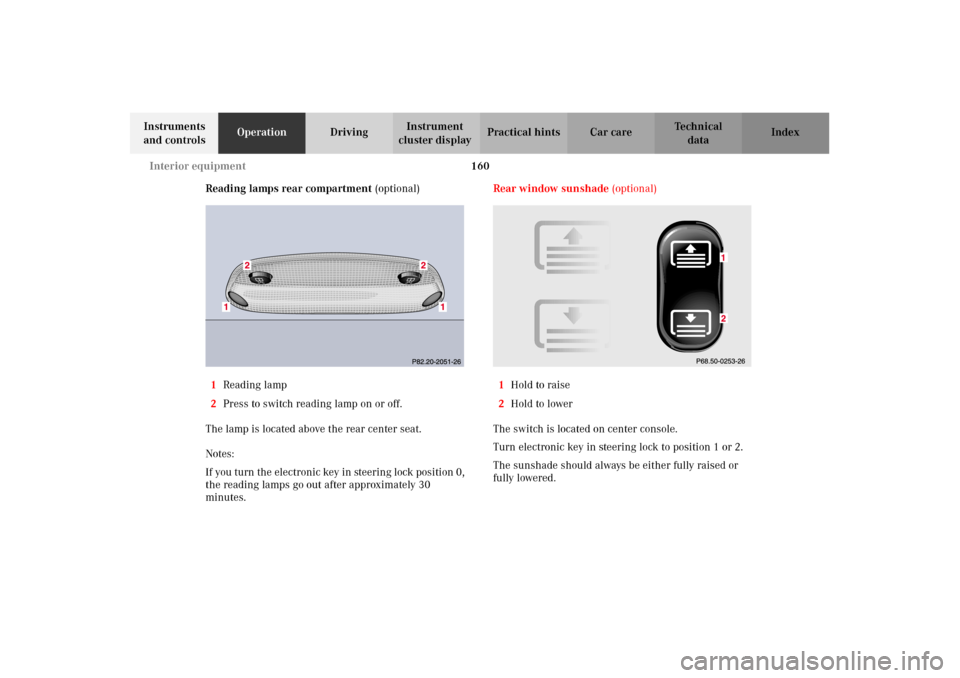
Reading lamps rear compartment (optional)
1Reading lamp
2Press to switch reading lamp on or off.
The lamp is located above the rear center seat.
Notes:
If you turn the electronic key in steering lock position 0,
the reading lamps go out after approximately 30
minutes.Rear window sunshade (optional)
1Hold to raise
2Hold to lower
The switch is located on center console.
Turn electronic key in steering lock to position 1 or 2.
The sunshade should always be either fully raised or
fully lowered.
W210.book Seite 160 Mittwoch, 30. Mai 2001 11:45 11
Page 166 of 350
163 Interior equipment
Technical
data Instruments
and controlsOperationDrivingInstrument
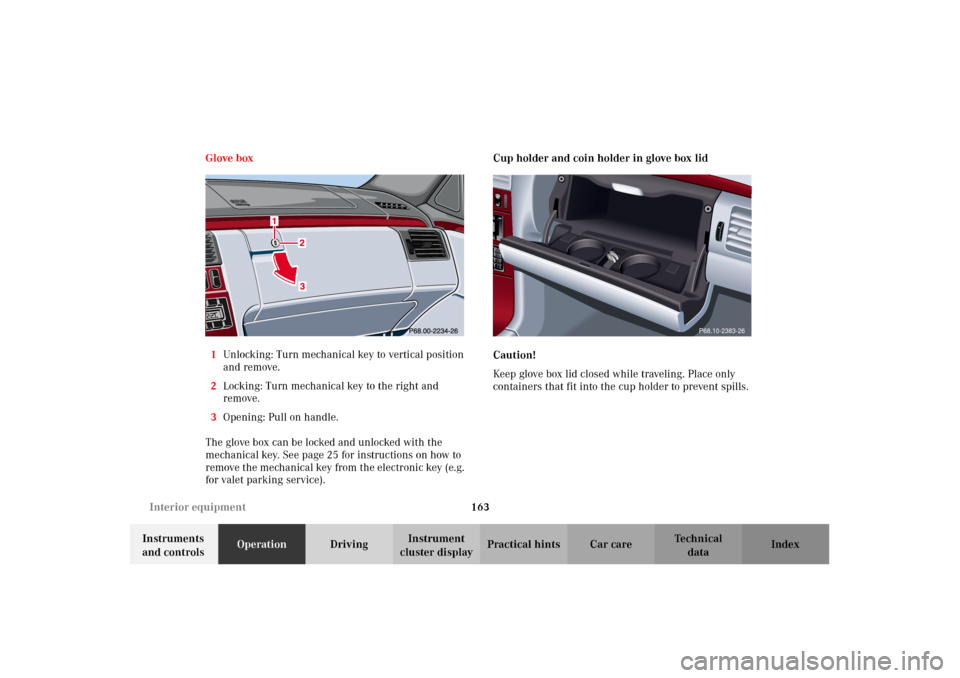
cluster displayPractical hints Car care Index Glove box
1Unlocking: Turn mechanical key to vertical position
and remove.
2Locking: Turn mechanical key to the right and
remove.
3Opening: Pull on handle.
The glove box can be locked and unlocked with the
mechanical key. See page 25 for instructions on how to
remove the mechanical key from the electronic key (e.g.
for valet parking service).Cup holder and coin holder in glove box lid
Caution!
Keep glove box lid closed while traveling. Place only
containers that fit into the cup holder to prevent spills.
P68.10-2383-26
W210.book Seite 163 Mittwoch, 30. Mai 2001 11:45 11