ECO mode MERCEDES-BENZ E350 2010 W212 User Guide
[x] Cancel search | Manufacturer: MERCEDES-BENZ, Model Year: 2010, Model line: E350, Model: MERCEDES-BENZ E350 2010 W212Pages: 372, PDF Size: 8.55 MB
Page 137 of 372
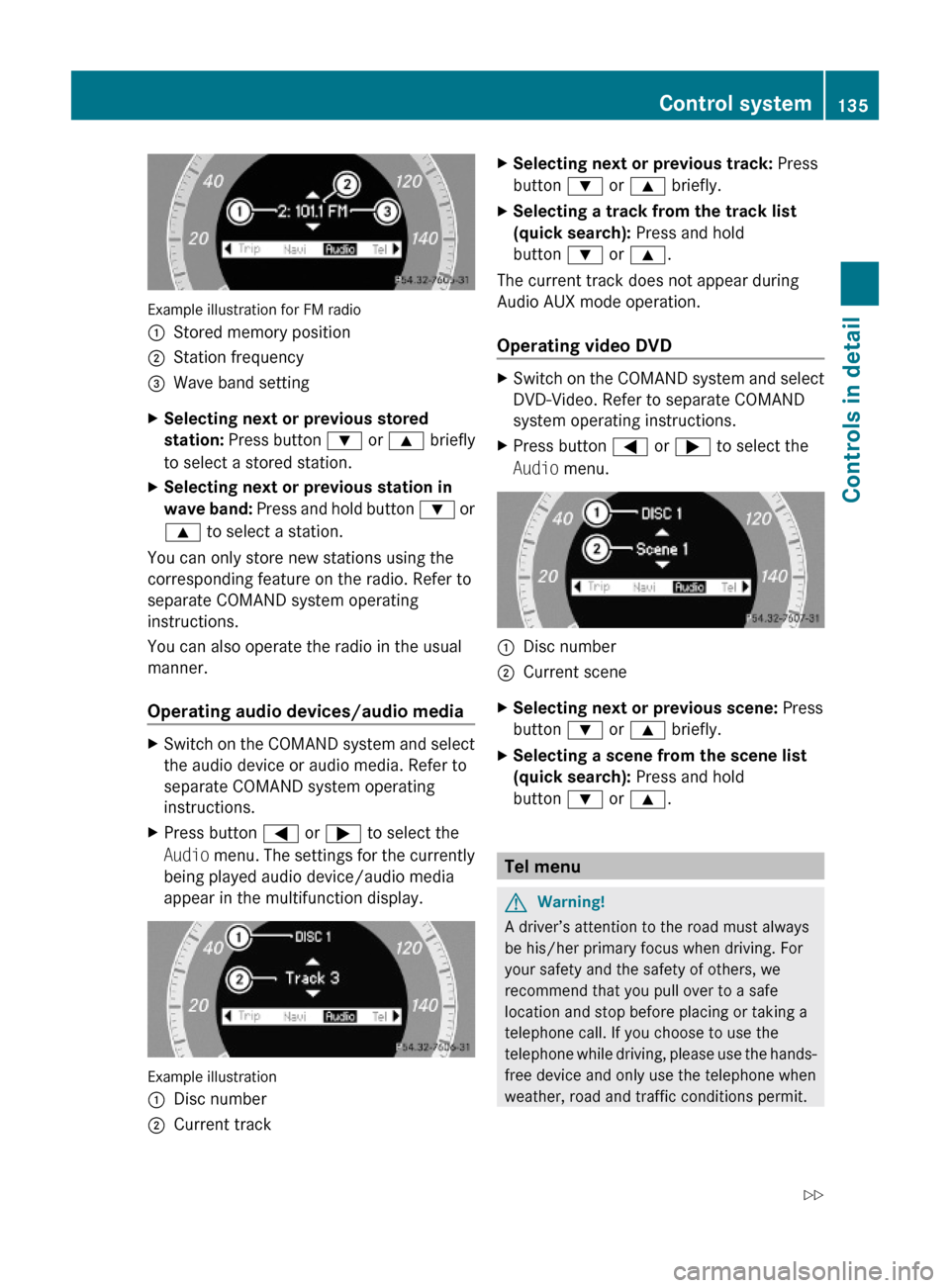
Example illustration for FM radio
:Stored memory position;Station frequency=Wave band settingXSelecting next or previous stored
station: Press button : or 9 briefly
to select a stored station.
XSelecting next or previous station in
wave band: Press and hold button : or
9 to select a station.
You can only store new stations using the
corresponding feature on the radio. Refer to
separate COMAND system operating
instructions.
You can also operate the radio in the usual
manner.
Operating audio devices/audio media
XSwitch on the COMAND system and select
the audio device or audio media. Refer to
separate COMAND system operating
instructions.
XPress button = or ; to select the
Audio menu. The settings for the currently
being played audio device/audio media
appear in the multifunction display.
Example illustration
:Disc number;Current trackXSelecting next or previous track: Press
button : or 9 briefly.
XSelecting a track from the track list
(quick search): Press and hold
button : or 9.
The current track does not appear during
Audio AUX mode operation.
Operating video DVD
XSwitch on the COMAND system and select
DVD-Video. Refer to separate COMAND
system operating instructions.
XPress button = or ; to select the
Audio menu.
:Disc number;Current sceneXSelecting next or previous scene: Press
button : or 9 briefly.
XSelecting a scene from the scene list
(quick search): Press and hold
button : or 9.
Tel menu
GWarning!
A driver’s attention to the road must always
be his/her primary focus when driving. For
your safety and the safety of others, we
recommend that you pull over to a safe
location and stop before placing or taking a
telephone call. If you choose to use the
telephone while driving, please use the hands-
free device and only use the telephone when
weather, road and traffic conditions permit.
Control system135Controls in detail212_AKB; 2; 41, en-USd2ureepe,Version: 2.11.8.12009-07-17T09:14:21+02:00 - Seite 135Z
Page 144 of 372
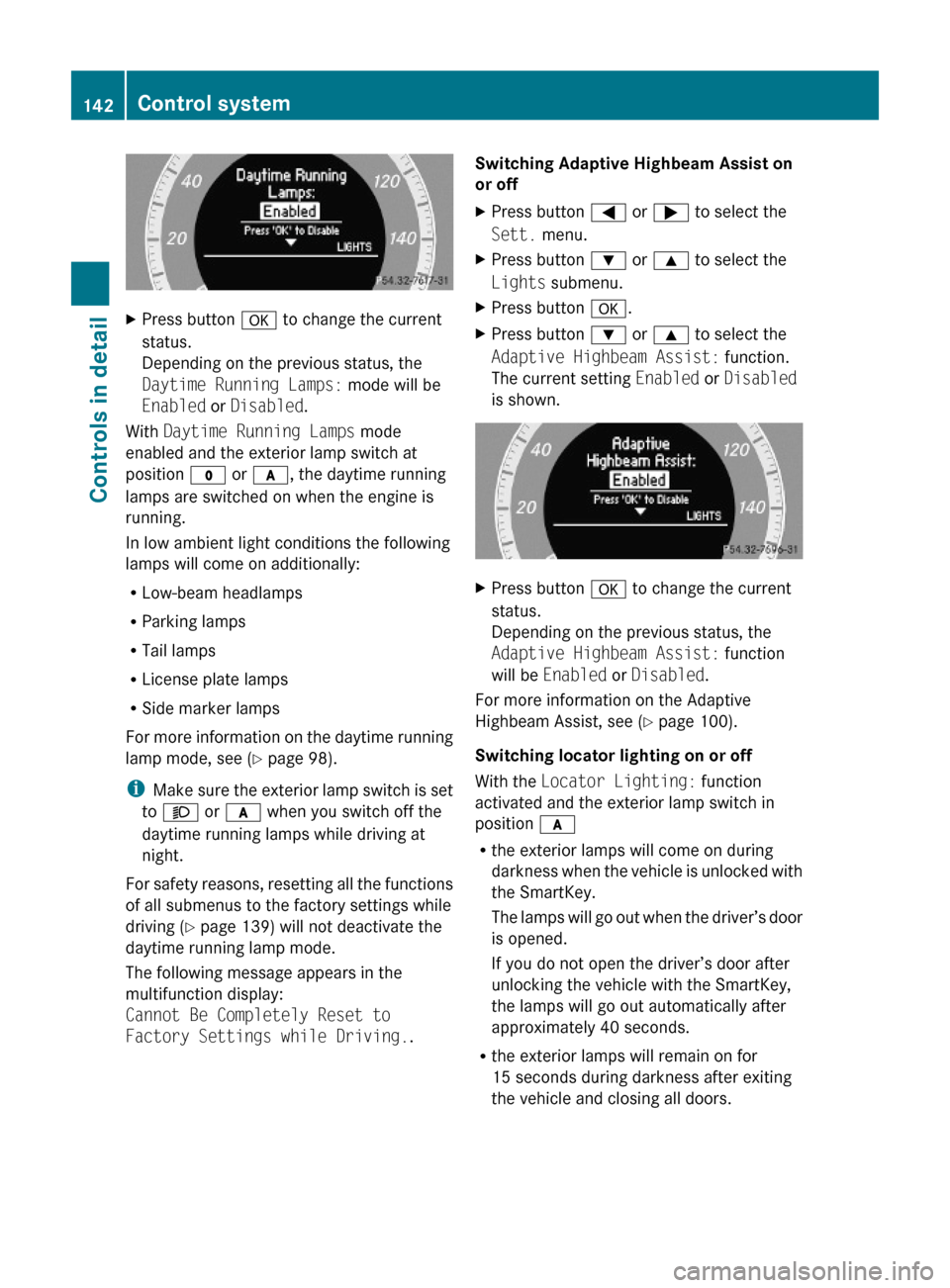
XPress button a to change the current
status.
Depending on the previous status, the
Daytime Running Lamps: mode will be
Enabled or Disabled.
With Daytime Running Lamps mode
enabled and the exterior lamp switch at
position $ or c, the daytime running
lamps are switched on when the engine is
running.
In low ambient light conditions the following
lamps will come on additionally:
RLow-beam headlamps
RParking lamps
RTail lamps
RLicense plate lamps
RSide marker lamps
For more information on the daytime running
lamp mode, see (Y page 98).
iMake sure the exterior lamp switch is set
to M or c when you switch off the
daytime running lamps while driving at
night.
For safety reasons, resetting all the functions
of all submenus to the factory settings while
driving (Y page 139) will not deactivate the
daytime running lamp mode.
The following message appears in the
multifunction display:
Cannot Be Completely Reset to
Factory Settings while Driving..
Switching Adaptive Highbeam Assist on
or off
XPress button = or ; to select the
Sett. menu.
XPress button : or 9 to select the
Lights submenu.
XPress button a.XPress button : or 9 to select the
Adaptive Highbeam Assist: function.
The current setting Enabled or Disabled
is shown.
XPress button a to change the current
status.
Depending on the previous status, the
Adaptive Highbeam Assist: function
will be Enabled or Disabled.
For more information on the Adaptive
Highbeam Assist, see (Y page 100).
Switching locator lighting on or off
With the Locator Lighting: function
activated and the exterior lamp switch in
position c
Rthe exterior lamps will come on during
darkness when the vehicle is unlocked with
the SmartKey.
The lamps will go out when the driver’s door
is opened.
If you do not open the driver’s door after
unlocking the vehicle with the SmartKey,
the lamps will go out automatically after
approximately 40 seconds.
Rthe exterior lamps will remain on for
15 seconds during darkness after exiting
the vehicle and closing all doors.
142Control systemControls in detail
212_AKB; 2; 41, en-USd2ureepe,Version: 2.11.8.12009-07-17T09:14:21+02:00 - Seite 142
Page 162 of 372
Rthe vehicle is standing still and the brake
pedal is depressed (left foot)
R the automatic transmission is in drive
position D
Activating RACE STARTXDepress the brake pedal with your left foot
and keep it depressed.XTurn the program mode selector dial
clockwise ( Y page 121) until the RS lamp
on the dial comes on.
The message RACE START Confirm:
Paddle UP Cancel: Paddle DOWN
appears in the multifunction display.
i When the activation conditions are not
fulfilled anymore, RACE START is canceled.
The message RACE START Canceled
appears in the multifunction display.
XTo cancel: Pull left steering wheel gearshift
control ( Y page 122).
or
XTo confirm: Pull right steering wheel
gearshift control ( Y page 122).
The message RACE START Available
Depress gas pedal. appears in the
multifunction display.
i If you do not depress the accelerator
pedal within 2 seconds, RACE START is
canceled. The message RACE START Not
Possible See Operator’s Manual
appears in the multifunction display.
XDepress the accelerator pedal fully.
The engine speed rises to approximately
4000 rpm.
The message RACE START Release
brake to start appears in the
multifunction display.
i If you do not release the brake pedal
within 7 seconds, RACE START is canceled.
The message RACE START Canceled
appears in the multifunction display.XTake your foot off the brake pedal while
keeping the accelerator pedal depressed.
The vehicle pulls away at maximum
acceleration.
The message RACE START Active appears
in the multifunction display.
RACE START deactivates at a vehicle speed
of approximately 30 mph
(Canada: 50 km/h). The automatic
transmission switches to program mode S+.
ESC SPORT remains switched on.
RACE START is canceled immediately if you
release the accelerator pedal while RACE
START is active or when the activation
conditions are not fulfilled anymore. The
message RACE START Not Possible See
Operator’s Manual appears in the
multifunction display.
i If RACE START is used repeatedly in a
short period of time, it is only available
again after having driven the vehicle a
certain distance.
Hill-start assist system
On uphill grades, the hill-start assist system
maintains the pressure in the brake system
for approximately 1 second after you have
released the brake pedal. Therefore, you can
start off smoothly without the vehicle moving
immediately after releasing the brake pedal.
GWarning!
The hill-start assist system is not designed to
function as a parking brake. It does not
prevent the vehicle from moving when parked
on an incline.
Always engage the parking brake in addition
to shifting the automatic transmission into
park position P.
XDepress the brake pedal.XShift the automatic transmission into drive
position D or reverse gear R.160Driving systemsControls in detail
212_AKB; 2; 41, en-USd2ureepe,Version: 2.11.8.12009-07-17T09:14:21+02:00 - Seite 160
Page 183 of 372
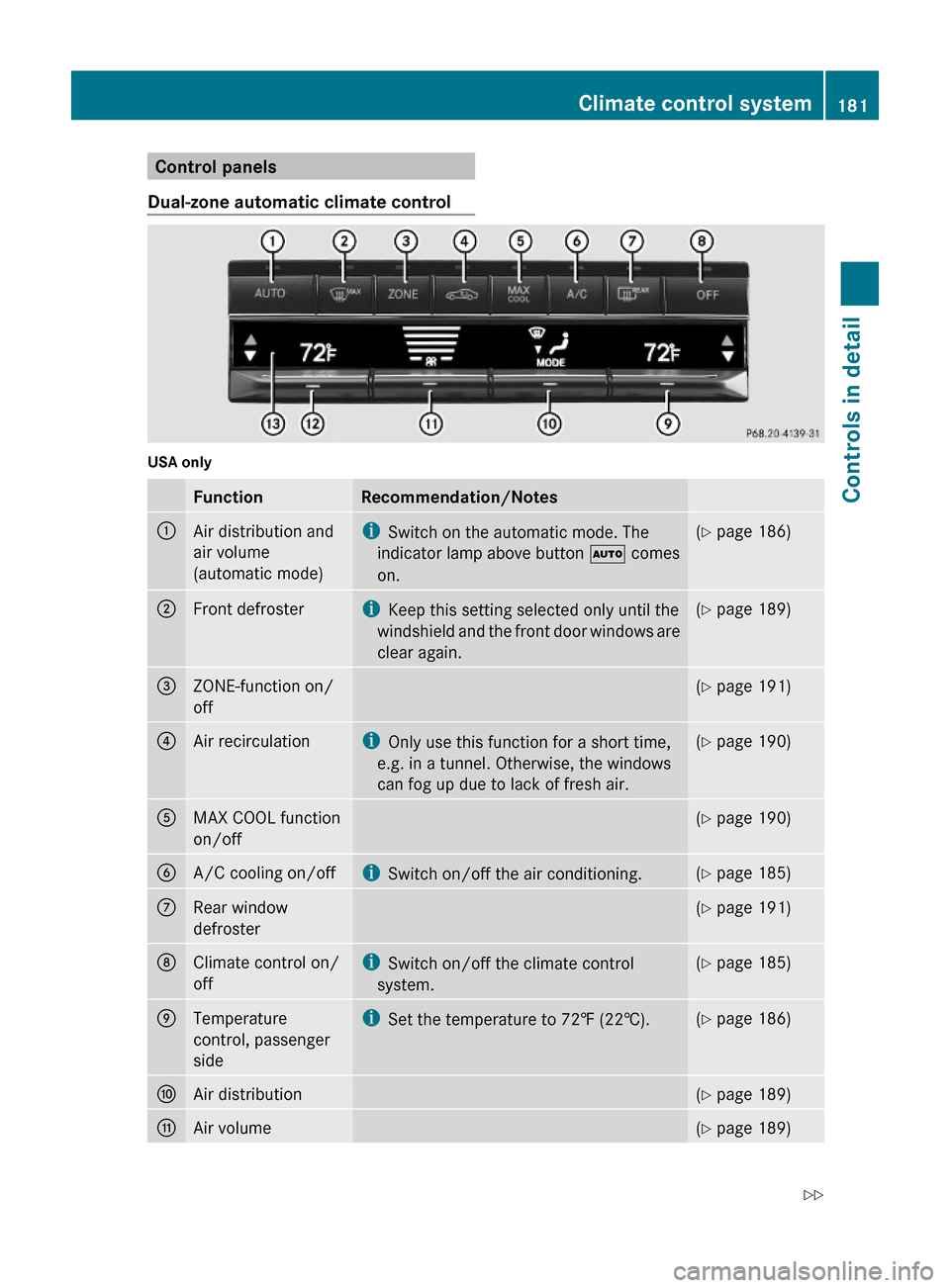
Control panels
Dual-zone automatic climate control
USA only
FunctionRecommendation/Notes:Air distribution and
air volume
(automatic mode)
iSwitch on the automatic mode. The
indicator lamp above button à comes
on.
(Y page 186);Front defrosteriKeep this setting selected only until the
windshield and the front door windows are
clear again.
(Y page 189)=ZONE-function on/
off
(Y page 191)?Air recirculationiOnly use this function for a short time,
e.g. in a tunnel. Otherwise, the windows
can fog up due to lack of fresh air.
(Y page 190)AMAX COOL function
on/off
(Y page 190)BA/C cooling on/offiSwitch on/off the air conditioning.(Y page 185)CRear window
defroster
(Y page 191)DClimate control on/
off
iSwitch on/off the climate control
system.
(Y page 185)ETemperature
control, passenger
side
iSet the temperature to 72‡ (22†).(Y page 186)FAir distribution(Y page 189)GAir volume(Y page 189)Climate control system181Controls in detail212_AKB; 2; 41, en-USd2ureepe,Version: 2.11.8.12009-07-17T09:14:21+02:00 - Seite 181Z
Page 184 of 372
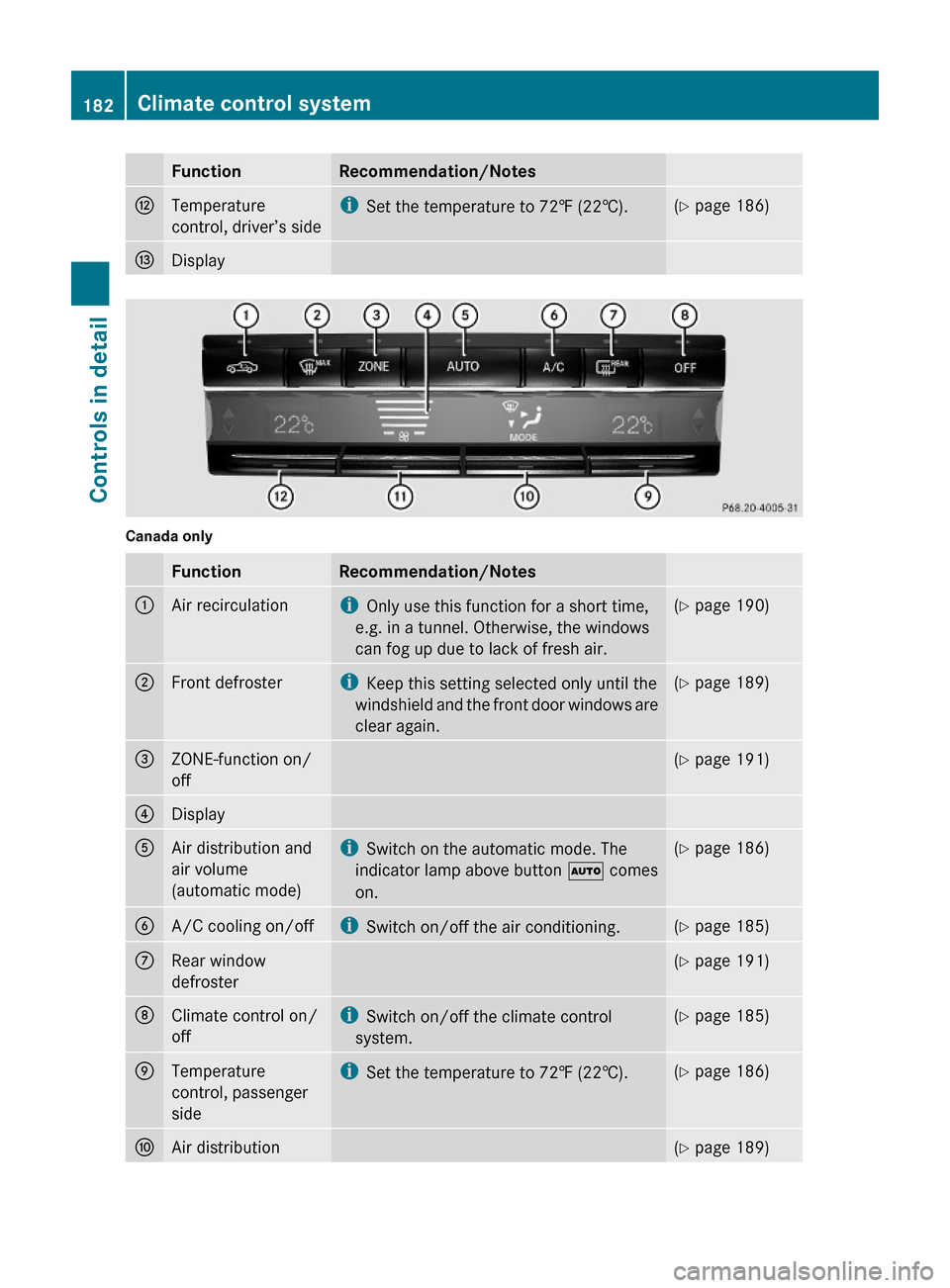
FunctionRecommendation/NotesHTemperature
control, driver’s side
iSet the temperature to 72‡ (22†).(Y page 186)IDisplay
Canada only
FunctionRecommendation/Notes:Air recirculationiOnly use this function for a short time,
e.g. in a tunnel. Otherwise, the windows
can fog up due to lack of fresh air.
(Y page 190);Front defrosteriKeep this setting selected only until the
windshield and the front door windows are
clear again.
(Y page 189)=ZONE-function on/
off
(Y page 191)?DisplayAAir distribution and
air volume
(automatic mode)
iSwitch on the automatic mode. The
indicator lamp above button à comes
on.
(Y page 186)BA/C cooling on/offiSwitch on/off the air conditioning.(Y page 185)CRear window
defroster
(Y page 191)DClimate control on/
off
iSwitch on/off the climate control
system.
(Y page 185)ETemperature
control, passenger
side
iSet the temperature to 72‡ (22†).(Y page 186)FAir distribution(Y page 189)182Climate control systemControls in detail
212_AKB; 2; 41, en-USd2ureepe,Version: 2.11.8.12009-07-17T09:14:21+02:00 - Seite 182
Page 185 of 372
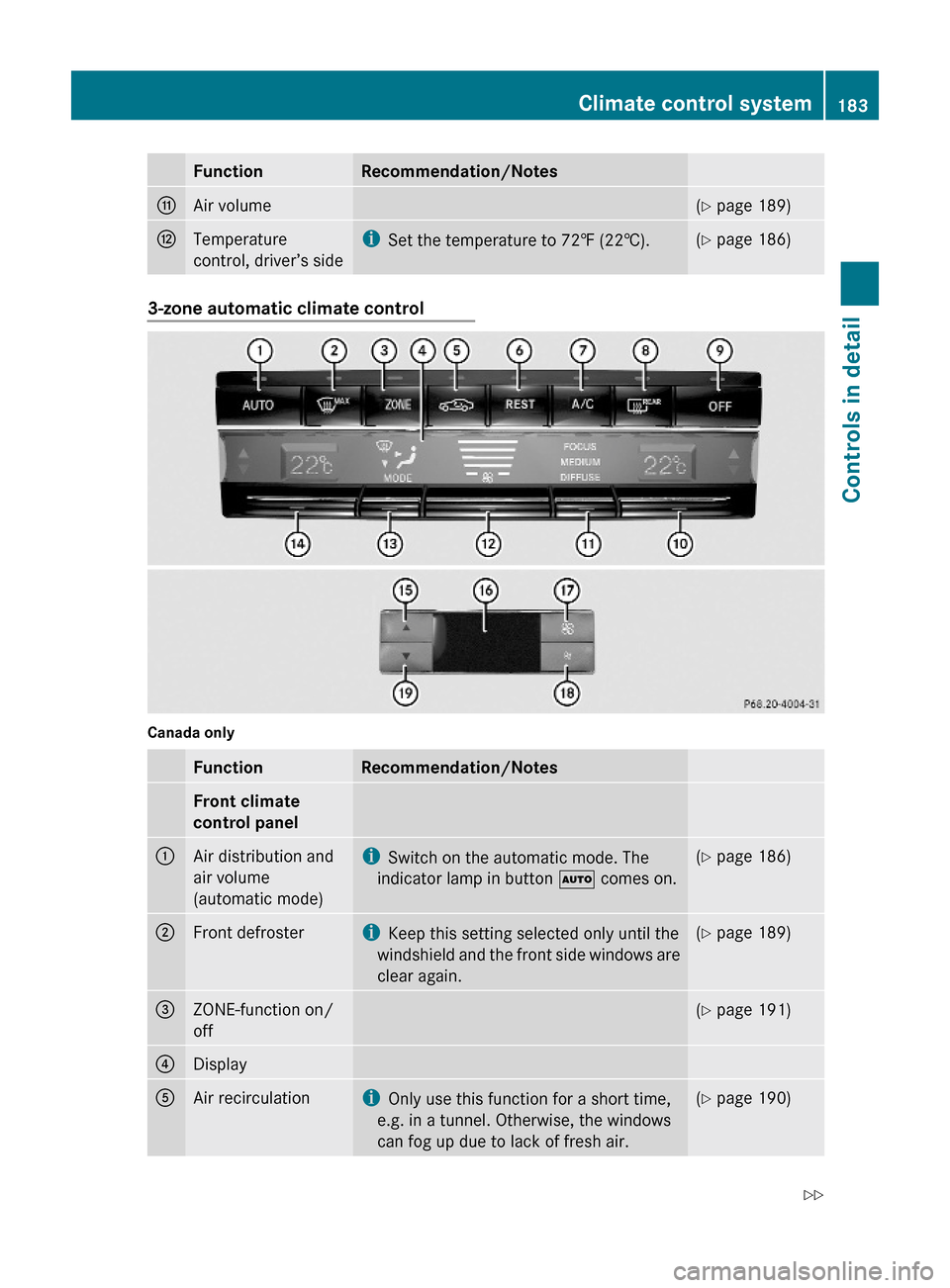
FunctionRecommendation/NotesGAir volume(Y page 189)HTemperature
control, driver’s side
iSet the temperature to 72‡ (22†).(Y page 186)3-zone automatic climate control
Canada only
FunctionRecommendation/NotesFront climate
control panel
:Air distribution and
air volume
(automatic mode)
iSwitch on the automatic mode. The
indicator lamp in button à comes on.
(Y page 186);Front defrosteriKeep this setting selected only until the
windshield and the front side windows are
clear again.
(Y page 189)=ZONE-function on/
off
(Y page 191)?DisplayAAir recirculationiOnly use this function for a short time,
e.g. in a tunnel. Otherwise, the windows
can fog up due to lack of fresh air.
(Y page 190)Climate control system183Controls in detail212_AKB; 2; 41, en-USd2ureepe,Version: 2.11.8.12009-07-17T09:14:21+02:00 - Seite 183Z
Page 186 of 372
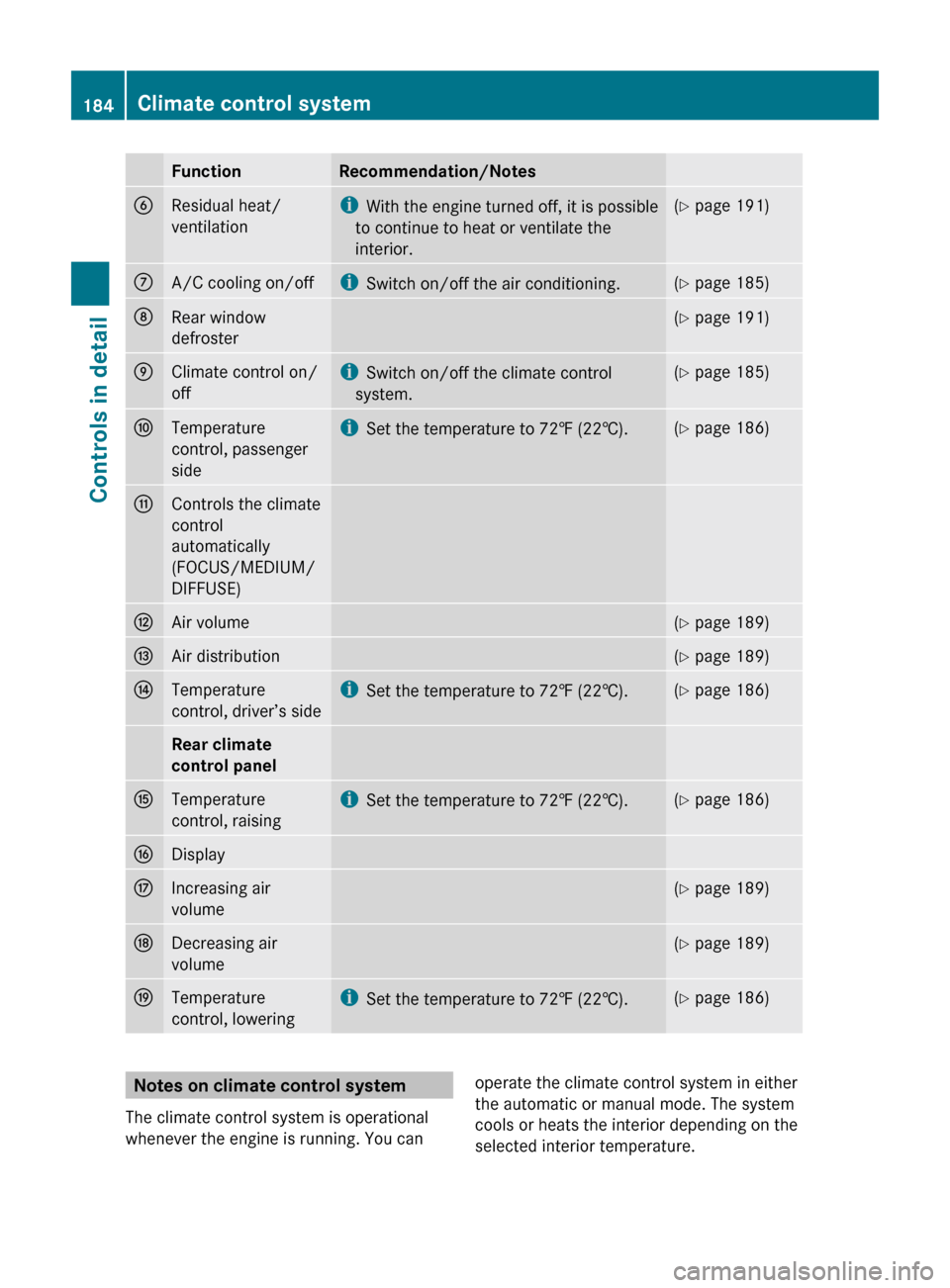
FunctionRecommendation/NotesBResidual heat/
ventilationi With the engine turned off, it is possible
to continue to heat or ventilate the
interior.( Y page 191)CA/C cooling on/offi
Switch on/off the air conditioning.(Y page 185)DRear window
defroster( Y page 191)EClimate control on/
offi Switch on/off the climate control
system.( Y page 185)FTemperature
control, passenger
sidei Set the temperature to 72‡ (22†).(Y page 186)GControls the climate
control
automatically
(FOCUS/MEDIUM/
DIFFUSE)HAir volume( Y page 189)IAir distribution(Y page 189)JTemperature
control, driver’s sidei Set the temperature to 72‡ (22†).(Y page 186)Rear climate
control panelKTemperature
control, raisingi Set the temperature to 72‡ (22†).(Y page 186)LDisplayMIncreasing air
volume( Y page 189)NDecreasing air
volume( Y page 189)OTemperature
control, loweringi Set the temperature to 72‡ (22†).(Y page 186)Notes on climate control system
The climate control system is operational
whenever the engine is running. You canoperate the climate control system in either
the automatic or manual mode. The system
cools or heats the interior depending on the
selected interior temperature.184Climate control systemControls in detail
212_AKB; 2; 41, en-USd2ureepe,Version: 2.11.8.12009-07-17T09:14:21+02:00 - Seite 184
Page 187 of 372
It can only function optimally when you are
driving with the windows, the tilt/sliding
sunroof or tilt/sliding panel closed.
Nearly all dust particles, pollutants and odors
are filtered out before outside air enters the
passenger compartment through the air
distribution system.GWarning!
Severe conditions (e.g. strong air pollution)
may require replacement of the filter before
its scheduled replacement interval. A clogged
filter will reduce the air volume to the interior
and the windows could fog up, impairing
visibility and endangering you and others.
Have a clogged filter replaced as soon as
possible at an authorized Mercedes-Benz
Center.
The air conditioning will not engage (no
cooling) if the A/C mode ( Y page 185) is
deactivated.
GWarning!
Follow the recommended settings for heating
and cooling given on the following pages.
Otherwise the windows could fog up,
impairing visibility and endangering you and
others.
XKeep the air intake grille in front of the
windshield free of snow and debris.
Do not obstruct air flow by placing objects on
the air flow-through exhaust slots below the
rear window.
i If the vehicle interior is hot, ventilate the
interior before driving off, see “Summer
opening feature” (Y page 107). The climate
control will then adjust the interior
temperature to the set value much faster.
Deactivating the climate control
systemGWarning!
When the climate control system is
deactivated, the outside air supply and
circulation are also deactivated. Only choose
this setting for a short time. Otherwise the
windows could fog up, impairing visibility and
endangering you and others.
XDeactivating: Press button ^.
The indicator lamp above the button comes
on.XReactivating: Press button ^.
The indicator lamp above the button goes
out. The previous settings are once again
in effect.
or
XPress button Ã.
The indicator lamp above the button comes
on. Air volume and air distribution are
adjusted automatically.
Air conditioning
The air conditioning is operational while the
engine is running and cools the interior air to
the temperature set by the operator. In
addition, the air conditioning dehumidifies
the interior air and helps prevent window
fogging.
GWarning!
If you deactivate the air conditioning, the
vehicle will not be cooled when weather
conditions are warm. The windows can fog up
more quickly. Window fogging may impair
visibility and endanger you and others.
i Condensated water may drip out from
underneath the vehicle. This is normal and
not an indication of a malfunction.
Climate control system185Controls in detail212_AKB; 2; 41, en-USd2ureepe,Version: 2.11.8.12009-07-17T09:14:21+02:00 - Seite 185Z
Page 200 of 372
Roof rack
For information about further roof rack
equipment, contact an authorized Mercedes-
Benz Center.
GWarning!
Only use roof racks approved by Mercedes-
Benz for your vehicle model to avoid damage
to the vehicle.
Follow the manufacturer’s installation
instructions. Otherwise, an improperly
attached roof rack system or its load could
become detached from the vehicle.
Do not exceed the maximum roof load of
220 lb (100 kg).
Take into consideration that when the roof
rack is loaded, the handling characteristics
are different from those when operating the
vehicle without the roof rack loaded.
Make sure
Ryou can raise the power tilt/sliding sunroof
or the panorama roof with tilt/sliding panel
completely
Ryou can open the trunk completely
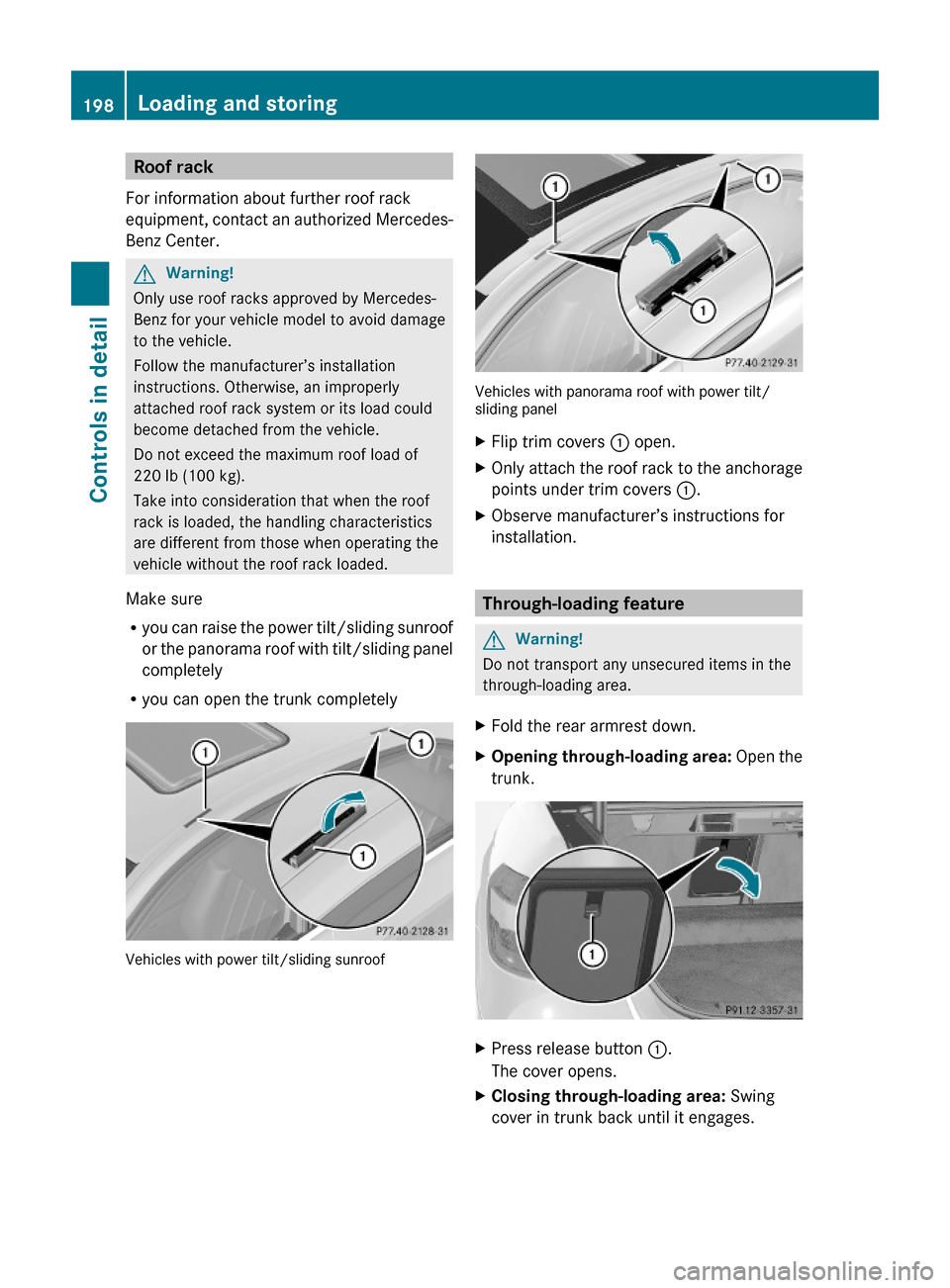
Vehicles with power tilt/sliding sunroof
Vehicles with panorama roof with power tilt/sliding panel
XFlip trim covers : open.XOnly attach the roof rack to the anchorage
points under trim covers :.
XObserve manufacturer’s instructions for
installation.
Through-loading feature
GWarning!
Do not transport any unsecured items in the
through-loading area.
XFold the rear armrest down.XOpening through-loading area: Open the
trunk.
XPress release button :.
The cover opens.
XClosing through-loading area: Swing
cover in trunk back until it engages.
198Loading and storingControls in detail
212_AKB; 2; 41, en-USd2ureepe,Version: 2.11.8.12009-07-17T09:14:21+02:00 - Seite 198
Page 211 of 372
An emergency call can also be initiated
manually (Y page 209).
Once the emergency call is in progress, the
indicator lamp in the SOS button will begin to
flash. The message Connecting Call
appears in the multifunction display and the
COMAND system is muted. When the
connection is established, the message
Call Connected appears in the
multifunction display.
All information relevant to the emergency,
such as the location of the vehicle
(determined by the GPS satellite location
system), vehicle model, identification number
and color are generated.
A voice connection between the Customer
Assistance Center and the occupants of the
vehicle will be established automatically soon
after the emergency call has been initiated.
The Customer Assistance Center will attempt
to determine the nature of the emergency
more precisely, provided they can speak to
an occupant of the vehicle.
iIf no vehicle occupant responds, an
ambulance will be sent to the vehicle
immediately.
GWarning!
If the indicator lamp in the SOS button is
flashing continuously and there was no voice
connection to the Customer Assistance
Center established, then the Tele Aid system
could not initiate an emergency call (e.g. the
relevant cellular phone network is not
available).
The message Call Failed appears in the
multifunction display for approximately
10 seconds.
Should this occur, assistance must be
summoned by other means.
iThe “911” emergency call system is a
public service. Using it without due cause
is a criminal offense.
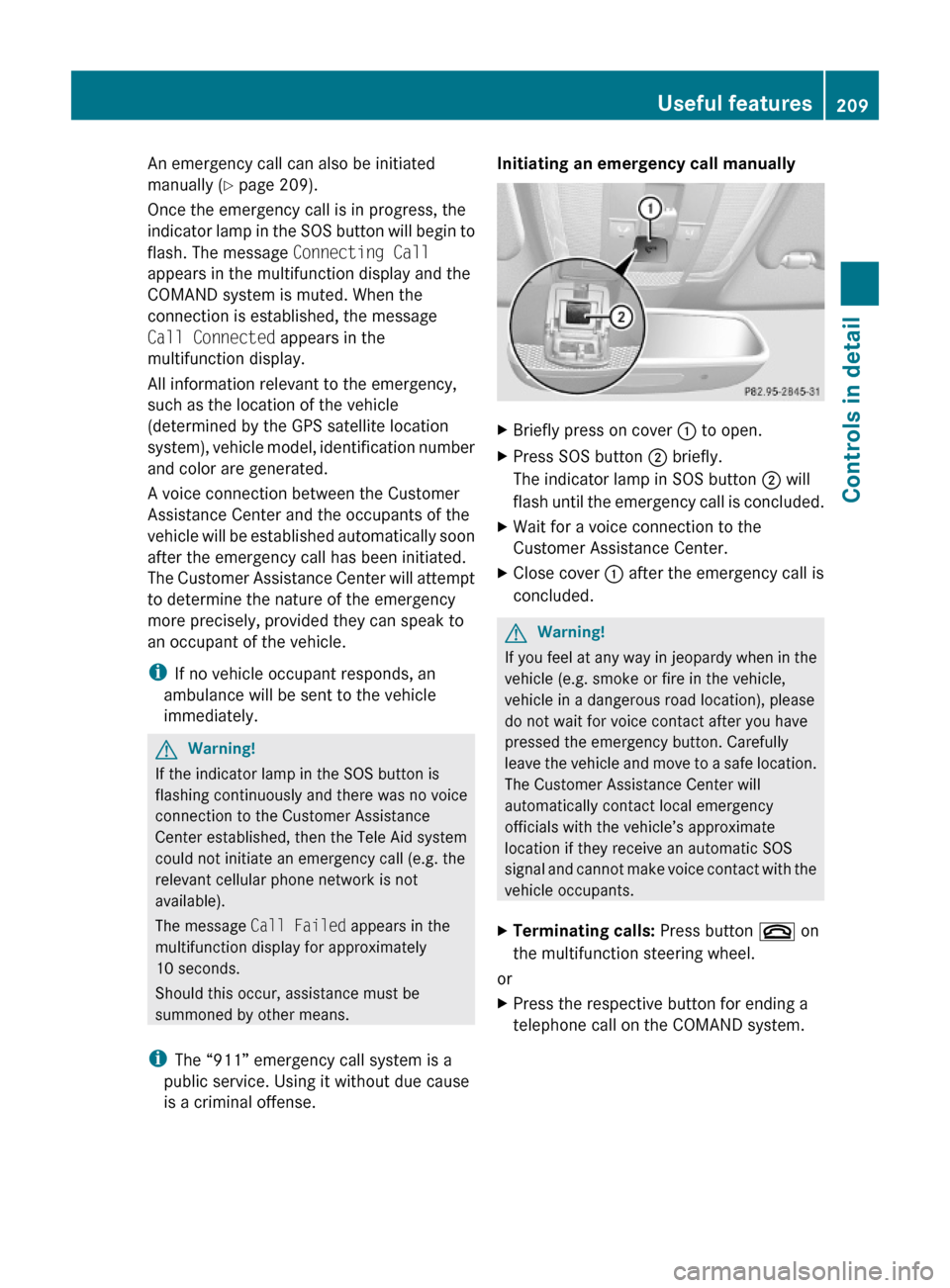
Initiating an emergency call manually XBriefly press on cover : to open.XPress SOS button ; briefly.
The indicator lamp in SOS button ; will
flash until the emergency call is concluded.
XWait for a voice connection to the
Customer Assistance Center.
XClose cover : after the emergency call is
concluded.
GWarning!
If you feel at any way in jeopardy when in the
vehicle (e.g. smoke or fire in the vehicle,
vehicle in a dangerous road location), please
do not wait for voice contact after you have
pressed the emergency button. Carefully
leave the vehicle and move to a safe location.
The Customer Assistance Center will
automatically contact local emergency
officials with the vehicle’s approximate
location if they receive an automatic SOS
signal and cannot make voice contact with the
vehicle occupants.
XTerminating calls: Press button ~ on
the multifunction steering wheel.
or
XPress the respective button for ending a
telephone call on the COMAND system.
Useful features209Controls in detail212_AKB; 2; 41, en-USd2ureepe,Version: 2.11.8.12009-07-17T09:14:21+02:00 - Seite 209Z