Camera MERCEDES-BENZ E350 2010 W212 Owner's Manual
[x] Cancel search | Manufacturer: MERCEDES-BENZ, Model Year: 2010, Model line: E350, Model: MERCEDES-BENZ E350 2010 W212Pages: 372, PDF Size: 8.55 MB
Page 10 of 372
RACE START (E 63 AMG) ...............159
Safety systems ................................ 61
Systems ......................................... 146
Through standing water .................257
With DISTRONIC PLUS ...................157
Driving and parking
Safety notes .................................. 109
Driving off .................................. 111, 257
Driving safety systems ....................... 61
ABS .................................................. 62
Adaptive Brake ................................ 64
BAS .................................................. 63
BAS PLUS ........................................ 63
EBP .................................................. 64
ESC .................................................. 65
ETS/4-ETS ....................................... 65
PRE-SAFE ®
Brake ............................. 69
Driving systems
AIRMATIC (except E 63 AMG) ........163
All-wheel drive (4MATIC) ................ 161
AMG adaptive sport suspension
system (E 63 AMG) ........................164
ATTENTION ASSIST ........................178
Blind Spot Assist ............................ 175
Cruise control ................................ 146
DISTRONIC PLUS ........................... 149
Hill-start assist system ..................160
HOLD function ............................... 161
Lane Keeping Assist ......................177
Night View Assist Plus ...................172
Parking Guidance ........................... 168
Parktronic system ..........................165
RACE START (E 63 AMG) ...............159
Rear view camera .......................... 171
Driving tips, automatic
transmission ...................................... 119
E
Easy-entry/exit feature .............. 93, 145
EBP (Electronic Brake
Proportioning) ...................................... 64
Electrical system
Improper work on or
modifications ................................... 22
Power outlets ................................. 207
Electrical system (Technical data)
see Vehicle specification
Electronic Stability Control
see ESC
Electronic Traction System
see ETS/4-ETS
Emergency, in case of
First aid kit ..................................... 268
Flat tire .......................................... 323
Hazard warning flasher ..................101
Roadside Assistance ................ 21, 210
Towing the vehicle .........................340
Emergency calls
Tele Aid .......................................... 208
Emergency operations
Remote door lock (Tele Aid) ........... 212
Remote door unlock (Tele Aid) .......211
Trunk lid, emergency release ...........84
Emergency Tensioning Device
see ETD
Emission control ............................... 258
Information label ............................ 347
System warranties ...........................20
Engine
Break-in recommendations ............220
Cleaning ......................................... 261
Compartment ................................ 223
Malfunction indicator lamp ............310
Messages in the multifunction
display ........................................... 295
Number .......................................... 347
Starting .......................................... 109
Turning off ..................................... 113
Engine (Technical data)
see Vehicle specification
Engine compartment
Radiator ......................................... 224
Engine coolant
see Coolant
Engine oil
Adding ........................................... 225
Additives ........................................ 362
Checking level ............................... 224
Consumption ................................. 224
Messages in the multifunction
display ........................................... 298
Oil dipstick ..................................... 225
Recommended engine oils and oil
filter ............................................... 3618Index212_AKB; 2; 41, en-USd2ureepe,Version: 2.11.8.12009-07-17T09:14:21+02:00 - Seite 8
Page 15 of 372
Brake pads ..................................... 287
Child seat ...................................... 279
Coolant .......................................... 295
Corner-illuminating lamps ..............303
Cruise control ................................ 279
DISTRONIC PLUS ........................... 280
Doors ............................................. 293
EBP ................................................ 289
Engine oil ....................................... 298
ESC ............................... 288, 289, 290
Fog lamps .............................. 300, 302
Front passenger front air bag ........276
Gas cap .......................................... 298
High-beam lamps ........................... 301
Hood .............................................. 293
Lane Keeping Assist ......................283
License plate lamps .......................301
Light sensor ................................... 302
Low-beam lamps ............................ 302
Parking brake ................................ 289
Parking lamps ................................ 301
Power steering ............................... 295
PRE-SAFE ®
.................................... 274
Radar sensors ................................ 282
Reserve fuel ................................... 298
Reverse lamp ................................. 300
Side marker lamps .........................300
SmartKey ....................................... 293
SRS ................................................ 290
Tele Aid .......................................... 290
Tire inflation pressure ............284, 304
Tire pressure monitor ....................285
Tires ...................................... 284, 304
Trunk ............................................. 293
Turn signals ................................... 303
Washer fluid ................................... 294
Multifunction steering wheel
Adjustment ...................................... 93
Buttons .......................................... 126
Cleaning ......................................... 265
Easy-entry/exit feature ...........93, 145
Gearshift control ............................ 122
Heating ............................................ 94
Memory function .............................. 96
Overview .......................................... 30N
Navigation system see Separate operating instructions
Navi menu .......................................... 134
NECK-PRO active front head
restraints ............................................. 54
Resetting ....................................... 316
Nets, parcel ....................................... 199
Night View Assist Plus ...................... 172
Cleaning the windshield in front of
the camera .................................... 263
Normal occupant weight .................. 251
Number, vehicle identification
(VIN) ................................................... 346
O
Occupant Classification System see OCS (Occupant Classification
System)
Occupant distribution ....................... 251
Occupant safety
Air bags ........................................... 37
BabySmart™ .................................... 46
Children and air bags .......................37
Children in the vehicle .....................56
Child seat anchors – LATCH-type
(ISOFIX) ........................................... 59
Fastening the seat belts ................... 50
Front passenger front air bag off
indicator lamp (Canada
only) ........................................ 46, 313
Front passenger front air bag off
indicator lamp (USA only) ........43, 314
Infant and child restraint systems .... 56
Introduction ..................................... 36
ISOFIX (Child seat anchors –
LATCH-type) ..................................... 59
OCS (Occupant Classification
System) ........................................... 43
PRE-SAFE ®
....................................... 53
Seat belts .................................. 39, 48
OCS (Occupant Classification
System) ................................................ 43
Self-test ........................................... 46
Odometer ........................................... 129
Index13212_AKB; 2; 41, en-USd2ureepe,Version: 2.11.8.12009-07-17T09:14:21+02:00 - Seite 13
Page 17 of 372
Program mode selector dial (E 63 AMG)
Automatic shift program ........121, 123
Program mode selector switch
Automatic shift program ................120
Proximity key
see Key, SmartKey
PSI (air pressure unit) ....................... 251
R
RACE START (E 63 AMG) ................... 159
RACETIMER ........................................ 132
Radar sensors
Messages in the multifunction
display ........................................... 282
Switching on or off ......................... 144
Radiator ..................................... 224, 252
Radio
Selecting stations ..........................134
Radio transmitters ............................ 257
Rain sensor see Intermittent wiping
Rear axle oil ....................................... 360
Rear center console ashtray see Ashtrays
Rear center seat belt
Unblocking ....................................... 51
Rear doors
Child safety locks ............................ 60
Rear door window
Override switch ................................ 60
Rear fog lamp
see Fog lamps
Rear lamps
see Tail lamps
Rear seat head restraints
see Head restraints
Rear view camera .............................. 171
Cleaning the camera lens ..............263
Rear window defroster ..................... 191
Recommended tire inflation
pressure ..................................... 229, 251
Refilling
AdBlue ®
......................................... 334
Refrigerant, air conditioning ............ 362
Refueling ............................................ 220
Regular checks .................................. 222
Reminder, Seat belt
see Seat belts, Telltale
Remote control
see Key, SmartKey
Remote door lock (Tele Aid) ............. 212
Remote door unlock (Tele Aid) ......... 211
Replacing
Key .................................................. 80
Replacing bulbs ................................. 318
Reporting safety defects .................... 23
Research Octane Number see RON
Reserve fuel
Messages in the multifunction
display ........................................... 298
Warning lamp ................................. 310
Restraint systems
see Occupant safety
Retaining hook .................................. 199
Rims ........................................... 251, 353
Roadside Assistance ................... 21, 210
Roller sunblinds ................................. 194
RON (Research Octane Number) ..... 363
Roof rack ............................................ 198
Rubber parts, cleaning ...................... 265
Run-flat tires see MOExtended tires
S
Safety
Driving safety systems .....................61
Occupant safety ............................... 36
Reporting defects ............................ 23
Safety belts
see Seat belts
Seat belt force limiter ......................... 52
Seat belts ............................................. 48
Adjustment function ........................51
Automatic comfort-fit feature ..........53
Children in the vehicle .....................56
Cleaning ......................................... 266
Fastening ......................................... 50
Height adjustment ...........................51
Proper use of ................................... 49
Rear center seat .............................. 51
Safety guidelines ............................. 39
Index15212_AKB; 2; 41, en-USd2ureepe,Version: 2.11.8.12009-07-17T09:14:21+02:00 - Seite 15
Page 148 of 372
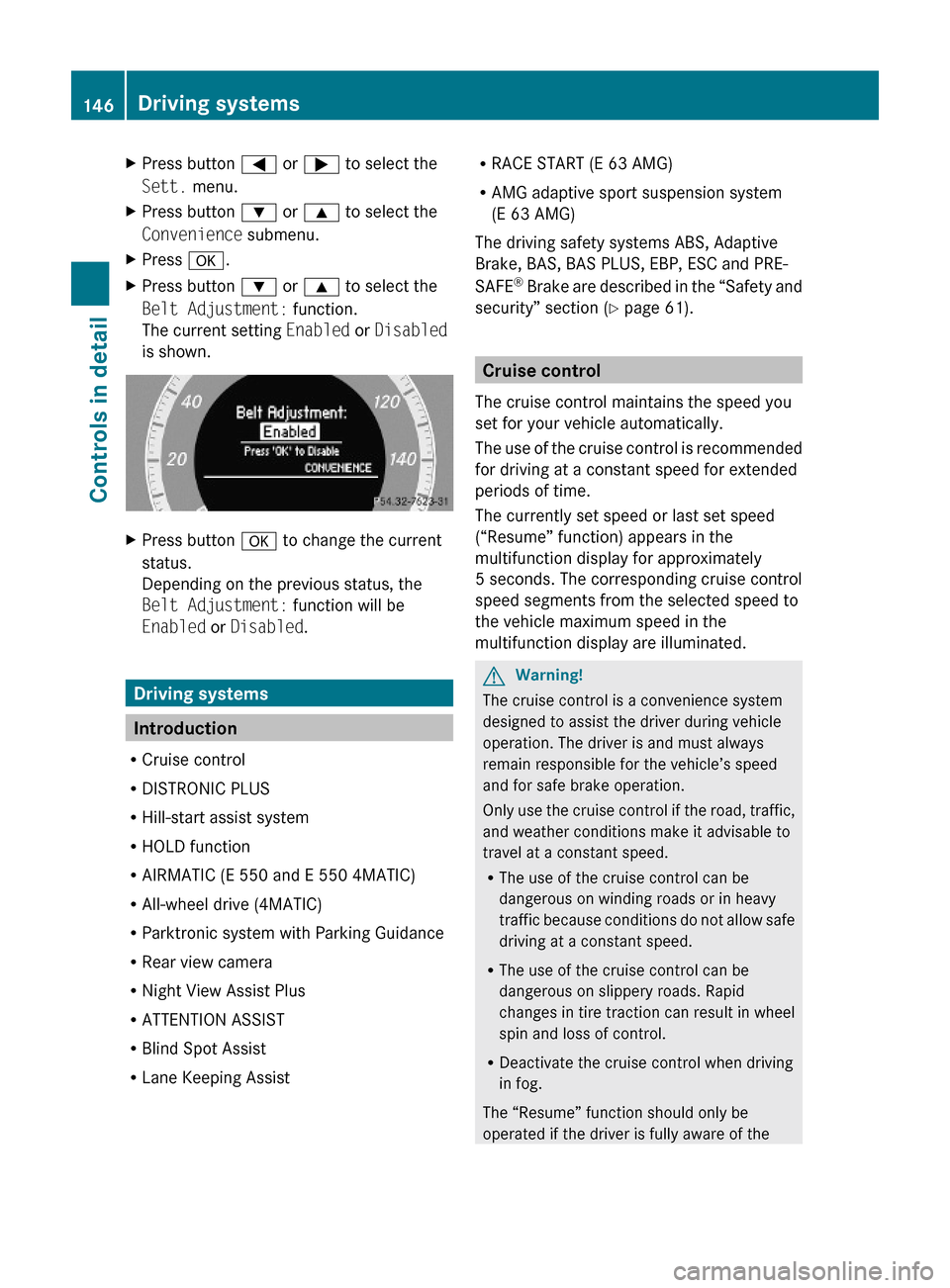
XPress button = or ; to select the
Sett. menu.
XPress button : or 9 to select the
Convenience submenu.
XPress a.XPress button : or 9 to select the
Belt Adjustment: function.
The current setting Enabled or Disabled
is shown.
XPress button a to change the current
status.
Depending on the previous status, the
Belt Adjustment: function will be
Enabled or Disabled.
Driving systems
Introduction
RCruise control
RDISTRONIC PLUS
RHill-start assist system
RHOLD function
RAIRMATIC (E 550 and E 550 4MATIC)
RAll-wheel drive (4MATIC)
RParktronic system with Parking Guidance
RRear view camera
RNight View Assist Plus
RATTENTION ASSIST
RBlind Spot Assist
RLane Keeping Assist
RRACE START (E 63 AMG)
RAMG adaptive sport suspension system
(E 63 AMG)
The driving safety systems ABS, Adaptive
Brake, BAS, BAS PLUS, EBP, ESC and PRE-
SAFE® Brake are described in the “Safety and
security” section (Y page 61).
Cruise control
The cruise control maintains the speed you
set for your vehicle automatically.
The use of the cruise control is recommended
for driving at a constant speed for extended
periods of time.
The currently set speed or last set speed
(“Resume” function) appears in the
multifunction display for approximately
5 seconds. The corresponding cruise control
speed segments from the selected speed to
the vehicle maximum speed in the
multifunction display are illuminated.
GWarning!
The cruise control is a convenience system
designed to assist the driver during vehicle
operation. The driver is and must always
remain responsible for the vehicle’s speed
and for safe brake operation.
Only use the cruise control if the road, traffic,
and weather conditions make it advisable to
travel at a constant speed.
RThe use of the cruise control can be
dangerous on winding roads or in heavy
traffic because conditions do not allow safe
driving at a constant speed.
RThe use of the cruise control can be
dangerous on slippery roads. Rapid
changes in tire traction can result in wheel
spin and loss of control.
RDeactivate the cruise control when driving
in fog.
The “Resume” function should only be
operated if the driver is fully aware of the
146Driving systemsControls in detail
212_AKB; 2; 41, en-USd2ureepe,Version: 2.11.8.12009-07-17T09:14:21+02:00 - Seite 146
Page 173 of 372
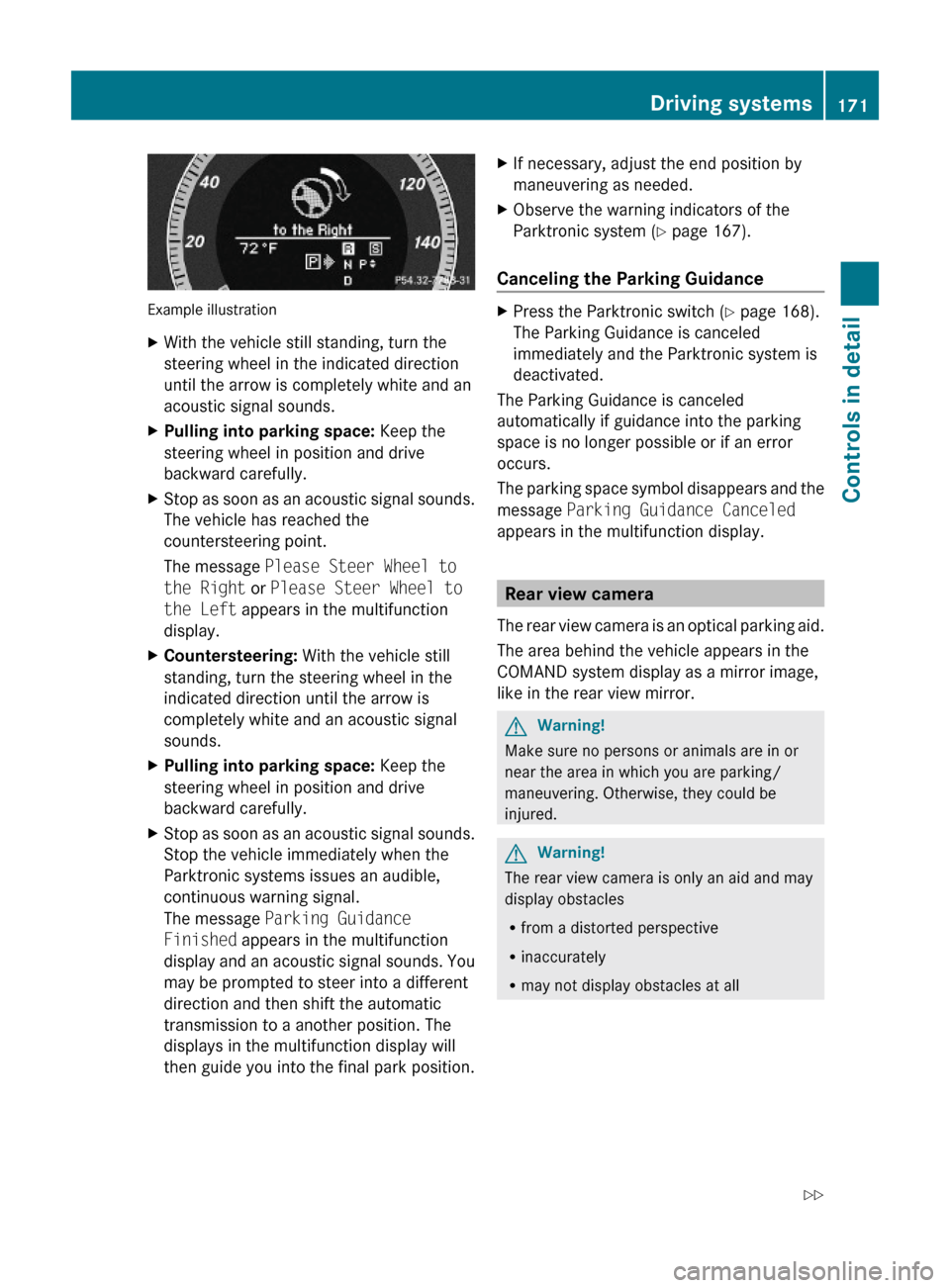
Example illustration
XWith the vehicle still standing, turn the
steering wheel in the indicated direction
until the arrow is completely white and an
acoustic signal sounds.
XPulling into parking space: Keep the
steering wheel in position and drive
backward carefully.
XStop as soon as an acoustic signal sounds.
The vehicle has reached the
countersteering point.
The message Please Steer Wheel to
the Right or Please Steer Wheel to
the Left appears in the multifunction
display.
XCountersteering: With the vehicle still
standing, turn the steering wheel in the
indicated direction until the arrow is
completely white and an acoustic signal
sounds.
XPulling into parking space: Keep the
steering wheel in position and drive
backward carefully.
XStop as soon as an acoustic signal sounds.
Stop the vehicle immediately when the
Parktronic systems issues an audible,
continuous warning signal.
The message Parking Guidance
Finished appears in the multifunction
display and an acoustic signal sounds. You
may be prompted to steer into a different
direction and then shift the automatic
transmission to a another position. The
displays in the multifunction display will
then guide you into the final park position.
XIf necessary, adjust the end position by
maneuvering as needed.
XObserve the warning indicators of the
Parktronic system (Y page 167).
Canceling the Parking Guidance
XPress the Parktronic switch (Y page 168).
The Parking Guidance is canceled
immediately and the Parktronic system is
deactivated.
The Parking Guidance is canceled
automatically if guidance into the parking
space is no longer possible or if an error
occurs.
The parking space symbol disappears and the
message Parking Guidance Canceled
appears in the multifunction display.
Rear view camera
The rear view camera is an optical parking aid.
The area behind the vehicle appears in the
COMAND system display as a mirror image,
like in the rear view mirror.
GWarning!
Make sure no persons or animals are in or
near the area in which you are parking/
maneuvering. Otherwise, they could be
injured.
GWarning!
The rear view camera is only an aid and may
display obstacles
Rfrom a distorted perspective
Rinaccurately
Rmay not display obstacles at all
Driving systems171Controls in detail212_AKB; 2; 41, en-USd2ureepe,Version: 2.11.8.12009-07-17T09:14:21+02:00 - Seite 171Z
Page 174 of 372
The rear view camera does not relieve you of
the responsibility to be cautious. Take care
and pay careful attention. The rear view
camera may not show objects which are
Rvery close to the rear bumper
Runder the rear bumper
Rabove the trunk handle
You are responsible for safety at all times and
must continue to pay attention to the
immediate surroundings when parking and
maneuvering. This includes the area behind,
in front of, and beside the vehicle. Otherwise
you could endanger yourself and/or others.
GWarning!
The rear view camera either will not function
or will not function to its full capability if
Rthe trunk lid is open
Rit is raining very hard, snowing or foggy
Rit is night or you are parking/maneuvering
your vehicle in an area where it is very dark
Rthe camera is exposed to a very bright white
light
Rthe immediate surroundings are
illuminated with fluorescent light (the
COMAND system display can flicker)
Rthere is a sudden change in temperature,
e.g. if you drive into a heated garage from
the cold (lens condensation)
Rthe camera lens is dirty or covered
Rthe rear of your vehicle is damaged
In this case, have the position and setting
of the camera checked by a qualified
specialist workshop. Mercedes-Benz
recommends that you contact a Mercedes-
Benz Center for this purpose.
Do not use the rear view camera in these
situations. Otherwise you could injure
yourself or others and/or damage property
including your vehicle while parking/
maneuvering.
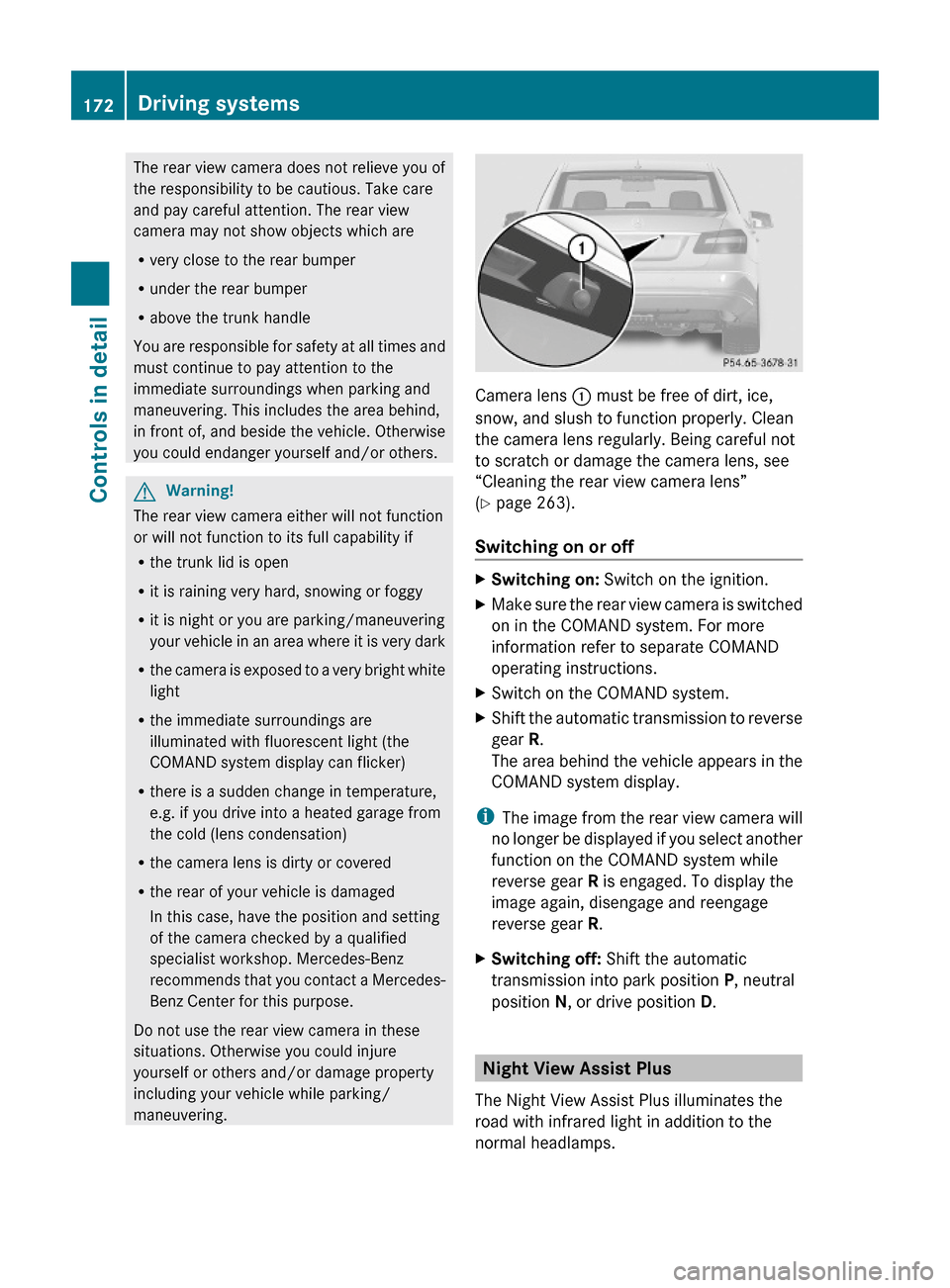
Camera lens : must be free of dirt, ice,
snow, and slush to function properly. Clean
the camera lens regularly. Being careful not
to scratch or damage the camera lens, see
“Cleaning the rear view camera lens”
(Y page 263).
Switching on or off
XSwitching on: Switch on the ignition.XMake sure the rear view camera is switched
on in the COMAND system. For more
information refer to separate COMAND
operating instructions.
XSwitch on the COMAND system.XShift the automatic transmission to reverse
gear R.
The area behind the vehicle appears in the
COMAND system display.
iThe image from the rear view camera will
no longer be displayed if you select another
function on the COMAND system while
reverse gear R is engaged. To display the
image again, disengage and reengage
reverse gear R.
XSwitching off: Shift the automatic
transmission into park position P, neutral
position N, or drive position D.
Night View Assist Plus
The Night View Assist Plus illuminates the
road with infrared light in addition to the
normal headlamps.
172Driving systemsControls in detail
212_AKB; 2; 41, en-USd2ureepe,Version: 2.11.8.12009-07-17T09:14:21+02:00 - Seite 172
Page 175 of 372
A camera at the top of the windshield
measures the infrared light and shows a
black-and-white image in the COMAND
system display. The image in the COMAND
system display corresponds to a road lit up
by high-beam headlamps.
GWarning!
The Night View Assist Plus is only an aid to
support you while driving and cannot
substitute your careful attention. Do not rely
on the display of the Night View Assist Plus;
instead, continue to look through the
windshield. You are always responsible for
safety and must drive in accordance with
traffic conditions. Otherwise, you could
endanger yourself and others.
The system may be impaired or unavailable
when
Rvisibility is poor, e.g. due to snow, rain, fog,
or heavy spray
Rthe camera area of the windshield is dirty,
fogged up or covered by a sticker for
example
Rdriving through curves or on inclines or
declines
GWarning!
The Night View Assist Plus cannot record
objects immediately in front of or next to the
vehicle. When maneuvering, continue to look
through the windshield. Make sure no
persons or animals are in the area in which
you are maneuvering. You could otherwise
injure them.
The Night View Assist Plus image in the
COMAND system display is not impaired by
the headlamps of approaching vehicles.
As a result, you can better follow the course
of the road and detect obstacles earlier on.
iInfrared light is invisible to the human eye
and thus does not blind. The Night View
Assist Plus can remain switched on
permanently even with oncoming traffic
present.
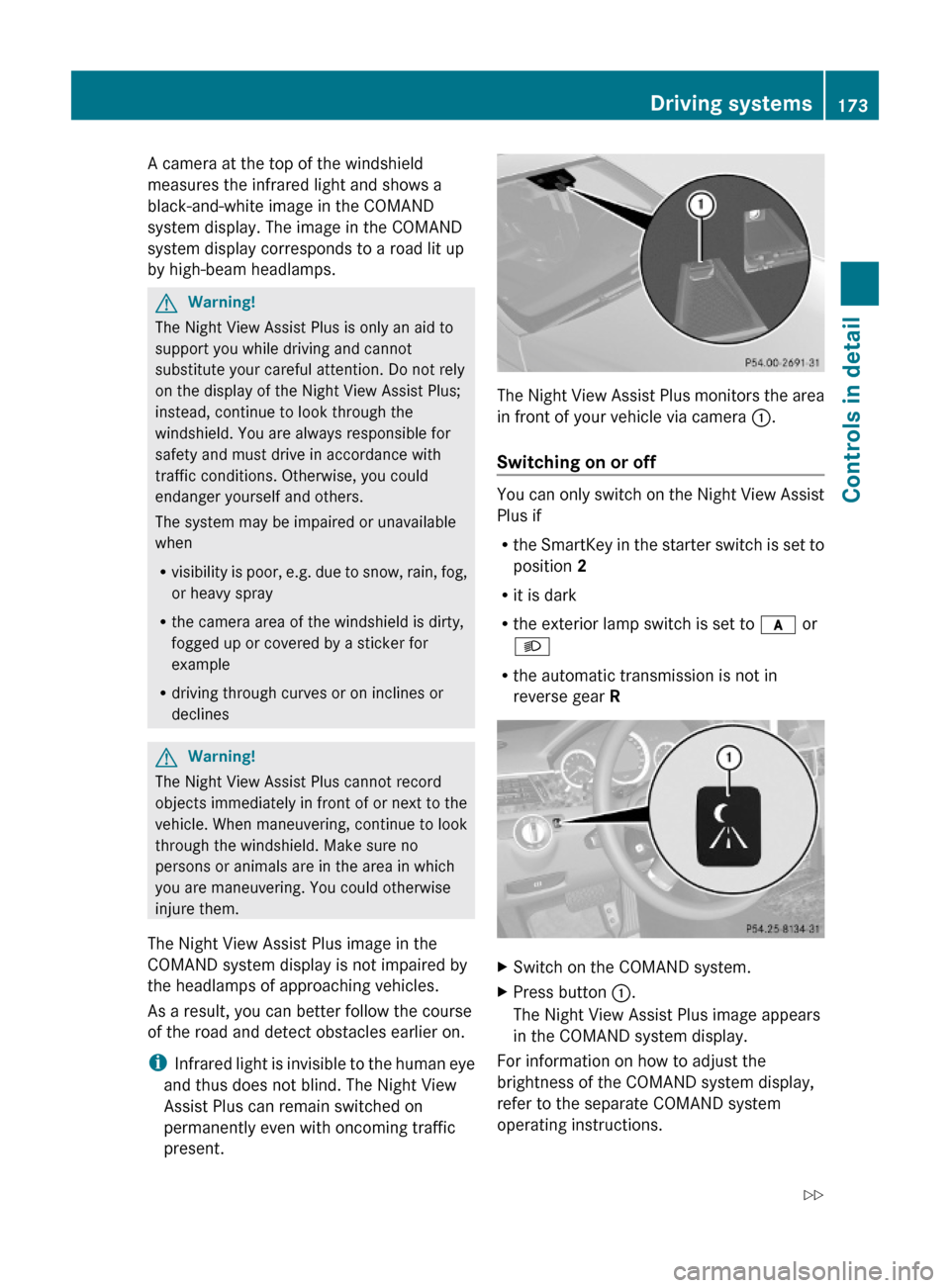
The Night View Assist Plus monitors the area
in front of your vehicle via camera :.
Switching on or off
You can only switch on the Night View Assist
Plus if
Rthe SmartKey in the starter switch is set to
position 2
Rit is dark
Rthe exterior lamp switch is set to c or
L
Rthe automatic transmission is not in
reverse gear R
XSwitch on the COMAND system.XPress button :.
The Night View Assist Plus image appears
in the COMAND system display.
For information on how to adjust the
brightness of the COMAND system display,
refer to the separate COMAND system
operating instructions.
Driving systems173Controls in detail212_AKB; 2; 41, en-USd2ureepe,Version: 2.11.8.12009-07-17T09:14:21+02:00 - Seite 173Z
Page 176 of 372
iThe infrared headlamps only come on
above a speed of approximately 6 mph
(10 km/h). Therefore, when you are at a
standstill, you do not have a complete view
and cannot check the function of the Night
View Assist Plus.
Pedestrian detection
The Night View Assist Plus detects
pedestrians by means of specific
characteristics, e.g. a human silhouette.
Pedestrian detection is activated when
Rthe Night View Assist Plus is switched on
Rthe vehicle speed is above approximately
6 mph (10 km/h)
Rdriving in darkness, e.g. on highways
without road lighting
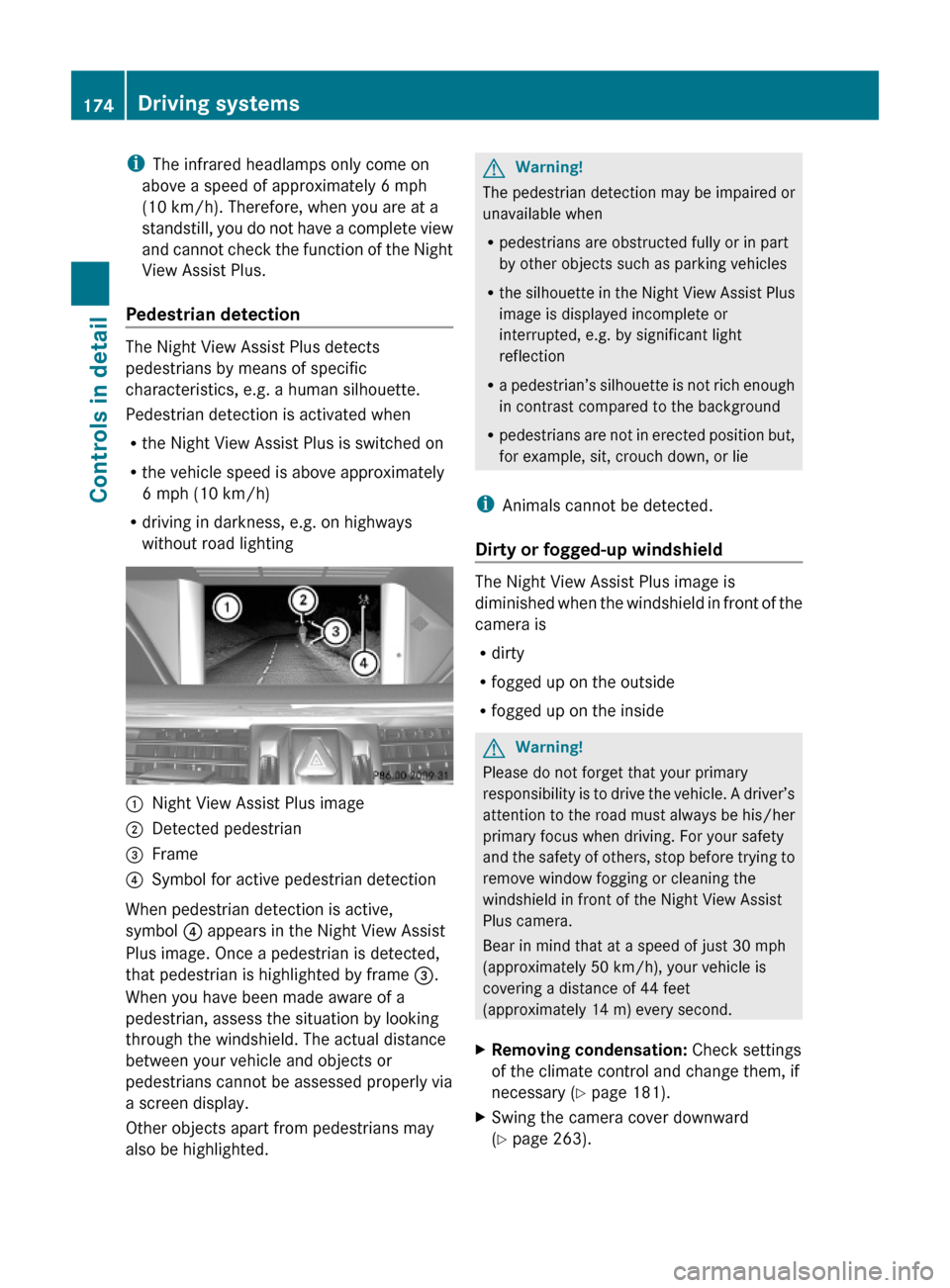
:Night View Assist Plus image;Detected pedestrian=Frame?Symbol for active pedestrian detection
When pedestrian detection is active,
symbol ? appears in the Night View Assist
Plus image. Once a pedestrian is detected,
that pedestrian is highlighted by frame =.
When you have been made aware of a
pedestrian, assess the situation by looking
through the windshield. The actual distance
between your vehicle and objects or
pedestrians cannot be assessed properly via
a screen display.
Other objects apart from pedestrians may
also be highlighted.
GWarning!
The pedestrian detection may be impaired or
unavailable when
Rpedestrians are obstructed fully or in part
by other objects such as parking vehicles
Rthe silhouette in the Night View Assist Plus
image is displayed incomplete or
interrupted, e.g. by significant light
reflection
Ra pedestrian’s silhouette is not rich enough
in contrast compared to the background
Rpedestrians are not in erected position but,
for example, sit, crouch down, or lie
iAnimals cannot be detected.
Dirty or fogged-up windshield
The Night View Assist Plus image is
diminished when the windshield in front of the
camera is
Rdirty
Rfogged up on the outside
Rfogged up on the inside
GWarning!
Please do not forget that your primary
responsibility is to drive the vehicle. A driver’s
attention to the road must always be his/her
primary focus when driving. For your safety
and the safety of others, stop before trying to
remove window fogging or cleaning the
windshield in front of the Night View Assist
Plus camera.
Bear in mind that at a speed of just 30 mph
(approximately 50 km/h), your vehicle is
covering a distance of 44 feet
(approximately 14 m) every second.
XRemoving condensation: Check settings
of the climate control and change them, if
necessary (Y page 181).
XSwing the camera cover downward
(Y page 263).
174Driving systemsControls in detail
212_AKB; 2; 41, en-USd2ureepe,Version: 2.11.8.12009-07-17T09:14:21+02:00 - Seite 174
Page 179 of 372
When you shift the automatic transmission in
reverse gear R, yellow indicator lamps : in
the exterior rear view mirrors goes out after
approximately 3 seconds. The Blind Spot
Assist is then not active.
The brightness of indicator lamps/warning
lamps : is controlled automatically
depending on the brightness of the ambient
light.
GWarning!
The Blind Spot Assist is not active at speeds
below approximately 20 mph (30 km/h). The
yellow indicator lamps in the exterior rear
view mirrors are illuminated. You will not be
alerted to the presence of vehicles in the
monitored area at these speeds.
It is the driver’s responsibility at all times to
be attentive to road, weather and traffic
conditions and to provide the steering,
braking and other driving inputs necessary to
retain control of the vehicle. Failure to do so
could result in recognizing dangers too late,
possibly resulting in an accident and serious
injury to yourself and others.
Collision warning
If a vehicle is detected in the Blind Spot Assist
range and you activate the turn signal, a two-
tone warning will sound once. Red warning
lamp : on the corresponding side of the
vehicle will flash.
GWarning!
Do not change lanes or make turns, while red
warning lamp : is flashing. Doing so could
result in an accident and serious injury to
yourself and others.
XRemain on the lane that you are currently
on until traffic conditions permit to change.
If the turn signal remains on, red warning
lamp : will flash to indicate that vehicles
have been detected. No further audible
warnings will sound.
Lane Keeping Assist
The Lane Keeping Assist supports you at a
vehicle speed of above 40 mph when you
have set the display unit to miles in the
Display Unit Speed-/Odometer: menu in
the control system (Y page 141). When you
have set the display unit to km, the system
supports you at a vehicle speed of above
60 km/h. When the Lane Keeping Assist
detects lane markings, the system is
designed to alert you in case you leave your
lane unintentionally. A warning is usually
issued when a front wheel is on the lane
marking. An interval vibration in the steering
wheel that lasts for up to 1.5 seconds will
then alert you.
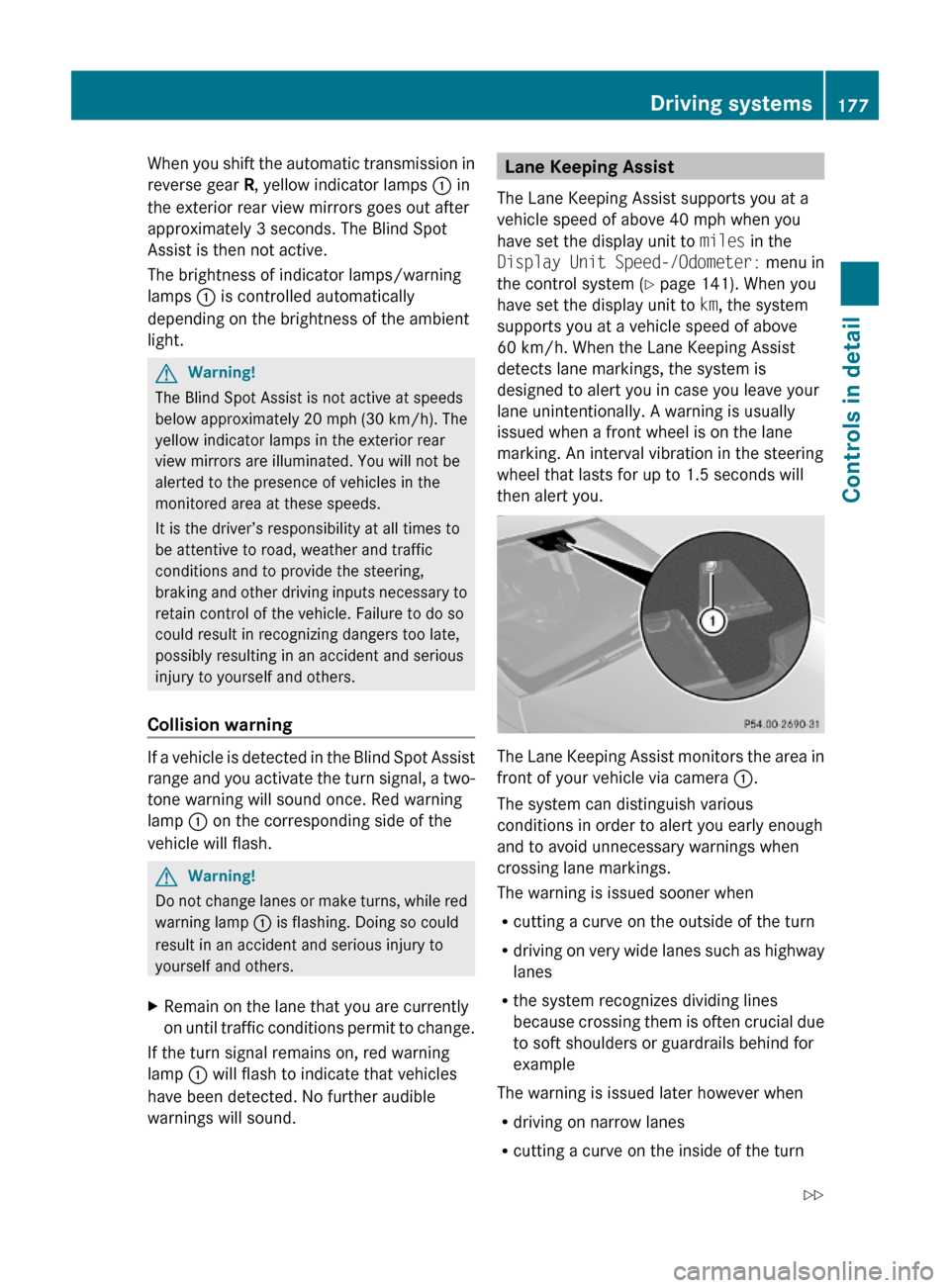
The Lane Keeping Assist monitors the area in
front of your vehicle via camera :.
The system can distinguish various
conditions in order to alert you early enough
and to avoid unnecessary warnings when
crossing lane markings.
The warning is issued sooner when
Rcutting a curve on the outside of the turn
Rdriving on very wide lanes such as highway
lanes
Rthe system recognizes dividing lines
because crossing them is often crucial due
to soft shoulders or guardrails behind for
example
The warning is issued later however when
Rdriving on narrow lanes
Rcutting a curve on the inside of the turn
Driving systems177Controls in detail212_AKB; 2; 41, en-USd2ureepe,Version: 2.11.8.12009-07-17T09:14:21+02:00 - Seite 177Z
Page 180 of 372
The system does not issue a warning when
Rsteering, braking, or accelerating in a
clearly active manner, e.g. when changing
lanes, passing, exiting a highway
Rcutting a narrow curve
Rmaking a very sharp turn
Ra driving safety system such as the ABS,
the BAS, or the ESC has been activated
When setting the turn signal in either
direction, the warning will be suppressed. The
system will issue a warning if a turn signal has
been on for an extended period of time.
GWarning!
The Lane Keeping Assist does not keep the
vehicle in the lane. The Lane Keeping Assist
is only an aid to the driver and may not always
recognize lane markings properly or fail to
recognize them at all.
The system may be impaired or unavailable
when
Rvisibility is poor, e.g. due to snow, rain, fog,
or heavy spray
Roncoming traffic, sun glare or reflection
from other vehicles
Rthe camera area of the windshield is dirty,
foggy, or otherwise obstructed
Rlane markings are not present
Rlane markings are worn, dark, or covered
e.g. by snow or dirt
Rthe distance to the preceding vehicle is too
short
Rwhen lane markings are ambiguous, for
example in road work sections
Rlane markings change rapidly, e.g. on
highway exits or turn-off lanes
Rlanes are narrow and winding
The Lane Keeping Assist cannot take road and
traffic conditions into account. It is the
driver’s responsibility at all times to be
attentive to road, weather and traffic
conditions and to provide the steering,
braking and other driving inputs necessary to
retain control of the vehicle. Failure to do so
could result in recognizing dangers too late,
possibly resulting in an accident and serious
injury to yourself and others.
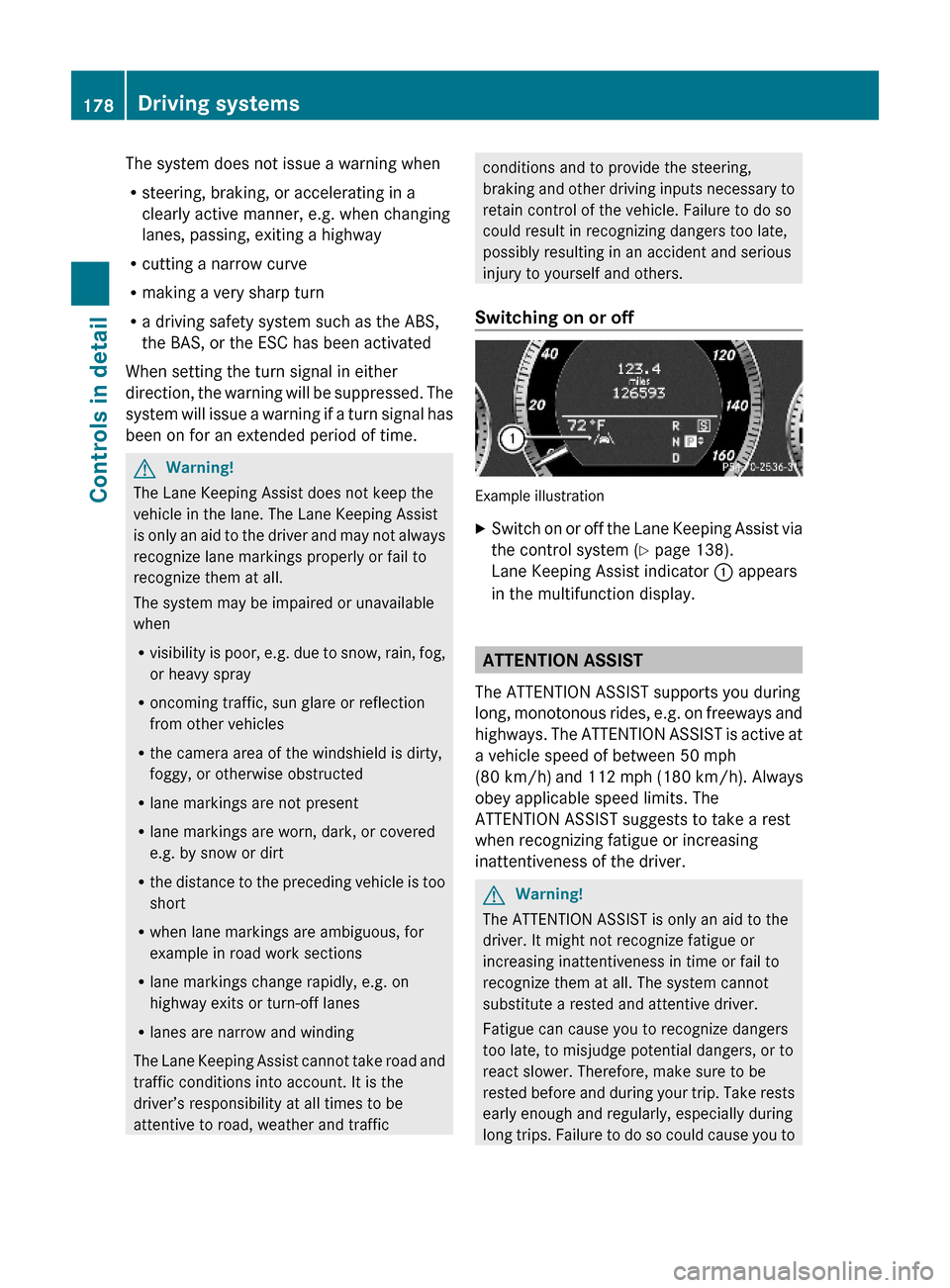
Switching on or off
Example illustration
XSwitch on or off the Lane Keeping Assist via
the control system (Y page 138).
Lane Keeping Assist indicator : appears
in the multifunction display.
ATTENTION ASSIST
The ATTENTION ASSIST supports you during
long, monotonous rides, e.g. on freeways and
highways. The ATTENTION ASSIST is active at
a vehicle speed of between 50 mph
(80 km/h) and 112 mph (180 km/h). Always
obey applicable speed limits. The
ATTENTION ASSIST suggests to take a rest
when recognizing fatigue or increasing
inattentiveness of the driver.
GWarning!
The ATTENTION ASSIST is only an aid to the
driver. It might not recognize fatigue or
increasing inattentiveness in time or fail to
recognize them at all. The system cannot
substitute a rested and attentive driver.
Fatigue can cause you to recognize dangers
too late, to misjudge potential dangers, or to
react slower. Therefore, make sure to be
rested before and during your trip. Take rests
early enough and regularly, especially during
long trips. Failure to do so could cause you to
178Driving systemsControls in detail
212_AKB; 2; 41, en-USd2ureepe,Version: 2.11.8.12009-07-17T09:14:21+02:00 - Seite 178